
Self-host DeepTutor
An AI tutor that quizzes you on your own notes. No API keys.
Shelley handles the setup. About 10 minutes.
Prefer a terminal?
curl -fsSL https://exe.dev/deploy/deeptutor/prompt.txt | ssh exe.dev new --prompt=/dev/stdinDeepTutor, from the University of Hong Kong's Data Intelligence Lab, is an AI tutor built around your own material. Upload lecture notes, papers, or a textbook into a knowledge base, then ask questions grounded in them, turn them into quizzes that check your answers, or research a topic with web search. Here it runs on your own exe.dev VM, with the chat model and the embeddings for your notes coming from exe.dev's LLM gateway. There are no API keys to find, paste, or leak.
The VM is private behind your exe.dev login, so DeepTutor needs no password of its own. Your notes stay on the VM's disk, backed up every night. Share the VM with a study group or team when you want company.
What you get#
- DeepTutor at your VM's private URL, behind your exe.dev login.
- Chat, quizzes, and research with a model from exe.dev's LLM gateway. No API keys.
- Knowledge bases from your PDFs and notes, embedded through the gateway and kept on the VM's disk.
- Web search through DuckDuckGo, without a key.
- Starts again after a reboot; nightly backups, with one restored and checked.
What's running, and where
https://my-deeptutor.exe.xyz/
DeepTutor, behind your exe.dev login
https://my-deeptutor.exe.xyz/
Your study group or team, once you share the VM
https://my-deeptutor.exe.xyz/api/
DeepTutor's API, for scripts with a VM token
Deploy with Shelley#
Click Deploy and Shelley will set up DeepTutor on a new VM, then check that it works. No config-file wrangling required.
Prefer a terminal?
curl -fsSL \
  https://exe.dev/deploy/deeptutor/prompt.txt \
  | ssh exe.dev new --prompt=/dev/stdin
What Shelley is told
Set up DeepTutor on this VM by following the exe.dev recipe at https://exe.dev/deploy/deeptutor.md?via=deploy from top to bottom.

The recipe's example VM name is my-deeptutor. This VM's name is the output of `hostname`: use it wherever the recipe writes my-deeptutor. Skip the step that creates the VM; you are on it.

You are done when all of these are true. Check each one yourself:
- DeepTutor at your VM's private URL, behind your exe.dev login.
- Chat, quizzes, and research with a model from exe.dev's LLM gateway. No API keys.
- Knowledge bases from your PDFs and notes, embedded through the gateway and kept on the VM's disk.
- Web search through DuckDuckGo, without a key.
- Starts again after a reboot; nightly backups, with one restored and checked.

Read the whole recipe, including the closed details. For initial setup,
follow "Install by hand" first, skipping VM creation and SSH: Docker,
the Compose stack, the models, the knowledge-base check, the backup
timer, and the backup check. Those checks are enough; don't install
extra tools to test further. The walkthrough at the top is for the
owner afterwards. Do not run "Give everyone their own account",
"Call the API from scripts", Restore, or Update.
Work as exedev in ~/deeptutor. Don't share the VM or make it public:
until accounts are turned on, anyone who can reach the URL uses
DeepTutor as its owner.
Verify docker.service is enabled and the container uses unless-stopped;
do not reboot.

Finish with the URLs I should open.
Also at /deploy/deeptutor/prompt.txt. The recipe it follows is /deploy/deeptutor.md.
Start studying#
Open the URL Shelley gives you. It'll look like
https://my-deeptutor.exe.xyz/. Sign in to exe.dev if you're asked, and
DeepTutor opens on its chat page. Ask it anything to say hello.
Then give it your notes:
- Click the folder icon at the top left (Resources), then Knowledge Center → New knowledge base.
- Name it, say
biology-101. Keep the LlamaIndex engine and thetext-embedding-3-small · Agent Setupembedding model. - Drop in PDFs, Word or PowerPoint files, Markdown, or plain text, and click Create. A few dozen pages are ready in under a minute.
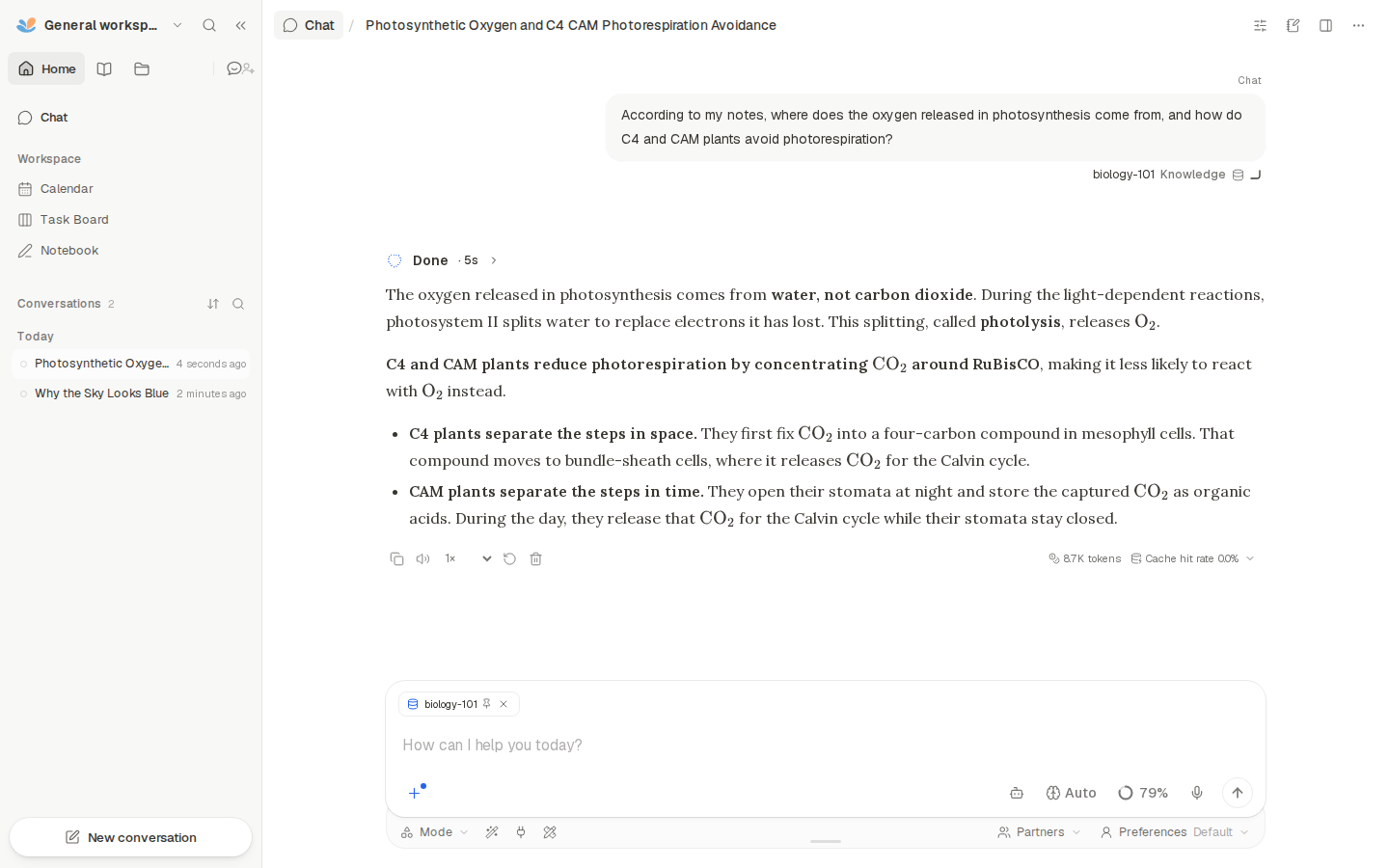
Back in Chat, click + in the message box, then Knowledge, and
pick biology-101. It shows as a chip in the message box and stays
attached to the conversation. Ask a question and DeepTutor answers from
your notes.
To test yourself, open Mode under the message box and choose Quiz. Set how many questions and how hard, click Confirm, and type a topic, such as "photosynthesis, from my week 4 notes". Pick an answer and click Check Answer for an explanation that cites your notes.
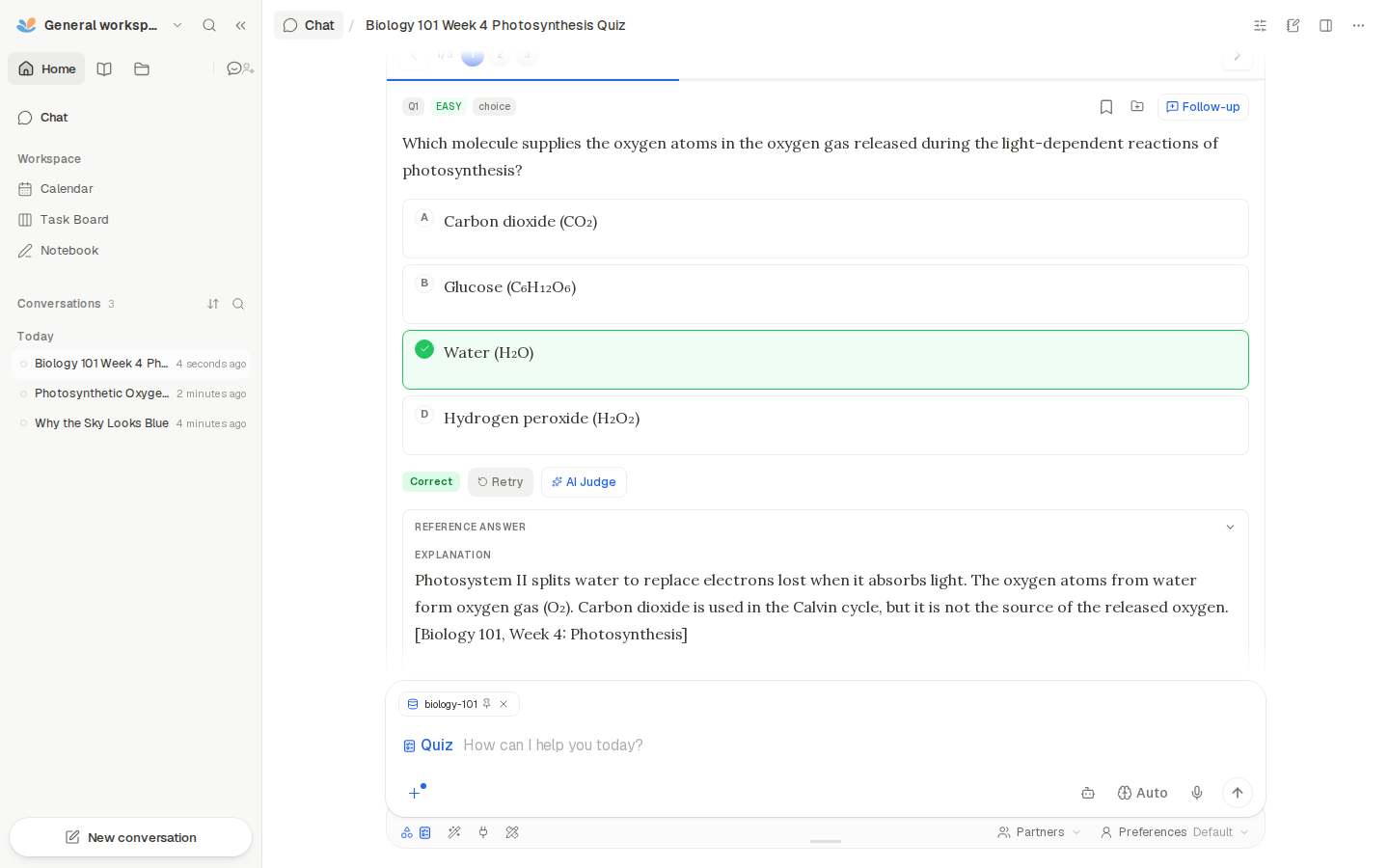
The other modes are worth a look too: Solve works through a problem step by step, Research searches the web with DuckDuckGo and writes a report, and Visualize draws charts and diagrams. The shortcuts under the message box (Explain, Practice, Plan) start common requests. Models, search, and everything else are in Settings, in the menu under the workspace name at the top left.
Study with your group#
On your computer, share the VM with a friend or teammate:
ssh exe.dev share add my-deeptutor friend@example.com
They get an email invitation, sign in to exe.dev, and open the same URL.
ssh exe.dev share add my-deeptutor team shares with your whole exe.dev
team, and ssh exe.dev share remove my-deeptutor friend@example.com locks
someone out again.
As set up here, everyone you share with uses the same DeepTutor: the same knowledge bases, chats, and settings. That suits a study group building one set of notes together. To give each person their own chats and knowledge bases, with you deciding which of yours they can use, turn on accounts.
Warning
Don't make the VM public with
share set-public. Until accounts are on, anyone who reaches the URL uses DeepTutor as you, and everyone's questions count against your LLM allocation.
Keep your notes#
Backups run nightly into ~/deeptutor-backups. Each one has your
knowledge bases with the original files, chats, settings, and accounts.
Keep a copy off the VM. On your computer:
scp -r my-deeptutor.exe.xyz:deeptutor-backups .
To restore one, update DeepTutor, or call its API from your own scripts,
see the sections below, or ask Shelley to help. Something stuck? On the
VM, try cd ~/deeptutor && docker compose logs --tail=100.
The nuts and bolts#
Happy clicking Deploy? You can stop here. These are the same setup steps Shelley follows, plus optional extras and the maintenance commands for later.
Install by hand
Create a VM#
On your computer (pick another name if my-deeptutor is taken):
ssh exe.dev new --name=my-deeptutor
ssh my-deeptutor.exe.xyz
All remaining installation commands run on the VM, as exedev.
Commands use hostname, so your VM can have any name.
Get Docker ready#
DeepTutor's Docker image bundles the backend, the web app, and the
document readers. Enable Docker at boot, or exe.dev's on-demand Docker
won't restart DeepTutor after a reboot. Install jq if needed:
sudo systemctl enable --now docker.service
systemctl is-enabled docker.service
command -v jq >/dev/null || sudo apt-get install -y jq
The check should print enabled.
Start DeepTutor#
The image runs DeepTutor's web app on port 3782, which passes requests on
to its backend inside the container. Compose publishes the web app on
port 8000, the port exe.dev's HTTPS proxy serves at
https://<vm>.exe.xyz/. Everything DeepTutor keeps goes in data. The
image tag pins the exact release; DeepTutor publishes no floating minor
tags.
mkdir -p ~/deeptutor/data
cat > ~/deeptutor/compose.yaml <<'EOF'
# DeepTutor behind exe.dev's HTTPS proxy. Settings, knowledge bases,
# chats, and accounts live in ./data.
name: deeptutor

services:
  deeptutor:
    image: ghcr.io/hkuds/deeptutor:1.7.3
    restart: unless-stopped
    ports:
      # The web app. Only exe.dev's proxy reaches it from outside.
      - "8000:3782"
    environment:
      TZ: UTC
    volumes:
      - ./data:/app/data
EOF
A small wrapper runs DeepTutor's command-line tool inside the container. The gateway needs no key, but DeepTutor won't call an embedding endpoint without one, so the wrapper hands it a placeholder:
cat > ~/deeptutor/dt <<'EOF'
#!/usr/bin/env bash
# Run DeepTutor's CLI inside its container: ./dt doctor, ./dt kb list, ...
cd "$(dirname "$(readlink -f "$0")")"
exec docker compose exec -T -u deeptutor -e GATEWAY_KEY=exe-llm-gateway \
  deeptutor python -m deeptutor_cli "$@"
EOF
chmod +x ~/deeptutor/dt
Start it and wait for {"status":"ready"}. The first start downloads
about 1 GB (4 GB on disk), which takes a minute or two. If it takes more
than ten, stop the loop with Ctrl-C and
check the logs.
cd ~/deeptutor
docker compose up -d
until docker compose exec -T deeptutor curl -fsS http://localhost:8001/health/ready 2>/dev/null; do sleep 5; done; echo
docker compose ps
curl -s -o /dev/null -w '%{http_code} %{redirect_url}\n' http://localhost:8000/
The container should be Up and, after half a minute, healthy; the
last line shows 307 and a redirect to /chat.
Connect the models#
DeepTutor reads its model setup from a JSON file. This one points chat at
the gateway's preferred GPT model, through OpenAI's Responses API, and
embeddings for your notes at text-embedding-3-small. Web search uses
DuckDuckGo. api_key_env names the placeholder from the wrapper;
DeepTutor refuses keys written into the file itself.
cd ~/deeptutor
model=$(curl -fsS https://llm.int.exe.xyz/models.json | jq -r '
  .preferred_model as $p
  | [.models[] | select(.id == $p and .provider == "openai"
      and ((.apis // []) | index("openai_responses")))][0].id // "openai/gpt-5.5"
  | sub("^openai/"; "")')
echo "$model"
cat > data/setup.json <<EOF
{
  "llm": {
    "provider": "custom",
    "base_url": "https://llm.int.exe.xyz/v1",
    "model": "$model",
    "api_format": "openai_responses",
    "api_key_env": "GATEWAY_KEY"
  },
  "embedding": {
    "provider": "custom",
    "base_url": "https://llm.int.exe.xyz/v1/embeddings",
    "model": "text-embedding-3-small",
    "dimension": 1536,
    "api_key_env": "GATEWAY_KEY"
  },
  "search": {"provider": "duckduckgo"}
}
EOF
./dt config apply /app/data/setup.json
Expect "status": "applied". DeepTutor 1.7.3 has one bug to work around:
when accounts are on, the chat page crashes for everyone but
the admin unless each model lists its reasoning levels. Add them now, so
turning accounts on later just works. DeepTutor picks up the change
without a restart:
cd ~/deeptutor/data/user/settings
jq '(.services.llm.profiles[].models[]) |=
    (.codex_supported_reasoning_levels //= ["low", "medium", "high"])' \
  model_catalog.json > /tmp/model_catalog.json
cat /tmp/model_catalog.json > model_catalog.json && rm /tmp/model_catalog.json
jq -c '.services.llm.profiles[].models[]' model_catalog.json
Now ask DeepTutor to check itself, including a small request to the model:
cd ~/deeptutor
./dt config show | jq -c '{llm: .llm.model, embedding: .embedding.model, search: .search.provider}'
./dt doctor --online --format json | jq -r '.checks[] | "\(.status)\t\(.label)"'
Expect the model, text-embedding-3-small, and duckduckgo, then pass
for the configuration, credentials (the placeholder), endpoint, storage,
and provider response. "RAG prerequisites" says skip until there's a
knowledge base.
Check a knowledge base#
Index a one-line note through the embedding model, search it, and delete it again:
cd ~/deeptutor
echo 'Our study group meets in room BLUE PELICAN.' > data/smoke-test.md
./dt kb create smoke-test --doc /app/data/smoke-test.md | tail -n 1
./dt kb search smoke-test 'Where does the study group meet?' --format json | jq -r .answer
./dt kb delete smoke-test --force
rm data/smoke-test.md
./dt kb list --format json | jq length
Expect Knowledge base created successfully., the sentence with
BLUE PELICAN, Deleted 'smoke-test'., and 0. A warning about
similarity_top_k is normal for a one-line knowledge base.
Set up nightly backups#
The backup stops DeepTutor for a few seconds, so the knowledge-base
indexes and chat history are copied in a consistent state. It runs as
root and skips data/.cache, a root-owned cache DeepTutor rebuilds.
cat > ~/deeptutor/backup.sh <<'EOF'
#!/usr/bin/env bash
# Back up DeepTutor: data (settings, knowledge bases, chats, accounts),
# the Compose file, and the CLI wrapper. Run with sudo.
set -euo pipefail
umask 077
cd "$(dirname "$(readlink -f "$0")")"
owner=$(stat -c %U:%G .)
dest="$(dirname "$PWD")/deeptutor-backups"
mkdir -p "$dest"
out="$dest/deeptutor-$(date -u +%Y%m%d-%H%M%S).tar.gz"

# A short stop keeps the indexes and the session store consistent.
docker compose stop deeptutor
trap 'docker compose start deeptutor' EXIT
tar -czf "$out.part" --exclude=data/.cache compose.yaml dt backup.sh data
docker compose start deeptutor
trap - EXIT
mv "$out.part" "$out"
chown -R "$owner" "$dest"

# Keep the 14 newest backups.
ls -1t "$dest"/deeptutor-*.tar.gz | tail -n +15 | xargs -r rm --
echo "$out"
EOF
chmod +x ~/deeptutor/backup.sh
Schedule it for 03:30 UTC (or so), then take a first backup:
sudo tee /etc/systemd/system/deeptutor-backup.service >/dev/null <<EOF
[Unit]
Description=Back up DeepTutor to ~/deeptutor-backups
Requires=docker.service
After=docker.service

[Service]
Type=oneshot
ExecStart=$HOME/deeptutor/backup.sh
EOF
sudo tee /etc/systemd/system/deeptutor-backup.timer >/dev/null <<'EOF'
[Unit]
Description=Back up DeepTutor every night

[Timer]
OnCalendar=*-*-* 03:30:00
RandomizedDelaySec=30m
Persistent=true

[Install]
WantedBy=timers.target
EOF
sudo systemctl daemon-reload
sudo systemctl enable --now deeptutor-backup.timer
sudo systemctl start deeptutor-backup.service
systemctl list-timers deeptutor-backup.timer
ls -lh ~/deeptutor-backups
cd ~/deeptutor
until docker compose exec -T deeptutor curl -fsS http://localhost:8001/health/ready 2>/dev/null; do sleep 5; done; echo
Check that the timer has a next run, the directory has a tarball, and
DeepTutor is ready again. For failures:
journalctl -u deeptutor-backup.service.
Test a backup#
Unpack the newest backup into a scratch directory and run DeepTutor's CLI on that copy, without touching the running one:
latest=$(ls -1t ~/deeptutor-backups/deeptutor-*.tar.gz | head -n 1)
mkdir /tmp/deeptutor-restore-test
sudo tar -xzf "$latest" -C /tmp/deeptutor-restore-test
cd /tmp/deeptutor-restore-test
sudo ls -A . data
docker compose -p deeptutor-restore-test run --rm --no-deps -T -u deeptutor \
  --entrypoint python deeptutor -m deeptutor_cli kb list --format json
Expect compose.yaml, dt, backup.sh, and data with user and
knowledge_bases among its folders, then a list of your knowledge bases
([] on a new install). Remove only the scratch copy:
cd /tmp/deeptutor-restore-test && docker compose -p deeptutor-restore-test down
cd ~ && sudo rm -rf /tmp/deeptutor-restore-test
Installation done. Leave sharing to the owner; continue with Start studying.
Give everyone their own account
With accounts on, each person you share the VM with signs in to DeepTutor too, and gets their own chats and knowledge bases. You, the first account, are the admin: you add the others and choose which models and which of your knowledge bases each one can use. DeepTutor can't read exe.dev's login, so this is a second password, behind the first.
On the VM, turn accounts on, with secure cookies for the HTTPS URL, and restart:
cd ~/deeptutor/data/user/settings
jq '.enabled = true | .cookie_secure = true' auth.json > /tmp/auth.json
cat /tmp/auth.json > auth.json && rm /tmp/auth.json
jq --arg o "https://$(hostname).exe.xyz" '.cors_origins = [$o]' system.json > /tmp/system.json
cat /tmp/system.json > system.json && rm /tmp/system.json
cd ~/deeptutor
docker compose restart
until docker compose exec -T deeptutor curl -fsS http://localhost:8001/health/ready 2>/dev/null; do sleep 5; done; echo
Open DeepTutor right away: it asks you to Create your account. The first account becomes the admin, and after that DeepTutor closes registration. Then, for each person:
- Open Admin in the menu under the workspace name at the top left
(or go to
/admin/users), click Add user, and set a username and a starting password. They choose their own at first sign-in. - Click the sliders icon on their row (Manage assignments), tick the model and any knowledge bases of yours they should use, and click Save assignments. Without a model, they see "Feature locked".
- Share the VM with them, as in Study with your group, and send them their username and starting password.
If you skipped the reasoning-levels step in
Connect the models, run it now; otherwise their
chat page doesn't load. Accounts and passwords are in the nightly
backup. To turn accounts off again, set .enabled = false the same way
and restart; everyone then shares your view again.
Call the API from scripts
DeepTutor's web app talks to its backend through /api, and scripts can
too, through exe.dev's proxy with a VM token.
The proxy checks the token and strips it before DeepTutor sees the
request.
On your computer, make a token for this VM and keep it in a mode-600 file:
(umask 077; ssh exe.dev ssh-key generate-api-key --vm=my-deeptutor --label=deeptutor-scripts > ~/.deeptutor-token)
List your knowledge bases, then add a file to one, say biology-101:
TOKEN=$(cat ~/.deeptutor-token)
curl -fsS -H "X-Exedev-Authorization: Bearer $TOKEN" \
  https://my-deeptutor.exe.xyz/api/knowledge-bases
curl -fsS -H "X-Exedev-Authorization: Bearer $TOKEN" \
  -F files=@week5-notes.md \
  https://my-deeptutor.exe.xyz/api/knowledge-bases/biology-101/upload
The upload returns at once and DeepTutor indexes in the background; the
file shows up in the knowledge base a few seconds later. Tools that only
do Basic auth can send the token as the password, with any username. If
you turned on accounts, DeepTutor also wants its own login:
POST your username and password to /api/auth/login with a cookie jar
(curl -c jar.txt -H 'Content-Type: application/json' -d '{"username":"...","password":"..."}')
and send the cookie (-b jar.txt) with later requests.
The API is undocumented and changes between releases; the web app's network tab is the best reference.
Back up and restore
Backups run nightly at about 03:30 UTC into ~/deeptutor-backups, the
14 newest kept. Take one by hand any time:
sudo ~/deeptutor/backup.sh
Copy them off the VM now and then, as in Keep your notes. For whole-disk copies, see exe.dev's VM backups.
To restore one in place, stop DeepTutor, move the current install aside,
unpack the backup, and start it. Pick the backup by name with
ls ~/deeptutor-backups:
backup=~/deeptutor-backups/deeptutor-YYYYMMDD-HHMMSS.tar.gz
cd ~/deeptutor && docker compose down
cd ~ && mv deeptutor deeptutor.before-restore
mkdir deeptutor && sudo tar -xzf "$backup" -C deeptutor
cd ~/deeptutor && docker compose up -d
until docker compose exec -T deeptutor curl -fsS http://localhost:8001/health/ready 2>/dev/null; do sleep 5; done; echo
./dt kb list
The knowledge bases come back with their indexes, so nothing is
re-embedded. Once DeepTutor looks right, delete
~/deeptutor.before-restore with sudo rm -rf.
Update DeepTutor
DeepTutor releases often. Read the release notes for anything about settings or storage, then take a backup, change the image tag, and pull. For example, for 1.7.4:
cd ~/deeptutor
sudo ./backup.sh
sed -i 's|ghcr.io/hkuds/deeptutor:.*|ghcr.io/hkuds/deeptutor:1.7.4|' compose.yaml
docker compose pull && docker compose up -d
until docker compose exec -T deeptutor curl -fsS http://localhost:8001/health/ready 2>/dev/null; do sleep 5; done; echo
docker image inspect "$(docker compose images -q deeptutor)" \
  --format '{{index .Config.Labels "org.opencontainers.image.version"}}'
./dt doctor --online --format json | jq -r '.checks[] | "\(.status)\t\(.label)"'
The version should be the new one, and the doctor checks pass as
before. If the update goes wrong, put the old tag back in compose.yaml
and restore the backup you just took. Old images
stay on disk; remove the old one with docker image rm, for example
docker image rm ghcr.io/hkuds/deeptutor:1.7.3.
Troubleshooting
Start with the status, the logs, and DeepTutor's own checks:
cd ~/deeptutor
docker compose ps
docker compose logs --tail=100
./dt doctor --online
The page doesn't load, or shows a 502. DeepTutor takes half a minute
to start; wait for healthy in docker compose ps. If the container
keeps restarting, the logs say why. Check that nothing else uses port
8000 (sudo ss -ltnp 'sport = :8000').
Chat replies with an error about max_tokens or a model. Keep
api_format at openai_responses for GPT models; the older
openai_chat format fails with them. Gateway models from other
providers need their prefix, such as fireworks/glm-5p3.
"Embedding API key not set" when creating a knowledge base. The
setup file lost its api_key_env, or the CLI ran without the wrapper.
Rerun Connect the models with ./dt.
Someone else sees "This page couldn't load" in Chat. With accounts on, DeepTutor 1.7.3's chat page crashes for non-admins when a model has no reasoning levels, for example one added later in Settings. Rerun the reasoning-levels command from Connect the models.
Someone else sees "Feature locked". Assign them a model in User Management → Manage assignments.
Research finds nothing on the web. DuckDuckGo sometimes returns no results to servers, and DeepTutor falls back to fetching pages directly. Try again, or pick another provider in Settings → Search.
The knowledge-base engine shows "Not installed". The Docker image includes LlamaIndex, the default, but not LightRAG or GraphRAG. Use LlamaIndex.
Frequently asked questions#
How much does it cost?
DeepTutor is free and open source. You pay for your VM plan, and chats, quizzes, and embeddings use your exe.dev LLM allocation, including your study group's. Embedding a few hundred pages of notes costs very little; long Research runs cost the most.
Which models can I use? Is Claude there?
Any gateway model that speaks OpenAI's Responses API, which includes the GPT models. Claude works too, through Anthropic's API: in ~/deeptutor/data/setup.json, set the llm block's model to, say, claude-sonnet-5-5, api_format to anthropic, and rerun the apply step. The gateway's list is at https://llm.int.exe.xyz/models.json.
Will it run on the default VM? How much memory does it need?
Yes. On a 2-vCPU, 8 GB VM, DeepTutor used about 200 MB idle and under 400 MB with a knowledge base and a few chats; the models run on the gateway, not the VM. The Node.js heap limit in DeepTutor's release notes is for its development server; the Docker image runs the production build. The image takes about 4 GB of disk.
Who can see my notes and chats?
Only people you share the VM with. Out of the box, everyone you share it with uses the same DeepTutor: the same notes, chats, and settings. Turn on accounts to give each person their own. Prompts and note excerpts go to the model provider through exe.dev's gateway.
Which web search providers work without a key?
DuckDuckGo, which this setup uses. DeepTutor also supports a SearXNG instance you run yourself; Brave, Tavily, Jina, Serper, Perplexity, and others need their own API keys. Change it in Settings → Search.
Can DeepTutor run code on my VM?
Its agent can run commands for some tasks, such as charts and math animations, but inside DeepTutor's container, not on the VM itself. The container can still reach your notes and the gateway, so only share DeepTutor with people you trust with your notes.
Can I use it for a class or a company?
Yes. DeepTutor is Apache-2.0, which allows commercial use. For more than a small group, turn on accounts so each learner has their own history, and keep an eye on your LLM allocation.
Published Nov 19, 2026 · Updated Nov 19, 2026 · tested end to end Nov 19, 2026 · Markdown · manifest.json · Something wrong? Tell us