
Self-host daily_stock_analysis
AI stock reports every trading day, without forking to GitHub Actions.
Shelley handles the setup. About 10 minutes.
Prefer a terminal?
curl -fsSL https://exe.dev/deploy/daily-stock-analysis/prompt.txt | ssh exe.dev new --prompt=/dev/stdindaily_stock_analysis (DSA) checks a list of stocks every trading day: it pulls prices, technical indicators and fundamentals from free data sources, asks a language model for a verdict on each one, and sends you a "decision dashboard": a score, a trend call, buy and stop levels, and the risks. It covers A-shares, Hong Kong, US, Japanese, Korean and Taiwanese stocks, and has a web UI with the history of every report, chat about a stock, and backtests.
Most people run it by forking the repository and letting GitHub Actions run it each evening. On an exe.dev VM it stays up instead: the scheduler runs inside the app, the dashboard and its history live on the VM's disk at a private URL behind your exe.dev login, and models come from exe.dev's LLM gateway, so there are no API keys to manage. The report arrives by email, with nothing to sign up for.
Warning
daily_stock_analysis is a research tool. Its reports are not investment advice, and it never places trades. A language model writes them from free data that can be late or wrong, and it can be confidently wrong. Decisions and losses are yours.
What you get#
- daily_stock_analysis 3.35 from its official Docker image, with config, history and reports in
~/dsa - Models from exe.dev's LLM gateway, with no API key on the VM
- A first report on AAPL and NVDA, readable at the VM's private URL
- A scheduled run at 17:00 New York time on trading days, with the report emailed to you
- The container back after a reboot
What's running, and where
https://my-daily-stock-analysis.exe.xyz/
the dashboard, history, settings and API, signed in with exe.dev
https://my-daily-stock-analysis.exe.xyz/
people you share the VM with, with the same full access
Deploy with Shelley#
Click Deploy and Shelley will set up daily_stock_analysis on a new VM, then check that it works. No config-file wrangling required.
Prefer a terminal?
curl -fsSL \
  https://exe.dev/deploy/daily-stock-analysis/prompt.txt \
  | ssh exe.dev new --prompt=/dev/stdin
What Shelley is told
Set up daily_stock_analysis on this VM by following the exe.dev recipe at https://exe.dev/deploy/daily-stock-analysis.md?via=deploy from top to bottom.

The recipe's example VM name is my-daily-stock-analysis. This VM's name is the output of `hostname`: use it wherever the recipe writes my-daily-stock-analysis. Skip the step that creates the VM; you are on it.

You are done when all of these are true. Check each one yourself:
- daily_stock_analysis 3.35 from its official Docker image, with config, history and reports in `~/dsa`
- Models from exe.dev's LLM gateway, with no API key on the VM
- A first report on AAPL and NVDA, readable at the VM's private URL
- A scheduled run at 17:00 New York time on trading days, with the report emailed to you
- The container back after a reboot

Read the whole recipe, closed details included. Run "Install by hand"
in order, skipping VM creation; the walkthrough above it is for the
owner afterwards. Work as exedev in ~/dsa. Never overwrite an existing
~/dsa/data/.env. Start the first analysis only with the run-now request
given, once; don't run main.py with --stocks or other one-off flags in
the container, which starts a second scheduler. Don't turn on admin
authentication, share the VM, or add search or data API keys unless the
owner asks. Skip "Back up and restore", "Update" and the FAQ. Finish
with the dashboard URL for this VM's name, the next scheduled run from
the status request, how to change the stock list, and say plainly that
the reports are research, not investment advice.

Finish with the URLs I should open.
Also at /deploy/daily-stock-analysis/prompt.txt. The recipe it follows is /deploy/daily-stock-analysis.md.
Your first report#
Open https://my-daily-stock-analysis.exe.xyz/. Setup already analyzed
Apple and NVIDIA, so History lists both, with the market review. Click
one for its dashboard: the verdict and score, the key points, buy, stop and
target levels, and the news it found.
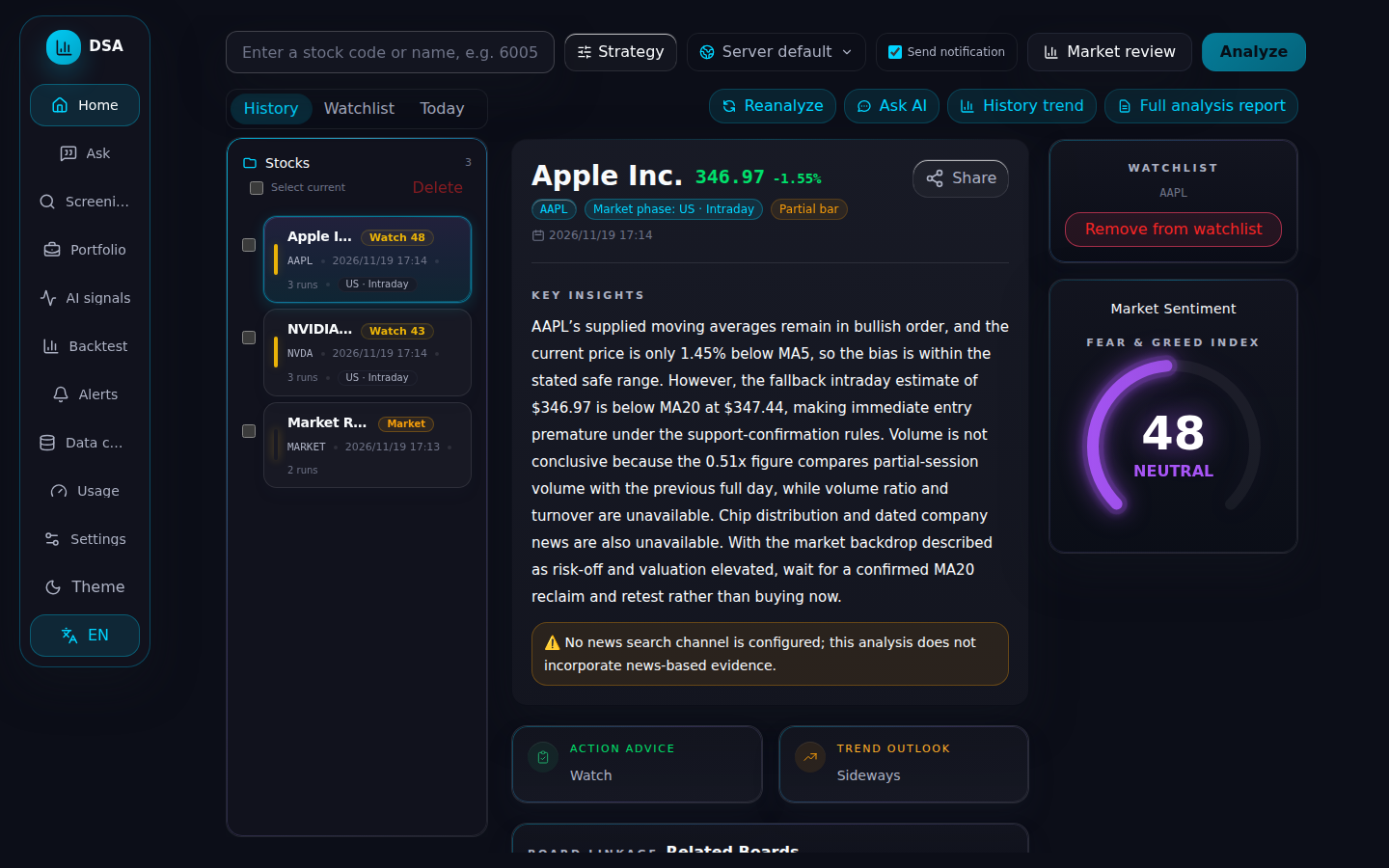
To analyze another stock, type its code in the box at the top (MSFT,
600519, hk00700) and click Analyze. A report takes under a minute, and is emailed to
you too while Send notification is ticked.
Full analysis report opens the long version, and Ask AI starts a
chat about the stock with the report as context.
The interface is in English (switch with EN in the sidebar), and so are
the reports, because setup sets REPORT_LANGUAGE=en. The upstream docs are
mostly in Chinese; the English README
and full guide
cover the settings.
The daily run#
At 17:00 New York time on every trading day, DSA analyzes your stock list, writes a US market review, saves both to the history, and emails you the report. Weekends and market holidays are skipped.
Everything is in Settings, which saves to ~/dsa/data/.env and applies
without a restart (if you edit .env by hand instead, run
docker compose restart in ~/dsa):
- Base settings → Stock List: the stocks to analyze, such as
AAPL,NVDA,MSFT,600519,hk00700. - System → Scheduled task: the run times (add more than one), and Run once now to run the whole list right away.
- Notifications: the email webhook setup made, and other channels.
The times are in the container's time zone, America/New_York. Following
the Chinese market instead? Change TZ in ~/dsa/compose.yaml to
Asia/Shanghai, set the run time to after its close (the upstream default
is 18:00), set Market review region to cn, and run
docker compose up -d in ~/dsa.
Settings worth knowing#
The ones you'll change most, with their names in .env:
| Setting | What it does |
|---|---|
STOCK_LIST |
The stocks to analyze, comma-separated |
REPORT_LANGUAGE |
en, zh (the default) or ko |
REPORT_TYPE |
simple (the default), full, or brief |
SINGLE_STOCK_NOTIFY |
true sends one message per stock instead of one report |
MARKET_REVIEW_REGION |
us, cn, hk, jp, kr, tw, or both (China and US) |
SCHEDULE_TIME, SCHEDULE_TIMES |
One run time, or several, comma-separated |
LITELLM_MODEL |
The model that writes the reports |
Models and cost#
DSA reaches the gateway as an OpenAI-compatible channel named exe, with
the placeholder key the gateway ignores. Reports come from GPT-6 Luna, which
took under 40 seconds per stock in our test, at roughly $0.002 a report.
To use another model the gateway serves through OpenAI's API, add it to
AI models → LLM_EXE_MODELS and make it the main model, with the
openai/ prefix: for example openai/gpt-6.1-terra. Claude isn't
available this way: the gateway offers it only through Anthropic's
Messages API.
News and data sources#
Prices and fundamentals come from free sources that need no keys. They can be slow or rate-limited, and some data (chip distribution, for one) exists only for A-shares; the report says what was missing.
News makes the reports noticeably better, and needs a search API key. DSA
supports Tavily, SerpAPI,
Brave Search and others, under Settings →
Data sources; Tavily and Brave have free tiers. DSA calls those APIs
directly, so the key goes in ~/dsa/data/.env on the VM rather than an
exe.dev integration. For A-shares, a Tushare token
adds better data.
Share it, or script it#
The dashboard is private to you. To let someone in, on your computer:
ssh exe.dev share add my-daily-stock-analysis friend@example.com
They sign in with exe.dev and get everything you have, including Settings and any API keys in it, so share it with people you'd hand those to. DSA also has its own admin password (Settings → System); it puts a second sign-in in front of the whole app and its API, which the exe.dev login already covers.
Scripts can use DSA's API through exe.dev with a VM token. On your computer:
ssh exe.dev ssh-key generate-api-key --vm=my-daily-stock-analysis --label=dsa-scripts
It prints a token starting with exe1.. Save it in a file only you can
read, such as ~/.dsa-token with chmod 600, then start a run:
curl -X POST -H "X-Exedev-Authorization: Bearer $(cat ~/.dsa-token)" \
  https://my-daily-stock-analysis.exe.xyz/api/v1/system/scheduler/run-now
It answers {"accepted":true,"running":true}, or 409 if a run is
already going. GET /api/v1/system/scheduler/status shows the last and
next runs, and the full API is listed at /docs on the VM.
The nuts and bolts#
Happy with Deploy? You can stop here. These are the steps Shelley follows, and the upkeep for later.
Install by hand
Create the VM#
On your computer (pick another name if my-daily-stock-analysis is taken):
ssh exe.dev new --name=my-daily-stock-analysis
ssh my-daily-stock-analysis.exe.xyz
Everything else runs on the VM as exedev.
Get Docker ready#
Enable Docker at boot, or exe.dev's on-demand Docker won't bring DSA back after a reboot, and pull the 3.35.0 image (about 600 MB):
sudo systemctl enable --now docker.service
docker pull zhulinsen/daily_stock_analysis:v3.35.0
Write the settings#
All of DSA's settings live in one file, which the web UI edits too. This points it at the gateway, writes reports in English, and emails them to the VM's owner through exe.dev's email gateway, using DSA's custom webhook channel:
mkdir -p ~/dsa/data ~/dsa/logs ~/dsa/reports
cd ~/dsa
test -e data/.env || (umask 077; cat > data/.env <<'EOF'
STOCK_LIST=AAPL,NVDA
REPORT_LANGUAGE=en
MARKET_REVIEW_REGION=us

LLM_CHANNELS=exe
LLM_EXE_PROTOCOL=openai
LLM_EXE_BASE_URL=https://llm.int.exe.xyz/v1
LLM_EXE_API_KEY=exe-llm-integration
LLM_EXE_MODELS=gpt-6-luna,gpt-6.1-terra
LITELLM_MODEL=openai/gpt-6-luna

SCHEDULE_ENABLED=true
SCHEDULE_TIME=17:00

CUSTOM_WEBHOOK_URLS=http://169.254.169.254/gateway/email/send
CUSTOM_WEBHOOK_BODY_TEMPLATE={"to":"OWNER_EMAIL","subject":"Daily stock analysis","body":$content_json}
EOF
)
OWNER=$(curl -s https://reflection.int.exe.xyz/email | jq -r .email)
sed -i "s/OWNER_EMAIL/$OWNER/" data/.env
grep -E '^(STOCK_LIST|LITELLM_MODEL|CUSTOM_WEBHOOK_BODY)' data/.env
The last line shows your stock list, the model, and your email in the
webhook body. If the email is missing, put the VM owner's exe.dev address
in its place with nano data/.env.
Start DSA#
The container runs the web UI and API on port 8000, which the
HTTPS proxy serves at the VM's private URL, and the
scheduler with them. TZ sets the time zone of the run times:
cat > compose.yaml <<'EOF'
name: dsa
services:
  dsa:
    image: zhulinsen/daily_stock_analysis:v3.35.0
    container_name: dsa
    restart: unless-stopped
    command: [python, main.py, --serve-only, --host, 0.0.0.0, --port, "8000"]
    environment:
      ENV_FILE: /app/data/.env
      TZ: America/New_York
    ports:
      - "8000:8000"
    volumes:
      - ./data:/app/data
      - ./logs:/app/logs
      - ./reports:/app/reports
EOF
docker compose up -d
sleep 15
curl -s localhost:8000/api/health; echo
curl -s localhost:8000/api/v1/system/scheduler/status; echo
Health says "status":"ok", and the scheduler says "enabled":true with
the next run at 17:00. The log warns that the web UI listens on all
addresses without a password; that's expected, because exe.dev's proxy
lets only you in.
Run the first analysis#
This runs the whole stock list and the market review once, the same as the scheduled run, email included. It takes a minute or two:
curl -s -X POST localhost:8000/api/v1/system/scheduler/run-now; echo
until curl -s localhost:8000/api/v1/system/scheduler/status | grep -q '"running":false'; do sleep 10; done
ls reports
The first request answers {"accepted":true,"running":true}, and
reports then holds report_<date>.md and market_review_<date>.md.
Two emails titled "Daily stock analysis" arrive, the report and the
market review, as Markdown text, and the dashboard lists both stocks.
Back up and restore
Back up#
~/dsa holds everything: settings in data/.env, the history database
data/stock_analysis.db, and the Markdown reports. Stop DSA briefly for a
consistent copy, on the VM:
cd ~/dsa && docker compose stop
(umask 077; tar czf ~/dsa-backup-$(date +%F).tgz -C ~ dsa/compose.yaml dsa/data dsa/reports)
docker compose start
Then fetch it on your computer, and keep it private, since .env holds
any API keys you added:
scp 'my-daily-stock-analysis.exe.xyz:dsa-backup-*.tgz' .
Restore#
Copy a backup to the VM's home directory (scp the other way), then on
the VM:
cd ~/dsa && docker compose down
cd ~ && tar xzf dsa-backup-YYYY-MM-DD.tgz
cd ~/dsa && docker compose up -d
The history is back on the dashboard.
Update
DSA releases often; see its releases.
Back up first, then set the new tag in compose.yaml and restart, on the
VM:
cd ~/dsa
sed -i 's/:v3.35.0/:v3.36.0/' compose.yaml
docker compose pull && docker compose up -d
docker image prune -f
The database migrates itself on start.
Troubleshooting
No email. In Settings → Notifications, pick Custom Webhook
under Notification test and click Send test: it shows the HTTP
status from exe.dev's email gateway. Check the address in
CUSTOM_WEBHOOK_BODY_TEMPLATE; the gateway sends only to the VM's owner
and the people it's shared with.
A run is skipped. Scheduled runs, and Run once now, leave out
stocks whose market is closed that day, and do nothing on a day every
market in the list is closed. Analyze works any day. To turn the check
off, set TRADING_DAY_CHECK_ENABLED=false in .env.
Missing prices or data. The free sources sometimes fail or rate-limit; the log names each source it tried. Run again later, or add a keyed source under Data sources.
Settings shows "worker did not exit" after a run. In our tests this appeared after runs that had finished and sent their report. If the report is in the history, it's harmless.
Two analyses at once. Don't run python main.py with other flags
inside the container to analyze a stock: with the schedule on, it starts a
second scheduler. Use Analyze, Run once now, or the API, and
docker compose restart if you already did.
Forgot the admin password. On the VM:
cd ~/dsa && docker compose exec -u dsa dsa python -m src.auth reset_password.
Anything else. docker compose logs -f dsa in ~/dsa, or the daily
logs in ~/dsa/logs. They're mostly in Chinese; scheduled runs log little
there, so the history and the report files are the surer record.
Frequently asked questions#
Is this investment advice? Does it trade for me?
No and no. The project says its reports are for information and learning only, and it never places orders. A language model writes each report from free market data that can be late or incomplete, and two runs on the same day can disagree. Treat a "Buy" as a prompt to do your own research.
Why not fork it and run it on GitHub Actions, as the README says?
That works, and it's free for public forks. On a VM you also get the web dashboard, the history of every report, chat about a stock, and backtests, which an Actions run throws away; you edit settings in a browser instead of repository secrets; and there are no model API keys to manage, because the gateway is built in.
How much does it cost?
The software is free (MIT). You pay for your VM plan, and the reports use your exe.dev LLM allocation: each stock is one model call, and a call the size of a report cost about $0.002 with GPT-6 Luna in our test. Bigger models cost more.
Which markets does it cover?
Chinese A-shares, Hong Kong, the US, Japan, Korea and Taiwan, plus ETFs, from free sources (AkShare, Baostock, Yahoo Finance) by default. Use codes like 600519, hk00700, AAPL, 7203.T, 005930.KS and 2330.TW.
Can it push to Telegram?
Yes: daily_stock_analysis has its own Telegram, Discord, Slack, ntfy and other channels under Settings → Notifications. Its Telegram sender talks to Telegram directly with a bot token, so the token is stored in ~/dsa/data/.env on the VM; exe.dev's Telegram integration can't stand in for it.
How is it different from TradingAgents?
daily_stock_analysis gives one model one stock at a time and builds a dashboard, history and notifications around the results. TradingAgents has a team of agents debate each ticker, which is slower and costs more per stock. Both run well on an always-on VM.
Published Nov 19, 2026 · Updated Nov 19, 2026 · tested end to end Nov 19, 2026 · Markdown · manifest.json · Something wrong? Tell us