Self-host Formbricks
Open-source surveys and forms on your own VM. Public links, private admin.
Shelley handles the setup. About 20 minutes.
Prefer a terminal?
curl -fsSL https://exe.dev/deploy/formbricks/prompt.txt | ssh exe.dev new --prompt=/dev/stdinFormbricks is an open-source survey platform, an alternative to Typeform and Qualtrics, with about 13,000 stars on GitHub. You build NPS, CSAT and feedback surveys in its editor, send people a link or show the survey inside your website or app, and read results and an API on the other side.
On an exe.dev VM, a Formbricks self-host takes no VPS chores: HTTPS works without setup, the disk keeps every response, and the admin stays on a private port behind your exe.dev login while only the surveys face the internet. Scripts reach the admin's API with a VM token, and Shelley sets it all up. If you only need nice forms, HeyForm, further down, is a lighter choice.
What you get#
- Formbricks 6.2.2 running in Docker Compose, with every image pinned and secrets in a mode-600 .env.
- The admin on a private port behind exe.dev login; the public port answers 404 for admin pages.
- Survey links at https://my-formbricks.exe.xyz/s/... as soon as you make the port public.
- Nightly database backups with a restore you can run, and settings and secrets saved alongside.
- Everything comes back after a reboot.
What's running, and where
https://my-formbricks.exe.xyz:3000/
The Formbricks admin, behind exe.dev login and your Formbricks account
https://my-formbricks.exe.xyz/
Survey links and the website SDK, once you make the port public
Deploy with Shelley#
Click Deploy and Shelley will set up Formbricks on a new VM, then check that it works. No config-file wrangling required.
Prefer a terminal?
curl -fsSL \
  https://exe.dev/deploy/formbricks/prompt.txt \
  | ssh exe.dev new --prompt=/dev/stdin
What Shelley is told
Set up Formbricks on this VM by following the exe.dev recipe at https://exe.dev/deploy/formbricks.md?via=deploy from top to bottom.

The recipe's example VM name is my-formbricks. This VM's name is the output of `hostname`: use it wherever the recipe writes my-formbricks. Skip the step that creates the VM; you are on it.

You are done when all of these are true. Check each one yourself:
- Formbricks 6.2.2 running in Docker Compose, with every image pinned and secrets in a mode-600 .env.
- The admin on a private port behind exe.dev login; the public port answers 404 for admin pages.
- Survey links at https://my-formbricks.exe.xyz/s/... as soon as you make the port public.
- Nightly database backups with a restore you can run, and settings and secrets saved alongside.
- Everything comes back after a reboot.

Read the whole recipe, including the closed details. For initial setup,
follow "Install by hand" first, skipping VM creation and SSH: Docker,
the Compose files, the settings, starting Formbricks, nginx, and nightly
backups. The walkthrough at the top is for the owner afterwards.
Work as exedev in ~/formbricks. Never overwrite an existing .env. Don't
create the Formbricks admin account (the first person to open the admin
becomes its owner), set up SMTP, file storage, a custom domain or
HeyForm, or run Restore or Update. You can't make the VM public from
the VM; leave that to the owner.
Verify docker.service is enabled, localhost:3000/health answers
{"status":"ok"}, the nginx checks print the expected codes, the backup
timer is enabled and the first backup exists. Do not reboot.
Never paste secrets from .env into the chat. Finish by pointing the
owner to "Make your account" and "Open surveys to the world".

Finish with the URLs I should open.
Also at /deploy/formbricks/prompt.txt. The recipe it follows is /deploy/formbricks.md.
Make your account#
Open https://my-formbricks.exe.xyz:3000/ and sign in to exe.dev if
asked. Only you, and people you share the VM with, get this far.
- Click Get started, then Continue with Email, and enter your name, email and a password. The first account becomes the owner.
- Log in, and name your organization.
- Click Skip on the invite step; without email, invitations are links you copy later.
That's the whole admin setup. Email verification and password-reset emails are off in the official Compose file, so keep the password in your password manager.
Open surveys to the world#
On your computer, make the VM's main port public:
ssh exe.dev share set-public my-formbricks
Now https://my-formbricks.exe.xyz/ reaches Formbricks, but only its
survey pages, the client API, and the scripts the website SDK loads.
Open https://my-formbricks.exe.xyz/auth/login in a private window: it's
a 404, and port 3000 still asks for exe.dev login. ssh exe.dev share set-private my-formbricks closes the surveys again.
Open the port before you build surveys: the editor's live preview loads from the public address.
Send your first survey#
- On Create your first survey, pick Use a template and choose NPS, or start from scratch.
- Edit the questions; the preview on the right updates as you type.
- Click Save & Close. Formbricks shows Your survey is active with
a link like
https://my-formbricks.exe.xyz/s/cmwrb4b3l000801p5zbm8znos. - Open the link in a private window and answer it.
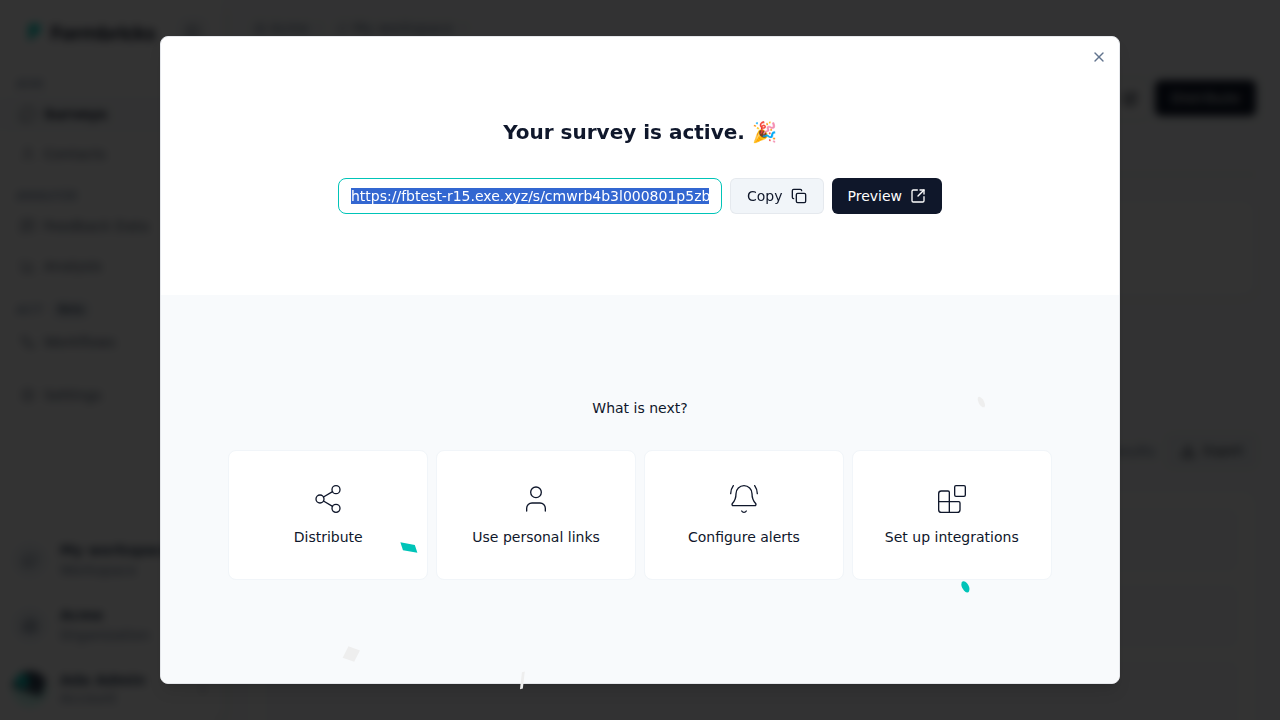
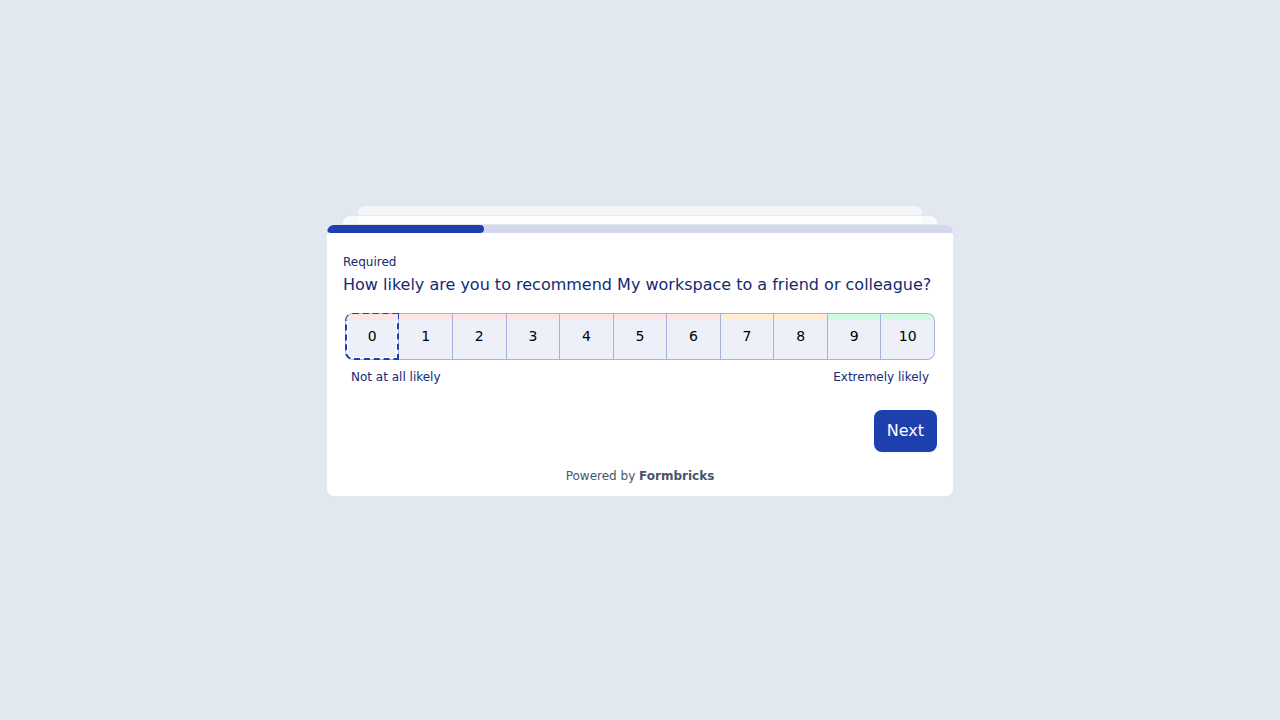
Back in the admin, Summary shows the response within seconds, and Responses lists it with the free-text answers. Export downloads CSV or Excel.
To show surveys inside your own website or app instead, open Settings → Web & Mobile SDK: the snippet it gives you loads from the public address, and the client API answers there with open CORS. We checked those endpoints from outside, but didn't wire the SDK into a real site.
Read responses from scripts#
Formbricks' management API is an admin API, so it's on the private port only. A script needs two keys: an exe.dev VM token to get past exe.dev login, and a Formbricks API key for Formbricks itself.
-
In Formbricks, open Organization settings → API Keys, click Add API Key, give it a label, Add permission for your workspace (Read is enough to export), and copy the
fbk_...key. -
On your computer, make a VM token (a token is as good as your login to this VM, so give it an expiry):
ssh exe.dev ssh-key generate-api-key --vm=my-formbricks --label=formbricks-api --exp=90d -
Send both:
curl -s https://my-formbricks.exe.xyz:3000/api/v1/management/responses \
  -H "X-Exedev-Authorization: Bearer $EXE_TOKEN" \
  -H "x-api-key: $FORMBRICKS_KEY"
You get your responses as JSON. Without the VM token it's a 401 from exe.dev; on the public address the same path is a 404. For pushing responses somewhere as they arrive, use a webhook (Settings → Integrations → Webhooks) pointed at, say, an n8n workflow.
Bring your team#
Everyone who edits surveys needs two things: access to the VM's private port, and a Formbricks account. On your computer:
ssh exe.dev share add my-formbricks teammate@example.com
Then, in Formbricks, invite them under Organization settings → General and send them the invite link yourself. People who only answer surveys need neither. Teams and per-survey access roles are Enterprise features; without a license, everyone in the organization sees every survey.
You can also leave the survey port private and share the VM with the people who should answer: then only they can open your survey links. Handy for internal surveys, but every respondent needs an exe.dev login.
Keep responses safe#
Surveys, responses, accounts and permissions all live in PostgreSQL.
Every night a timer dumps both databases (Formbricks and its SpiceDB
permissions store) and saves the Compose files and .env alongside, to
~/formbricks-backups, keeping two weeks. The .env holds the encryption
key: a database dump without it can't be fully restored.
A backup on the same disk doesn't survive losing the VM. Copy them off regularly; on your computer:
rsync -a my-formbricks.exe.xyz:formbricks-backups/ ./formbricks-backups/
They contain your respondents' answers and every secret, so keep them private. For whole-disk copies in your own S3 bucket, see exe.dev's VM backups. To restore, see Back up and restore, or ask Shelley.
What you don't get#
This install is the free Community Edition with nothing third-party attached. Out of the box:
- No file uploads. File-upload questions, logos and image backgrounds need S3-compatible storage; the editor shows File storage not set up. See File uploads.
- No email. No invitation, password-reset or follow-up emails. See Email.
- No AI or two-factor login. Both need an Enterprise license. The admin's second lock is exe.dev login, which is why it stays private.
- One workspace, and a "Powered by Formbricks" badge on surveys.
Email (optional)#
Formbricks sends mail over SMTP. exe.dev's email gateway
only mails you, so use a transactional email service's SMTP settings. On
the VM, add them to ~/formbricks/.env:
MAIL_FROM=surveys@example.com
MAIL_FROM_NAME=Acme Surveys
SMTP_HOST=smtp.example.com
SMTP_PORT=587
SMTP_USER=your-smtp-user
SMTP_PASSWORD=your-smtp-password
SMTP_AUTHENTICATED=1
SMTP_SECURE_ENABLED=0
SMTP_REQUIRE_TLS=1
Then cd ~/formbricks && docker compose up -d. We didn't test a mail
provider; the official Compose file keeps email verification and password
reset off, and you can turn them on there once mail works.
File uploads (optional)#
Formbricks hands each respondent's browser a short-lived link to upload
straight to your bucket, so the bucket's S3 address must be public
HTTPS. A hosted bucket (Cloudflare R2, AWS S3, Backblaze B2) is the easy
way. To keep files on exe.dev, run RustFS or
Garage on a second VM and make its S3 port public there
(see S3 storage); this VM's one public port belongs
to the surveys. Either way, add to ~/formbricks/.env:
S3_ACCESS_KEY=...
S3_SECRET_KEY=...
S3_REGION=us-east-1
S3_BUCKET_NAME=formbricks-uploads
S3_ENDPOINT_URL=https://my-files.exe.xyz
S3_FORCE_PATH_STYLE=1
Then docker compose up -d in ~/formbricks. Your bucket also needs a
CORS rule allowing POST from https://my-formbricks.exe.xyz and
https://my-formbricks.exe.xyz:3000. We didn't test uploads; see
Formbricks' file storage docs,
and back up the bucket separately.
Use your own domain#
To serve surveys at surveys.example.com, point a CNAME at
my-formbricks.exe.xyz and register it, on your computer, as described
in custom domains:
ssh exe.dev domain add my-formbricks surveys.example.com
Then set PUBLIC_URL=https://surveys.example.com in ~/formbricks/.env
and run docker compose up -d. The admin stays on
https://my-formbricks.exe.xyz:3000/. Links you already sent keep the old
address, which then serves only the admin's 404s, so change the domain
before you send surveys. We didn't test this step.
HeyForm, a simpler form builder#
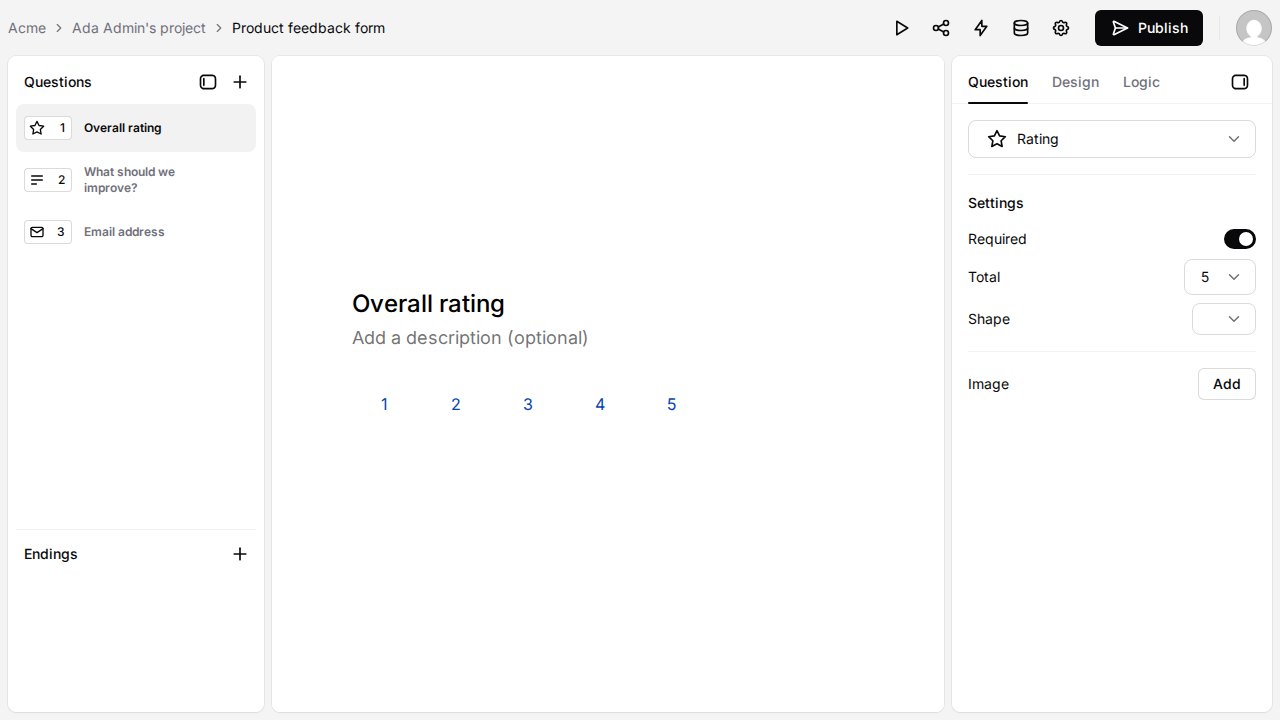
HeyForm (AGPL-3.0, about 9,000 GitHub stars) builds Typeform-style, one-question-at-a-time forms: contact forms, sign-ups, quizzes, payments through Stripe. It's three containers (HeyForm, MongoDB and KeyDB) instead of Formbricks' dozen, and its AI form builder works with exe.dev's LLM gateway, so there's no OpenAI key to paste: we described a feedback form and got three questions back.
The catch: HeyForm serves its login page and its forms on the same address, so when you make forms public, the login is public too. The install below closes sign-ups once your account exists. Give HeyForm its own VM.
Install HeyForm
On your computer (pick any free name):
ssh exe.dev new --name=my-heyform
ssh my-heyform.exe.xyz
On the VM, write the settings (secrets generated here, mode 600), the
Compose file, and start it. VERIFY_USER_EMAIL=false matters: HeyForm
wants an emailed code at sign-up unless you turn that off, and without
SMTP nobody gets the code. TRUST_PROXY=1 records respondents' real
addresses rather than exe.dev's proxy.
sudo systemctl enable --now docker.service
mkdir -p ~/heyform/assets ~/heyform-backups && cd ~/heyform
if [ ! -f .env ]; then
  (
    umask 077
    cat > .env <<EOF
APP_HOMEPAGE_URL=https://$(hostname).exe.xyz
SESSION_KEY=$(openssl rand -hex 32)
FORM_ENCRYPTION_KEY=$(openssl rand -hex 32)
INTEGRATION_ENCRYPTION_KEY=$(openssl rand -base64 32)
APP_DISABLE_REGISTRATION=false
VERIFY_USER_EMAIL=false
TRUST_PROXY=1
OPENAI_BASE_URL=https://llm.int.exe.xyz/v1
OPENAI_API_KEY=unused
OPENAI_GPT_MODEL=gpt-5.4-mini
EOF
  )
fi
cat > docker-compose.yml <<'EOF'
services:
  heyform:
    image: heyform/community-edition:v3.0.7
    restart: always
    env_file: .env
    environment:
      MONGO_URI: mongodb://mongo:27017/heyform
      REDIS_HOST: keydb
      REDIS_PORT: 6379
    ports:
      - "8000:9157"
    volumes:
      - ./assets:/app/static/upload
    depends_on: [mongo, keydb]
  mongo:
    image: percona/percona-server-mongodb:8.0
    restart: always
    volumes:
      - mongodb_data:/data/db
  keydb:
    image: eqalpha/keydb:x86_64_v6.3.3
    restart: always
    command: keydb-server --appendonly yes --protected-mode no
    volumes:
      - keydb:/data
volumes:
  mongodb_data:
  keydb:
EOF
docker compose up -d
until curl -fs -o /dev/null localhost:8000/; do sleep 3; done; echo HeyForm is up
While the VM is still private, open https://my-heyform.exe.xyz/, click
Sign up, make your account and a workspace. Then close sign-ups:
cd ~/heyform
sed -i 's/^APP_DISABLE_REGISTRATION=.*/APP_DISABLE_REGISTRATION=true/' .env
docker compose up -d
The sign-up page now sends people to the login, and HeyForm's API refuses
new accounts with Registration is disabled. On your computer, publish
the forms with ssh exe.dev share set-public my-heyform; form links look
like https://my-heyform.exe.xyz/form/ok4czWRg.
To use another model, change OPENAI_GPT_MODEL to one listed by
curl -s https://llm.int.exe.xyz/v1/models | jq -r '.data[].id', or
delete the three OPENAI_ lines to turn AI off.
Back up MongoDB, the uploads and the settings; on the VM:
cd ~/heyform
t=$(date -u +%Y%m%dT%H%M%SZ)
(umask 077
 docker compose exec -T mongo mongodump --quiet --db heyform --archive --gzip > ~/heyform-backups/mongo-$t.archive.gz &&
 tar -czf ~/heyform-backups/files-$t.tar.gz .env docker-compose.yml assets)
ls -l ~/heyform-backups
To restore one, use its timestamp:
cd ~/heyform
docker compose stop heyform
docker compose exec -T mongo mongorestore --quiet --drop --archive --gzip < ~/heyform-backups/mongo-20261122T043740Z.archive.gz
docker compose start heyform
To run backups nightly, schedule the backup lines as in
Set up nightly backups. Upgrade by changing the
heyform/community-edition tag after reading its
releases, then
docker compose pull && docker compose up -d. Tested with HeyForm 3.0.7:
sign-up, AI form generation, publishing, a logged-out submission, and
backup and restore.
The nuts and bolts#
Happy clicking Deploy? You can stop here. These are the same setup steps Shelley follows, plus the maintenance commands for later. Tested with Formbricks 6.2.2 (Hub 0.14.3, SpiceDB 1.57.0, PostgreSQL 18 with pgvector) on a new exe.dev VM: the install as written, a reboot, a restore on the same VM and onto a second VM, and the update commands.
Install by hand
Create the VM#
On your computer (pick another name if my-formbricks is taken):
ssh exe.dev new --name=my-formbricks
ssh my-formbricks.exe.xyz
A new VM's 25 GB disk is enough to start; the images take about 5 GB.
All remaining installation commands run on the VM, as exedev. They
use hostname, so your VM can have any name.
Get Docker ready#
Enable Docker at boot, or exe.dev's on-demand Docker won't restart Formbricks after a reboot:
sudo systemctl enable --now docker.service
systemctl is-enabled docker.service
Expect enabled.
Download the Compose files#
Formbricks' official Compose file needs three helper files from the same release:
FB_VERSION=6.2.2
mkdir -p ~/formbricks/cube/schema && cd ~/formbricks
base=https://raw.githubusercontent.com/formbricks/formbricks/$FB_VERSION/docker
curl -fsSL -o docker-compose.yml $base/docker-compose.yml
curl -fsSL -o authzed-postgres-bootstrap.sh $base/authzed-postgres-bootstrap.sh
curl -fsSL -o cube/cube.js $base/cube/cube.js
curl -fsSL -o cube/schema/FeedbackRecords.js $base/cube/schema/FeedbackRecords.js
chmod 700 authzed-postgres-bootstrap.sh
grep -c 'ghcr.io/formbricks/formbricks:latest' docker-compose.yml
Expect 4: four services use the app image with a latest tag, which
the next steps pin.
Write the settings#
This writes ~/formbricks/.env, readable only by you, with every secret
generated here. The admin URL is the private port 3000; PUBLIC_URL, for
surveys, is the main address. HUB_IMAGE_REF comes from the release's
own Helm values, which name the Hub version it was tested with. It won't
overwrite an existing file.
cd ~/formbricks
FB_VERSION=6.2.2
HUB=$(curl -fsSL https://raw.githubusercontent.com/formbricks/formbricks/$FB_VERSION/charts/formbricks/values.yaml |
  grep -A8 'repository: "ghcr.io/formbricks/hub"' | sed -n 's/^ *tag: "\(.*\)"/\1/p')
if [ ! -f .env ]; then
  (
    umask 077
    PG=$(openssl rand -hex 32)
    cat > .env <<EOF
# Admin: private port, behind exe.dev login. Surveys and SDK: the public address.
WEBAPP_URL=https://$(hostname).exe.xyz:3000
BETTER_AUTH_URL=https://$(hostname).exe.xyz:3000
PUBLIC_URL=https://$(hostname).exe.xyz
# Pinned versions; docker-compose.override.yml uses FORMBRICKS_VERSION.
FORMBRICKS_VERSION=$FB_VERSION
HUB_IMAGE_REF=:$HUB
POSTGRES_PASSWORD=$PG
POSTGRES_PASSWORD_URL_ENCODED=$PG
BETTER_AUTH_SECRET=$(openssl rand -hex 32)
ENCRYPTION_KEY=$(openssl rand -hex 32)
CRON_SECRET=$(openssl rand -hex 32)
HUB_API_KEY=$(openssl rand -hex 32)
CUBEJS_API_SECRET=$(openssl rand -hex 32)
CUBEJS_JWT_ISSUER=formbricks-web
CUBEJS_JWT_AUDIENCE=formbricks-cube
AUTHZED_TOKEN=$(openssl rand -hex 32)
AUTHZED_DATABASE_PASSWORD=$(openssl rand -hex 32)
EOF
  )
fi
ls -l .env; grep -E '^(PUBLIC_URL|FORMBRICKS_VERSION|HUB_IMAGE_REF)=' .env
Expect -rw-------, your VM's address, 6.2.2 and :0.14.3. Losing
ENCRYPTION_KEY loses data that Formbricks encrypts, so the backups below
save this file.
Pin the images#
An override file, which Compose reads automatically, puts the pinned version on the four services:
cd ~/formbricks
cat > docker-compose.override.yml <<'EOF'
# Pin the Formbricks image; the upstream file says :latest.
x-formbricks-image: &formbricks-image ghcr.io/formbricks/formbricks:${FORMBRICKS_VERSION:?set in .env}
services:
  formbricks-migrate:
    image: *formbricks-image
  formbricks:
    image: *formbricks-image
  authzed-initialize:
    image: *formbricks-image
  authzed-ops:
    image: *formbricks-image
EOF
docker compose config --images | sort -u
Expect ghcr.io/formbricks/formbricks:6.2.2,
ghcr.io/formbricks/hub:0.14.3, ghcr.io/formbricks/cube:1.8.8-3,
authzed/spicedb:v1.57.0, pgvector/pgvector:pg18 and a Valkey image
pinned by digest: no latest.
Start Formbricks#
The first start pulls about 5 GB and runs the database migrations; it took about a minute and a half on our test VM:
cd ~/formbricks
docker compose up -d
until curl -fs localhost:3000/health; do sleep 5; done; echo
docker compose ps --format 'table {{.Service}}\t{{.Status}}'
Expect {"status":"ok"}, then formbricks, hub, hub-worker, cube,
spicedb, postgres and redis up. The one-shot setup services have
exited, which is right.
Put nginx in front#
exe.dev sends the main address to port 8000. nginx passes it to Formbricks
with the original Host, which matches PUBLIC_URL, so Formbricks serves
only the public routes there:
sudo tee /etc/nginx/sites-available/formbricks >/dev/null <<'EOF'
# exe.dev proxy -> :8000 (the port you make public) -> Formbricks :3000.
# The Host header is <vm>.exe.xyz, PUBLIC_URL's host, so Formbricks
# answers only surveys, the client API and static files here.
server {
    listen 8000 default_server;
    listen [::]:8000 default_server;
    server_name _;
    client_max_body_size 25m;

    location / {
        proxy_pass http://127.0.0.1:3000;
        proxy_http_version 1.1;
        proxy_set_header Host $http_host;
        proxy_set_header X-Forwarded-Proto $http_x_forwarded_proto;
        proxy_set_header X-Forwarded-Host $http_x_forwarded_host;
        proxy_set_header X-Forwarded-For $http_x_forwarded_for;
        proxy_read_timeout 300s;
    }
}
EOF
sudo rm -f /etc/nginx/sites-enabled/default
sudo ln -sf /etc/nginx/sites-available/formbricks /etc/nginx/sites-enabled/formbricks
sudo nginx -t && sudo systemctl enable nginx && sudo systemctl reload-or-restart nginx
H=$(hostname).exe.xyz
for p in /health /auth/login /api/v1/management/me; do
  echo "$p public $(curl -s -o /dev/null -w '%{http_code}' -H "Host: $H" localhost:8000$p)" \
    "admin $(curl -s -o /dev/null -w '%{http_code}' -H "Host: $H:3000" localhost:3000$p)"
done
Expect /health public 200 admin 200, /auth/login public 404 admin 307 (a redirect to first-time setup), and /api/v1/management/me public 404 admin 401 (no API key yet).
Set up nightly backups#
The script dumps both databases while Formbricks runs, and saves .env
and the Compose files next to them:
cat > ~/formbricks/backup.sh <<'EOF'
#!/bin/bash
# Back up Formbricks: the formbricks and spicedb databases, plus .env
# (every secret) and the Compose files. Keeps two weeks.
set -euo pipefail
cd /home/exedev/formbricks
out=/home/exedev/formbricks-backups
mkdir -p "$out"
umask 077
t=$(date -u +%Y%m%dT%H%M%SZ)
docker compose exec -T postgres pg_dump -Fc -U postgres -d formbricks > "$out/formbricks-$t.dump"
docker compose exec -T postgres pg_dump -Fc -U postgres -d spicedb > "$out/spicedb-$t.dump"
tar -czf "$out/config-$t.tar.gz" .env docker-compose.yml docker-compose.override.yml \
  authzed-postgres-bootstrap.sh cube backup.sh
find "$out" -name '*-20*' -mtime +13 -delete
ls -l "$out"/*-$t.*
EOF
chmod 700 ~/formbricks/backup.sh
Schedule it for 03:30 UTC (or so), then take a first backup:
sudo tee /etc/systemd/system/formbricks-backup.service >/dev/null <<'EOF'
[Unit]
Description=Back up Formbricks

[Service]
Type=oneshot
User=exedev
ExecStart=/home/exedev/formbricks/backup.sh
EOF
sudo tee /etc/systemd/system/formbricks-backup.timer >/dev/null <<'EOF'
[Unit]
Description=Back up Formbricks every night

[Timer]
OnCalendar=*-*-* 03:30:00
RandomizedDelaySec=30m
Persistent=true

[Install]
WantedBy=timers.target
EOF
sudo systemctl daemon-reload
sudo systemctl enable --now formbricks-backup.timer
sudo systemctl start formbricks-backup.service
systemctl list-timers formbricks-backup.timer
ls -l ~/formbricks-backups
Check that the timer has a next run and there are three files, readable
only by you: formbricks-*.dump, spicedb-*.dump and config-*.tar.gz.
For failures: journalctl -u formbricks-backup.
Installation done. Leave sharing to the owner; continue with Make your account.
Back up and restore
On the VM, ~/formbricks/backup.sh makes an extra backup at any time.
Copy backups off the VM as in Keep responses safe.
Restore#
This replaces every survey, response and account with the backup's: anything since is lost. Use your backup's timestamp below. On the VM:
cd ~/formbricks
./backup.sh   # keep the current state, just in case
t=20261122T033012Z
docker compose stop
docker compose up -d --wait postgres
docker compose run --rm authzed-db-bootstrap
for db in formbricks spicedb; do
  owner=postgres; [ $db = spicedb ] && owner=spicedb
  docker compose exec -T postgres dropdb -U postgres --force $db &&
  docker compose exec -T postgres createdb -U postgres -O $owner $db &&
  docker compose exec -T postgres pg_restore -U postgres -d $db --exit-on-error \
    < ~/formbricks-backups/$db-$t.dump || { echo "restore of $db failed"; break; }
done
docker compose run --rm --no-deps spicedb datastore repair transaction-ids
docker compose up -d
until curl -fs localhost:3000/health; do sleep 3; done; echo
Sign in and check your surveys and their responses. Two details matter.
The spicedb database must come back owned by spicedb, or SpiceDB fails
to start with permission denied for table alembic_version. And on a new
VM, SpiceDB can't see restored permissions (no schema has been defined)
until datastore repair transaction-ids catches PostgreSQL's transaction
counter up with the dump's; on the same VM it finds nothing to do.
On a new VM, do Get Docker ready, then copy the backup's three files over; on your computer:
scp formbricks-backups/*-20261122T033012Z.* my-formbricks.exe.xyz:
On the VM, unpack the settings. If the VM's name changed, the sed points
the three URLs at the new name:
mkdir -p ~/formbricks ~/formbricks-backups && cd ~/formbricks
mv ~/*-20261122T033012Z.* ~/formbricks-backups/
tar -xzf ~/formbricks-backups/config-20261122T033012Z.tar.gz
sed -i "s|https://[a-z0-9-]*\.exe\.xyz|https://$(hostname).exe.xyz|" .env
Then run the restore commands above, without the ./backup.sh line, and
do Put nginx in front and
Set up nightly backups. Survey links sent with
the old name won't follow; a custom domain avoids
that next time.
Update Formbricks
Formbricks wants upgrades one minor version at a time (6.2 to 6.3, never skipping one), each to its latest patch, and publishes a page for each version. Read the release notes and the upgrade guide first.
For a patch (6.2.2 to 6.2.3), on the VM: stop the writers, back up,
switch the files and versions, check, migrate and start. Replace 6.2.3:
cd ~/formbricks
FB_VERSION=6.2.3
docker compose stop formbricks hub hub-worker
./backup.sh
base=https://raw.githubusercontent.com/formbricks/formbricks/$FB_VERSION
curl -fsSL -o docker-compose.yml $base/docker/docker-compose.yml
curl -fsSL -o authzed-postgres-bootstrap.sh $base/docker/authzed-postgres-bootstrap.sh
curl -fsSL -o cube/cube.js $base/docker/cube/cube.js
curl -fsSL -o cube/schema/FeedbackRecords.js $base/docker/cube/schema/FeedbackRecords.js
HUB=$(curl -fsSL $base/charts/formbricks/values.yaml |
  grep -A8 'repository: "ghcr.io/formbricks/hub"' | sed -n 's/^ *tag: "\(.*\)"/\1/p')
sed -i -e "s/^FORMBRICKS_VERSION=.*/FORMBRICKS_VERSION=$FB_VERSION/" \
  -e "s/^HUB_IMAGE_REF=.*/HUB_IMAGE_REF=:$HUB/" .env
docker compose config --quiet && docker compose pull
docker compose --profile authzed-ops run --rm --no-deps authzed-ops upgrade check
docker compose run --rm --no-deps formbricks-migrate &&
  docker compose run --rm --no-deps hub-migrate &&
  docker compose up -d
until curl -fs localhost:3000/health; do sleep 3; done; echo
docker compose images formbricks
The upgrade check must end with "status":"ready" and exit 0; if it
doesn't, stop there and read the version page. For a minor version,
there's an extra permission-preparation step between the backup and the
migrations: follow Formbricks'
Docker Compose runbook
with these same files. An older image doesn't undo migrations: to roll
back, restore the backup taken before the upgrade, with its
settings. We ran these commands end to end with 6.2.2 as the "new"
version; no newer release existed yet to test a real upgrade.
Something not working?
On the VM:
cd ~/formbricks
docker compose ps -a
docker compose logs --tail=100 formbricks
- Survey links open exe.dev's login page: the VM is private. Run
ssh exe.dev share set-public my-formbricks. - The login page is a 404: you're on the public address. The admin is
https://my-formbricks.exe.xyz:3000/. - The editor's preview stays blank: the public address is closed; the preview loads from it. Make it public, or reload.
- "File storage not set up, uploads will likely fail": expected without S3; see File uploads.
- A script gets 401: that's exe.dev. Send the VM token in
X-Exedev-Authorization: Bearer ...and the Formbricks key inx-api-key. spicedb-migrateexited 1 withpermission denied: the spicedb database lost its owner in a restore. Redo the restore, which recreates it owned byspicedb.- "Something went wrong" on every page after a restore, and
no schema has been definedindocker compose logs spicedb: rundocker compose run --rm --no-deps spicedb datastore repair transaction-ids, thendocker compose restart spicedb formbricks. - The app logs
ETIMEDOUTto postgres or redis: recreate the container withdocker compose up -d --force-recreate formbricks. - Sign-in fails after renaming the VM: the URLs in
.envstill name the old VM. Fix them and rundocker compose up -d. - Down after a reboot: run
sudo systemctl enable --now docker.service.
Frequently asked questions#
Is Formbricks free to self-host?
The core is open source (AGPLv3) and free for commercial use, with unlimited surveys, responses and users, link and website surveys, logic, webhooks, the API and multi-language surveys. An Enterprise license adds teams and roles, contacts and segments, SSO, two-factor login, hiding the "Powered by Formbricks" badge, AI features and more than one workspace. You pay for your exe.dev plan either way.
Why does Formbricks get two addresses?
Respondents need to reach your surveys, but nobody outside your team needs the admin. Formbricks can serve them on separate addresses, so the admin sits on a private port behind exe.dev login, and the public address answers only surveys, the client API and static files. Admin pages there return 404.
How much does it need?
A new exe.dev VM (2 vCPUs, 8 GB of memory, 25 GB of disk) is plenty for a team. On our test VM the stack used about 1.5 GB of memory and 5 GB of disk for its images. Formbricks suggests 4 vCPUs, 8 GB and 50 GB once responses pile up; resize the VM when you get there.
Can respondents upload files?
Not out of the box. Formbricks stores uploads in S3-compatible storage that respondents' browsers reach directly, so you need a bucket with a public HTTPS address. See File uploads.
Do I need an email server?
No. Without one, you copy invitation links by hand, and there are no password-reset emails or email follow-ups. Add SMTP when you want them.
Can I use the exe.dev LLM gateway for its AI features?
Formbricks' AI features need an Enterprise license, so we couldn't test them. Formbricks does accept an OpenAI-compatible endpoint, so the gateway should work once licensed. HeyForm's AI form builder is free, and we tested it with the gateway: see HeyForm.
Formbricks or HeyForm?
Formbricks if you want product research: NPS and CSAT templates, surveys inside your website or app, a response API, and the admin kept off the internet. HeyForm if you want pretty, Typeform-style forms and a three-container install; its login page is public along with the forms.
Published Nov 22, 2026 · Updated Nov 22, 2026 · tested end to end Nov 22, 2026 · Markdown · manifest.json · Something wrong? Tell us