
Self-host RustFS
S3-compatible object storage on your own disk, with a console only you can open.
Shelley handles the setup. About 10 minutes.
Prefer a terminal?
curl -fsSL https://exe.dev/deploy/rustfs/prompt.txt | ssh exe.dev new --prompt=/dev/stdinRustFS is an S3-compatible object store written in Rust, under the Apache
license: point any S3 client or SDK at it and it behaves like a bucket on
Amazon S3. Here it runs on an exe.dev VM's own disk, so files survive
restarts and reboots, and both the console and the S3 API stay behind
exe.dev's login until you decide otherwise. Apps on the VM use it over
localhost; your laptop and scripts get in with a VM token or an SSH
tunnel. Shelley, the agent on the VM, sets it all up and can later make
app keys, apply updates, or restore a file for you. For how it compares
with Garage and SeaweedFS, see
self-hosted S3 storage.
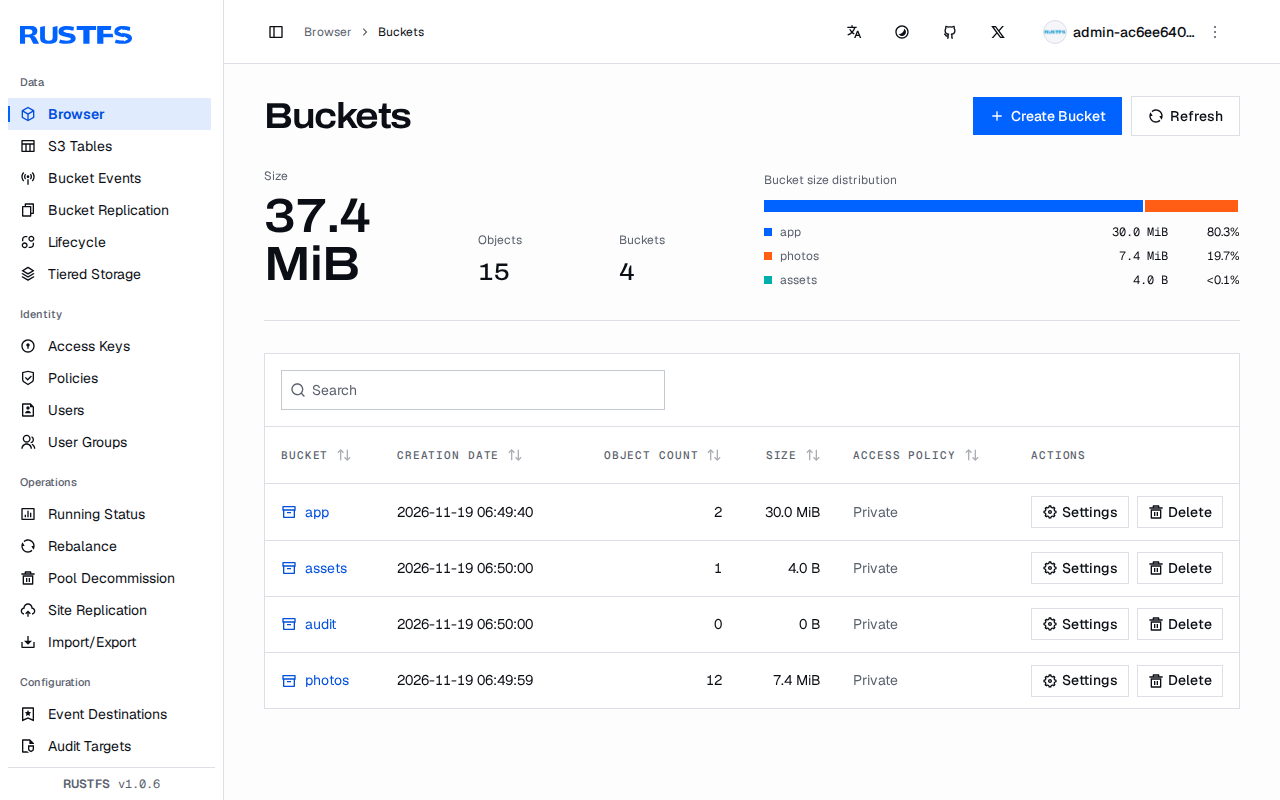
What you get#
- RustFS 1.0.6 on the VM's disk, with its own root keys, started at boot.
- The S3 API at
http://localhost:9000on the VM and, with a VM token, athttps://my-rustfs.exe.xyz:9000/. - The RustFS console at
https://my-rustfs.exe.xyz:9001/, behind exe.dev login. - An
appbucket and a key that can use only that bucket, in~/rustfs/app.env. - Nightly backups of every bucket, user, and policy to a bucket off the VM, one restored and checked.
What's running, and where
https://my-rustfs.exe.xyz:9001/
the RustFS console, signed in with the root keys
https://my-rustfs.exe.xyz:9000/
the S3 API, for clients that send a VM token
Deploy with Shelley#
Click Deploy and Shelley will set up RustFS on a new VM, then check that it works. No config-file wrangling required.
Have these ready; Shelley asks for them:
OFFSITE_BUCKET: an empty bucket at another provider for the nightly backups (get one), ornoneto keep them on the VM for nowOFFSITE_ENDPOINT: R2:https://<ACCOUNT_ID>.r2.cloudflarestorage.com; Backblaze B2:https://s3.<region>.backblazeb2.com; another RustFS:https://<vm>.exe.xyz; Amazon S3: leave emptyOFFSITE_REGION:autofor R2, the bucket's region for B2 and Amazon S3,us-east-1for RustFSOFFSITE_ACCESS_KEY_ID: a key that can read and write that bucket, and nothing elseOFFSITE_SECRET_ACCESS_KEY: the key's secret
Prefer a terminal?
curl -fsSL \
  https://exe.dev/deploy/rustfs/prompt.txt \
  | ssh exe.dev new --prompt=/dev/stdin
When it's done, run this on your computer (only you can):
ssh exe.dev ssh-key generate-api-key --vm=my-rustfs --label=s3 --exp=90d
ssh -N -L 9000:localhost:9000 my-rustfs.exe.xyz
What Shelley is told
OFFSITE_BUCKET=<fill-this-in>
OFFSITE_ENDPOINT=<fill-this-in>
OFFSITE_REGION=<fill-this-in>
OFFSITE_ACCESS_KEY_ID=<fill-this-in>
OFFSITE_SECRET_ACCESS_KEY=<fill-this-in>

Set up RustFS on this VM by following the exe.dev recipe at https://exe.dev/deploy/rustfs.md?via=deploy from top to bottom.

The values at the top of this message are mine:
- OFFSITE_BUCKET: an empty bucket at another provider for the nightly backups ([get one](#get-a-bucket)), or `none` to keep them on the VM for now
- OFFSITE_ENDPOINT: R2: `https://<ACCOUNT_ID>.r2.cloudflarestorage.com`; Backblaze B2: `https://s3.<region>.backblazeb2.com`; another RustFS: `https://<vm>.exe.xyz`; Amazon S3: leave empty
- OFFSITE_REGION: `auto` for R2, the bucket's region for B2 and Amazon S3, `us-east-1` for RustFS
- OFFSITE_ACCESS_KEY_ID: a key that can read and write that bucket, and nothing else
- OFFSITE_SECRET_ACCESS_KEY: the key's secret
Ask me for any that still say <fill-this-in> before you need them.

The recipe's example VM name is my-rustfs. This VM's name is the output of `hostname`: use it wherever the recipe writes my-rustfs. Skip the step that creates the VM; you are on it.

You are done when all of these are true. Check each one yourself:
- RustFS 1.0.6 on the VM's disk, with its own root keys, started at boot.
- The S3 API at `http://localhost:9000` on the VM and, with a VM token, at `https://my-rustfs.exe.xyz:9000/`.
- The RustFS console at `https://my-rustfs.exe.xyz:9001/`, behind exe.dev login.
- An `app` bucket and a key that can use only that bucket, in `~/rustfs/app.env`.
- Nightly backups of every bucket, user, and policy to a bucket off the VM, one restored and checked.

Read the whole recipe, including the closed details. For initial setup,
follow "Install by hand" from top to bottom: Docker, the root keys,
RustFS in Docker Compose, rc and the app bucket, rclone and the backup
timer, and the backup test. The walkthrough sections are for the owner
afterwards: don't make the VM public, change its shared port, move data
from MinIO, or run the Restore or Update instructions during setup.
Write the owner's OFFSITE_* values into ~/rustfs/offsite.env without
printing the secret. If OFFSITE_BUCKET is `none` or the owner has no
bucket yet, skip "Give the backups a bucket", run the "No bucket yet?"
block instead of the one before it, and tell the owner that the backups
stay on the VM until they add a bucket ("Add a bucket later"). If the bucket
already holds a `rustfs/` folder, stop and ask the owner: it may be
another VM's backup, which the nightly sync would overwrite.
Never overwrite an existing ~/rustfs/.env or ~/rustfs/*.env file.
Delete only the scratch bucket and the scratch restore the backup test
creates. Leave the VM private and do not reboot. Don't paste keys into
the chat; say they are in ~/rustfs/.env and ~/rustfs/app.env.

Finish with the URLs I should open and these commands, which only I can run, from my own computer (with this VM's name in them):
  ssh exe.dev ssh-key generate-api-key --vm=my-rustfs --label=s3 --exp=90d
  ssh -N -L 9000:localhost:9000 my-rustfs.exe.xyz
Also at /deploy/rustfs/prompt.txt. The recipe it follows is /deploy/rustfs.md.
Open the console#
When Shelley finishes, open https://my-rustfs.exe.xyz:9001/. exe.dev
asks you to sign in first; then RustFS asks for its own keys. They're
the root keys, in ~/rustfs/.env on the VM:
ssh my-rustfs.exe.xyz cat rustfs/.env
The console creates buckets, uploads and downloads files, and manages users, policies, versioning, and lifecycle rules. It is private because every port of the VM is: only you, and people you share the VM with, reach it, and they still need RustFS keys. Port 9001 serves the S3 API too, so never make it the public port.
Connect an app on this VM#
Your app's bucket is called app, and its key can use only that bucket.
The settings are in ~/rustfs/app.env, readable only by you:
AWS_ENDPOINT_URL=http://localhost:9000
AWS_REGION=us-east-1
AWS_ACCESS_KEY_ID=app
AWS_SECRET_ACCESS_KEY=<secret>
S3_BUCKET=app
Recent AWS SDKs and the aws command read these variables as they are.
Other libraries want the same values under their own names: endpoint
http://localhost:9000, region us-east-1, and path-style addressing
(forcePathStyle: true in JavaScript, use_path_style_endpoint in PHP,
force_path_style in Ruby). In Python:
import boto3

s3 = boto3.client("s3")  # reads AWS_ENDPOINT_URL and the keys from the environment
s3.upload_file("report.pdf", "app", "reports/2026/report.pdf")
print(s3.list_objects_v2(Bucket="app")["KeyCount"])
A second app gets a bucket and key of its own. On the VM:
~/rustfs/new-app.sh photos
cat ~/rustfs/photos.env
new-app.sh creates the
bucket, a policy allowing only that bucket, and a user with a random
secret, and writes photos.env. The nightly backup picks the bucket up.
In a Docker container on the VM? localhost is the container
itself. Give the service in your Compose file
extra_hosts: ["host.docker.internal:host-gateway"] and use
http://host.docker.internal:9000. Self-hosted apps that take an S3
endpoint, such as Supabase or
Langfuse, can use it with a key from new-app.sh;
we haven't tested those pairings.
Reach it from your computer#
The S3 API is at https://my-rustfs.exe.xyz:9000/, and like the console
it's private: exe.dev answers 401 until a request proves it's you. S3
keys can't do that, because S3 clients put their own signature in the
Authorization header. There are two ways in; where clients connect
from compares them with
the public port.
An SSH tunnel#
The simplest, and every S3 client works unchanged. On your computer:
ssh -N -L 9000:localhost:9000 my-rustfs.exe.xyz
While it runs, use the endpoint http://localhost:9000 with any client,
and http://localhost:9001 opens the console.
A VM token#
For scripts and machines without your SSH key, make a token for this VM. On your computer:
mkdir -p ~/.config/exedev
ssh exe.dev ssh-key generate-api-key --vm=my-rustfs --label=s3 --exp=90d > ~/.config/exedev/vm-token
chmod 600 ~/.config/exedev/vm-token
The client sends it in an X-Exedev-Authorization: Bearer <token>
header, which exe.dev checks and removes before the request reaches
RustFS. The header has to be added after the client signs the
request, or RustFS rejects the signature. With rclone, which has a flag
for it:
rclone config create my-rustfs s3 provider=Other \
  endpoint=https://my-rustfs.exe.xyz:9000 \
  access_key_id=app secret_access_key=<secret>
rclone --header "X-Exedev-Authorization: Bearer $(cat ~/.config/exedev/vm-token)" \
  copy ./photos my-rustfs:app/photos
With boto3, add the header in the before-send event:
from pathlib import Path
import boto3

token = (Path.home() / ".config/exedev/vm-token").read_text().strip()
s3 = boto3.client("s3", endpoint_url="https://my-rustfs.exe.xyz:9000",
                  aws_access_key_id="app", aws_secret_access_key="<secret>",
                  region_name="us-east-1")
def add_token(request, **kwargs):
    request.headers["X-Exedev-Authorization"] = f"Bearer {token}"
s3.meta.events.register("before-send.s3", add_token)

s3.upload_file("backup.tar", "app", "backup.tar")
MinIO's mc takes the header as
-H "X-Exedev-Authorization: Bearer $(cat ~/.config/exedev/vm-token)",
on mc alias set too, since it checks the keys right away.
The aws command needs a small plugin,
exedev_token.py, which
adds the header to requests for *.exe.xyz only, and the classic
transfer client (the newer one skips plugins). On your computer:
mkdir -p ~/.aws/plugins
curl -fsSL -o ~/.aws/plugins/exedev_token.py https://exe.dev/deploy/rustfs/exedev_token.py
cat >> ~/.aws/config <<EOF

[plugins]
cli_legacy_plugin_path = $HOME/.aws/plugins
exedev_token = exedev_token

[profile my-rustfs]
endpoint_url = https://my-rustfs.exe.xyz:9000
region = us-east-1
s3 =
  preferred_transfer_client = classic
EOF
aws configure set --profile my-rustfs aws_access_key_id app
aws configure set --profile my-rustfs aws_secret_access_key '<secret>'
aws --profile my-rustfs s3 ls s3://app/
If you already have a [plugins] section, add the two lines to it
instead. A 300 MB multipart upload passed with all four clients. Through
exe.dev's proxy it ran at about 13 MB/s up and 30 MB/s down, so for
big one-off moves, copy over the SSH tunnel or run rclone on the VM.
Make the S3 API public#
Presigned URLs opened by a browser, public-read buckets, and apps on other machines that can't add a header (Litestream, most self-hosted apps) need the S3 port to answer without exe.dev's login. On your computer:
ssh exe.dev share port my-rustfs 9000
ssh exe.dev share set-public my-rustfs
Now https://my-rustfs.exe.xyz/ is the S3 API, open to the internet,
with RustFS's keys as the only gate. Anyone without a key gets
AccessDenied. The console on port 9001 stays private. exe.dev has one
public port per VM, so this takes the place of a website on port 8000;
presigned URLs and public files
covers the trade-offs. Use the endpoint without a port from now on:
url = s3.generate_presigned_url("get_object", Params={"Bucket": "app", "Key": "report.pdf"},
                                ExpiresIn=3600)
# https://my-rustfs.exe.xyz/app/report.pdf?AWSAccessKeyId=app&...
The URL has to be signed for the address the browser will use, so make
the client with endpoint_url="https://my-rustfs.exe.xyz", not
localhost. To let anyone read one bucket's files without listing
them, give it a bucket policy. On the VM:
cat > ~/rustfs/assets-public.json <<'EOF'
{"Version": "2012-10-17",
 "Statement": [{"Effect": "Allow", "Principal": {"AWS": ["*"]},
                "Action": ["s3:GetObject"], "Resource": ["arn:aws:s3:::assets/*"]}]}
EOF
rc bucket anonymous set-json ~/rustfs/assets-public.json local/assets
Now https://my-rustfs.exe.xyz/assets/logo.png opens for anyone, while
listing the bucket stays denied. rc bucket anonymous set download local/assets is shorter, but lets anyone list the files too.
To go private again: ssh exe.dev share set-private my-rustfs.
From another exe.dev VM? VMs share no private network. Use the public
port with a scoped key, a VM token if the client can add headers, or
Tailscale on both VMs with
the endpoint http://my-rustfs:9000.
Versioning and object lock#
Turn on versioning for a bucket, and overwritten or deleted files keep their old versions. On the VM:
rc bucket version enable local/app
rc bucket lifecycle rule add local/app --noncurrent-expiry-days 30
rc object list --versions local/app/reports/
The lifecycle rule deletes old versions after 30 days, so they don't fill the disk. Object lock goes further: no one, root included, can delete a locked version until its retention runs out. It has to be chosen when the bucket is made:
rc bucket create local/audit --with-lock
rc bucket lock set local/audit --mode governance --days 30
The nightly backup copies only each file's current version.
Move from MinIO#
MinIO's open-source server and its mc client are archived on GitHub,
and its Docker images are no longer published. RustFS speaks the same API, so
clients only need a new endpoint and keys. The data folder isn't
interchangeable, so copy the buckets. On the RustFS VM, with the old
server reachable (its public URL, or an SSH tunnel to it):
rclone config create minio s3 provider=Minio endpoint=https://old-minio.example.com \
  access_key_id=<minio root key> secret_access_key=<minio root secret>
for b in $(rclone lsf --dirs-only minio: | tr -d /); do
  rclone mkdir "rustfs:$b"
  rclone sync "minio:$b" "rustfs:$b" --checksum --transfers 8
  rclone check "minio:$b" "rustfs:$b"
done
Then bring the users and their policies across with MinIO's last mc
release, which still works against both servers:
curl -fsSL -o ~/mc https://github.com/minio/mc/releases/download/RELEASE.2025-08-13T08-35-41Z/mc.linux-amd64.RELEASE.2025-08-13T08-35-41Z
chmod +x ~/mc
set -a; . ~/rustfs/.env; set +a
~/mc alias set old https://old-minio.example.com <minio root key> <minio root secret>
~/mc alias set new http://localhost:9000 "$RUSTFS_ACCESS_KEY" "$RUSTFS_SECRET_KEY"
~/mc admin cluster iam export old
~/mc admin cluster iam import new old-iam-info.zip
rm old-iam-info.zip
In our test, MinIO's users kept their secret keys and their policies, so apps only change the endpoint. The zip holds those secrets, which is why it's deleted. Bucket settings (policies, versioning, lifecycle rules) don't travel with the files: set them again. The MinIO page has the timeline, moves to Garage and SeaweedFS, and how to run MinIO safely in the meantime.
Keep an eye on it#
curl -s localhost:9000/health on the VM prints RustFS's version and
status, and the console's Running Status page shows the disk and
server. To be told when it stops, point Uptime Kuma
on the same VM at http://localhost:9000/health/ready. RustFS has no
Prometheus endpoint to scrape; it can push OpenTelemetry metrics, traces,
and logs to a collector named in RUSTFS_OBS_ENDPOINT (not tested here).
Its own log is in ~/rustfs/logs.
Keep your data#
One VM is one disk, so RustFS keeps a single copy of each file. Every
night, backup.sh copies every
bucket to a bucket at another provider, moves files that changed or
disappeared since the night before into changed/<date>, and saves the
users and policies in iam/. It keeps 14 days of changes. If the VM
goes away, you lose at most the changes since the last run, and the
backup takes no space on the VM's disk. Keep that bucket's key somewhere besides the VM, such as
your password manager: you need it to restore.
Watch the disk with df -h /. RustFS stops taking uploads when it's
full. To grow it, on your computer:
ssh exe.dev resize my-rustfs --disk=100GB
Then on the VM: sudo resize2fs "$(findmnt -no SOURCE /)". RustFS
sees the space at once.
Get a bucket#
Any S3-compatible provider works; Shelley asks for these details. Don't use a bucket on this VM: a backup into itself is gone with it. Disk and backups compares the options, including exe.dev's VM backups.
- Cloudflare R2 has a free tier and no fees for downloads. Create a
bucket, then an API token with Object Read & Write on that bucket
only. Note the Access Key ID, the Secret Access Key, and the
endpoint
https://<ACCOUNT_ID>.r2.cloudflarestorage.com; the region isauto. - Backblaze B2: create a private bucket and an application key for
it. The endpoint is on the bucket's page, and the region is the part
after
s3.in it. - Amazon S3: create a bucket and an IAM user whose policy allows only that bucket. Leave the endpoint empty and give the bucket's region.
- Another exe.dev VM: run this page on a second VM, make its S3 API
public, and make a bucket and key there with
~/rustfs/new-app.sh backups. The endpoint ishttps://<vm>.exe.xyzand the regionus-east-1.
We tested the backup against RustFS on a second VM; R2, B2, and S3 use
the same rclone settings but weren't tested here. Use one empty bucket
per RustFS VM. No bucket yet? Shelley keeps the
backups in ~/rustfs/backups on the VM until you add
one; they undo mistakes but don't survive losing
the VM, and they double the space your files use.
The nuts and bolts#
Happy clicking Deploy? You can stop here. These are the same setup steps Shelley follows, plus the maintenance commands for later.
Install by hand
Create a VM#
On your computer (pick another name if my-rustfs is taken):
ssh exe.dev new --name=my-rustfs
ssh my-rustfs.exe.xyz
All remaining commands run on the VM, as exedev. A new VM has a
25 GB disk; df -h / shows what's free. Expecting more data than that,
grow the disk now.
Start Docker#
Docker is installed on exe.dev's image but only starts on demand. Start it at boot, so RustFS comes back after a restart:
sudo systemctl enable --now docker.service
docker compose version
Make the root keys#
RustFS's built-in keys are rustfsadmin/rustfsadmin; replace them
before it first starts. This writes random ones to ~/rustfs/.env,
readable only by you, unless the file is already there:
mkdir -p ~/rustfs/data ~/rustfs/logs
cd ~/rustfs
[ -e .env ] || (umask 077; cat > .env <<EOF
RUSTFS_ACCESS_KEY=admin-$(openssl rand -hex 6)
RUSTFS_SECRET_KEY=$(openssl rand -hex 24)
EOF
)
ls -l .env
sudo chown 10001:10001 data logs
The last line hands the data and log folders to the user RustFS runs as inside its container.
Start RustFS#
Write ~/rustfs/compose.yaml. It pins RustFS 1.0.6, keeps data and logs
in the folders above, and publishes the S3 API on port 9000 and the
console on 9001:
cat > ~/rustfs/compose.yaml <<'EOF'
services:
  rustfs:
    image: rustfs/rustfs:1.0.6
    restart: unless-stopped
    env_file: .env
    environment:
      RUSTFS_VOLUMES: /data
      RUSTFS_ADDRESS: 0.0.0.0:9000
      RUSTFS_CONSOLE_ENABLE: "true"
      RUSTFS_CONSOLE_ADDRESS: 0.0.0.0:9001
      RUSTFS_CONSOLE_CORS_ALLOWED_ORIGINS: ""
      RUSTFS_OBS_LOG_DIRECTORY: /logs
    ports:
      - "9000:9000"
      - "9001:9001"
    volumes:
      - ./data:/data
      - ./logs:/logs
EOF
cd ~/rustfs && docker compose up -d
sleep 5
curl -s localhost:9000/health; echo
curl -s -o /dev/null -w 'console %{http_code}\n' localhost:9001/rustfs/console/
Expect "status":"ok" with "version":"1.0.6", then console 200.
The empty RUSTFS_CONSOLE_CORS_ALLOWED_ORIGINS stops other websites'
pages from calling the console's API; the image allows any by default.
Both ports stay behind exe.dev's login, since the VM is private.
Install rc and rclone#
rc is RustFS's command-line client and admin tool; rclone copies buckets for backups and moves. Install both, pinned and checked:
cd /tmp
curl -fsSLO https://github.com/rustfs/cli/releases/download/v0.1.38/rustfs-cli-linux-amd64-v0.1.38.tar.gz
curl -fsSLO https://github.com/rustfs/cli/releases/download/v0.1.38/rustfs-cli-linux-amd64-v0.1.38.tar.gz.sha256
sha256sum -c rustfs-cli-linux-amd64-v0.1.38.tar.gz.sha256
tar -xzf rustfs-cli-linux-amd64-v0.1.38.tar.gz
sudo install -m 0755 rc /usr/local/bin/rc

curl -fsSLO https://downloads.rclone.org/v1.76.0/rclone-v1.76.0-linux-amd64.zip
curl -fsSL https://downloads.rclone.org/v1.76.0/SHA256SUMS | grep ' rclone-v1.76.0-linux-amd64.zip$' | sha256sum -c
unzip -q -o rclone-v1.76.0-linux-amd64.zip
sudo install -m 0755 rclone-v1.76.0-linux-amd64/rclone /usr/local/bin/rclone
rc --version; rclone version | head -n 1
Give both the root keys. Each saves them in a config file only you can
read (~/.config/rc/config.toml, ~/.config/rclone/rclone.conf):
set -a; . ~/rustfs/.env; set +a
rc alias set local http://localhost:9000 "$RUSTFS_ACCESS_KEY" "$RUSTFS_SECRET_KEY"
rclone config create rustfs s3 provider=Other endpoint=http://localhost:9000 \
  access_key_id="$RUSTFS_ACCESS_KEY" secret_access_key="$RUSTFS_SECRET_KEY" >/dev/null
rc admin info cluster local
rc admin info should show one online drive.
Create the app bucket#
new-app.sh makes a bucket, a
policy that allows only that bucket, a user with a random secret, and an
.env file with the settings. Fetch it, read it, and make the app
bucket:
curl -fsSL -o ~/rustfs/new-app.sh https://exe.dev/deploy/rustfs/new-app.sh
chmod +x ~/rustfs/new-app.sh
~/rustfs/new-app.sh app
Check that the new key works in its own bucket and nowhere else:
(set -a; . ~/rustfs/app.env; rc alias set app-check "$AWS_ENDPOINT_URL" "$AWS_ACCESS_KEY_ID" "$AWS_SECRET_ACCESS_KEY")
echo hello | rc pipe app-check/app/hello.txt
rc object show app-check/app/hello.txt
rc bucket create app-check/not-mine || echo "denied, as it should be"
rc object remove app-check/app/hello.txt
rc alias remove app-check
Expect hello, then an Access Denied error and denied, as it should be.
Give the backups a bucket#
The nightly backup goes to a bucket at another provider (Get a
bucket lists some). Put its details in a file only you
can read. Run this, then fill in your values with
nano ~/rustfs/offsite.env:
(umask 077; [ -e ~/rustfs/offsite.env ] || cat > ~/rustfs/offsite.env <<'EOF'
OFFSITE_BUCKET=
OFFSITE_ENDPOINT=
OFFSITE_REGION=
OFFSITE_ACCESS_KEY_ID=
OFFSITE_SECRET_ACCESS_KEY=
EOF
)
Make it an rclone remote called offsite, and check that the bucket
answers and has no backup in it yet:
set -a; . ~/rustfs/offsite.env; set +a
rclone config create offsite s3 provider="$([ -n "$OFFSITE_ENDPOINT" ] && echo Other || echo AWS)" \
  endpoint="$OFFSITE_ENDPOINT" region="$OFFSITE_REGION" \
  access_key_id="$OFFSITE_ACCESS_KEY_ID" secret_access_key="$OFFSITE_SECRET_ACCESS_KEY" \
  no_check_bucket=true >/dev/null
echo ok | rclone rcat "offsite:$OFFSITE_BUCKET/rustfs-check.txt"
rclone cat "offsite:$OFFSITE_BUCKET/rustfs-check.txt"
rclone deletefile "offsite:$OFFSITE_BUCKET/rustfs-check.txt"
rclone lsf "offsite:$OFFSITE_BUCKET/rustfs/"
Expect ok and nothing after it. An error means a wrong endpoint,
region, or key: fix offsite.env and run it again. If it lists
current/ or iam/, the bucket already holds a RustFS backup; use
another bucket, or see Restore everything on a new
VM.
Set up nightly backups#
backup.sh copies every bucket
to BACKUP_DEST, keeps what changed for KEEP_DAYS, and exports the
users and policies with rc. BACKUP_DEST is any rclone path; here it
is the rustfs/ folder of your bucket:
curl -fsSL -o ~/rustfs/backup.sh https://exe.dev/deploy/rustfs/backup.sh
chmod +x ~/rustfs/backup.sh
[ -e ~/rustfs/backup.env ] || cat > ~/rustfs/backup.env <<EOF
BACKUP_DEST=offsite:$(sed -n 's/^OFFSITE_BUCKET=//p' ~/rustfs/offsite.env)/rustfs
KEEP_DAYS=14
EOF
cat ~/rustfs/backup.env
No bucket yet? Run this instead of the block above. It uses a folder on the VM; add a bucket soon:
curl -fsSL -o ~/rustfs/backup.sh https://exe.dev/deploy/rustfs/backup.sh
chmod +x ~/rustfs/backup.sh
mkdir -p ~/rustfs/backups && chmod 700 ~/rustfs/backups
[ -e ~/rustfs/backup.env ] || printf 'BACKUP_DEST=%s\nKEEP_DAYS=14\n' "$HOME/rustfs/backups" > ~/rustfs/backup.env
cat ~/rustfs/backup.env
Schedule it, then take a first backup:
sudo tee /etc/systemd/system/rustfs-backup.service >/dev/null <<EOF
[Unit]
Description=Back up RustFS buckets, users, and policies
After=docker.service

[Service]
Type=oneshot
User=$USER
ExecStart=$HOME/rustfs/backup.sh
EOF
sudo tee /etc/systemd/system/rustfs-backup.timer >/dev/null <<'EOF'
[Unit]
Description=Back up RustFS every night

[Timer]
OnCalendar=*-*-* 03:30:00
RandomizedDelaySec=30m
Persistent=true

[Install]
WantedBy=timers.target
EOF
sudo systemctl daemon-reload
sudo systemctl enable --now rustfs-backup.timer
sudo systemctl start rustfs-backup.service
systemctl list-timers rustfs-backup.timer
. ~/rustfs/backup.env; rclone lsf "$BACKUP_DEST" && rclone lsf "$BACKUP_DEST/iam"
Expect a next run time, the folders env/ and iam/ (and current/
once a bucket holds files), and a zip named for today's date and time. For failures: journalctl -u rustfs-backup.service.
Test a backup#
Put a file in the app bucket, back up, then restore the bucket from the
backup into a scratch bucket and compare the two:
head -c 20M /dev/urandom > /tmp/restore-test.bin
rclone copy /tmp/restore-test.bin rustfs:app/restore-test/
~/rustfs/backup.sh
. ~/rustfs/backup.env
rclone copy "$BACKUP_DEST/current/app" rustfs:restore-scratch
rclone check rustfs:app rustfs:restore-scratch
(umask 077; rclone copyto "$BACKUP_DEST/iam/$(rclone lsf "$BACKUP_DEST/iam" | sort | tail -n 1)" /tmp/iam-test.zip)
unzip -l /tmp/iam-test.zip | grep -c json
Expect 0 differences found and a count of a few JSON files (users,
policies, groups). Remove only the scratch bucket and the test file:
rclone purge rustfs:restore-scratch
rclone delete rustfs:app/restore-test/
rm /tmp/restore-test.bin /tmp/iam-test.zip
rc bucket list local
rc bucket list should show only app. Installation done; continue
with Open the console.
Back up and restore
On the VM, ~/rustfs/backup.sh takes an extra backup. In
BACKUP_DEST you find:
current/<bucket>/: every bucket as plain files, as of the last run.changed/<date>/<bucket>/: files that were replaced or deleted that night, kept forKEEP_DAYS.iam/iam-<date>-<time>.zip: users, their secret keys, groups, and policies.env/:~/rustfs/.envand the apps'.envfiles.
The zip and env/ hold every key, so keep backups private.
Undo a mistake#
Deleted or overwrote a file? Copy it back from last night's copy, or from the day it changed. On the VM:
. ~/rustfs/backup.env
rclone lsf -R "$BACKUP_DEST/changed/" | grep q3.pdf
rclone copy "$BACKUP_DEST/current/app/reports/" rustfs:app/reports/ --dry-run
rclone copyto "$BACKUP_DEST/changed/2026-11-18/app/reports/q3.pdf" rustfs:app/reports/q3.pdf
Drop --dry-run once the list looks right. A bucket with versioning on
has the old version itself: rc undo local/app/reports/q3.pdf.
Add a bucket later#
Started with backups on the VM? Get a bucket, then on the VM run the two blocks of Give the backups a bucket, point the backup at it, and take a backup:
sed -i "s|^BACKUP_DEST=.*|BACKUP_DEST=offsite:$(sed -n 's/^OFFSITE_BUCKET=//p' ~/rustfs/offsite.env)/rustfs|" ~/rustfs/backup.env
~/rustfs/backup.sh
The first run uploads everything; later runs send only what changed.
Once it has run, rm -r ~/rustfs/backups frees the space the local copy
took.
Restore everything on a new VM#
Make a new VM and follow Install by hand with these changes, so the new VM gets the old keys before RustFS first starts:
-
Run Start Docker and the first block of Install rc and rclone, then make the folders, but not the keys:
mkdir -p ~/rustfs/data ~/rustfs/logs sudo chown 10001:10001 ~/rustfs/data ~/rustfs/logs -
Run both blocks of Give the backups a bucket, with the old bucket. It lists
current/,env/, andiam/: that's your backup. -
Bring back the root keys and the apps' settings:
. ~/rustfs/offsite.env (umask 077; rclone copy "offsite:$OFFSITE_BUCKET/rustfs/env/" ~/rustfs/ --ignore-existing --include '/*.env') ls -la ~/rustfs -
Run Start RustFS and the second block of Install rc and rclone. Then copy the buckets back and import the users:
. ~/rustfs/backup.env
for b in $(rclone lsf --dirs-only "$BACKUP_DEST/current" | tr -d /); do
  rclone mkdir "rustfs:$b"
  rclone copy "$BACKUP_DEST/current/$b" "rustfs:$b" --transfers 8
done
z=$(rclone lsf "$BACKUP_DEST/iam" | sort | tail -n 1)
(umask 077; rclone copyto "$BACKUP_DEST/iam/$z" /tmp/iam.zip)
rc admin iam import local --file /tmp/iam.zip --yes --conflict overwrite
rm /tmp/iam.zip
rc admin user list local
rc admin user listshould show your apps' users. If the import failed, fix that first: the next backup saves this server's users as the newest export. -
Run Set up nightly backups, skipping the local-folder block.
backup.envis already back, so the backup carries on into the same folder.
--conflict overwrite is needed even on a new server, because the
export includes RustFS's built-in policies. The users come back with
their old secrets, so the apps' .env files still work. Set versioning,
lifecycle rules, and bucket policies again: backups don't carry them.
Turn off the old VM's backup timer, if it still runs, so the two don't
write to the same folder.
Update RustFS
Read the release notes for
the versions you're skipping. Take a backup, change the tag in
compose.yaml, and restart. On the VM:
~/rustfs/backup.sh
cd ~/rustfs
sed -i 's|rustfs/rustfs:1.0.6|rustfs/rustfs:1.0.7|' compose.yaml
docker compose pull && docker compose up -d
sleep 5; curl -s localhost:9000/health; echo
The health line shows the new version. Uploads fail for the few seconds RustFS restarts; S3 clients retry. Going back is the same with the old tag. Update rc and rclone the same way you installed them, with the new version in the URLs.
Something not working?
On the VM, RustFS's own view usually explains it:
cd ~/rustfs && docker compose ps && docker compose logs --tail 50
curl -s localhost:9000/health; echo
401 Unauthorizedfromhttps://my-rustfs.exe.xyz:9000: that's exe.dev, not RustFS. The client didn't send a VM token, or it expired. Test the token withcurl -s -o /dev/null -w '%{http_code}\n' -H "X-Exedev-Authorization: Bearer $(cat ~/.config/exedev/vm-token)" https://my-rustfs.exe.xyz:9000/health, which should print200.aws s3apiworks butaws s3 cpgets401: the newer transfer client skips plugins. Setpreferred_transfer_client = classicas in A VM token.SignatureDoesNotMatch: the request was signed for another address than the one it reached (a presigned URL made withlocalhostbut opened atmy-rustfs.exe.xyz), or the token header was added before signing (boto3'sbefore-signevent instead ofbefore-send).AccessDenied: the key's policy doesn't allow it. App keys fromnew-app.shcan use only their own bucket; that's on purpose.- The container restarts over and over, with
Permission denied: the data or log folder isn't owned by RustFS's user. Runsudo chown -R 10001:10001 ~/rustfs/data ~/rustfs/logs. Detected default root credentialsin the log: RustFS started without~/rustfs/.envand usesrustfsadmin. Make the keys as in Make the root keys anddocker compose up -d.InvalidBucketName: bucket names are 3 to 63 characters of lowercase letters, digits, dots, and dashes.- The console won't sign in: use the root keys from
~/rustfs/.env(or another user's keys), athttps://my-rustfs.exe.xyz:9001/. - RustFS isn't running after a reboot:
docker.serviceisn't enabled. Runsudo systemctl enable --now docker.service. - Disk full: uploads fail. Check
df -h /anddu -sh ~/rustfs/*, then grow the disk. Backups still on the VM? Move them to a bucket. - The backup fails with
AccessDeniedor403from the bucket: the key in~/rustfs/offsite.envcan't write that bucket, or the endpoint or region is wrong.journalctl -u rustfs-backup.serviceshows the failing call; fix the file and run both blocks of Give the backups a bucket again.
Frequently asked questions#
Is RustFS ready for production?
RustFS 1.0 shipped in September 2026, and 1.0.6 is the version tested here. This page runs one server on one disk, which RustFS's own docs recommend for development, testing, and small, non-critical workloads: there is no second copy of anything until a backup runs. That's why the nightly backups go to a bucket off the VM.
Can I use it as a MinIO replacement?
For clients, yes: the AWS SDKs, aws, rclone, and MinIO's mc all worked against it, including mc admin for users and policies. MinIO's data folder can't be reused, so copy the buckets with rclone and import MinIO's users with mc.
Can a browser open a presigned URL?
Only if the S3 port is public. exe.dev keeps every port behind its login until you make the S3 API public; then presigned URLs and public-read buckets work, and S3 keys are the only gate.
How much can I store?
As much as the VM's disk holds; the backups live elsewhere. Grow the disk any time with ssh exe.dev resize my-rustfs --disk=100GB and resize2fs; see Keep your data.
Can I add more disks or nodes later?
Not to this setup. A single-disk RustFS can't be grown into a multi-disk or multi-node cluster in place, and one exe.dev VM is one node anyway. Grow the disk instead, or copy the buckets to a new deployment with rclone.
Can people sign in to the console with their exe.dev account?
Not instead of RustFS's keys. exe.dev's login sits in front of the console, so only people you share the VM with reach it, and RustFS then asks for its own keys. Give each teammate a RustFS user of their own in the console's Users page.
Is RustFS free?
Yes, under the Apache License 2.0, and so are rc and rclone. You pay for the VM; see exe.dev plans.
Published Nov 19, 2026 · Updated Nov 19, 2026 · tested end to end Nov 19, 2026 · Markdown · manifest.json · Something wrong? Tell us