
Run New API, an LLM gateway with quotas for your team
One API over your model accounts, with a quota on every person and key.
Shelley handles the setup. About 15 minutes.
Prefer a terminal?
curl -fsSL https://exe.dev/deploy/new-api/prompt.txt | ssh exe.dev new --prompt=/dev/stdinNew API is an open-source LLM gateway: one OpenAI-, Claude-, and Gemini-compatible API in front of your model accounts, with a web console where you give people accounts, keys, and quotas, and see who used what. It's one of the most popular projects of its kind, with over 52,000 stars on GitHub. This recipe runs it on an exe.dev VM with PostgreSQL and Redis, with exe.dev's LLM gateway as its first provider, so Claude, GPT, Kimi, and GLM work without pasting a key.
The VM keeps New API in two parts. The console, on port 3000, is always
behind exe.dev login, and people sign in to it with that login too: share
the VM, and a teammate clicks Continue with exe.dev and has an
account. The model APIs, on port 8000, are private too,
until you decide that apps outside exe.dev should reach them with only a
New API key: then you make that port public, and nothing but /v1 is
there.
What you get#
- New API's console at your VM's private URL, with you as its admin.
- Sign-in with exe.dev, so sharing the VM gives each person an account, with no password to manage.
- Claude, GPT, Kimi, and GLM from exe.dev's LLM gateway, priced at list prices, behind one OpenAI-, Claude-, and Gemini-compatible API.
- Accounts for your team, each with a quota in dollars, and keys with their own quota, expiry, and model list.
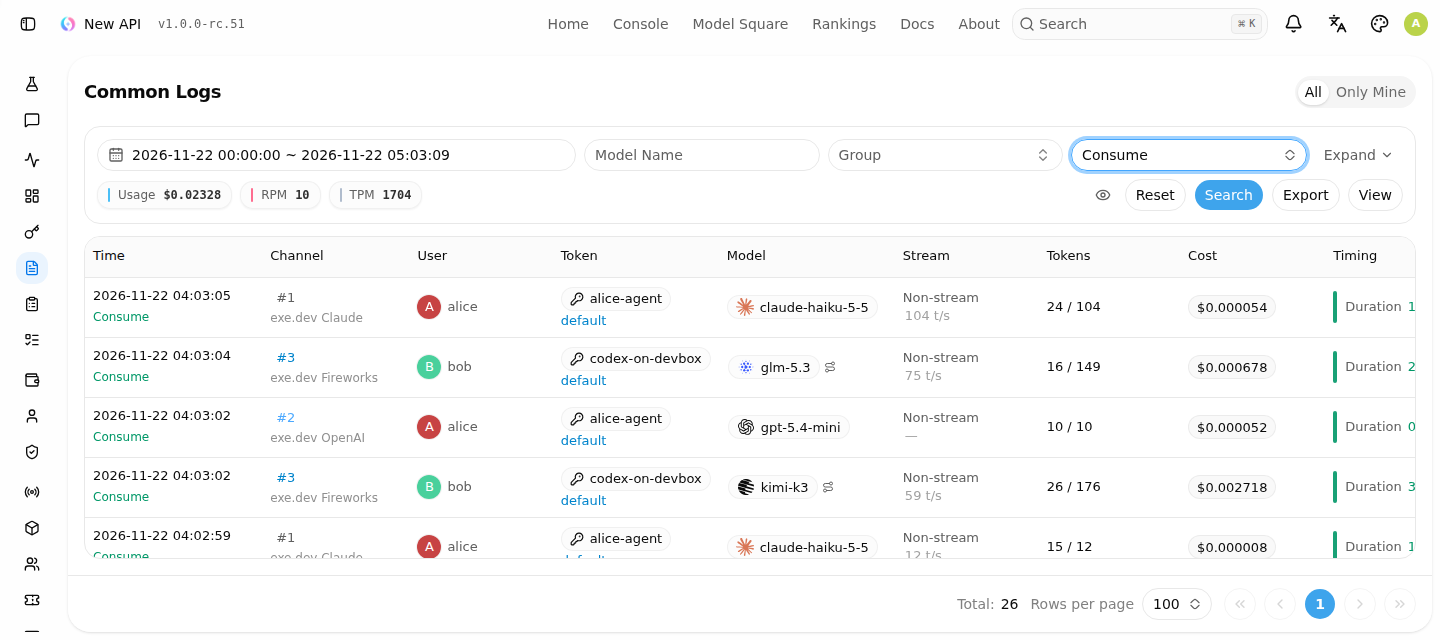
- A usage log of every request with its person, key, model, tokens, and cost; prompts aren't stored.
- An API-only address you can make public, while the console stays behind exe.dev login.
- Restarts after a reboot; nightly backups, with one checked.
What's running, and where
https://my-new-api.exe.xyz:3000/
New API's console, for you and anyone you share the VM with, signed in with exe.dev
https://my-new-api.exe.xyz/v1
The model APIs, with an exe.dev VM token and a New API key; make it public and the key is enough
Deploy with Shelley#
Click Deploy and Shelley will set up New API on a new VM, then check that it works. No config-file wrangling required.
Prefer a terminal?
curl -fsSL \
  https://exe.dev/deploy/new-api/prompt.txt \
  | ssh exe.dev new --prompt=/dev/stdin
What Shelley is told
Set up New API on this VM by following the exe.dev recipe at https://exe.dev/deploy/new-api.md?via=deploy from top to bottom.

The recipe's example VM name is my-new-api. This VM's name is the output of `hostname`: use it wherever the recipe writes my-new-api. Skip the step that creates the VM; you are on it.

You are done when all of these are true. Check each one yourself:
- New API's console at your VM's private URL, with you as its admin.
- Sign-in with exe.dev, so sharing the VM gives each person an account, with no password to manage.
- Claude, GPT, Kimi, and GLM from exe.dev's LLM gateway, priced at list prices, behind one OpenAI-, Claude-, and Gemini-compatible API.
- Accounts for your team, each with a quota in dollars, and keys with their own quota, expiry, and model list.
- A usage log of every request with its person, key, model, tokens, and cost; prompts aren't stored.
- An API-only address you can make public, while the console stays behind exe.dev login.
- Restarts after a reboot; nightly backups, with one checked.

Read the whole recipe, including the closed details. For initial setup,
follow "Install by hand" first, skipping VM creation and SSH: Docker, the
secrets, the Compose stack, the admin account, exe.dev sign-in, the
channels and prices, the model check, and the backups. Those checks are enough; don't install
extra tools to test further. The walkthrough at the top is for the owner
afterwards. Do not run Restore or Update.
Work as exedev in ~/new-api. Never overwrite an existing .env, and never
print a secret from it or a New API key. Keep the console on port 3000
and only the model APIs on port 8000.
Link the console to the owner's exe.dev email from the reflection
integration; if it prints nothing, ask the user for their exe.dev email.
Tell the owner the console's URL and to sign in with "Continue with
exe.dev".
Don't create accounts or keys for other people, VM tokens, or
integrations: those are the owner's to hand out. Keep test prompts to a
word or two. Don't share the VM or make it public. Verify docker.service
is enabled; do not reboot.

Finish with the URLs I should open.
Also at /deploy/new-api/prompt.txt. The recipe it follows is /deploy/new-api.md.
Sign in#
Open https://my-new-api.exe.xyz:3000/ and click Continue with
exe.dev. Your exe.dev login is linked to New API's admin account, so
that's all: no password. Only people you share the VM with can reach the
page; exe.dev asks for their login first.
The admin account also has a password, for the api helper on the VM
and for when you'd rather type one. On your computer,
ssh my-new-api.exe.xyz grep ADMIN_PASSWORD new-api/.env shows it; with
the username admin, it works in the same sign-in form. If you change it
under Profile, put the new one in .env too.
Open Playground, pick a model, and say hello. Usage Logs shows the request, its tokens, and what it cost.
Models, channels, and prices#
A channel is one upstream account: a base URL, a key, and the models it serves. Channels starts with three, all through exe.dev's gateway, which supplies the provider keys:
| Channel | Models |
|---|---|
| exe.dev Claude | claude-sonnet-5-5, claude-haiku-5-5, claude-opus-5-5 |
| exe.dev OpenAI | gpt-5.5, gpt-5.4-mini |
| exe.dev Fireworks | kimi-k3, glm-5.3 |
Clients ask for the names on the right. The Fireworks channel's Model
mapping turns them into Fireworks' own names,
accounts/fireworks/models/kimi-k3 and so on; use mapping to give any
model a short or stable name. When two channels serve the same model, New
API picks one by Priority, then spreads requests by Weight; set
Max Retries, at the top of Channels, to retry a failed request on
another channel. To add a model from the
gateway, edit a channel and add its name; a new channel or model starts
serving within a minute. On the VM,
curl -s https://llm.int.exe.xyz/models.json | jq -r '.models[].id' lists
what the gateway serves.
New API refuses a model it has no price for, so quotas can't be
bypassed. The install priced the seven models above from
models.dev's list prices, in dollars per million
tokens. To price more, run
prices.sh with the
provider and model as models.dev names them, and the name in New API
after = if it differs. On the VM:
cd ~/new-api
./prices.sh openai:gpt-5.4-nano fireworks-ai:accounts/fireworks/models/glm-5p3-flash=glm-5.3-flash
Or set prices by hand under System Settings → Billing & Payment → Model Pricing, which also lists models without a price.
Add your own provider accounts#
For models outside the gateway, or to bill a provider account of your
own, add a channel. Keep its key in an exe.dev
integration rather than in New API's database. For
OpenRouter,
connect it
with its default name, openrouter, and attach it to this VM. Then in
Channels → Create Channel, pick the type OpenRouter, set the
base URL to https://openrouter.int.exe.xyz/api, the key to any
placeholder such as exe-integration, and list the models you want. The
integration swaps in your real key on the way out; see
Agent secrets for how that works.
Your own Anthropic or OpenAI key works the same way through a BYOK LLM integration: on your computer,
printf '%s' "$ANTHROPIC_API_KEY" | ssh exe.dev integrations add llm \
  --name team-keys --anthropic=byok --anthropic-key=- --attach vm:my-new-api
and a channel of type Anthropic with the base URL
https://team-keys.int.exe.xyz/anthropic. You can also paste a
provider's key straight into a channel; New API keeps it in PostgreSQL on
the VM, and in its backups.
Give your team accounts and keys#
Each person gets an account with a quota in dollars, and makes keys under it. Share the VM with them; on your computer:
ssh exe.dev share add my-new-api alice@example.com
Alice opens the console's URL and clicks Continue with exe.dev. The
first time, New API makes her an account, named alice after her email
(or exe-dev_ and a number if that's taken), and links it to her exe.dev
login. People can also Sign up with a username and password, and
under Users, Add user makes an account for someone who isn't on
exe.dev.
New accounts start with no quota, so nobody spends until you top them up.
On the VM, ~/new-api/api calls New API's admin API as you; this gives
Alice $20:
cd ~/new-api
id=$(./api GET '/api/user/search?keyword=alice' | jq -r '.data.items[0].id')
./api POST /api/user/manage "{\"id\": $id, \"action\": \"add_quota\", \"mode\": \"add\", \"value\": 10000000}" | jq .success
Quota is counted in units of 500,000 per dollar. Once Alice's account
runs out, her requests fail with insufficient_user_quota.
In API Keys → Create API Key, each person makes keys for their
programs. A key can have its own quota on top of the account's, an
expiry, and, under Advanced Settings, a list of models it may use; a
key limited to claude-haiku-5-5 gets
This token has no access to model claude-sonnet-5-5 for anything else.
Usage Logs shows each person only their own requests, and shows you
everyone's.
To cap how often each person may call models, turn on System
Settings → Security & Limits → Rate Limiting; over the limit,
requests get 429 until the minute rolls over.
Call it#
The base URL is https://my-new-api.exe.xyz/v1, and every request
needs a New API key (sk-...) from API Keys. API Keys →
API Addresses shows that URL too.
While the VM is private, exe.dev's HTTPS proxy also wants a VM token, so only people you share the VM with get through. Make one per computer, on your computer:
ssh exe.dev ssh-key generate-api-key --vm=my-new-api \
  --label=new-api-laptop --exp=90d --json | jq -r .token
The proxy checks the VM token and drops it; New API checks the key and bills the request to it:
export EXE_TOKEN=exe0....        # the VM token
export NEW_API_KEY=sk-....       # the New API key
curl -s https://my-new-api.exe.xyz/v1/chat/completions \
  -H "X-Exedev-Authorization: Bearer $EXE_TOKEN" \
  -H "Authorization: Bearer $NEW_API_KEY" \
  -H 'Content-Type: application/json' \
  -d '{"model": "claude-sonnet-5-5", "messages": [{"role": "user", "content": "Say hi."}]}' \
  | jq -r '.choices[0].message.content'
Without the VM token, the proxy answers 401; without the key, New API
answers Invalid token. If you make the API public,
leave the VM token out.
OpenAI SDKs#
Any OpenAI-compatible client works with the base URL and the key. In Python:
import os
from openai import OpenAI

client = OpenAI(
    base_url="https://my-new-api.exe.xyz/v1",
    api_key=os.environ["NEW_API_KEY"],
    # Only while the VM is private:
    default_headers={"X-Exedev-Authorization": "Bearer " + os.environ["EXE_TOKEN"]},
)
r = client.chat.completions.create(
    model="kimi-k3", messages=[{"role": "user", "content": "Say hi."}]
)
print(r.choices[0].message.content)
Streaming, the Responses API, and client.models.list(), which lists the
models the key may use, work the same way.
Claude Code#
New API also speaks Anthropic's Messages API, so Claude Code can use it with a key limited to Claude models:
export ANTHROPIC_BASE_URL=https://my-new-api.exe.xyz
export ANTHROPIC_AUTH_TOKEN=$NEW_API_KEY
export ANTHROPIC_CUSTOM_HEADERS="X-Exedev-Authorization: Bearer $EXE_TOKEN"
claude
Codex#
Codex needs a provider in ~/.codex/config.toml:
[model_providers.newapi]
name = "New API"
base_url = "https://my-new-api.exe.xyz/v1"
wire_api = "responses"
env_key = "NEW_API_KEY"
env_http_headers = { "X-Exedev-Authorization" = "EXE_NEW_API_AUTH" }
Then:
export EXE_NEW_API_AUTH="Bearer $EXE_TOKEN"
codex -c model_provider=newapi -m gpt-5.5
From your other VMs#
A program on another of your VMs, such as Open WebUI, LibreChat, or an agent, can use the same URL with a VM token and a key. Or keep both off that VM with a peer integration that carries the key for it. On your computer:
ssh exe.dev integrations add http-proxy --name new-api \
  --target https://my-new-api.exe.xyz/ --peer --bearer sk-.... \
  --attach vm:my-agent-vm
On my-agent-vm, the base URL is then https://new-api.int.exe.xyz/v1,
with any placeholder as the API key: exe.dev vouches for the VM and swaps
in the New API key at its edge, so the VM never holds either, and the
usage log shows its requests under that key. Give each VM its own
integration and key, so the log tells them apart.
For Claude Code there, set ANTHROPIC_BASE_URL=https://new-api.int.exe.xyz
and ANTHROPIC_AUTH_TOKEN=exe, not ANTHROPIC_API_KEY: New API reads an
x-api-key header before the injected one, and rejects the placeholder.
Make the API public#
To let apps outside exe.dev call New API with only a key, make the VM's main port public. On your computer:
ssh exe.dev share set-public my-new-api
Port 8000 serves /v1 and /v1beta and nothing else: the console, the
sign-in page, and New API's own /api stay on port 3000, which is never
public. Anyone on the internet can now try keys against your API, and a
leaked key spends until you disable it, so give public keys a quota and
an expiry, and watch Usage Logs. To make it private again,
ssh exe.dev share set-private my-new-api.
Play by the rules#
New API is popular for running paid relays, and has payments, redemption codes, and subscriptions for that. This recipe is for your team's own use of accounts you pay for.
Warning
Don't put Claude, ChatGPT, Gemini, or Copilot subscription logins behind New API to share them, and don't resell a provider's models unless your agreement with the provider allows it. Most providers' terms forbid both, and accounts get banned for it. Everything through exe.dev's gateway is billed to your exe.dev account.
Keep your data#
Users, keys, channels, prices, and the usage log live in PostgreSQL in
~/new-api/postgres, and nightly backups go to ~/new-api/backups. Keep
a copy off the VM. On your computer:
scp -r my-new-api.exe.xyz:new-api/backups .
Backups hold .env and any provider keys pasted into channels, so keep
them private. For updates or trouble, ask Shelley, or open the
instructions below.
The nuts and bolts#
Happy clicking Deploy? You can stop here. These are Shelley's setup steps and your maintenance reference.
Install by hand
Create a VM#
On your computer (pick another name if my-new-api is taken):
ssh exe.dev new --name=my-new-api
ssh my-new-api.exe.xyz
The default VM (8 GB) is plenty; New API, PostgreSQL, and Redis use well
under 1 GB. All remaining installation commands run on the VM, as
exedev.
Write the secrets#
New API signs sessions with SESSION_SECRET. This writes it, the admin
password, PostgreSQL's password, and the secret New API and the exe.dev
sign-in share to a file only you can read, once:
mkdir -p ~/new-api && cd ~/new-api
if [ ! -e .env ]; then
  touch .env && chmod 600 .env
  cat >> .env <<EOF
# New API's secrets. Back this file up. Changing SESSION_SECRET signs
# everyone out; POSTGRES_PASSWORD must match the database.
SESSION_SECRET=$(openssl rand -hex 32)
CRYPTO_SECRET=$(openssl rand -hex 32)
POSTGRES_PASSWORD=$(openssl rand -hex 24)
# The admin account's password. Change it in New API? Change it here too.
ADMIN_PASSWORD=$(openssl rand -base64 18 | tr -d '/+=')
# The console's address, for New API's secure sign-in cookie.
SESSION_COOKIE_TRUSTED_URL=https://$(hostname).exe.xyz:3000
# Shared by New API and exe-login, the exe.dev sign-in.
OIDC_CLIENT_SECRET=$(openssl rand -hex 32)
EOF
fi
ls -l .env
ls should show -rw-------.
Start New API#
Port 3000 is the console. In front of it runs exe-oidc-proxy, a small open-source program from exe.dev: an OpenID Connect provider that signs people in as the email exe.dev's HTTPS proxy vouches for, and passes everything else on to New API. Compose builds it from a pinned commit. nginx on port 8000 passes on only the model APIs, so that port can be made public without the console:
cd ~/new-api
cat > nginx.conf <<'EOF'
# Port 8000: New API's model APIs and nothing else. The console, sign-in,
# and setup stay on port 3000, which exe.dev never makes public.
map $http_upgrade $connection_upgrade {
  default upgrade;
  ''      close;
}
server {
  listen 8000;
  client_max_body_size 64m;

  location ~ ^/(v1|v1beta)/ {
    proxy_pass http://new-api:3000;
    proxy_http_version 1.1;
    proxy_set_header Host $host;
    proxy_set_header X-Forwarded-For $proxy_add_x_forwarded_for;
    proxy_set_header X-Forwarded-Proto https;
    proxy_set_header Upgrade $http_upgrade;
    proxy_set_header Connection $connection_upgrade;
    proxy_buffering off;
    proxy_read_timeout 600s;
  }
  location / {
    default_type text/plain;
    return 404 "Not here: this address serves New API's /v1 API.\n";
  }
}
EOF
Then the Compose file:
cd ~/new-api
cat > compose.yaml <<'EOF'
# New API with PostgreSQL and Redis. Secrets come from .env.
# Port 3000: the console and everything else, through exe-login
# (private, exe.dev login).
# Port 8000: only the model APIs, through nginx (private until you say).
name: new-api

services:
  new-api:
    image: calciumion/new-api:v1.0.0-rc.51
    restart: unless-stopped
    command: --log-dir /app/logs
    environment:
      SQL_DSN: postgresql://newapi:${POSTGRES_PASSWORD:?set in .env}@postgres:5432/newapi
      REDIS_CONN_STRING: redis://redis:6379
      SESSION_SECRET: ${SESSION_SECRET:?set in .env}
      CRYPTO_SECRET: ${CRYPTO_SECRET:?set in .env}
      SESSION_COOKIE_SECURE: "true"
      SESSION_COOKIE_TRUSTED_URL: ${SESSION_COOKIE_TRUSTED_URL:?set in .env}
      TZ: UTC
      ERROR_LOG_ENABLED: "true"
      BATCH_UPDATE_ENABLED: "true"
      NODE_NAME: new-api
    volumes:
      - ./data:/data
      - ./logs:/app/logs
    depends_on:
      postgres:
        condition: service_healthy
      redis:
        condition: service_started
    healthcheck:
      test: ["CMD-SHELL", "wget -q -O - http://localhost:3000/api/status | grep -q '\"success\":true'"]
      interval: 15s
      timeout: 5s
      retries: 5
      start_period: 1m

  # "Continue with exe.dev": an OpenID Connect provider that signs people
  # in as the email exe.dev's proxy vouches for. Everything that isn't
  # /_oidc/ goes on to New API.
  exe-login:
    build:
      context: https://github.com/boldsoftware/exe-oidc-proxy.git#988147d5e5da7ab2c658e146634e2bc244a7e4aa
      dockerfile_inline: |
        FROM golang:1.25-alpine AS build
        WORKDIR /src
        COPY . .
        RUN CGO_ENABLED=0 go build -trimpath -o /exe-oidc-proxy .
        FROM alpine:3.22
        COPY --from=build /exe-oidc-proxy /usr/local/bin/exe-oidc-proxy
        USER nobody
        ENTRYPOINT ["exe-oidc-proxy"]
    image: exe-oidc-proxy:988147d
    restart: unless-stopped
    ports:
      - "3000:3000"
    environment:
      LISTEN: ":3000"
      UPSTREAM: http://new-api:3000
      ISSUER: ${SESSION_COOKIE_TRUSTED_URL:?set in .env}/_oidc
      CLIENT_ID: new-api
      CLIENT_SECRET: ${OIDC_CLIENT_SECRET:?set in .env}
    depends_on:
      - new-api

  api:
    image: nginx:1.29-alpine
    restart: unless-stopped
    ports:
      - "8000:8000"
    volumes:
      - ./nginx.conf:/etc/nginx/conf.d/default.conf:ro
    depends_on:
      - new-api

  postgres:
    image: postgres:18
    restart: unless-stopped
    environment:
      POSTGRES_DB: newapi
      POSTGRES_USER: newapi
      POSTGRES_PASSWORD: ${POSTGRES_PASSWORD:?set in .env}
    volumes:
      - ./postgres:/var/lib/postgresql
    healthcheck:
      test: ["CMD", "pg_isready", "-U", "newapi", "-d", "newapi"]
      interval: 10s
      timeout: 5s
      retries: 5

  redis:
    image: redis:8
    restart: unless-stopped
    command: ["redis-server", "--save", "", "--appendonly", "no"]
EOF
docker compose config --quiet && echo compose ok
Enable Docker at boot, download the images, build exe-login, and start:
sudo systemctl enable --now docker.service
docker compose pull -q --ignore-buildable
docker compose build -q exe-login
docker compose up -d --wait --wait-timeout 300
curl -fsS localhost:3000/api/status | jq -r '.data.version'
curl -sS localhost:8000/
The first curl should print v1.0.0-rc.51, and the second
Not here: .... The HTTPS proxy adds HTTPS and exe.dev login in front of
both ports.
Create the admin account#
New API's first visitor creates its admin, so do it now, with the
password from .env:
cd ~/new-api
pw=$(sed -n 's/^ADMIN_PASSWORD=//p' .env)
curl -fsS localhost:3000/api/setup -H 'Content-Type: application/json' \
  -d "$(jq -nc --arg p "$pw" '{username: "admin", password: $p, confirmPassword: $p,
        SelfUseModeEnabled: false, DemoSiteEnabled: false}')" | jq -r .message
It should print System initialized successfully.
Write api, a helper that signs in as admin and calls New API's admin
API, and download prices.sh,
which prices models from models.dev:
cd ~/new-api
cat > api <<'EOF'
#!/bin/sh
# Call New API's admin API as admin: ./api METHOD /path ['{json}']
# Signs in with ADMIN_PASSWORD from .env and reuses the 15-minute session
# token from .api-token. Changed the admin password in New API? Update .env.
set -eu
cd "$(dirname "$0")"
umask 077
if [ "$(jq -r '.exp // 0' .api-token 2>/dev/null || echo 0)" -le "$(( $(date +%s) + 60 ))" ]; then
  pw=$(sed -n 's/^ADMIN_PASSWORD=//p' .env)
  curl -fsS localhost:3000/api/user/login -H 'Content-Type: application/json' \
    -d "$(jq -nc --arg p "$pw" '{username: "admin", password: $p}')" |
    jq -ce '{token: .data.access_token, exp: .data.access_expires_at}' > .api-token ||
    { rm -f .api-token; echo "api: can't sign in as admin; check ADMIN_PASSWORD in .env" >&2; exit 1; }
fi
token=$(jq -r .token .api-token)
if [ $# -ge 3 ]; then
  exec curl -sS -X "$1" "localhost:3000$2" -H "Authorization: Bearer $token" \
    -H 'Content-Type: application/json' -d "$3"
fi
exec curl -sS -X "$1" "localhost:3000$2" -H "Authorization: Bearer $token"
EOF
curl -fsSLo prices.sh https://exe.dev/deploy/new-api/prices.sh
chmod 700 api prices.sh
./api GET /api/user/self | jq -r '.data.username + " is role " + (.data.role | tostring)'
It should print admin is role 100.
Turn on exe.dev sign-in#
This adds exe-login to New API as a sign-in provider called exe.dev, tells New API the console's address (for the sign-in redirect) and the API's (for API Keys → API Addresses), and links your exe.dev email, from the reflection integration, to the admin account. Running it again, say on a renamed VM, updates the same provider:
cd ~/new-api
. ./.env
opt() {
  ./api PUT /api/option/ "$(jq -nc --arg k "$1" --arg v "$2" '{key: $k, value: $v}')" |
    jq -r --arg k "$1" '$k + ": " + (.success | tostring)'
}
opt ServerAddress "$SESSION_COOKIE_TRUSTED_URL"
opt console_setting.api_info "$(jq -nc --arg u "https://$(hostname).exe.xyz"   '[{url: $u, route: "API", description: "Add /v1 for OpenAI clients", color: "blue"}]')"
provider=$(jq -nc --arg c "$SESSION_COOKIE_TRUSTED_URL" --arg s "$OIDC_CLIENT_SECRET" '{
  name: "exe.dev", slug: "exe-dev", enabled: true, client_id: "new-api", client_secret: $s,
  authorization_endpoint: ($c + "/_oidc/authorize"),
  token_endpoint: "http://exe-login:3000/_oidc/token",
  user_info_endpoint: "http://exe-login:3000/_oidc/userinfo",
  scopes: "openid email profile", user_id_field: "email",
  username_field: "preferred_username", display_name_field: "name", email_field: "email"}')
pid=$(./api GET /api/custom-oauth-provider/ | jq -r '.data[] | select(.slug == "exe-dev") | .id')
if [ -n "$pid" ]; then ./api PUT /api/custom-oauth-provider/$pid "$provider"
else ./api POST /api/custom-oauth-provider/ "$provider"; fi | jq -r '"provider: " + .message'
pid=$(./api GET /api/custom-oauth-provider/ | jq -r '.data[] | select(.slug == "exe-dev") | .id')
owner=$(curl -fsS https://reflection.int.exe.xyz/email | jq -r .email)
docker compose exec -T postgres psql -U newapi -d newapi -qAt -v pid="$pid" -v owner="$owner" <<'SQL'
INSERT INTO user_oauth_bindings (user_id, provider_id, provider_user_id, created_at)
SELECT id, :pid, :'owner', now() FROM users WHERE username = 'admin'
ON CONFLICT DO NOTHING;
SQL
./api GET /api/user/1/oauth/bindings | jq -r '.data[] | "admin signs in as " + .provider_user_id'
It should print ServerAddress: true, console_setting.api_info: true,
a provider message, and admin signs in as your exe.dev email. If the reflection integration
isn't attached to the VM, set owner= to your email by hand. People
sign in by email, so someone whose exe.dev email changes gets a new
account.
Add the models#
This adds the three channels through exe.dev's gateway
(exe-llm-gateway is a placeholder key; the gateway adds the real ones),
and prices their models:
cd ~/new-api
channel() {
  ./api POST /api/channel/ "$(jq -nc --argjson c "$1" '{mode: "single", channel: $c}')" |
    jq -r --argjson c "$1" '$c.name + ": " + (.success | tostring)'
}
channel '{"type": 14, "name": "exe.dev Claude", "group": "default",
  "base_url": "https://llm.int.exe.xyz/anthropic", "key": "exe-llm-gateway",
  "models": "claude-sonnet-5-5,claude-haiku-5-5,claude-opus-5-5"}'
channel '{"type": 1, "name": "exe.dev OpenAI", "group": "default",
  "base_url": "https://llm.int.exe.xyz/openai", "key": "exe-llm-gateway",
  "models": "gpt-5.5,gpt-5.4-mini"}'
channel '{"type": 1, "name": "exe.dev Fireworks", "group": "default",
  "base_url": "https://llm.int.exe.xyz/fireworks/inference", "key": "exe-llm-gateway",
  "models": "kimi-k3,glm-5.3",
  "model_mapping": "{\"kimi-k3\": \"accounts/fireworks/models/kimi-k3\", \"glm-5.3\": \"accounts/fireworks/models/glm-5p3\"}"}'
./prices.sh anthropic:claude-sonnet-5-5 anthropic:claude-haiku-5-5 anthropic:claude-opus-5-5 \
  openai:gpt-5.5 openai:gpt-5.4-mini \
  fireworks-ai:accounts/fireworks/models/kimi-k3=kimi-k3 \
  fireworks-ai:accounts/fireworks/models/glm-5p3=glm-5.3
Each channel should print true, and prices.sh a price for each model.
Check the models#
New API picks up new channels within a minute. This makes a key for you, calls a model on each channel through port 8000, waiting for the channels if needed, and deletes the key:
cd ~/new-api
./api POST /api/token/ '{"name": "setup-check", "remain_quota": 0, "unlimited_quota": true, "expired_time": -1}' >/dev/null
id=$(./api GET '/api/token/?p=1&page_size=100' | jq -r '.data.items[] | select(.name == "setup-check") | .id' | head -1)
key=sk-$(./api POST /api/token/$id/key | jq -r .data.key)
for m in claude-haiku-5-5 gpt-5.4-mini glm-5.3; do
  for try in 1 2 3 4 5 6 7 8 9; do
    out=$(curl -sS localhost:8000/v1/chat/completions -H "Authorization: Bearer $key" \
      -H 'Content-Type: application/json' \
      -d "{\"model\": \"$m\", \"messages\": [{\"role\": \"user\", \"content\": \"Say hi.\"}]}" |
      jq -r '.choices[0].message.content // .error.message')
    case $out in "No available channel"*) sleep 10 ;; *) break ;; esac
  done
  echo "$m: $out"
done
./api DELETE /api/token/$id | jq -r .success
Each model should answer, and Usage Logs in the console shows the three requests with their cost.
Set up nightly backups#
This dumps New API's database while it runs, checks the dump, saves it
with the files in ~/new-api, and keeps two weeks of backups:
cd ~/new-api
cat > backup.sh <<'EOF'
#!/bin/sh
# Back up New API: its database, its config, and the .env with its secrets.
set -eu
umask 077
cd "$(dirname "$0")"
mkdir -p -m 700 backups
out="backups/new-api-$(date +%Y%m%d-%H%M%S).tar.gz"
work=$(mktemp -d)
trap 'rm -rf "$work"' EXIT
docker compose exec -T postgres pg_dump -U newapi -d newapi -Fc > "$work/newapi.dump"
docker compose exec -T postgres pg_restore --list < "$work/newapi.dump" > /dev/null
cp .env compose.yaml nginx.conf api prices.sh "$work/"
tar -C "$work" -czf "$out.tmp" .
mv "$out.tmp" "$out"
find backups -name 'new-api-*.tar.gz' -mtime +14 -delete
EOF
chmod +x backup.sh

sudo tee /etc/systemd/system/new-api-backup.service >/dev/null <<'EOF'
[Unit]
Description=Back up New API
After=docker.service

[Service]
Type=oneshot
User=exedev
ExecStart=/home/exedev/new-api/backup.sh
EOF
sudo tee /etc/systemd/system/new-api-backup.timer >/dev/null <<'EOF'
[Unit]
Description=Back up New API nightly

[Timer]
OnCalendar=daily
Persistent=true

[Install]
WantedBy=timers.target
EOF
sudo systemctl daemon-reload
sudo systemctl enable --now new-api-backup.timer
sudo systemctl start new-api-backup.service
systemctl list-timers new-api-backup.timer
tar -tzf backups/new-api-*.tar.gz
The timer should list its next run, and the archive should hold
newapi.dump, .env, and the config files. You're ready: sign in and try
the walkthrough above.
Back up and restore
To take an extra backup, on the VM:
cd ~/new-api
./backup.sh
Restore#
Pick an archive in backups/ and substitute its filename below. On a new
VM, run Install by hand first, stopping after Start New API, and
copy your archive into ~/new-api/backups. These commands run on the
VM. They take New API's secrets and admin password from the backup,
keep this VM's PostgreSQL password, and set the current database aside
rather than delete it:
cd ~/new-api
backup=backups/new-api-YYYYMMDD-HHMMSS.tar.gz
work=$(mktemp -d)
tar -C "$work" -xzf "$backup" &&
docker compose exec -T postgres pg_restore --list < "$work/newapi.dump" >/dev/null &&
sudo systemctl stop new-api-backup.timer new-api-backup.service &&
docker compose stop new-api &&
cp -p .env ".env.before-restore-$(date +%s)" &&
for key in SESSION_SECRET CRYPTO_SECRET ADMIN_PASSWORD OIDC_CLIENT_SECRET; do
  line=$(grep "^$key=" "$work/.env") && sed -i "s|^$key=.*|$line|" .env
done &&
docker compose exec -T postgres psql -U newapi -d postgres \
  -c "ALTER DATABASE newapi RENAME TO newapi_before_restore_$(date +%s)" \
  -c "CREATE DATABASE newapi" &&
docker compose exec -T postgres pg_restore -U newapi -d newapi --no-owner --exit-on-error < "$work/newapi.dump" &&
docker compose exec -T redis redis-cli FLUSHALL >/dev/null &&
rm -f .api-token &&
docker compose up -d --wait --wait-timeout 300 &&
sudo systemctl start new-api-backup.timer &&
rm -rf "$work"
Sign in and check Channels, Users, and Usage Logs. On a new
VM with a different name, run Turn on exe.dev sign-in again so the
sign-in redirect and API address follow. Once you're happy, drop the set-aside
database; list it with
docker compose exec postgres psql -U newapi -d postgres -c '\l', then
docker compose exec postgres dropdb -U newapi newapi_before_restore_....
Update
New API releases often. Read the
release notes, then
change the image tag in compose.yaml to the new release. On the VM,
back up first, then pull and restart; New API updates its database on
start:
cd ~/new-api
sed -i 's|new-api:v1.0.0-rc.51|new-api:v1.0.0-rc.52|' compose.yaml   # the new tag
./backup.sh && docker compose pull -q --ignore-buildable && docker compose up -d --wait --wait-timeout 300
curl -fsS localhost:3000/api/status | jq -r '.data.version'
exe-login stays at its pinned commit; to move it, change the commit in
both context and image, and run docker compose build exe-login
before up. To undo an update, put the old tag back and
restore the backup you took first.
Something's not happy?
Start with the logs. On the VM:
cd ~/new-api
docker compose ps
docker compose logs --tail=50 new-api
- Down after a reboot? Run
sudo systemctl enable --now docker.service. - 401 with an exe.dev login page or no JSON? The request didn't get
past the proxy: the
X-Exedev-Authorizationheader is missing, or the VM token expired or was made for another VM. Or make the API public. Invalid token? That's New API: the request has nosk-...key, or the key is wrong, disabled, or expired.price not configured? The model has no price; run./prices.shfor it, or set one under Model Pricing.insufficient_user_quota, or the key's quota is used up? Top up the account under Users, or raise the key's quota under API Keys.This token has no access to model ...? The key's model list doesn't include it.No available channel for model ...? No enabled channel serves that model name. New API disables a channel that keeps failing; check Channels and test it there.- A model fails with a 4xx from the gateway? Check the name in
curl -s https://llm.int.exe.xyz/models.json | jq -r '.models[].id', and that your LLM integration is attached to the VM. Not here: ...? That's port 8000, which serves only/v1and/v1beta; the console is on port 3000.- Continue with exe.dev fails?
email is already in usemeans someone already has a password account with that email: they can keep using the password, or clear the account's email under Users and sign in again for a new, linked account. For anything else,docker compose logs --tail=50 exe-login new-api, and check that Server Address under System Settings → Site & Branding is the console's URL, with:3000. ./apican't sign in?ADMIN_PASSWORDin.envmust match the admin's password. New API also allows only 20 sign-ins every 20 minutes; wait, orrm .api-tokenif it's stale.
Frequently asked questions#
Do I need New API, or is exe.dev's LLM gateway enough?
For yourself, the gateway is enough: every VM of yours reaches Claude, GPT, and open models with no keys. The LLM router adds a budget and a log per person for a team that shares a VM, with no keys to hand out. New API is for when you hand out keys: to people outside exe.dev, to apps on a public API, with quotas in dollars, a console where each person sees their own usage, and many providers' native APIs.
How much does it cost?
New API is free and open source. You pay for your VM plan; the gateway's models use your exe.dev LLM allocation, and providers you add bill you directly. New API's quotas count spending at the prices you set, so they track your bill but aren't the bill.
Does New API keep our prompts?
No. The usage log keeps each request's person, key, model, tokens, cost, and timing, not the messages. Everything it keeps is in PostgreSQL on the VM.
Can I sell access, or share my Claude or ChatGPT subscription through it?
New API has payment and redemption features because many people run it as a paid relay. Don't put subscription accounts behind it, and don't resell a provider's models unless your agreement with them allows it; most providers' terms forbid both. See Play by the rules.
What does AGPL-3.0 mean for me?
Running New API for your team is fine. If you change its code and let others use it over a network, the license says you must offer them your changed source.
Do people need another password?
No. Share the VM with them and they click Continue with exe.dev: exe-oidc-proxy, a small open-source program on the VM, signs them in to New API as the email exe.dev's proxy vouches for, and New API makes their account the first time. Password accounts still work for people who aren't on exe.dev.
How does New API compare with LiteLLM?
Both put many providers behind one API with keys and spending limits. LiteLLM is configured in a YAML file and fits developer teams; New API is run from its web console, has accounts people sign up for themselves, quotas in dollars, and native Claude and Gemini endpoints next to OpenAI's.
Published Nov 22, 2026 · Updated Nov 22, 2026 · tested end to end Nov 22, 2026 · Markdown · manifest.json · Something wrong? Tell us