
Self-host nanobot
A small personal agent with a WebUI, memory, and a schedule.
Shelley handles the setup. About 10 minutes.
Prefer a terminal?
curl -fsSL https://exe.dev/deploy/nanobot/prompt.txt | ssh exe.dev new --prompt=/dev/stdinnanobot, from the University of Hong Kong's data intelligence lab (HKUDS), is a small open-source personal agent in the spirit of OpenClaw. It remembers what you tell it, runs tasks on a schedule, runs commands and reads the web, and answers from a browser WebUI or a chat app such as Telegram, Discord, or Slack. Give it a computer of its own that stays on, and it keeps working while your laptop sleeps.
The WebUI signs you in with your exe.dev login, and model usage is billed to your exe.dev account through the LLM integration. There's no password to keep and no API key to find.
What you get#
- A private WebUI at
https://<vm>.exe.xyz/that signs you in with your exe.dev login, with no second password. - Claude through exe.dev's LLM integration, with no API key to paste, and GPT a
/model gptaway. - A gateway that stays on when you disconnect and starts again after a reboot, so scheduled tasks keep running.
- Nightly backups of memory, conversations, schedules, and settings in
~/backups/nanobot. - If you gave a bot token, a Telegram bot that answers only the accounts you approve.
What's running, and where
https://my-nanobot.exe.xyz/
The nanobot WebUI, behind your exe.dev login
Deploy with Shelley#
Click Deploy and Shelley will set up nanobot on a new VM, then check that it works. No config-file wrangling required.
Have these ready; Shelley asks for them:
TELEGRAM_BOT_TOKEN: optional; from @BotFather's/newbotin Telegram. Leave it as is to skip Telegram
Prefer a terminal?
curl -fsSL \
  https://exe.dev/deploy/nanobot/prompt.txt \
  | ssh exe.dev new --prompt=/dev/stdin
What Shelley is told
TELEGRAM_BOT_TOKEN=<fill-this-in>

Set up nanobot on this VM by following the exe.dev recipe at https://exe.dev/deploy/nanobot.md?via=deploy from top to bottom.

The values at the top of this message are mine:
- TELEGRAM_BOT_TOKEN: optional; from @BotFather's `/newbot` in Telegram. Leave it as is to skip Telegram
Ask me for any that still say <fill-this-in> before you need them.

The recipe's example VM name is my-nanobot. This VM's name is the output of `hostname`: use it wherever the recipe writes my-nanobot. Skip the step that creates the VM; you are on it.

You are done when all of these are true. Check each one yourself:
- A private WebUI at `https://<vm>.exe.xyz/` that signs you in with your exe.dev login, with no second password.
- Claude through exe.dev's LLM integration, with no API key to paste, and GPT a `/model gpt` away.
- A gateway that stays on when you disconnect and starts again after a reboot, so scheduled tasks keep running.
- Nightly backups of memory, conversations, schedules, and settings in `~/backups/nanobot`.
- If you gave a bot token, a Telegram bot that answers only the accounts you approve.

Read the whole recipe, including the closed details. For initial setup,
follow "Install by hand" first, skipping VM creation and SSH. The
opening walkthrough is for the owner. Do not run the restore or update
instructions, and don't change the tool settings in "Rein in its
tools" unless the owner asks.
Telegram is optional. If TELEGRAM_BOT_TOKEN is empty or still says
<fill-this-in>, skip Telegram and don't ask for it. Otherwise follow
"Connect Telegram by hand", setting TG_TOKEN to the supplied token
instead of the interactive read. If the log says the token was
rejected, set channels.telegram.enabled to false, restart the gateway,
and tell the owner. Never echo the bot token back.
Keep the VM private. Never run share set-public or share add, bind the
WebUI to a non-loopback address, or change trustedProxyAuth. On an
existing VM, ask before replacing configuration or a service on port
8000.
Verify a model reply, the gateway enabled and active, Linger=yes, the
health check ready, the bootstrap answering 403 without the login
header and 200 with it through nginx, the backup timer, and a tested
archive. Do not reboot.
Finish with the WebUI URL. If Telegram is connected, tell the owner to
message the bot and approve its pairing code in the WebUI.

Finish with the URLs I should open.
Also at /deploy/nanobot/prompt.txt. The recipe it follows is /deploy/nanobot.md.
Say hello#
Open https://my-nanobot.exe.xyz/ and sign in to exe.dev. Start a
New topic and try:
Remember that I drink my coffee black. Then tell me which model you're running on and the output of
uname -n.
It answers from Claude and runs the command on its VM. Open another topic
and ask how you take your coffee: memory carries across topics. Type /
in the box for commands, such as /model, /status, and /new.
Warning
Keep this VM private. nanobot runs commands on the VM as you, and anyone who can open the WebUI gets all of it. Don't make the VM public or share it, and don't keep unrelated secrets on it. nanobot can't use sudo, and you can rein in its tools further.
Put it on a schedule#
The VM keeps UTC time, so first give nanobot yours. Ask Shelley, or on the VM (with your own time zone):
cfg=~/.nanobot/config.json
jq --arg tz Europe/Lisbon '.agents.defaults.timezoneMode = "manual"
  | .agents.defaults.timezone = $tz' "$cfg" > "$cfg.new" &&
  chmod 600 "$cfg.new" && mv "$cfg.new" "$cfg"
systemctl --user restart nanobot-gateway
Then ask for something regular, in a topic:
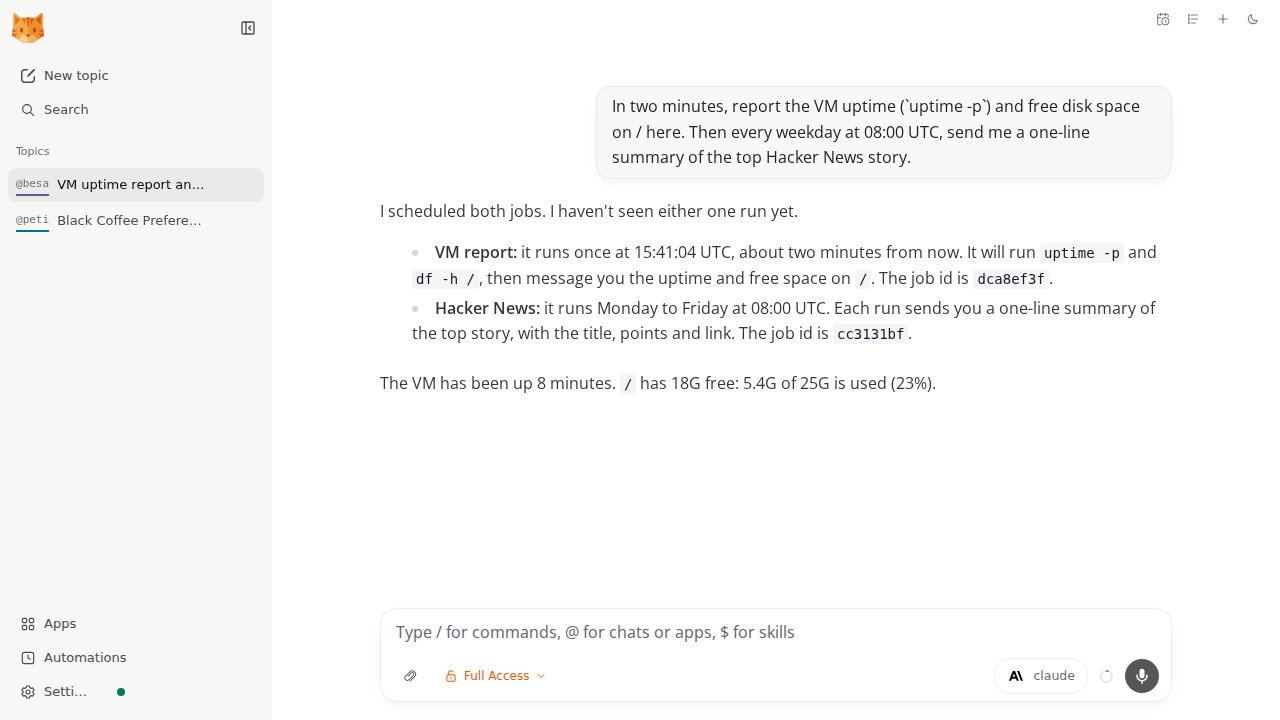
In two minutes, tell me the VM's uptime and free disk space here. Then every weekday at 8:00, send me a one-line summary of the top Hacker News story.
Results arrive in the topic where you asked, even with the browser closed. Tasks set up from Telegram report back to Telegram. Pause, edit, or run them on the Automations page.
For checks that should speak up only when something needs you, list them
under ## Active Tasks in ~/.nanobot/workspace/HEARTBEAT.md. nanobot
looks every 30 minutes and stays quiet when there's nothing to say.
Take it to Telegram#
Happy in the browser? Skip this bit.
Message @BotFather in Telegram (check the handle), send /newbot, and
follow the prompts. Give the token to Shelley in your private
conversation and ask it to connect Telegram, or follow
Connect Telegram by hand.
Then message your bot. It answers strangers, you included, only with a pairing code. Approve yours in a WebUI topic:
/pairing approve ABCD-EFGH
Send /pairing to list waiting requests, and /pairing revoke to undo
one.
Discord, Slack, WhatsApp, email, and more are set up on the WebUI's
Channels page, after adding their support on the VM, for example
nanobot plugins enable discord (nanobot plugins list names them all).
See nanobot's chat apps
guide. Telegram, Discord, and Slack connect outward, so they need no
public address.
nanobot keeps the bot token in its settings on the VM. For a plain chat bot whose token never touches the VM, see Telegram bot.
Rein in its tools#
nanobot runs commands as exedev, without sudo. It can read and change
anything in your home folder, its own settings and bot token included.
That's fine on a VM that does nothing else. For tighter limits, keep
files and commands inside its workspace and run commands in a
bubblewrap sandbox, as
nanobot advises for always-on setups. On the VM:
cfg=~/.nanobot/config.json
jq '.tools.restrictToWorkspace = true | .tools.exec.sandbox = "bwrap"' \
  "$cfg" > "$cfg.new" && chmod 600 "$cfg.new" && mv "$cfg.new" "$cfg"
systemctl --user restart nanobot-gateway
Now new topics and chat apps work inside ~/.nanobot/workspace and
refuse commands that reach outside. The access switch under a topic's
message box can still give that one topic Full Access, and topics
already on it stay there; switch them back to Restricted. Set both
settings back (false and "") to undo.
Keep the memories#
Everything lives in ~/.nanobot: settings and keys in config.json,
conversations in sessions/, and in workspace/ the long-term memory
(memory/, kept in git, so /dream-restore can roll it back), your
scheduled tasks, and the files it works on. Every two hours nanobot's
"Dream" step tidies new conversations into memory; /dream-log shows
what changed.
Nightly backups go to ~/backups/nanobot, and the newest 14 are kept.
Copy them off the VM, too. On your computer:
rsync -av my-nanobot.exe.xyz:backups/nanobot/ ./nanobot-backups/
Keep those copies private: they hold your bot token, sign-ins, and conversations.
Setup and upkeep#
No need to read on unless you're curious—or doing it yourself.
Install by hand
On your computer (pick another name if my-nanobot is taken):
ssh exe.dev new --name=my-nanobot
ssh my-nanobot.exe.xyz
All remaining installation commands run on the VM, as exedev.
Install nanobot#
nanobot is on PyPI as nanobot-ai. Install the tested release as a
uv tool, which gives it a Python
environment of its own:
uv tool install 'nanobot-ai==0.4.2'
export PATH="$HOME/.local/bin:$PATH"
nanobot --version
Expect nanobot v0.4.2.
Create its settings#
nanobot onboard writes default settings and a workspace in
~/.nanobot. Bot tokens and sign-ins end up there, so keep it to
yourself:
nanobot onboard
chmod 700 ~/.nanobot
chmod 600 ~/.nanobot/config.json
Connect Claude through exe.dev#
The API keys below are placeholders; exe.dev supplies the real
credentials outside the VM. The /anthropic path speaks Claude's own
API, and the exe provider reaches the integration's other models. Two
presets, claude and gpt, are what /model switches between:
cfg=~/.nanobot/config.json
jq '.providers.anthropic.apiKey = "exe-llm-integration"
  | .providers.anthropic.apiBase = "https://llm.int.exe.xyz/anthropic"
  | .providers.exe = {apiKey: "exe-llm-integration",
                     apiBase: "https://llm.int.exe.xyz/v1"}
  | .modelPresets = {
      claude: {provider: "anthropic", model: "claude-sonnet-5-5",
               maxTokens: 8192, contextWindowTokens: 200000},
      gpt: {provider: "exe", model: "gpt-5.5",
            maxTokens: 8192, contextWindowTokens: 200000}}
  | .agents.defaults.modelPreset = "claude"' "$cfg" > "$cfg.new" &&
  chmod 600 "$cfg.new" && mv "$cfg.new" "$cfg"
nanobot status | grep "Model:"
nanobot agent -m "Reply with exactly: pong"
Expect claude-sonnet-5-5 (preset: claude), then pong.
Sign in with your exe.dev login#
The WebUI listens only on the VM. nanobot can trust a login header from
a proxy on the same machine: here, the X-ExeDev-Email header that
exe.dev's proxy adds once you've signed in, and drops from anything
else:
cfg=~/.nanobot/config.json
jq '.channels.websocket = {enabled: true, host: "127.0.0.1", port: 8765,
      trustedProxyAuth: {trustedPeerCidrs: ["127.0.0.1/32", "::1/128"],
                         assertionHeader: "X-ExeDev-Email"}}' \
  "$cfg" > "$cfg.new" && chmod 600 "$cfg.new" && mv "$cfg.new" "$cfg"
Start the gateway#
The gateway serves the WebUI, connects chat apps, and runs scheduled tasks. nanobot installs it as a systemd user service; lingering keeps it running after you log out:
sudo loginctl enable-linger "$USER"
nanobot gateway install-service --manager systemd
loginctl show-user "$USER" -p Linger
systemctl --user is-enabled nanobot-gateway
systemctl --user is-active nanobot-gateway
sleep 5
curl -fsS --retry 20 --retry-connrefused --retry-delay 3 \
  http://127.0.0.1:18790/health | jq -c '{status, ready}'
Expect Linger=yes, enabled, active, and
{"status":"ok","ready":true}.
Set up the WebUI proxy#
The exe.dev proxy handles HTTPS and login. nginx passes requests, the WebSocket, and your login header to the WebUI. This replaces the image's default site:
sudo tee /etc/nginx/sites-available/nanobot >/dev/null <<'EOF'
map $http_upgrade $nanobot_connection {
    default upgrade;
    ""      close;
}
server {
    listen 8000 default_server;
    listen [::]:8000 default_server;
    server_name _;
    location / {
        proxy_pass http://127.0.0.1:8765;
        proxy_http_version 1.1;
        proxy_set_header Upgrade $http_upgrade;
        proxy_set_header Connection $nanobot_connection;
        proxy_set_header Host $host;
        proxy_set_header X-ExeDev-Email $http_x_exedev_email;
        # Overwrite, never append, client attribution.
        proxy_set_header X-Forwarded-For $remote_addr;
        proxy_set_header X-Forwarded-Proto https;
        proxy_set_header X-Forwarded-Host $host;
        proxy_read_timeout 1d;
        proxy_send_timeout 1d;
        proxy_buffering off;
        client_max_body_size 50m;
    }
}
EOF
sudo rm -f /etc/nginx/sites-enabled/default
sudo ln -sf /etc/nginx/sites-available/nanobot /etc/nginx/sites-enabled/nanobot
sudo nginx -t && sudo systemctl enable nginx && sudo systemctl restart nginx
url=http://127.0.0.1:8000/webui/bootstrap
curl -s -o /dev/null -w '%{http_code}\n' -H "Host: $(hostname).exe.xyz" "$url"
curl -s -o /dev/null -w '%{http_code}\n' -H "Host: $(hostname).exe.xyz" \
  -H "X-ExeDev-Email: test@example.com" "$url"
Expect 403 without the login header and 200 with it.
Set up nightly backups#
nanobot-backup stops
the gateway for a few seconds, packs ~/.nanobot (minus caches) into a
private archive in ~/backups/nanobot, starts the gateway again, and
keeps the newest 14. A timer runs it nightly:
curl -fsSL -o ~/.local/bin/nanobot-backup https://exe.dev/deploy/nanobot/nanobot-backup
chmod 755 ~/.local/bin/nanobot-backup
mkdir -p ~/.config/systemd/user
cat > ~/.config/systemd/user/nanobot-backup.service <<'EOF'
[Unit]
Description=nanobot backup

[Service]
Type=oneshot
ExecStart=%h/.local/bin/nanobot-backup
EOF
cat > ~/.config/systemd/user/nanobot-backup.timer <<'EOF'
[Unit]
Description=Nightly nanobot backup

[Timer]
OnCalendar=*-*-* 03:30:00
RandomizedDelaySec=30m
Persistent=true

[Install]
WantedBy=timers.target
EOF
systemctl --user daemon-reload
systemctl --user enable --now nanobot-backup.timer
systemctl --user start nanobot-backup.service
tar -tzf "$(ls -t ~/backups/nanobot/nanobot-*.tar.gz | head -1)" | grep -c config.json
systemctl --user is-active nanobot-gateway
systemctl --user list-timers nanobot-backup.timer
Expect 1, active, and a scheduled next run. A scheduled task due in
the few seconds the gateway is down is skipped, so keep tasks away from
03:30–04:00 UTC.
Open the WebUI#
Open https://my-nanobot.exe.xyz/, sign in to exe.dev, and say hello.
Connect Telegram by hand (optional)
On the VM, add Telegram support (it reinstalls nothing else), then paste the token from @BotFather:
nanobot plugins enable telegram
read -rsp "Telegram bot token: " TG_TOKEN; echo
export TG_TOKEN
cfg=~/.nanobot/config.json
jq '.channels.telegram.token = env.TG_TOKEN
  | .channels.telegram.enabled = true' "$cfg" > "$cfg.new" &&
  chmod 600 "$cfg.new" && mv "$cfg.new" "$cfg"
unset TG_TOKEN
systemctl --user restart nanobot-gateway
sleep 15
systemctl --user is-active nanobot-gateway
journalctl --user -u nanobot-gateway -n 100 --no-pager | grep -i telegram | tail -n 3
Expect active and bot @yourbot connected. With no allowFrom list,
the bot answers only accounts you approve with /pairing approve; see
above. Groups need more settings; see nanobot's
chat apps guide.
Back up and restore
On the VM, take a fresh backup:
nanobot-backup && ls -t ~/backups/nanobot | head -1
To restore, replace BACKUP.tar.gz with your chosen archive's filename.
This sets the current ~/.nanobot aside as ~/.nanobot.old (delete it
once you're happy):
systemctl --user stop nanobot-gateway &&
rm -rf ~/.nanobot.old && mv ~/.nanobot ~/.nanobot.old &&
tar -C ~ -xzf ~/backups/nanobot/BACKUP.tar.gz &&
systemctl --user start nanobot-gateway &&
nanobot agent -m "What do you remember about me?"
The archive brings back settings, the bot token, memory, conversations,
and scheduled tasks. Moving to a new VM? Set it up first, copy the
archive over with scp, restore, and run nanobot plugins enable telegram if you use Telegram. Stop the old VM's gateway: a Telegram bot
answers only one.
Update
Check nanobot's releases
for what's new. nanobot update --check shows the latest stable version.
On the VM, back up, stop, install the new version, put Telegram support
back if you use it (a reinstall drops it), and start again:
version=0.4.2   # the release you want
nanobot-backup &&
systemctl --user stop nanobot-gateway &&
uv tool install --force "nanobot-ai==$version" &&
{ ! jq -e '.channels.telegram.enabled' ~/.nanobot/config.json >/dev/null ||
  nanobot plugins enable telegram; } &&
systemctl --user start nanobot-gateway &&
nanobot --version
sleep 10; systemctl --user is-active nanobot-gateway
Expect the new version and active. Reload the WebUI and try a chat.
Your settings and memory stay put. Skip the WebUI's Update & restart
button: from the browser it would need remote package installs turned on.
Something stuck?
Ask Shelley, or check on the VM:
systemctl --user is-active nanobot-gateway
systemctl is-active nginx
journalctl --user -u nanobot-gateway -n 40 --no-pager
nanobot agent -m "Reply with exactly: pong"
nanobot: command not found? Runsource ~/.bashrc, or log in again.- 502 in the browser? The gateway takes a few seconds to start; reload. Still there? Look for errors in the log above.
bootstrap is localhost-onlyor a page that never connects? The login setting is missing; rerun the sign-in step and restartnanobot-gateway.- Bot silent? Look for
bot token rejected by Telegramin the log. Set a fresh token, or.channels.telegram.enabled = false, and restart.No module named 'telegram'after an update? Runnanobot plugins enable telegram. - Scheduled task fired at the wrong hour? Set your time zone as in Put it on a schedule, then ask nanobot to recreate the task.
- No model reply? Check
nanobot statusand the settings above, and your LLM integration.
Frequently asked questions#
What does it cost?
Your VM plan plus model usage, billed through the LLM integration. nanobot itself is light: it idles in about 200 MB of memory. Scheduled tasks spend tokens each time they run; the WebUI's Automations page lists them.
How is it different from OpenClaw and Hermes Agent?
All three are personal agents that remember you, run on a schedule, and talk to you over chat apps. nanobot is the smallest of the three: a Python package with a browser workbench and simple JSON settings. OpenClaw has the largest ecosystem, and Hermes Agent writes itself new skills as it works. Try the one whose style suits you; each fits on its own VM.
Can I use GPT, my ChatGPT plan, or GitHub Copilot?
Yes. /model gpt in a chat switches to GPT through the same integration, and a ChatGPT subscription can back the integration's OpenAI models (see LLM integration). For Copilot, run nanobot provider login github-copilot --set-main on the VM and enter the code it prints at github.com/login/device. Other providers and keys go under Settings → Models.
Why only one login?
nanobot trusts a login header from a proxy in front of it. nginx passes on the X-ExeDev-Email header that exe.dev's proxy sets after you sign in, and nanobot only believes it from the VM itself. So keep the VM private: anyone you share it with gets the whole agent, with no separate accounts.
Can a script on my computer talk to it?
The WebUI's endpoints accept an exe.dev VM token in an X-Exedev-Authorization: Bearer header, so a script can, say, list conversations at /api/sessions. nanobot 0.4.2 retired its OpenAI-style API, though, so to send it work, ask over Telegram, or run nanobot agent -m "..." over SSH.
Does it keep working when my laptop is closed?
Yes. nanobot runs on the VM. Scheduled tasks and chat apps carry on, replies land in the WebUI for when you're back, and the gateway starts again after a reboot. A task due while the gateway was down is skipped, not run late.
Published Nov 22, 2026 · Updated Nov 21, 2026 · tested end to end Nov 21, 2026 · Markdown · manifest.json · Something wrong? Tell us