
Self-host AstrBot, the open-source chatbot and agent framework
One AI agent for Telegram, Discord, QQ and more, on a server that stays on.
Shelley handles the setup. About 10 minutes.
Prefer a terminal?
curl -fsSL https://exe.dev/deploy/astrbot/prompt.txt | ssh exe.dev new --prompt=/dev/stdinAstrBot is an open-source framework for AI chatbots and agents: one install answers in QQ, WeChat, Lark, Telegram, Discord, Slack and a dozen more, with a WebUI for models, personas, knowledge bases and plugins. It needs a machine that stays on. On exe.dev that's a VM of your own: the WebUI is private behind your exe.dev login, models come through the LLM integration without an API key, and the Telegram integration keeps your bot token off the server.
Shelley installs AstrBot 4.29.4 in Docker, which we ran end to end on 19 November 2026: WebUI, chat with Claude, GPT and GLM through exe.dev, the agent running commands, and the HTTP API from outside.
What you get#
- AstrBot's WebUI at
https://<vm>.exe.xyz/, behind your exe.dev login, with a one-time password to set your own account. - A pinned AstrBot container that restarts on failure and after a reboot, with its data on the VM's disk.
- The steps to add Claude, GPT and open models through exe.dev's LLM integration, with no API key to paste.
- A Telegram bot whose token stays with exe.dev, and notes for Discord, QQ, WeChat and Lark.
- A backup and an update path that keeps your bots, chats and plugins.
What's running, and where
https://my-astrbot.exe.xyz/
The AstrBot WebUI and ChatUI, behind your exe.dev login and AstrBot's own
Telegram, Discord, QQ, …
Your bots, for the people and groups you let in
llm.int.exe.xyz: Claude, GPT and open models with no API key on the VM
telegram.int.exe.xyz adds the bot token to every Bot API call
Deploy with Shelley#
Click Deploy and Shelley will set up AstrBot on a new VM, then check that it works. No config-file wrangling required.
Prefer a terminal?
curl -fsSL \
  https://exe.dev/deploy/astrbot/prompt.txt \
  | ssh exe.dev new --prompt=/dev/stdin
What Shelley is told
Set up AstrBot on this VM by following the exe.dev recipe at https://exe.dev/deploy/astrbot.md?via=deploy from top to bottom.

The recipe's example VM name is my-astrbot. This VM's name is the output of `hostname`: use it wherever the recipe writes my-astrbot. Skip the step that creates the VM; you are on it.

You are done when all of these are true. Check each one yourself:
- AstrBot's WebUI at `https://<vm>.exe.xyz/`, behind your exe.dev login, with a one-time password to set your own account.
- A pinned AstrBot container that restarts on failure and after a reboot, with its data on the VM's disk.
- The steps to add Claude, GPT and open models through exe.dev's LLM integration, with no API key to paste.
- A Telegram bot whose token stays with exe.dev, and notes for Discord, QQ, WeChat and Lark.
- A backup and an update path that keeps your bots, chats and plugins.

Read the whole recipe, closed details included. Follow "Install by
hand" first, skipping VM creation and SSH; the sections above it are
the owner's walkthrough. Install exactly the pinned image. Do not run
the restore or update instructions.
Keep the VM private: never run share set-public. On an existing VM, ask
before replacing anything on port 8000.
Give the owner the initial username and password from the log, and say
AstrBot will ask them to choose their own at first login. Then walk
them through "Pick a model". Never ask for a Telegram bot token: if
they want Telegram, give them the steps in "Connect Telegram" with the
connect link for this VM's name.

Finish with the URLs I should open.
Also at /deploy/astrbot/prompt.txt. The recipe it follows is /deploy/astrbot.md.
Sign in#
When Shelley finishes, open https://my-astrbot.exe.xyz/ and sign in to
exe.dev. AstrBot's login page opens in Chinese: the language icon (文A) at
the top right switches to English.
Sign in with the username astrbot and the initial password Shelley gives
you. AstrBot then asks you to choose your own username and password. You
land on Welcome, with three steps of Quick Onboarding.
Tip
Forgot the password? On the VM,
docker exec -it astrbot astrbot passwordsets a new one; thendocker restart astrbot.
Pick a model#
AstrBot talks to Anthropic- and OpenAI-style APIs, and exe.dev's LLM integration speaks both. The key field needs some text; exe.dev adds the real credentials outside the VM.
- Open Providers and click Add next to Provider Sources.
- Choose Anthropic Compatible. Set ID to
exe-claude, API Key toexe-llm-integration, and API Base URL tohttps://llm.int.exe.xyz. - Click Save And Fetch Models, then + next to
anthropic/claude-sonnet-5-5, and Save. The first model you add becomes the default.
For GPT and open models (GLM, Kimi, DeepSeek, Qwen), add a second source,
OpenAI Compatible, with the same key and the base URL
https://llm.int.exe.xyz/v1, then + the models you want, such as
gpt-5.5 or fireworks/glm-5p3.
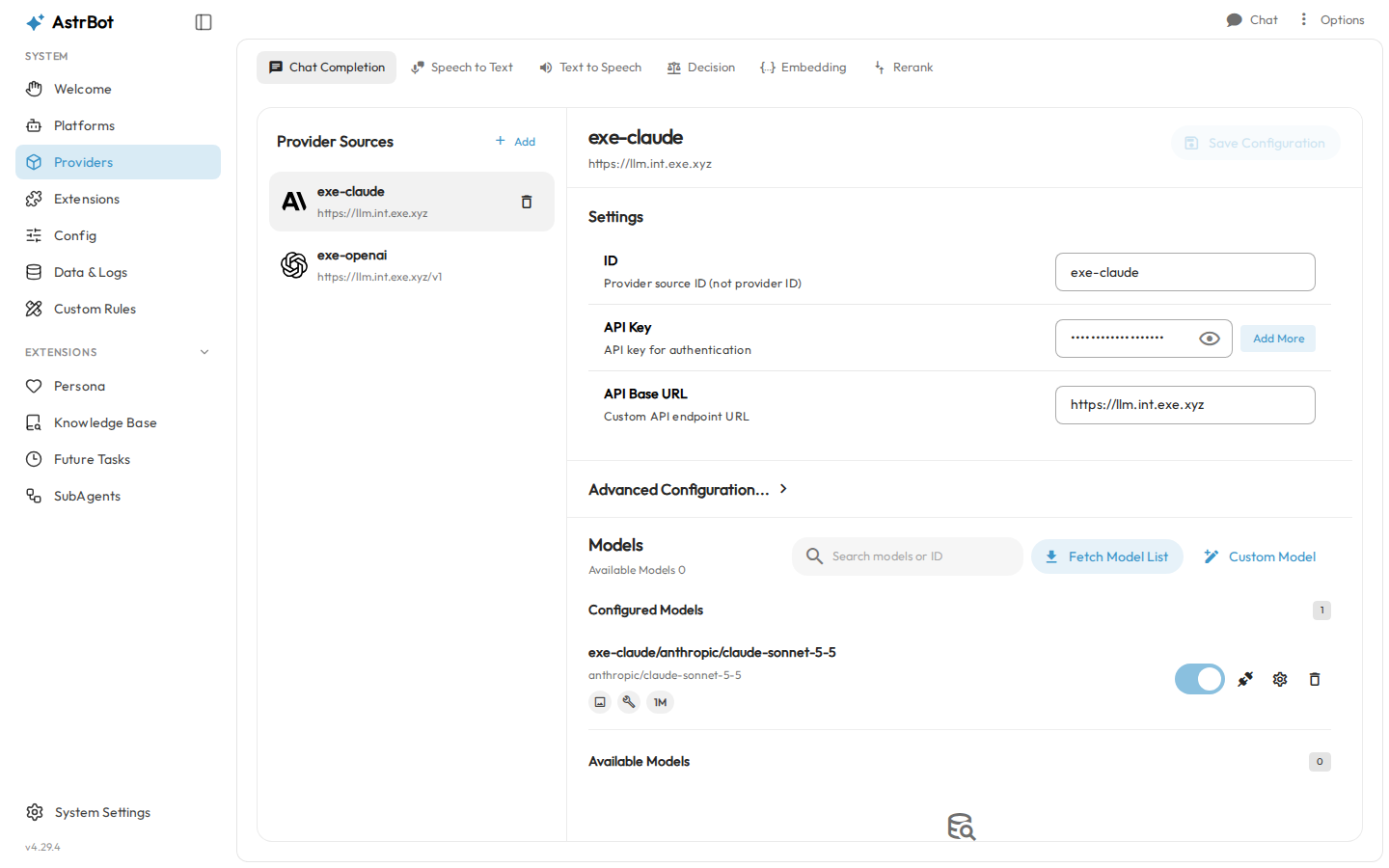
Now click Chat at the top right. The ChatUI is AstrBot's own chat window; the model picker sits at the top.
Let it use the computer#
On Welcome, step 3 sets Computer Access. With Allow, the agent can run shell commands and Python for administrators (you, in the WebUI). Other users get workspace files only. Try:
Check this server for me: how much disk is free, and what time is it here?
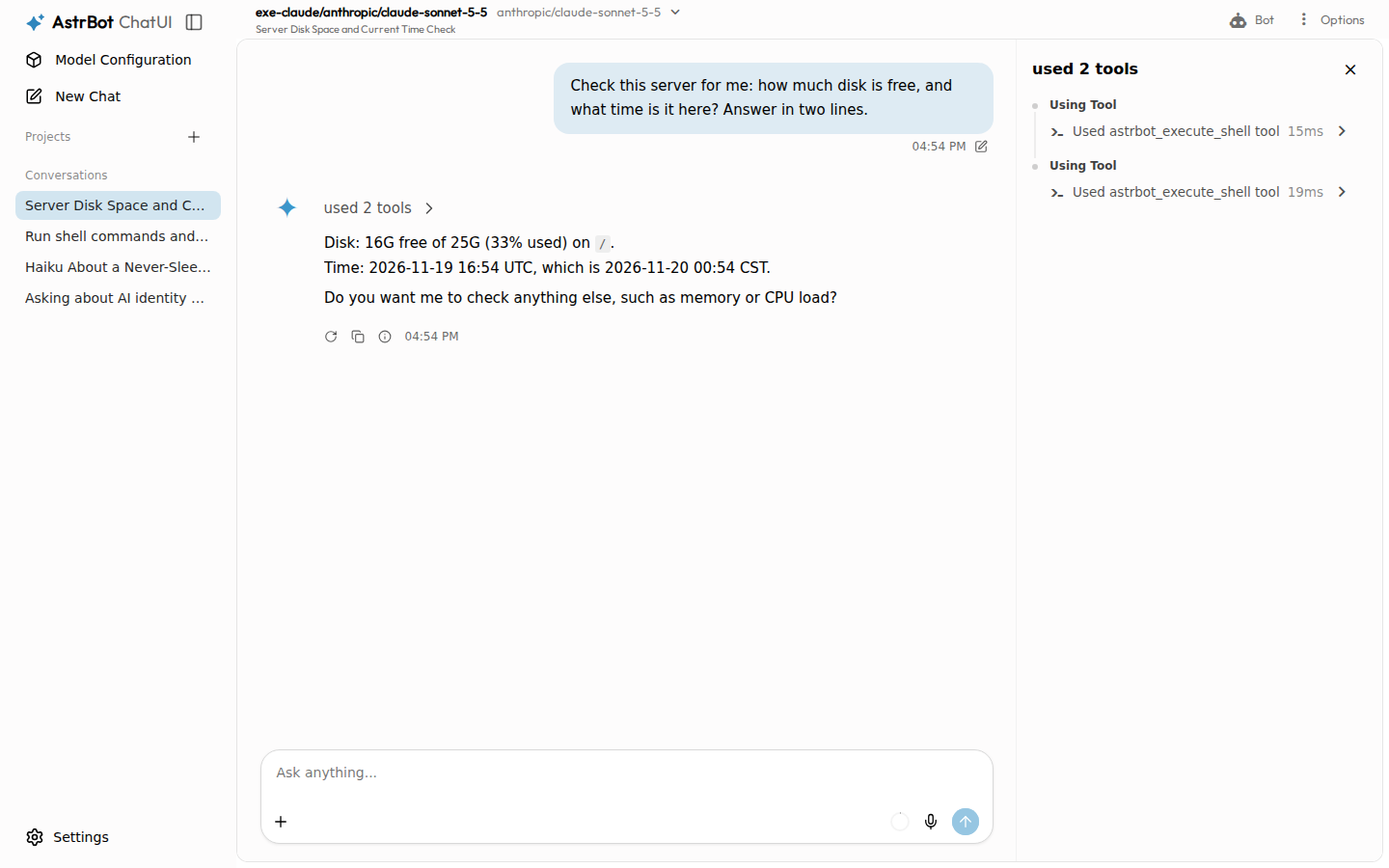
Commands run inside the AstrBot container, as its root user, with the
network and ~/astrbot/data at hand. They can't reach the VM's other
files or Docker.
Warning
The agent can reach anything the VM can, including its integrations. Keep the VM private, and keep strangers out of the administrator list.
AstrBot can send code to a separate sandbox (Shipyard Neo) instead, under Config → Agent Computer Use. It's a technical preview that needs 4 CPUs and 8 GB, and we didn't test it here.
Connect Telegram#
exe.dev's Telegram integration holds the bot token and adds it to every Bot API call, so AstrBot gets a placeholder.
-
In Telegram, open @BotFather, send
/newbot, and answer its two questions. It replies with the bot's token. -
Open exe.dev/integrations/add?service=telegram&attach=vm:my-astrbot, name the integration
telegram, paste the token, and add it. Delete the token from wherever else you pasted it. -
In AstrBot, open Platforms → Add Adapter, choose Telegram, and set:
- Bot Token:
exe-dev-integration - API URL:
https://telegram.int.exe.xyz/{token}/.. - File API URL:
https://telegram.int.exe.xyz/file/{token}/..
Then Save.
- Bot Token:
AstrBot's Telegram library puts the token into each URL; the /.. drops it
again, so requests reach telegram.int.exe.xyz/getMe and the like, where
exe.dev adds the real one.
Message your bot. In groups it answers when mentioned; for more, send
BotFather /setprivacy and choose Disable.
Anyone who finds the bot can talk to it, on your model budget. Send it
/sid to see your ID, then in Config, under Access Control →
Whitelist, add that ID and Save Configuration. Put your ID under
Administrators too if you want commands and computer access from
Telegram.
Other platforms#
AstrBot's platform docs cover each one. On exe.dev:
- Discord keeps a live connection to Discord, which exe.dev's REST-only Discord integration can't hold, so the bot token goes into AstrBot on the VM.
- QQ official bots (WebSocket), Lark, DingTalk and Slack (Socket Mode) connect out to their platform, so the private VM is fine.
- Platforms that call a webhook need a public URL, and making the VM public would put the WebUI on the internet too. Prefer each platform's WebSocket or long-connection mode.
- OneBot v11 (NapCat and other personal QQ clients) talks to AstrBot on port 6199, which this setup doesn't open. Run NapCat on the same VM and add it to the Compose file.
Add plugins#
Extensions → Plugins → AstrBot Plugin Market lists community
plugins, installed with a click. AstrBot warns that it can't vouch for them: a plugin runs
inside AstrBot, with your keys and data. Plugins and their Python packages
live in ~/astrbot/data, so they survive updates.
Call it from scripts#
AstrBot has an HTTP API. Make a key in System Settings → OpenAPI
(the default scopes include chat). From outside, a private VM also needs a
VM token; on your computer:
ssh exe.dev ssh-key generate-api-key --vm=my-astrbot --label=astrbot-api
Send both, AstrBot's key in Authorization and exe.dev's in
X-Exedev-Authorization:
curl -N https://my-astrbot.exe.xyz/api/v1/chat \
  -H "X-Exedev-Authorization: Bearer $EXE_TOKEN" \
  -H "Authorization: Bearer $ASTRBOT_KEY" \
  -H 'Content-Type: application/json' \
  -d '{"username":"script","message":"Reply with exactly: pong"}'
The reply streams as server-sent events, ending in
{"type": "complete", "data": "pong", …}. The API's reference is at
https://my-astrbot.exe.xyz/api/v1/docs.
Keep your data#
Everything AstrBot knows is in ~/astrbot/data on the VM's persistent disk:
settings, chats, plugins, knowledge bases. Ask Shelley for a backup before
updates; see Back up and restore. Copy backups off
the VM too. On your computer:
rsync -av my-astrbot.exe.xyz:backups/astrbot/ ./astrbot-backups/
They hold your chats and settings, so keep them private.
Setup and upkeep#
No need to read on unless you're curious—or doing it yourself.
Install by hand
On your computer (pick another name if my-astrbot is taken):
ssh exe.dev new --name=my-astrbot
ssh my-astrbot.exe.xyz
All remaining installation commands run on the VM, as exedev.
Turn on Docker#
The VM's image has Docker but leaves it off until something calls it:
sudo systemctl enable --now docker.service
docker info --format '{{.ServerVersion}}'
Start AstrBot#
The WebUI listens on 6185 in the container; the VM's port 8000 is the one
the exe.dev proxy serves at https://my-astrbot.exe.xyz/.
mkdir -p ~/astrbot && cd ~/astrbot
cat > compose.yml <<'EOF'
services:
  astrbot:
    image: soulter/astrbot:v4.29.4
    container_name: astrbot
    restart: unless-stopped
    security_opt:
      - no-new-privileges:true
    ports:
      - "8000:6185"
    environment:
      - TZ=UTC
    volumes:
      - ./data:/AstrBot/data
EOF
docker compose up -d
sleep 30
docker logs astrbot 2>&1 | grep -E 'WebUI is ready|Initial (username|password)'
Expect AstrBot v4.29.4 WebUI is ready and the initial username and
password. The image is about 3 GB, so the first pull takes a minute.
Set the time zone#
AstrBot defaults to Asia/Shanghai for scheduled tasks and the time it
tells the model. Set yours (any IANA name), then restart:
docker exec astrbot astrbot conf set timezone UTC
docker restart astrbot
Check it#
sleep 20
curl -s -o /dev/null -w '%{http_code}\n' http://localhost:8000/
curl -s -o /dev/null -w '%{http_code}\n' https://llm.int.exe.xyz/v1/models
Expect 200 twice: the WebUI, and the LLM integration AstrBot will use.
Back up and restore
AstrBot's files are owned by the container's root user, hence sudo. On
the VM, stop it for a consistent copy:
mkdir -p ~/backups/astrbot && chmod 700 ~/backups ~/backups/astrbot
cd ~/astrbot && docker compose stop &&
sudo tar czf ~/backups/astrbot/astrbot-$(date +%F).tar.gz compose.yml data &&
sudo chown exedev: ~/backups/astrbot/*.tar.gz && chmod 600 ~/backups/astrbot/*.tar.gz
docker compose start
To restore, replace BACKUP.tar.gz with the archive's filename:
cd ~/astrbot && test ! -e data.before-restore &&
tar tzf ~/backups/astrbot/BACKUP.tar.gz >/dev/null &&
docker compose down && sudo mv data data.before-restore &&
sudo tar xzf ~/backups/astrbot/BACKUP.tar.gz data &&
docker compose up -d
Sign in and try a chat before removing data.before-restore with
sudo rm -r. System Settings → Maintenance also has an in-app
backup, without the files in the agent's workspace.
Update
Read the release notes
and back up first. Then set the new tag, here
v4.30.0 as an example:
cd ~/astrbot
sed -i 's|soulter/astrbot:v[0-9.]*|soulter/astrbot:v4.30.0|' compose.yml
docker compose pull && docker compose up -d
sleep 30 && docker logs --tail 50 astrbot 2>&1 | grep 'WebUI is ready'
Skip AstrBot's in-app update button: it changes files inside the container,
and the next up -d puts the image's back. To roll back, set the old tag
and restore the backup.
Troubleshooting
- The page asks for exe.dev login again, or scripts get
401. The VM is private; scripts need a VM token. - Telegram:
integration not found or not attached to this VMindocker logs astrbot. Attach the integration to this VM, check its name istelegram(curl -s https://reflection.int.exe.xyz/integrations), anddocker restart astrbot; AstrBot stops polling after this error. - Telegram:
Conflict: terminated by other getUpdates request. The same bot is polled somewhere else. One bot, one poller. - The model answers with an error. Check the source's base URL:
https://llm.int.exe.xyzfor Anthropic Compatible,https://llm.int.exe.xyz/v1for OpenAI Compatible. Claude models need the Anthropic source. - Logs:
docker logs -f astrbot, or Data & Logs in the WebUI.
Frequently asked questions#
What is AstrBot?
An open-source (AGPL-3.0) framework for AI chatbots and agents. One AstrBot connects a model to QQ, WeChat, Lark, DingTalk, Telegram, Discord, Slack and more, with a WebUI for setup, a plugin market, knowledge bases, personas, scheduled tasks, and an agent that can run commands. It calls itself an alternative to OpenClaw.
Why not RainYun, Railway or another VPS?
Any always-on Linux box runs AstrBot. On exe.dev the VM is yours and persistent, the WebUI sits behind your exe.dev login instead of on the open internet, models come through the LLM integration without a key, and Telegram's bot token never touches the server.
What does it cost?
Your VM plan, plus model usage through the LLM integration. AstrBot's system prompt and tools make each turn about 6,000 input tokens before your message. AstrBot itself idles at about 260 MB of memory.
Can I use my own OpenAI, DeepSeek or Anthropic key?
Yes: add a provider source with your key and that provider's base URL. Put keys you'd rather not keep on the VM behind an HTTP proxy integration and use a placeholder in AstrBot, as with exe.dev's LLM integration.
Is the agent's computer access safe?
It runs inside the AstrBot container, for administrators only by default, and can reach the network and the VM's integrations. Keep the VM private, keep strangers out of the administrator list, and put nothing on the VM you wouldn't hand to the agent.
Does AstrBot's own update button work here?
Don't use it. It changes files inside the container, which the next recreate throws away. Change the image tag instead, as in Update.
Published Nov 19, 2026 · Updated Nov 19, 2026 · tested end to end Nov 19, 2026 · Markdown · manifest.json · Something wrong? Tell us