
Self-host LightRAG, a knowledge graph of your documents
Turn a pile of documents into a knowledge graph you can ask. No OpenAI key.
Shelley handles the setup. About 10 minutes.
Prefer a terminal?
curl -fsSL https://exe.dev/deploy/lightrag/prompt.txt | ssh exe.dev new --prompt=/dev/stdinLightRAG turns documents into a knowledge graph you can ask questions of. As it indexes, a model reads every chunk and writes down the people, products, places and ideas in it and how they relate; questions then use that graph and the usual vector search together, and answers cite the files they came from. It comes from the University of Hong Kong's data lab, has about 41,000 stars on GitHub, and ships a server with a web UI where you upload files, browse the graph and ask.
An exe.dev VM gives that server a home with a real disk, private behind exe.dev's login and reachable from scripts and agents with a VM token. The model that builds the graph and the embeddings that index it come from exe.dev's LLM integration, so there's no OpenAI key to store, and everything lives in one PostgreSQL database that a nightly job backs up. LightRAG also pretends to be an Ollama server, so chat apps like Open WebUI can talk to your documents.
exe.dev gives you persistent Linux VMs with HTTPS, sign-in and a coding agent built in; this page sets up LightRAG on one. We tested LightRAG 1.5.7 on Nov 22, 2026.
What you get#
- LightRAG Server 1.5.7 and PostgreSQL with pgvector in Docker Compose, back by themselves after a reboot
- Entity extraction, answers and embeddings through exe.dev's LLM integration, with no OpenAI key on the VM
- The web UI at
https://<vm>.exe.xyz/, behind exe.dev login and LightRAG's own login, for documents, the knowledge graph and questions - The REST API and an Ollama-compatible chat API that need a VM token and LightRAG's API key from outside
- Nightly backups of the database, the uploaded files and the settings in
~/lightrag-backups
What's running, and where
https://my-lightrag.exe.xyz/
the web UI, behind exe.dev login and LightRAG's own login
https://my-lightrag.exe.xyz/query
the REST API and the Ollama-style /api/chat; a VM token plus LightRAG's API key
Deploy with Shelley#
Click Deploy and Shelley will set up LightRAG on a new VM, then check that it works. No config-file wrangling required.
Prefer a terminal?
curl -fsSL \
  https://exe.dev/deploy/lightrag/prompt.txt \
  | ssh exe.dev new --prompt=/dev/stdin
When it's done, run this on your computer (only you can):
ssh exe.dev ssh-key generate-api-key --vm=my-lightrag --label=lightrag --exp=90dWhat Shelley is told
Set up LightRAG on this VM by following the exe.dev recipe at https://exe.dev/deploy/lightrag.md?via=deploy from top to bottom.

The recipe's example VM name is my-lightrag. This VM's name is the output of `hostname`: use it wherever the recipe writes my-lightrag. Skip the step that creates the VM; you are on it.

You are done when all of these are true. Check each one yourself:
- LightRAG Server 1.5.7 and PostgreSQL with pgvector in Docker Compose, back by themselves after a reboot
- Entity extraction, answers and embeddings through exe.dev's LLM integration, with no OpenAI key on the VM
- The web UI at `https://<vm>.exe.xyz/`, behind exe.dev login and LightRAG's own login, for documents, the knowledge graph and questions
- The REST API and an Ollama-compatible chat API that need a VM token and LightRAG's API key from outside
- Nightly backups of the database, the uploaded files and the settings in `~/lightrag-backups`

Read the whole recipe, closed details included, and follow "Set up by
hand" in order, skipping VM creation; the walkthrough above it is for the
owner. Never overwrite an existing ~/lightrag/.env. Don't make the VM
public or share it. Don't run Restore or Update, and don't reboot. The
VM can't reach its own https://<vm>.exe.xyz, so checks use localhost.
Finish by telling the owner the web UI URL, the LightRAG username and
password from AUTH_ACCOUNTS in ~/lightrag/.env, that LIGHTRAG_API_KEY in
the same file is the API key, and point them to "Add documents".

Finish with the URLs I should open and these commands, which only I can run, from my own computer (with this VM's name in them):
  ssh exe.dev ssh-key generate-api-key --vm=my-lightrag --label=lightrag --exp=90d
Also at /deploy/lightrag/prompt.txt. The recipe it follows is /deploy/lightrag.md.
Add documents#
Open https://my-lightrag.exe.xyz/, log in to exe.dev, then to LightRAG
as admin with the password after admin: in ~/lightrag/.env. On the
VM:
grep ^AUTH_ACCOUNTS ~/lightrag/.env
On Documents, Upload takes PDF, Word, PowerPoint, Excel, Markdown, HTML, EPUB, text and source code files, up to 100 MB each. Or upload from the VM with the API key:
cd ~/lightrag
KEY=$(grep ^LIGHTRAG_API_KEY= .env | cut -d= -f2)
curl -s localhost:8000/documents/upload -H "X-API-Key: $KEY" -F file=@notes.md
For a folder of files, copy them into ~/lightrag/data/inputs and click
Scan (or curl -s -X POST localhost:8000/documents/scan -H "X-API-Key: $KEY").
LightRAG moves each file it has read into inputs/__parsed__.
Each document goes through the pipeline: split into chunks of about 1,200 tokens, entities and relations extracted from each chunk by gpt-5.4-mini, then merged into the graph. Six exe.dev docs pages (4,300 words) took 25 seconds; the 1 MB LightRAG paper PDF took a minute, in 15 chunks and 44 extraction calls. A document shows Completed when it's in.
Explore the knowledge graph#
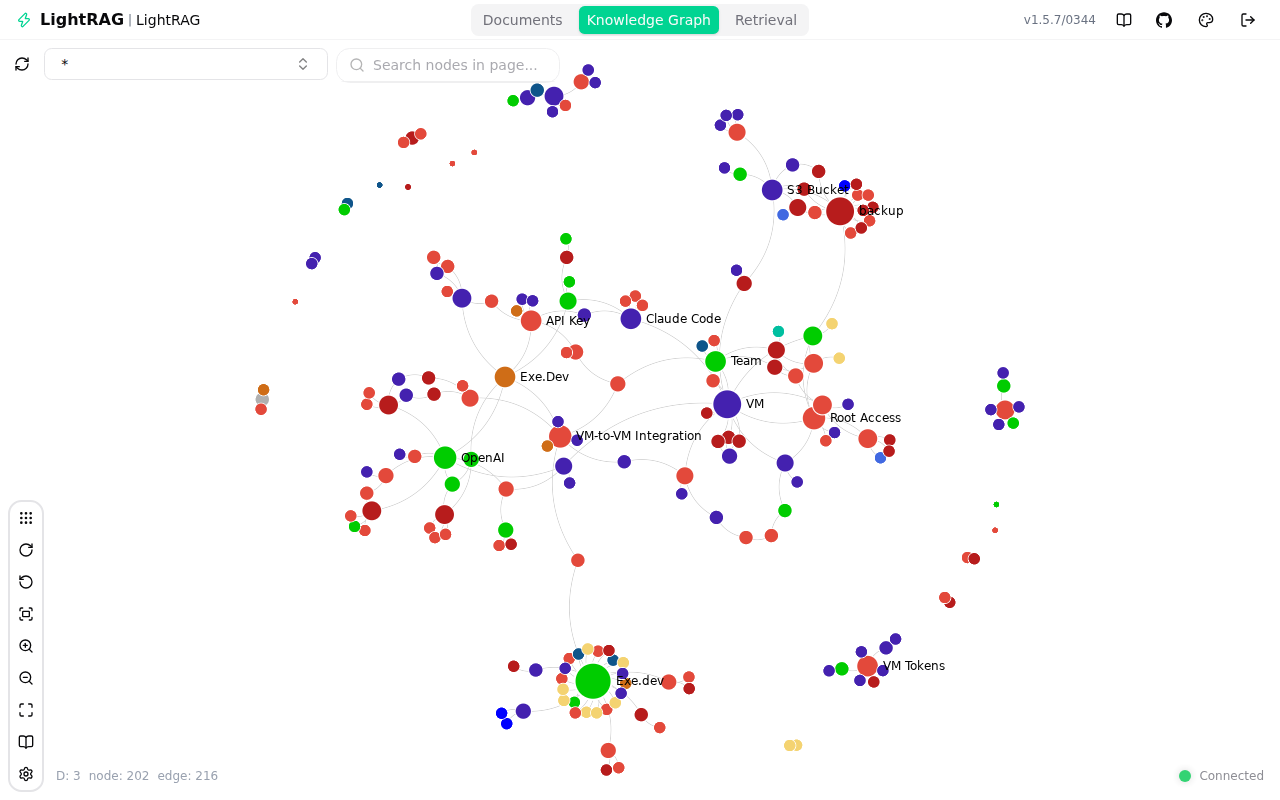
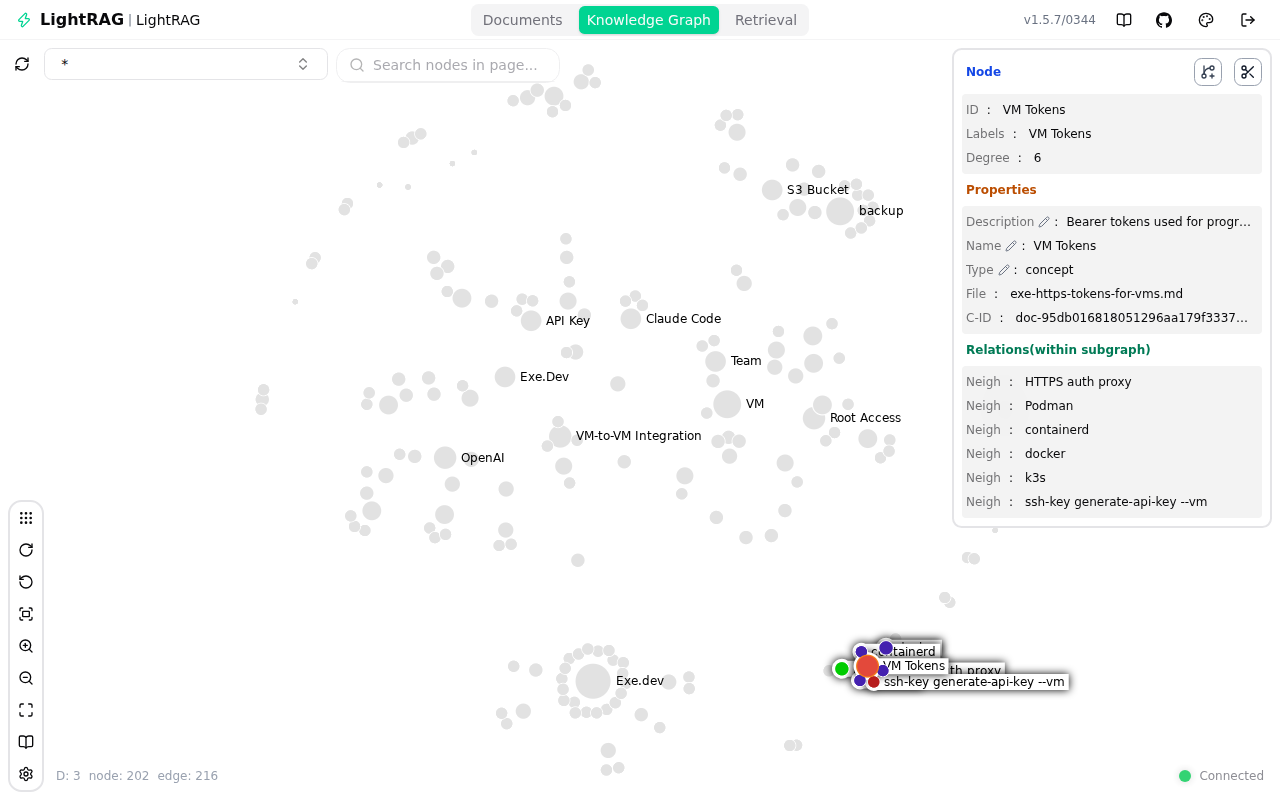
Knowledge Graph draws the graph. Pick a label at the top left (*
is everything, up to 1,000 nodes) or search for a node, then click one to
see its description, the files it came from and its relations. You can
edit or merge entities there when the model got one wrong.
Ask questions#
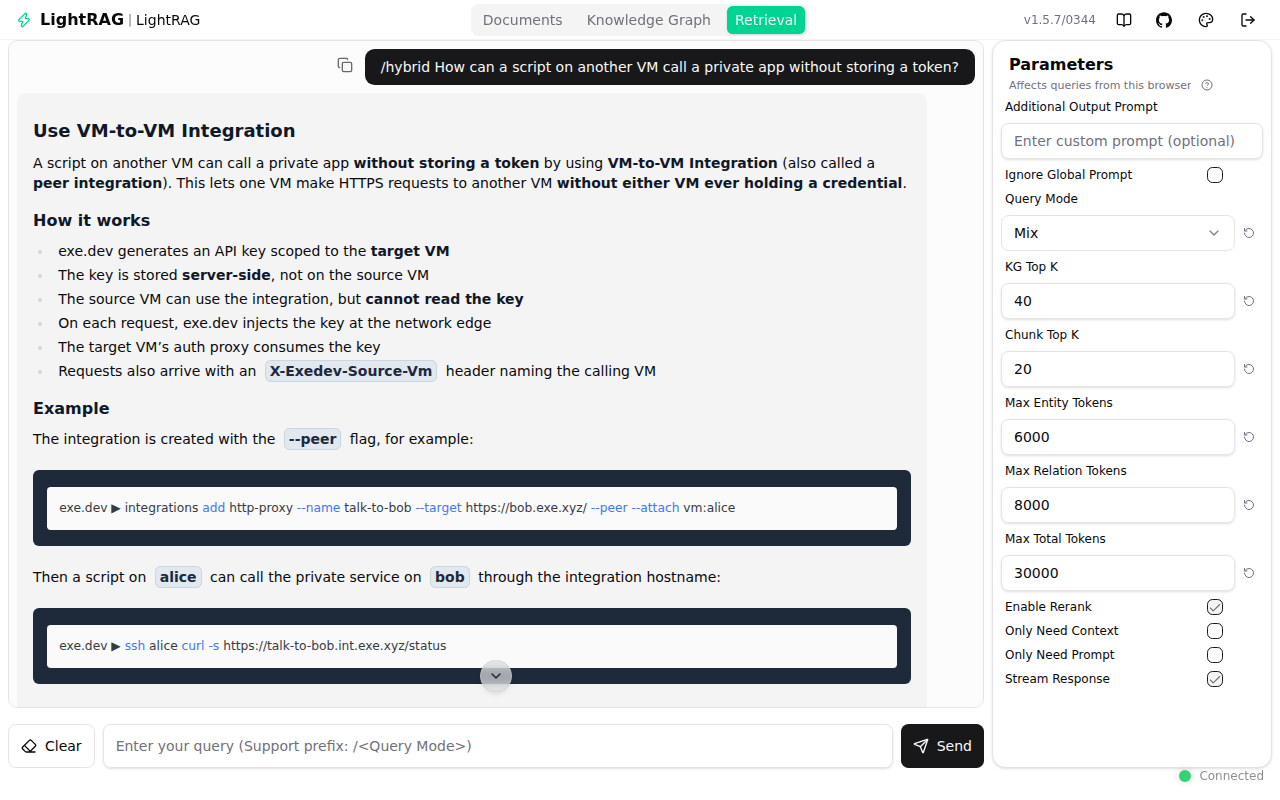
Retrieval is a chat over your documents. Start a question with a mode
to pick how it searches, like /hybrid How can a script on another VM call a private app without storing a token?:
| Mode | Searches | Good for |
|---|---|---|
local |
entities near the question, and their chunks | a specific thing: "what does X do?" |
global |
relations across the graph | themes and summaries |
hybrid |
both | most questions |
mix (the default) |
the graph plus plain vector search | most questions |
naive |
chunks only, no graph | comparison, simple lookups |
The same from the VM, with the API:
curl -s localhost:8000/query -H "X-API-Key: $KEY" -H 'Content-Type: application/json' \
  -d '{"query": "How does LightRAG compare with GraphRAG on cost?", "mode": "hybrid"}' | jq -r .response
With the paper indexed, the answer quotes its numbers (GraphRAG spends
about 610,000 tokens on a retrieval that takes LightRAG under 100) and
cites lightrag-paper.pdf. Our questions took 1 to 4 seconds;
/query/stream streams the answer, and /query/data returns the
entities, relations and chunks it found without writing an answer, for
your own prompt. The book icon in the web UI's top bar opens the
full API reference.
Use it from your computer or another VM#
From outside the VM, a request passes exe.dev's proxy with a token for the VM, then LightRAG with its API key. On your computer, create a VM token into a file only you can read, and copy the API key next to it:
(umask 077; ssh exe.dev ssh-key generate-api-key --vm=my-lightrag --label=lightrag --exp=90d > ~/.lightrag-vm-token)
(umask 077; ssh my-lightrag.exe.xyz "grep ^LIGHTRAG_API_KEY= lightrag/.env | cut -d= -f2" > ~/.lightrag-key)
Send the token as X-Exedev-Authorization, which the proxy removes
before the request reaches LightRAG, and the key as X-API-Key:
curl -s https://my-lightrag.exe.xyz/query \
  -H "X-Exedev-Authorization: Bearer $(cat ~/.lightrag-vm-token)" \
  -H "X-API-Key: $(cat ~/.lightrag-key)" \
  -H 'Content-Type: application/json' \
  -d '{"query": "What are the main themes?", "mode": "global"}' | jq -r .response
With only the VM token, LightRAG answers 401 with
No credentials provided; with neither, exe.dev's proxy does.
For scripts and agents on another of your exe.dev VMs, keep both secrets
off that VM with a VM-to-VM integration:
exe.dev adds the VM token at the edge, and --header adds LightRAG's
key. On your computer (my-agent-vm is the VM that calls it):
ssh exe.dev integrations add http-proxy --name lightrag \
  --target https://my-lightrag.exe.xyz/ --peer \
  --header "X-API-Key:$(cat ~/.lightrag-key)" --attach vm:my-agent-vm
On my-agent-vm, call https://lightrag.int.exe.xyz/query with no
headers of its own.
Chat with your documents in Open WebUI#
LightRAG answers Ollama's chat API at /api/tags and /api/chat as a
model called lightrag:latest, so a chat app that speaks Ollama can use
it as a model. Mode prefixes work there too (/local, /global, and so
on), and a message starting with /bypass goes straight to the model
without the documents.
In an Open WebUI on another VM, open Admin
Panel, Settings, Connections, add an Ollama API connection
with the URL https://lightrag.int.exe.xyz (the integration above,
attached to the Open WebUI VM), and save. Without an integration, use
https://my-lightrag.exe.xyz and put both headers under Advanced,
Headers:
{"X-Exedev-Authorization": "Bearer <VM token>", "X-API-Key": "<LightRAG key>"}
lightrag:latest then shows up in the model picker. We tested this from
Open WebUI 0.12; the answer to the GraphRAG question above came back
with its reference.
Size and cost#
Measured with LightRAG 1.5.7 on a 4-CPU VM, after indexing the six docs pages and the paper:
| Measure | Result |
|---|---|
| Memory | 750 MB: LightRAG 600 MB, PostgreSQL 140 MB |
| Disk for the images | 5.6 GB |
| Database | 104 MB for 555 entities and 684 relations |
| Indexing | 25 seconds for 4,300 words; a minute for a 1 MB PDF |
| A question | 1 to 4 seconds |
The work is waiting on the model, not the VM, so a default VM (2 CPUs,
8 GB) is plenty. LightRAG sends four model calls at once
(MAX_ASYNC_LLM) and indexes three files at once
(MAX_PARALLEL_INSERT); raise them in .env for big batches, within
your LLM allocation. Indexing spends most of the tokens: about three model
calls per chunk, so a 300-page book is around 500 calls.
Answers are cached, so the same question asked twice costs nothing the
second time.
Things to know before you pour in a library:
- Text only. Scanned PDFs and images need OCR (MinerU or Docling), which this setup leaves out.
- The embedding model is for life. Vectors from
text-embedding-3-smallcan't be compared with another model's; changing it means a new, empty index. - One account. LightRAG has one login and one API key, with full access. It's a team's shared library, not a per-user one.
- HTTPS on port 8000. exe.dev's proxy carries HTTP, so the web UI
and API share the VM's address; there's no direct PostgreSQL access from
outside (use
sshfor that).
The nuts and bolts#
Everything lives in ~/lightrag: compose.yaml, the settings and
secrets in .env, uploads in data/inputs, and the database in
data/postgres. Logs: cd ~/lightrag && docker compose logs lightrag.
Set up by hand
Create the VM#
On your computer (pick another name if my-lightrag is taken):
ssh exe.dev new --name=my-lightrag
ssh my-lightrag.exe.xyz
Everything else runs on the VM, as exedev.
Write the settings#
The settings file holds generated secrets: the database password,
LightRAG's login (user admin), the key that signs its sessions, and its
API key. It points LightRAG's OpenAI client at the LLM integration, which
needs no key (LightRAG wants a value anyway), and keeps everything in
PostgreSQL. WHITELIST_PATHS=/health makes LightRAG ask for a login or
key on everything else, including the Ollama API, which it leaves open by
default:
sudo systemctl enable --now docker.service
mkdir -p ~/lightrag/data/rag_storage ~/lightrag/data/inputs ~/lightrag/data/postgres
cd ~/lightrag
if [ ! -e .env ]; then
  install -m 600 /dev/null .env
  cat >> .env <<EOF
# LightRAG on exe.dev. Keep this file private and backed up.
WEBUI_TITLE=$(hostname)
SUMMARY_LANGUAGE=English
ENTITY_EXTRACTION_USE_JSON=true
LIGHTRAG_PARSER=*:native-teP,*:legacy-R
VLM_PROCESS_ENABLE=false
RERANK_BY_DEFAULT=false

# Models through exe.dev's LLM integration; the key is a placeholder.
LLM_BINDING=openai
LLM_BINDING_HOST=https://llm.int.exe.xyz/v1
LLM_BINDING_API_KEY=exe-llm-gateway
LLM_MODEL=gpt-5.4-mini
EMBEDDING_BINDING=openai
EMBEDDING_BINDING_HOST=https://llm.int.exe.xyz/v1
EMBEDDING_BINDING_API_KEY=exe-llm-gateway
EMBEDDING_MODEL=text-embedding-3-small
EMBEDDING_DIM=1536
EMBEDDING_TOKEN_LIMIT=8192
EMBEDDING_SEND_DIM=false
EMBEDDING_USE_BASE64=true

# Everything in PostgreSQL with pgvector.
LIGHTRAG_KV_STORAGE=PGKVStorage
LIGHTRAG_DOC_STATUS_STORAGE=PGDocStatusStorage
LIGHTRAG_GRAPH_STORAGE=PGTableGraphStorage
LIGHTRAG_VECTOR_STORAGE=PGVectorStorage
POSTGRES_USER=lightrag
POSTGRES_PASSWORD=$(openssl rand -hex 24)
POSTGRES_DATABASE=lightrag

# LightRAG's own login (web UI) and API key (scripts, Ollama clients).
AUTH_ACCOUNTS=admin:$(openssl rand -hex 12)
TOKEN_SECRET=$(openssl rand -hex 32)
LIGHTRAG_API_KEY=$(openssl rand -hex 24)
WHITELIST_PATHS=/health
EOF
fi
Write the Compose file#
LightRAG listens on port 8000, the one exe.dev's proxy serves at
https://my-lightrag.exe.xyz/. PostgreSQL has no published port; only
LightRAG reaches it:
cat > ~/lightrag/compose.yaml <<'EOF'
# LightRAG behind exe.dev's HTTPS proxy, on PostgreSQL with pgvector.
# Settings and secrets come from .env in this directory.
name: lightrag

services:
  lightrag:
    image: ghcr.io/hkuds/lightrag:v1.5.7
    restart: unless-stopped
    env_file: .env
    environment:
      HOST: 0.0.0.0
      PORT: "9621"
      WORKING_DIR: /app/data/rag_storage
      INPUT_DIR: /app/data/inputs
      POSTGRES_HOST: postgres
      POSTGRES_PORT: "5432"
    ports:
      - "8000:9621"
    volumes:
      - ./data/rag_storage:/app/data/rag_storage
      - ./data/inputs:/app/data/inputs
    depends_on:
      postgres:
        condition: service_healthy

  postgres:
    image: pgvector/pgvector:0.8.7-pg18
    restart: unless-stopped
    environment:
      POSTGRES_USER: ${POSTGRES_USER}
      POSTGRES_PASSWORD: ${POSTGRES_PASSWORD}
      POSTGRES_DB: ${POSTGRES_DATABASE}
    volumes:
      - ./data/postgres:/var/lib/postgresql
    healthcheck:
      test: ["CMD-SHELL", "pg_isready -U $${POSTGRES_USER} -d $${POSTGRES_DB}"]
      interval: 5s
      timeout: 5s
      retries: 20
EOF
Start it#
The first start downloads about 2 GB of images (5.6 GB on disk), then LightRAG creates its tables. Wait for the health check:
cd ~/lightrag
docker compose up -d
until curl -fs localhost:8000/health >/dev/null; do sleep 3; done
curl -s localhost:8000/health | jq '{status, auth_mode, core_version}'
Expect "status": "healthy", "auth_mode": "enabled" and
"core_version": "1.5.7". It took about a minute in testing.
Check it#
Without the key LightRAG refuses; with it, a question about an empty index gets an answer that says there's nothing to go on yet:
cd ~/lightrag
KEY=$(grep ^LIGHTRAG_API_KEY= .env | cut -d= -f2)
curl -s -o /dev/null -w '%{http_code}\n' localhost:8000/documents/status_counts
curl -s localhost:8000/documents/status_counts -H "X-API-Key: $KEY"; echo
curl -s localhost:8000/api/tags -H "X-API-Key: $KEY" | jq -r '.models[].name'
Expect 401, a JSON count of documents, and lightrag:latest.
Back up nightly#
This script dumps the database with pg_dump (safe while LightRAG runs)
and copies the uploaded files, .env and compose.yaml. A systemd timer
runs it at night; it keeps two weeks:
cat > ~/lightrag/backup.sh <<'EOF'
#!/bin/bash
# Nightly LightRAG backup: the database, the uploaded files, and the settings.
set -euo pipefail
cd ~/lightrag
dest=~/lightrag-backups/$(date +%F)
mkdir -p "$dest"
docker compose exec -T postgres sh -c 'pg_dump -Fc -U "$POSTGRES_USER" "$POSTGRES_DB"' > "$dest/lightrag.dump"
tar -czf "$dest/inputs.tar.gz" -C data inputs
cp .env compose.yaml "$dest/"
chmod -R go-rwx ~/lightrag-backups
find ~/lightrag-backups -mindepth 1 -maxdepth 1 -type d -mtime +14 -exec rm -rf {} +
echo "backed up to $dest"
EOF
chmod +x ~/lightrag/backup.sh
sudo tee /etc/systemd/system/lightrag-backup.service >/dev/null <<'EOF'
[Unit]
Description=Back up LightRAG
After=docker.service

[Service]
Type=oneshot
User=exedev
ExecStart=/home/exedev/lightrag/backup.sh
EOF
sudo tee /etc/systemd/system/lightrag-backup.timer >/dev/null <<'EOF'
[Unit]
Description=Back up LightRAG nightly

[Timer]
OnCalendar=*-*-* 03:30:00
RandomizedDelaySec=30m
Persistent=true

[Install]
WantedBy=timers.target
EOF
sudo systemctl daemon-reload
sudo systemctl enable --now lightrag-backup.timer
sudo systemctl start lightrag-backup.service
ls -A ~/lightrag-backups/*/
Expect .env compose.yaml inputs.tar.gz lightrag.dump.
Back up and restore
The nightly backups sit on the VM's disk, next to what they protect.
Copy them off now and then, to your computer with
scp -r my-lightrag.exe.xyz:lightrag-backups ., or back up the whole VM
to your own S3 bucket with VM backups. The .env in
each backup holds the passwords and the API key; keep the copies private.
The database holds everything LightRAG knows: documents, chunks, vectors, the graph and the answer cache. To restore a backup on the VM, stop LightRAG, start an empty database, load the dump, and start the rest (pick the date):
cd ~/lightrag
B=~/lightrag-backups/2026-11-22
docker compose down
sudo rm -rf data
mkdir -p data/rag_storage
tar -xzf $B/inputs.tar.gz -C data
docker compose up -d --wait postgres
docker compose exec -T postgres sh -c 'pg_restore -U "$POSTGRES_USER" -d "$POSTGRES_DB" --no-owner' < $B/lightrag.dump
docker compose up -d --wait
Load the dump before LightRAG starts, as here: it creates empty tables on startup. In testing, all seven documents, the graph and the answers came back.
To move LightRAG to a new VM, set it up there as above, but before
"Start it", copy the backup's .env into ~/lightrag, then restore as
above.
Update
Read LightRAG's release notes
first; skip the rc pre-releases. Back up, change the image tag in
compose.yaml (here to v1.5.8), and restart. LightRAG migrates its
tables when it starts; the old version must be stopped first, which
up -d does:
cd ~/lightrag
./backup.sh
sed -i 's|ghcr.io/hkuds/lightrag:v1.5.7|ghcr.io/hkuds/lightrag:v1.5.8|' compose.yaml
docker compose pull
docker compose up -d --wait
docker image prune -f
The pgvector tag pins PostgreSQL 18. A new major PostgreSQL version needs a dump and restore, as in Back up and restore.
Something not working?
Start with cd ~/lightrag && docker compose ps and
docker compose logs lightrag --tail 50.
- A document stays Processing or ends Failed, and the log shows
402. Your exe.dev LLM credits ran out; once they refresh, click Retry (or Scan) on the Documents tab. - A PDF ends Completed with almost nothing in the graph. It's a
scan, with no text layer. Run it through OCR first (
ocrmypdfon your computer, for example) and upload the result. Rerank is enabled but no rerank model is configuredin the log. Harmless: the web UI's Enable Rerank box is on by default. Untick it in Parameters on the Retrieval tab.- Answers ignore a document you just uploaded. It's still in the
pipeline; the Documents tab shows its state, and
curl -s localhost:8000/documents/pipeline_status -H "X-API-Key: $KEY" | jq .busysaysfalsewhen indexing is done. 401withNo credentials provided. Please login.That's LightRAG: sendX-API-Key. A401with no JSON, or an exe.dev login page, comes from the proxy: the VM token is missing, expired, or for another VM.- The web UI logs you out. LightRAG's session lasts 48 hours; log in
again with the password from
.env. - Forgot the LightRAG password, or want your own. Change the part
after
admin:inAUTH_ACCOUNTSin.envand rundocker compose up -d.
Frequently asked questions#
How is LightRAG different from plain vector search?
While it indexes, LightRAG has a model read every chunk and pull out entities and the relations between them, and stores that graph next to the usual chunk vectors. Questions can then follow the graph (local for specific things, global for themes, hybrid and mix for both), which helps with questions whose answer is spread over many documents. naive mode is plain vector search, for comparison.
How much does it cost?
LightRAG is free and open source (MIT); you pay for the VM as part of your exe.dev plan. Indexing is where the model calls go: about three gpt-5.4-mini calls per chunk of 1,200 tokens, plus embeddings. A question is two or three calls. All of it is billed to your exe.dev LLM allocation.
Do I need an OpenAI API key or a GPU?
No. LightRAG speaks OpenAI's API, so it talks to exe.dev's LLM integration, which serves both the model and the embeddings without a key on the VM. The VM only parses files and runs PostgreSQL, so it needs no GPU. To bill your own OpenAI account instead, put your key in the integration, not in LightRAG.
Can it read scanned PDFs, images and tables?
Not in this setup. The built-in parsers read text from PDF, Word, PowerPoint, Excel, Markdown, HTML and plain text, but a scanned PDF has no text to read. LightRAG can hand files to MinerU or Docling for OCR and layout, which want a much bigger VM (or a GPU) and aren't covered here.
Who can read my documents?
Requests from outside the VM pass two locks: exe.dev's proxy lets in only you (signed in) and holders of a VM token, then LightRAG wants its own login or API key. There is one LightRAG account and one API key, and both can read and delete everything, so share the VM only with people who may.
Can I use a different model?
Yes, any chat model the LLM integration serves: change LLM_MODEL in ~/lightrag/.env and run docker compose up -d. The embedding model is different: the stored vectors only make sense with the model that made them, so changing EMBEDDING_MODEL means starting the index over.
Why log in twice?
exe.dev's login keeps the VM private, and LightRAG's web UI has its own login, which can't take exe.dev's sign-in headers. The password is in ~/lightrag/.env; your browser can remember it.
Published Nov 25, 2026 · Updated Nov 22, 2026 · tested end to end Nov 22, 2026 · Markdown · manifest.json · Something wrong? Tell us