
Self-host Mem0, one memory for agents on all your VMs
One memory server for the agents on all your VMs. No OpenAI key.
Shelley handles the setup. About 15 minutes.
Prefer a terminal?
curl -fsSL https://exe.dev/deploy/mem0/prompt.txt | ssh exe.dev new --prompt=/dev/stdinMem0 is a memory layer for AI agents. You hand it conversations or facts; a model pulls out the parts worth keeping ("deploys only on Fridays", "prefers pnpm") and merges them with what it already knows, and agents search that memory by meaning before they answer. The self-hosted Mem0 server is a REST API with a dashboard, on PostgreSQL with pgvector.
One server is worth more than a memory per laptop: an agent on one VM learns something, and the agents on your other VMs find it. An exe.dev VM keeps that server running with its database on a real disk, private behind exe.dev's login, and lets agents elsewhere in with a VM token. The model that writes the memories and the embeddings that index them come from exe.dev's LLM integration, so there's no OpenAI key to store. This page adds an MCP endpoint, so Claude Code, Codex and Cursor can use the memory as tools.
exe.dev gives you persistent Linux VMs with HTTPS, sign-in and a coding agent built in; this page sets up Mem0 on one. We tested Mem0 2.2.1 on Nov 21, 2026.
What you get#
- Mem0 2.2.1's REST server, dashboard and pgvector database in Docker Compose, back by themselves after a reboot
- Memories extracted and embedded through exe.dev's LLM integration, with no OpenAI key on the VM
- The dashboard at
https://<vm>.exe.xyz/, behind exe.dev login, with the owner as Mem0's admin - An MCP endpoint at
/mcpand the REST API on port 8888, each needing a VM token and a Mem0 API key from outside - A memory added and found again through the API and through MCP
- Nightly backups of the database, history and secrets in
~/mem0-backups
What's running, and where
https://my-mem0.exe.xyz/
the dashboard, behind exe.dev login and Mem0's own login
https://my-mem0.exe.xyz/mcp
MCP for Claude Code, Codex and Cursor; a VM token plus a Mem0 API key
https://my-mem0.exe.xyz:8888/
the REST API and its /docs; a VM token plus a Mem0 API key
Deploy with Shelley#
Click Deploy and Shelley will set up Mem0 on a new VM, then check that it works. No config-file wrangling required.
Prefer a terminal?
curl -fsSL \
  https://exe.dev/deploy/mem0/prompt.txt \
  | ssh exe.dev new --prompt=/dev/stdin
When it's done, run this on your computer (only you can):
ssh exe.dev ssh-key generate-api-key --vm=my-mem0 --label=mem0-agents --exp=90dWhat Shelley is told
Set up Mem0 on this VM by following the exe.dev recipe at https://exe.dev/deploy/mem0.md?via=deploy from top to bottom.

The recipe's example VM name is my-mem0. This VM's name is the output of `hostname`: use it wherever the recipe writes my-mem0. Skip the step that creates the VM; you are on it.

You are done when all of these are true. Check each one yourself:
- Mem0 2.2.1's REST server, dashboard and pgvector database in Docker Compose, back by themselves after a reboot
- Memories extracted and embedded through exe.dev's LLM integration, with no OpenAI key on the VM
- The dashboard at `https://<vm>.exe.xyz/`, behind exe.dev login, with the owner as Mem0's admin
- An MCP endpoint at `/mcp` and the REST API on port 8888, each needing a VM token and a Mem0 API key from outside
- A memory added and found again through the API and through MCP
- Nightly backups of the database, history and secrets in `~/mem0-backups`

Read the whole recipe, closed details included, and follow "Set up by
hand" in order, skipping VM creation; the walkthrough above it is for the
owner. Make the owner Mem0's admin with the email from the reflection
integration, as written. Never overwrite an existing ~/mem0/.env or
admin.json. Don't make the VM public or share it. Don't run Restore or
Update, and don't reboot. The VM can't reach its own
https://<vm>.exe.xyz, so checks use localhost. Finish by telling the
owner the dashboard URL, that the admin password is in
~/mem0/admin.json, and the `ssh exe.dev ssh-key generate-api-key`
command to run on their computer, then point them to "Connect your
agents".

Finish with the URLs I should open and these commands, which only I can run, from my own computer (with this VM's name in them):
  ssh exe.dev ssh-key generate-api-key --vm=my-mem0 --label=mem0-agents --exp=90d
Also at /deploy/mem0/prompt.txt. The recipe it follows is /deploy/mem0.md.
Try it#
On the VM, give Mem0 something to remember, using the API key made during setup:
cd ~/mem0
KEY=$(jq -r .api_key admin.json)
curl -s localhost:8888/memories -H "X-API-Key: $KEY" -H 'Content-Type: application/json' \
  -d '{"messages":[{"role":"user","content":"Staging runs Postgres 17 on orca-db, and we deploy only on Fridays after 2pm."}],"user_id":"me"}'
In two or three seconds it answers with what it extracted, two memories
marked ADD, such as User's staging database runs Postgres 17 on the VM named orca-db. Then ask in other words:
curl -s localhost:8888/search -H "X-API-Key: $KEY" -H 'Content-Type: application/json' \
  -d '{"query":"when can we ship?","filters":{"user_id":"me"}}' | jq -r '.results[].memory'
The deploy rule comes first, though the question shares no words with it. Tell it something that contradicts an old memory and Mem0 updates the memory instead of adding a second one.
Open the dashboard#
Open https://my-mem0.exe.xyz/ and log in to exe.dev, then to Mem0 with
your email and the password in ~/mem0/admin.json on the VM:
jq -r .password ~/mem0/admin.json
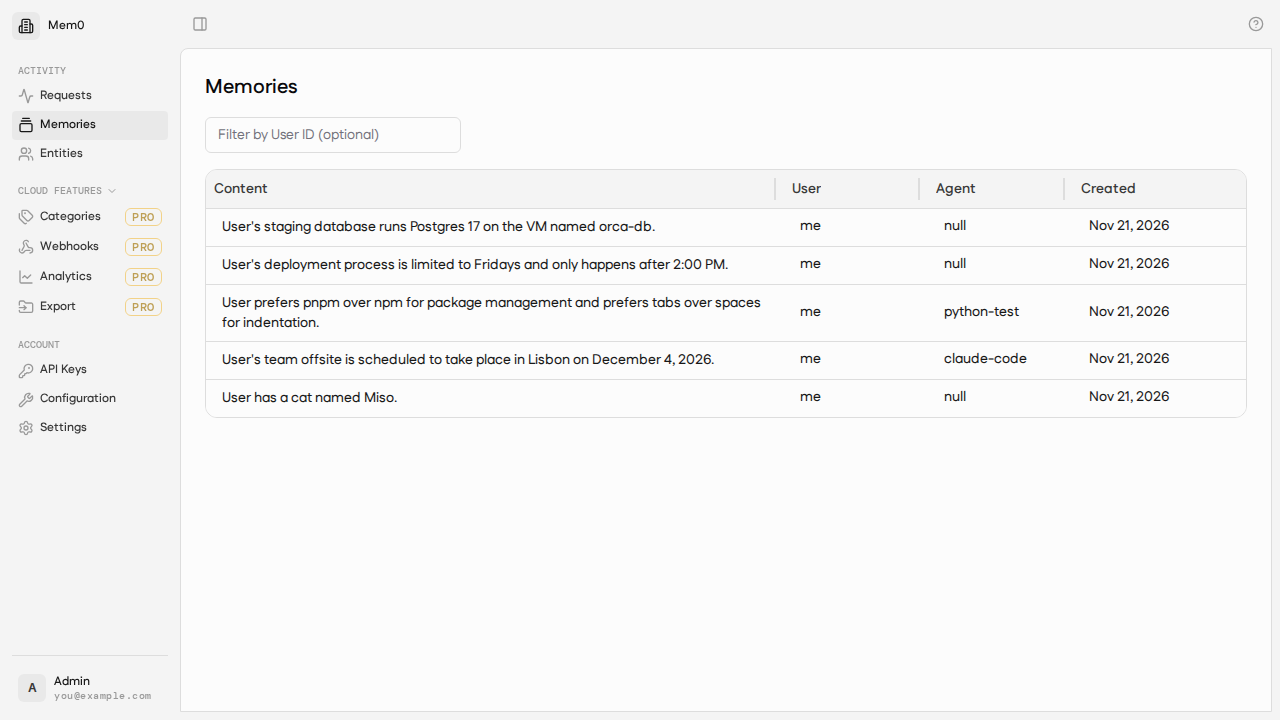
Requests is a live log of API calls, Memories and Entities let you read and delete memories by user and agent, and API Keys makes and revokes keys. Items marked Pro are for the hosted Mem0 Platform and don't work here.
Connect your agents#
From outside the VM, every request carries two headers:
X-Exedev-Authorization: Bearer exe1.…, a VM token that gets it past exe.dev's proxy, which removes the header before Mem0 sees the request.X-API-Key: m0sk_…, a Mem0 API key.
Make the VM token on your computer. --exp sets when it expires; one
token can serve all your agents:
ssh exe.dev ssh-key generate-api-key --vm=my-mem0 --label=mem0-agents --exp=90d
Make a Mem0 key for each agent, on the API Keys page or on the VM (change the label):
cd ~/mem0
JWT=$(jq '{email, password}' admin.json | curl -s localhost:8888/auth/login -H 'Content-Type: application/json' -d @- | jq -r .access_token)
curl -s localhost:8888/api-keys -H "Authorization: Bearer $JWT" -H 'Content-Type: application/json' \
  -d '{"label":"agent-vm"}' | jq -r .key
The key is shown once. Below, replace exe1.paste-yours-here and
m0sk_paste-yours-here with yours.
Claude Code, on another VM such as one from Claude Code on exe.dev, or your computer:
claude mcp add --transport http --scope user mem0 https://my-mem0.exe.xyz/mcp \
  --header "X-Exedev-Authorization: Bearer exe1.paste-yours-here" \
  --header "X-API-Key: m0sk_paste-yours-here"
claude mcp list
Expect mem0: https://my-mem0.exe.xyz/mcp (HTTP) - ✔ Connected. Claude
gets four tools: add_memory, search_memories, list_memories and
delete_memory.
Codex, in ~/.codex/config.toml. The approval line lets
codex exec use the tools without asking:
[mcp_servers.mem0]
url = "https://my-mem0.exe.xyz/mcp"
http_headers = { "X-Exedev-Authorization" = "Bearer exe1.paste-yours-here", "X-API-Key" = "m0sk_paste-yours-here" }
default_tools_approval_mode = "approve"
Cursor, in ~/.cursor/mcp.json (we didn't test Cursor):
{
  "mcpServers": {
    "mem0": {
      "url": "https://my-mem0.exe.xyz/mcp",
      "headers": {
        "X-Exedev-Authorization": "Bearer exe1.paste-yours-here",
        "X-API-Key": "m0sk_paste-yours-here"
      }
    }
  }
}
Your own code calls the REST API on port 8888. With curl:
curl -s https://my-mem0.exe.xyz:8888/search \
  -H "X-Exedev-Authorization: Bearer exe1.paste-yours-here" \
  -H "X-API-Key: m0sk_paste-yours-here" -H 'Content-Type: application/json' \
  -d '{"query":"which database does staging use?","filters":{"user_id":"me"},"top_k":3}'
Or Python, with nothing to install:
import json, os, urllib.request

def mem0(path, body):
    req = urllib.request.Request(
        "https://my-mem0.exe.xyz:8888" + path, data=json.dumps(body).encode(),
        headers={"Content-Type": "application/json",
                 "X-Exedev-Authorization": "Bearer " + os.environ["EXE_TOKEN"],
                 "X-API-Key": os.environ["MEM0_API_KEY"]})
    return json.load(urllib.request.urlopen(req))

mem0("/memories", {"messages": [{"role": "user", "content": "I prefer pnpm over npm."}],
                   "user_id": "me", "agent_id": "build-bot"})
print(mem0("/search", {"query": "package manager", "filters": {"user_id": "me"}}))
https://my-mem0.exe.xyz:8888/docs, opened in your browser, lists every
endpoint. Use one user_id for memories all your agents should share,
and agent_id or run_id to tell them apart.
Tip
For agents on your other exe.dev VMs, a VM-to-VM integration can add both headers at exe.dev's edge, so neither secret is stored on the agent's VM. On your computer, for an agent on
my-claude-code:ssh exe.dev integrations add http-proxy --name mem0 --target https://my-mem0.exe.xyz/ --peer --header "X-API-Key:m0sk_paste-yours-here" --attach vm:my-claude-code. The agent then useshttps://mem0.int.exe.xyz/mcpwith no headers. We tested VM tokens end to end, not this integration.
Teach agents to use it#
Agents use memory more when told to. Add this to CLAUDE.md or
AGENTS.md:
Before answering questions about me, my projects or earlier decisions, search mem0. When I tell you a lasting fact, preference or decision, save it with add_memory.
We told Claude Code on one VM to remember an offsite in Lisbon; codex exec on another found it with search_memories, and the dashboard
showed claude-code as the agent that saved it.
The nuts and bolts#
Everything lives in ~/mem0: compose.yaml, nginx.conf, the MCP
bridge mem0-mcp.py, the secrets in .env, the admin login and first API
key in admin.json, Mem0's source in src, and the data in data.
Logs: cd ~/mem0 && docker compose logs api (or dashboard, mcp,
web).
Set up by hand
Create the VM#
On your computer (pick another name if my-mem0 is taken):
ssh exe.dev new --name=my-mem0
ssh my-mem0.exe.xyz
Everything else runs on the VM, as exedev.
Get Mem0 and write the settings#
Mem0 publishes no current images, so build the server and dashboard from
the v2.2.1 tag. The settings file holds generated secrets, points
Mem0's OpenAI client at the LLM integration (which needs no key; Mem0
wants a value anyway), and turns Mem0's anonymous telemetry off:
sudo systemctl enable --now docker.service
mkdir -p ~/mem0 && cd ~/mem0
[ -d src ] || git clone -q --depth 1 --branch v2.2.1 https://github.com/mem0ai/mem0.git src
if [ ! -e .env ]; then
  install -m 600 /dev/null .env
  cat >> .env <<EOF
# Mem0 settings and secrets. Back this file up.
POSTGRES_HOST=postgres
POSTGRES_PORT=5432
POSTGRES_DB=postgres
POSTGRES_USER=postgres
POSTGRES_PASSWORD=$(openssl rand -hex 24)
POSTGRES_COLLECTION_NAME=memories
APP_DB_NAME=mem0_app
JWT_SECRET=$(openssl rand -base64 48 | tr -d '\n')
DASHBOARD_URL=https://$(hostname).exe.xyz
OPENAI_BASE_URL=https://llm.int.exe.xyz/v1
OPENAI_API_KEY=implicit
MEM0_DEFAULT_LLM_MODEL=gpt-5.4-mini
MEM0_DEFAULT_EMBEDDER_MODEL=text-embedding-3-small
MEM0_TELEMETRY=false
EOF
fi
Write the Compose file#
Five containers: PostgreSQL with pgvector (not published), the API on
port 8888, the dashboard, the MCP bridge,
and nginx on port 8000, which serves the dashboard and /mcp and gives
the dashboard's browser code the API at /mem0-api/ on the same address:
cd ~/mem0
curl -fsSO https://exe.dev/deploy/mem0/mem0-mcp.py
cat > compose.yaml <<'EOF'
name: mem0
services:
  postgres:
    image: pgvector/pgvector:pg17
    restart: unless-stopped
    shm_size: 128mb
    environment:
      POSTGRES_USER: ${POSTGRES_USER}
      POSTGRES_PASSWORD: ${POSTGRES_PASSWORD}
    volumes:
      - ./data/postgres:/var/lib/postgresql/data
      - ./src/server/init-db.sh:/docker-entrypoint-initdb.d/init-db.sh:ro
    healthcheck:
      test: ["CMD-SHELL", "pg_isready -q -d postgres -U ${POSTGRES_USER}"]
      interval: 5s
      timeout: 5s
      retries: 10

  api:
    build:
      context: ./src
      dockerfile: server/dev.Dockerfile
    image: mem0-api:local
    restart: unless-stopped
    env_file: .env
    environment:
      HISTORY_DB_PATH: /app/history/history.db
    command: sh -c "alembic upgrade head && exec uvicorn main:app --host 0.0.0.0 --port 8000"
    ports:
      - "8888:8000"
    volumes:
      - ./data/history:/app/history
    depends_on:
      postgres:
        condition: service_healthy

  dashboard:
    build: ./src/server/dashboard
    image: mem0-dashboard:local
    restart: unless-stopped
    environment:
      NEXT_PUBLIC_API_URL: /mem0-api
      NEXT_PUBLIC_INSTANCE_NAME: Mem0
      API_INTERNAL_URL: http://api:8000
    depends_on:
      - api

  mcp:
    image: ghcr.io/astral-sh/uv:0.9-python3.12-bookworm-slim
    restart: unless-stopped
    command: uv run --script /app/mem0-mcp.py
    environment:
      MEM0_API_URL: http://api:8000
      MEM0_USER_ID: me
      UV_CACHE_DIR: /cache
    volumes:
      - ./mem0-mcp.py:/app/mem0-mcp.py:ro
      - uv-cache:/cache
    depends_on:
      - api

  web:
    image: nginx:1.29-alpine
    restart: unless-stopped
    ports:
      - "8000:80"
    volumes:
      - ./nginx.conf:/etc/nginx/conf.d/default.conf:ro
    depends_on:
      - dashboard
      - api
      - mcp

volumes:
  uv-cache:
EOF
cat > nginx.conf <<'EOF'
server {
    listen 80;
    client_max_body_size 20m;

    # The dashboard's browser code calls the API here.
    location /mem0-api/ {
        proxy_pass http://api:8000/;
        proxy_set_header Host $host;
        proxy_buffering off;
        proxy_read_timeout 300s;
    }

    # MCP for agents.
    location /mcp {
        proxy_pass http://mcp:8765;
        proxy_set_header Host $host;
        proxy_buffering off;
        proxy_read_timeout 300s;
    }

    location / {
        proxy_pass http://dashboard:3000;
        proxy_set_header Host $host;
        proxy_set_header X-Forwarded-Proto https;
    }
}
EOF
The bridge passes each caller's X-API-Key on to Mem0 and keeps no key
of its own. MEM0_USER_ID is the user its memories belong to.
Build and start#
The build takes two to five minutes. The last line frees about 4 GB of build cache:
cd ~/mem0
docker compose build
docker compose up -d --wait
docker builder prune -f
Expect each container Healthy or Started.
Make the owner the admin#
Mem0's seed script creates the admin account and a first API key. This
uses your exe.dev email (from the VM's
reflection integration) and saves the
password and key in admin.json:
cd ~/mem0
if [ ! -e admin.json ]; then
  EMAIL=$(curl -s https://reflection.int.exe.xyz/email | jq -r .email)
  install -m 600 /dev/null admin.json
  API_URL=http://localhost:8888 DASHBOARD_URL=https://$(hostname).exe.xyz \
    EMAIL="$EMAIL" NAME=Admin OUTPUT=json ./src/server/scripts/seed.sh | tail -1 > admin.json
fi
jq -r .email admin.json
It prints your email. If it prints nothing, use
EMAIL=you@example.com instead of the reflection call.
Check it#
Check that the API refuses a request without a key, that the dashboard answers, and that MCP lists its tools:
cd ~/mem0
KEY=$(jq -r .api_key admin.json)
curl -s -o /dev/null -w 'API without a key: %{http_code}\n' localhost:8888/memories?user_id=me
curl -s -o /dev/null -w 'dashboard: %{http_code}\n' localhost:8000/api/health
curl -s localhost:8000/mcp -H "X-API-Key: $KEY" -H 'Content-Type: application/json' \
  -H 'Accept: application/json, text/event-stream' \
  -d '{"jsonrpc":"2.0","id":1,"method":"tools/list"}' | grep -o '"name":"[a-z_]*"'
Expect 401, 200, and the four tool names. Then run
Try it, which checks the LLM integration.
Back up nightly#
This script dumps every database with pg_dumpall (safe while Mem0
runs) and copies the history log, .env and admin.json. A systemd timer
runs it at night; it keeps two weeks:
cat > ~/mem0/backup.sh <<'EOF'
#!/bin/bash
# Nightly Mem0 backup: every database, the history log, and the secrets.
set -euo pipefail
cd ~/mem0
dest=~/mem0-backups/$(date +%F)
mkdir -p "$dest"
docker compose exec -T postgres pg_dumpall -U postgres | gzip > "$dest/postgres.sql.gz"
sqlite3 data/history/history.db ".backup '$dest/history.db'"
cp .env admin.json "$dest/"
chmod -R go-rwx ~/mem0-backups
find ~/mem0-backups -mindepth 1 -maxdepth 1 -type d -mtime +14 -exec rm -rf {} +
echo "backed up to $dest"
EOF
chmod +x ~/mem0/backup.sh
sudo tee /etc/systemd/system/mem0-backup.service >/dev/null <<'EOF'
[Unit]
Description=Back up Mem0
After=docker.service

[Service]
Type=oneshot
User=exedev
ExecStart=/home/exedev/mem0/backup.sh
EOF
sudo tee /etc/systemd/system/mem0-backup.timer >/dev/null <<'EOF'
[Unit]
Description=Back up Mem0 nightly

[Timer]
OnCalendar=*-*-* 03:30:00
RandomizedDelaySec=30m
Persistent=true

[Install]
WantedBy=timers.target
EOF
sudo systemctl daemon-reload
sudo systemctl enable --now mem0-backup.timer
sudo systemctl start mem0-backup.service
ls ~/mem0-backups/*/
Expect admin.json history.db postgres.sql.gz (and .env, hidden).
Back up and restore
The nightly backups sit on the VM's disk, next to what they protect.
Copy them off now and then, to your computer with
scp -r my-mem0.exe.xyz:mem0-backups ., or back up the whole VM to your
own S3 bucket with VM backups. The .env and
admin.json in each backup hold the database password and the admin
login; keep the copies private.
To restore a backup on the VM, stop Mem0, start an empty database, load the dump, and start the rest (pick the date):
cd ~/mem0
B=~/mem0-backups/2026-11-21
docker compose down
sudo rm -rf data
mkdir -p data/history
docker compose up -d --wait postgres
gunzip -c $B/postgres.sql.gz | docker compose exec -T postgres psql -q -U postgres -d postgres
sudo cp $B/history.db data/history/
docker compose up -d --wait
The dump prints errors that the postgres role and the mem0_app
database already exist; that's expected. Load the dump before the API
starts, as here: the API creates empty tables on startup. Memories, users
and API keys all come back, so agents keep working.
To move Mem0 to a new VM, set it up there as above, but before
"Build and start", copy the backup's .env and admin.json into
~/mem0, change DASHBOARD_URL in .env to the new name, then build
and restore as above.
Update
Read Mem0's release notes
first, then back up, check out the new tag, rebuild and restart (here
v2.3.0). The API applies database migrations when it starts:
cd ~/mem0
./backup.sh
git -C src fetch -q --depth 1 origin tag v2.3.0
git -C src checkout -q v2.3.0
docker compose build
docker compose up -d --wait
docker builder prune -f
docker compose pull updates PostgreSQL 17, nginx and uv. A new major
PostgreSQL version needs a dump and restore, as Mem0's
server README shows.
Something not working?
Start with cd ~/mem0 && docker compose ps and
docker compose logs api --tail 50.
- Adding a memory says
provider_bad_request, and the log says'temperature' does not support 0.2. The model rejects Mem0's temperature; Mem0 2.2.1 sends one togpt-5-mini(its own default) andgpt-6models. Usegpt-5.4-mini, as this page does. - Changing the model in
.envdoes nothing. Models saved on the dashboard's Configuration page are stored in the database and win over.env. Change them there, orPOST /configureto the API. - Adding or searching fails with an upstream error, and the log shows
402. Your exe.dev LLM credits ran out (search needs embeddings, so it uses them too); it works again when they refresh. spaCy is not installedwarnings. Harmless: Mem0 skips word lemmatisation in keyword matching without it.- The dashboard shows a login loop or
Network Error. Open it athttps://my-mem0.exe.xyz/, not port 3000 or 8888; its API calls go through/mem0-api/on port 8000. Checkdocker compose logs web. - An agent gets
401with no JSON, or an exe.dev login page. The VM token is missing, expired, or for another VM. A401withAuthentication requiredcomes from Mem0: check theX-API-Key. - Forgot the Mem0 password. On the VM:
docker compose exec -T -e EMAIL=you@example.com -e PASSWORD='new-password' -e PYTHONPATH=/app api python scripts/reset_admin_password.py. - The request log grows. Every API call is logged in Postgres. Prune
entries older than 30 days with
docker compose exec -T -e PYTHONPATH=/app api python scripts/prune_request_logs.py.
Frequently asked questions#
Is this OpenMemory?
No. OpenMemory, Mem0's earlier local MCP server and UI, was removed from the Mem0 repository in July 2026, and its name now belongs to a tool that moves coding sessions between agents. Mem0's current MCP server and agent plugins talk only to the hosted Mem0 Platform. This page runs Mem0's self-hosted server and adds a small MCP bridge in front of it.
How much does it cost?
Mem0's server is free and open source (Apache-2.0); you pay for the VM as part of your exe.dev plan. Each memory you add makes a gpt-5.4-mini call and a few embedding calls, and each search one embedding call, billed to your exe.dev LLM allocation. The dashboard's Pro items (categories, webhooks, analytics, export) belong to the paid Mem0 Platform and aren't in the self-hosted server.
Do I need an OpenAI API key?
No. Mem0 uses OpenAI's API for both the model and the embeddings, and honours OPENAI_BASE_URL, so it talks to exe.dev's LLM integration, which serves both without a key on the VM. To bill your own OpenAI account instead, put your key in the integration, not in Mem0.
Who can read the memories?
Requests from outside the VM pass two locks: exe.dev's proxy lets in only you (signed in) and holders of a VM token, then Mem0 wants its own API key or login. Mem0's keys aren't scoped: any key can read and change every memory. Give each agent its own key so you can revoke one, and share the VM only with people who may read everything.
Can I use the Python or TypeScript SDK?
Not its MemoryClient, which speaks the hosted Platform's /v1/ API. The self-hosted server has its own paths (POST /memories, POST /search), so call them with any HTTP client, as in Connect your agents; /docs on port 8888 lists them all.
Does it do graph memory, or need Qdrant or Neo4j?
No. Graph memory (and with it Neo4j) has left open-source Mem0; it's a hosted Platform feature now. The self-hosted server keeps memories and their vectors in PostgreSQL with pgvector, and its search mixes vector and keyword matching. Mem0 the library supports Qdrant and other vector stores; the server ships set up for pgvector.
Why log in twice?
exe.dev's login keeps the VM private, and Mem0's dashboard has its own accounts and can't take exe.dev's sign-in headers. The Mem0 password is in ~/mem0/admin.json; your browser can remember it.
Published Nov 21, 2026 · Updated Nov 21, 2026 · tested end to end Nov 21, 2026 · Markdown · manifest.json · Something wrong? Tell us