
Self-host Kaneo
A light, fully open-source issue tracker that your agents can work from too.
Shelley handles the setup. About 10 minutes.
Prefer a terminal?
curl -fsSL https://exe.dev/deploy/kaneo/prompt.txt | ssh exe.dev new --prompt=/dev/stdinKaneo is a project tracker: boards, a backlog, list, Gantt and calendar views, custom fields, time tracking, and two-way sync with GitHub, GitLab and Gitea issues. It's MIT-licensed, with no paid edition, and small: one application container plus PostgreSQL.
On an exe.dev VM it's always on, at an HTTPS address that only you and the people you share the VM with can reach, and everyone signs in with their exe.dev login: no Kaneo passwords. Kaneo's REST API, its CLI and its MCP server let Claude Code, Codex or Shelley file, update and close tasks next to you.
What you get#
- Kaneo 2 with PostgreSQL at
https://my-kaneo.exe.xyz/, behind your exe.dev login, restarted after a reboot. - Sign-in with exe.dev, through Dex: no Kaneo passwords. Your account becomes the admin; teammates you invite get theirs on their first visit.
- Secrets generated on the VM in
~/kaneo/.env(mode 600), which is also where the agents' API key goes. - The
kaneoCLI and thekaneo-mcpMCP server on the VM, ready for Claude Code, Codex and Shelley once there's an API key. - Nightly database backups in
~/kaneo/backups, keeping two weeks.
What's running, and where
https://my-kaneo.exe.xyz/
Kaneo, signed in with your exe.dev login
https://my-kaneo.exe.xyz/api/
the REST API, for agents elsewhere with an exe.dev VM token and a Kaneo API key
kaneo CLI and kaneo-mcp (the official @kaneo/mcp server, in a Node 24 container), both using the API key in ~/kaneo/.env
Deploy with Shelley#
Click Deploy and Shelley will set up Kaneo on a new VM, then check that it works. No config-file wrangling required.
Prefer a terminal?
curl -fsSL \
  https://exe.dev/deploy/kaneo/prompt.txt \
  | ssh exe.dev new --prompt=/dev/stdin
What Shelley is told
Set up Kaneo on this VM by following the exe.dev recipe at https://exe.dev/deploy/kaneo.md?via=deploy from top to bottom.

The recipe's example VM name is my-kaneo. This VM's name is the output of `hostname`: use it wherever the recipe writes my-kaneo. Skip the step that creates the VM; you are on it.

You are done when all of these are true. Check each one yourself:
- Kaneo 2 with PostgreSQL at `https://my-kaneo.exe.xyz/`, behind your exe.dev login, restarted after a reboot.
- Sign-in with exe.dev, through Dex: no Kaneo passwords. Your account becomes the admin; teammates you invite get theirs on their first visit.
- Secrets generated on the VM in `~/kaneo/.env` (mode 600), which is also where the agents' API key goes.
- The `kaneo` CLI and the `kaneo-mcp` MCP server on the VM, ready for Claude Code, Codex and Shelley once there's an API key.
- Nightly database backups in `~/kaneo/backups`, keeping two weeks.

Read the whole recipe, closed details included, and follow "Set up by
hand" in order, skipping VM creation; the walkthrough above it is for
the owner. Don't sign in to Kaneo or send requests with X-ExeDev
headers other than the check as written: the first account becomes the
instance admin, and that must be the owner. Don't make the VM public.
The VM can't reach its own https://<vm>.exe.xyz, so check with
http://localhost:8000 as written. Don't run Restore or Update. Finish
with Kaneo's URL, tell the owner to open it first to become the admin
(choosing "Continue with exe.dev" if Kaneo shows a setup form), and
point them to "Connect your agents" for the API key.

Finish with the URLs I should open.
Also at /deploy/kaneo/prompt.txt. The recipe it follows is /deploy/kaneo.md.
Create your account#
Open https://my-kaneo.exe.xyz/ and sign in to exe.dev if asked. Kaneo
signs you in with that login and makes your account; the first account
on a new instance becomes its administrator, which is why setup leaves
the first visit to you. If Kaneo shows Set up your Kaneo instance
instead, choose Continue with exe.dev at the bottom, not the form.
Kaneo then asks for a workspace name (your team or company), who it's
for, and a first
project, which it fills with five starter tasks to show you around. A
project named API numbers its tasks API-1, API-2 and so on.
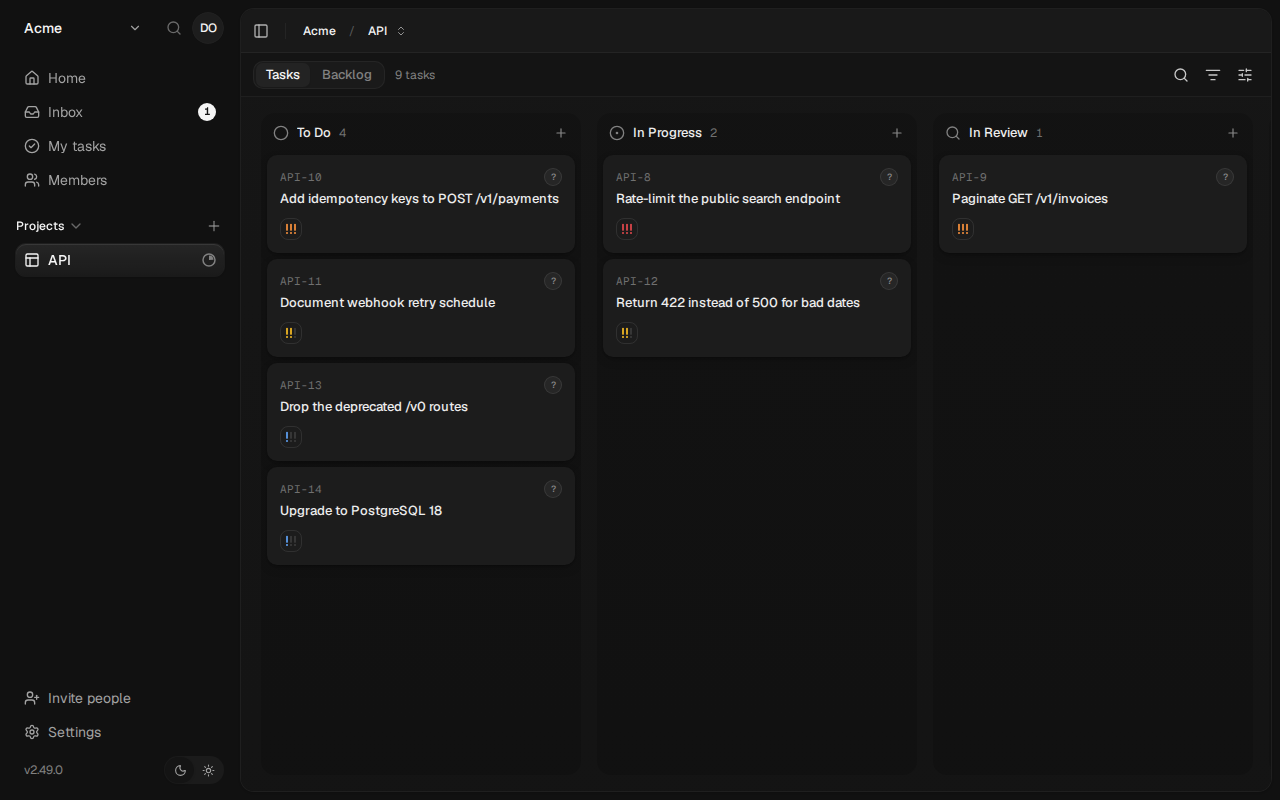
kaneo CLI.From then on, opening Kaneo signs you straight in. Your name starts out as your email address; change it under Settings → Profile. Signing out of Kaneo leads to a page that can sign you out of exe.dev too; otherwise Sign in again gets you back without a password.
Bring your team#
On your computer, give each teammate access to the VM:
ssh exe.dev share add my-kaneo alice@example.com
Then invite the same email in Kaneo: Members in the workspace
sidebar, Invite member. You can skip the link the dialog offers. They open https://my-kaneo.exe.xyz/,
sign in to exe.dev, and Kaneo makes their account and offers the
invitation to accept. Only people with an invitation get an account, and
invitations expire after two days.
ssh exe.dev share remove my-kaneo alice@example.com takes the VM away
again; to take them out of the workspace too, use Members, and to
lock their account, Settings → Administration → Users.
Connect your agents#
Agents use an API key that acts as you. In Kaneo, open Settings,
then API keys under Account, and choose New key. Name it
agents, pick when it expires, and copy it: Kaneo shows it only once. On the VM, save it in Kaneo's secrets file, then pick the
workspace the CLI works in by its slug (the first command lists them):
read -rsp 'Kaneo API key: ' key && echo "KANEO_API_KEY=$key" >> ~/kaneo/.env && unset key; echo
kaneo workspace list --jq '.[] | "\(.slug)  \(.name)"'
kaneo workspace use your-workspace-slug
kaneo whoami --jq .user.email
Expect your workspaces, then your email. Setup installed two tools that read the key from
~/kaneo/.env, so it never has to be pasted anywhere else:
kaneo, Kaneo's CLI: one binary with JSON output, made for scripts and agents. Shelley, Claude Code and Codex on this VM can use it from their shell with no setup.kaneo-mcp, Kaneo's MCP server over stdio, for agents that prefer tools to commands.
To give Claude Code and Codex on this VM the MCP tools too:
claude mcp add kaneo --scope user -- kaneo-mcp
codex mcp add kaneo -- kaneo-mcp
claude mcp list
Expect kaneo: kaneo-mcp - ✔ Connected. The first start takes up to a
minute while Docker fetches the package; later starts take seconds.
The CLI's own agent skill teaches Claude Code its conventions. To add it:
mkdir -p ~/.claude/skills/kaneo-cli
curl -fsSL -o ~/.claude/skills/kaneo-cli/SKILL.md \
  https://raw.githubusercontent.com/usekaneo/kaneo/main/skills/kaneo-cli/SKILL.md
Try it#
Create, update and close a task with the CLI, on the VM (use your
project's key in place of API):
id=$(kaneo task create "Rotate the staging TLS certificate" -p API --priority high --jq .ticketId)
kaneo task status "$id" in-progress
kaneo task comment "$id" "Renewed and deployed."
kaneo task status "$id" done
kaneo task view "$id" --jq '{ticketId, status}'
The last line shows "status":"done", and the task sits in Done on
the board with the comment. Or ask an agent:
Use the kaneo MCP tools: in project API, create a task "Write the release notes for 1.2" with priority high, move it to in-progress, comment "Drafted, see docs/release-1.2.md", then move it to done.
Use the kaneo CLI to file a task in project API for each TODO comment in this repository, then list the open tasks.
Things agents do are signed with your name, because the key is yours. To
tell them apart, invite an account for your agents (say
agents@example.com) and create the API key while signed in as it.
From your computer or another VM#
The API is behind exe.dev's proxy too, so a remote script needs two keys: an exe.dev VM token for the proxy, and the Kaneo API key. Create the VM token on your computer:
ssh exe.dev ssh-key generate-api-key --vm=my-kaneo --label=kaneo-agents --exp=90d
Then list your workspaces with both:
curl -sS https://my-kaneo.exe.xyz/api/workspace \
  -H "X-Exedev-Authorization: Bearer exe1.paste-vm-token-here" \
  -H "Authorization: Bearer paste-kaneo-api-key-here"
The proxy checks and removes X-Exedev-Authorization; Kaneo checks
Authorization. Every call in the
API reference works
this way. Kaneo's CLI and MCP server can't send the extra header, so
run those on the Kaneo VM, or make Kaneo public (below).
Open it to the internet (optional)#
Making the VM public lets in things that can't send an exe.dev token:
kaneo login from your laptop, MCP clients that sign in with OAuth at
https://my-kaneo.exe.xyz/api/mcp, and the webhooks that
GitHub sync
needs. On your computer:
ssh exe.dev share set-public my-kaneo
Signing in still goes through exe.dev: visitors who aren't signed in to
exe.dev are sent to its login first. Any exe.dev user can then get that
far, but only people you've invited get an account, so keep invitations
to people you know. ssh exe.dev share set-private my-kaneo closes the
VM again.
The nuts and bolts#
Happy with what Shelley set up? Stop here. Below are the steps it followed, and maintenance for later.
Set up by hand
Create the VM#
On your computer (pick another name if my-kaneo is taken):
ssh exe.dev new --name=my-kaneo
ssh my-kaneo.exe.xyz
Everything else runs on the VM.
Write the settings#
This generates the database password and Kaneo's secrets into
~/kaneo/.env, readable only by you. KANEO_CLIENT_URL is the address
people use; Kaneo checks browser requests against it.
The CUSTOM_OAUTH_ lines make exe.dev the way in. Kaneo signs people in
through Dex, an OpenID Connect provider that runs
beside it and takes who someone is from the X-ExeDev-Email and
X-ExeDev-UserID headers that exe.dev's proxy adds to every request
(Login with exe). Browsers reach Dex at /dex/
through the proxy; Kaneo's server reaches it directly at
http://dex:5556. The DISABLE_ lines turn off Kaneo's own passwords
and open sign-up, so an account takes an exe.dev login and, after the
first, an invitation.
mkdir -p ~/kaneo && cd ~/kaneo
url=https://$(hostname).exe.xyz
(umask 077; cat > .env <<EOF
# Kaneo's settings and secrets. Keep this file private and backed up.
KANEO_CLIENT_URL=$url
POSTGRES_DB=kaneo
POSTGRES_USER=kaneo
POSTGRES_PASSWORD=$(openssl rand -hex 32)
AUTH_SECRET=$(openssl rand -hex 32)
NOTIFICATION_SECRET_ENCRYPTION_KEY=$(openssl rand -hex 32)
DISABLE_REGISTRATION=true
DISABLE_GUEST_ACCESS=true
DISABLE_PASSWORD_REGISTRATION=true
DISABLE_LOGIN_FORM=true

# Sign in with exe.dev, through Dex.
CUSTOM_OAUTH_NAME=exe.dev
CUSTOM_OAUTH_CLIENT_ID=kaneo
CUSTOM_OAUTH_CLIENT_SECRET=$(openssl rand -hex 32)
CUSTOM_OAUTH_AUTHORIZATION_URL=$url/dex/auth
CUSTOM_OAUTH_TOKEN_URL=http://dex:5556/dex/token
CUSTOM_OAUTH_USER_INFO_URL=http://dex:5556/dex/userinfo
CUSTOM_OAUTH_SCOPES=openid,profile,email
CUSTOM_OAUTH_AUTO_LOGIN=true
CUSTOM_OAUTH_LOGOUT_URL=$url/signed-out
EOF
)
ls -l .env
Expect -rw-------. Changing AUTH_SECRET later signs everyone out, and
losing NOTIFICATION_SECRET_ENCRYPTION_KEY loses saved notification
credentials, so this file is part of every backup.
Configure Dex and the front door#
Dex's settings: one client, Kaneo, and one way to sign in, the
authproxy connector, which reads exe.dev's headers. With a single
connector and no approval screen, Dex sends people straight back to
Kaneo.
cd ~/kaneo
cat > dex.yaml <<EOF
# Dex: signs people in to Kaneo with their exe.dev login.
issuer: https://$(hostname).exe.xyz/dex
storage:
  type: memory
web:
  http: 0.0.0.0:5556
enablePasswordDB: false
oauth2:
  skipApprovalScreen: true
connectors:
  - type: authproxy
    id: exe
    name: exe.dev
    config:
      userIDHeader: X-ExeDev-UserID
      userHeader: X-ExeDev-Email
      emailHeader: X-ExeDev-Email
staticClients:
  - id: kaneo
    name: Kaneo
    secretEnv: DEX_CLIENT_SECRET
    redirectURIs:
      - https://$(hostname).exe.xyz/api/auth/oauth2/callback/custom
EOF
In front of both, nginx takes port 8000, where exe.dev's
HTTPS proxy sends traffic: /dex/ to Dex, the rest to
Kaneo. It also serves the page Kaneo shows after signing out, and turns
away Kaneo's password sign-up, so the first account can't be made with a
password by mistake.
cd ~/kaneo
cat > nginx.conf <<'EOF'
# Port 8000, where exe.dev's proxy sends everything: /dex/ to Dex, the rest to Kaneo.
map $http_upgrade $connection_upgrade {
  default upgrade;
  ''      close;
}

server {
  listen 80;
  absolute_redirect off;
  client_max_body_size 50m;
  resolver 127.0.0.11 valid=10s;
  set $kaneo http://kaneo:5173;
  set $dex http://dex:5556;

  location /dex/ {
    # Visitors to a public VM may not be signed in to exe.dev yet.
    if ($http_x_exedev_email = "") {
      return 302 /__exe.dev/login?redirect=/;
    }
    proxy_pass $dex;
    proxy_set_header Host $host;
  }

  location = /api/auth/sign-up/email {
    default_type application/json;
    return 403 '{"code":"LOCAL_REGISTRATION_DISABLED","message":"Use Continue with exe.dev."}';
  }

  location = /signed-out {
    default_type text/html;
    return 200 '<!doctype html><meta charset="utf-8"><meta name="viewport" content="width=device-width"><meta name="color-scheme" content="light dark"><title>Signed out of Kaneo</title><body style="font:16px system-ui;max-width:28em;margin:15vh auto;padding:0 1em"><h1>Signed out of Kaneo</h1><p><a href="/">Sign in again</a></p><form method="post" action="/__exe.dev/logout"><button>Sign out of exe.dev too</button></form>';
  }

  location / {
    proxy_pass $kaneo;
    proxy_set_header Host $host;
    proxy_http_version 1.1;
    proxy_set_header Upgrade $http_upgrade;
    proxy_set_header Connection $connection_upgrade;
    proxy_read_timeout 1h;
  }
}
EOF
Start Kaneo#
This is Kaneo's Compose file,
with the image on the 2 tag (Kaneo 2's newest release), plus Dex and
nginx. Only nginx has a port, on 127.0.0.1, so from outside the VM, Dex
can be reached only through exe.dev's proxy, which sets the headers it
trusts. Docker is enabled at boot so Kaneo comes back after a reboot.
sudo systemctl enable --now docker.service
cd ~/kaneo
cat > compose.yml <<'EOF'
name: kaneo
services:
  postgres:
    image: postgres:16-alpine
    environment:
      POSTGRES_USER: ${POSTGRES_USER:-kaneo}
      POSTGRES_DB: ${POSTGRES_DB:-kaneo}
      POSTGRES_PASSWORD: ${POSTGRES_PASSWORD:?Set POSTGRES_PASSWORD in .env}
    volumes:
      - postgres_data:/var/lib/postgresql/data
    restart: unless-stopped
    healthcheck:
      test: ["CMD-SHELL", 'pg_isready -U "$${POSTGRES_USER}" -d "$${POSTGRES_DB}"']
      interval: 10s
      timeout: 5s
      retries: 5

  kaneo:
    image: ghcr.io/usekaneo/kaneo:2
    env_file:
      - .env
    depends_on:
      postgres:
        condition: service_healthy
    restart: unless-stopped
    healthcheck:
      test: ["CMD", "wget", "-Y", "off", "--quiet", "--spider", "http://127.0.0.1:5173/api/health"]
      interval: 30s
      timeout: 5s
      start_period: 60s
      retries: 3

  dex:
    image: ghcr.io/dexidp/dex:v2.46.1
    command: ["dex", "serve", "/etc/dex/dex.yaml"]
    environment:
      DEX_CLIENT_SECRET: ${CUSTOM_OAUTH_CLIENT_SECRET:?Set CUSTOM_OAUTH_CLIENT_SECRET in .env}
    volumes:
      - ./dex.yaml:/etc/dex/dex.yaml:ro
    restart: unless-stopped

  web:
    image: nginx:stable-alpine
    ports:
      - "127.0.0.1:8000:80"
    volumes:
      - ./nginx.conf:/etc/nginx/conf.d/default.conf:ro
    depends_on:
      - kaneo
      - dex
    restart: unless-stopped

volumes:
  postgres_data:
EOF
docker compose up -d --wait --wait-timeout 300
docker compose ps
The first start downloads the images and runs the database migrations;
postgres and kaneo should end up healthy, dex and web Up.
Then:
curl -fsS http://localhost:8000/api/health; echo
curl -fsS http://localhost:8000/api/instance/status; echo
curl -fsS http://localhost:8000/dex/.well-known/openid-configuration -H 'X-ExeDev-Email: test' | grep '"issuer"'
Expect {"status":"ok"}, then {"hasUsers":false,"hasAdmin":false} (the
first account is still to be made), then Dex's issuer, this VM's address
followed by /dex.
Add the agent tools#
Kaneo's CLI is one binary. Install it out of the way, then put a small
kaneo command on everyone's PATH that points it at this Kaneo with
the API key from ~/kaneo/.env. kaneo-mcp does the same for Kaneo's
MCP server, which needs Node 24, so it runs in Docker:
curl -fsSL https://kaneo.app/cli/install.sh | KANEO_INSTALL_DIR="$HOME/.local/share/kaneo-cli" sh
sudo tee /usr/local/bin/kaneo >/dev/null <<'EOF'
#!/bin/sh
# The Kaneo CLI, pointed at this VM's Kaneo with the API key in ~/kaneo/.env.
: "${KANEO_API_URL:=http://localhost:8000}"
[ -n "${KANEO_API_KEY:-}" ] || KANEO_API_KEY=$(sed -n 's/^KANEO_API_KEY=//p' "$HOME/kaneo/.env")
export KANEO_API_URL KANEO_API_KEY
exec "$HOME/.local/share/kaneo-cli/kaneo" "$@"
EOF
sudo tee /usr/local/bin/kaneo-mcp >/dev/null <<'EOF'
#!/bin/sh
# Kaneo's MCP server (stdio) for agents on this VM: the official @kaneo/mcp
# package, run in Docker because it needs Node 24, with the API key in ~/kaneo/.env.
KANEO_API_KEY=$(sed -n 's/^KANEO_API_KEY=//p' "$HOME/kaneo/.env")
[ -n "$KANEO_API_KEY" ] || { echo "kaneo-mcp: no KANEO_API_KEY in ~/kaneo/.env" >&2; exit 1; }
export KANEO_API_KEY KANEO_API_URL=http://localhost:8000
exec docker run -i --rm --network host -e KANEO_API_KEY -e KANEO_API_URL \
  -e NPM_CONFIG_UPDATE_NOTIFIER=false -v kaneo-mcp-npm:/root/.npm \
  node:24-alpine npx -y @kaneo/mcp@0.1 serve
EOF
sudo chmod 755 /usr/local/bin/kaneo /usr/local/bin/kaneo-mcp
docker pull -q node:24-alpine
kaneo doctor --human
The installer says its folder isn't on your PATH and suggests adding
it: don't. The kaneo in /usr/local/bin is the one that knows this
server and the API key; putting the installer's folder first on PATH
hides it, and kaneo then says it isn't signed in.
kaneo doctor should reach the server and report that you aren't signed
in yet: there's no API key until you create one in
Connect your agents.
Back up nightly#
backup.sh dumps the database with pg_dump while Kaneo runs, checks
that the dump reads back, adds compose.yml and .env, and keeps the 14
newest archives. A systemd timer runs it every night:
cd ~/kaneo
cat > backup.sh <<'EOF'
#!/bin/sh
# Back up Kaneo to ~/kaneo/backups/kaneo-<time>.tar: a pg_dump of the
# database, checked, plus the settings and .env (secrets). Keeps the 14 newest.
set -eu
umask 077
cd "$(dirname "$0")"
mkdir -p backups
work=$(mktemp -d)
trap 'rm -rf "$work"' EXIT
docker compose exec -T postgres sh -c \
  'pg_dump -U "$POSTGRES_USER" -d "$POSTGRES_DB" --format=custom' > "$work/database.dump"
docker compose exec -T postgres pg_restore --list < "$work/database.dump" > /dev/null
cp compose.yml .env dex.yaml nginx.conf "$work/"
out="backups/kaneo-$(date -u +%Y%m%d-%H%M%S).tar"
tar -cf "$out.part" -C "$work" .
mv "$out.part" "$out"
ls -1t backups/kaneo-*.tar | tail -n +15 | xargs -r rm --
echo "$PWD/$out"
EOF
chmod +x backup.sh
sudo tee /etc/systemd/system/kaneo-backup.service >/dev/null <<'EOF'
[Unit]
Description=Back up Kaneo to ~/kaneo/backups
After=docker.service

[Service]
Type=oneshot
User=exedev
ExecStart=/home/exedev/kaneo/backup.sh
EOF
sudo tee /etc/systemd/system/kaneo-backup.timer >/dev/null <<'EOF'
[Unit]
Description=Back up Kaneo nightly

[Timer]
OnCalendar=*-*-* 03:30:00 UTC
RandomizedDelaySec=15m
Persistent=true

[Install]
WantedBy=timers.target
EOF
sudo systemctl daemon-reload
sudo systemctl enable --now kaneo-backup.timer
sudo systemctl start kaneo-backup.service
ls -l backups
Expect one kaneo-….tar. Copy ~/kaneo/backups off the VM now and
then; otherwise the VM's disk holds the only copy.
Back up and restore
On the VM, ~/kaneo/backup.sh backs up now and prints the archive's
path. To copy the backups to your computer:
scp 'my-kaneo.exe.xyz:kaneo/backups/kaneo-*.tar' .
The archives contain .env, with your secrets and API key: keep them
private.
Restore#
This replaces the database with the backup's, and carries over the
backup's AUTH_SECRET, notification key and API key; the database
password stays this VM's. It works on the same VM or, after
Set up by hand, on a new one (copy the archive over
with scp first). On the VM, with your archive's name:
cd ~/kaneo
backup=backups/kaneo-20261117-033012.tar
rm -rf /tmp/kaneo-restore && mkdir -m 700 /tmp/kaneo-restore
tar -xf "$backup" -C /tmp/kaneo-restore
./backup.sh
docker compose stop kaneo
for k in AUTH_SECRET NOTIFICATION_SECRET_ENCRYPTION_KEY KANEO_API_KEY; do
  v=$(sed -n "s/^$k=//p" /tmp/kaneo-restore/.env)
  [ -n "$v" ] && sed -i "/^$k=/d" .env && echo "$k=$v" >> .env
done
docker compose exec -T postgres sh -c \
  'dropdb -U "$POSTGRES_USER" --force "$POSTGRES_DB" && createdb -U "$POSTGRES_USER" "$POSTGRES_DB"'
docker compose exec -T postgres sh -c \
  'pg_restore -U "$POSTGRES_USER" -d "$POSTGRES_DB" --no-owner --exit-on-error' \
  < /tmp/kaneo-restore/database.dump
docker compose up -d --wait kaneo
rm -rf /tmp/kaneo-restore
The first ./backup.sh saves what you're about to replace. Sign in and
check a few projects. Anything created after the backup is gone.
Update
Kaneo releases most weeks. The 2 tag follows Kaneo 2, so updating is
a pull. Back up first, then, on the VM:
cd ~/kaneo
./backup.sh && docker compose pull && docker compose up -d --wait
curl -fsS http://localhost:8000/api/health; echo
Kaneo runs its database migrations on start. Read the
release notes before moving
to a new major version. To update the CLI, rerun its install command
from Set up by hand; kaneo-mcp picks up new 0.1
releases of the MCP server by itself. Dex stays on the version in
compose.yml; to move to a newer one, change its tag there, check Dex's
release notes, and run
docker compose up -d dex. Kaneo has its own guide for
moving PostgreSQL 16 to 18.
Something not working?
On the VM, the containers and Kaneo's log:
cd ~/kaneo
docker compose ps
docker compose logs --tail=50 kaneo dex web
Kaneo is down after a reboot. Run
sudo systemctl enable --now docker.service; the containers restart
with Docker.
Sign-in or live updates fail. Every address in ~/kaneo/.env
(KANEO_CLIENT_URL and the CUSTOM_OAUTH_ URLs that start with
https://) and in ~/kaneo/dex.yaml must use exactly the address in your
browser, https://my-kaneo.exe.xyz. After changing them, run
docker compose up -d --force-recreate kaneo dex; a plain restart keeps
the old settings.
A teammate sees "Registration not allowed" ("Accounts here are invite-only"). Kaneo found no open invitation for the email they're signed in to exe.dev with. Invite exactly that address, or resend an invitation older than two days, then have them open Kaneo again.
"Use Continue with exe.dev" on the setup page. Kaneo's form was used for the first account. Choose Continue with exe.dev instead.
/dex/ redirects to /__exe.dev/login, or Dex says required HTTP header X-ExeDev-Email is not set. A request reached Dex without exe.dev's
headers, which happens only from the VM itself. Open Kaneo at
https://my-kaneo.exe.xyz/.
Signed out, but signed straight back in. That's exe.dev's login at work: Kaneo sends you to it and it knows you. Use Sign out of exe.dev too on the page after signing out.
kaneo says it isn't signed in, or kaneo-mcp says there's no key.
Check that ~/kaneo/.env has a KANEO_API_KEY= line with the full key,
and that the key still exists, unexpired, under Settings → API keys.
429 Too Many Requests for an agent. An API key may make 100
requests a minute; wait the Retry-After seconds.
An agent elsewhere gets 401 or an HTML login page. No valid exe.dev
token reached the proxy. Check the X-Exedev-Authorization header, the
Bearer before the token, and that the token is for this VM and hasn't
expired.
Frequently asked questions#
Is Kaneo really free? What's paywalled?
Nothing in the software. Kaneo is MIT-licensed with one edition: single sign-on, the GitHub, GitLab and Gitea sync, time tracking, the API and MCP are all in the build you run here. The maintainers sell hosting (Kaneo Cloud and managed instances), and the iPhone app is free with Kaneo Cloud but costs a one-time $9.99 per person to connect to a self-hosted server.
How much does it cost to self-host Kaneo on exe.dev?
Just your VM plan. Kaneo and PostgreSQL use 250–500 MB of memory together, Dex and nginx about 15 MB more, so they fit comfortably on a default VM next to other things. Your agents' model use bills wherever those agents run.
How does the exe.dev sign-in work?
Kaneo signs people in with any OpenID Connect provider, and exe.dev isn't one, so Dex stands in. Its authproxy connector believes the X-ExeDev-Email and X-ExeDev-UserID headers, which exe.dev's proxy sets on every request to a private VM and strips from what browsers send. Only nginx on 127.0.0.1:8000 leads to Dex, so from outside, those headers come from exe.dev. A program on the VM itself can send them too and sign in as anyone, as it could with any app that trusts its proxy; it could read the database anyway. Kaneo's own settings (Custom OAuth/OIDC) turn off its passwords and send everyone to Dex.
Why does the MCP server run in Docker instead of using Kaneo's /api/mcp?
Kaneo's built-in endpoint at /api/mcp signs clients in with OAuth in a browser and doesn't accept API keys, and an agent on the VM can't complete that sign-in against the private URL. The official @kaneo/mcp package takes an API key, but needs Node 24, which exe.dev's image doesn't have, so kaneo-mcp runs it in the node:24-alpine image. If you make Kaneo public, MCP clients that support OAuth can use https://my-kaneo.exe.xyz/api/mcp directly.
Can I attach files to tasks?
Not with this setup. Kaneo keeps attachments in S3-compatible storage, which it needs to reach from both the server and your browser. Add Silo or a bucket elsewhere if you need them; everything else works without it.
Kaneo or Plane?
Kaneo is one container plus PostgreSQL with nothing held back for a paid edition. Plane has more (cycles, modules, pages, intake) but needs more machine and keeps some features for its commercial edition. The issue tracker roundup compares them all.
Updated Nov 17, 2026 · tested end to end Nov 17, 2026 · Markdown · manifest.json · Something wrong? Tell us