Self-host Kanzo, one kanban board for you and your agents
One kanban board, behind your exe.dev login, that all your agents work from.
Shelley handles the setup. About 5 minutes.
Prefer a terminal?
curl -fsSL https://exe.dev/deploy/kanzo/prompt.txt | ssh exe.dev new --prompt=/dev/stdinKanzo is a kanban board and an MCP server in one small program. You add tasks on the board in your browser; your coding agents take the next one, move it to doing, comment on what they did and move it to review. Mark a task Human and agents leave it to you.
On your laptop, it's a board for the agents on your laptop. On an exe.dev VM, it's one board for all of them: Claude Code on one VM, Codex on another, Shelley, and you from any browser, at one HTTPS address. Kanzo has no logins of its own, so it must never face the internet bare; behind exe.dev's HTTPS proxy only you and your agents' tokens get in. The VM is always on and keeps the board on its disk.
What you get#
- Kanzo 0.3 at
https://my-kanzo.exe.xyz/, behind your exe.dev login, restarted on failure and after a reboot. - MCP at
https://my-kanzo.exe.xyz/mcpfor Claude Code, Codex, Shelley and other agents, with an exe.dev VM token. - The board in
~/kanzo, backed up nightly to~/backups, with a restore checked in a scratch directory.
What's running, and where
https://my-kanzo.exe.xyz/
the board, behind your exe.dev login
https://my-kanzo.exe.xyz/mcp
MCP for agents anywhere, with a VM token
https://kanzo.int.exe.xyz/mcp
the same, for agents on your other VMs, with no token on them (VM-to-VM integration)
~/.cargo/bin: the board, its API and MCP at /mcp, as a systemd user service
Deploy with Shelley#
Click Deploy and Shelley will set up Kanzo on a new VM, then check that it works. No config-file wrangling required.
Prefer a terminal?
curl -fsSL \
  https://exe.dev/deploy/kanzo/prompt.txt \
  | ssh exe.dev new --prompt=/dev/stdin
When it's done, run this on your computer (only you can):
ssh exe.dev ssh-key generate-api-key --vm=my-kanzo --label=kanzo-agents --exp=90dWhat Shelley is told
Set up Kanzo on this VM by following the exe.dev recipe at https://exe.dev/deploy/kanzo.md from top to bottom.

The recipe's example VM name is my-kanzo. This VM's name is the output of `hostname`: use it wherever the recipe writes my-kanzo. Skip the step that creates the VM; you are on it.

You are done when all of these are true. Check each one yourself:
- Kanzo 0.3 at `https://my-kanzo.exe.xyz/`, behind your exe.dev login, restarted on failure and after a reboot.
- MCP at `https://my-kanzo.exe.xyz/mcp` for Claude Code, Codex, Shelley and other agents, with an exe.dev VM token.
- The board in `~/kanzo`, backed up nightly to `~/backups`, with a restore checked in a scratch directory.

Read the whole recipe, closed details included, and follow "Set up by
hand" in order, skipping VM creation; the walkthrough above it is for
the owner. Never make the VM public or turn on Kanzo's "Share this
board": Kanzo has no logins, so exe.dev's proxy is its only lock. On an
existing VM, ask before replacing anything on port 8000. The VM can't
reach its own https://<vm>.exe.xyz, so checks use localhost with the
Host header as written. Delete the project you create while checking.
Don't reboot or restore over live data. Finish with the board's URL, the
`ssh-key generate-api-key` command to run on the owner's computer, and
the "Connect your agents" section to follow next.

Finish with the URLs I should open and these commands, which only I can run, from my own computer (with this VM's name in them):
  ssh exe.dev ssh-key generate-api-key --vm=my-kanzo --label=kanzo-agents --exp=90d
Also at /deploy/kanzo/prompt.txt. The recipe it follows is /deploy/kanzo.md.
Open the board#
Open https://my-kanzo.exe.xyz/ and sign in to exe.dev if asked. Press
New project, name it after a repository (api), then press n to
add a few tasks. Under the project's ⋯ menu, link its GitHub repository
(you/api): agents that run Kanzo locally find the project by it.
Leave Share this board (the share icon) off. That's Kanzo's own sharing for a home network, without logins; here exe.dev does the sharing. To give a teammate the board, share the VM with their email; they'll sign in with exe.dev.
Connect your agents#
Agents can't sign in with a browser, so they send a VM token instead.
On your computer (--exp sets when it expires):
ssh exe.dev ssh-key generate-api-key --vm=my-kanzo --label=kanzo-agents --exp=90d
exe.dev's proxy checks the token in X-Exedev-Authorization and removes
it before the request reaches the VM
(HTTPS tokens for VMs). Below, replace
exe1.paste-yours-here with yours.
Claude Code, on your computer or on a Claude Code VM:
claude mcp add --transport http --scope user kanzo https://my-kanzo.exe.xyz/mcp \
  --header "X-Exedev-Authorization: Bearer exe1.paste-yours-here"
claude mcp list
Expect kanzo: https://my-kanzo.exe.xyz/mcp (HTTP) - ✔ Connected.
Codex, in ~/.codex/config.toml:
[mcp_servers.kanzo]
url = "https://my-kanzo.exe.xyz/mcp"
http_headers = { "X-Exedev-Authorization" = "Bearer exe1.paste-yours-here" }
Shelley, on any of your VMs:
shelley mcp add kanzo -d "Kanzo: my kanban board" \
  -H "X-Exedev-Authorization: Bearer exe1.paste-yours-here" \
  https://my-kanzo.exe.xyz/mcp
shelley mcp call kanzo.list_projects
Other clients: any MCP client that speaks Streamable HTTP and can send a header.
Agents on your other VMs, with no token#
For agents on your other exe.dev VMs, a
VM-to-VM integration adds the token at
exe.dev's edge, so it never sits on the agent's VM. On your computer, for
an agent on my-claude-code:
ssh exe.dev integrations add http-proxy --name kanzo \
  --target https://my-kanzo.exe.xyz/ --peer --attach vm:my-claude-code
Then, on that VM, connect with no header:
claude mcp add --transport http --scope user kanzo https://kanzo.int.exe.xyz/mcp
To give the same board to more VMs, attach the same integration to each
(ssh exe.dev integrations attach kanzo vm:my-codex), or to a tag.
Agents on the Kanzo VM itself#
The Kanzo VM is a fine place to run agents too. There they can start Kanzo's own MCP server, which also finds the project from the git remote of the folder they work in:
claude mcp add kanzo --scope user -- kanzo mcp
codex mcp add kanzo -- kanzo mcp
Try it#
Ask your agent, in a repository's folder:
Take the next task from kanzo in project api and do it. Sign your comments as claude@my-claude-code.
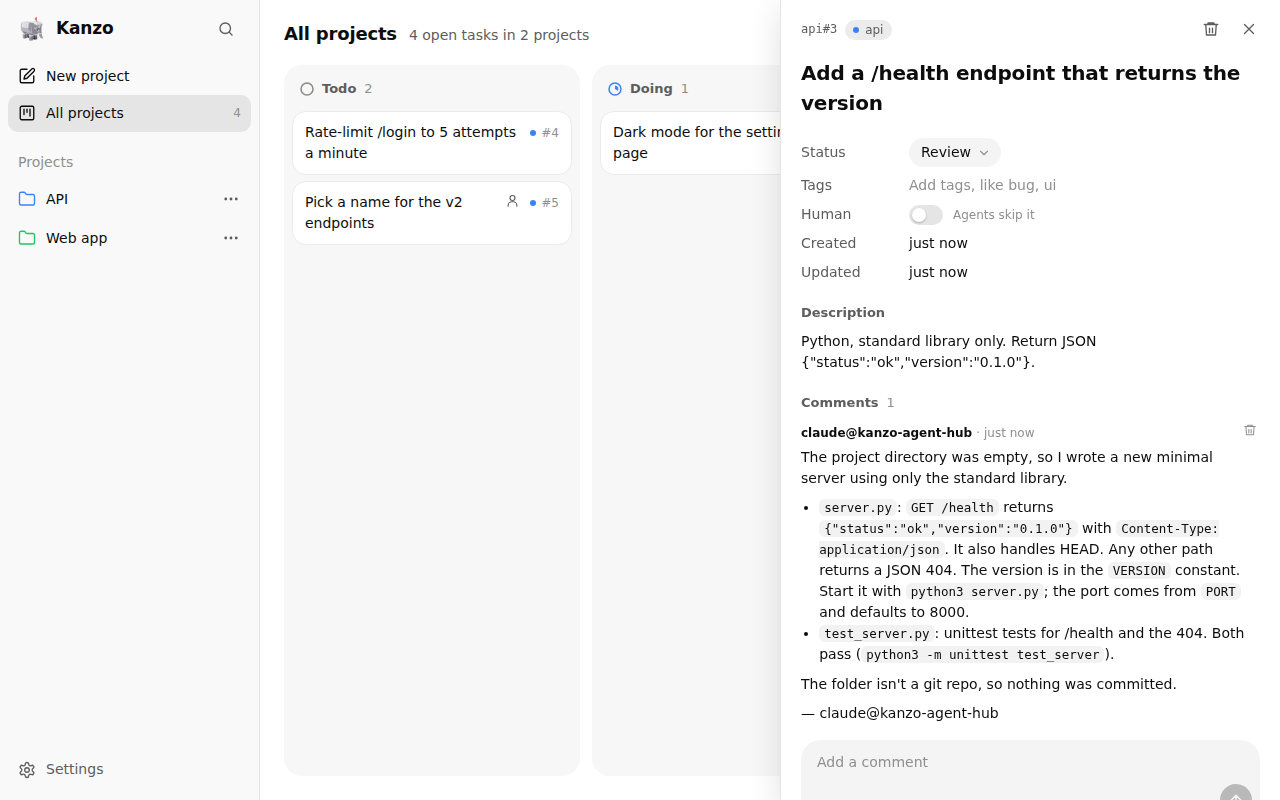
The card moves to Doing on your board within seconds, then to Review with the agent's notes. Over HTTP, Kanzo can't see which folder the agent is in, so name the project; and it signs comments with whatever name the agent gives, so ask for one per agent.
Other things to ask:
Break the README's roadmap into kanzo tasks in project web, one per feature, tagged ui or api.
What's in review on kanzo? Summarize each task's last comment.
The nuts and bolts#
Happy with what Shelley set up? Stop here. Below are the steps it followed, and maintenance for later.
Set up by hand
Create the VM#
On your computer (pick another name if my-kanzo is taken):
ssh exe.dev new --name=my-kanzo
ssh my-kanzo.exe.xyz
Everything else runs on the VM.
Install Kanzo#
Kanzo's installer puts the program in ~/.cargo/bin, the one place it
can update itself:
curl -LsSf https://github.com/emanuele-em/kanzo/releases/download/v0.3.0/kanzo-installer.sh | sh
. ~/.cargo/env
kanzo --version
Expect kanzo 0.3.0. Keep it running as a systemd user service, started
at boot even when no one is logged in:
kanzo service install
sudo loginctl enable-linger exedev
The first run creates ~/kanzo, with the board in kanzo.db and
settings in config.toml. Kanzo listens on 127.0.0.1:4242 only; leave
it there.
Put it behind the exe.dev proxy#
Kanzo refuses requests addressed to any name but localhost and pages
from any origin but its own http:// one, to stop other websites from
reaching it through your browser. So nginx takes exe.dev's proxy traffic
on port 8000, does that check against the VM's HTTPS address instead,
and passes the request on as a local one. This replaces the image's
default site:
sudo tee /etc/nginx/sites-available/kanzo >/dev/null <<'EOF'
server {
    listen 8000 default_server;
    listen [::]:8000 default_server;
    server_name _;
    client_max_body_size 32m;
    location / {
        # exe.dev's proxy signs people in. Refuse pages from other sites,
        # then hand Kanzo a local request, which is all it accepts.
        set $same_site 0;
        if ($http_origin = "") { set $same_site 1; }
        if ($http_origin = "https://$host") { set $same_site 1; }
        if ($same_site = 0) { return 403; }
        proxy_pass http://127.0.0.1:4242;
        proxy_http_version 1.1;
        proxy_set_header Host localhost:4242;
        proxy_set_header Origin "";
        proxy_set_header Connection "";
        proxy_buffering off;
        proxy_read_timeout 1h;
    }
}
EOF
sudo rm -f /etc/nginx/sites-enabled/default
sudo ln -sf /etc/nginx/sites-available/kanzo /etc/nginx/sites-enabled/kanzo
sudo nginx -t && sudo systemctl enable --now nginx && sudo systemctl reload nginx
Check it#
As exe.dev's proxy reaches it: the board, a write from the board's own page, a write from another site's page, and MCP:
H="Host: $(hostname).exe.xyz"; J='Content-Type: application/json'
curl -s -o /dev/null -w 'board %{http_code}\n' -H "$H" http://localhost:8000/
curl -s -o /dev/null -w 'same site %{http_code}\n' -H "$H" -H "$J" \
  -H "Origin: https://$(hostname).exe.xyz" -d '{"slug":"setup-check"}' http://localhost:8000/api/projects
curl -s -o /dev/null -w 'other site %{http_code}\n' -H "$H" -H "$J" \
  -H 'Origin: https://example.com' -d '{"slug":"nope"}' http://localhost:8000/api/projects
curl -s -o /dev/null -w 'mcp %{http_code}\n' -H "$H" -H "$J" -H 'Accept: application/json, text/event-stream' \
  -d '{"jsonrpc":"2.0","id":1,"method":"initialize","params":{"protocolVersion":"2025-06-18","capabilities":{},"clientInfo":{"name":"check","version":"1"}}}' \
  http://localhost:8000/mcp
curl -s -o /dev/null -w 'cleanup %{http_code}\n' -X DELETE http://localhost:4242/api/projects/setup-check
Expect 200, 200, 403, 200 and 200.
Back up nightly#
This script copies the board with sqlite3 .backup (safe while Kanzo
and agents write), checks the copy, adds the settings and pasted images,
and keeps the 14 newest:
mkdir -p ~/bin ~/backups
cat > ~/bin/kanzo-backup <<'EOF'
#!/bin/bash
# Back up ~/kanzo to ~/backups/kanzo-<time>.tar.gz. Keeps the 14 newest.
set -euo pipefail
umask 077
work=$(mktemp -d)
trap 'rm -rf "$work"' EXIT
sqlite3 "$HOME/kanzo/kanzo.db" ".backup '$work/kanzo.db'"
[ "$(sqlite3 "$work/kanzo.db" 'PRAGMA integrity_check')" = ok ]
cp "$HOME/kanzo/config.toml" "$work/"
[ -d "$HOME/kanzo/images" ] && cp -r "$HOME/kanzo/images" "$work/"
out="$HOME/backups/kanzo-$(date -u +%Y%m%d-%H%M%S).tar.gz"
tar -czf "$out.part" -C "$work" .
mv "$out.part" "$out"
ls -1t "$HOME"/backups/kanzo-*.tar.gz | tail -n +15 | xargs -r rm --
echo "$out"
EOF
chmod +x ~/bin/kanzo-backup
Run it nightly, around 03:30 UTC:
sudo tee /etc/systemd/system/kanzo-backup.service >/dev/null <<'EOF'
[Unit]
Description=Back up the Kanzo board to ~/backups

[Service]
Type=oneshot
User=exedev
ExecStart=/home/exedev/bin/kanzo-backup
EOF
sudo tee /etc/systemd/system/kanzo-backup.timer >/dev/null <<'EOF'
[Unit]
Description=Back up the Kanzo board nightly

[Timer]
OnCalendar=*-*-* 03:30:00 UTC
RandomizedDelaySec=15m
Persistent=true

[Install]
WantedBy=timers.target
EOF
sudo systemctl daemon-reload
sudo systemctl enable --now kanzo-backup.timer
Make one now and check that it opens, in a scratch directory:
backup=$(~/bin/kanzo-backup)
rm -rf /tmp/restore-check && mkdir /tmp/restore-check
tar -xzf "$backup" -C /tmp/restore-check
sqlite3 /tmp/restore-check/kanzo.db 'PRAGMA integrity_check; SELECT count(*) FROM projects;'
rm -rf /tmp/restore-check
Expect ok and a number of projects. Copy ~/backups off the VM now
and then; otherwise the VM's disk holds the only copy.
Back up and restore
On the VM, ~/bin/kanzo-backup backs up now and prints the archive's
path. To copy the backups to your computer:
scp 'my-kanzo.exe.xyz:backups/kanzo-*.tar.gz' .
To restore one, on the VM, stop Kanzo, set the current board aside, and unpack:
backup=~/backups/kanzo-20261102-033012.tar.gz
systemctl --user stop kanzo
mv ~/kanzo ~/kanzo.before-restore-$(date +%s)
mkdir ~/kanzo && tar -xzf "$backup" -C ~/kanzo
systemctl --user start kanzo
On a new VM, follow Set up by hand first, then copy
the archive over with scp and restore it the same way. Delete
~/kanzo.before-restore-* once you're happy.
Kanzo can also keep the board in a private git repository of yours
(kanzo sync). That's meant for carrying a board between computers you
use one at a time, not for a board several computers use at once.
Update
Back up first. Then, on the VM:
kanzo update
It installs the latest release over ~/.cargo/bin/kanzo and restarts the
service. The board's sidebar offers new versions too, with one click.
Kanzo is pre-1.0 and releases often; read the
release notes before
updating a board you rely on.
Something not working?
On the VM, Kanzo's status and log, and nginx's:
systemctl --user status kanzo --no-pager
journalctl --user -u kanzo -n 50 --no-pager
sudo tail -n 20 /var/log/nginx/error.log
kanzo does not answer requests from other sites. The request
reached Kanzo without going through nginx, for example at
https://my-kanzo.exe.xyz:4242/. Use https://my-kanzo.exe.xyz/.
A plain 403 Forbidden from nginx. A page from another site, or an
address other than https://my-kanzo.exe.xyz, tried to change the board.
A custom domain needs its own if ($http_origin = ...) line.
An agent gets 401 or an HTML login page. No valid token reached
exe.dev. Check the header name, the Bearer before the token, and that
the token is for this VM and hasn't expired.
nginx won't start. Something else listens on port 8000:
sudo ss -ltnp | grep ':8000' shows what. Stop it, or move it to
another port, then sudo systemctl restart nginx.
502 Bad Gateway. Kanzo isn't running: check its status and log
above, then systemctl --user restart kanzo.
The agent says to pass project. Over HTTP, Kanzo can't tell which
repository the agent is in. Name the project in your request, or ask the
agent to call list_projects.
Frequently asked questions#
What is Kanzo?
A kanban board and an MCP server in one 4.5 MB Rust program, by Emanuele Micheletti, first released in October 2026. You use the board in a browser; agents take tasks, move cards and comment over MCP. It's young and changes daily: this page was tested with 0.3.0.
Kanzo can share a board by itself. Why put it behind exe.dev?
Kanzo's sharing (kanzo share on, kanzo join) has no logins: anyone who can reach the port can read and change the board, so its README says to share only on a network you trust. On exe.dev, the board and its MCP endpoint answer only you, people you share the VM with, and agents holding a VM token or a VM-to-VM integration.
Can I use kanzo join from my laptop instead?
Not through exe.dev's proxy: kanzo join speaks plain HTTP to an address and can't send a token. Put the VM and your computers on Tailscale, turn on sharing on the VM, and join its Tailscale address; anyone on your tailnet then has the board, with no login. Connecting agents over MCP, as above, needs neither.
Does Kanzo know who changed what?
Not by itself. Comments from the board are signed "me", whoever is signed in, and comments over HTTP MCP are signed with the name the agent gives, so ask agents to sign theirs. exe.dev's proxy does know who called (X-ExeDev-Email, X-Exedev-Source-Vm), but Kanzo doesn't record it.
How do agents know which project to use?
An agent running kanzo mcp on its own computer finds the project from its repository's git remote. Over HTTP, Kanzo can't see the agent's folder, so the agent has to name the project; Kanzo tells it so and lists them. Say "in project api" in your request.
What does it cost?
Kanzo is free (AGPL-3.0) and runs no model, so just your VM plan; it uses a few megabytes of memory and can share a VM with other things. Your agents' model use bills wherever those agents run.
Updated Nov 2, 2026 · tested end to end Nov 2, 2026 · Markdown · manifest.json · Something wrong? Tell us