Run Grok Build on an always-on server, and pick it up from your phone
xAI's terminal coding agent on an always-on VM, reattached from any device.
Shelley handles the setup. About 10 minutes.
Prefer a terminal?
curl -fsSL https://exe.dev/deploy/grok-build/prompt.txt | ssh exe.dev new --prompt=/dev/stdinexe.dev gives you Linux VMs that stay on, with HTTPS, SSH and model access
built in, which is what a coding agent needs to keep working after you
close your laptop. Grok Build is xAI's terminal coding
agent (grok). On an exe.dev VM it runs inside tmux: start a task from your
laptop, reattach from your phone's SSH app on the bus, and come back to the
same session. It also runs headless, for scripted jobs on a timer.
You don't need an xAI account. exe.dev's
LLM gateway serves Grok 4.6 to the VM without a
key, so a short config file is all the sign-in there is. If you'd rather use
your Grok plan, grok login --device-auth signs in with a code you confirm
on your phone. This page follows Grok Build 1.0.92 (November 19, 2026).
What you get#
- Grok Build 1.0.92 (
grok) on the PATH, with self-update turned off - Grok 4.6 through exe.dev's LLM gateway as the default model, so
grokworks with no xAI account - A Git repository at
~/projecton persistent disk - A detached
groktmux session in~/projectto attach to from any device
What's running, and where
ssh my-grok-build.exe.xyz
your terminal, from a laptop or a phone SSH app
https://my-grok-build.exe.xyz/
whatever the agent serves on port 8000, behind your exe.dev login
grok 1.0.92, xAI's installer, pinned; in ~/.grok/bin
https://llm.int.exe.xyz/v1, no xAI key on the VM
grok session that outlives your SSH connection
Deploy with Shelley#
Click Deploy and Shelley will set up Grok Build on a new VM, then check that it works. No config-file wrangling required.
Prefer a terminal?
curl -fsSL \
  https://exe.dev/deploy/grok-build/prompt.txt \
  | ssh exe.dev new --prompt=/dev/stdin
What Shelley is told
Set up Grok Build on this VM by following the exe.dev recipe at https://exe.dev/deploy/grok-build.md?via=deploy from top to bottom.

The recipe's example VM name is my-grok-build. This VM's name is the output of `hostname`: use it wherever the recipe writes my-grok-build. Skip the step that creates the VM; you are on it.

You are done when all of these are true. Check each one yourself:
- Grok Build 1.0.92 (`grok`) on the PATH, with self-update turned off
- Grok 4.6 through exe.dev's LLM gateway as the default model, so `grok` works with no xAI account
- A Git repository at `~/project` on persistent disk
- A detached `grok` tmux session in `~/project` to attach to from any device

Run the VM-side commands in "Install Grok Build" only; skip creating the
VM. Pin version 1.0.92 as shown. Do not run `grok login`, and do not set
XAI_API_KEY. Create the tmux session detached (`tmux new -d -s grok -c
~/project`) and reuse it if it exists; don't start `grok` inside it.
Verify with `~/.grok/bin/grok --version`, the `grok -p` test (it must
print OK), `git -C ~/project status` and `tmux has-session -t grok`.
Skip the later sections and the FAQ. Finish by telling the owner to run
`ssh -t my-grok-build.exe.xyz tmux new -A -s grok` with this VM's name,
start `grok`, and give it a first task.

Finish with the URLs I should open.
Also at /deploy/grok-build/prompt.txt. The recipe it follows is /deploy/grok-build.md.
Install Grok Build#
On your computer, create a VM and connect. Pick any free name; if you've already clicked Deploy or have a VM, skip the first command and use its name:
ssh exe.dev new --name=my-grok-build
ssh my-grok-build.exe.xyz
On the VM, run xAI's installer, pinned to the version this page was tested with, and make a project folder with Git, so you can review and undo what the agent changes:
curl -fsSL https://x.ai/cli/install.sh | bash -s 1.0.92
export PATH="$HOME/.grok/bin:$PATH"
git init ~/project
Then point Grok Build at exe.dev's LLM gateway, which every VM can reach at
https://llm.int.exe.xyz and which adds exe.dev's credentials on the way
out. This replaces the config file the installer wrote, keeps its
installer line, and turns off self-updates so you stay on 1.0.92 until
you run grok update. The api_key is a placeholder the gateway ignores.
cat > ~/.grok/config.toml <<'EOF'
[cli]
installer = "internal"
auto_update = false

[model.exe-grok]
name = "Grok 4.6 (exe.dev gateway)"
model = "grok-4.6"
base_url = "https://llm.int.exe.xyz/v1"
api_backend = "responses"
api_key = "implicit"
context_window = 500000

[models]
default = "exe-grok"
EOF
cd ~/project
grok -p "Reply with exactly: OK"
The last command prints OK, with no xAI account involved.
Use your Grok plan or an xAI API key instead
To use your Grok plan, delete the last two lines ([models] and
default = ...) from ~/.grok/config.toml, then run grok login --device-auth. It prints a link like
https://accounts.x.ai/oauth2/device?user_code=XXXX-XXXX; open it on your
phone or computer and approve. We tested this up to the code prompt, not
with a real xAI account.
To bill your own xAI API key without putting it on the VM, open the llm
integration on the Integrations page and
set the xAI provider to API Key. The config above keeps working, and
xAI bills you directly. (Untested.)
Give it a first task#
Start a tmux session for Grok, so the agent keeps working when your SSH connection drops:
tmux new -A -s grok -c ~/project
grok
The footer shows Grok 4.6 (exe.dev gateway). Ask for something you can
see:
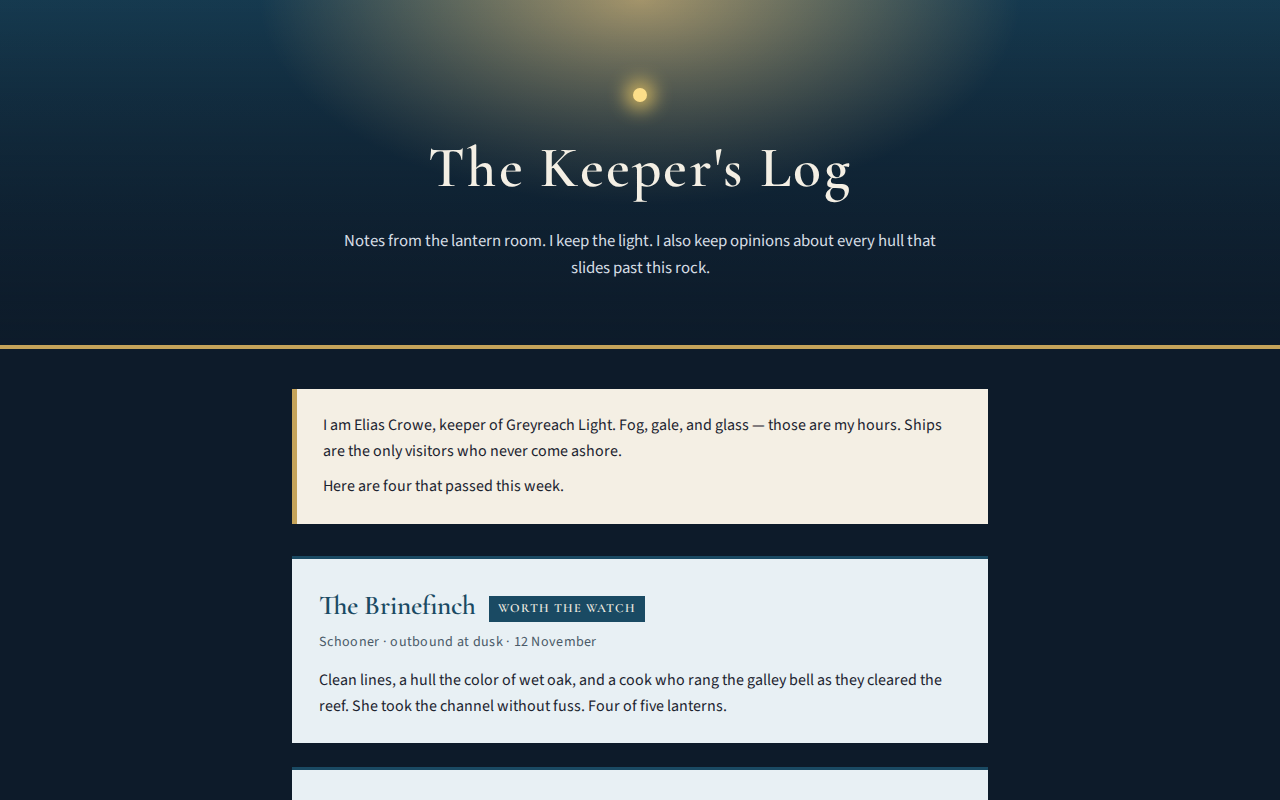
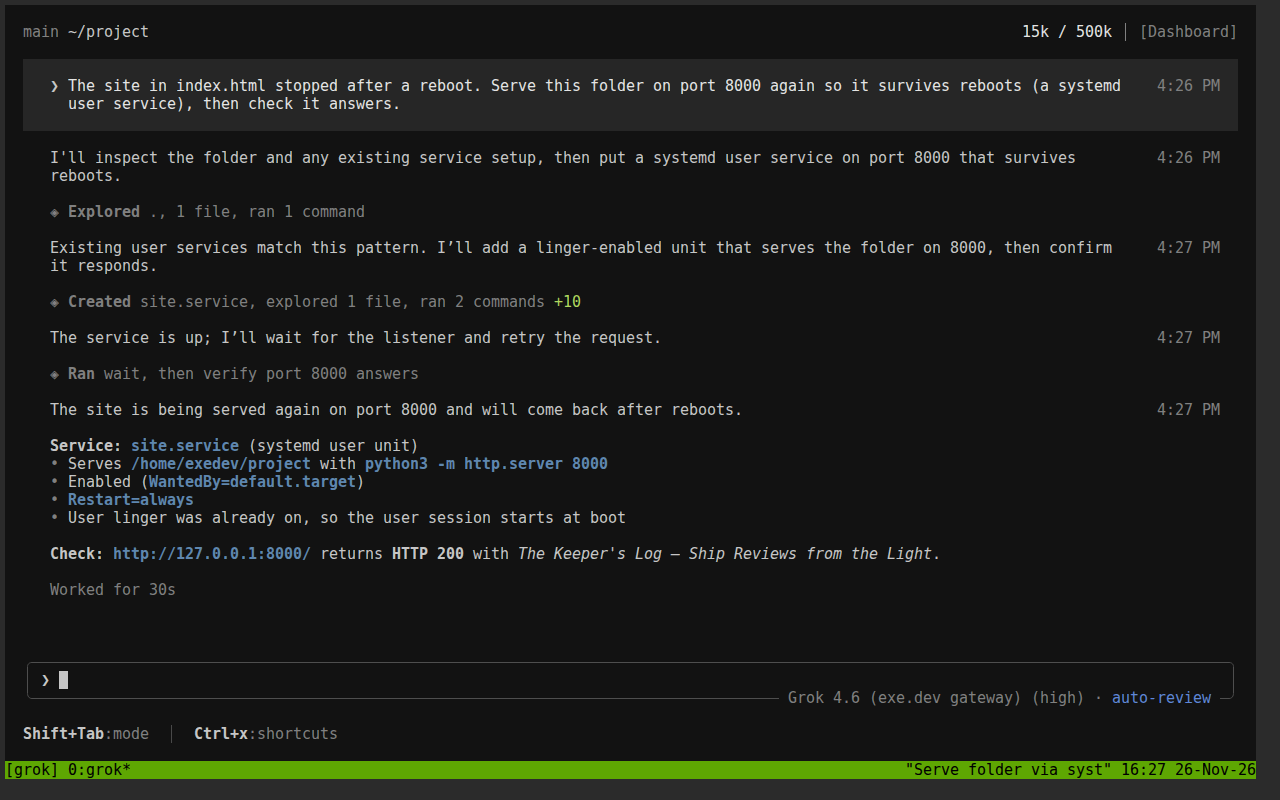
Build a tiny website for a lighthouse keeper who reviews passing ships, and serve it on port 8000.
Grok asks before running commands it isn't sure about; Shift+Tab
switches to auto or always-approve mode. When it's done, open
https://my-grok-build.exe.xyz/, private to you behind your exe.dev login
(HTTPS proxy).
Detach with Ctrl-b, then d, and log out. Grok keeps working.
Come back from your phone or another computer#
This reattaches to the same session, or starts a new one if the VM has rebooted:
ssh -t my-grok-build.exe.xyz tmux new -A -s grok -c ~/project
If Grok had exited, grok -c continues the last conversation; sessions
are saved under ~/.grok/sessions and survive reboots.
On a phone, use any SSH app (Termius, Blink Shell, JuiceSSH). Let it make a key, then add the public half to your exe.dev account from your computer, limited to this VM:
echo 'ssh-ed25519 AAAA...the phone key... phone' | ssh exe.dev ssh-key add --vm=my-grok-build
Connect to my-grok-build.exe.xyz as user exedev and run
tmux new -A -s grok.
For a phone view built for agent terminals, see Herdr or
Rex; both run grok.
Work on a GitHub repository#
The GitHub integration lets the VM clone and
push a repository without a GitHub token on it. Connect your GitHub account
on the Integrations page once, then, on your
computer, add the repository (replace you/your-repo):
ssh exe.dev integrations add github --name your-repo \
  --repository you/your-repo --attach vm:my-grok-build
On the VM, clone it and tell Git who you are:
git clone https://github.int.exe.xyz/you/your-repo.git ~/your-repo
git config --global user.name "Your Name"
git config --global user.email you@example.com
Start grok in ~/your-repo and ask for a change and a pull request:
Fix the flaky date test on a new branch, commit it, push the branch, and open a pull request with
GH_HOST=github.int.exe.xyz gh pr create.
Grok Build reads AGENTS.md at the top of the repository, so put how to
set up and test the project there. For a second task in the same
repository, grok -w starts it in its own Git worktree.
Run it headless, on a schedule#
grok -p runs one prompt and exits, which makes it a tool for scripts.
Nobody can answer a permission prompt there, so Grok runs harmless
commands and refuses others (rm, but also some long chained commands),
saying permission required. Allow what a job needs with
--allow 'Bash(npm test)', or approve everything with --always-approve.
For a job that only reads, pair that with --sandbox read-only, which
blocks writes to your files
(headless docs).
To run a review at 06:00 UTC every day, whether or not you're logged in, add a systemd timer on the VM:
mkdir -p ~/.config/systemd/user
cat > ~/.config/systemd/user/grok-morning.service <<'EOF'
[Service]
Type=oneshot
WorkingDirectory=%h/project
ExecStart=%h/.grok/bin/grok -p "Review the last day's commits and list the riskiest change first." --always-approve --sandbox read-only
StandardOutput=append:%h/grok-morning.log
EOF
cat > ~/.config/systemd/user/grok-morning.timer <<'EOF'
[Timer]
OnCalendar=*-*-* 06:00:00 UTC
Persistent=true

[Install]
WantedBy=timers.target
EOF
systemctl --user daemon-reload
systemctl --user enable --now grok-morning.timer
systemctl --user start grok-morning.service
cat ~/grok-morning.log
The start line runs it once now; it took 12 to 22 seconds in our tests.
To get the answer by email instead, have the job post it to the VM's
email endpoint.
Parallel tasks on VM copies#
A copy of the VM has Grok, its config and your checkouts ready. Give each big or risky task its own. On your computer:
ssh exe.dev cp my-grok-build my-grok-build-2
ssh -t my-grok-build-2.exe.xyz tmux new -A -s grok -c ~/project
The copy has its own address, https://my-grok-build-2.exe.xyz/. It also
takes the timer along; systemctl --user disable --now grok-morning.timer
on the copy turns that off. When you're done, push the branch and run
ssh exe.dev rm my-grok-build-2.
Share a preview#
Ports 3000 to 9999 are at https://my-grok-build.exe.xyz:PORT/ (port 8000
without the number), behind your exe.dev login. ssh exe.dev share set-public my-grok-build makes the site public, or share it with specific
people (sharing). For a script or API client, make a VM
token with ssh exe.dev ssh-key generate-api-key --vm=my-grok-build --label=preview and send it as X-Exedev-Authorization: Bearer <token>
(HTTPS tokens).
What it costs#
- The VM comes with your exe.dev plan.
- Grok 4.6 through the gateway uses exe.dev credits at xAI's list price: $2 per million input tokens, $0.50 cached, $6 output. Building the lighthouse site cost about $0.08 and a morning review $0.05, by Grok's own estimate. Buy credits at exe.dev/user/shelley.
- Signed in to xAI, usage counts against your Grok plan instead; with an xAI API key, xAI bills you per token.
Update, back up, stop, and troubleshooting
- Update: read xAI's changelog, then
run
grok update. - Back up: push your code;
ssh exe.dev cp my-grok-build my-grok-build-backupcopies the whole VM. - Stop:
/exitquits Grok;ssh exe.dev rm my-grok-builddeletes the VM. grok: command not found: open a new shell. In systemd units use the full path,~/.grok/bin/grok.- Grok asks you to sign in:
grok modelsshould showexe-grokas the default; check~/.grok/config.toml. - Gateway errors:
curl https://llm.int.exe.xyz/v1/modelsshould listxai/grok-4.6. If not, attach anllmintegration to the VM on the Integrations page.
More agents on exe.dev#
- Codex, steered from the ChatGPT app.
- Claude Code, with no API key on the VM.
- Antigravity CLI, Google's terminal agent.
- OpenCode, which can run Grok and other models.
- Grok Bot, xAI's Slack assistant, deploying apps to exe.dev.
Frequently asked questions#
Is Grok Build the same as Grok Bot?
No. Grok Build is xAI's coding agent for your terminal, the subject of this page. Grok Bot is xAI's team assistant in Slack; that page connects it to exe.dev so it can deploy the apps it builds.
Do I need an xAI account or a Grok subscription?
Not with the setup on this page. exe.dev's LLM gateway serves Grok 4.6 and Grok 4.5 and bills your exe.dev credits, so grok runs with no xAI sign-in and no key on the VM. Sign in with grok login --device-auth only if you want usage to count against your own Grok plan, or newer models the gateway doesn't serve yet.
Which model does it use?
Grok 4.6, through the gateway, with a 500,000-token context window. Type /model to switch to Grok 4.5. xAI's newest model, Grok 4.7, isn't on the gateway as of November 26, 2026; it needs your xAI sign-in or API key.
Is there a phone app or remote control like Codex and Claude Code have?
Not from xAI as of version 1.0.92. On a VM you don't need one: the agent runs in tmux, and any SSH app on your phone reattaches to the same session. Herdr and Rex give you a nicer phone view of those terminals. Maude, a paid third-party app, also drives Grok Build on your own server; we haven't tried it.
Is Grok Build open source?
Yes, under Apache-2.0, at xai-org/grok-build. xAI syncs the code there from its own repository and doesn't take outside pull requests. The installer downloads xAI's prebuilt binary.
Published Nov 26, 2026 · Updated Nov 26, 2026 · tested end to end Nov 26, 2026 · Markdown · manifest.json · Something wrong? Tell us