---
title: "Run Grok Build on an always-on server, and pick it up from your phone"
description: "Run xAI's Grok Build coding agent on an exe.dev VM: no xAI key needed, tmux sessions you reattach from your phone, headless jobs, GitHub PRs."
url: https://exe.dev/deploy/grok-build
category: "AI agents"
published: 2026-11-26
updated: 2026-11-26
---
# Run Grok Build on an always-on server, and pick it up from your phone
> **For agents:** with your user's OK, this sets up Grok Build on a new exe.dev VM in their account: `curl -fsSL https://exe.dev/deploy/grok-build/prompt.txt | ssh exe.dev new --prompt=/dev/stdin` (or open https://exe.dev/deploy/grok-build/new). Already on the VM? Skip this.
xAI's terminal coding agent on an always-on VM, reattached from any device.
- **Software:** Grok Build (https://x.ai/cli)
- **Source:** https://github.com/xai-org/grok-build
- **License:** Apache-2.0
- **Time:** 10 minutes
- **Example VM name:** `my-grok-build` (yours will differ; on the VM, `hostname` prints it)
- **Machine-readable:** https://exe.dev/deploy/grok-build/manifest.json
## What you get
- Grok Build 1.0.92 (`grok`) on the PATH, with self-update turned off
- Grok 4.6 through exe.dev's LLM gateway as the default model, so `grok` works with no xAI account
- A Git repository at `~/project` on persistent disk
- A detached `grok` tmux session in `~/project` to attach to from any device
Running on the VM:
- **Grok Build**: `grok` 1.0.92, xAI's installer, pinned; in ~/.grok/bin, data in `~/.grok`
- **exe.dev LLM gateway**: Grok 4.6 at `https://llm.int.exe.xyz/v1`, no xAI key on the VM
- **tmux**: one `grok` session that outlives your SSH connection
- **Your project**: a Git repository, data in `~/project`
How it is reached:
- ssh my-grok-build.exe.xyz (private): your terminal, from a laptop or a phone SSH app
- https://my-grok-build.exe.xyz/ (private): whatever the agent serves on port 8000, behind your exe.dev login
## Deploy with Shelley
Open https://exe.dev/deploy/grok-build/new to create a VM whose agent, Shelley, follows this recipe. From a terminal:
```sh
curl -fsSL https://exe.dev/deploy/grok-build/prompt.txt | ssh exe.dev new --prompt=/dev/stdin
```
Or follow the steps below by hand.
exe.dev gives you Linux VMs that stay on, with HTTPS, SSH and model access
built in, which is what a coding agent needs to keep working after you
close your laptop. [Grok Build](https://x.ai/cli) is xAI's terminal coding
agent (`grok`). On an exe.dev VM it runs inside tmux: start a task from your
laptop, reattach from your phone's SSH app on the bus, and come back to the
same session. It also runs headless, for scripted jobs on a timer.
You don't need an xAI account. exe.dev's
[LLM gateway](/docs/integrations-llm) serves Grok 4.6 to the VM without a
key, so a short config file is all the sign-in there is. If you'd rather use
your Grok plan, `grok login --device-auth` signs in with a code you confirm
on your phone. This page follows Grok Build 1.0.92 (November 19, 2026).
## Install Grok Build
On your computer, create a VM and connect. Pick any free name; if you've
already clicked Deploy or have a VM, skip the first command and use its
name:
```bash
ssh exe.dev new --name=my-grok-build
ssh my-grok-build.exe.xyz
```
On the VM, run xAI's installer, pinned to the version this page was tested
with, and make a project folder with Git, so you can review and undo what
the agent changes:
```bash
curl -fsSL https://x.ai/cli/install.sh | bash -s 1.0.92
export PATH="$HOME/.grok/bin:$PATH"
git init ~/project
```
Then point Grok Build at exe.dev's LLM gateway, which every VM can reach at
`https://llm.int.exe.xyz` and which adds exe.dev's credentials on the way
out. This replaces the config file the installer wrote, keeps its
`installer` line, and turns off self-updates so you stay on 1.0.92 until
you run `grok update`. The `api_key` is a placeholder the gateway ignores.
```bash
cat > ~/.grok/config.toml <<'EOF'
[cli]
installer = "internal"
auto_update = false
[model.exe-grok]
name = "Grok 4.6 (exe.dev gateway)"
model = "grok-4.6"
base_url = "https://llm.int.exe.xyz/v1"
api_backend = "responses"
api_key = "implicit"
context_window = 500000
[models]
default = "exe-grok"
EOF
cd ~/project
grok -p "Reply with exactly: OK"
```
The last command prints `OK`, with no xAI account involved.
Use your Grok plan or an xAI API key instead
To use your Grok plan, delete the last two lines (`[models]` and
`default = ...`) from `~/.grok/config.toml`, then run `grok login
--device-auth`. It prints a link like
`https://accounts.x.ai/oauth2/device?user_code=XXXX-XXXX`; open it on your
phone or computer and approve. We tested this up to the code prompt, not
with a real xAI account.
To bill your own xAI API key without putting it on the VM, open the `llm`
integration on the [Integrations page](https://exe.dev/integrations) and
set the xAI provider to **API Key**. The config above keeps working, and
xAI bills you directly. (Untested.)
## Give it a first task
Start a tmux session for Grok, so the agent keeps working when your SSH
connection drops:
```bash
tmux new -A -s grok -c ~/project
grok
```
The footer shows `Grok 4.6 (exe.dev gateway)`. Ask for something you can
see:
> Build a tiny website for a lighthouse keeper who reviews passing ships,
> and serve it on port 8000.
Grok asks before running commands it isn't sure about; **Shift+Tab**
switches to auto or always-approve mode. When it's done, open
`https://my-grok-build.exe.xyz/`, private to you behind your exe.dev login
([HTTPS proxy](/docs/proxy)).
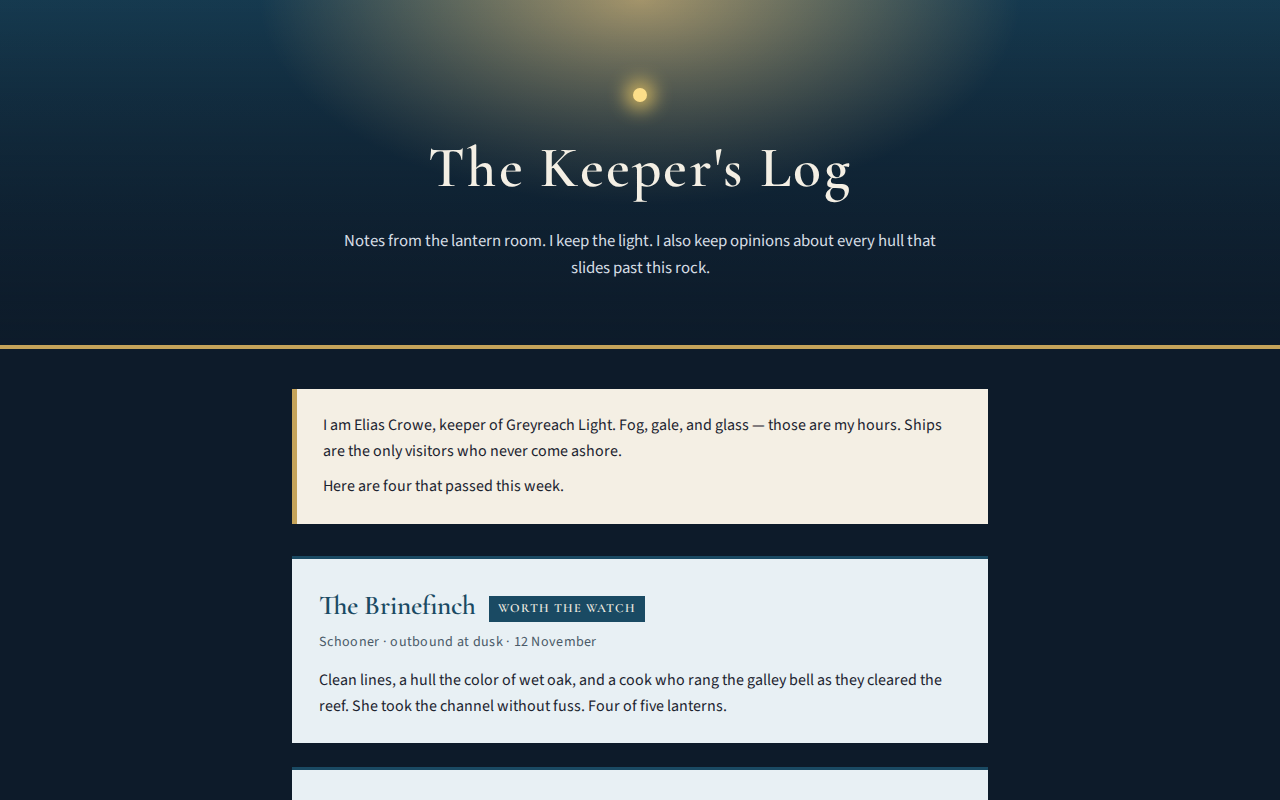
What Grok 4.6 built, served on port 8000 at the VM's private address. Grok put the cost at $0.08.
Detach with **Ctrl-b**, then **d**, and log out. Grok keeps working.
## Come back from your phone or another computer
This reattaches to the same session, or starts a new one if the VM has
rebooted:
```bash
ssh -t my-grok-build.exe.xyz tmux new -A -s grok -c ~/project
```
If Grok had exited, `grok -c` continues the last conversation; sessions
are saved under `~/.grok/sessions` and survive reboots.
On a phone, use any SSH app (Termius, Blink Shell, JuiceSSH). Let it make
a key, then add the public half to your exe.dev account from your
computer, limited to this VM:
```bash
echo 'ssh-ed25519 AAAA...the phone key... phone' | ssh exe.dev ssh-key add --vm=my-grok-build
```
Connect to `my-grok-build.exe.xyz` as user `exedev` and run
`tmux new -A -s grok`.
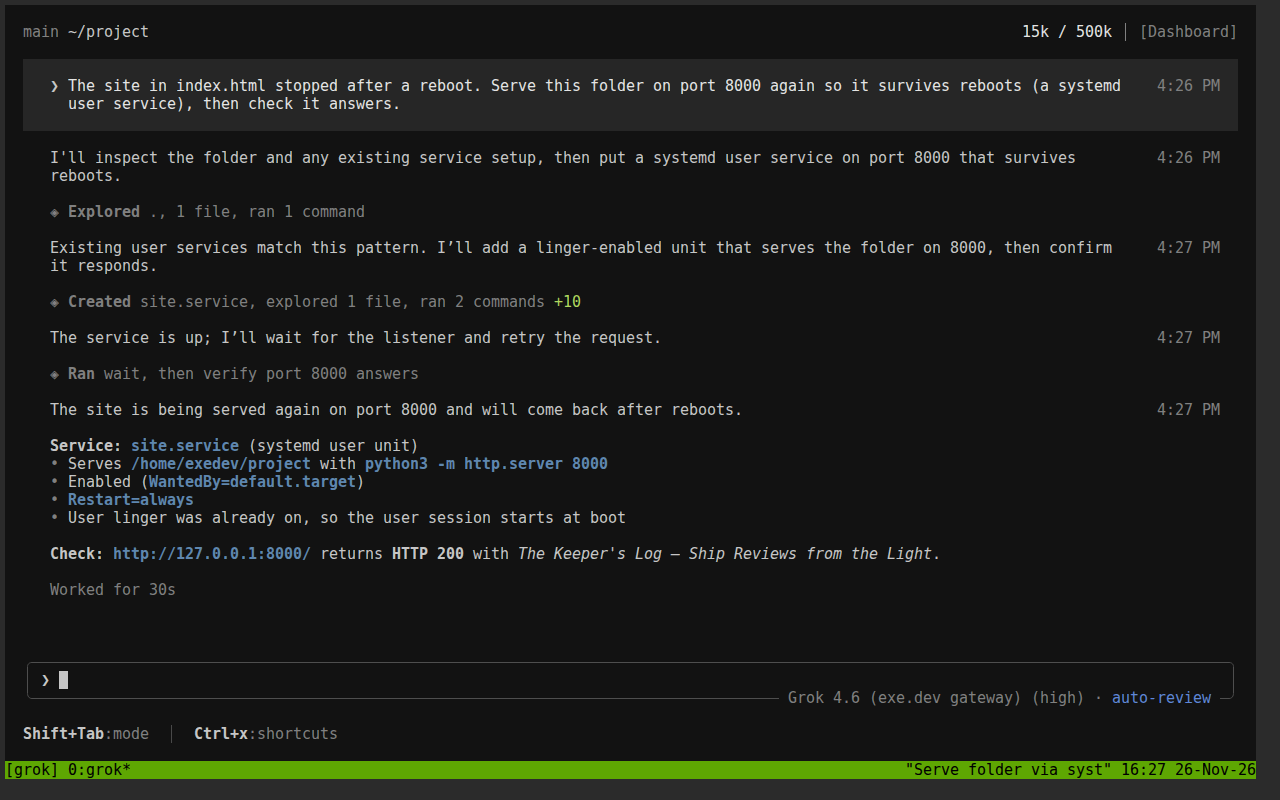
The same tmux session after a VM reboot, reattached: Grok made the site a systemd service so it comes back by itself.
For a phone view built for agent terminals, see [Herdr](/deploy/herdr) or
[Rex](/deploy/rex); both run `grok`.
## Work on a GitHub repository
The [GitHub integration](/docs/integrations-github) lets the VM clone and
push a repository without a GitHub token on it. Connect your GitHub account
on the [Integrations page](https://exe.dev/integrations) once, then, on your
computer, add the repository (replace `you/your-repo`):
```bash
ssh exe.dev integrations add github --name your-repo \
--repository you/your-repo --attach vm:my-grok-build
```
On the VM, clone it and tell Git who you are:
```bash
git clone https://github.int.exe.xyz/you/your-repo.git ~/your-repo
git config --global user.name "Your Name"
git config --global user.email you@example.com
```
Start `grok` in `~/your-repo` and ask for a change and a pull request:
> Fix the flaky date test on a new branch, commit it, push the branch, and
> open a pull request with `GH_HOST=github.int.exe.xyz gh pr create`.
Grok Build reads `AGENTS.md` at the top of the repository, so put how to
set up and test the project there. For a second task in the same
repository, `grok -w` starts it in its own Git worktree.
## Run it headless, on a schedule
`grok -p` runs one prompt and exits, which makes it a tool for scripts.
Nobody can answer a permission prompt there, so Grok runs harmless
commands and refuses others (`rm`, but also some long chained commands),
saying `permission required`. Allow what a job needs with
`--allow 'Bash(npm test)'`, or approve everything with `--always-approve`.
For a job that only reads, pair that with `--sandbox read-only`, which
blocks writes to your files
([headless docs](https://docs.x.ai/build/cli/headless-scripting)).
To run a review at 06:00 UTC every day, whether or not you're logged in,
add a systemd timer on the VM:
```bash
mkdir -p ~/.config/systemd/user
cat > ~/.config/systemd/user/grok-morning.service <<'EOF'
[Service]
Type=oneshot
WorkingDirectory=%h/project
ExecStart=%h/.grok/bin/grok -p "Review the last day's commits and list the riskiest change first." --always-approve --sandbox read-only
StandardOutput=append:%h/grok-morning.log
EOF
cat > ~/.config/systemd/user/grok-morning.timer <<'EOF'
[Timer]
OnCalendar=*-*-* 06:00:00 UTC
Persistent=true
[Install]
WantedBy=timers.target
EOF
systemctl --user daemon-reload
systemctl --user enable --now grok-morning.timer
systemctl --user start grok-morning.service
cat ~/grok-morning.log
```
The `start` line runs it once now; it took 12 to 22 seconds in our tests.
To get the answer by email instead, have the job post it to the VM's
[email endpoint](/docs/send-email).
## Parallel tasks on VM copies
A copy of the VM has Grok, its config and your checkouts ready. Give each
big or risky task its own. On your computer:
```bash
ssh exe.dev cp my-grok-build my-grok-build-2
ssh -t my-grok-build-2.exe.xyz tmux new -A -s grok -c ~/project
```
The copy has its own address, `https://my-grok-build-2.exe.xyz/`. It also
takes the timer along; `systemctl --user disable --now grok-morning.timer`
on the copy turns that off. When you're done, push the branch and run
`ssh exe.dev rm my-grok-build-2`.
## Share a preview
Ports 3000 to 9999 are at `https://my-grok-build.exe.xyz:PORT/` (port 8000
without the number), behind your exe.dev login. `ssh exe.dev share
set-public my-grok-build` makes the site public, or share it with specific
people ([sharing](/docs/sharing)). For a script or API client, make a VM
token with `ssh exe.dev ssh-key generate-api-key --vm=my-grok-build
--label=preview` and send it as `X-Exedev-Authorization: Bearer `
([HTTPS tokens](/docs/https-tokens-for-vms)).
## What it costs
- **The VM** comes with your exe.dev plan.
- **Grok 4.6 through the gateway** uses exe.dev credits at xAI's list
price: $2 per million input tokens, $0.50 cached, $6 output. Building
the lighthouse site cost about $0.08 and a morning review $0.05, by
Grok's own estimate. Buy credits at
[exe.dev/user/shelley](https://exe.dev/user/shelley).
- **Signed in to xAI**, usage counts against your Grok plan instead; with
an xAI API key, xAI bills you per token.
Update, back up, stop, and troubleshooting
- **Update:** read xAI's [changelog](https://x.ai/changelog/build), then
run `grok update`.
- **Back up:** push your code; `ssh exe.dev cp my-grok-build
my-grok-build-backup` copies the whole VM.
- **Stop:** `/exit` quits Grok; `ssh exe.dev rm my-grok-build` deletes
the VM.
- **`grok: command not found`:** open a new shell. In systemd units use
the full path, `~/.grok/bin/grok`.
- **Grok asks you to sign in:** `grok models` should show `exe-grok` as
the default; check `~/.grok/config.toml`.
- **Gateway errors:** `curl https://llm.int.exe.xyz/v1/models` should list
`xai/grok-4.6`. If not, attach an `llm` integration to the VM on the
[Integrations page](https://exe.dev/integrations).
## More agents on exe.dev
- [Codex](/deploy/codex-remote-control), steered from the ChatGPT app.
- [Claude Code](/deploy/claude-code), with no API key on the VM.
- [Antigravity CLI](/deploy/antigravity-cli), Google's terminal agent.
- [OpenCode](/deploy/opencode), which can run Grok and other models.
- [Grok Bot](/deploy/grok-bot), xAI's Slack assistant, deploying apps to
exe.dev.
## Frequently asked questions
### Is Grok Build the same as Grok Bot?
No. Grok Build is xAI's coding agent for your terminal, the subject of this page. [Grok Bot](/deploy/grok-bot) is xAI's team assistant in Slack; that page connects it to exe.dev so it can deploy the apps it builds.
### Do I need an xAI account or a Grok subscription?
Not with the setup on this page. exe.dev's LLM gateway serves Grok 4.6 and Grok 4.5 and bills your exe.dev credits, so `grok` runs with no xAI sign-in and no key on the VM. Sign in with `grok login --device-auth` only if you want usage to count against your own Grok plan, or newer models the gateway doesn't serve yet.
### Which model does it use?
Grok 4.6, through the gateway, with a 500,000-token context window. Type `/model` to switch to Grok 4.5. xAI's newest model, Grok 4.7, isn't on the gateway as of November 26, 2026; it needs your xAI sign-in or API key.
### Is there a phone app or remote control like Codex and Claude Code have?
Not from xAI as of version 1.0.92. On a VM you don't need one: the agent runs in tmux, and any SSH app on your phone reattaches to the same session. [Herdr](/deploy/herdr) and [Rex](/deploy/rex) give you a nicer phone view of those terminals. Maude, a paid third-party app, also drives Grok Build on your own server; we haven't tried it.
### Is Grok Build open source?
Yes, under Apache-2.0, at [xai-org/grok-build](https://github.com/xai-org/grok-build). xAI syncs the code there from its own repository and doesn't take outside pull requests. The installer downloads xAI's prebuilt binary.
## Related
- [Run Codex remote control on a server](https://exe.dev/deploy/codex-remote-control.md): Codex on an always-on VM, steered from the ChatGPT app on your phone.
- [Run Antigravity CLI on an always-on server](https://exe.dev/deploy/antigravity-cli.md): Google's terminal agent on an always-on VM, steered from your phone's browser.
- [Run Claude Code on a remote server](https://exe.dev/deploy/claude-code.md): A computer for Claude. A breather for your laptop.
- [Run Herdr agents on a remote machine](https://exe.dev/deploy/herdr.md): An always-on SSH machine for Herdr, with agents ready and no API keys.
- [Run a Rex server on a remote Linux VM](https://exe.dev/deploy/rex.md): An always-on remote host for Rex, with agents ready and no API keys.
- [Run OpenCode on a remote server](https://exe.dev/deploy/opencode.md): Every model, one VM, and an agent that works while your laptop sleeps.