Run CLI-Anything on an always-on Linux VM
A Linux workbench where agents drive LibreOffice, Blender and Inkscape.
Shelley handles the setup. About 10 minutes.
Prefer a terminal?
curl -fsSL https://exe.dev/deploy/cli-anything/prompt.txt | ssh exe.dev new --prompt=/dev/stdinCLI-Anything gives AI agents a command line for software built for people: LibreOffice, Blender, GIMP, Inkscape, Audacity, Kdenlive, draw.io, n8n and about 80 others in its CLI-Hub. Each CLI keeps a project file, answers in JSON and hands the real work to the real app, so the spreadsheet, render or SVG at the end is what LibreOffice, Blender or Inkscape made.
This page sets up a VM as the workbench: LibreOffice, Blender and Inkscape
installed headless, their CLIs and skills ready for Claude Code and Codex,
and a private web page with everything the agents make. The agents use
exe.dev's LLM integration, so there's no API key
on the VM. The heavy apps, and everything the agents install along the way,
stay off your laptop, and the VM keeps working when your laptop sleeps.
Tested on November 19, 2026 with CLI-Anything at commit 34f5195,
CLI-Hub 0.4.1, Blender 4.5.16 LTS, LibreOffice 24.2.7, Inkscape 1.2.2,
Claude Code 2.1.327 and Codex 0.169.1.
What you get#
- LibreOffice, Blender 4.5 LTS and Inkscape installed and working headless
- The CLI-Anything CLIs for all three, plus
cli-hubto add more, on the agents'PATH - CLI-Anything skills for Claude Code and Codex, and the
/cli-anythingplugin for Claude Code - Claude Code and Codex using exe.dev's LLM integration, with no API key on the VM
- A
~/workbenchfolder whoseout/is served privately athttps://<vm>.exe.xyz/, back after a reboot
What's running, and where
https://my-cli-anything.exe.xyz/
the files the agents made (renders, PDFs, spreadsheets), behind exe.dev login
ssh my-cli-anything.exe.xyz
your terminal, where Claude Code and Codex run
Deploy with Shelley#
Click Deploy and Shelley will set up CLI-Anything on a new VM, then check that it works. No config-file wrangling required.
Prefer a terminal?
curl -fsSL \
  https://exe.dev/deploy/cli-anything/prompt.txt \
  | ssh exe.dev new --prompt=/dev/stdin
What Shelley is told
Set up CLI-Anything on this VM by following the exe.dev recipe at https://exe.dev/deploy/cli-anything.md?via=deploy from top to bottom.

The recipe's example VM name is my-cli-anything. This VM's name is the output of `hostname`: use it wherever the recipe writes my-cli-anything. Skip the step that creates the VM; you are on it.

You are done when all of these are true. Check each one yourself:
- LibreOffice, Blender 4.5 LTS and Inkscape installed and working headless
- The CLI-Anything CLIs for all three, plus `cli-hub` to add more, on the agents' `PATH`
- CLI-Anything skills for Claude Code and Codex, and the `/cli-anything` plugin for Claude Code
- Claude Code and Codex using exe.dev's LLM integration, with no API key on the VM
- A `~/workbench` folder whose `out/` is served privately at `https://<vm>.exe.xyz/`, back after a reboot

Run the setup script from "Set up by hand" (skip creating the VM; the
default disk is enough). If `exeuntu configure` reports an existing user
config, leave it alone. Check that the script's last lines print the
Blender, LibreOffice, Inkscape and cli-hub versions, the three
`cli-anything-*` paths, and `file server: HTTP 200`. Don't start an
agent task yourself and don't make the VM public. Finish by giving the
owner the files URL and the first prompt from "Try it", with this VM's name.

Finish with the URLs I should open.
Also at /deploy/cli-anything/prompt.txt. The recipe it follows is /deploy/cli-anything.md.
Try it#
On your computer, connect to the VM and start Claude Code (or codex) in
the workbench:
ssh my-cli-anything.exe.xyz
cd ~/workbench && claude
The first run asks for a theme and whether you trust the folder. Then ask for something real, naming the CLI:
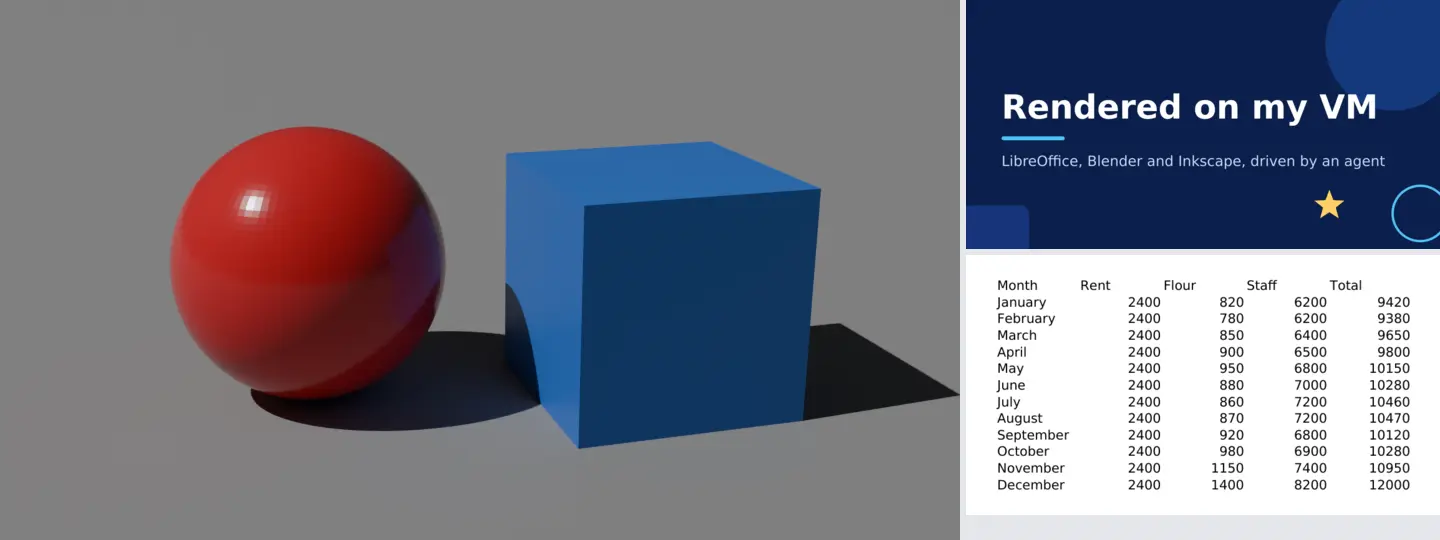
Use the cli-anything-blender CLI (read its skill first) to build a small scene: a matte grey floor, a glossy red sphere, a blue cube beside it, a sun light and a camera looking at both. Render it with Cycles at 960x540 with 32 samples to out/scene.png.
Use cli-anything-libreoffice to make a 2026 budget spreadsheet for a small bakery, one row per month with Rent, Flour, Staff and Total, and export it to out/bakery-budget.xlsx and out/bakery-budget.pdf.
Use cli-anything-inkscape to design a 1200x630 social card that says "Rendered on my VM", and export out/card.svg and out/card.png.
The agent reads the skill, runs the CLI step by step (you approve the
commands, or let it run), and checks the file it made. Each of these took
one to three minutes in our test. The project files (*.blend-cli.json,
*.lo-cli.json, *.inkscape-cli.json) stay in ~/workbench, so you can
ask for changes later: "make the sphere gold and render again".
Open https://my-cli-anything.exe.xyz/ to see the results. The page lists
~/workbench/out; PNGs and PDFs open in the browser, spreadsheets download.
~/workbench/AGENTS.md (Claude Code reads it as CLAUDE.md) tells the
agents where things are, where to put results, and the current
rough edges in the CLIs, so you don't have to repeat them in every prompt.
Shelley, at https://my-cli-anything.shelley.exe.xyz/,
can run the same CLIs if you'd rather work in a browser.
See and share the results#
https://my-cli-anything.exe.xyz/ is private: it asks for an exe.dev
login, and only you and people you share the VM with get in. To show a
colleague, run this on your computer:
ssh exe.dev share add my-cli-anything colleague@example.com
They get the web page, not a shell. share set-public would open it to
everyone; there's no reason to, unless the folder is meant for the world.
A script on your computer can fetch results with a token for this VM, which the proxy accepts instead of a login. On your computer:
ssh exe.dev ssh-key generate-api-key --vm=my-cli-anything --label=renders --exp=90d
It prints a token starting with exe1.. Save it in a file only you can
read, such as ~/.cli-anything-token with chmod 600. Then:
curl -fsS -H "X-Exedev-Authorization: Bearer $(cat ~/.cli-anything-token)" \
  -o scene.png https://my-cli-anything.exe.xyz/scene.png
Without the token, curl gets 401. The token opens only this VM's web
pages, not a shell. Tools that only do Basic auth can send
the token as the password (any user name).
Add more apps#
cli-hub lists every CLI and installs one into the same environment:
cli-hub list
cli-hub search audio
cli-hub info gimp
Install the app first, then its CLI and its skill. For GIMP:
sudo apt-get install -y gimp
cli-hub install gimp
cp -r ~/cli-anything/src/skills/cli-anything-gimp ~/.agents/skills/
ln -sfn ~/.agents/skills/cli-anything-gimp ~/.claude/skills/
cli-hub info <name> says what each one needs (sox for Audacity, melt
for Shotcut and Kdenlive). The agents can do this themselves: the
cli-hub-meta-skill they have tells them to look in CLI-Hub, so "Find a CLI
in CLI-Hub for this and use it" works, and on this VM they have sudo to
install the app. cli-hub install takes the CLI from CLI-Anything's
current main branch, not the pinned commit.
CLIs that call web services (Exa, Mailchimp, ComfyUI on another machine)
want an API key. Rather than putting it in the agent's environment, add an
HTTP proxy integration that injects the
key, and point the CLI at https://<name>.int.exe.xyz/; see
agent secrets.
Make a CLI for software that has none#
The Claude Code plugin is installed, so /cli-anything:cli-anything runs
CLI-Anything's seven phases: analyze the code, design the commands, build
a Click CLI, plan and write tests, document it, and install it. Give it a
local source folder or a repository URL, in a folder of its own:
mkdir -p ~/harnesses && cd ~/harnesses
git clone --depth 1 https://github.com/fukuchi/libqrencode qrencode
tmux new -s gen
claude
Then, in Claude Code:
/cli-anything:cli-anything ./qrencode
CLI-Anything's README also shows a shorter /cli-anything; in our test
Claude Code 2.1.327 didn't recognize it and the full name worked. The
wrapped program should be installed too (sudo apt-get install -y qrencode),
so the tests can run it; the agent installs it with sudo if you don't.
Our test build of a CLI for qrencode took 13 minutes and about $3.65 of
model usage. It wrote qrencode/agent-harness (a Click CLI with project
files, undo, JSON output, and 133 passing tests), installed
cli-anything-qrencode into ~/cli-anything/venv, and wrote a skill to
~/harnesses/skills/cli-anything-qrencode. Copy that skill to
~/.agents/skills/ and link it into ~/.claude/skills/, as in
Add more apps, and agents use the new CLI like the
others:
cli-anything-qrencode encode "https://exe.dev/" -o ~/workbench/out/qr.png -t png
Run builds in tmux and detach with Ctrl-b d; they keep going while
you're away. /cli-anything:refine
adds commands to an existing CLI, /cli-anything:validate checks one. In
Codex, say "Use CLI-Anything to build a harness for ./qrencode": the
Codex skill is installed too.
Apps that need a desktop#
Some CLIs drive an app that has to be open: Zotero's talks to the running Zotero, OBS Studio's to OBS's WebSocket, Obsidian's to its Local REST API plugin. For those, give the VM a desktop with the Linux desktop recipe, open the app there, and run the agent in a terminal on the same VM. You can watch it work in the browser tab. For apps you only want to look at, such as a Blender scene or a LibreOffice file, the desktop helps too: open the agent's files in the real app. For agents that click through GUIs themselves, see computer use.
One VM per project#
Apps, CLIs, skills and the workbench are all on the VM's disk. Copy it to start a new project with everything installed, or to try something risky:
ssh exe.dev cp my-cli-anything my-cli-anything-poster
The copy has its own address (https://my-cli-anything-poster.exe.xyz/)
and its own files; delete it with ssh exe.dev rm when the project's done.
Set up by hand
Create the VM#
On your computer, pick any free name. The default disk is enough: the apps take about 2.5 GB.
ssh exe.dev new --name=my-cli-anything
ssh my-cli-anything.exe.xyz
Run the setup script#
On the VM, run setup.sh. It takes two to three minutes and is safe to run again. It:
- installs LibreOffice (Calc, Writer, Impress) and Inkscape from Ubuntu,
and Blender 4.5 LTS from blender.org into
/opt(Ubuntu's Blender 4.0 is too old for the Blender CLI); - clones CLI-Anything at a tested commit into
~/cli-anything/srcand installscli-huband the three CLIs into~/cli-anything/venv, which it adds toPATHin~/.profileand~/.bashrc, withCLI_HUB_NO_ANALYTICS=1; - copies the skills to
~/.agents/skills(Codex) and links them into~/.claude/skills(Claude Code), installs the Claude Code plugin and the Codex skill, and runsexeuntu configurefor both agents; - writes
~/workbench/AGENTS.mdand startsworkbench-files, a systemd service that serves~/workbench/outon port 8000.
curl -fsSL https://exe.dev/deploy/cli-anything/setup.sh -o setup.sh
bash setup.sh
It ends with a check: the versions of Blender, LibreOffice, Inkscape and
cli-hub, the paths of the three CLIs, and file server: HTTP 200.
Then open a new SSH session, or run source ~/.profile, so your shell has
the new PATH, and check that Claude Code reaches the LLM integration:
cd ~/workbench && claude -p "Reply with exactly: OK"
Back up and restore#
What matters is ~/workbench: the project files and out/. The
workbench is a Git repository (with out/ ignored); commit the projects
and push them to GitHub through the GitHub integration
if you like. For a copy of the whole VM, apps included, run on your
computer:
ssh exe.dev cp my-cli-anything my-cli-anything-backup
To restore, keep working on the copy, or copy ~/workbench from it to a
new VM set up with this page:
scp -r my-cli-anything-backup.exe.xyz:workbench .
scp -r workbench my-cli-anything.exe.xyz:
Update#
On the VM, edit the versions at the top of setup.sh
(CLI_ANYTHING_REF, HUB_VERSION, BLENDER) and run it again. It
reinstalls the three CLIs from the new commit and refreshes their skills
and ~/workbench/AGENTS.md; your projects and out/ stay as they are.
Keep your own notes for the agents in another file, since AGENTS.md is
rewritten. For CLIs added
with cli-hub, run cli-hub update <name>. The agents:
sudo exeuntu update claude
sudo exeuntu update codex
claude plugin marketplace update cli-anything
Troubleshooting#
command not found: cli-anything-.... The shell started before setup. Open a new SSH session orsource ~/.profile. One-off commands (ssh my-cli-anything.exe.xyz cli-hub list) don't read it: use~/cli-anything/venv/bin/cli-hub.- Calc totals show
Err:510. The LibreOffice CLI writes formulas without declaring their namespace (issue #652, open as of November 19, 2026; fixes are proposed). Until it's fixed, have the agent write computed values. Agents that notice usually work around it. - Blender says the render is done but there's no image.
render executeonly writes_render_script.pybeside the output; runblender --background --python out/_render_script.py. EEVEE needs a GPU; use Cycles or Workbench. - Inkscape's
export pngprinted a command instead of a PNG. Without Pillow, the Inkscape CLI hands PNG export to Inkscape: run the printedinkscape ... --export-filename=...command. - The results page doesn't load.
systemctl status workbench-filesandjournalctl -u workbench-files; check that~/workbench/outexists. - An agent gets
402or401from the model. Check your LLM integration and allowance on exe.dev;exeuntu configure claude(orcodex) sets the agent up again.
For everything else, see CLI-Anything's
README, each CLI's
SKILL.md, and CLI-Hub.
Frequently asked questions#
What is CLI-Anything?
An open-source project from HKU's Data Intelligence Lab (HKUDS) that wraps desktop software in command-line tools built for agents: JSON output, a saved project state, undo, and a skill file that tells the agent how to use it. CLI-Hub (cli-hub) is its package manager and catalog, and the /cli-anything plugin has an agent write a new CLI for software that doesn't have one yet.
Which apps work on a VM with no screen?
Those whose CLI calls the real app in batch or headless mode: LibreOffice, Blender (Cycles and Workbench, on the CPU), Inkscape, GIMP, Audacity (via sox), Shotcut and Kdenlive (via melt), Mermaid, draw.io and more. CLIs that talk to a running desktop app, such as Zotero, OBS Studio or MuseScore, need a desktop; see Apps that need a desktop. Mac- and Windows-only ones (Safari, iTerm2, Sketch) don't apply.
Why a VM instead of my laptop?
The apps are big (about 2.5 GB here) and the agents install more, with sudo, as they go. On a VM that happens away from your own computer, keeps running when your laptop sleeps, and is easy to throw away or copy: one VM per project, each with its own apps and files.
How much does it cost?
CLI-Anything is free (Apache-2.0), and so are the apps. You pay for the VM as part of your exe.dev plan; model usage through the LLM integration is billed to your exe.dev account. exe.dev keeps a list of models and prices.
Can I use my own Claude or ChatGPT subscription?
Yes. On the VM, run claude auth login or codex login after removing what exeuntu configure added: apiKeyHelper and env.ANTHROPIC_BASE_URL in ~/.claude/settings.json, and the exe-llm provider in ~/.codex/config.toml.
Does CLI-Hub send analytics?
By default cli-hub sends anonymous usage events to PostHog. The setup here sets CLI_HUB_NO_ANALYTICS=1, which turns them off.
Can a script on my computer fetch the results?
Yes, with a token for this VM only: see See and share the results. It works with curl, wget and anything that can send a header or Basic auth.
Published Nov 19, 2026 · Updated Nov 19, 2026 · tested end to end Nov 19, 2026 · Markdown · manifest.json · Something wrong? Tell us