
Self-host SigNoz
OpenTelemetry traces, logs and metrics for your apps, on one private VM.
Shelley handles the setup. About 15 minutes.
Prefer a terminal?
curl -fsSL https://exe.dev/deploy/signoz/prompt.txt | ssh exe.dev new --prompt=/dev/stdinSigNoz is an open-source, OpenTelemetry-native alternative to Datadog-style APM. Your apps send traces, logs and metrics with the standard OpenTelemetry SDKs or Collector; SigNoz stores them in ClickHouse and shows service latency and errors, traces linked to their logs, dashboards and alerts.
On exe.dev, ClickHouse gets a persistent disk, the UI is private behind your exe.dev login, and the OTLP endpoint gets HTTPS from the proxy: apps send with a VM token, or with no key from your other VMs. Alert email goes through exe.dev's email gateway. Give it memory, watch the disk, and note that only HTTP(S) crosses the proxy, so OTLP over gRPC stays on the VM or Tailscale. For something much smaller, see OpenObserve.
What you get#
- SigNoz 0.151.0 with ClickHouse and PostgreSQL, restarted after a reboot.
- The UI at the VM's private URL, and an OTLP/HTTP endpoint on port 4318 for your apps.
- Alert and invitation email delivered through exe.dev, with no SMTP account.
- A nightly backup of users, dashboards and alerts, with one checked.
What's running, and where
https://my-signoz.exe.xyz/
The SigNoz UI, behind exe.dev login and SigNoz's own
https://my-signoz.exe.xyz:4318/
OTLP over HTTP; apps send with a VM token or a VM-to-VM integration
Deploy with Shelley#
Click Deploy and Shelley will set up SigNoz on a new VM, then check that it works. No config-file wrangling required.
Prefer a terminal?
curl -fsSL \
  https://exe.dev/deploy/signoz/prompt.txt \
  | ssh exe.dev new --prompt=/dev/stdin
What Shelley is told
Set up SigNoz on this VM by following the exe.dev recipe at https://exe.dev/deploy/signoz.md?via=deploy from top to bottom.

The recipe's example VM name is my-signoz. This VM's name is the output of `hostname`: use it wherever the recipe writes my-signoz. Skip the step that creates the VM; you are on it.

You are done when all of these are true. Check each one yourself:
- SigNoz 0.151.0 with ClickHouse and PostgreSQL, restarted after a reboot.
- The UI at the VM's private URL, and an OTLP/HTTP endpoint on port 4318 for your apps.
- Alert and invitation email delivered through exe.dev, with no SMTP account.
- A nightly backup of users, dashboards and alerts, with one checked.

Read the whole recipe, including the closed details. For initial setup,
follow "Install by hand" from top to bottom, skipping VM creation and SSH.
The walkthrough at the top is for the owner afterwards: don't create the
SigNoz account (the first person to sign up becomes its admin, and that
must be the owner), run the sample app, add channels or alerts, or set up
OpenObserve, Tailscale or a collector. Do not run Restore or Update.
Work as exedev in ~/signoz. Leave the VM private and do not reboot.
Verify docker.service is enabled, every container is up, the checks in
each step pass, and the backup timer is enabled with a first backup in
~/signoz/backups. Port 4318 resets connections until the account
exists; that is expected. Finish with https://<vm>.exe.xyz/, a reminder
to create the account right away (OTLP starts working then), and the
token command from "Send from
your other servers" with this VM's name filled in.

Finish with the URLs I should open.
Also at /deploy/signoz/prompt.txt. The recipe it follows is /deploy/signoz.md.
Create your account#
Open https://my-signoz.exe.xyz/ and create your account with the email
you use for exe.dev, so alerts can reach you. Do it first: the first
person to sign up becomes the admin, and the collector only accepts
telemetry once the account exists.
See your first traces#
On the VM (ssh my-signoz.exe.xyz), port 4318 needs no token. This Flask
shop fails one checkout in five, instrumented with OpenTelemetry's
zero-code Python package:
mkdir -p ~/shop && cd ~/shop
cat > app.py <<'EOF'
import logging, random, time
from flask import Flask

app = Flask(__name__)
log = logging.getLogger("shop")
log.setLevel(logging.INFO)


@app.get("/checkout")
def checkout():
    time.sleep(random.uniform(0.02, 0.2))
    if random.random() < 0.2:
        log.error("payment declined")
        return {"ok": False}, 502
    log.info("order placed")
    return {"ok": True}
EOF

export OTEL_SERVICE_NAME=shop OTEL_RESOURCE_ATTRIBUTES=deployment.environment=test
export OTEL_EXPORTER_OTLP_ENDPOINT=http://localhost:4318 OTEL_EXPORTER_OTLP_PROTOCOL=http/protobuf
export OTEL_PYTHON_LOGGING_AUTO_INSTRUMENTATION_ENABLED=true
timeout 90 uv run -q --with flask==3.1.3 --with opentelemetry-distro==0.66b2 \
  --with opentelemetry-exporter-otlp-proto-http==1.45.2 \
  --with opentelemetry-instrumentation-flask==0.66b2 \
  opentelemetry-instrument flask --app app run --port 5000 &
sleep 10; for i in $(seq 100); do curl -s -o /dev/null localhost:5000/checkout; sleep 0.5; done
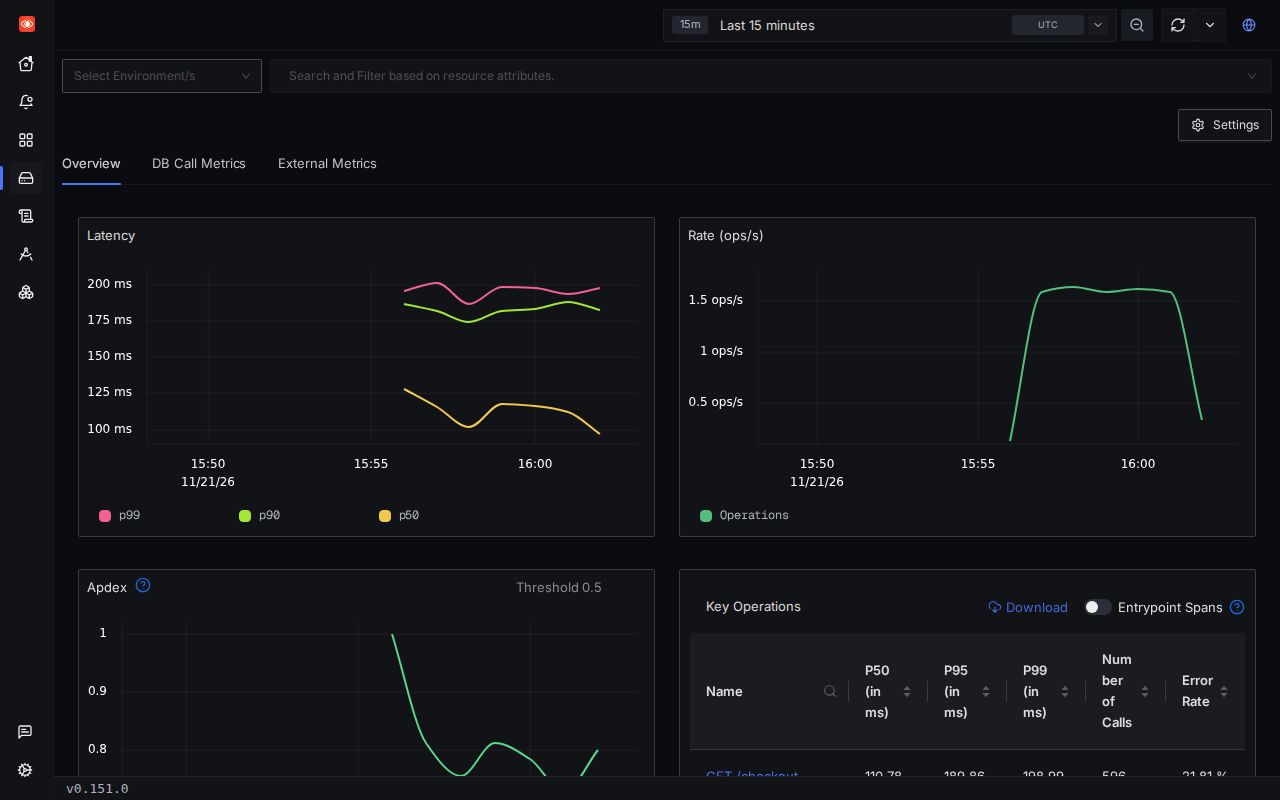
Open Services: shop appears within a minute with its latency and an
error rate around 20%. Click through to Traces for a failed request's
spans and Logs for its payment declined line.
Send from your other servers#
Port 4318 is private like the rest of the VM; the proxy lets telemetry in two ways.
From anywhere: a VM token. It works for this VM only, and the proxy
strips it before SigNoz. On your computer, one per app (add
--ips=203.0.113.7/32 to pin it to a server):
ssh exe.dev ssh-key generate-api-key --vm=my-signoz --label=shop-otel --exp=1y
Then set the standard variables in the app's environment (%20 is the
space after Bearer):
OTEL_SERVICE_NAME=shop
OTEL_EXPORTER_OTLP_ENDPOINT=https://my-signoz.exe.xyz:4318
OTEL_EXPORTER_OTLP_PROTOCOL=http/protobuf
OTEL_EXPORTER_OTLP_HEADERS=X-Exedev-Authorization=Bearer%20<token>
Python apps run under opentelemetry-instrument as above. Node.js
(CommonJS) apps install @opentelemetry/api@1.10.0 and
@opentelemetry/auto-instrumentations-node@0.83.1 and start with
node --require @opentelemetry/auto-instrumentations-node/register server.js.
Other languages: SigNoz's
instrumentation guides.
Revoke a token with ssh exe.dev ssh-key remove.
From your exe.dev VMs: no key. A VM-to-VM integration adds the key at the edge. On your computer:
ssh exe.dev integrations add http-proxy --name signoz-otlp \
  --target https://my-signoz.exe.xyz:4318/ --peer --attach vm:my-app
On my-app, use OTEL_EXPORTER_OTLP_ENDPOINT=https://signoz-otlp.int.exe.xyz
with no header.
Host metrics with an OpenTelemetry Collector
An OpenTelemetry Collector on a server can report its CPU, memory and load
and forward your apps' telemetry, so the token sits in one file. This
config, for the core otelcol 0.165.0 release, sends host metrics every 30
seconds and accepts OTLP from local apps on localhost:4318:
receivers:
  host_metrics:
    collection_interval: 30s
    scrapers: {cpu: {}, memory: {}, load: {}, filesystem: {}, network: {}}
  otlp:
    protocols:
      http: {endpoint: localhost:4318}
processors:
  resourcedetection:
    detectors: [system]
exporters:
  otlp_http:
    endpoint: https://my-signoz.exe.xyz:4318
    headers:
      X-Exedev-Authorization: Bearer ${env:EXE_VM_TOKEN}
service:
  pipelines:
    metrics: {receivers: [host_metrics, otlp], processors: [resourcedetection], exporters: [otlp_http]}
    traces: {receivers: [otlp], exporters: [otlp_http]}
    logs: {receivers: [otlp], exporters: [otlp_http]}
Run it with EXE_VM_TOKEN in its environment (a systemd
EnvironmentFile= with mode 600). Through a VM-to-VM integration, use
https://signoz-otlp.int.exe.xyz as the endpoint and drop headers.
OTLP over gRPC with Tailscale
gRPC to port 4317 through exe.dev's proxy fails with 502. If an agent
only speaks gRPC, send from the VM itself (localhost:4317) or join both
machines to your Tailscale network; exe.dev's
Tailscale integration joins without a
login link. On my-signoz:
sudo systemctl enable --now tailscaled
sudo tailscale up --hostname=$(hostname)
The sender then uses http://my-signoz:4317 with no token. Every device
on your tailnet can reach ports 4317 and 4318 unless your
access rules say otherwise.
Get alerts#
Email goes through a small relay to exe.dev's gateway, which delivers to you, your team, and people the VM is shared with.
- Alerts → Configuration → Notification Channels → New channel: pick Email, put your exe.dev email in To, Test, Save.
- Alerts → Alert Rules → New Alert: for the shop, a
Log-based Alert on
severity_text = 'ERROR', grouped byservice.name, above 0 over 5 minutes, sent to that channel.
Slack, with the webhook kept off the VM: run
ssh exe.dev integrations setup slack, attach it with
ssh exe.dev integrations attach <name> vm:my-signoz, and add a SigNoz
Slack channel with Webhook URL https://<name>.int.exe.xyz/. See
Slack integration.
Share it with your team#
On your computer:
ssh exe.dev share add my-signoz teammate@example.com # or: team
Once they've accepted, invite them under Settings → Members → Invite
member with a role (signoz-viewer, signoz-editor, signoz-admin);
the invitation email can't reach them before that.
Retention, disk and backups#
SigNoz keeps traces and logs 15 days and metrics a month; change it under
Settings → Workspace → Retention controls. Watch df -h / and grow
the disk with ssh exe.dev resize my-signoz --disk=100GB (then
sudo resize2fs "$(findmnt -no SOURCE /)" on the VM), or sample traces
with OTEL_TRACES_SAMPLER=parentbased_traceidratio and
OTEL_TRACES_SAMPLER_ARG=0.1.
Every night, users, dashboards and alert rules are dumped to
~/signoz/backups; copy them off with
scp -r my-signoz.exe.xyz:signoz/backups .. For the telemetry too, use
VM backups. Shelley on the VM can also query
ClickHouse for you: "Which services had the most errors in the last hour?"
OpenObserve: the lighter option#
OpenObserve (AGPL-3.0) takes the same OTLP and stores it as compressed Parquet files. It's one process, about 250 MB of memory against about 1 GB for SigNoz. Pick it for logs, long retention on little disk, or a shared VM; pick SigNoz for APM views.
Run OpenObserve instead
On a new VM (ssh exe.dev new --name=my-openobserve), on the VM:
sudo systemctl enable --now docker.service
mkdir -p ~/openobserve/data && cd ~/openobserve
test -e openobserve.env || (umask 077 && cat > openobserve.env <<EOF
ZO_ROOT_USER_EMAIL=you@example.com
ZO_ROOT_USER_PASSWORD=Zo-9$(openssl rand -hex 16)
EOF
)
cat > compose.yaml <<'EOF'
services:
  openobserve:
    image: openobserve/openobserve:v1.1.2
    restart: unless-stopped
    user: "1000:1000"
    ports: ["8000:5080"]
    env_file: openobserve.env
    environment:
      ZO_DATA_DIR: /data
      ZO_COMPACT_DATA_RETENTION_DAYS: "30"
      ZO_TELEMETRY: "false"
    volumes: ["./data:/data"]
EOF
docker compose up -d --wait && curl -s localhost:8000/healthz
It prints {"status":"ok"}. Sign in at https://my-openobserve.exe.xyz/
with the credentials in openobserve.env (the root password needs upper
and lower case, a digit and a symbol). Without
ZO_COMPACT_DATA_RETENTION_DAYS it keeps data for ten years.
OpenObserve wants its own Basic auth on OTLP requests too; the proxy passes
Authorization through when the VM token is in X-Exedev-Authorization.
Use the base64 of email:password or the ingestion token from
Data sources:
OTEL_EXPORTER_OTLP_ENDPOINT=https://my-openobserve.exe.xyz/api/default
OTEL_EXPORTER_OTLP_PROTOCOL=http/protobuf
OTEL_EXPORTER_OTLP_HEADERS=X-Exedev-Authorization=Bearer%20<token>,Authorization=Basic%20<base64>
With a VM-to-VM integration, add --header "Authorization: Basic <base64>"
to it instead and the app holds no secret. Back up ~/openobserve with
the container stopped, or use VM backups.
The nuts and bolts#
Happy clicking Deploy? You can stop here. These are Shelley's setup steps and your maintenance reference. Tested with SigNoz 0.151.0, SigNoz OTel Collector 0.144.18, foundryctl 0.5.0, OpenObserve 1.1.2, otelcol 0.165.0, the OpenTelemetry Python distro 0.66b2 and auto-instrumentations-node 0.83.1 on November 21, 2026.
Install by hand
Create the VM#
On your computer (pick another name if my-signoz is taken):
ssh exe.dev new --name=my-signoz
ssh my-signoz.exe.xyz
All remaining installation commands run on the VM, as exedev. A new
VM has 8 GB of memory and a 25 GB disk, enough to start; the images take
about 4 GB. Check with free -g and df -h /.
Install foundryctl#
SigNoz installs through Foundry, its
CLI that turns one casting.yaml into a Docker Compose deployment. Its
installer checks the download's checksum. Start Docker at boot too:
sudo systemctl enable --now docker.service
curl -fsSL https://signoz.io/foundry.sh | FOUNDRY_VERSION=v0.5.0 bash
~/.local/bin/foundryctl version | grep Version
It prints Version: v0.5.0.
Write the casting#
The casting pins the SigNoz and collector versions and sets four things for exe.dev:
- the UI on port 8000, the one
https://<vm>.exe.xyz/serves; - the VM's address for links in alerts and the ingestion URL SigNoz shows;
- email through mail-relay.py, a small SMTP server that passes each message to exe.dev's email gateway as plain text;
- SigNoz's usage reporting off.
mkdir -p ~/signoz/backups && cd ~/signoz
curl -fsSL -o mail-relay.py https://exe.dev/deploy/signoz/mail-relay.py
vm=$(hostname)
cat > casting.yaml <<EOF
apiVersion: v1alpha1
kind: Installation
metadata:
  name: signoz
spec:
  deployment:
    flavor: compose
    mode: docker
  signoz:
    spec:
      image: signoz/signoz:v0.151.0
      env:
        SIGNOZ_GLOBAL_EXTERNAL__URL: https://$vm.exe.xyz
        SIGNOZ_GLOBAL_INGESTION__URL: https://$vm.exe.xyz:4318
        SIGNOZ_ALERTMANAGER_SIGNOZ_EXTERNAL__URL: https://$vm.exe.xyz
        SIGNOZ_ALERTMANAGER_SIGNOZ_GLOBAL_SMTP__SMARTHOST: exe-mailer:2525
        SIGNOZ_ALERTMANAGER_SIGNOZ_GLOBAL_SMTP__FROM: signoz@$vm.exe.xyz
        SIGNOZ_ALERTMANAGER_SIGNOZ_GLOBAL_SMTP__REQUIRE__TLS: "false"
        SIGNOZ_EMAILING_ENABLED: "true"
        SIGNOZ_EMAILING_SMTP_ADDRESS: exe-mailer:2525
        SIGNOZ_EMAILING_SMTP_FROM: signoz@$vm.exe.xyz
        SIGNOZ_STATSREPORTER_ENABLED: "false"
  ingester:
    spec:
      image: signoz/signoz-otel-collector:v0.144.18
  patches:
    - target: deployment/compose.yaml
      operations:
        - op: replace
          path: /services/signoz-signoz-0/ports/0
          value: "8000:8080"
        - op: add
          path: /services/exe-mailer
          value:
            build:
              dockerfile_inline: |
                FROM python:3.13-alpine
                RUN pip install --no-cache-dir aiosmtpd==1.4.6
            restart: unless-stopped
            command: [python, /mail-relay.py]
            volumes: ["$HOME/signoz/mail-relay.py:/mail-relay.py:ro"]
            networks: [signoz-network]
EOF
Start SigNoz#
cast checks Docker, renders the Compose files into pours/deployment/,
and starts them. It took about two minutes in our tests, mostly pulling
images. Don't edit pours/ by hand: the next cast rewrites it.
cd ~/signoz
~/.local/bin/foundryctl --no-ledger cast -f casting.yaml
alias sz='docker compose -f ~/signoz/pours/deployment/compose.yaml'
echo "alias sz='docker compose -f ~/signoz/pours/deployment/compose.yaml'" >> ~/.bashrc
until curl -sf localhost:8000/api/v1/health; do sleep 5; done; echo
sz ps --format '{{.Name}}\t{{.Status}}'
sz logs --tail=1 exe-mailer
The health check prints {"status":"ok"}, every service is Up
(ClickHouse, Keeper, PostgreSQL and SigNoz healthy; the migrator
disappears from the list once ClickHouse's schema is ready), and the
relay says mail relay listening on :2525. The collector on port 4318
starts taking data once you create your account. --no-ledger turns off
foundryctl's anonymous usage events. The sz alias saves typing later.
Set up nightly backups#
This dumps SigNoz's PostgreSQL, checks the dump, and archives it with the config. Two weeks are kept:
cd ~/signoz
cat > backup.sh <<'EOF'
#!/bin/sh
set -eu
umask 077
cd "$(dirname "$0")"
mkdir -p backups
work=$(mktemp -d)
trap 'rm -rf "$work"' EXIT
docker exec signoz-metastore-postgres-0 pg_dump -U signoz -d signoz --clean --if-exists > "$work/signoz.sql"
grep -q 'PostgreSQL database dump complete' "$work/signoz.sql"
out="backups/signoz-$(date +%Y%m%d-%H%M%S).tar.gz"
tar -czf "$out.tmp" casting.yaml mail-relay.py backup.sh -C "$work" signoz.sql
mv "$out.tmp" "$out"
find backups -name 'signoz-*.tar.gz' -mtime +14 -delete
EOF
chmod +x backup.sh

sudo tee /etc/systemd/system/signoz-backup.service >/dev/null <<'EOF'
[Unit]
Description=Back up SigNoz settings

[Service]
Type=oneshot
User=exedev
ExecStart=/home/exedev/signoz/backup.sh
EOF
sudo tee /etc/systemd/system/signoz-backup.timer >/dev/null <<'EOF'
[Unit]
Description=Back up SigNoz settings nightly

[Timer]
OnCalendar=daily
Persistent=true

[Install]
WantedBy=timers.target
EOF
sudo systemctl daemon-reload
sudo systemctl enable --now signoz-backup.timer
sudo systemctl start signoz-backup.service
systemctl list-timers signoz-backup.timer
tar -tzf "$(ls -t backups/signoz-*.tar.gz | head -1)"
The timer lists its next run, and tar lists the four files in the first
archive. Open https://<vm>.exe.xyz/ and create your account.
Back up and restore
Take an extra backup any time, on the VM:
~/signoz/backup.sh && ls -lh ~/signoz/backups | tail -3
Restore#
On a new VM, run Install by hand first, then copy your archive into
~/signoz/backups. On the VM, substitute the archive's name. This
replaces the new install's users, dashboards and alerts with the backup's:
cd ~/signoz
backup=backups/signoz-YYYYMMDD-HHMMSS.tar.gz
sz='docker compose -f pours/deployment/compose.yaml'
$sz stop signoz-signoz-0 &&
tar -xzf "$backup" -O signoz.sql | docker exec -i signoz-metastore-postgres-0 psql -q -o /dev/null -U signoz -d signoz -v ON_ERROR_STOP=1 &&
$sz start signoz-signoz-0
Sign in with your old SigNoz password. On a VM with a different name,
the new install's casting.yaml already has the right addresses; keep it.
Update
The images are pinned to the versions this recipe was tested with. Read
the SigNoz release notes,
then change the signoz/signoz and signoz/signoz-otel-collector tags in
~/signoz/casting.yaml, and on the VM:
cd ~/signoz
./backup.sh && ~/.local/bin/foundryctl --no-ledger cast -f casting.yaml
cast reruns the database migrations before the collector starts. To
update foundryctl itself, rerun its installer with a newer
FOUNDRY_VERSION from its releases;
it may pick newer ClickHouse or PostgreSQL images, so back up first.
Something not working?
Start with the containers and their logs. On the VM:
sz ps -a --format '{{.Name}}\t{{.Status}}'
sz logs --tail=50 signoz-signoz-0 ingester
401from your app's exporter. The VM token is missing, expired, for another VM, or its space wasn't written as%20inOTEL_EXPORTER_OTLP_HEADERS. Try it by hand:curl -X POST https://my-signoz.exe.xyz:4318/v1/traces -H "X-Exedev-Authorization: Bearer $TOKEN" -H 'Content-Type: application/json' -d '{"resourceSpans":[]}'answers{"partialSuccess":{}}.- Connection reset on port 4318. No one has created the SigNoz account yet; the collector gets its configuration from SigNoz once the account exists.
502from the exporter. It's speaking gRPC through the proxy; usehttp/protobufand port 4318, or Tailscale.- Nothing shows up, no errors. Check the time range at the top right,
and that the app was started with
opentelemetry-instrument(Python) or--require(Node).sz logs ingestershows write errors. caststops withpull rate limit. Docker Hub limits anonymous pulls per address. Rundocker loginwith a free Docker Hub account and runcastagain; it picks up where it stopped.- Down after a reboot? Run
sudo systemctl enable --now docker.service. - Containers keep restarting. Usually memory: check
free -manddocker stats --no-stream, and grow the VM withssh exe.dev resize my-signoz --memory=16GBon your computer. - No alert email.
sz logs exe-mailershows each message and, if exe.dev refused it, why. Use the address you use for exe.dev, or share the VM with the person first. - A blank page or a login loop. You reached SigNoz without exe.dev's
proxy, or on another address; use
https://<vm>.exe.xyz/.
Frequently asked questions#
How much memory and disk does self-hosted SigNoz need?
SigNoz asks for at least 4 GB of memory. On a new exe.dev VM (2 vCPUs, 8 GB) the stack used about 1 GB with light traffic, and the images about 4 GB of disk. Telemetry is what grows; shorten retention or resize the disk.
Is SigNoz free to self-host?
Yes. The community edition is MIT-licensed, apart from SigNoz's enterprise code. You pay for your exe.dev plan, with no per-host or per-GB fees.
Can apps send OTLP over gRPC?
Not through exe.dev's proxy, which answers gRPC with a 502. Use OTLP over HTTP on port 4318, or gRPC from the VM itself or over Tailscale.
SigNoz, Grafana or Sentry?
SigNoz for OpenTelemetry traces, logs and metrics from your code. Grafana with Prometheus for scraped machine metrics and dashboards. Sentry for exceptions grouped into issues. Many teams run two of them.
Do my apps need to be on exe.dev?
No. Anything that makes HTTPS requests can send with a VM token; apps on other exe.dev VMs can use a VM-to-VM integration instead.
Published Nov 21, 2026 · Updated Nov 21, 2026 · tested end to end Nov 21, 2026 · Markdown · manifest.json · Something wrong? Tell us