Self-host Meilisearch
A search API that's private for your backend and public for your search box.
Shelley handles the setup. About 10 minutes.
Prefer a terminal?
curl -fsSL https://exe.dev/deploy/meilisearch/prompt.txt | ssh exe.dev new --prompt=/dev/stdinMeilisearch is an open-source search engine with a REST API: send it JSON documents and get search-as-you-type results in milliseconds, with typo tolerance, filters, facets and hybrid AI search. It's Algolia-style search on your own server.
Your backend needs the full API; your website's visitors need only search. On exe.dev each gets its own door: Meilisearch's API on port 7700 stays behind your login, reachable by backends with a VM token, while port 8000, the one you can make public, serves a search page and the search route and nothing else. AI search gets embeddings from exe.dev's LLM gateway, with no OpenAI key on the VM.
What you get#
- Meilisearch 1.57.0 as a systemd service, its data and a daily snapshot on the VM's disk, back after a reboot.
- A master key in one file with mode 600, and a search-only key that can search only the movies index.
- 31,944 movies indexed with filters, facets and sorting, and a search page at the VM's address.
- The admin API at port 7700 behind exe.dev login, and port 8000 serving only the search page and search routes, ready to make public.
- A snapshot made and listed, with the restore and update steps on the page.
What's running, and where
https://my-meilisearch.exe.xyz:7700/
The whole Meilisearch API, for you and for backends with a VM token
https://my-meilisearch.exe.xyz/
The movie search page, until you make it public
https://my-meilisearch.exe.xyz/indexes/movies/search
After share set-public, search with a search-only key or tenant token, nothing else
Deploy with Shelley#
Click Deploy and Shelley will set up Meilisearch on a new VM, then check that it works. No config-file wrangling required.
Prefer a terminal?
curl -fsSL \
  https://exe.dev/deploy/meilisearch/prompt.txt \
  | ssh exe.dev new --prompt=/dev/stdin
What Shelley is told
Set up Meilisearch on this VM by following the exe.dev recipe at https://exe.dev/deploy/meilisearch.md?via=deploy from top to bottom.

The recipe's example VM name is my-meilisearch. This VM's name is the output of `hostname`: use it wherever the recipe writes my-meilisearch. Skip the step that creates the VM; you are on it.

You are done when all of these are true. Check each one yourself:
- Meilisearch 1.57.0 as a systemd service, its data and a daily snapshot on the VM's disk, back after a reboot.
- A master key in one file with mode 600, and a search-only key that can search only the movies index.
- 31,944 movies indexed with filters, facets and sorting, and a search page at the VM's address.
- The admin API at port 7700 behind exe.dev login, and port 8000 serving only the search page and search routes, ready to make public.
- A snapshot made and listed, with the restore and update steps on the page.

Read the whole recipe, including the closed details. For initial setup,
follow "Install by hand" first, skipping VM creation and SSH: the binary,
the config, the service, the movies, the search key, the search page and
nginx, and the snapshot check. Skip the checks that say "On your
computer"; the VM can't reach its own public address.
Work as exedev in ~/meilisearch. Never overwrite an existing .env, and
never print the master key in your replies.
Don't share the VM or make it public, and don't create VM tokens (only
the owner can, on their computer). Don't set up AI search unless the
owner asks: it spends their LLM allowance. Do not reboot. Do not run
Restore or Update.
Finish with the search page's URL and the private API's URL, and point
the owner to "Call it from your backend" and "Put search on a public
website".

Finish with the URLs I should open.
Also at /deploy/meilisearch/prompt.txt. The recipe it follows is /deploy/meilisearch.md.
Search the movies#
The setup indexes Meilisearch's sample dataset of 31,944 movies. Open
https://my-meilisearch.exe.xyz/, sign in if asked, and type.
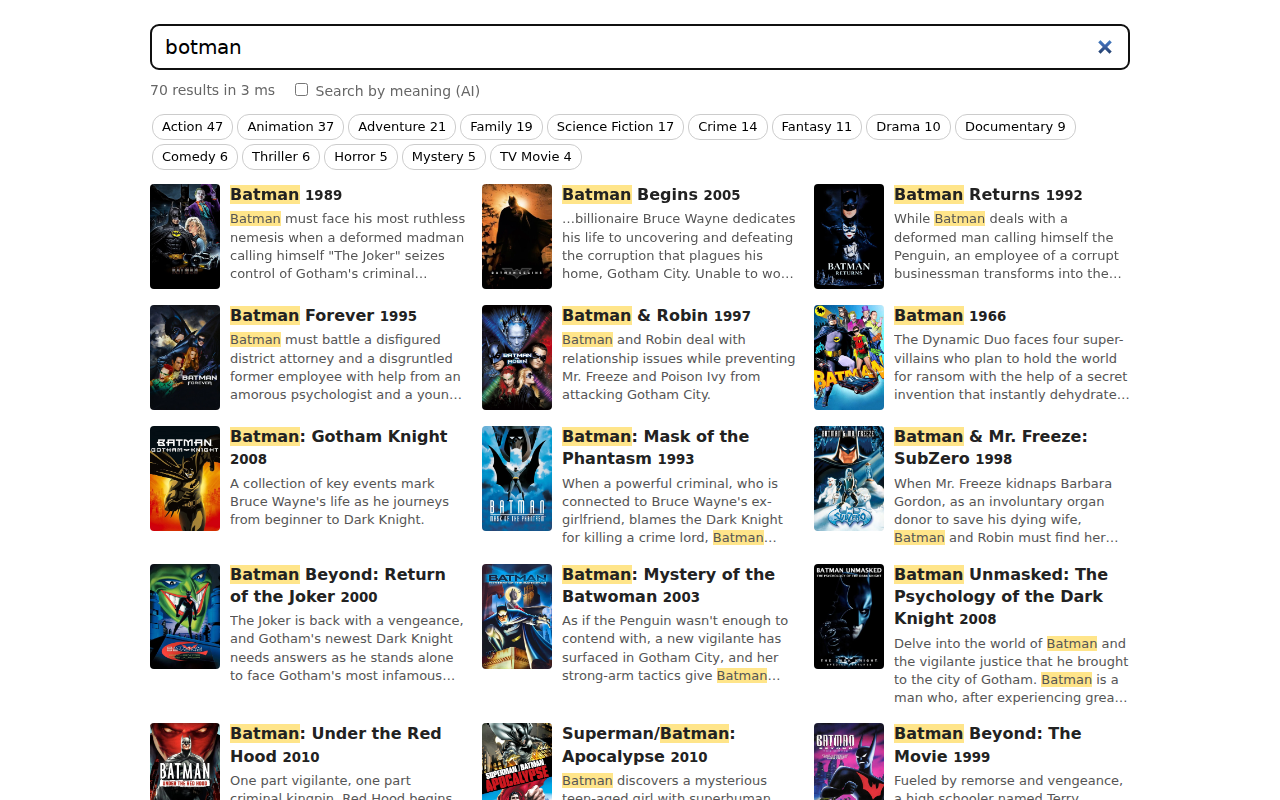
The page is one file, search.html,
calling POST /indexes/movies/search with a key that can only search
movies: the same call your own frontend will make.
Call it from your backend#
A request to https://my-meilisearch.exe.xyz:7700/ needs an exe.dev VM
token, to get past exe.dev's proxy, and a Meilisearch key. On your
computer, make a token that opens only this VM:
ssh exe.dev ssh-key generate-api-key --vm=my-meilisearch --label=meili-backend
For the key, use the Default Admin API Key to add documents, or
movies-search to search. On the VM, list them:
. ~/meilisearch/.env
curl -s http://localhost:7700/keys -H "Authorization: Bearer $MEILI_MASTER_KEY" \
  | jq -r '.results[] | "\(.name)\t\(.key)"'
Send the token in X-Exedev-Authorization and the key in Authorization;
exe.dev strips the first and passes the second through:
curl -s https://my-meilisearch.exe.xyz:7700/indexes/movies/search \
  -H "X-Exedev-Authorization: Bearer $EXE_VM_TOKEN" \
  -H "Authorization: Bearer $MEILI_KEY" \
  -H 'Content-Type: application/json' \
  -d '{"q": "dark knight", "limit": 3}' | jq -r '.hits[].title'
The SDKs take the extra header as an option. JavaScript (meilisearch 0.63):
import { Meilisearch } from "meilisearch";

const client = new Meilisearch({
  host: "https://my-meilisearch.exe.xyz:7700",
  apiKey: process.env.MEILI_KEY,
  requestInit: {
    headers: { "X-Exedev-Authorization": `Bearer ${process.env.EXE_VM_TOKEN}` },
  },
});
const { hits } = await client.index("movies").search("dark knight", { limit: 3 });
In Python, pass custom_headers={"X-Exedev-Authorization": ...} to
meilisearch.Client. Code on the VM itself uses http://localhost:7700
with no token. A backend on another exe.dev VM can use a
VM-to-VM integration instead of tokens.
Put search on a public website#
To let anyone search without an exe.dev login, on your computer:
ssh exe.dev share set-public my-meilisearch
nginx decides what the internet reaches:
| Path | Public? |
|---|---|
/ |
The search page |
POST /indexes/movies/search, POST /multi-search |
Yes, with a search key; 20 requests a second per visitor, bursts of 40 |
/health |
Yes |
| Everything else | 404; only on the private port 7700 |
Port 7700 stays private, so even a leaked master key can't be used from the internet. The search key in the page is meant to be seen, like Algolia's. Meilisearch answers CORS preflights, so any site can call it:
const res = await fetch("https://my-meilisearch.exe.xyz/indexes/movies/search", {
  method: "POST",
  headers: { "Content-Type": "application/json", Authorization: `Bearer ${SEARCH_KEY}` },
  body: JSON.stringify({ q: "alien", limit: 10, filter: ["genres = Horror"] }),
});
For your own index, make a search key for it as in
Make a search-only key, copy the movies
location block in the nginx file for its search route, and
sudo systemctl reload nginx. share set-private closes it again.
Give each user their own results#
A tenant token is a JWT your backend signs with the search key. It carries a filter Meilisearch adds to every search, and the browser can't change it. In Node:
import { generateTenantToken } from "meilisearch/token";

const token = await generateTenantToken({
  apiKey: SEARCH_KEY, apiKeyUid: SEARCH_KEY_UID,
  searchRules: { movies: { filter: `team_id = ${user.teamId}` } },
  expiresAt: new Date(Date.now() + 60 * 60 * 1000),
});
The browser sends it like a key, on the same public route. On the test VM,
a token with genres = Animation found 38 Batman films instead of 70, and
expired or altered tokens were refused. The attribute must be in
filterableAttributes; deleting the search key invalidates its tokens.
Add AI search#
Hybrid search mixes keyword ranking with meaning, using an embedding model.
The setup's config.toml already lets Meilisearch call exe.dev's LLM
gateway, which its SSRF protection otherwise blocks. On the VM:
. ~/meilisearch/.env
curl -s -X PATCH http://localhost:7700/indexes/movies/settings \
  -H "Authorization: Bearer $MEILI_MASTER_KEY" -H 'Content-Type: application/json' \
  --data-binary '{
    "embedders": {
      "openai": {
        "source": "openAi",
        "url": "https://llm.int.exe.xyz/v1/embeddings",
        "model": "text-embedding-3-small",
        "dimensions": 512,
        "documentTemplate": "A movie titled {{doc.title}}: {{doc.overview | truncatewords: 40}}"
      }
    }
  }'
No apiKey: the gateway adds credentials. Embedding all the movies took
under four minutes and, by our estimate, about four cents of LLM
allowance. Then reload the search page and tick Search by meaning (AI).
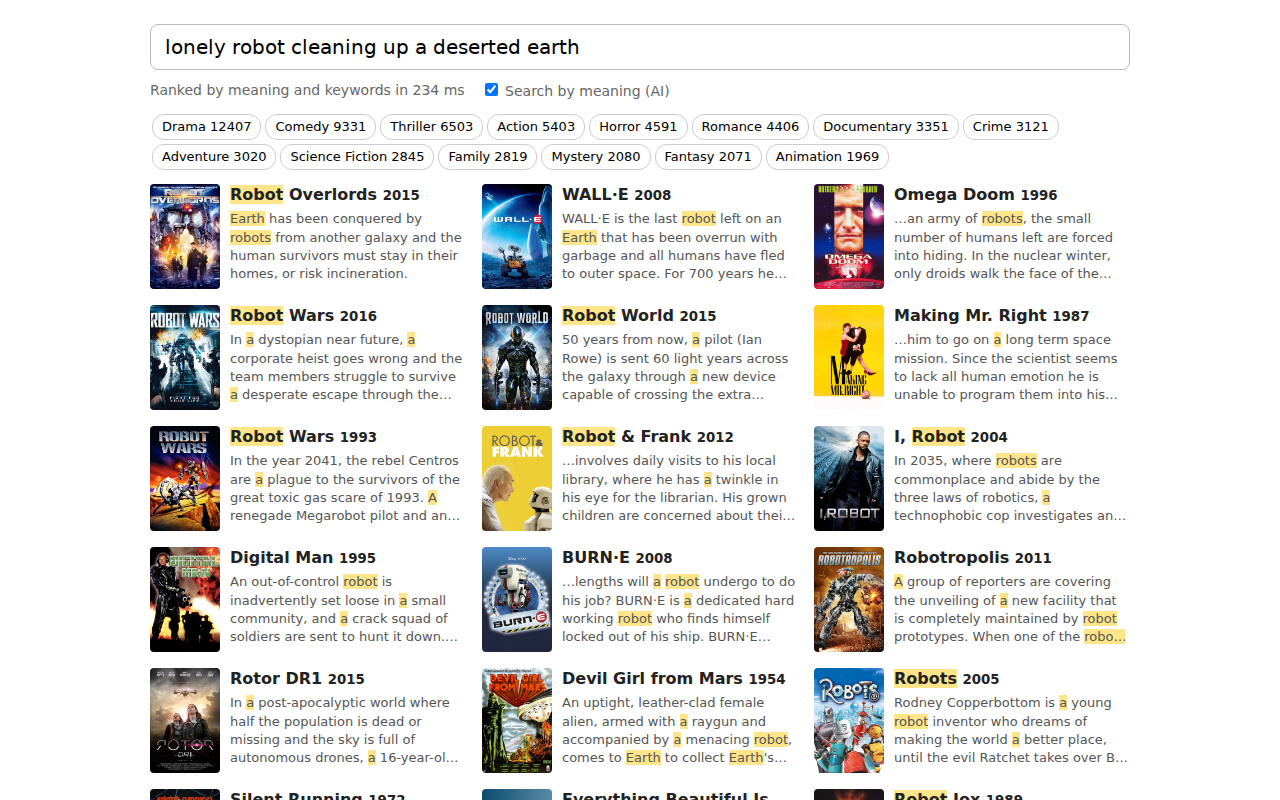
Any OpenAI-compatible embedding endpoint works the same way: change url
and model, and add apiKey if needed.
Index your own data#
Send JSON, CSV or NDJSON (up to 100 MB a request); the first documents create the index. On the VM:
. ~/meilisearch/.env
curl -s -X POST 'http://localhost:7700/indexes/products/documents?primaryKey=id' \
  -H "Authorization: Bearer $MEILI_MASTER_KEY" -H 'Content-Type: application/json' \
  --data-binary @products.json
Indexing runs in the background; GET /tasks/<taskUid> reports when it's
done. Set searchable, filterable and sortable fields with
PATCH /indexes/products/settings. To stay in sync with a database, have
your app send changed rows as it writes them. Meilisearch has guides for
migrating from Algolia
and from PostgreSQL.
Typesense instead#
Typesense (GPL-3.0) is the other popular open-source Algolia alternative. It keeps the index in RAM, so size the VM's memory for your data. On a VM of its own:
curl -fsSLO https://dl.typesense.org/releases/30.2/typesense-server-30.2-amd64.deb
sudo apt-get install -y ./typesense-server-30.2-amd64.deb
sudo grep api-key /etc/typesense/typesense-server.ini
curl -s http://localhost:8108/health
It runs as a systemd service on port 8108, private at
https://<vm>.exe.xyz:8108/ with the same VM-token pattern; its key goes in
X-TYPESENSE-API-KEY. For public search, put the same kind of nginx
allowlist on port 8000 in front of /collections/<name>/documents/search
and /multi_search.
The nuts and bolts#
The same steps Shelley follows, plus maintenance for later.
Install by hand
Create a VM#
On your computer (pick another name if my-meilisearch is taken):
ssh exe.dev new --name=my-meilisearch
ssh my-meilisearch.exe.xyz
All remaining installation commands run on the VM, as exedev.
Install Meilisearch#
Meilisearch is one static binary. Download a pinned release from GitHub (the newest is on the releases page):
MEILI_VERSION=v1.57.0
curl -fsSL -o /tmp/meilisearch \
  "https://github.com/meilisearch/meilisearch/releases/download/$MEILI_VERSION/meilisearch-linux-amd64"
sudo install -m 755 /tmp/meilisearch /usr/local/bin/meilisearch
meilisearch --version
Expect meilisearch 1.57.0.
Configure it#
Everything lives in ~/meilisearch. The master key in .env is written
once; every API key derives from it, so back it up.
mkdir -p ~/meilisearch/data ~/meilisearch/dumps ~/meilisearch/snapshots
cd ~/meilisearch
if [ ! -e .env ]; then
  touch .env && chmod 600 .env
  echo "MEILI_MASTER_KEY=$(openssl rand -hex 32)" >> .env
fi
cat > config.toml <<'EOF'
# https://www.meilisearch.com/docs/resources/self_hosting/configuration/reference
# The master key is in .env, not here.
env = "production"
# exe.dev's proxy reaches localhost, so nothing listens on the network.
http_addr = "127.0.0.1:7700"
db_path = "/home/exedev/meilisearch/data"
dump_dir = "/home/exedev/meilisearch/dumps"
snapshot_dir = "/home/exedev/meilisearch/snapshots"
# A snapshot every 24 hours, replacing the previous one.
schedule_snapshot = 86400
no_analytics = true
# exe.dev integrations, like the LLM gateway at llm.int.exe.xyz, answer on
# this link-local address, which Meilisearch otherwise refuses to call.
experimental_allowed_ip_networks = ["169.254.169.254/32"]
EOF
Run it as a service#
sudo tee /etc/systemd/system/meilisearch.service >/dev/null <<'EOF'
[Unit]
Description=Meilisearch
After=network-online.target
Wants=network-online.target

[Service]
User=exedev
WorkingDirectory=/home/exedev/meilisearch
EnvironmentFile=/home/exedev/meilisearch/.env
ExecStart=/usr/local/bin/meilisearch --config-file-path /home/exedev/meilisearch/config.toml
Restart=on-failure
LimitNOFILE=65536

[Install]
WantedBy=multi-user.target
EOF
sudo systemctl daemon-reload
sudo systemctl enable --now meilisearch
until curl -fs http://localhost:7700/health; do sleep 1; done; echo
Expect {"status":"available"}.
Load the movies#
Set the searchable, filterable and sortable fields, send the 16 MB dataset, and wait:
. ~/meilisearch/.env
M=http://localhost:7700
H="Authorization: Bearer $MEILI_MASTER_KEY"
curl -fsSL -o /tmp/movies.json https://www.meilisearch.com/docs/assets/datasets/movies.json
curl -fsS -X PATCH "$M/indexes/movies/settings" -H "$H" -H 'Content-Type: application/json' \
  --data-binary '{
    "searchableAttributes": ["title", "overview", "genres"],
    "filterableAttributes": ["genres", "release_date"],
    "sortableAttributes": ["release_date"]
  }' >/dev/null
task=$(curl -fsS -X POST "$M/indexes/movies/documents?primaryKey=id" -H "$H" \
  -H 'Content-Type: application/json' --data-binary @/tmp/movies.json | jq .taskUid)
until s=$(curl -fsS "$M/tasks/$task" -H "$H" | jq -r .status); [ "$s" = succeeded ] || [ "$s" = failed ]; do sleep 2; done
curl -fsS "$M/tasks/$task" -H "$H" | jq -c '{status, details, error}'
curl -fsS -X POST "$M/indexes/movies/search" -H "$H" -H 'Content-Type: application/json' \
  -d '{"q": "botman", "limit": 3}' | jq -c '[.hits[].title]'
Expect "status":"succeeded" with "indexedDocuments":31944 (about 10
seconds), then ["Batman","Batman Begins","Batman Returns"].
Make a search-only key#
The public page gets a key that can search only the movies index:
. ~/meilisearch/.env
if ! curl -fsS http://localhost:7700/keys -H "Authorization: Bearer $MEILI_MASTER_KEY" \
    | jq -e '.results[] | select(.name == "movies-search")' >/dev/null; then
  curl -fsS -X POST http://localhost:7700/keys \
    -H "Authorization: Bearer $MEILI_MASTER_KEY" -H 'Content-Type: application/json' \
    --data-binary '{"name": "movies-search", "description": "Search the movies index, nothing else",
                    "actions": ["search"], "indexes": ["movies"], "expiresAt": null}' \
    | jq -c '{name, actions, indexes}'
fi
Expect {"name":"movies-search","actions":["search"],"indexes":["movies"]}.
Serve the search page on port 8000#
nginx, which comes with the VM, serves the page (with the search key written in) and passes only the search routes to Meilisearch:
. ~/meilisearch/.env
SEARCH_KEY=$(curl -fsS http://localhost:7700/keys -H "Authorization: Bearer $MEILI_MASTER_KEY" \
  | jq -r '.results[] | select(.name == "movies-search") | .key')
sudo mkdir -p /var/www/meilisearch
curl -fsSL https://exe.dev/deploy/meilisearch/search.html \
  | sed "s/__SEARCH_KEY__/$SEARCH_KEY/" | sudo tee /var/www/meilisearch/index.html >/dev/null
sudo tee /etc/nginx/sites-available/meilisearch-public >/dev/null <<'EOF'
# Port 8000, the only port of this VM that can be made public: the search
# page and Meilisearch's search routes. Documents, settings, keys and
# dumps stay on the private port 7700.

# exe.dev's proxy adds the visitor's address last in X-Forwarded-For;
# rate limit per visitor, not per proxy.
map $http_x_forwarded_for $visitor {
    "~(?<last>[^,\s]+)\s*$" $last;
    default $remote_addr;
}
limit_req_zone $visitor zone=meili_search:10m rate=20r/s;

server {
    listen 8000 default_server;
    listen [::]:8000 default_server;
    root /var/www/meilisearch;
    client_max_body_size 16k;

    location = /indexes/movies/search {
        limit_except POST OPTIONS { deny all; }
        limit_req zone=meili_search burst=40 nodelay;
        limit_req_status 429;
        proxy_pass http://127.0.0.1:7700;
    }
    location = /multi-search {
        limit_except POST OPTIONS { deny all; }
        limit_req zone=meili_search burst=40 nodelay;
        limit_req_status 429;
        proxy_pass http://127.0.0.1:7700;
    }
    location = /health {
        proxy_pass http://127.0.0.1:7700;
    }
    location = / {
        try_files /index.html =404;
    }
    location / {
        return 404;
    }
}
EOF
sudo ln -sf /etc/nginx/sites-available/meilisearch-public /etc/nginx/sites-enabled/
sudo nginx -t
sudo systemctl enable nginx
sudo systemctl restart nginx
default_server wins over the VM's stock site on 8000. Check:
curl -s -o /dev/null -w 'page %{http_code}\n' http://localhost:8000/
curl -s -X POST http://localhost:8000/indexes/movies/search -H "Authorization: Bearer $SEARCH_KEY" \
  -H 'Content-Type: application/json' -d '{"q": "inception", "limit": 1}' | jq -c '[.hits[].title]'
curl -s -o /dev/null -w 'keys %{http_code}\n' http://localhost:8000/keys -H "Authorization: Bearer $MEILI_MASTER_KEY"
Expect page 200, ["Inception"], and keys 404: even the master key
gets nothing but search through port 8000.
Check the snapshot#
Make one now rather than waiting a day:
. ~/meilisearch/.env
task=$(curl -fsS -X POST http://localhost:7700/snapshots -H "Authorization: Bearer $MEILI_MASTER_KEY" | jq .taskUid)
until s=$(curl -fsS "http://localhost:7700/tasks/$task" -H "Authorization: Bearer $MEILI_MASTER_KEY" | jq -r .status); [ "$s" = succeeded ] || [ "$s" = failed ]; do sleep 1; done
echo "$s"; ls -lh ~/meilisearch/snapshots
Expect succeeded and a data.snapshot file.
Back up and restore
A snapshot is an exact copy of the database and restores only on the
same Meilisearch version; this setup writes one daily to
~/meilisearch/snapshots/data.snapshot. A dump (POST /dumps, written
to ~/meilisearch/dumps) imports into a newer version too, but rebuilds the
index (103 seconds for the movies on the test VM). Neither holds the master
key, so keep .env with them or every key changes. On the VM:
cd ~/meilisearch && tar -czf ~/meilisearch-backup-$(date +%Y%m%d).tar.gz .env config.toml snapshots/data.snapshot
Then on your computer: scp 'my-meilisearch.exe.xyz:meilisearch-backup-*.tar.gz' .
Restore a snapshot#
Meilisearch never overwrites a database, so move the current one aside. On the VM:
cd ~/meilisearch
sudo systemctl stop meilisearch
mv data data.before-restore
sudo systemctl set-environment MEILI_IMPORT_SNAPSHOT=/home/exedev/meilisearch/snapshots/data.snapshot
sudo systemctl start meilisearch
until curl -fs http://localhost:7700/health; do sleep 1; done; echo
sudo systemctl unset-environment MEILI_IMPORT_SNAPSHOT
For a dump, use MEILI_IMPORT_DUMP=/home/exedev/meilisearch/dumps/<date>.dump
instead. On a new VM, install up to "Configure it", unpack the backup into
~/meilisearch, run the restore without mv, then the service and nginx
steps.
Update
A new binary upgrades the database in place when started with
MEILI_UPGRADE_DB. Upgrades aren't atomic, so this takes a snapshot first.
On the VM, with the version from the
releases page:
. ~/meilisearch/.env
M=http://localhost:7700; H="Authorization: Bearer $MEILI_MASTER_KEY"
task=$(curl -fsS -X POST $M/snapshots -H "$H" | jq .taskUid)
until [ "$(curl -fsS $M/tasks/$task -H "$H" | jq -r .status)" = succeeded ]; do sleep 2; done
MEILI_VERSION=v1.57.0
curl -fsSL -o /tmp/meilisearch \
  "https://github.com/meilisearch/meilisearch/releases/download/$MEILI_VERSION/meilisearch-linux-amd64"
chmod +x /tmp/meilisearch && /tmp/meilisearch --version
cp ~/meilisearch/snapshots/data.snapshot ~/meilisearch/before-upgrade.snapshot
sudo systemctl stop meilisearch
sudo cp /usr/local/bin/meilisearch /usr/local/bin/meilisearch.previous
sudo install -m 755 /tmp/meilisearch /usr/local/bin/meilisearch
sudo systemctl set-environment MEILI_UPGRADE_DB=true
sudo systemctl start meilisearch
sudo systemctl unset-environment MEILI_UPGRADE_DB
until curl -fs $M/health >/dev/null; do sleep 1; done
curl -fsS "$M/tasks?types=upgradeDatabase&limit=1" -H "$H" | jq -c '.results[] | {status, details}'
Expect "status":"succeeded" with upgradeFrom and upgradeTo. If it
fails, put back meilisearch.previous and restore before-upgrade.snapshot.
Troubleshooting
Start with journalctl -u meilisearch -n 50 --no-pager and
GET /tasks?statuses=failed.
401on port 7700: the VM token is missing, expired or for another VM; send it inX-Exedev-Authorization.missing_authorization_headerorinvalid_api_key: no Meilisearch key, or one not allowed to do that.- Won't start after a binary swap ("database version … is incompatible"): run the Update steps.
- The embedder task stays
processing:experimental_allowed_ip_networksis missing fromconfig.toml; add it and restart Meilisearch. 404or429from port 8000: the nginx allowlist and rate limit, by design; edit the nginx file to change them.- The stock "exe.dev" page on port 8000:
default_serveris missing or nginx wasn't restarted.
Frequently asked questions#
Is Meilisearch free to self-host?
Yes. The Community Edition installed here is MIT licensed and includes full-text, faceted and AI search; a few features, such as sharding, are in the BUSL-1.1 Enterprise Edition. You pay for the VM plan.
How much disk and memory does it need?
On a 2 vCPU, 8 GB test VM, the 31,944 movies took 8 seconds to index and 158 MB of disk (290 MB with embeddings), and searches took 1-3 ms. The index lives on disk, with free memory as a cache.
Does it work with Algolia's InstantSearch?
Yes, through instant-meilisearch, which calls POST /multi-search. Port 8000 allows that route, so point it at https://my-meilisearch.exe.xyz with the search-only key.
Meilisearch or Typesense?
Both are fast and typo-tolerant. Meilisearch is MIT licensed and keeps its index on disk; Typesense keeps it in RAM and has built-in clustering. See Typesense instead.
How do I back it up?
Meilisearch writes a snapshot every 24 hours. Copy it off the VM with .env, which holds the master key. See Back up and restore.
Published Nov 25, 2026 · Updated Nov 22, 2026 · tested end to end Nov 22, 2026 · Markdown · manifest.json · Something wrong? Tell us