Run Caddy as a reverse proxy
One port, many apps: path and host routing, static sites and file browsing.
Shelley handles the setup. About 10 minutes.
Prefer a terminal?
curl -fsSL https://exe.dev/deploy/caddy/prompt.txt | ssh exe.dev new --prompt=/dev/stdinCaddy is a web server and reverse proxy with a short config file (the
Caddyfile), reloads that don't drop connections, and a built-in file
server. Here it's the front door of one exe.dev VM: a static site at /,
an API at /api/, Grafana at /grafana/ and a folder at /files/, all
at https://my-caddy.exe.xyz/.
Note
Caddy doesn't do HTTPS here. exe.dev's HTTPS proxy holds the certificate, ends TLS and handles sign-in, then sends plain HTTP to port 8000. Caddy routes requests and serves files.
The VM is private until you open it, Caddy sees each visitor's exe.dev email, and scripts get in with a VM token. Tested with Caddy 2.11.9 on Ubuntu 24.04.
What you get#
- Caddy 2.11 from Caddy's apt repository on port 8000, behind exe.dev's HTTPS proxy, held to Caddy 2 and started again after a reboot.
- One Caddyfile that sends / to a static site in /srv/www, /api/ to an app on port 3001 and /files/ to a browsable folder.
- exe.dev's X-Forwarded-* headers trusted and its login headers passed on, so the app sees https and the signed-in user's email.
- A check-then-reload routine that keeps the running config when a new one is broken, and JSON access logs with rotation.
- A backup of the Caddyfile and both folders, with the restore command.
What's running, and where
https://my-caddy.exe.xyz/
The static site, after exe.dev login
https://my-caddy.exe.xyz/api/whoami
The app behind Caddy; scripts get in with a VM token
https://my-caddy.exe.xyz/files/
A browsable listing of /srv/files
https://my-caddy.exe.xyz/
Optional; with chosen paths still behind login
Deploy with Shelley#
Click Deploy and Shelley will set up Caddy on a new VM, then check that it works. No config-file wrangling required.
Prefer a terminal?
curl -fsSL \
  https://exe.dev/deploy/caddy/prompt.txt \
  | ssh exe.dev new --prompt=/dev/stdin
What Shelley is told
Set up Caddy on this VM by following the exe.dev recipe at https://exe.dev/deploy/caddy.md?via=deploy from top to bottom.

The recipe's example VM name is my-caddy. This VM's name is the output of `hostname`: use it wherever the recipe writes my-caddy. Skip the step that creates the VM; you are on it.

You are done when all of these are true. Check each one yourself:
- Caddy 2.11 from Caddy's apt repository on port 8000, behind exe.dev's HTTPS proxy, held to Caddy 2 and started again after a reboot.
- One Caddyfile that sends / to a static site in /srv/www, /api/ to an app on port 3001 and /files/ to a browsable folder.
- exe.dev's X-Forwarded-* headers trusted and its login headers passed on, so the app sees https and the signed-in user's email.
- A check-then-reload routine that keeps the running config when a new one is broken, and JSON access logs with rotation.
- A backup of the Caddyfile and both folders, with the restore command.

Read the whole recipe, including the closed details. For initial setup,
follow "Install by hand" first, skipping VM creation and SSH: Caddy's apt
repository and pin, the folders, the whoami API, the Caddyfile, and the
checks at the end of it. Then run the backup command in "Back up and
restore" once. The walkthrough at the top is for the owner afterwards.
Don't add Grafana, a custom domain or extra ports unless the owner asks.
Don't make the VM public or share it. Never put a hostname in a site
address without http:// in front. Leave the admin API on localhost:2019.
Verify caddy and whoami are enabled; do not reboot. Do not run Restore
or Update. Finish with the VM's URL and point the owner to
https://VMNAME.exe.xyz/api/whoami and the "Add your own app" section.

Finish with the URLs I should open.
Also at /deploy/caddy/prompt.txt. The recipe it follows is /deploy/caddy.md.
See it work#
Open https://my-caddy.exe.xyz/ and sign in to exe.dev. The page links
to two more:
-
/api/whoami: a small Go app on port 3001 that replies with what Caddy passed on: your email,https, your IP, and the path with/apiremoved.{"email": "you@example.com", "proto": "https", "path": "/whoami", "host": "my-caddy.exe.xyz", "client": "203.0.113.7"} -
/files/: a listing of/srv/files, with search and a grid view.
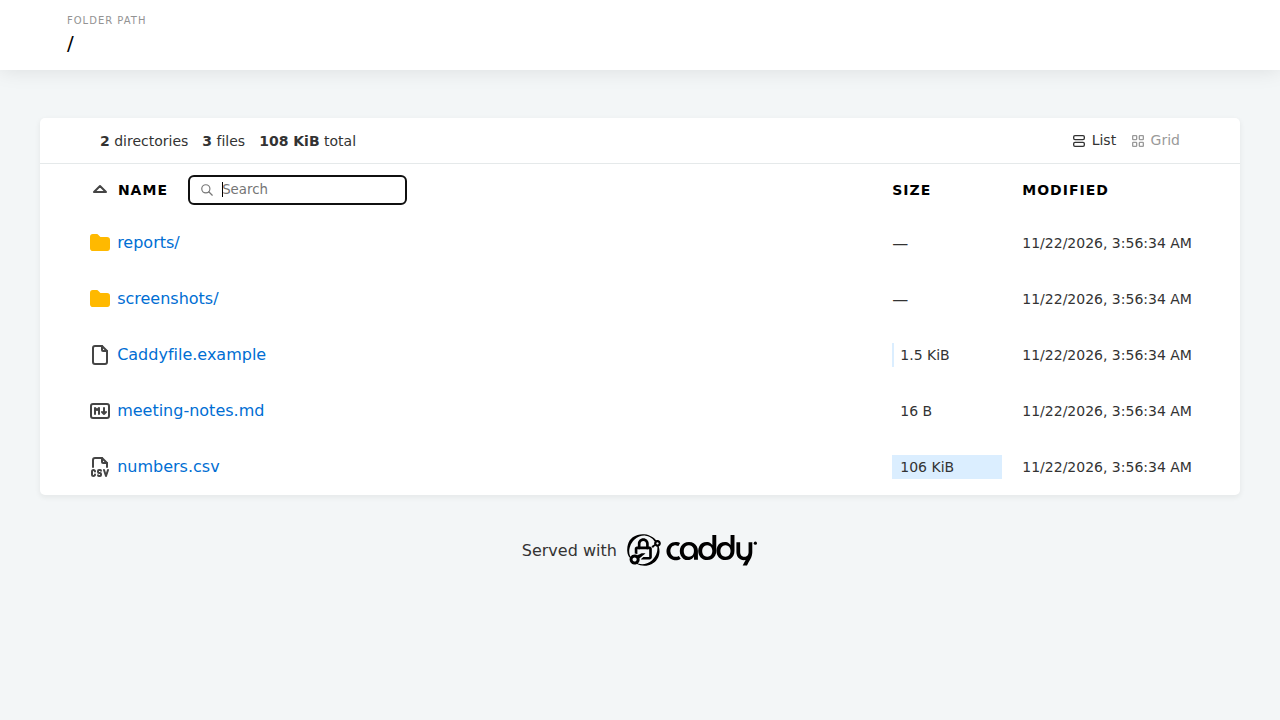
It's all one file, /etc/caddy/Caddyfile (shown in full in
Install by hand). The lines that matter on exe.dev:
auto_https off: Caddy can't get a certificate here, so it shouldn't try.default_bind 127.0.0.1 [::1]: listen on loopback only, which is where exe.dev's proxy connects.trusted_proxies static private_rangesandtrusted_proxies_strict: believe the proxy'sX-Forwarded-*headers. Without them your apps are told the request was plainhttp, which causes redirect loops and CSRF errors.:8000: the porthttps://my-caddy.exe.xyz/is forwarded to.handle_path /api/*strips the prefix;handlekeeps it. The most specific path wins, and the barehandlecatches the rest.
After editing the Caddyfile, on the VM:
sudo -u caddy caddy validate --config /etc/caddy/Caddyfile && sudo systemctl reload caddy
If the file is broken, the reload fails and the old config keeps
serving; journalctl -u caddy -n 20 names the line.
Add your own app#
Run the app on a local port (a systemd service, or Compose with
ports: ["127.0.0.1:3002:3000"] and restart: unless-stopped), add a
block above the catch-all handle, then validate and reload:
	handle_path /orders/* {
		reverse_proxy 127.0.0.1:3002
	}
| The app... | Use |
|---|---|
| doesn't care about its path (most APIs) | handle_path /x/* |
has a base path setting (Grafana, Vite base, Next.js basePath) |
handle /x/*, with the base path set to /x/ |
assumes it owns / |
its own port (see More ports and domains) |
An app that assumes / shows up with missing CSS and JavaScript under a
prefix. WebSockets and streaming pass through reverse_proxy as is. See
Go, Node.js and
Docker Compose for running the apps.
Tip
exe.dev forwards ports 3000-9999 to signed-in users, even on
127.0.0.1, so the API is also athttps://my-caddy.exe.xyz:3001/. If Caddy's rules must be the only way in, use a port outside that range, such as127.0.0.1:10001.
Put Grafana under /grafana#
Grafana can live under a path and take its users from exe.dev's login. On the VM:
sudo systemctl enable --now docker.service
mkdir -p ~/grafana/data && cd ~/grafana
owner=$(curl -fsS https://reflection.int.exe.xyz/email | jq -r '.email // empty')
cat > compose.yaml <<EOF
services:
  grafana:
    image: grafana/grafana:13.3.1
    restart: unless-stopped
    user: "1000:1000"
    ports: ["127.0.0.1:3000:3000"]
    environment:
      GF_SERVER_ROOT_URL: https://$(hostname).exe.xyz/grafana/
      GF_SERVER_SERVE_FROM_SUB_PATH: "true"
      GF_SECURITY_ADMIN_USER: ${owner:?set owner=you@example.com first}
      GF_AUTH_PROXY_ENABLED: "true"
      GF_AUTH_PROXY_HEADER_NAME: X-ExeDev-Email
      GF_AUTH_PROXY_HEADER_PROPERTY: username
      GF_AUTH_PROXY_HEADERS: Email:X-ExeDev-Email
      GF_AUTH_PROXY_AUTO_SIGN_UP: "true"
      GF_AUTH_DISABLE_LOGIN_FORM: "true"
      GF_AUTH_BASIC_ENABLED: "false"
    volumes:
      - ./data:/var/lib/grafana
EOF
docker compose up -d --wait
Grafana knows its path, so keep the prefix (handle, not handle_path):
	redir /grafana /grafana/
	handle /grafana/* {
		reverse_proxy 127.0.0.1:3000
	}
Reload and open https://my-caddy.exe.xyz/grafana/: you're the admin,
with no password. People you share the VM with sign in as Viewers. For
dashboards and alerts, see the Grafana recipe.
Serve a front-end build#
Copy a React and Vite or Astro
build into /srv/www; no reload needed:
npm run build && rsync -a --delete dist/ /srv/www/
Hashed files in /assets/ are cached for a year, index.html is
checked on every visit, and unknown paths fall back to index.html for
client-side routing.
Who's signed in#
exe.dev adds X-ExeDev-Email and X-ExeDev-UserID to every signed-in
request (Login with exe.dev), and Caddy passes
them to your apps. exe.dev strips any a visitor sends, so they can't be
forged from outside (programs on the VM can still set them).
Caddy can use the header too. This, at the top of the
handle_path /files/* block, lets in two people and gives everyone else
a 403:
		@not_on_list not {
			header X-ExeDev-Email you@example.com
			header X-ExeDev-Email colleague@example.com
		}
		respond @not_on_list "Forbidden" 403
It must go inside the block: Caddy runs handle blocks before a
site-level respond.
Scripts and API clients#
Programs get 401 from a private VM. Give them a
VM token. On your computer:
ssh exe.dev ssh-key generate-api-key --vm=my-caddy --label=caddy-api
curl -H "X-Exedev-Authorization: Bearer $TOKEN" https://my-caddy.exe.xyz/api/whoami
The app sees your email, as with a browser. Basic auth with the token as
the password also works. On the VM, use http://localhost:8000 with no
token.
Make part of it public#
ssh exe.dev share set-public my-caddy opens all of port 8000. To keep
some paths behind login, add this near the top of the :8000 site:
	@needs_login {
		path /api/* /files/* /grafana/*
		header !X-ExeDev-Email
	}
	redir @needs_login /__exe.dev/login?redirect={path} 302
Visitors without a login go to exe.dev's sign-in page and come back.
Any exe.dev user can sign in, so use the allowlist above for anything
private. ssh exe.dev share set-private my-caddy closes it again.
More ports and domains#
Ports 3000-9999 are at https://my-caddy.exe.xyz:<port>/, always
private. A second site block is the place for an app that wants /:
:8080 {
	reverse_proxy 127.0.0.1:3002
}
For your own domain, add a CNAME to my-caddy.exe.xyz and run
ssh exe.dev domain add my-caddy blog.example.com (custom domains).
exe.dev issues the certificate and passes the name through in Host:
http://blog.example.com:8000 {
	root * /srv/blog
	file_server
}
Always write http:// and the port before a hostname; without it Caddy
expects TLS on port 8000 and exe.dev's requests fail. We tested domain
blocks by sending the Host header on the VM, not with a newly
registered domain.
Logs and the admin API#
-
journalctl -u caddy -f: reloads and errors. A 502 shows up asconnect: connection refusedwith the app's port. -
/var/log/caddy/access.log: JSON, rotated at 50 MB, with the visitor's real IP and email:sudo tail -n 20 /var/log/caddy/access.log | jq -c '{ip: .request.client_ip, who: .request.headers["X-Exedev-Email"][0], uri: .request.uri, status}' -
localhost:2019: Caddy's admin API, used bysystemctl reload. It takes config changes without authentication, so leave it on localhost; port 2019 is outside what exe.dev forwards.curl -s localhost:2019/reverse_proxy/upstreams | jqshows each app's health.
The nuts and bolts#
Happy clicking Deploy? You can stop here. These are the same setup steps Shelley follows, plus the maintenance commands for later.
Install by hand
Create a VM#
On your computer (pick another name if my-caddy is taken):
ssh exe.dev new --name=my-caddy
ssh my-caddy.exe.xyz
All remaining installation commands run on the VM, as exedev.
Install Caddy#
These are the commands from Caddy's install page, plus an apt pin that keeps the VM on Caddy 2 until you decide to move to a new major version:
sudo apt-get install -y debian-keyring debian-archive-keyring apt-transport-https curl
curl -1sLf 'https://dl.cloudsmith.io/public/caddy/stable/gpg.key' | sudo gpg --dearmor --yes -o /usr/share/keyrings/caddy-stable-archive-keyring.gpg
curl -1sLf 'https://dl.cloudsmith.io/public/caddy/stable/debian.deb.txt' | sudo tee /etc/apt/sources.list.d/caddy-stable.list
sudo chmod o+r /usr/share/keyrings/caddy-stable-archive-keyring.gpg /etc/apt/sources.list.d/caddy-stable.list
printf 'Package: caddy\nPin: version 3.*\nPin-Priority: -1\n' | sudo tee /etc/apt/preferences.d/caddy
sudo apt-get update
sudo apt-get install -y caddy
caddy version
systemctl is-enabled caddy
Expect v2.11.9 or a later 2.x, and enabled. The package runs Caddy as
the caddy user with its example config on port 80, which the next steps
replace.
Make the folders#
Caddy can't read your home directory, so sites live in /srv, owned by
you so you can write to them without sudo:
sudo mkdir -p /srv/www /srv/files
sudo chown exedev:exedev /srv/www /srv/files
test -e /srv/www/index.html || cat > /srv/www/index.html <<'EOF'
<!doctype html>
<meta charset="utf-8">
<title>Caddy on exe.dev</title>
<h1>Caddy is serving this page</h1>
<ul>
  <li><a href="/api/whoami">/api/whoami</a>: what the app behind Caddy sees</li>
  <li><a href="/files/">/files/</a>: a listing of /srv/files</li>
</ul>
EOF
test -e /srv/files/README.txt || echo "Files in /srv/files are listed at /files/." > /srv/files/README.txt
Start the whoami API#
A stand-in for your own app: it answers every request with the headers it received, which shows what Caddy passes on. Go is already on the VM.
mkdir -p ~/whoami && cd ~/whoami
cat > main.go <<'EOF'
// whoami answers with what Caddy passed on.
package main

import (
	"encoding/json"
	"log"
	"net/http"
	"os"
)

func main() {
	http.HandleFunc("/", func(w http.ResponseWriter, r *http.Request) {
		w.Header().Set("Content-Type", "application/json")
		json.NewEncoder(w).Encode(map[string]string{
			"path":   r.URL.Path,
			"email":  r.Header.Get("X-ExeDev-Email"),
			"proto":  r.Header.Get("X-Forwarded-Proto"),
			"host":   r.Header.Get("X-Forwarded-Host"),
			"client": r.Header.Get("X-Real-IP"),
		})
	})
	log.Fatal(http.ListenAndServe(os.Getenv("ADDR"), nil))
}
EOF
test -f go.mod || go mod init whoami
go build -o whoami .

sudo tee /etc/systemd/system/whoami.service >/dev/null <<'EOF'
[Unit]
Description=whoami demo API behind Caddy
After=network.target

[Service]
User=exedev
Environment=ADDR=127.0.0.1:3001
ExecStart=/home/exedev/whoami/whoami
Restart=always

[Install]
WantedBy=multi-user.target
EOF
sudo systemctl daemon-reload
sudo systemctl enable --now whoami
curl -s --retry 5 --retry-connrefused --retry-delay 1 localhost:3001/hello
Expect JSON with "path":"/hello" and empty headers, since nothing is
in front of it yet.
Write the Caddyfile#
This is the file from See it work:
sudo tee /etc/caddy/Caddyfile >/dev/null <<'EOF'
{
	# exe.dev's proxy terminates HTTPS and handles certificates.
	# Caddy serves plain HTTP behind it.
	auto_https off

	# Listen on loopback only; that's where exe.dev's proxy connects.
	default_bind 127.0.0.1 [::1]

	servers {
		# Trust the proxy's X-Forwarded-* headers,
		# reading the client IP right to left.
		trusted_proxies static private_ranges
		trusted_proxies_strict
	}
}

# https://<vm>.exe.xyz/ arrives here as plain HTTP on port 8000.
:8000 {
	encode zstd gzip

	log {
		output file /var/log/caddy/access.log {
			roll_size 50MiB
			roll_keep 5
		}
	}

	# /api/... goes to the API on port 3001, without the /api prefix.
	handle_path /api/* {
		reverse_proxy 127.0.0.1:3001 {
			# The visitor's own address, as exe.dev saw it.
			header_up X-Real-IP {client_ip}
		}
	}

	# A directory listing of /srv/files.
	redir /files /files/
	handle_path /files/* {
		root * /srv/files
		file_server browse
	}

	# Everything else: the static site in /srv/www.
	handle {
		root * /srv/www
		@assets path /assets/*
		header @assets Cache-Control "public, max-age=31536000, immutable"
		try_files {path} /index.html
		file_server
	}
}
EOF
sudo -u caddy caddy validate --config /etc/caddy/Caddyfile && sudo systemctl reload caddy
The last line ends with Valid configuration, and the reload prints
nothing. Validate as the caddy user, as here: run as exedev it
can't open the access log, and run as root it would create the log file
owned by root, which Caddy then can't write to.
Check it#
curl -s localhost:8000/ | grep h1
curl -s localhost:8000/api/whoami
curl -s -H 'Accept: application/json' localhost:8000/files/ | jq -r '.[].name'
sudo ss -ltnp | grep caddy
Expect the page's heading, whoami's JSON with "path":"/whoami",
README.txt, and Caddy listening on 127.0.0.1:8000, [::1]:8000 and
127.0.0.1:2019.
The email and https appear only for requests through exe.dev: open
https://my-caddy.exe.xyz/api/whoami in your browser.
Back up and restore
Caddy keeps no state that matters here: no certificates, no database. The Caddyfile and your folders are everything. On the VM:
sudo tar -czf ~/caddy-backup-$(date +%F).tar.gz -C / etc/caddy etc/apt/preferences.d/caddy srv/www srv/files etc/systemd/system/whoami.service home/exedev/whoami/main.go
sudo chown exedev: ~/caddy-backup-*.tar.gz
tar -tzf ~/caddy-backup-$(date +%F).tar.gz
On your computer, copy it off the VM:
scp 'my-caddy.exe.xyz:caddy-backup-*.tar.gz' .. Apps behind Caddy keep
their own data (Grafana's in ~/grafana/data); back those up the way
their recipes say. For the whole disk, see VM backups.
To restore on a VM where Caddy is installed (Install by hand, up to
"Install Caddy"), copy the archive over and unpack it at /:
sudo tar -xzf ~/caddy-backup-2026-11-22.tar.gz -C /
sudo chown -R exedev:exedev /srv/www /srv/files
sudo -u caddy caddy validate --config /etc/caddy/Caddyfile && sudo systemctl reload caddy
Rebuild the whoami API with the go build and systemctl enable lines
from "Start the whoami API" if you use it.
Update
Ubuntu's automatic updates are off on exe.dev VMs, so update Caddy yourself. Read the release notes first, then on the VM:
sudo apt-get update
sudo apt-get install --only-upgrade -y caddy
caddy version
systemctl is-active caddy
The package restarts Caddy with the new version. The pin in
/etc/apt/preferences.d/caddy keeps you on 2.x; when Caddy 3 ships,
read its upgrade notes, test your Caddyfile, then delete the pin. To go
back a version, list them with apt-cache madison caddy and install one,
such as sudo apt-get install -y --allow-downgrades caddy=2.11.8.
Troubleshooting
- 502 Bad Gateway: the app isn't answering.
journalctl -u caddy -n 20shows the port; check the app withcurl localhost:<port>/. - Redirect loops,
http://links, CSRF errors: thetrusted_proxieslines are missing from the global block. - CSS and JavaScript 404 under a prefix: set the app's base path and
use
handle, or give it its own port. Client sent an HTTP request to an HTTPS serveror ACME errors: a hostname withouthttp://in a site address.- Reload failed:
journalctl -u caddy -n 20names the line; the old config is still running. - 403 serving files: the
caddyuser can't read them. Keep sites in/srv, readable by all (chmod -R a+rX /srv/www). - Not running after a reboot: the Caddyfile on disk is broken;
journalctl -u caddy -bsays where.
Frequently asked questions#
Do I need Caddy on exe.dev at all?
Not for HTTPS: exe.dev's HTTPS proxy handles certificates and login. Caddy helps when several apps share one address, when you serve static files, or when you want rules by path or signed-in user.
Why turn off Caddy's automatic HTTPS?
exe.dev answers on ports 80 and 443 and sends Caddy plain HTTP, so Caddy can't get a certificate. auto_https off, plus http:// before any hostname, keeps it serving plain HTTP.
Can my apps see who is signed in?
Yes. Caddy passes on exe.dev's X-ExeDev-Email and X-ExeDev-UserID headers, which visitors can't forge. See Who's signed in.
Caddy or nginx?
Either works; nginx is already on the VM. Caddy's config is shorter, it refuses a broken config instead of loading it, and it has a file browser and header rules built in.
Can I run Caddy in Docker instead?
Yes, with the official caddy:2 image publishing 8000:8000. Drop the default_bind line inside the container, and use your other services' names as upstreams.
Is Caddy free?
Yes, it's open source under the Apache 2.0 license. You pay only for your exe.dev plan.
Published Nov 22, 2026 · Updated Nov 22, 2026 · tested end to end Nov 22, 2026 · Markdown · manifest.json · Something wrong? Tell us