---
title: "Run Caddy as a reverse proxy"
description: "Run Caddy 2 on an exe.dev VM: route /api, /grafana and static sites on one port behind exe.dev's HTTPS and login, with file browsing and live reloads."
url: https://exe.dev/deploy/caddy
category: "Developer tools"
published: 2026-11-22
updated: 2026-11-22
---
# Run Caddy as a reverse proxy
> **For agents:** with your user's OK, this sets up Caddy on a new exe.dev VM in their account: `curl -fsSL https://exe.dev/deploy/caddy/prompt.txt | ssh exe.dev new --prompt=/dev/stdin` (or open https://exe.dev/deploy/caddy/new). Already on the VM? Skip this.
One port, many apps: path and host routing, static sites and file browsing.
- **Software:** Caddy (https://caddyserver.com)
- **Source:** https://github.com/caddyserver/caddy
- **License:** Apache-2.0
- **Time:** 10 minutes
- **Example VM name:** `my-caddy` (yours will differ; on the VM, `hostname` prints it)
- **Machine-readable:** https://exe.dev/deploy/caddy/manifest.json
## What you get
- Caddy 2.11 from Caddy's apt repository on port 8000, behind exe.dev's HTTPS proxy, held to Caddy 2 and started again after a reboot.
- One Caddyfile that sends / to a static site in /srv/www, /api/ to an app on port 3001 and /files/ to a browsable folder.
- exe.dev's X-Forwarded-* headers trusted and its login headers passed on, so the app sees https and the signed-in user's email.
- A check-then-reload routine that keeps the running config when a new one is broken, and JSON access logs with rotation.
- A backup of the Caddyfile and both folders, with the restore command.
Running on the VM:
- **Caddy 2.11**: Caddy's own apt package, as the caddy systemd service; plain HTTP behind exe.dev's HTTPS proxy, port 8000, data in `/etc/caddy/Caddyfile`
- **Static site**: Any HTML or built front end, served with compression and cache headers, data in `/srv/www`
- **whoami API**: A tiny Go program standing in for your app, as a systemd service, port 3001
- **File listing**: Caddy's file_server browse, for sharing a folder, data in `/srv/files`
How it is reached:
- https://my-caddy.exe.xyz/ (private): The static site, after exe.dev login
- https://my-caddy.exe.xyz/api/whoami (private): The app behind Caddy; scripts get in with a VM token
- https://my-caddy.exe.xyz/files/ (private): A browsable listing of /srv/files
- https://my-caddy.exe.xyz/ (public): Optional; with chosen paths still behind login
## Deploy with Shelley
Open https://exe.dev/deploy/caddy/new to create a VM whose agent, Shelley, follows this recipe. From a terminal:
```sh
curl -fsSL https://exe.dev/deploy/caddy/prompt.txt | ssh exe.dev new --prompt=/dev/stdin
```
Or follow the steps below by hand.
Caddy is a web server and reverse proxy with a short config file (the
Caddyfile), reloads that don't drop connections, and a built-in file
server. Here it's the front door of one exe.dev VM: a static site at `/`,
an API at `/api/`, Grafana at `/grafana/` and a folder at `/files/`, all
at `https://my-caddy.exe.xyz/`.
> [!NOTE]
> Caddy doesn't do HTTPS here. exe.dev's [HTTPS proxy](/docs/proxy)
> holds the certificate, ends TLS and handles sign-in, then sends plain
> HTTP to port 8000. Caddy routes requests and serves files.
The VM is private until you open it, Caddy sees each visitor's exe.dev
email, and scripts get in with a VM token. Tested with Caddy 2.11.9 on
Ubuntu 24.04.
## See it work
Open `https://my-caddy.exe.xyz/` and sign in to exe.dev. The page links
to two more:
- **`/api/whoami`**: a small Go app on port 3001 that replies with what
Caddy passed on: your email, `https`, your IP, and the path with
`/api` removed.
```json
{"email": "you@example.com", "proto": "https", "path": "/whoami",
"host": "my-caddy.exe.xyz", "client": "203.0.113.7"}
```
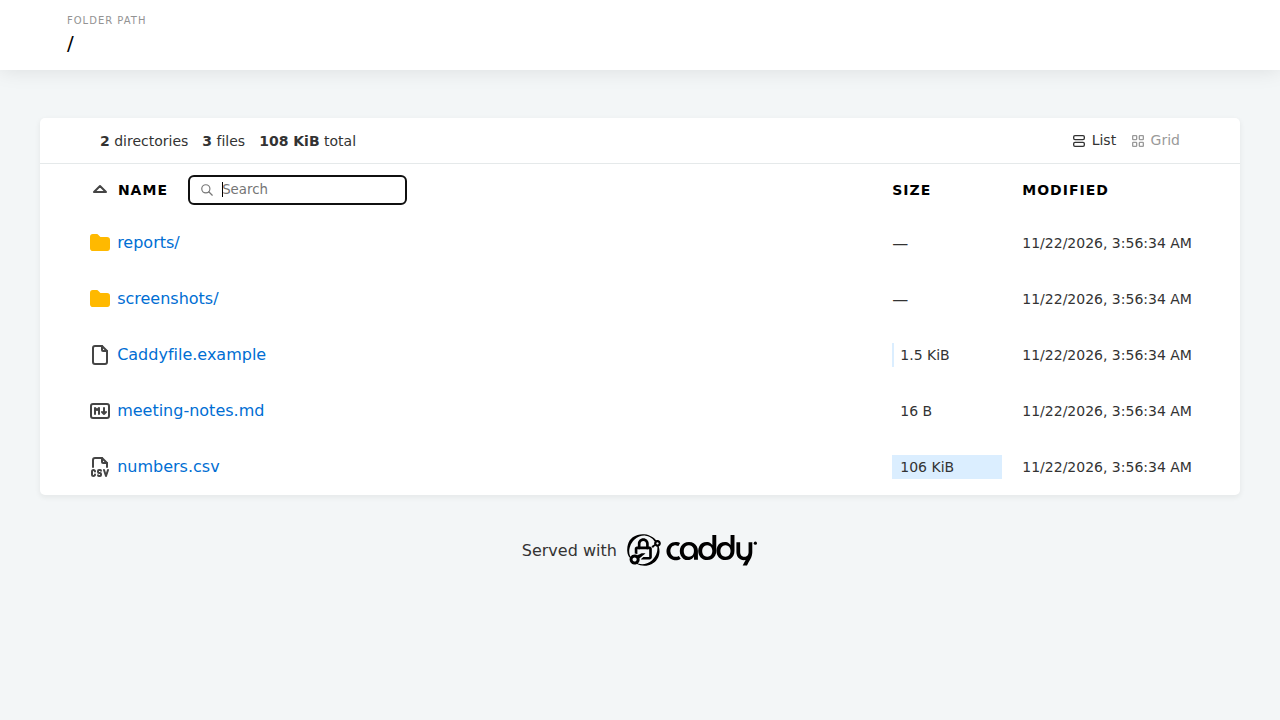
- **`/files/`**: a listing of `/srv/files`, with search and a grid view.
Caddy's built-in directory listing, behind exe.dev login.
It's all one file, `/etc/caddy/Caddyfile` (shown in full in
[Install by hand](#create-the-vm)). The lines that matter on exe.dev:
- **`auto_https off`**: Caddy can't get a certificate here, so it
shouldn't try.
- **`default_bind 127.0.0.1 [::1]`**: listen on loopback only, which is
where exe.dev's proxy connects.
- **`trusted_proxies static private_ranges`** and
**`trusted_proxies_strict`**: believe the proxy's `X-Forwarded-*`
headers. Without them your apps are told the request was plain `http`,
which causes redirect loops and CSRF errors.
- **`:8000`**: the port `https://my-caddy.exe.xyz/` is forwarded to.
- **`handle_path /api/*`** strips the prefix; **`handle`** keeps it. The
most specific path wins, and the bare `handle` catches the rest.
After editing the Caddyfile, on the VM:
```bash
sudo -u caddy caddy validate --config /etc/caddy/Caddyfile && sudo systemctl reload caddy
```
If the file is broken, the reload fails and the old config keeps
serving; `journalctl -u caddy -n 20` names the line.
## Add your own app
Run the app on a local port (a systemd service, or Compose with
`ports: ["127.0.0.1:3002:3000"]` and `restart: unless-stopped`), add a
block above the catch-all `handle`, then validate and reload:
```caddyfile
handle_path /orders/* {
reverse_proxy 127.0.0.1:3002
}
```
| The app... | Use |
|---|---|
| doesn't care about its path (most APIs) | `handle_path /x/*` |
| has a base path setting (Grafana, Vite `base`, Next.js `basePath`) | `handle /x/*`, with the base path set to `/x/` |
| assumes it owns `/` | its own port (see [More ports and domains](#more-ports-and-domains)) |
An app that assumes `/` shows up with missing CSS and JavaScript under a
prefix. WebSockets and streaming pass through `reverse_proxy` as is. See
[Go](/deploy/go), [Node.js](/deploy/nodejs) and
[Docker Compose](/deploy/docker-compose) for running the apps.
> [!TIP]
> exe.dev forwards ports 3000-9999 to signed-in users, even on
> `127.0.0.1`, so the API is also at `https://my-caddy.exe.xyz:3001/`.
> If Caddy's rules must be the only way in, use a port outside that
> range, such as `127.0.0.1:10001`.
## Put Grafana under /grafana
Grafana can live under a path and take its users from exe.dev's login.
On the VM:
```bash
sudo systemctl enable --now docker.service
mkdir -p ~/grafana/data && cd ~/grafana
owner=$(curl -fsS https://reflection.int.exe.xyz/email | jq -r '.email // empty')
cat > compose.yaml </`, always
private. A second site block is the place for an app that wants `/`:
```caddyfile
:8080 {
reverse_proxy 127.0.0.1:3002
}
```
For your own domain, add a CNAME to `my-caddy.exe.xyz` and run
`ssh exe.dev domain add my-caddy blog.example.com` ([custom domains](/docs/cnames)).
exe.dev issues the certificate and passes the name through in `Host`:
```caddyfile
http://blog.example.com:8000 {
root * /srv/blog
file_server
}
```
Always write `http://` and the port before a hostname; without it Caddy
expects TLS on port 8000 and exe.dev's requests fail. We tested domain
blocks by sending the `Host` header on the VM, not with a newly
registered domain.
## Logs and the admin API
- `journalctl -u caddy -f`: reloads and errors. A 502 shows up as
`connect: connection refused` with the app's port.
- `/var/log/caddy/access.log`: JSON, rotated at 50 MB, with the visitor's
real IP and email:
```bash
sudo tail -n 20 /var/log/caddy/access.log | jq -c '{ip: .request.client_ip, who: .request.headers["X-Exedev-Email"][0], uri: .request.uri, status}'
```
- `localhost:2019`: Caddy's admin API, used by `systemctl reload`. It
takes config changes without authentication, so leave it on localhost;
port 2019 is outside what exe.dev forwards.
`curl -s localhost:2019/reverse_proxy/upstreams | jq` shows each app's
health.
## The nuts and bolts
Happy clicking Deploy? You can stop here. These are the same setup steps
Shelley follows, plus the maintenance commands for later.
Install by hand
### Create a VM
On your computer (pick another name if `my-caddy` is taken):
```bash
ssh exe.dev new --name=my-caddy
ssh my-caddy.exe.xyz
```
All remaining installation commands run **on the VM**, as `exedev`.
### Install Caddy
These are the commands from
[Caddy's install page](https://caddyserver.com/docs/install#debian-ubuntu-raspbian),
plus an apt pin that keeps the VM on Caddy 2 until you decide to move to
a new major version:
```bash
sudo apt-get install -y debian-keyring debian-archive-keyring apt-transport-https curl
curl -1sLf 'https://dl.cloudsmith.io/public/caddy/stable/gpg.key' | sudo gpg --dearmor --yes -o /usr/share/keyrings/caddy-stable-archive-keyring.gpg
curl -1sLf 'https://dl.cloudsmith.io/public/caddy/stable/debian.deb.txt' | sudo tee /etc/apt/sources.list.d/caddy-stable.list
sudo chmod o+r /usr/share/keyrings/caddy-stable-archive-keyring.gpg /etc/apt/sources.list.d/caddy-stable.list
printf 'Package: caddy\nPin: version 3.*\nPin-Priority: -1\n' | sudo tee /etc/apt/preferences.d/caddy
sudo apt-get update
sudo apt-get install -y caddy
caddy version
systemctl is-enabled caddy
```
Expect `v2.11.9` or a later 2.x, and `enabled`. The package runs Caddy as
the `caddy` user with its example config on port 80, which the next steps
replace.
### Make the folders
Caddy can't read your home directory, so sites live in `/srv`, owned by
you so you can write to them without `sudo`:
```bash
sudo mkdir -p /srv/www /srv/files
sudo chown exedev:exedev /srv/www /srv/files
test -e /srv/www/index.html || cat > /srv/www/index.html <<'EOF'
Caddy on exe.dev
EOF
test -e /srv/files/README.txt || echo "Files in /srv/files are listed at /files/." > /srv/files/README.txt
```
### Start the whoami API
A stand-in for your own app: it answers every request with the headers
it received, which shows what Caddy passes on. Go is already on the VM.
```bash
mkdir -p ~/whoami && cd ~/whoami
cat > main.go <<'EOF'
// whoami answers with what Caddy passed on.
package main
import (
"encoding/json"
"log"
"net/http"
"os"
)
func main() {
http.HandleFunc("/", func(w http.ResponseWriter, r *http.Request) {
w.Header().Set("Content-Type", "application/json")
json.NewEncoder(w).Encode(map[string]string{
"path": r.URL.Path,
"email": r.Header.Get("X-ExeDev-Email"),
"proto": r.Header.Get("X-Forwarded-Proto"),
"host": r.Header.Get("X-Forwarded-Host"),
"client": r.Header.Get("X-Real-IP"),
})
})
log.Fatal(http.ListenAndServe(os.Getenv("ADDR"), nil))
}
EOF
test -f go.mod || go mod init whoami
go build -o whoami .
sudo tee /etc/systemd/system/whoami.service >/dev/null <<'EOF'
[Unit]
Description=whoami demo API behind Caddy
After=network.target
[Service]
User=exedev
Environment=ADDR=127.0.0.1:3001
ExecStart=/home/exedev/whoami/whoami
Restart=always
[Install]
WantedBy=multi-user.target
EOF
sudo systemctl daemon-reload
sudo systemctl enable --now whoami
curl -s --retry 5 --retry-connrefused --retry-delay 1 localhost:3001/hello
```
Expect JSON with `"path":"/hello"` and empty headers, since nothing is
in front of it yet.
### Write the Caddyfile
This is the file from [See it work](#see-it-work):
```bash
sudo tee /etc/caddy/Caddyfile >/dev/null <<'EOF'
{
# exe.dev's proxy terminates HTTPS and handles certificates.
# Caddy serves plain HTTP behind it.
auto_https off
# Listen on loopback only; that's where exe.dev's proxy connects.
default_bind 127.0.0.1 [::1]
servers {
# Trust the proxy's X-Forwarded-* headers,
# reading the client IP right to left.
trusted_proxies static private_ranges
trusted_proxies_strict
}
}
# https://.exe.xyz/ arrives here as plain HTTP on port 8000.
:8000 {
encode zstd gzip
log {
output file /var/log/caddy/access.log {
roll_size 50MiB
roll_keep 5
}
}
# /api/... goes to the API on port 3001, without the /api prefix.
handle_path /api/* {
reverse_proxy 127.0.0.1:3001 {
# The visitor's own address, as exe.dev saw it.
header_up X-Real-IP {client_ip}
}
}
# A directory listing of /srv/files.
redir /files /files/
handle_path /files/* {
root * /srv/files
file_server browse
}
# Everything else: the static site in /srv/www.
handle {
root * /srv/www
@assets path /assets/*
header @assets Cache-Control "public, max-age=31536000, immutable"
try_files {path} /index.html
file_server
}
}
EOF
sudo -u caddy caddy validate --config /etc/caddy/Caddyfile && sudo systemctl reload caddy
```
The last line ends with `Valid configuration`, and the reload prints
nothing. Validate as the `caddy` user, as here: run as `exedev` it
can't open the access log, and run as root it would create the log file
owned by root, which Caddy then can't write to.
### Check it
```bash
curl -s localhost:8000/ | grep h1
curl -s localhost:8000/api/whoami
curl -s -H 'Accept: application/json' localhost:8000/files/ | jq -r '.[].name'
sudo ss -ltnp | grep caddy
```
Expect the page's heading, whoami's JSON with `"path":"/whoami"`,
`README.txt`, and Caddy listening on `127.0.0.1:8000`, `[::1]:8000` and
`127.0.0.1:2019`.
The email and `https` appear only for requests through exe.dev: open
`https://my-caddy.exe.xyz/api/whoami` in your browser.
Back up and restore
Caddy keeps no state that matters here: no certificates, no database. The
Caddyfile and your folders are everything. On the VM:
```bash
sudo tar -czf ~/caddy-backup-$(date +%F).tar.gz -C / etc/caddy etc/apt/preferences.d/caddy srv/www srv/files etc/systemd/system/whoami.service home/exedev/whoami/main.go
sudo chown exedev: ~/caddy-backup-*.tar.gz
tar -tzf ~/caddy-backup-$(date +%F).tar.gz
```
On your computer, copy it off the VM:
`scp 'my-caddy.exe.xyz:caddy-backup-*.tar.gz' .`. Apps behind Caddy keep
their own data (Grafana's in `~/grafana/data`); back those up the way
their recipes say. For the whole disk, see [VM backups](/docs/vm-backups).
To restore on a VM where Caddy is installed (Install by hand, up to
"Install Caddy"), copy the archive over and unpack it at `/`:
```bash
sudo tar -xzf ~/caddy-backup-2026-11-22.tar.gz -C /
sudo chown -R exedev:exedev /srv/www /srv/files
sudo -u caddy caddy validate --config /etc/caddy/Caddyfile && sudo systemctl reload caddy
```
Rebuild the whoami API with the `go build` and `systemctl enable` lines
from "Start the whoami API" if you use it.
Update
Ubuntu's automatic updates are off on exe.dev VMs, so update Caddy
yourself. Read the [release notes](https://github.com/caddyserver/caddy/releases)
first, then on the VM:
```bash
sudo apt-get update
sudo apt-get install --only-upgrade -y caddy
caddy version
systemctl is-active caddy
```
The package restarts Caddy with the new version. The pin in
`/etc/apt/preferences.d/caddy` keeps you on 2.x; when Caddy 3 ships,
read its upgrade notes, test your Caddyfile, then delete the pin. To go
back a version, list them with `apt-cache madison caddy` and install one,
such as `sudo apt-get install -y --allow-downgrades caddy=2.11.8`.
Troubleshooting
- **502 Bad Gateway:** the app isn't answering. `journalctl -u caddy -n 20`
shows the port; check the app with `curl localhost:/`.
- **Redirect loops, `http://` links, CSRF errors:** the `trusted_proxies`
lines are missing from the global block.
- **CSS and JavaScript 404 under a prefix:** set the app's base path and
use `handle`, or give it its own port.
- **`Client sent an HTTP request to an HTTPS server` or ACME errors:** a
hostname without `http://` in a site address.
- **Reload failed:** `journalctl -u caddy -n 20` names the line; the old
config is still running.
- **403 serving files:** the `caddy` user can't read them. Keep sites in
`/srv`, readable by all (`chmod -R a+rX /srv/www`).
- **Not running after a reboot:** the Caddyfile on disk is broken;
`journalctl -u caddy -b` says where.
## Frequently asked questions
### Do I need Caddy on exe.dev at all?
Not for HTTPS: exe.dev's [HTTPS proxy](/docs/proxy) handles certificates and login. Caddy helps when several apps share one address, when you serve static files, or when you want rules by path or signed-in user.
### Why turn off Caddy's automatic HTTPS?
exe.dev answers on ports 80 and 443 and sends Caddy plain HTTP, so Caddy can't get a certificate. `auto_https off`, plus `http://` before any hostname, keeps it serving plain HTTP.
### Can my apps see who is signed in?
Yes. Caddy passes on exe.dev's `X-ExeDev-Email` and `X-ExeDev-UserID` headers, which visitors can't forge. See [Who's signed in](#whos-signed-in).
### Caddy or nginx?
Either works; nginx is already on the VM. Caddy's config is shorter, it refuses a broken config instead of loading it, and it has a file browser and header rules built in.
### Can I run Caddy in Docker instead?
Yes, with the official `caddy:2` image publishing `8000:8000`. Drop the `default_bind` line inside the container, and use your other services' names as upstreams.
### Is Caddy free?
Yes, it's open source under the Apache 2.0 license. You pay only for your [exe.dev plan](https://exe.dev/pricing).
## Related
- [Develop and deploy a React + Vite app on your own VM](https://exe.dev/deploy/react-vite.md): A live Vite dev server at a private HTTPS address, and production on the same VM.
- [Deploy a Go web app](https://exe.dev/deploy/go.md): One Go binary on a VM of its own. git push to deploy.
- [Deploy a Node.js app](https://exe.dev/deploy/nodejs.md): Your Express app on a server of its own. git push to deploy.
- [Self-host Grafana and Prometheus](https://exe.dev/deploy/grafana.md): Dashboards and alerts for every VM you run, signed in with exe.dev.
- [Deploy a Docker Compose app from GitHub](https://exe.dev/deploy/docker-compose.md): Your compose.yaml on a VM of its own. git push to deploy.
- [Deploy an Astro site](https://exe.dev/deploy/astro.md): Your Astro site, static or server-rendered, on a VM of its own.