
Self-host Activepieces
Open-source Zapier alternative with webhooks, AI steps, and MCP.
Shelley handles the setup. About 15 minutes.
Prefer a terminal?
curl -fsSL https://exe.dev/deploy/activepieces/prompt.txt | ssh exe.dev new --prompt=/dev/stdinActivepieces is an open-source Zapier alternative: chain triggers and actions from 750+ apps into flows, add AI steps, and let them run. It is also an MCP server, so Claude Code or Codex can build and run those flows for you. On exe.dev it lives on a VM that stays up while your laptop sleeps, behind your exe.dev login, with AI models a URL away and no API key to paste.
What you get#
- Always-on Activepieces with PostgreSQL and Redis, back after a reboot.
- A builder only you can open, and webhooks you can make public with one command.
- An example flow file that summarizes a webhook with AI and emails you.
- Nightly database backups, with a restore checked before you start.
What's running, and where
https://my-activepieces.exe.xyz/
The flow builder, for you only (exe.dev login, then Activepieces login)
https://my-activepieces.exe.xyz/api/v1/webhooks/
Flow webhooks, only after you enable public access
https://my-activepieces.exe.xyz/mcp/platform
The MCP server for Claude Code, Codex and others, behind Activepieces OAuth
Deploy with Shelley#
Click Deploy and Shelley will set up Activepieces on a new VM, then check that it works. No config-file wrangling required.
Prefer a terminal?
curl -fsSL \
  https://exe.dev/deploy/activepieces/prompt.txt \
  | ssh exe.dev new --prompt=/dev/stdin
What Shelley is told
Set up Activepieces on this VM by following the exe.dev recipe at https://exe.dev/deploy/activepieces.md?via=deploy from top to bottom.

The recipe's example VM name is my-activepieces. This VM's name is the output of `hostname`: use it wherever the recipe writes my-activepieces. Skip the step that creates the VM; you are on it.

You are done when all of these are true. Check each one yourself:
- Always-on Activepieces with PostgreSQL and Redis, back after a reboot.
- A builder only you can open, and webhooks you can make public with one command.
- An example flow file that summarizes a webhook with AI and emails you.
- Nightly database backups, with a restore checked before you start.

Read the whole recipe, including the closed details. For initial setup,
follow "Install by hand" first: containers, nginx gate, backup cron, and
scratch restore check. The opening walkthrough is for the owner
afterwards. Do not run the later Restore or Update instructions during
initial setup.
Work as exedev in ~/activepieces. Never overwrite an existing
~/activepieces/.env: it holds the encryption key for saved connections.
Do not create the Activepieces account; the owner does that in the
browser, and the first account becomes the admin. Leave public sharing
off. Verify the three gate checks at localhost:8000 (302, 403, 200).
Verify docker.service is enabled and every container uses
unless-stopped; do not reboot.
Finish with the builder URL, a link to the example flow file, and the
OPTIONAL command the owner can run on their own computer to let webhooks
and MCP clients in: ssh exe.dev share set-public my-activepieces

Finish with the URLs I should open.
Also at /deploy/activepieces/prompt.txt. The recipe it follows is /deploy/activepieces.md.
Open the builder#
When Shelley finishes, open your builder at
https://my-activepieces.exe.xyz/. exe.dev asks you to sign in first,
and lets only you through. Then create your Activepieces account. The first account becomes the admin, and only
you can reach the sign-up page, so take your time.
Run the example flow#
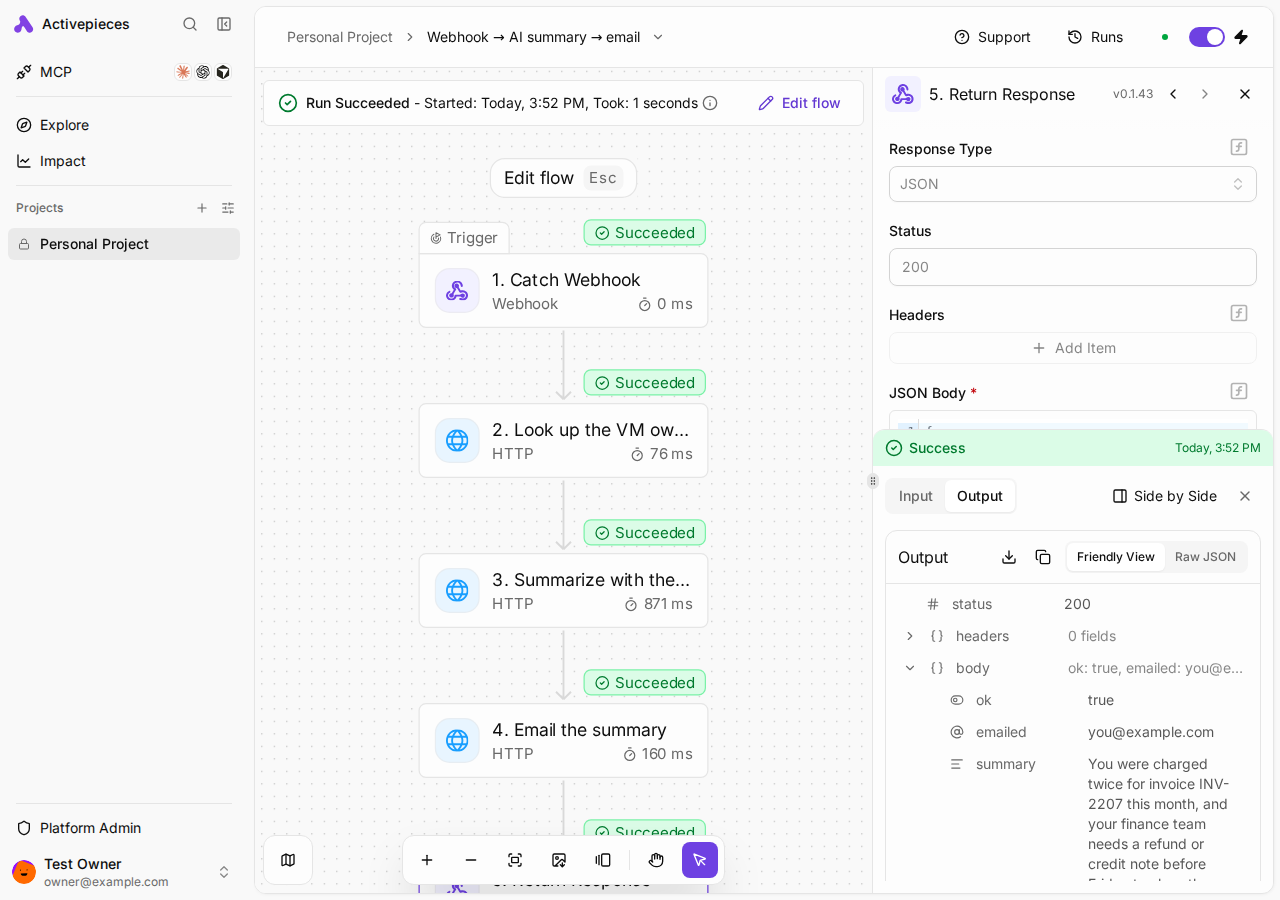
Download summarize-webhook.json to your computer. In Activepieces, open Automations → Import → Import Flow, choose the file, and click Import. Then click Publish.
The flow catches a webhook, asks the exe.dev LLM gateway for a summary, emails it to you with the email gateway, and returns it. Every step is a plain HTTP request: no connections, no keys.
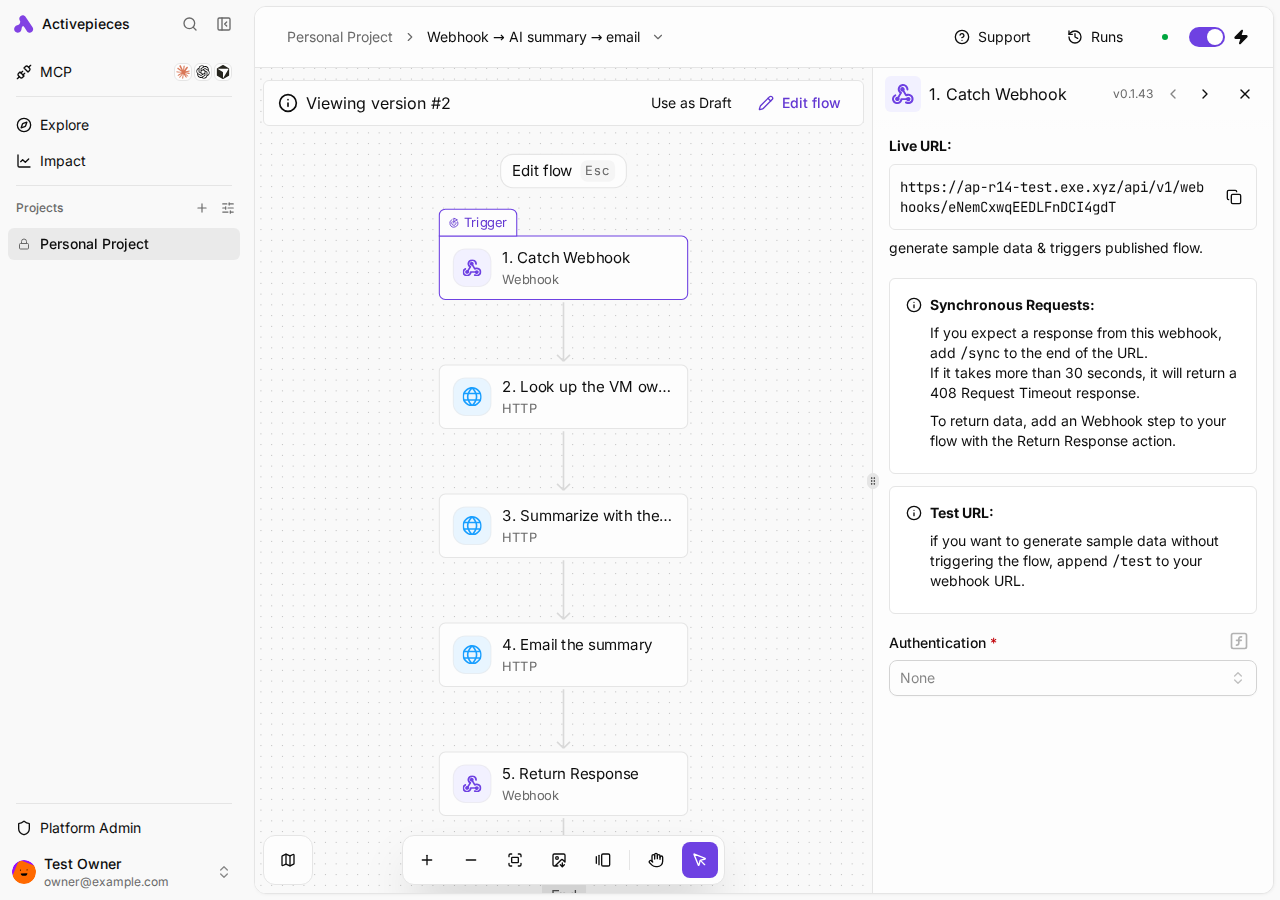
Click the Catch Webhook step and copy its Live URL; the last part
is your flow's ID. On the VM (ssh my-activepieces.exe.xyz), with your ID:
curl -X POST http://localhost:8000/api/v1/webhooks/YOUR_FLOW_ID/sync \
  -H 'Content-Type: application/json' \
  -d '{"subject":"Order 1042","text":"My order 1042 still has not shipped and I need it before the weekend. Can you check?"}'
You'll get "ok":true and a summary back within seconds, and the same
summary lands in your inbox. Runs shows each step's input and output.
Without /sync, the call returns at once and the flow runs in the
background.
Let webhooks and AI agents in#
Only using schedules and polling triggers? Skip this. To accept calls from other apps, or connect Claude Code from your laptop, make the VM public. On your computer:
ssh exe.dev share set-public my-activepieces
curl -X POST https://my-activepieces.exe.xyz/api/v1/webhooks/YOUR_FLOW_ID/sync \
  -H 'Content-Type: application/json' -d '{"subject":"Hi","text":"Hello from outside."}'
The builder stays private. The nginx gate in front of Activepieces
lets anonymous visitors reach only webhooks, the MCP endpoint with its
OAuth sign-in, and a health check; everything else needs your exe.dev
login. Anyone with a webhook URL can call it, so give webhooks that do
real work Authentication (basic, header, or HMAC) on the Catch
Webhook step. Undo with ssh exe.dev share set-private my-activepieces.
Tip
Calling a webhook from your own scripts only? Keep the VM private and send a VM token instead:
ssh exe.dev ssh-key generate-api-key --vm=my-activepieces --label=flows, then add-H "X-Exedev-Authorization: Bearer $TOKEN"to the curl.
Use AI pieces#
The built-in AI piece (Ask AI, Summarize Text, Classify Text, Extract Structured Data) needs a provider. Open Platform Admin → AI Center, click Add key on Other (OpenAI Compatible), and fill in:
- Name: exe.dev LLM gateway
- Base URL:
https://llm.int.exe.xyz/v1 - API key: anything, such as
exe-dev; the gateway ignores it - API style: Chat completions
Save, open its Models tab, add gpt-5.4-mini (type Text), and save
again. AI steps can now pick it. Other ids the gateway serves, such as
gpt-5.5, work the same way.
Connect Claude Code or Codex#
Activepieces is an MCP server: an agent can list, build, publish and run your flows, as you. It needs public access (above); Activepieces checks an OAuth token on every call. On your computer:
claude mcp add --transport http activepieces https://my-activepieces.exe.xyz/mcp/platform
claude mcp login activepieces
Your browser opens Activepieces' consent page (behind your exe.dev login). Click Authorize, then ask Claude Code “What Activepieces tools do you have?” or “Run my summarize flow with a test message.” For Codex:
codex mcp add activepieces --url https://my-activepieces.exe.xyz/mcp/platform
codex mcp login activepieces
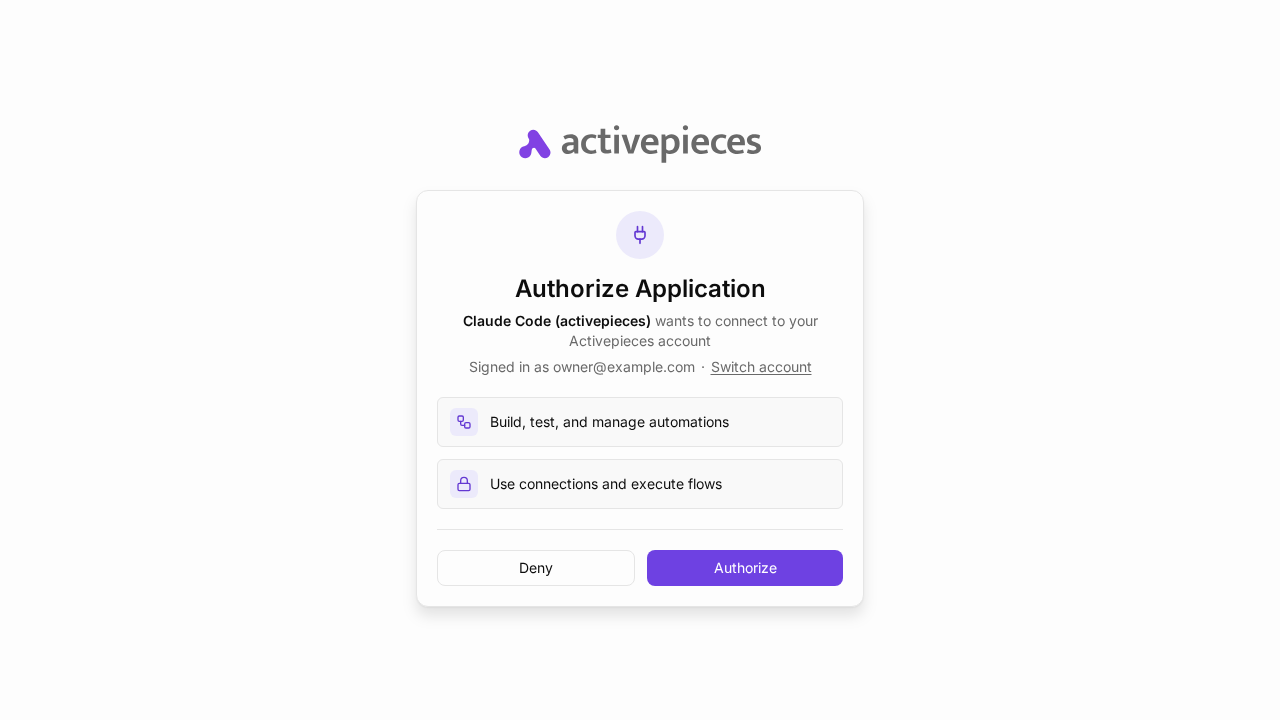
The MCP page has steps for Cursor, VS Code and more. Under Platform Admin → MCP Server, edit, run and delete tools all start switched on; turn off Delete unless you want an agent able to remove flows.
Connect Slack, GitHub, and other apps#
Slack, GitHub, Google and most OAuth pieces use Activepieces' own OAuth
apps: click New connection and sign in. The token passes through
secrets.activepieces.com once, then stays encrypted on your VM. For
your own OAuth app, use https://my-activepieces.exe.xyz/redirect as the
redirect URL. Or skip tokens on the VM: an HTTP step can post
{"text": "..."} to the exe.dev
Slack integration, or call any API through an
HTTP proxy integration.
Code steps run in a sandbox#
Code steps run in SANDBOX_CODE_ONLY mode: each gets its own V8 isolate
with 128 MB and no filesystem, so no require() or npm packages. Need
packages, and you're the only builder? Set
AP_EXECUTION_MODE=UNSANDBOXED in .env and run docker compose up -d;
code then runs with the worker's full access.
Activepieces or n8n?#
Both are visual automation tools with AI steps and public webhooks; Activepieces is MIT-licensed with a simpler, Zapier-like builder and a built-in MCP server, while n8n has more nodes and lower-level control under its Sustainable Use License. Prefer n8n? See Self-host n8n or the n8n 3.0 beta.
Keep your work#
A backup of the database and settings runs nightly into
~/activepieces-backups. Keep a copy off the VM. On your computer:
scp -r my-activepieces.exe.xyz:activepieces-backups .
Keep them private: .env holds AP_ENCRYPTION_KEY, without which saved
connections can't be decrypted. For whole-VM snapshots, see
VM backups.
Good to know:
- CPU only, one worker running five flows at once; for more, resize
the VM and raise
AP_WORKER_CONCURRENCYin.env. - Disk: images take about 4 GB and run history grows (
df -h /). - HTTP only. The HTTPS proxy carries web traffic; to reach services on your private network, use Tailscale.
- Webhooks time out after 30 seconds and accept up to 25 MB.
Something stuck? On the VM, try
cd ~/activepieces && docker compose logs --tail=100 app worker.
The nuts and bolts#
Happy clicking Deploy? You can stop here. These are the same setup steps Shelley follows, plus the maintenance commands for later.
Install by hand
Create a VM#
On your computer (pick another name if my-activepieces is taken):
ssh exe.dev new --name=my-activepieces
ssh my-activepieces.exe.xyz
All remaining installation commands run on the VM, as exedev.
Commands use hostname, so your VM can have any name.
Install Activepieces#
Enable Docker at boot, so the containers come back after a reboot, and
install jq if needed:
sudo systemctl enable --now docker.service
systemctl is-enabled docker.service
command -v jq >/dev/null || sudo apt-get install -y jq
The check should print enabled. Generate the settings and secrets
once; this leaves an existing .env alone. It pins Activepieces 0.93,
picks the MIT Community Edition, sandboxes code steps, and turns off
telemetry:
mkdir -p ~/activepieces/postgres ~/activepieces/redis ~/activepieces/cache
cd ~/activepieces
if [ ! -e .env ]; then
  touch .env && chmod 600 .env
  cat >> .env <<EOF
# Activepieces settings and secrets. Back this file up: without
# AP_ENCRYPTION_KEY the connections saved in Activepieces can't be decrypted.
AP_VERSION=0.93.0
AP_EDITION=ce
AP_ENVIRONMENT=prod
AP_EXECUTION_MODE=SANDBOX_CODE_ONLY
AP_FRONTEND_URL=https://$(hostname).exe.xyz
AP_API_KEY=$(openssl rand -hex 64)
AP_ENCRYPTION_KEY=$(openssl rand -hex 16)
AP_JWT_SECRET=$(openssl rand -hex 32)
AP_POSTGRES_HOST=postgres
AP_POSTGRES_PORT=5432
AP_POSTGRES_DATABASE=activepieces
AP_POSTGRES_USERNAME=postgres
AP_POSTGRES_PASSWORD=$(openssl rand -hex 32)
AP_REDIS_HOST=redis
AP_REDIS_PORT=6379
AP_TELEMETRY_ENABLED=false
EOF
fi
grep -E '^AP_(VERSION|EDITION|FRONTEND_URL)=' .env
AP_FRONTEND_URL is the address Activepieces puts in webhook URLs and
sign-in redirects. Next, the Compose stack. It follows Activepieces'
Docker Compose setup
with one worker, data in directories beside it, and nginx in front:
cat > ~/activepieces/compose.yaml <<'EOF'
# Activepieces app + worker + PostgreSQL + Redis + an nginx gate.
# Settings and secrets come from .env in this directory.
name: activepieces

services:
  app:
    image: ghcr.io/activepieces/activepieces:${AP_VERSION}
    restart: unless-stopped
    env_file: .env
    environment:
      - AP_CONTAINER_TYPE=APP
    volumes:
      - ./cache:/usr/src/app/cache
    depends_on: [postgres, redis]

  worker:
    image: ghcr.io/activepieces/activepieces:${AP_VERSION}
    restart: unless-stopped
    env_file: .env
    environment:
      - AP_CONTAINER_TYPE=WORKER
      - AP_FRONTEND_URL=http://app
    volumes:
      - ./cache:/usr/src/app/cache
    depends_on: [app]

  postgres:
    image: pgvector/pgvector:0.8.0-pg14
    restart: unless-stopped
    environment:
      - POSTGRES_DB=${AP_POSTGRES_DATABASE}
      - POSTGRES_USER=${AP_POSTGRES_USERNAME}
      - POSTGRES_PASSWORD=${AP_POSTGRES_PASSWORD}
    volumes:
      - ./postgres:/var/lib/postgresql/data

  redis:
    image: redis:7.0.7
    restart: unless-stopped
    volumes:
      - ./redis:/data

  proxy:
    image: nginx:stable-alpine
    restart: unless-stopped
    ports:
      - "8000:80"
    volumes:
      - ./nginx.conf:/etc/nginx/conf.d/default.conf:ro
    depends_on: [app]
EOF
Put the builder behind your login#
exe.dev's HTTPS proxy sends https://<vm>.exe.xyz/ to port
8000. While the VM is private, only you get through. Once it's public,
this nginx gate keeps the builder yours: it lets webhook, MCP, and OAuth
paths through, and checks the X-ExeDev-Email header that exe.dev
adds for signed-in visitors against the VM
owner's address, which it looks up with the
Reflection integration:
OWNER=$(curl -fsS https://reflection.int.exe.xyz/email | jq -r .email)
echo "$OWNER"
cat > ~/activepieces/nginx.conf <<'EOF'
# Port 8000: https://<vm>.exe.xyz/. Webhooks, the MCP server (which has
# its own OAuth), and the health check are open once you run
# `share set-public`; everything else needs the owner's exe.dev login.
map $http_x_exedev_email $ap_gate {
    ""              login;
    "OWNER_EMAIL"   ok;
    default         deny;
}

server {
    listen 80 default_server;
    absolute_redirect off;
    server_tokens off;

    # Look the app up at request time, so a recreated container is found.
    resolver 127.0.0.11 valid=10s ipv6=off;
    set $ap http://app:80;

    client_max_body_size 30m;
    proxy_http_version 1.1;
    proxy_read_timeout 300s;
    proxy_set_header Host $host;
    proxy_set_header Upgrade $http_upgrade;
    proxy_set_header Connection $http_connection;
    proxy_set_header X-Forwarded-For $http_x_forwarded_for;
    proxy_set_header X-Forwarded-Host $http_x_forwarded_host;
    proxy_set_header X-Forwarded-Proto $http_x_forwarded_proto;

    # Public: /api/v1/webhooks/<flowId>[/sync|/test|/draft|/draft/sync].
    # Check the raw path too, so encoded tricks can't reach anything else.
    location ^~ /api/v1/webhooks/ {
        if ($request_uri !~ "^/api/v1/webhooks/[A-Za-z0-9_-]+(/sync|/test|/draft|/draft/sync)?/?(\?.*)?$") {
            return 404;
        }
        proxy_pass $ap;
    }

    # Public: the MCP server and its OAuth endpoints. Activepieces checks
    # every token; the consent page stays behind the login.
    location = /mcp            { proxy_pass $ap; }
    location = /mcp/platform   { proxy_pass $ap; }
    location = /register       { proxy_pass $ap; }
    location = /authorize      { proxy_pass $ap; }
    location = /token          { proxy_pass $ap; }
    location = /revoke         { proxy_pass $ap; }
    location = /userinfo       { proxy_pass $ap; }
    location ^~ /.well-known/  { proxy_pass $ap; }
    location = /api/v1/health  { proxy_pass $ap; }

    # Everything else (the builder, its API and websocket): the owner only.
    location / {
        if ($ap_gate = login) {
            return 302 /__exe.dev/login?redirect=$request_uri;
        }
        if ($ap_gate = deny) {
            return 403 "This Activepieces belongs to someone else.\n";
        }
        proxy_pass $ap;
    }
}
EOF
sed -i "s/OWNER_EMAIL/$OWNER/" ~/activepieces/nginx.conf
grep -c "\"$OWNER\"" ~/activepieces/nginx.conf
The first line prints your email and the last prints 1. To let a second
person in, add another "them@example.com" ok; line to the map, then
run docker compose restart proxy.
Start it#
cd ~/activepieces
docker compose up -d
until curl -fs http://localhost:8000/api/v1/health; do sleep 5; done; echo
The first start pulls about 4 GB of images and takes a few minutes. Expect
{"status":"Healthy"}. Activepieces then downloads its catalog of
pieces, which takes another minute or two; flows can't be imported or
published until the pieces they use have arrived:
cd ~/activepieces
until [ "$(docker compose exec -T postgres psql -U postgres -d activepieces -Atc \
  "select count(*) from piece_metadata where name = '@activepieces/piece-webhook'")" -gt 0 ]; do sleep 10; done
echo pieces ready
Then check the gate:
curl -s -o /dev/null -w '%{http_code}\n' http://localhost:8000/
curl -s -o /dev/null -w '%{http_code}\n' -H 'X-ExeDev-Email: someone@example.com' http://localhost:8000/
curl -s -o /dev/null -w '%{http_code}\n' -H "X-ExeDev-Email: $(curl -fsS https://reflection.int.exe.xyz/email | jq -r .email)" http://localhost:8000/
Expect 302 (to the login), 403, and 200. exe.dev replaces any
X-ExeDev-Email header a visitor sends, so these can't be faked from
outside. Confirm every service restarts on its own:
docker compose ps --format '{{.Service}} {{.Status}}'
docker inspect --format '{{.Name}} {{.HostConfig.RestartPolicy.Name}}' $(docker compose ps -q)
Five services Up, each unless-stopped.
Set up nightly backups#
The backup dumps the database without the piece catalog (about 600 MB that Activepieces downloads again on start) and archives the settings next to it:
mkdir -p ~/activepieces-backups
cat > ~/activepieces/backup.sh <<'EOF'
#!/bin/sh
# Nightly Activepieces backup: database dump plus the settings it needs.
set -eu
umask 077
cd ~/activepieces
. ./.env
out=~/activepieces-backups
stamp=$(date +%F)
docker compose exec -T postgres pg_dump -U "$AP_POSTGRES_USERNAME" -d "$AP_POSTGRES_DATABASE" --clean --if-exists \
    --exclude-table-data=piece_metadata --exclude-table-data=piece_translation | gzip > "$out/activepieces-$stamp.sql.gz"
tar czf "$out/activepieces-config-$stamp.tgz" .env compose.yaml nginx.conf backup.sh
find "$out" -name 'activepieces-*' -mtime +14 -delete
echo "$out/activepieces-$stamp.sql.gz"
EOF
chmod +x ~/activepieces/backup.sh
~/activepieces/backup.sh
(crontab -l 2>/dev/null | grep -v activepieces/backup.sh; echo '17 3 * * * $HOME/activepieces/backup.sh >/dev/null') | crontab -
crontab -l | grep backup.sh
The script prints the new dump's path; backups older than 14 days are deleted.
Test a backup#
Load the latest dump into a throwaway PostgreSQL container and list the published flows:
latest=$(ls -t ~/activepieces-backups/activepieces-*.sql.gz | head -1)
docker run -d --name ap-restore-test -e POSTGRES_PASSWORD=restore-test \
  -e POSTGRES_DB=activepieces pgvector/pgvector:0.8.0-pg14
docker exec ap-restore-test sh -c 'until pg_isready -q -h 127.0.0.1; do sleep 1; done'
zcat "$latest" | docker exec -i ap-restore-test psql -q -v ON_ERROR_STOP=1 -U postgres -d activepieces >/dev/null && echo restored
docker exec ap-restore-test psql -U postgres -d activepieces -Atc 'select count(*) from flow'
docker rm -f ap-restore-test
Expect restored and a count (0 before anyone has built a flow).
Installation done. Leave the Activepieces account and public sharing to the owner; continue with Open the builder.
Back up and restore
On the VM, ~/activepieces/backup.sh makes an extra backup. A restore
needs the database dump and the .env from the same day's config
archive. Copy backups off the VM as shown above.
Restore#
On a new VM, follow Install Activepieces as far as enabling Docker, then copy both files over from your computer, using your backups' actual names:
ssh my-activepieces.exe.xyz mkdir -p activepieces-backups
scp activepieces-2026-11-21.sql.gz activepieces-config-2026-11-21.tgz my-activepieces.exe.xyz:activepieces-backups/
The rest runs on the VM. If Activepieces already runs there, stop it and keep its directory aside first:
cd ~/activepieces && docker compose down
sudo mv ~/activepieces ~/activepieces.before-restore
Unpack the settings, point them at this VM, and refresh the owner email in the gate:
mkdir -p ~/activepieces/postgres ~/activepieces/redis ~/activepieces/cache
cd ~/activepieces
tar -xzf ~/activepieces-backups/activepieces-config-2026-11-21.tgz
sed -i "s#^AP_FRONTEND_URL=.*#AP_FRONTEND_URL=https://$(hostname).exe.xyz#" .env
OWNER=$(curl -fsS https://reflection.int.exe.xyz/email | jq -r .email)
sed -i "s/^\(    \"\)[^\"]*\(\"   ok;\)/\1$OWNER\2/" nginx.conf
grep '   ok;' nginx.conf
Load the database before starting Activepieces:
cd ~/activepieces
. ./.env
docker compose up -d postgres
until docker compose exec -T postgres pg_isready -q -h 127.0.0.1; do sleep 2; done
zcat ~/activepieces-backups/activepieces-2026-11-21.sql.gz \
  | docker compose exec -T postgres psql -q -v ON_ERROR_STOP=1 -U "$AP_POSTGRES_USERNAME" -d "$AP_POSTGRES_DATABASE" >/dev/null && echo restored
Start the app on its own first, so it can download the piece catalog again (5 to 15 minutes). Without the worker and proxy, no flow runs meanwhile: a flow that ran before its pieces arrived would be switched off.
cd ~/activepieces
docker compose up -d app
until docker compose logs app 2>&1 | grep -q 'Piece synchronization completed'; do sleep 15; done
docker compose up -d
until curl -fs http://localhost:8000/api/v1/health; do sleep 5; done; echo
Sign in with your old Activepieces account: flows, runs and connections
are back. Recreate the backup cron from
Set up nightly backups, and run share set-public again if you used it. Webhook URLs change if the VM's name
did. Keep ~/activepieces.before-restore until you're happy.
Update Activepieces
Pick a version from the
releases and read
its notes. On the VM, back up, then change only AP_VERSION in .env:
cd ~/activepieces
./backup.sh
nano .env
docker compose pull
docker compose up -d
until curl -fs http://localhost:8000/api/v1/health; do sleep 5; done; echo
docker compose logs app | grep -o -m1 '"version":"[^"]*"'
The app migrates the database on start. Try your flows. To roll back,
restore the backup; changing the image tag alone won't undo
database migrations. Run docker image prune afterwards to get the old
images' disk space back.
Something not working?
On the VM:
cd ~/activepieces
docker compose ps
docker compose logs --tail=100 app worker proxy
- 403 “belongs to someone else”: you're signed in to exe.dev with a
different email than the VM owner's. Add yours to the
mapinnginx.confand rundocker compose restart proxy. - Edited
nginx.confbut nothing changed:docker compose restart proxy. Docker keeps reading the old file if an editor replaced it. - Webhook returns 401 from outside: the VM is still private. Run
ssh exe.dev share set-public my-activepieceson your computer, or send a VM token. - “Trigger not found for piece” on import or publish: the piece catalog is still downloading after a fresh start or restore. Wait a minute or two and try again.
- Webhook returns 404: publish the flow, and check the flow ID. For
sample data while building, use the
/testURL. - “The flow has failed and there is no response returned”: open
Runs to see which step failed and why. In expressions, refer to
earlier steps as
{{step_1['output']['body']}}or pick them from the data selector. - AI step says no provider: add the gateway in AI Center and add a model, as in Use AI pieces.
- Claude Code can't connect: the VM must be public for MCP;
curl -s https://my-activepieces.exe.xyz/.well-known/oauth-authorization-servershould return JSON. - Connections fail to decrypt after a restore:
.envdoesn't match the database. Restore both from the same day. - Down after reboot: run
sudo systemctl enable --now docker.service.
Frequently asked questions#
Is Activepieces free to self-host?
The Community Edition used here is MIT-licensed and free. You pay for your VM; see exe.dev plans. AI steps through the exe.dev LLM gateway are billed through your LLM integration.
What's missing from the Community Edition?
SSO, audit logs, API keys, secret managers, embedding, and AI agents and chat are paid features. Flows, 750+ pieces, webhooks, tables, AI pieces, code steps and the MCP server all work. The official installer runs the Enterprise edition without a licence, which puts you on a metered free plan; this recipe sets AP_EDITION=ce instead.
Can I use AI models without an OpenAI key?
Yes. Add the exe.dev LLM gateway as an OpenAI-compatible provider in AI Center, or call it from an HTTP step as the example flow does. No key to paste.
Can Claude Code build and run flows for me?
Yes. Activepieces is an MCP server: claude mcp add --transport http activepieces https://my-activepieces.exe.xyz/mcp/platform, sign in once, and Claude Code can list, edit, publish and run your flows. Codex, Cursor and other MCP clients work the same way.
Can I use my own domain?
Yes. Ask Shelley to connect a custom domain, then set AP_FRONTEND_URL to it and restart, so webhook URLs and sign-in redirects use the new name.
How big a VM does it need?
Activepieces asks for 2 vCPUs and 4 GB of memory. On our test VM the whole VM used about 2.5 GB of memory and 8 GB of disk, half of that the container images.
Published Nov 21, 2026 · Updated Nov 21, 2026 · tested end to end Nov 21, 2026 · Markdown · manifest.json · Something wrong? Tell us


