
Self-host Unleash feature flags
Feature flags and gradual rollouts on your own VM. A LaunchDarkly alternative.
Shelley handles the setup. About 10 minutes.
Prefer a terminal?
curl -fsSL https://exe.dev/deploy/unleash/prompt.txt | ssh exe.dev new --prompt=/dev/stdinUnleash is an open-source feature flag server. You wrap new code in
if (unleash.isEnabled('new-checkout')), ship it turned off, and then
turn it on for yourself, for 5% of users, for one customer, or for
everyone, from a web UI, without a deploy. Its SDKs cover Node, Go,
Python, Java, Ruby, .NET, Rust, PHP, the browser, React and mobile, and
server-side SDKs evaluate flags in your own process, so a flag check is
never a network call. It has 14,338 stars on GitHub (November 22, 2026).
On an exe.dev VM the admin UI sits on port 4242, which only you and the
people you share the VM with can open. Your backends on
other VMs read flags through an exe.dev VM-to-VM integration, which adds
the credentials on the way, so the app VMs hold none. The main address,
https://my-unleash.exe.xyz/, answers only Unleash's Frontend API, the
part that browsers and mobile apps call with a token that isn't secret.
If you'd rather run GrowthBook or Flagsmith, two sections further down sketch each on exe.dev, and Which one to pick compares the three.
What you get#
- Unleash 8.3 on PostgreSQL 17, restarted after a reboot.
- The admin UI and Client API on private port 4242, behind exe.dev login and Unleash's own.
- A main URL that answers only the Frontend API, so browsers can read flags once the VM is public.
- An admin password generated on the VM, not Unleash's well-known default.
- Nightly backups of the database and secrets.
What's running, and where
https://my-unleash.exe.xyz:4242/
The admin UI, behind exe.dev login and Unleash's own
https://unleash.int.exe.xyz/api/
The Client API for your backends, from app VMs you attach a VM-to-VM integration to
https://my-unleash.exe.xyz/api/frontend
The Frontend API for browser and mobile apps, once you make the VM public
Deploy with Shelley#
Click Deploy and Shelley will set up Unleash on a new VM, then check that it works. No config-file wrangling required.
Prefer a terminal?
curl -fsSL \
  https://exe.dev/deploy/unleash/prompt.txt \
  | ssh exe.dev new --prompt=/dev/stdin
When it's done, run this on your computer (only you can):
ssh exe.dev integrations add http-proxy --name unleash --target https://my-unleash.exe.xyz:4242/ --peer --header 'Authorization:<backend token>' --attach vm:my-app   # after you make a backend token
ssh exe.dev share set-public my-unleash   # only if browsers or mobile apps read flags
What Shelley is told
Set up Unleash on this VM by following the exe.dev recipe at https://exe.dev/deploy/unleash.md?via=deploy from top to bottom.

The recipe's example VM name is my-unleash. This VM's name is the output of `hostname`: use it wherever the recipe writes my-unleash. Skip the step that creates the VM; you are on it.

You are done when all of these are true. Check each one yourself:
- Unleash 8.3 on PostgreSQL 17, restarted after a reboot.
- The admin UI and Client API on private port 4242, behind exe.dev login and Unleash's own.
- A main URL that answers only the Frontend API, so browsers can read flags once the VM is public.
- An admin password generated on the VM, not Unleash's well-known default.
- Nightly backups of the database and secrets.

Read the whole recipe, including closed details, and follow "Install by
hand" first. The walkthrough before it is for the owner afterwards. Do
not run the Restore or Update instructions.
Work as exedev in ~/unleash. Never overwrite an existing ~/unleash/.env.
Do not create flags or API tokens: the owner does that. Leave public
sharing off; only the owner can turn it on. Verify docker.service is
enabled, the three containers are restart unless-stopped and up (db and
unleash healthy), localhost:4242/health answers {"health":"GOOD"},
localhost:8000/api/frontend returns 401, and localhost:8000/ and
localhost:8000/api/client/features return 404. Check the backup timer is
enabled and the first dump exists in ~/unleash/backups.
Finish with the admin URL on port 4242, the user name admin and the
password from UNLEASH_ADMIN_PASSWORD in ~/unleash/.env, and the two
next steps for the owner: make a backend API token in Unleash and, on
their own computer, connect their app VM with ssh exe.dev integrations
add http-proxy --name unleash --target https://my-unleash.exe.xyz:4242/
--peer --header 'Authorization:<backend token>' --attach vm:<app vm>
(see "Read flags from a backend on another VM"); and, only for browser
flags, ssh exe.dev share set-public my-unleash.

Finish with the URLs I should open and these commands, which only I can run, from my own computer (with this VM's name in them):
  ssh exe.dev integrations add http-proxy --name unleash --target https://my-unleash.exe.xyz:4242/ --peer --header 'Authorization:<backend token>' --attach vm:my-app   # after you make a backend token
  ssh exe.dev share set-public my-unleash   # only if browsers or mobile apps read flags
Also at /deploy/unleash/prompt.txt. The recipe it follows is /deploy/unleash.md.
Sign in and create a flag#
Open the admin Shelley gives you, https://my-unleash.exe.xyz:4242/.
After exe.dev login you'll see Unleash's own sign-in page. The user is
admin; Shelley tells you the password, or read it on the VM with
grep ADMIN_PASSWORD ~/unleash/.env.
Unleash starts with one project, Default, and two environments, development and production. Create a flag:
- Click New feature flag, name it
new-checkout, and click Create feature flag. - In the production environment, click Add strategy, choose Gradual rollout, set the rollout to 25%, and save. Leave stickiness on default: a signed-in user keeps the same answer.
- Turn production on with its switch.
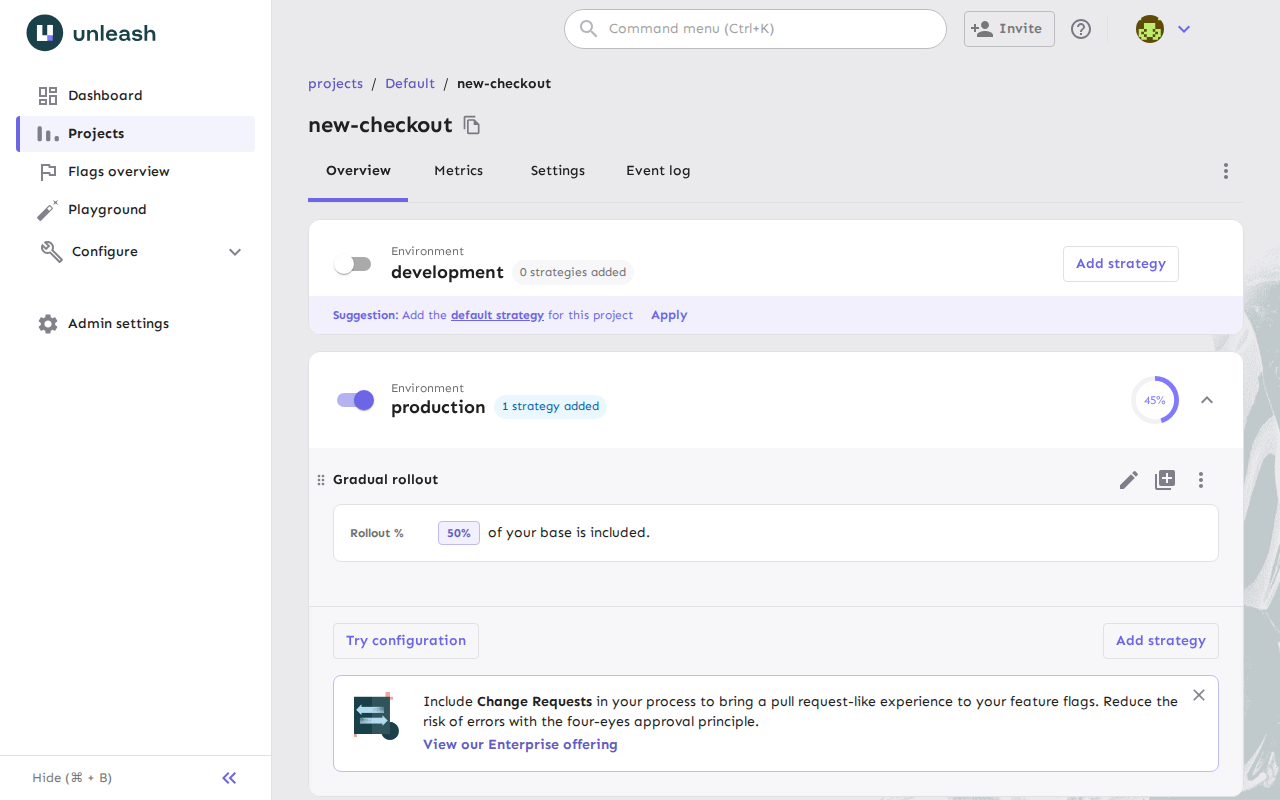
Change the admin password under your avatar → Profile settings, and add your team under Admin settings → Users.
Read flags from a backend on another VM#
Port 4242 is private, so an app on another VM can't just call it. An exe.dev VM-to-VM integration gives the app VM its own address for Unleash, adds the credentials on the way, and keeps them off the app VM entirely.
In Unleash, open Admin settings → API access → New API token,
choose Backend, the production environment and all projects, and
copy the token. It looks like *:production.v2_… and is shown only once.
On your computer, make the integration and attach it to your app's VM,
here my-app. Keep the single quotes; the token starts with *:
ssh exe.dev integrations add http-proxy --name unleash \
  --target https://my-unleash.exe.xyz:4242/ --peer \
  --header 'Authorization:*:production.v2_paste-the-backend-token' \
  --attach vm:my-app
--peer makes exe.dev generate a key for my-unleash and add it to
every request, which gets past exe.dev login. --header adds the
Unleash token. Both are stored by exe.dev, not on either VM. From
my-app, check it:
curl -s https://unleash.int.exe.xyz/api/client/features | head -c 200
You should see {"version":2,"features":[{"name":"new-checkout". The
app VM can now read production flags, and nothing more: the admin UI
through the same address answers 403, because a backend token can't
use it. To add more app VMs, attach the integration to them, or to a
tag with ssh exe.dev integrations attach unleash tag:prod.
The SDKs need only the URL. A Node app, with Node.js
installed (npm install unleash-client):
// server.mjs: node server.mjs
import http from 'node:http';
import { initialize } from 'unleash-client';

const unleash = initialize({
  url: 'https://unleash.int.exe.xyz/api/',
  appName: 'checkout',
});
unleash.on('error', (err) => console.error('unleash:', err.message));

http.createServer((req, res) => {
  const url = new URL(req.url, 'http://localhost');
  if (url.pathname === '/rollout') {
    // How many of 1,000 sample users get the new checkout right now?
    let on = 0;
    for (let i = 1; i <= 1000; i++) {
      if (unleash.isEnabled('new-checkout', { userId: `user-${i}` })) on++;
    }
    res.end(`${on} of 1000 users get the new checkout\n`);
    return;
  }
  const userId = url.searchParams.get('user') ?? 'anonymous';
  const on = unleash.isEnabled('new-checkout', { userId });
  res.end(`${userId}: ${on ? 'new checkout' : 'old checkout'}\n`);
}).listen(8000);
Python (pip install UnleashClient):
from UnleashClient import UnleashClient

client = UnleashClient(url="https://unleash.int.exe.xyz/api/", app_name="checkout")
client.initialize_client()
print(client.is_enabled("new-checkout", {"userId": "carol"}))
Go (go get github.com/Unleash/unleash-go-sdk/v6):
import (
	unleash "github.com/Unleash/unleash-go-sdk/v6"
	"github.com/Unleash/unleash-go-sdk/v6/context"
)

unleash.Initialize(
	unleash.WithAppName("checkout"),
	unleash.WithUrl("https://unleash.int.exe.xyz/api/"),
)
unleash.WaitForReady()
on := unleash.IsEnabled("new-checkout",
	unleash.FeatureOptions{Ctx: context.Context{UserId: "carol"}})
Your apps show up under Applications in Unleash once they connect.
For a staging VM, make a second integration, say unleash-dev, with a
development token: the same code then reads development flags. To
change a token, ssh exe.dev integrations remove unleash and add it
again. If you'd rather keep the Unleash token in the app, leave out
--header and set Authorization in the SDK (customHeaders in Node,
api_key in Python, WithCustomHeaders in Go); a token set in the
integration wins over one the app sends.
Roll out 25%, then 50%#
With the flag at 25%, the Node app above, on another VM:
$ curl localhost:8000/rollout
253 of 1000 users get the new checkout
$ curl 'localhost:8000/?user=carol'
carol: new checkout
$ curl 'localhost:8000/?user=alice'
alice: old checkout
Now edit the strategy in production, move the slider to 50%, and save. Within about 15 seconds, without a restart:
$ curl localhost:8000/rollout
505 of 1000 users get the new checkout
$ curl 'localhost:8000/?user=carol'
carol: new checkout
$ curl 'localhost:8000/?user=alice'
alice: new checkout
Carol, who already had the new checkout, keeps it: Unleash hashes the user ID with the flag name, so raising the percentage only adds people. The Python and Go SDKs gave the same 505 for the same 1,000 users, so a user sees the same answer from every service. To undo a bad release, turn production off; the apps follow on their next fetch.
Flags in the browser#
Browser and mobile apps can't use the integration or hold a backend token, so they use the Frontend API on the VM's main address, which is the only thing it serves. On your computer:
ssh exe.dev share set-public my-unleash
This makes https://my-unleash.exe.xyz/ public, and that address is a
404 except for /api/frontend. Port 4242, with the admin UI and the
Client API, stays private. Check it from anywhere:
curl -i https://my-unleash.exe.xyz/api/frontend   # 401: needs a frontend token
curl -i https://my-unleash.exe.xyz/login          # 404
In Unleash, make a New API token of type Frontend for production. Frontend tokens aren't secret: they only read the flags that are on for the context you send, evaluated on the server. Then, in your page:
<script src="https://cdn.jsdelivr.net/npm/unleash-proxy-client@3.8.2/build/main.min.js"></script>
<h1 id="checkout">Loading…</h1>
<script>
  const client = new unleash.UnleashClient({
    url: 'https://my-unleash.exe.xyz/api/frontend',
    clientKey: '*:production.paste-the-frontend-token',
    appName: 'checkout-web',
  });
  client.updateContext({ userId: 'carol' });
  client.on('update', () => {
    document.getElementById('checkout').textContent =
      client.isEnabled('new-checkout') ? 'new checkout' : 'old checkout';
  });
  client.start();
</script>
React apps use @unleash/proxy-client-react with the same URL and
token. Unleash allows every origin by default; to limit which sites can
call it, list them under Admin settings → CORS origins. The Frontend
API is fine for a product's own pages; for very high traffic, Unleash
sells Edge.
Environments and projects#
The open-source edition has two environments, development and production, and creating more is an Enterprise feature. Each flag has its own switch and strategies per environment, and every API token is for one environment: give your staging and dev VMs a development token and production a production token, and the same code reads different answers.
Projects group flags, for example per team or per app, and tokens can
be limited to one project. Flags you no longer need show as stale;
remove the isEnabled from your code, then archive the flag.
For scripts and CI, make a personal token under your avatar → Profile
settings → Personal API tokens and call the Admin API on port 4242 with
it in Authorization, plus an exe.dev VM token
from ssh exe.dev ssh-key generate-api-key --vm=my-unleash in
X-Exedev-Authorization: Bearer …. Unleash documents the API at
https://my-unleash.exe.xyz:4242/docs/openapi/.
GrowthBook instead#
GrowthBook (8,642 GitHub stars, November 22, 2026) does feature flags too, but its center is experiments: it connects to your data warehouse (BigQuery, Snowflake, Postgres, ClickHouse and more), and computes A/B test results with Bayesian or frequentist statistics from events you already collect. The core is MIT; some enterprise directories are under a commercial license.
On exe.dev it is two containers, growthbook/growthbook:5.2.1 and
mongo:8.0. Its app and its API must be on different ports, so put the
app on private port 3000 and the API, which serves SDKs at
/api/features/<client key>, on 8000, the main address. In the
GrowthBook service of a Compose file:
ports:
  - "3000:3000"   # the app: private, behind exe.dev login
  - "8000:3100"   # the API and SDK endpoint: https://my-growthbook.exe.xyz/
environment:
  MONGODB_URI: mongodb://root:${MONGO_PASSWORD}@mongo:27017/growthbook?authSource=admin
  NODE_ENV: production
  JWT_SECRET: ${JWT_SECRET}
  ENCRYPTION_KEY: ${ENCRYPTION_KEY}
  APP_ORIGIN: https://my-growthbook.exe.xyz:3000
  API_HOST: https://my-growthbook.exe.xyz
Generate the three secrets with openssl rand -hex 32 into a mode 600
.env, and chown 1000:1000 the uploads directory, since the image
runs as user 1000. In our test both answered within a minute, and
used about 1.1 GB of memory between them. The first
account you register becomes the admin, so register before you share
anything. GrowthBook's docs suggest exposing only /api/features/*
publicly; put an nginx in front of port 8000, as this page does for
Unleash, before you share set-public.
Flagsmith instead#
Flagsmith (8,425 GitHub stars, November 22, 2026; BSD-3-Clause) is flags plus remote config: every flag can carry a value, and you can override it per user or per segment from the dashboard. Its UI is friendly to product and support people, and it has SDKs for the same languages as Unleash.
Flagsmith's official Compose file runs flagsmith/flagsmith:2.294.0
three times (a one-off migrate, serve, and run-task-processor)
plus PostgreSQL. The dashboard and the SDK API (/api/v1/) share one
port, so on exe.dev map it to private port 3000:
x-flagsmith: &flagsmith
  image: flagsmith/flagsmith:2.294.0
  restart: unless-stopped
  environment:
    DATABASE_URL: postgresql://flagsmith:${POSTGRES_PASSWORD}@db:5432/flagsmith
    DJANGO_SECRET_KEY: ${DJANGO_SECRET_KEY}
    DJANGO_ALLOWED_HOSTS: "*"
    ENVIRONMENT: production
    TASK_RUN_METHOD: TASK_PROCESSOR
    USE_POSTGRES_FOR_ANALYTICS: "true"
services:
  migrate:   { <<: *flagsmith, restart: "no", command: migrate }
  flagsmith: { <<: *flagsmith, command: serve, ports: ["3000:8000"] }
  task-processor: { <<: *flagsmith, command: run-task-processor }
Add a db service with postgres:17-alpine and depends_on
conditions so migrate runs after the database and the others after
migrate. The first start migrates for about a minute; the three
services used about 850 MB of memory in our test, against Unleash's 150.
The first person to open a fresh instance gets a "Welcome to Flagsmith"
screen and becomes the superuser, which is why the port stays private.
Backends reach /api/v1/ through a VM-to-VM integration, which can add
the environment key as an X-Environment-Key header, the same way as
Unleash; for browsers, proxy /api/v1/flags/ and
/api/v1/identities/ publicly with nginx.
Which one to pick#
| Unleash | GrowthBook | Flagsmith | |
|---|---|---|---|
| Best at | Flags and gradual rollouts | Experiments on your warehouse data | Flags with remote config values |
| Server | One container + PostgreSQL | One container + MongoDB | Three containers + PostgreSQL |
| Memory at rest (our test) | ~150 MB | ~1.1 GB | ~850 MB |
| License | AGPL-3.0 (open source edition) | MIT core, some enterprise code | BSD-3-Clause |
| Environments in open source | development, production | Unlimited | Unlimited |
| SAML / OIDC SSO | Enterprise | Enterprise | Enterprise |
Pick Unleash for plain feature flags, kill switches and percentage rollouts with the least to run. Pick GrowthBook if "did it work?" is the question and your events are already in a warehouse. Pick Flagsmith if you change config values, not just switches, and want more environments without paying.
Share the admin#
To give a teammate the admin, on your computer:
ssh exe.dev share add my-unleash alice@example.com
They sign in to exe.dev, then to Unleash with an account you create for them under Admin settings → Users; root roles (Admin, Editor, Viewer) limit what they can change. See sharing.
Keep your flags safe#
Flags, strategies, API tokens and users live in PostgreSQL in
~/unleash/postgres. Every night a database dump goes to
~/unleash/backups, with a copy of .env. Keep a copy off the VM.
On your computer:
scp -r my-unleash.exe.xyz:unleash/backups unleash-backups
The dump holds your API tokens, so store it like a password. If the
Unleash VM is down, backends keep evaluating the flags they last
fetched, but restarted apps and browsers get nothing until it's back,
so code your defaults (isEnabled returns false) to be safe. For a
copy of the whole disk, see VM backups to your own
S3 bucket (a preview feature).
The nuts and bolts#
These are Shelley's setup steps and your maintenance reference. Tested with Unleash 8.3.1, PostgreSQL 17, nginx stable, a VM-to-VM integration, and the Node 6.12.2, Python 7.0.0, Go 6.5.1 and browser 3.8.2 SDKs on November 22, 2026.
Install by hand
Create a VM#
On your computer (pick another name if my-unleash is taken):
ssh exe.dev new --name=my-unleash
ssh my-unleash.exe.xyz
The remaining commands run on the VM, as exedev.
Write the secrets#
The database password and the first admin's password. The file is created only once, so running this again keeps them:
sudo systemctl enable --now docker.service
mkdir -p ~/unleash && cd ~/unleash
if [ ! -f .env ]; then
  (umask 077; cat > .env <<EOF
POSTGRES_PASSWORD=$(openssl rand -hex 24)
UNLEASH_ADMIN_PASSWORD=$(openssl rand -base64 18 | tr -d '/+=')
UNLEASH_URL=https://$(hostname).exe.xyz:4242
EOF
  )
fi
ls -l .env
ls shows -rw-------. Enabling docker.service makes the containers
come back after a reboot. Unleash uses the admin password only on its
first start; without it you'd get Unleash's documented default,
unleash4all.
Start Unleash#
cd ~/unleash
cat > compose.yaml <<'EOF'
name: unleash
services:
  db:
    image: postgres:17-alpine
    restart: unless-stopped
    environment:
      POSTGRES_DB: unleash
      POSTGRES_USER: unleash
      POSTGRES_PASSWORD: ${POSTGRES_PASSWORD}
    volumes: ["./postgres:/var/lib/postgresql/data"]
    healthcheck:
      test: ["CMD-SHELL", "pg_isready -U unleash -d unleash"]
      interval: 5s
      retries: 20
  unleash:
    image: unleashorg/unleash-server:8.3.1
    restart: unless-stopped
    environment:
      DATABASE_URL: postgres://unleash:${POSTGRES_PASSWORD}@db:5432/unleash
      DATABASE_SSL: "false"
      UNLEASH_URL: ${UNLEASH_URL}
      UNLEASH_DEFAULT_ADMIN_USERNAME: admin
      UNLEASH_DEFAULT_ADMIN_PASSWORD: ${UNLEASH_ADMIN_PASSWORD}
      LOG_LEVEL: warn
    ports: ["4242:4242"]
    depends_on:
      db: { condition: service_healthy }
    healthcheck:
      test: ["CMD-SHELL", "wget -qO- http://localhost:4242/health"]
      interval: 10s
      retries: 30
  public:
    image: nginx:stable-alpine
    restart: unless-stopped
    ports: ["8000:8000"]
    volumes: ["./public.conf:/etc/nginx/conf.d/default.conf:ro"]
    depends_on: [unleash]
EOF

cat > public.conf <<'EOF'
server {
    listen 8000;
    access_log off;
    client_max_body_size 256k;
    resolver 127.0.0.11 valid=30s;
    set $unleash http://unleash:4242;

    # exe.dev's proxy puts the visitor's address last in X-Forwarded-For.
    set_real_ip_from 0.0.0.0/0;
    set_real_ip_from ::/0;
    real_ip_header X-Forwarded-For;
    proxy_set_header Host $host;
    proxy_set_header X-Forwarded-For $remote_addr;
    proxy_set_header X-Forwarded-Proto https;

    # The Frontend API, for browser and mobile apps. Nothing else is public.
    location = /api/frontend { proxy_pass $unleash; }
    location /api/frontend/ { proxy_pass $unleash; }
    location / { return 404; }
}
EOF

docker compose up -d --wait --wait-timeout 300
docker compose ps
The first start creates the schema and takes about half a minute. Check it:
curl -fsS localhost:4242/health; echo
curl -s -o /dev/null -w '%{http_code}\n' localhost:8000/api/frontend
curl -s -o /dev/null -w '%{http_code}\n' localhost:8000/
curl -s -o /dev/null -w '%{http_code}\n' localhost:8000/api/client/features
You should see {"health":"GOOD"}, then 401 (the Frontend API wants
a token), then 404 twice: the admin UI and the Client API aren't on
the public port.
What each part does:
UNLEASH_URLis the address Unleash puts in links and shows in its UI, the private admin port.- Unleash needs PostgreSQL 15 or newer since v8; this pins 17. See our PostgreSQL recipe for running it on its own.
publicis nginx on port 8000, the VM's main address. It forwards only/api/frontendand answers 404 to everything else, so making the VM public never exposes the admin.
Set up nightly backups#
pg_dump copies the database while Unleash keeps running. The script
checks each dump is readable and keeps two weeks:
cd ~/unleash
cat > backup.sh <<'EOF'
#!/bin/sh
set -eu
umask 077
cd "$(dirname "$0")"
mkdir -p backups
stamp=$(date +%Y%m%d-%H%M%S)
out="backups/unleash-$stamp.dump"
docker compose exec -T db pg_dump -U unleash -d unleash -Fc > "$out.tmp"
docker compose exec -T db pg_restore --list < "$out.tmp" > /dev/null
mv "$out.tmp" "$out"
cp .env backups/unleash.env
find backups -name 'unleash-*.dump' -mtime +14 -delete
EOF
chmod +x backup.sh

sudo tee /etc/systemd/system/unleash-backup.service >/dev/null <<'EOF'
[Unit]
Description=Back up Unleash
After=docker.service

[Service]
Type=oneshot
User=exedev
ExecStart=/home/exedev/unleash/backup.sh
EOF
sudo tee /etc/systemd/system/unleash-backup.timer >/dev/null <<'EOF'
[Unit]
Description=Back up Unleash nightly

[Timer]
OnCalendar=daily
Persistent=true

[Install]
WantedBy=timers.target
EOF
sudo systemctl daemon-reload
sudo systemctl enable --now unleash-backup.timer
sudo systemctl start unleash-backup.service
systemctl list-timers unleash-backup.timer
ls -l backups
The timer lists its next run, and backups holds a .dump and
unleash.env. Now open the admin and follow the walkthrough at the top.
Restore from a backup
On the VM. This replaces the database with the newest dump; flags, strategies, users and API tokens all come back:
cd ~/unleash
dump=$(ls -t backups/unleash-*.dump | head -1)
docker compose stop unleash public
docker compose exec -T db dropdb -U unleash unleash
docker compose exec -T db createdb -U unleash unleash
docker compose exec -T db pg_restore -U unleash -d unleash --no-owner < "$dump"
docker compose up -d --wait
curl -fsS localhost:4242/health; echo
On a new VM, run "Install by hand" up to writing the secrets, copy
backups/ over, and put backups/unleash.env back as .env before
the first docker compose up, so the database password matches. Then
restore as above. If the new VM has a different name, change
UNLEASH_URL in .env, and the URLs in your apps.
Update
Read the release notes first; major versions can drop old API paths or need a newer PostgreSQL. Back up, change the image tag, and restart. Unleash migrates the database on start:
cd ~/unleash
./backup.sh
sed -i 's#unleashorg/unleash-server:8.3.1#unleashorg/unleash-server:X.Y.Z#' compose.yaml
docker compose pull
docker compose up -d --wait
curl -fsS localhost:4242/health; echo
docker compose logs --tail 20 unleash
Replace X.Y.Z with the new tag. Update the SDKs in your apps separately; they work
with newer servers. To move PostgreSQL to a new major version, dump,
start a fresh postgres container on an empty data directory, and
restore; see our PostgreSQL recipe.
Troubleshooting
- The SDK can't reach
unleash.int.exe.xyz. The integration isn't attached to this VM:ssh exe.dev integrations listshows where it is attached, andssh exe.dev integrations attach unleash vm:my-appadds it. - The SDK logs
401. Unleash rejected the token in the integration: it was deleted in API access, mistyped, or is a frontend token.curl -i https://unleash.int.exe.xyz/api/client/featuresfrom the app VM shows Unleash's message. Remove the integration and add it again with a new backend token. - A flag is always off in the app. The token's environment must be
the one where the flag is on, and a gradual rollout needs a
userId(or session ID) in the context: without one, stickiness falls back to random. - Changes take a while to show. Backend SDKs refresh about every 15 seconds and the browser SDK about every 30 by default; both have a refresh-interval option.
- Browsers get an exe.dev login page or a CORS error. The VM isn't
public yet:
ssh exe.dev share set-public my-unleash. If you set CORS origins, the page's origin must be in the list. - A public URL is a 404. Only
/api/frontendis public, on the main address, not port 4242. Browsers must usehttps://my-unleash.exe.xyz/api/frontend. - Containers don't come back after a reboot.
systemctl is-enabled docker.servicemust sayenabled; runsudo systemctl enable --now docker.service. - Forgot the admin password. Changing
UNLEASH_ADMIN_PASSWORDdoes nothing after the first start. Have another admin reset it under Admin settings → Users, or restore a backup from before you changed it.
Frequently asked questions#
Is Unleash free to self-host?
Yes. The open-source edition is free, with no limit on flags, users or requests; since v8.0 the server is AGPL-3.0 (earlier versions were Apache 2.0). You pay for the VM (exe.dev plans). SSO, more than two environments, change requests and audit-heavy features are in the paid Enterprise edition.
Do my users' requests go to the Unleash server?
Not from your backends. Server-side SDKs fetch the flag rules every 15 seconds or so and evaluate them in your process, so checking a flag is a local function call and keeps working if the Unleash VM is down. Browser SDKs do call the Frontend API, every 30 seconds per open page by default.
Can I sign in to Unleash with my exe.dev login?
Not directly. Unleash's open-source edition has its own users and password login; SSO is an Enterprise feature, and it doesn't read the X-ExeDev-Email header. exe.dev login guards port 4242 in front of it, so a stranger never reaches Unleash's login page.
Unleash, GrowthBook or Flagsmith?
Unleash if you mainly want feature flags and gradual rollouts with the leanest server. GrowthBook if you run experiments and want the statistics against your own data warehouse. Flagsmith if you want remote config values and per-user overrides edited by non-developers. See Which one to pick.
Should I run Unleash Edge or Unleash Proxy?
Not for one VM. Unleash Proxy is retired, and the open-source Edge went into long-term support in December 2025 and reaches end of life on December 31, 2026. The Frontend API built into the server, which this page uses, is what Unleash points open-source users to.
How much does the VM need?
Very little. At rest in our test, Unleash used about 85 MB of memory, PostgreSQL about 60 MB and nginx 3 MB. Flag rules are small, and backends cache them, so one VM serves many apps.
Published Nov 25, 2026 · Updated Nov 22, 2026 · tested end to end Nov 22, 2026 · Markdown · manifest.json · Something wrong? Tell us