
Self-host Sure
Personal finance and budgets on your own private VM. AI without API keys.
Shelley handles the setup. About 10 minutes.
Prefer a terminal?
curl -fsSL https://exe.dev/deploy/sure/prompt.txt | ssh exe.dev new --prompt=/dev/stdinSure is an open-source personal finance app: accounts, net worth, transactions, budgets, investments, and an AI assistant that answers questions about your money. It's the community fork of Maybe Finance, which published its app as open source and then stopped working on it in 2025.
On exe.dev, Sure runs on its own VM with the official Docker images. Its address is private, and exe.dev's login doubles as Sure's: there are no Sure passwords, and nobody you haven't shared the VM with gets in. The AI assistant uses exe.dev's LLM gateway, with no API key, and Sure backs itself up every night.
What you get#
- Sure at your VM's private URL, with web app, worker, PostgreSQL, and Redis, back after a reboot.
- Sign-in through exe.dev's login, with no Sure passwords; the first person to open Sure becomes its admin.
- The AI assistant answering questions about your money through exe.dev's LLM gateway, no API key.
- Free stock prices and exchange rates from Yahoo Finance.
- Daily backups of the database, files, and secrets, with the first one made and listed.
What's running, and where
https://my-sure.exe.xyz/
Sure, signed in with your exe.dev login; no Sure password
https://my-sure.exe.xyz/
Household members you share the VM with, signed in the same way
Deploy with Shelley#
Click Deploy and Shelley will set up Sure on a new VM, then check that it works. No config-file wrangling required.
Prefer a terminal?
curl -fsSL \
  https://exe.dev/deploy/sure/prompt.txt \
  | ssh exe.dev new --prompt=/dev/stdin
What Shelley is told
Set up Sure on this VM by following the exe.dev recipe at https://exe.dev/deploy/sure.md?via=deploy from top to bottom.

The recipe's example VM name is my-sure. This VM's name is the output of `hostname`: use it wherever the recipe writes my-sure. Skip the step that creates the VM; you are on it.

You are done when all of these are true. Check each one yourself:
- Sure at your VM's private URL, with web app, worker, PostgreSQL, and Redis, back after a reboot.
- Sign-in through exe.dev's login, with no Sure passwords; the first person to open Sure becomes its admin.
- The AI assistant answering questions about your money through exe.dev's LLM gateway, no API key.
- Free stock prices and exchange rates from Yahoo Finance.
- Daily backups of the database, files, and secrets, with the first one made and listed.

Read the whole recipe, including the closed details. For initial setup,
follow "Install by hand" first, skipping VM creation and SSH: Docker,
the Compose file and .env, starting Sure, the AI check, and backups.
The walkthrough at the top is for the owner afterwards. Do not run
Restore, Update, or Troubleshooting steps unless something fails.
Work as exedev in ~/sure. Never overwrite an existing .env: it holds
keys that can't be replaced without losing data.
Don't open Sure through the proxy or send X-ExeDev-Email headers: the
first exe.dev user Sure sees becomes its admin, and that should be the
owner. Don't share the VM or make it public.
Verify docker.service is enabled; do not reboot.
Finish by giving the owner https://<vm>.exe.xyz/ and telling them that
their first visit makes them Sure's admin, with no password to set.

Finish with the URLs I should open.
Also at /deploy/sure/prompt.txt. The recipe it follows is /deploy/sure.md.
Open Sure#
Open the URL Shelley gives you, such as https://my-sure.exe.xyz/, and
sign in to exe.dev if you're asked. Sure signs you in with your exe.dev
email. You're its first user, so you get a new household and become the
admin, before anyone else can reach the VM.
A short setup follows: your name, household, and country; then theme, language, and currency; then your goals. You land on an empty dashboard.
The sign-in comes from a small Rails initializer in the
Compose file, not from Sure
itself. It trusts the X-ExeDev-Email header that exe.dev's proxy adds
and that clients can't fake. Sure's Sign out signs you straight back
in; to sign out, sign out of exe.dev.
Import your transactions#
Sure starts with no accounts and no categories. Add an account first:
on the dashboard, click Add account, choose Cash, then Enter
account balance. Name it Checking, enter a balance and the date it
applies to (for the sample below, 2500 on 2026-07-31), and pick the
Checking subtype.
Then import a CSV file from your bank. To try it with fake data first,
download sample-transactions.csv:
91 transactions from August to November 2026, for an account called
Checking.
- Go to Transactions → Import → Raw Data → Import transactions.
- Upload the file. Leave Account on Multi-account import if your file has an account column, as the sample does; otherwise pick the account.
- Match the columns: Date
datewith formatYYYY-MM-DD, Amountamount, Accountaccount, Namename, and Categorycategory. The sample's amounts are signed, with income positive. Click Apply configuration. - Click Next step past the cleaned data, then Next through three
short pages: keep Add as new category for each category, leave tags
alone, and check that
Checkingmaps to your account. Click Publish import.
The worker imports in the background; refresh after a few seconds. The
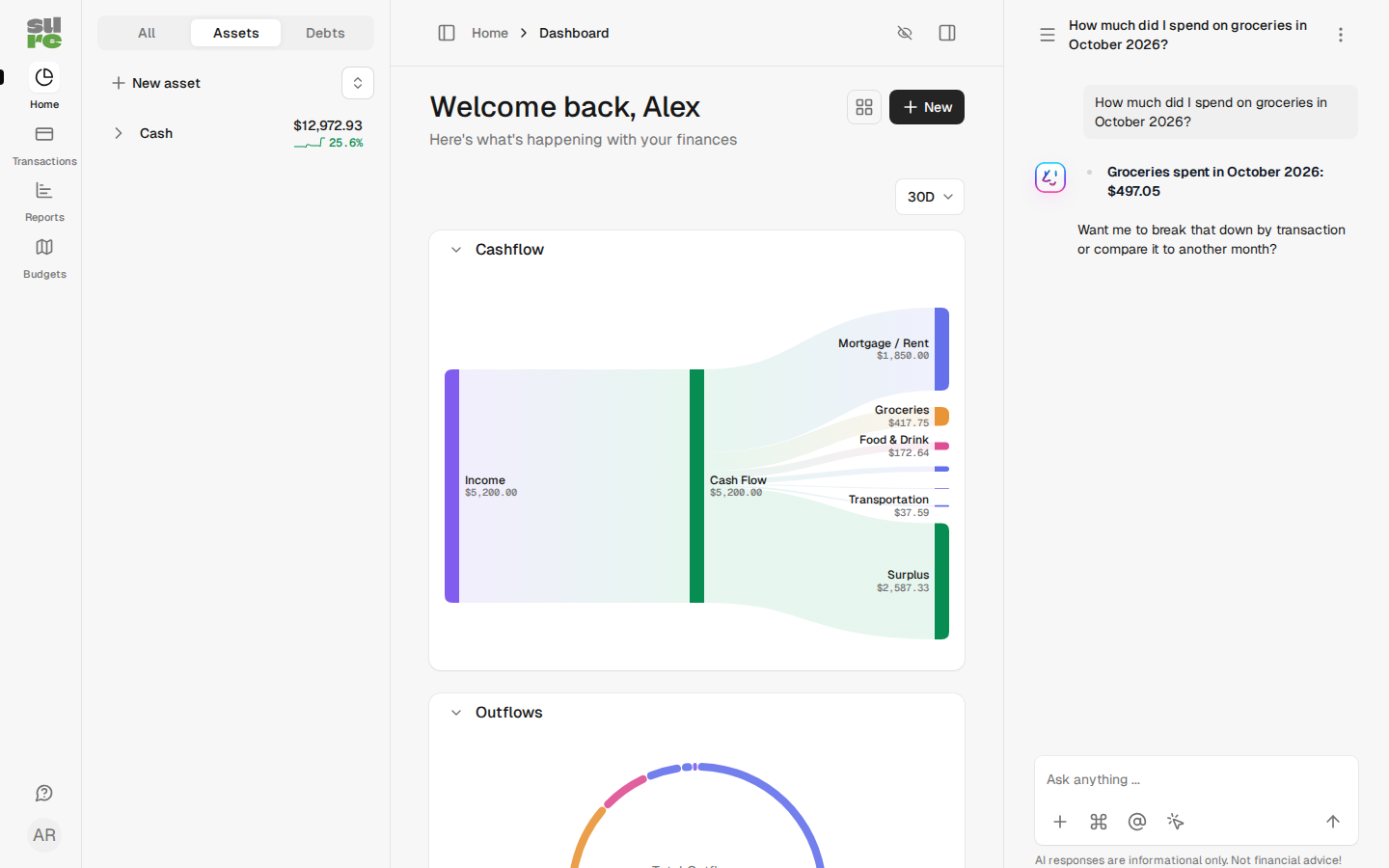
sample leaves Checking with $12,972.93 and fills the dashboard's
cash flow chart.
Import → Financial Tools & Files reads exports from Mint, YNAB, Actual Budget, Quicken (QIF), and Sure itself. Sure can also sync with banks through a provider such as Plaid or SimpleFIN, in Settings → Bank sync; each needs your own account with that provider, and most charge for it.
Ask the AI assistant#
The chat panel on the right says Enable AI Chats. Each person turns it on for themselves. Click it and ask something like:
How much did I spend on groceries in October 2026?
With the sample data the answer is $497.05. The assistant looks things up with Sure's own tools, and it can also change things when you ask: add transactions, recategorize, and create rules or budgets. Your questions and what it reads go to the model provider through exe.dev's gateway, and the chats count against your LLM allocation.
The model is gpt-6-luna, set by OPENAI_MODEL in ~/sure/.env.
Share with your household#
On your computer, share the VM:
ssh exe.dev share add my-sure partner@example.com
Send them the URL. When they open it, signed in to exe.dev, Sure adds them to your household as a Member and runs them through the same short setup. Everyone in a household sees the accounts that are shared with it; change someone's role in Settings → Profile Info → Household.
ssh exe.dev share remove my-sure partner@example.com locks them out
again.
Scripts and apps#
Sure has an HTTP API and a mobile app. Both get past exe.dev's login with a VM token. On your computer:
ssh exe.dev ssh-key generate-api-key --vm=my-sure --label=sure-api --exp=90d
It prints a token starting with exe1.. Keep it in a file only you can
read. Then make a Sure API key in Settings → API Keys (Read Only
is enough to look), and send both, exe.dev's token in
X-Exedev-Authorization and Sure's key in X-Api-Key:
curl https://my-sure.exe.xyz/api/v1/accounts \
  -H "X-Exedev-Authorization: Bearer $EXE_TOKEN" \
  -H "X-Api-Key: $SURE_API_KEY"
Expect your accounts as JSON. Without the token, exe.dev answers 401.
Tools that only speak basic auth can send the token as the password, with
any user name. See HTTPS tokens for VMs.
The Sure mobile app signs in with an email and password, so first give
yourself a Sure password: open https://my-sure.exe.xyz/password/edit,
leave Current Password empty, and enter a new one. In the app, enter
https://my-sure.exe.xyz as the server, open Custom proxy headers,
and add the header X-Exedev-Authorization with the value Bearer exe1.…. Then sign in with your exe.dev email and that password.
Keep your data#
Sure writes a full backup every night at 03:30 UTC into ~/sure/backups:
the database, uploaded files, .env, and the Compose file, which is
everything needed to bring Sure back. It keeps 14 days. Keep a copy off
the VM. On your computer:
scp -r my-sure.exe.xyz:sure/backups ./sure-backups
The backups include your secret keys and every transaction, so store them somewhere private. exe.dev's VM backups add a second layer. To restore, update Sure, or fix something, see below, or ask Shelley.
The nuts and bolts#
Happy clicking Deploy? You can stop here. These are the same setup steps Shelley follows, plus the maintenance commands for later.
Install by hand
Create a VM#
On your computer (pick another name if my-sure is taken):
ssh exe.dev new --name=my-sure
ssh my-sure.exe.xyz
All remaining installation commands run on the VM, as exedev.
Get Docker ready#
Sure's supported way to self-host is Docker Compose. Enable Docker at boot, or exe.dev's on-demand Docker won't restart Sure after a reboot:
sudo systemctl enable --now docker.service
systemctl is-enabled docker.service
The check should print enabled.
Download the Compose file and write the secrets#
compose.yml is Sure's
compose.example.yml with a few changes for exe.dev: Sure pinned to a
release, the web app on port 8000 (where exe.dev's
HTTPS proxy sends https://my-sure.exe.xyz/),
RAILS_ASSUME_SSL because the proxy handles HTTPS, free Yahoo Finance
market data, AI settings, backups owned by exedev, and the exe.dev
sign-in, which Compose mounts into the web container as a Rails
initializer. The Compose file is in every backup, so the sign-in comes
back with a restore.
mkdir -p ~/sure/backups
cd ~/sure
curl -fsSLO https://exe.dev/deploy/sure/compose.yml
This writes .env once. SECRET_KEY_BASE and the three
ACTIVE_RECORD_ENCRYPTION_* keys encrypt sessions and stored provider
credentials; Sure can't read its data without them, and they must never
change. The AI lines point Sure at the LLM gateway, which needs no real
key. OPENAI_REASONING_EFFORT=none lets newer models such as
gpt-6-luna call Sure's tools: on the Chat Completions API that Sure
uses with a custom endpoint, they refuse tools unless reasoning is off.
Sure has no setting for it, so a small initializer in the Compose file
adds it to each request.
cd ~/sure
if [ ! -e .env ]; then
  touch .env && chmod 600 .env
  cat >> .env <<EOF
SURE_IMAGE_TAG=0.7.6-hotfix.1
PORT=8000
APP_DOMAIN=$(hostname).exe.xyz
# Never change these on an existing install. Back them up.
SECRET_KEY_BASE=$(openssl rand -hex 64)
POSTGRES_PASSWORD=$(openssl rand -hex 24)
ACTIVE_RECORD_ENCRYPTION_PRIMARY_KEY=$(openssl rand -hex 32)
ACTIVE_RECORD_ENCRYPTION_DETERMINISTIC_KEY=$(openssl rand -hex 32)
ACTIVE_RECORD_ENCRYPTION_KEY_DERIVATION_SALT=$(openssl rand -hex 32)
# AI through exe.dev's LLM gateway.
OPENAI_ACCESS_TOKEN=exe-llm-gateway
OPENAI_URI_BASE=https://llm.int.exe.xyz/v1
OPENAI_MODEL=gpt-6-luna
OPENAI_REASONING_EFFORT=none
LLM_CONTEXT_WINDOW=128000
EOF
fi
docker compose config -q && echo ok
Expect ok.
Start Sure#
The first start downloads about 2.5 GB of images and sets up the database, which takes a minute or two:
cd ~/sure
docker compose up -d
until curl -fs http://localhost:8000/up >/dev/null; do sleep 5; done; echo up
docker compose ps --format '{{.Service}}: {{.Status}}'
Expect up, then web, worker, db, and redis, all Up (the
database and Redis also healthy). Requests that don't come through
exe.dev's proxy have no X-ExeDev-Email header, so Sure sends them to
its own sign-up page, at an https:// address because it trusts the
proxy:
curl -s -o /dev/null -w '%{redirect_url}\n' http://localhost:8000/
Expect a URL ending in /registration/new that starts with https://.
Check that the exe.dev sign-in is loaded:
cd ~/sure
docker compose exec -T web bin/rails runner '
  puts ApplicationController.ancestors.include?(ExedevLogin::Session) ? "exe.dev sign-in on" : "off"
' 2>/dev/null | tail -1
Expect exe.dev sign-in on. Don't open Sure through the proxy yet: the
first person it sees becomes the admin, and that should be the owner,
at https://$(hostname).exe.xyz/.
Check the AI#
Give the configured model a tool and ask a question that needs it, the same way Sure's assistant calls it:
cd ~/sure
docker compose exec -T worker bin/rails runner '
  fn = { name: "get_balance", description: "Balance of an account",
         params_schema: { type: "object", properties: { account: { type: "string" } },
                          required: ["account"] }, strict: false }
  r = Provider::Registry.get_provider(:openai).chat_response(
    "What is the balance of my Checking account?", model: ENV["OPENAI_MODEL"], functions: [fn])
  puts r.success? ? r.data.function_requests.map(&:function_name).join : r.error.message
' 2>/dev/null | tail -1
Expect get_balance.
Set up backups#
Sure ships its own backup tool. Start the scheduled backup service, then make a first backup now and list it:
cd ~/sure
docker compose --profile backup up -d backup
docker compose run --rm backup create
docker compose run --rm backup list
Expect a line like 0.7.6/2026-11-19_171331-manual manual 780K. Each
backup is a folder in ~/sure/backups/<version>/ with the database dump,
uploaded files, .env, the Compose file, checksums, and a restore.sh.
BACKUP_SCHEDULE and BACKUP_KEEP_DAYS in .env change the defaults
(30 3 * * * UTC, 14 days); run docker compose --profile backup up -d backup after changing them.
Restore a backup
Roll back on the same VM#
This replaces the current database and files with a backup. Stop the app, restore, and start it again, on the VM:
cd ~/sure
docker compose run --rm backup list
docker compose stop web worker
docker compose run --rm backup restore latest
docker compose up -d
Type restore when asked, or name a backup from the list instead of
latest, such as 0.7.6/2026-11-19_171331-manual. If the backup came
from an older Sure, the tool says so: set SURE_IMAGE_TAG in .env to
that version before docker compose up -d.
Restore onto a new VM#
Create a VM and enable Docker as in Install by hand, then copy one backup folder over. On your computer:
scp -r ./sure-backups/0.7.6/2026-11-19_171331-manual my-sure-2.exe.xyz:sure-backup
On the new VM, restore.sh sets up ~/sure with the backup's Compose
file and .env, restores the data, and starts Sure on port 8000:
sh ~/sure-backup/restore.sh --target ~/sure --port 8000
cd ~/sure
sed -i "s/^APP_DOMAIN=.*/APP_DOMAIN=$(hostname).exe.xyz/" .env
docker compose up -d
docker compose --profile backup up -d backup
The sed line points Sure's links at the new address. Share the new VM
with your household again; everyone keeps their Sure user, which goes by
their exe.dev email. Stop Sure on
the old VM first (cd ~/sure && docker compose stop): two copies syncing
the same bank connections can disconnect them, and scheduled jobs would
run twice.
Update Sure
Read the release notes
first. Back up, change SURE_IMAGE_TAG in ~/sure/.env to the new
version (such as 0.7.7), and pull. Database migrations run on their own
when the web app starts. On the VM:
cd ~/sure
docker compose run --rm backup create
nano .env    # set SURE_IMAGE_TAG=<new version>
docker compose pull
docker compose up -d
docker compose --profile backup up -d backup
until curl -fs http://localhost:8000/up >/dev/null; do sleep 5; done; echo up
Open Sure in the browser to check that you're still signed in. The exe.dev
sign-in hooks into Sure's own session code, so a release that changes it
could break it; the web logs then show exedev_login. If the new version
misbehaves, roll back to the backup you just made,
with the old SURE_IMAGE_TAG.
Troubleshooting
Start with the logs, on the VM:
cd ~/sure
docker compose logs --tail=100 web worker
- Sure shows its own sign-in or sign-up page: the request didn't
carry exe.dev's
X-ExeDev-Emailheader, or the sign-in isn't loaded. Use thehttps://my-sure.exe.xyz/address, not a port, and run the check in Start Sure. Keep the VM private: on a public VM, visitors who aren't signed in to exe.dev reach Sure's sign-up page. - "Some data may be out of date … No Sidekiq worker process": the
worker isn't running, so imports and syncs wait.
docker compose ps worker, thendocker compose up -d. A banner right after a restart goes away on its own. - AI chat says "Failed to generate a response": the chat shows the
technical error under the message. Check
OPENAI_MODELnames a gateway model that supports tools. "Function tools with reasoning_effort are not supported" meansOPENAI_REASONING_EFFORT=noneis missing from.env; "Unrecognized request argument supplied: reasoning_effort" means the model has no reasoning, so empty it. Don't setOPENAI_SUPPORTS_RESPONSES_ENDPOINT: Sure's Responses mode chains turns with stored responses, and the gateway, which keeps no data, answers400. Don't setLLM_MAX_RESPONSE_TOKENSeither: Sure then sendsmax_tokens, which newer OpenAI models refuse with a400. - The web app restarts with a database error on a fresh install: an
old
sure_postgres-datavolume, from an earlier try with a differentPOSTGRES_PASSWORD. If it holds nothing you need,docker compose down -vdeletes it; thendocker compose up -d. - No stock prices or exchange rates: Sure fetches them from Yahoo Finance after the market closes (22:00 UTC on weekdays). If Yahoo refuses, add a Twelve Data key in Settings → Self-Hosting.
- After a reboot Sure doesn't come back:
systemctl is-enabled docker.servicemust printenabled; runsudo systemctl enable --now docker.service.
Frequently asked questions#
Is Sure the same as Maybe Finance?
It's the community fork. Maybe Finance open-sourced its app in 2024, then stopped work on it in July 2025 (its last release, 0.6.0, says the company is pivoting to B2B) and archived the repository. Sure picked up the code the same week and keeps releasing it under the AGPL.
How much does it cost?
Sure is free and open source. You pay for your VM plan. AI chats use your exe.dev LLM allocation, including your household's chats. Bank sync providers have their own prices.
Can Sure connect to my bank?
Yes, through a provider: Plaid, SimpleFIN, Lunch Flow, Enable Banking, and others, set up by the admin in Settings → Bank sync. Each one needs your own account with that provider, and most charge for it. Without one, import CSV files, or exports from Mint, YNAB, Actual Budget, or Quicken (QIF).
Who can see my financial data?
Only you and the people you share the VM with: exe.dev's login is Sure's login, and everyone signed in belongs to one household. Everything is stored on the VM's disk. If you turn on AI chat, your questions and the transactions the assistant looks up go to the model provider through exe.dev's LLM gateway.
Does the Sure mobile app work with a private VM?
Yes, with a Sure password and a VM token. See Scripts and apps.
Which AI models can I use?
Any model the gateway serves through OpenAI's API that can call tools, such as gpt-6-luna (the default here, fast and cheap) or gpt-6.2-sol for harder questions. Change OPENAI_MODEL in ~/sure/.env and run docker compose up -d. For a model without reasoning, such as gpt-4.1, also empty OPENAI_REASONING_EFFORT.
Published Nov 19, 2026 · Updated Nov 19, 2026 · tested end to end Nov 19, 2026 · Markdown · manifest.json · Something wrong? Tell us


