
Self-host Langflow
Build AI agents on a canvas, call them from anywhere. No model keys.
Shelley handles the setup. About 10 minutes.
Prefer a terminal?
curl -fsSL https://exe.dev/deploy/langflow/prompt.txt | ssh exe.dev new --prompt=/dev/stdinLangflow is an open-source visual builder for AI agents and workflows: you wire models, tools, prompts, and data on a canvas, try them in a chat playground, and every flow is also an API endpoint and an MCP tool.
On exe.dev it runs on a persistent VM of your own, in Docker with PostgreSQL. The editor stays private behind your exe.dev login, and a small API door on port 8000 lets scripts, CI, other VMs, and Claude Code run flows without ever reaching the editor. Models come from exe.dev's LLM gateway with no API keys, and nightly backups plus exe.dev VM backups keep your flows.
What you get#
- Langflow 1.13.3 and PostgreSQL 16 in Docker Compose, with generated secrets in
~/langflow/.env(mode 600), coming back after a reboot. - The editor at
https://<vm>.exe.xyz:7860/, signed in as you, with sign-up turned off. - OpenAI and Anthropic models from exe.dev's LLM gateway, with no API keys.
- An Assistant agent flow that reads web pages, answering on
/api/v1/run/assistant. - Port 8000 serving flow runs, webhooks, and MCP to callers with a Langflow API key, and nothing else.
- A Langflow API key in
~/langflow/api-key(mode 600) for scripts, CI, and Claude Code. - Nightly backups of the database, files, and secrets into
~/langflow-backups, with one checked.
What's running, and where
https://my-langflow.exe.xyz:7860/
The Langflow editor, after exe.dev login and Langflow's own sign-in
https://my-langflow.exe.xyz/
Flow runs, webhooks, and MCP, with a Langflow API key; make it public for outside servers
Deploy with Shelley#
Click Deploy and Shelley will set up Langflow on a new VM, then check that it works. No config-file wrangling required.
Prefer a terminal?
curl -fsSL \
  https://exe.dev/deploy/langflow/prompt.txt \
  | ssh exe.dev new --prompt=/dev/stdin
What Shelley is told
Set up Langflow on this VM by following the exe.dev recipe at https://exe.dev/deploy/langflow.md?via=deploy from top to bottom.

The recipe's example VM name is my-langflow. This VM's name is the output of `hostname`: use it wherever the recipe writes my-langflow. Skip the step that creates the VM; you are on it.

You are done when all of these are true. Check each one yourself:
- Langflow 1.13.3 and PostgreSQL 16 in Docker Compose, with generated secrets in `~/langflow/.env` (mode 600), coming back after a reboot.
- The editor at `https://<vm>.exe.xyz:7860/`, signed in as you, with sign-up turned off.
- OpenAI and Anthropic models from exe.dev's LLM gateway, with no API keys.
- An Assistant agent flow that reads web pages, answering on `/api/v1/run/assistant`.
- Port 8000 serving flow runs, webhooks, and MCP to callers with a Langflow API key, and nothing else.
- A Langflow API key in `~/langflow/api-key` (mode 600) for scripts, CI, and Claude Code.
- Nightly backups of the database, files, and secrets into `~/langflow-backups`, with one checked.

Read the whole recipe, including the closed details. For initial setup,
follow "Install by hand" first, skipping VM creation and SSH, through
"Test a backup". The sections at the top are for the owner afterwards.
Do not run Restore unless the user asks. Never print ~/langflow/.env or
~/langflow/api-key into the chat; tell the owner where they are. Don't
share the VM or make it public: the owner decides. Leave the Assistant
flow in place so the owner can see it. Langflow takes about half a
minute to start; connection errors in that time are normal.

Finish with the URLs I should open.
Also at /deploy/langflow/prompt.txt. The recipe it follows is /deploy/langflow.md.
Open Langflow#
Open https://my-langflow.exe.xyz:7860/ and sign in with your exe.dev
email and the password on the LANGFLOW_SUPERUSER_PASSWORD line of
~/langflow/.env on the VM. If you change it under your avatar →
Settings → General, change it in .env too: the helper scripts
sign in with it.
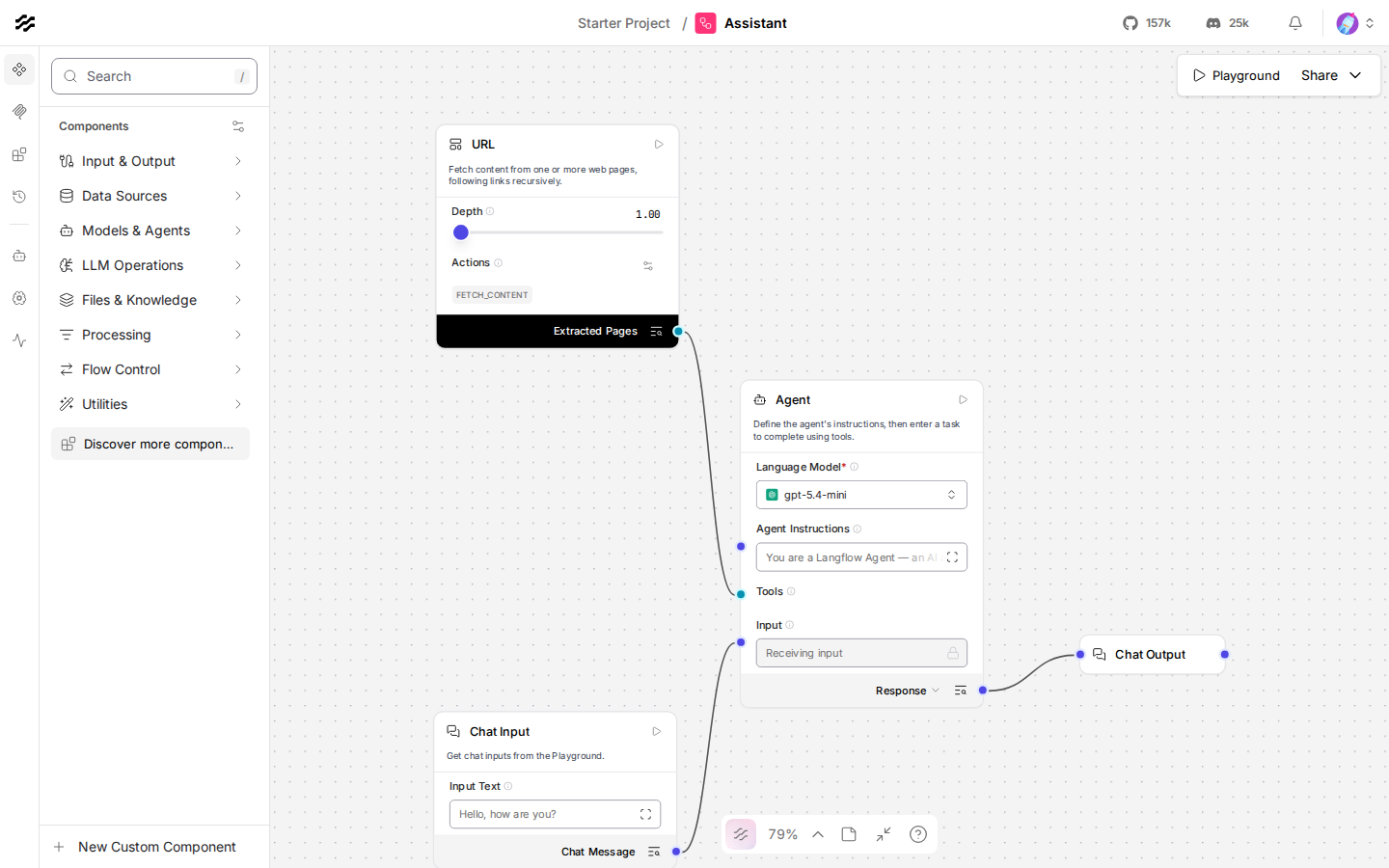
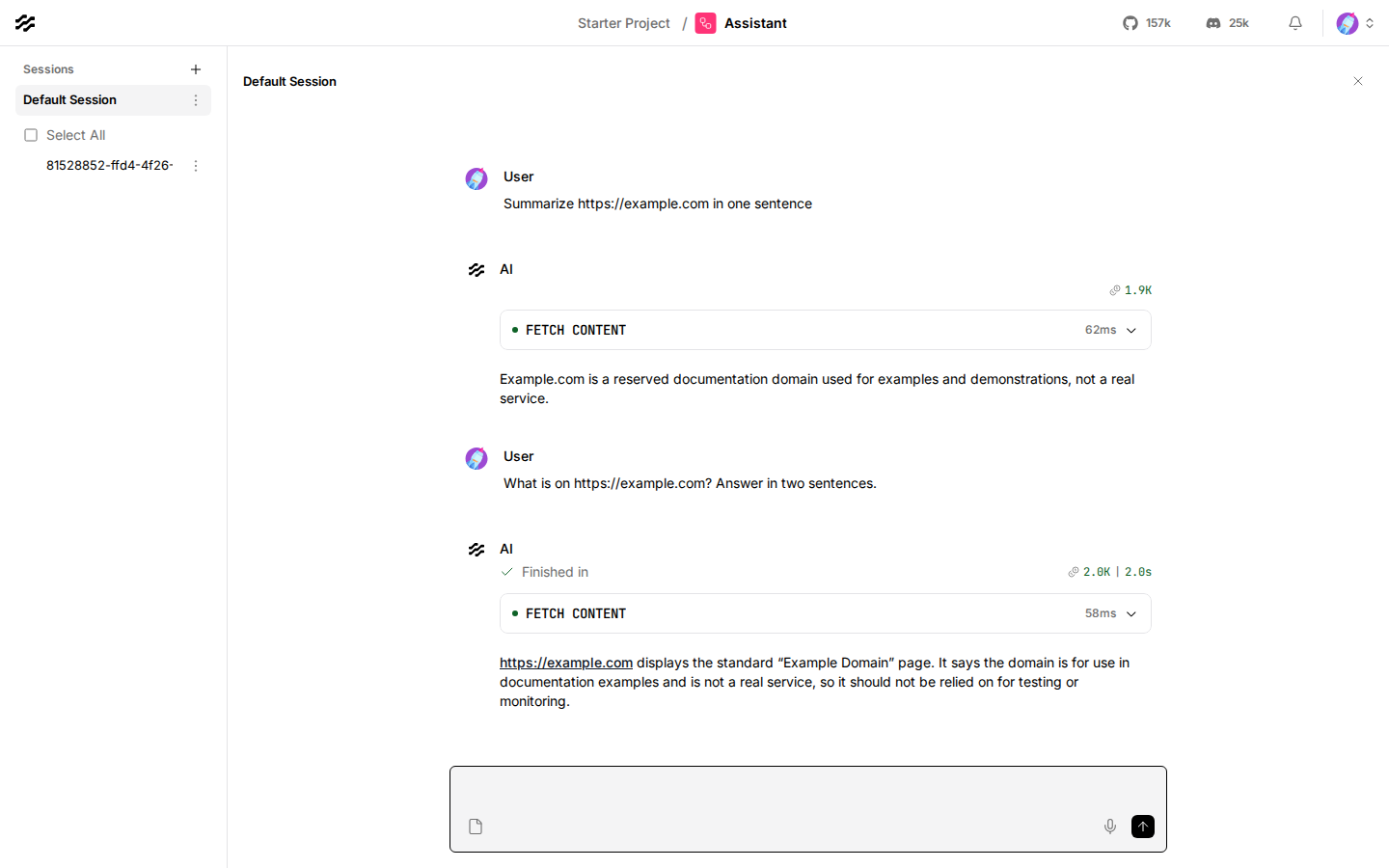
Open Assistant in Starter Project and click Playground to chat with it. Add tools from the left-hand panel, connect them to the Agent's Tools input, and the agent can use them. Starter templates are under New Flow.
Note
The templates' Web Search tool scrapes DuckDuckGo, which blocks most server addresses, so it returns nothing here. Use the Tavily, SerpApi, Exa, or SearXNG components instead, or your own SearXNG.
Models#
GPT and Claude models are ready in Settings → Model Providers,
with a placeholder key. OpenAI's provider points at
https://llm.int.exe.xyz/v1 through the OPENAI_BASE_URL global variable;
Anthropic's reaches https://llm.int.exe.xyz through ANTHROPIC_BASE_URL
in compose.yaml. Turn on more models in the same page; the gateway's list
is at https://llm.int.exe.xyz/models.json. Then pick one in any Agent or
Language Model component.
Run flows from anywhere#
Every flow runs at /api/v1/run/<flow id or endpoint name>, with a
Langflow API key in the x-api-key header. Share → API access in
the editor shows the code. On the VM:
curl -s http://localhost:8000/api/v1/run/assistant \
  -H "x-api-key: $(cat ~/langflow/api-key)" -H 'Content-Type: application/json' \
  -d '{"input_value": "What is on https://example.com?"}' \
  | jq -r '.outputs[0].outputs[0].results.message.text'
Make more keys in Settings → Langflow API Keys. A key runs flows as the account that made it.
Port 8000 is private, so a call from anywhere else gets exe.dev's 401
before it reaches Langflow. Three ways in:
From another exe.dev VM, with no token. Give that VM a VM-to-VM integration. On your computer:
ssh exe.dev integrations add http-proxy --name=langflow \
  --target=https://my-langflow.exe.xyz/ --peer --attach=vm:my-app
On my-app, call https://langflow.int.exe.xyz/api/v1/run/assistant with
the Langflow key. exe.dev adds a VM key at the network edge that my-app
never sees.
From your laptop or CI, with a token. Make a token that opens this VM's HTTPS ports:
ssh exe.dev ssh-key generate-api-key --vm=my-langflow --label=langflow-ci --exp=90d
Send it in X-Exedev-Authorization, which exe.dev's proxy checks and
removes, next to the Langflow key:
curl -s https://my-langflow.exe.xyz/api/v1/run/assistant \
  -H "X-Exedev-Authorization: Bearer $EXE_VM_TOKEN" \
  -H "x-api-key: $LANGFLOW_API_KEY" -H 'Content-Type: application/json' \
  -d '{"input_value": "Summarize https://example.com"}'
The token gets past exe.dev's login to every port on the VM, the editor's
too, though not past Langflow's sign-in. Keep both in your CI's secrets and
revoke the token with ssh exe.dev ssh-key remove langflow-ci.
From services that can't add headers, with a public door. Port 8000
serves only /api/v1/run/, /api/v1/webhook/, /api/v1/responses, MCP,
and /health; everything else, the editor and the login page included, is
a 404. To open it to the internet:
ssh exe.dev share set-public my-langflow
Port 7860 stays private. Webhooks then work from anywhere: add a
Webhook component to a flow, and point GitHub, Stripe, or a form at
https://my-langflow.exe.xyz/api/v1/webhook/<flow id>?x-api-key=<key>. The
flow gets the request body as data and runs in the background.
share set-private closes the door again.
Warning
Anyone with a Langflow API key runs flows on your LLM allocation and your integrations. Give each caller its own key and delete it when done.
Flows as MCP tools#
Each Langflow project is an MCP server whose tools are its flows. In the
editor, open the project's MCP Server tab (next to Flows) to pick
which flows to expose and copy the configuration. Its address is
/api/v1/mcp/project/<project id>/streamable, behind the same API key.
On the VM, add it to Claude Code with the address setup.sh printed:
claude mcp add --scope user --transport http langflow \
  http://localhost:8000/api/v1/mcp/project/<project id>/streamable \
  --header "x-api-key: $(cat ~/langflow/api-key)"
Then ask Claude Code to "use the assistant tool to read https://example.com".
From your laptop, use https://my-langflow.exe.xyz/api/v1/mcp/... and add
--header "X-Exedev-Authorization: Bearer <token>". Langflow can also
use MCP servers: add them in Settings → MCP Servers.
Keys and integrations#
Langflow keeps keys as encrypted Global Variables, readable by anyone
who can edit your flows. Where you can, keep keys out of Langflow: add an
exe.dev integration that holds the key, and point an
API Request component at https://<name>.int.exe.xyz. exe.dev adds
the credential on the way out, so Langflow never sees it. Langflow's
protection against internal addresses would block those, so compose.yaml
allows *.int.exe.xyz and nothing else.
To trace flows in your own Langfuse, add
LANGFUSE_SECRET_KEY, LANGFUSE_PUBLIC_KEY, and LANGFUSE_BASE_URL to
the langflow service's environment and run docker compose up -d.
Bring your team#
Share the VM with ssh exe.dev share add my-langflow teammate@example.com.
Langflow's open-source edition has no admin page, so make their account
through the API on the VM:
cd ~/langflow && bash add-user.sh teammate@example.com
It prints a password to send them. Each account has its own flows, projects, and keys; superusers can see everyone's.
Keep your work#
Backups run nightly into ~/langflow-backups, the .env secrets
included: without LANGFLOW_SECRET_KEY the stored credentials can't be
decrypted. Copy them off with scp -r my-langflow.exe.xyz:langflow-backups .,
or back up the whole disk to your own S3 bucket with exe.dev
VM backups.
To upgrade, read the
release notes, run a
backup, change the image tag in ~/langflow/compose.yaml, then
docker compose pull && docker compose up -d. Langflow migrates its
database on start, so going back means the old tag and the backup. Stay
on released versions; the 1.x.devN builds are nightlies.
The nuts and bolts#
Happy clicking Deploy? You can stop here. These are the same setup steps Shelley follows, plus the maintenance commands for later.
Install by hand
Create a VM#
On your computer (pick another name if my-langflow is taken):
ssh exe.dev new --name=my-langflow
ssh my-langflow.exe.xyz
All remaining installation commands run on the VM, as exedev.
Get Docker ready#
Enable Docker at boot, or exe.dev's on-demand Docker won't start Langflow after a reboot:
sudo systemctl enable --now docker.service
systemctl is-enabled docker.service
docker compose version
Expect enabled and a Compose version.
Write the configuration#
The superuser is you, by your exe.dev email from the reflection
integration. Secrets are generated into .env, readable only by you:
mkdir -p ~/langflow && cd ~/langflow
owner=$(curl -fsS https://reflection.int.exe.xyz/email | jq -r '.email // empty')
echo "${owner:?no email: set owner=you@example.com and rerun from here}"
(umask 077; cat > .env <<EOF
POSTGRES_PASSWORD=$(openssl rand -hex 24)
LANGFLOW_SECRET_KEY=$(openssl rand -base64 32 | tr '+/' '-_')
LANGFLOW_SUPERUSER=$owner
LANGFLOW_SUPERUSER_PASSWORD=$(openssl rand -hex 16)
EOF
)
If the email is empty, set owner=you@example.com and run the
umask block again. Then the Compose file. Langflow is pinned to 1.13.3;
sign-in is on, sign-up is off, and *.int.exe.xyz is allowed past
Langflow's block on internal addresses:
cat > compose.yaml <<'EOF'
services:
  langflow:
    image: langflowai/langflow:1.13.3
    restart: unless-stopped
    depends_on:
      postgres:
        condition: service_healthy
    environment:
      LANGFLOW_DATABASE_URL: postgresql://langflow:${POSTGRES_PASSWORD}@postgres:5432/langflow
      LANGFLOW_CONFIG_DIR: /app/langflow
      LANGFLOW_SECRET_KEY: ${LANGFLOW_SECRET_KEY}
      LANGFLOW_AUTO_LOGIN: "false"
      LANGFLOW_SUPERUSER: ${LANGFLOW_SUPERUSER}
      LANGFLOW_SUPERUSER_PASSWORD: ${LANGFLOW_SUPERUSER_PASSWORD}
      LANGFLOW_ENABLE_SIGNUP: "false"
      LANGFLOW_SSRF_ALLOWED_HOSTS: "*.int.exe.xyz"
      ANTHROPIC_BASE_URL: https://llm.int.exe.xyz
    ports:
      - "7860:7860"
    volumes:
      - ./data:/app/langflow

  postgres:
    image: postgres:16-trixie
    restart: unless-stopped
    environment:
      POSTGRES_USER: langflow
      POSTGRES_PASSWORD: ${POSTGRES_PASSWORD}
      POSTGRES_DB: langflow
    healthcheck:
      test: ["CMD-SHELL", "pg_isready -U langflow -d langflow"]
      interval: 5s
      timeout: 5s
      retries: 10
    volumes:
      - ./postgres:/var/lib/postgresql/data

  api:
    image: nginx:1.30-alpine
    restart: unless-stopped
    depends_on: [langflow]
    ports:
      - "8000:8000"
    volumes:
      - ./api.conf:/etc/nginx/conf.d/default.conf:ro
EOF
Last, the API door on port 8000. It passes flow runs, webhooks, the
OpenAI-style responses endpoint, and project MCP servers to Langflow, and
answers 404 to everything else:
curl -fsSL https://exe.dev/deploy/langflow/api.conf -o api.conf
mkdir -p data
api.conf is short; read it.
Start Langflow#
docker compose up -d
until curl -fsS http://localhost:7860/health_check; do sleep 3; done; echo
The first start pulls about 1 GB and takes a minute or two. Expect
{"status":"ok","chat":"ok","db":"ok"}.
Connect models and make a flow#
setup.sh signs in as you,
points the OpenAI and Anthropic providers at the gateway, turns on
gpt-5.4-mini, gpt-5.5, claude-sonnet-4-6, and claude-haiku-4-5,
makes a Langflow API key in ~/langflow/api-key, and creates the Assistant
flow from Langflow's Simple Agent template:
cd ~/langflow
curl -fsSLO https://exe.dev/deploy/langflow/setup.sh
curl -fsSLO https://exe.dev/deploy/langflow/add-user.sh
bash setup.sh
Expect both providers in the list, and a run and an MCP address. Keep the MCP address for the owner.
Check it works#
Ask the Assistant something through port 8000:
curl -s http://localhost:8000/api/v1/run/assistant \
  -H "x-api-key: $(cat ~/langflow/api-key)" -H 'Content-Type: application/json' \
  -d '{"input_value": "Read https://example.com and give me its title."}' \
  | jq -r '.outputs[0].outputs[0].results.message.text'
Expect an answer that mentions Example Domain. Then check that port 8000 hides the editor and wants a key:
for path in / /login /api/v1/flows/ /health; do
  curl -s -o /dev/null -w "$path: %{http_code}\n" http://localhost:8000$path
done
curl -s -o /dev/null -w "run without key: %{http_code}\n" -X POST \
  http://localhost:8000/api/v1/run/assistant -H 'Content-Type: application/json' -d '{}'
Expect 404 for the first three, 200 for /health, and 403 without a
key.
Set up nightly backups#
backup.sh dumps PostgreSQL
while Langflow runs and packs data/, .env, and the configuration into
one tarball. It keeps the newest 14.
curl -fsSL https://exe.dev/deploy/langflow/backup.sh -o ~/langflow-backup.sh
chmod +x ~/langflow-backup.sh
sudo tee /etc/systemd/system/langflow-backup.service >/dev/null <<EOF
[Unit]
Description=Back up Langflow to ~/langflow-backups
Requires=docker.service
After=docker.service

[Service]
Type=oneshot
User=$USER
Environment=LANGFLOW_DIR=$HOME/langflow
ExecStart=$HOME/langflow-backup.sh
EOF
sudo tee /etc/systemd/system/langflow-backup.timer >/dev/null <<'EOF'
[Unit]
Description=Back up Langflow every night

[Timer]
OnCalendar=*-*-* 03:30:00
RandomizedDelaySec=30m
Persistent=true

[Install]
WantedBy=timers.target
EOF
sudo systemctl daemon-reload
sudo systemctl enable --now langflow-backup.timer
sudo systemctl start langflow-backup.service
systemctl list-timers langflow-backup.timer
ls -lh ~/langflow-backups
Check that the timer has a next run and the directory has a tarball. For
failures: journalctl -u langflow-backup.service.
Test a backup#
Load the newest backup's dump into a throwaway PostgreSQL, without touching the running one:
latest=$(ls -1t ~/langflow-backups/langflow-*.tar.gz | head -n 1)
mkdir /tmp/langflow-restore-test && cd /tmp/langflow-restore-test
tar -xzf "$latest"
tar -tzf files.tar.gz | grep -E '^(\.env|compose.yaml|api.conf)$'
docker run -d --name langflow-restore-test -e POSTGRES_USER=langflow \
  -e POSTGRES_PASSWORD=test postgres:16-trixie
until docker exec langflow-restore-test pg_isready -U langflow -q; do sleep 1; done; sleep 2
gunzip -c postgres.sql.gz | docker exec -i langflow-restore-test psql -q -U langflow -o /dev/null 2>&1 \
  | grep -Ev 'NOTICE|does not exist' || true
docker exec langflow-restore-test psql -U langflow -tAc 'select name from flow where user_id is not null'
Expect the three configuration files and Assistant among the flows.
Remove only the scratch copy:
docker rm -f langflow-restore-test
cd ~ && rm -rf /tmp/langflow-restore-test
Installation done. Leave sharing to the owner; continue with Open Langflow.
Back up and restore
Run a backup now with sudo systemctl start langflow-backup.service, or
~/langflow-backup.sh. Each tarball holds postgres.sql.gz and
files.tar.gz (data/, .env, compose.yaml, api.conf).
Restore#
On the VM, onto an existing install (or a fresh VM after "Get Docker
ready"), with the backup in ~/langflow-backups:
latest=$(ls -1t ~/langflow-backups/langflow-*.tar.gz | head -n 1)
mkdir -p ~/langflow && cd ~/langflow
docker compose stop langflow api 2>/dev/null || true
tar -xzf "$latest" -O files.tar.gz | tar -xzf - -C ~/langflow
docker compose up -d postgres
until docker compose exec -T postgres pg_isready -U langflow -q </dev/null; do sleep 1; done; sleep 2
tar -xzf "$latest" -O postgres.sql.gz | gunzip \
  | docker compose exec -T postgres psql -q -U langflow -d langflow -o /dev/null
docker compose up -d
until curl -fsS http://localhost:7860/health_check; do sleep 3; done; echo
The restored .env brings back the same secret key, so stored global
variables and API keys keep working.
Troubleshooting
On the VM, in ~/langflow:
- Connection refused or 502 right after a start: Langflow is still
migrating and loading components; give it a minute.
docker compose logs -f langflowshows progress. - Can't sign in: the username is the
LANGFLOW_SUPERUSERemail in.env. Changing the password in.envdoesn't change an existing account; change it in Settings → General. Permission deniedon/app/langflow: the container runs as uid 1000.sudo chown -R 1000:1000 data && docker compose up -d.- Model errors: check
OPENAI_BASE_URLishttps://llm.int.exe.xyz/v1in Global Variables, and that the model is inhttps://llm.int.exe.xyz/models.json. If the OpenAI key is refused while saving, save the base URL first. - API Request or URL components fail on
*.int.exe.xyz: checkLANGFLOW_SSRF_ALLOWED_HOSTSincompose.yaml; those names resolve to an internal address that Langflow blocks otherwise. 403from the API: the key is missing, or belongs to an account that doesn't own the flow.401from outside the VM: that's exe.dev's login. Add the VM token, or make port 8000 public.- Disk full:
df -h /,docker system df, anddu -sh ~/langflow-backups;docker image pruneremoves old images after an upgrade. - Everything else:
docker compose logs --tail=100 langflow api.
Frequently asked questions#
How big a VM do I need?
The default VM is enough. Langflow uses 1.3 to 2 GB of memory at rest and Postgres about 100 MB; the images take about 4.5 GB of disk. Big flows with local embeddings or many parallel runs want more memory: grow the VM with ssh exe.dev resize.
Do I need an OpenAI or Anthropic API key?
No. Langflow's OpenAI and Anthropic providers talk to exe.dev's LLM gateway, which needs no key, so a placeholder goes in the key field. Usage counts against your exe.dev LLM allocation. Other providers work with their own keys.
Who can open my Langflow?
Only people you share the VM with get past exe.dev's login, and they still need a Langflow account; sign-up is off. Port 8000 serves only flow runs, webhooks, and MCP, each behind a Langflow API key, and stays private until you run share set-public.
Can I call my flows from CI or another server?
Yes. Send a Langflow API key and an exe.dev VM token, or call through a VM-to-VM integration from another exe.dev VM. For services that can't add headers, such as GitHub webhooks, make port 8000 public and put the Langflow key in the URL. See Run flows from anywhere.
Can Claude Code or Cursor use my flows as tools?
Yes. Every Langflow project is an MCP server, and its flows are its tools. Add it to Claude Code with claude mcp add and the API key. See Flows as MCP tools.
Why Docker and not pip install langflow?
The image pins the whole Python environment, so an upgrade is one changed tag, and going back is the old tag and a backup. A uv pip install langflow works on the VM too, but you'd look after Python versions, a service unit, and the database yourself.
Is this the same as DataStax Langflow?
It's the same open-source Langflow, without the hosted service's managed database, teams, or billing. Langflow's open-source edition has no admin page or single sign-on: you add accounts through its API.
How much does it cost?
Langflow is free and MIT-licensed. You pay for your exe.dev plan, and model calls count against your exe.dev LLM allocation.
Published Nov 21, 2026 · Updated Nov 21, 2026 · tested end to end Nov 21, 2026 · Markdown · manifest.json · Something wrong? Tell us