
Self-host Crawl4AI for your agents
Your own Crawl4AI server, private by default, with keyless LLM extraction and MCP.
Shelley handles the setup. About 10 minutes.
Prefer a terminal?
curl -fsSL https://exe.dev/deploy/crawl4ai/prompt.txt | ssh exe.dev new --prompt=/dev/stdinCrawl4AI is an open-source crawler that turns web pages into what language models read well: one call gives you a page as clean Markdown, a deep crawl walks a site, and a model pulls structured JSON out of a page. It has more than 87,000 stars on GitHub, and its server, which this page sets up, puts a headless Chromium behind an HTTP API, a playground and an MCP endpoint.
An exe.dev VM is a good home for it. The API and the playground stay private behind exe.dev's HTTPS proxy, with Crawl4AI's own token as a second lock: you open the playground with your exe.dev login, and scripts and agents elsewhere call the API with a token for the VM. Extraction goes through exe.dev's LLM integration, so there's no OpenAI key on the VM. Claude Code and Codex are already installed and connect to the MCP endpoint, and the VM is always on, so scheduled crawls run while your laptop sleeps.
Once it's set up, an agent on the VM answers like this:
$ claude -p "Use the crawl4ai md tool to get https://books.toscrape.com/catalogue/category/books/mystery_3/index.html as markdown. List the five cheapest books on that page as 'title - price', cheapest first."

These are the five cheapest books on that page, cheapest first:

1. Tastes Like Fear (DI Marnie Rome #3) - £10.69
2. Hide Away (Eve Duncan #20) - £11.84
3. Playing with Fire - £13.71
4. That Darkness (Gardiner and Renner #1) - £13.92
5. A Murder in Time - £16.64

The page shows only 20 of the 32 Mystery books; the rest are on page 2,
which I didn't fetch.
What you get#
- Crawl4AI 0.9.6 in Docker Compose with an API token, restarted after a reboot
- Markdown from a page, and a 100-page crawl in under 20 seconds
- Structured extraction through exe.dev's LLM integration, with no OpenAI key on the VM
- Crawl4AI's MCP server connected to Claude Code and Codex on the VM
- A Claude Code run that reads books.toscrape.com through Crawl4AI
What's running, and where
http://localhost:8000
the API, for agents and scripts on the VM, with the Crawl4AI token
https://my-crawl4ai.exe.xyz/playground/
the playground, for you in a browser
https://my-crawl4ai.exe.xyz/
the API for your computer and other VMs, with a VM token and the Crawl4AI token
ssh my-crawl4ai.exe.xyz
your terminal
Deploy with Shelley#
Click Deploy and Shelley will set up Crawl4AI on a new VM, then check that it works. No config-file wrangling required.
Prefer a terminal?
curl -fsSL \
  https://exe.dev/deploy/crawl4ai/prompt.txt \
  | ssh exe.dev new --prompt=/dev/stdin
What Shelley is told
Set up Crawl4AI on this VM by following the exe.dev recipe at https://exe.dev/deploy/crawl4ai.md?via=deploy from top to bottom.

The recipe's example VM name is my-crawl4ai. This VM's name is the output of `hostname`: use it wherever the recipe writes my-crawl4ai. Skip the step that creates the VM; you are on it.

You are done when all of these are true. Check each one yourself:
- Crawl4AI 0.9.6 in Docker Compose with an API token, restarted after a reboot
- Markdown from a page, and a 100-page crawl in under 20 seconds
- Structured extraction through exe.dev's LLM integration, with no OpenAI key on the VM
- Crawl4AI's MCP server connected to Claude Code and Codex on the VM
- A Claude Code run that reads books.toscrape.com through Crawl4AI

Run the VM-side commands in "Set up by hand" only; skip creating the VM.
If `exeuntu configure` reports an existing user config, leave it alone,
and if `~/.codex/config.toml` already has `[mcp_servers.crawl4ai]`,
don't add it twice. Verify with the checks in that section. Don't print
the API token in your summary and don't create VM tokens unless the
person asks. Finish by showing the Claude Code answer, and tell the owner
how to open the playground ("Try it in the playground") and reach the API
from their computer ("Use it from your computer or another VM").

Finish with the URLs I should open.
Also at /deploy/crawl4ai/prompt.txt. The recipe it follows is /deploy/crawl4ai.md.
Set up the VM#
Deploy does this for you. By hand, it's three blocks of commands: start the official image at a pinned release with an API token, check Markdown and an extraction, and connect Claude Code and Codex.
Set up by hand
On your computer, create a VM and connect. Pick any free name; if you've already clicked Deploy or have a VM, skip the first command and use its name:
ssh exe.dev new --name=my-crawl4ai
ssh my-crawl4ai.exe.xyz
The default size (2 CPUs, 8 GB of memory, 25 GB of disk) is enough; see Size and speed.
Start Crawl4AI#
On the VM, turn on Docker at boot and write the settings to
~/crawl4ai/.env, which only you can read. The server gets a random API
token (since 0.9 it won't listen outside its container without one), the
OPENAI_ and LLM_ lines send extraction to exe.dev's LLM integration,
and deep crawls, off by default, are allowed:
sudo systemctl enable --now docker.service
mkdir -p ~/crawl4ai && cd ~/crawl4ai
(umask 077; cat > .env <<EOF
CRAWL4AI_API_TOKEN=$(openssl rand -hex 32)
OPENAI_BASE_URL=https://llm.int.exe.xyz/v1
OPENAI_API_KEY=exe-llm-integration
LLM_PROVIDER=openai/gpt-6-luna
CRAWL4AI_ALLOW_DEEP_CRAWL=true
EOF
)
Then the compose file. It runs release 0.9.6 of the official image (for
amd64 and arm64) on port 8000, the VM's main port, with the hardening
from Crawl4AI's own compose file: a read-only container without root or
capabilities, scratch space in memory, and limits of 4 GB and 512
processes. Chromium gets 1 GB of shared memory:
cat > compose.yaml <<'EOF'
services:
  crawl4ai:
    image: unclecode/crawl4ai:0.9.6
    ports:
      - "8000:11235"
    env_file: .env
    shm_size: 1gb
    deploy:
      resources:
        limits:
          memory: 4G
          pids: 512
    restart: unless-stopped
    user: appuser
    cap_drop: [ALL]
    security_opt: ["no-new-privileges:true"]
    read_only: true
    tmpfs:
      - /tmp
      - /var/lib/redis:uid=999,gid=999,mode=0700
      - /var/lib/crawl4ai/outputs:uid=999,gid=999,mode=0700
      - /home/appuser/.crawl4ai:uid=999,gid=999,mode=0700
      - /home/appuser/.cache/url_seeder:uid=999,gid=999,mode=0700
      - /home/appuser/.gunicorn:uid=999,gid=999,mode=0700
EOF
docker compose pull -q
docker compose up -d
timeout 120 sh -c 'until curl -sf localhost:8000/health; do sleep 2; done'; echo
The pull is 2.3 GB and takes about a minute. The wait ends with
{"status":"ok",...,"version":"0.9.6"}.
Check Markdown and an extraction#
Every call but /health needs the token. Load it into your shell and get
a page as Markdown:
. ~/crawl4ai/.env
AUTH="Authorization: Bearer $CRAWL4AI_API_TOKEN"
URL=https://books.toscrape.com/catalogue/category/books/mystery_3/index.html
curl -s localhost:8000/md -H "$AUTH" -H 'Content-Type: application/json' \
  -d "{\"url\": \"$URL\"}" | jq -r .markdown | head -n 8
It prints the page's heading and the first books, Sharp Objects at
£47.82 first. Without the header, the answer is
{"detail": "Authentication required"}.
Then extract JSON with the model. /llm/job takes the URL, an
instruction and a JSON schema (as a string), and runs as a job; the loop
waits for it, about ten seconds:
JOB=$(curl -s localhost:8000/llm/job -H "$AUTH" -H 'Content-Type: application/json' \
  -d "$(jq -n --arg url "$URL" '{url: $url,
    q: "Every book on the page, with its title and price in pounds",
    schema: ({type: "object", properties: {title: {type: "string"}, price: {type: "number"}}} | tojson)}')" \
  | jq -r .task_id)
until curl -s localhost:8000/llm/job/$JOB -H "$AUTH" | jq -e '.status == "completed" or .status == "failed"' >/dev/null; do sleep 2; done
curl -s localhost:8000/llm/job/$JOB -H "$AUTH" | jq -c '.result | sort_by(.price) | .[:5][]'
It prints five books, starting with
{"title":"Tastes Like Fear (DI Marnie Rome #3)","price":10.69,"error":false}.
Connect Claude Code and Codex#
Connect both agents to the LLM integration, then add Crawl4AI's MCP
endpoint. Claude Code speaks its SSE transport directly. Codex doesn't,
so a small wrapper runs mcp-proxy
to bridge it, reading the token from .env when Codex starts it:
exeuntu configure claude
exeuntu configure codex
. ~/crawl4ai/.env
claude mcp add --scope user --transport sse crawl4ai http://localhost:8000/mcp/sse \
  --header "Authorization: Bearer $CRAWL4AI_API_TOKEN"
mkdir -p ~/.local/bin
cat > ~/.local/bin/crawl4ai-mcp <<'EOF'
#!/bin/sh
. "$HOME/crawl4ai/.env"
exec uvx mcp-proxy@0.15.0 -H Authorization "Bearer $CRAWL4AI_API_TOKEN" http://localhost:8000/mcp/sse
EOF
chmod +x ~/.local/bin/crawl4ai-mcp
cat >> ~/.codex/config.toml <<'EOF'

[mcp_servers.crawl4ai]
command = "/home/exedev/.local/bin/crawl4ai-mcp"
enabled_tools = ["md", "html", "crawl", "screenshot", "pdf", "ask"]
default_tools_approval_mode = "approve"
EOF
The Codex lines leave out execute_js, which the server turns off, and
let Codex call the rest without asking. Check it end to end: claude mcp list shows crawl4ai: http://localhost:8000/mcp/sse (SSE) - ✔ Connected,
and Claude Code answers with the five cheapest mystery books, starting
with Tastes Like Fear at £10.69:
mkdir -p ~/project && cd ~/project
claude mcp list
claude -p "Use the crawl4ai md tool to get https://books.toscrape.com/catalogue/category/books/mystery_3/index.html as markdown. List the five cheapest books on that page as 'title - price', cheapest first." --allowedTools "mcp__crawl4ai__md"
Try it in the playground#
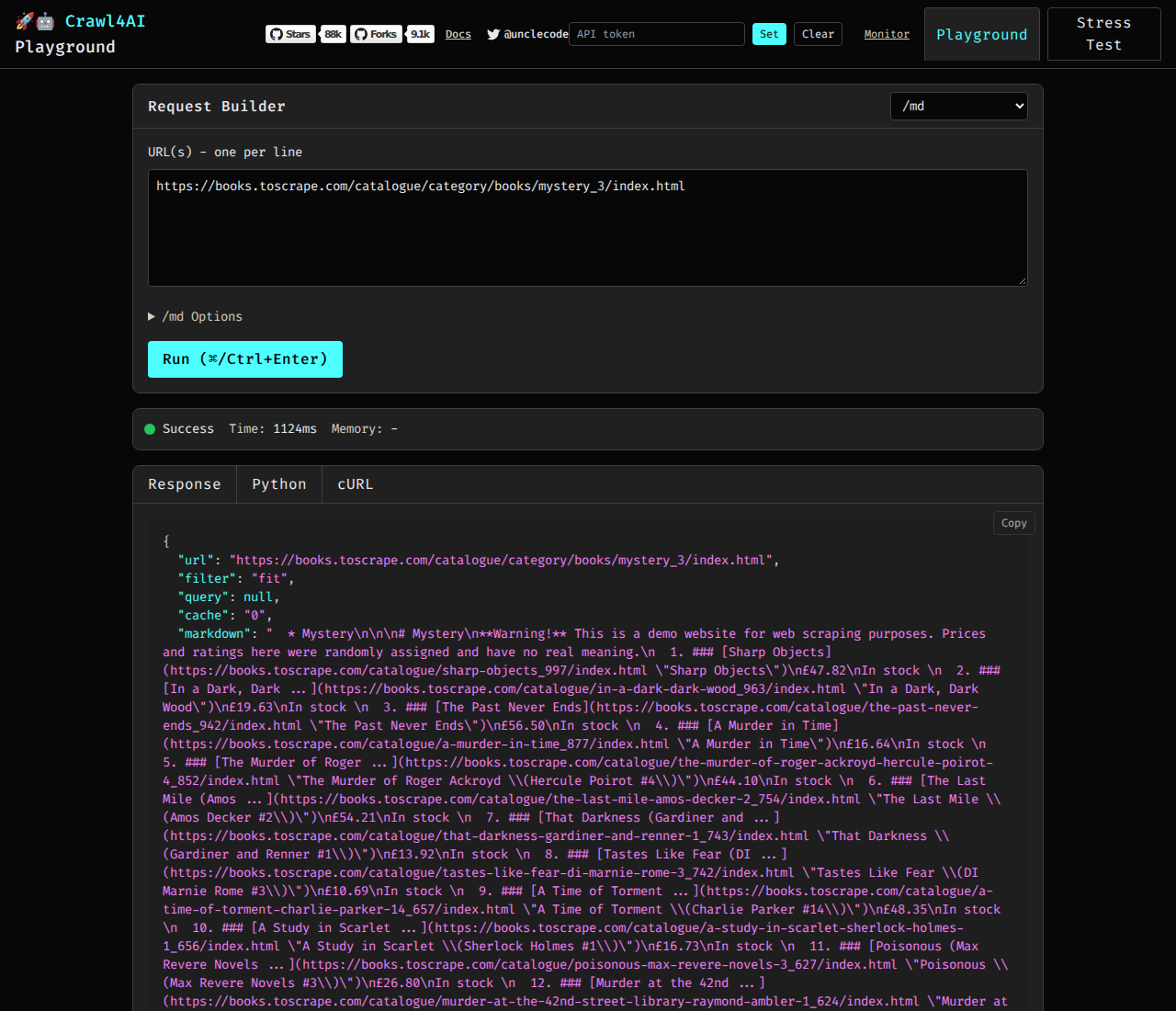
Crawl4AI's playground builds requests in a form and shows the response,
with the same request as Python and curl. Open
https://my-crawl4ai.exe.xyz/playground/ in your browser; exe.dev asks
you to log in, and nobody else gets in. Then give the playground the API
token: print it on the VM,
sed -n 's/^CRAWL4AI_API_TOKEN=//p' ~/crawl4ai/.env
paste it into the API token box at the top, and click Set. The
browser keeps it for this tab only. Pick /md, enter a URL, and run.
The Monitor page shows the server's health, its browsers, recent requests and errors.
Ask an agent to crawl#
On the VM, start claude or codex in a project folder and ask in plain
words. Naming the tool saves the agent a guess:
Use the crawl4ai md tool to fetch https://quotes.toscrape.com/ as markdown. How many quotes are on the page, and who wrote the first one?
The answer is ten quotes, the first by Albert Einstein. With Codex:
codex exec --skip-git-repo-check "Use the crawl4ai MCP server's md tool to ...".
The tools:
| Tool | Use it for |
|---|---|
md |
a page as Markdown, optionally filtered by a query or the model |
html |
a page's cleaned HTML |
crawl |
several URLs at once, with full results |
screenshot, pdf |
a full-page PNG or a PDF of a page |
ask |
Crawl4AI's own documentation, for an agent writing Crawl4AI code |
execute_js |
turned off on the server; it answers with an error |
Crawl and extract from code#
The API is the Crawl4AI Docker API:
JSON over HTTP, with Authorization: Bearer and the token from .env.
The calls you'll use most:
| Call | What it does |
|---|---|
POST /md |
one page as Markdown (f: fit, raw, bm25 or llm, with q) |
POST /crawl |
a list of URLs, or a deep crawl from one, with every result field |
POST /llm/job, GET /llm/job/<id> |
JSON from a page by instruction and schema |
GET /llm/<url>?q=... |
a short answer about one page |
POST /screenshot, POST /pdf |
a PNG or PDF of a page, base64 in the JSON |
crawl.py runs a deep crawl
through /crawl and saves each page as a Markdown file in
~/crawls/<site>/, with an index.jsonl listing URLs, titles, status
codes and depth. It needs nothing beyond Python, and reads the token from
~/crawl4ai/.env. On the VM:
mkdir -p ~/scripts && cd ~/scripts
curl -fsSLO https://exe.dev/deploy/crawl4ai/crawl.py
python3 crawl.py https://books.toscrape.com/ 50
It prints 50 pages saved to /home/exedev/crawls/books.toscrape.com in 10 s.
The optional arguments are the page limit (50) and the link depth (2).
The crawl stays on the start URL's site, skips what robots.txt
disallows, and returns all pages in one response, so the server's limits
apply: at most 100 pages, five levels and five minutes per crawl.
From Python, the crawl4ai package has a client for the server. On the
VM, with the token in the environment:
# /// script
# dependencies = ["crawl4ai==0.9.6"]
# ///
import asyncio, os
from crawl4ai import CrawlerRunConfig, CacheMode
from crawl4ai.docker_client import Crawl4aiDockerClient

async def main():
    async with Crawl4aiDockerClient(base_url="http://localhost:8000",
                                    api_token=os.environ["CRAWL4AI_API_TOKEN"],
                                    verbose=False) as client:
        result = await client.crawl(["https://quotes.toscrape.com/"],
                                    crawler_config=CrawlerRunConfig(cache_mode=CacheMode.BYPASS))
        print(result.markdown.raw_markdown[:200])

asyncio.run(main())
Save it as quotes.py and run
CRAWL4AI_API_TOKEN=$(sed -n 's/^CRAWL4AI_API_TOKEN=//p' ~/crawl4ai/.env) uv run quotes.py.
Pass crawler_config only; the server rejects a browser_config from
the client. The package prints a notice about Crawl4AI Cloud, which
CRAWL4AI_NO_CLOUD_NOTICE=1 turns off.
Crawl on a schedule#
The VM is always on, so a systemd timer can refresh a crawl every day.
On the VM, with crawl.py in ~/scripts from above:
sudo tee /etc/systemd/system/crawl-books.service >/dev/null <<'EOF'
[Unit]
Description=Crawl books.toscrape.com with Crawl4AI
After=docker.service

[Service]
Type=oneshot
User=exedev
ExecStart=/usr/bin/python3 /home/exedev/scripts/crawl.py https://books.toscrape.com/ 50
EOF
sudo tee /etc/systemd/system/crawl-books.timer >/dev/null <<'EOF'
[Unit]
Description=Crawl books.toscrape.com every morning

[Timer]
OnCalendar=*-*-* 06:00:00
RandomizedDelaySec=15m
Persistent=true

[Install]
WantedBy=timers.target
EOF
sudo systemctl daemon-reload
sudo systemctl enable --now crawl-books.timer
systemctl list-timers crawl-books shows the next run, sudo systemctl start crawl-books runs it now, and journalctl -u crawl-books shows
what it saved. Each run replaces the site's files, so an agent always
finds the latest copy in ~/crawls/books.toscrape.com.
Crawl as a signed-in user#
The server keeps no browser state between calls, and since 0.9.6 refuses cookies, sessions, profiles and page scripts from requests: anything that can call the API shouldn't be able to drive a logged-in browser. For sites you sign in to, use the Crawl4AI Python library on the VM, which runs its own Chromium and can save a signed-in session to disk.
Install the library's browser once (about a minute, 1.4 GB):
uvx --from crawl4ai==0.9.6 crawl4ai-setup
login.py is an example for
quotes.toscrape.com, a practice site with a fake login. The first run
fills in the form, submits it, and saves cookies and storage to
~/crawl4ai/state/quotes.json (mode 600); later runs load that file and
skip the sign-in:
cd ~/scripts
curl -fsSLO https://exe.dev/deploy/crawl4ai/login.py
uv run login.py
uv run login.py
The first run prints signed in; saved /home/exedev/crawl4ai/state/quotes.json
and signed in: True, the second only signed in: True. For your own
site, change the URL, the form's selectors and the check for being signed
in. The state file is as good as the password for as long as the session
lasts, so keep it on the VM. A persistent browser profile
(use_persistent_context with user_data_dir) didn't keep this site's
session across runs in testing, because its cookie ends with the browser;
the saved state does.
Use it from your computer or another VM#
The API is also at https://my-crawl4ai.exe.xyz/, behind exe.dev's
proxy, which answers 401 to anything without a login or a
token for the VM. A request needs both
locks: the VM token in X-Exedev-Authorization, which the proxy checks
and removes, and the Crawl4AI token in Authorization, which reaches the
server. On your computer, save both to files only you can read:
(umask 077
ssh exe.dev ssh-key generate-api-key --vm=my-crawl4ai --label=crawl4ai > ~/.crawl4ai-vm-token
ssh my-crawl4ai.exe.xyz "sed -n 's/^CRAWL4AI_API_TOKEN=//p' crawl4ai/.env" > ~/.crawl4ai-token)
curl -s https://my-crawl4ai.exe.xyz/md \
  -H "X-Exedev-Authorization: Bearer $(cat ~/.crawl4ai-vm-token)" \
  -H "Authorization: Bearer $(cat ~/.crawl4ai-token)" \
  -H 'Content-Type: application/json' \
  -d '{"url": "https://example.com"}' | jq -r .markdown
crawl.py takes the same pair from the environment:
export CRAWL4AI_URL=https://my-crawl4ai.exe.xyz
export CRAWL4AI_API_TOKEN=$(cat ~/.crawl4ai-token)
export EXE_VM_TOKEN=$(cat ~/.crawl4ai-vm-token)
curl -fsSL https://exe.dev/deploy/crawl4ai/crawl.py | python3 - https://books.toscrape.com/ 20
And Claude Code on your computer connects to the MCP endpoint with both headers:
claude mcp add --scope user --transport sse crawl4ai https://my-crawl4ai.exe.xyz/mcp/sse \
  --header "X-Exedev-Authorization: Bearer $(cat ~/.crawl4ai-vm-token)" \
  --header "Authorization: Bearer $(cat ~/.crawl4ai-token)"
The pages are fetched by the VM, from its IP address, and the Markdown comes back to your laptop.
For an agent on another of your exe.dev VMs, keep both tokens off that VM
with a VM-to-VM integration: exe.dev adds
the VM key at the edge, and --bearer adds the Crawl4AI token. On your
computer (my-agent-vm is the VM that runs the agent):
ssh exe.dev integrations add http-proxy --name crawl4ai \
  --target https://my-crawl4ai.exe.xyz/ --peer \
  --bearer "$(cat ~/.crawl4ai-token)" --attach vm:my-agent-vm
On my-agent-vm, call https://crawl4ai.int.exe.xyz/ with no
credentials, for example CRAWL4AI_URL=https://crawl4ai.int.exe.xyz python3 crawl.py https://books.toscrape.com/ 20.
Warning
Whoever holds the tokens can make this VM fetch any URL. Hand out VM tokens like you'd hand out a shell;
ssh exe.dev ssh-key listshows each one by its label, andssh exe.dev ssh-key removerevokes it. To change the Crawl4AI token, put a new one in.env, rundocker compose up -din~/crawl4ai, and update the MCP config and integration.
Size and speed#
On a default VM (2 CPUs, 8 GB), measured with release 0.9.6:
| Measure | Result |
|---|---|
| Memory at rest | 310 MB |
| Deep crawl of 100 pages of books.toscrape.com | 18 seconds, 800 MB at the peak |
20 /md requests at once |
5 seconds, all answered, 1.2 GB at the peak |
| Memory after that, idle | 780 MB, with the browsers kept warm |
| Disk for the image | 8.3 GB (a 2.3 GB download) |
| Library and its Chromium, for signed-in crawls | 2.2 GB more |
The server shares one browser among callers and opens up to 40 pages at
once. It holds back new crawls while the container uses more than 95% of
its memory, which the compose file caps at 4 GB. On a bigger VM
(ssh exe.dev new --name=my-crawl4ai --cpu=4 --memory=16GB, within your
plan's limits) raise memory in compose.yaml and run docker compose up -d. These and the crawl limits live in the image's /app/config.yml;
the Docker guide
shows how to mount your own.
Scrape responsibly#
A hundred pages in 18 seconds is a lot of traffic for a small site, and
it comes from your VM's address. Check a site's terms before you crawl
it, keep max_pages and the depth to what you need, and leave
check_robots_txt on (crawl.py sets it; the API's default is off). Don't
crawl behind a login you aren't entitled to. The sites in these
examples, books.toscrape.com and quotes.toscrape.com, are sandboxes built
for scraping practice.
Update#
Crawl4AI publishes every release as an image tag. Read the
release notes first:
0.9.x tightened what requests may carry, and a release can change what
the API refuses. Then, on the VM, with the release you want in V:
cd ~/crawl4ai
V=0.9.6
OLD=$(sed -n 's|.*unclecode/crawl4ai:||p' compose.yaml)
sed -i "s|unclecode/crawl4ai:.*|unclecode/crawl4ai:$V|" compose.yaml
docker compose pull -q && docker compose up -d
timeout 120 sh -c 'until curl -sf localhost:8000/health; do sleep 2; done'; echo
[ "$OLD" = "$V" ] || docker rmi unclecode/crawl4ai:$OLD
The health check prints the new version. To go back, do the same with the
old one. For the library, change crawl4ai==0.9.6 in the scripts and
rerun crawl4ai-setup with the new version.
There's little to back up: ~/crawl4ai/.env holds the token, and the
results you keep are files such as ~/crawls. Jobs and the server's
cache are in memory and gone after a restart.
Troubleshooting#
Connection reset by peeron port 8000: the server is listening only inside its container, which 0.9 does whenCRAWL4AI_API_TOKENis empty. Check.env, thendocker compose up -d.docker compose logs --tail=50says what the server did at startup.{"detail": "Authentication required"}: the Crawl4AI token is missing or wrong. From outside the VM, an exe.dev login page or plain401instead means the VM token is missing.400with a field name (js_code,session_id,cookies,headers,proxy, ...): the server refuses that field from requests; see Crawl as a signed-in user.deep_crawl_strategyrefused meansCRAWL4AI_ALLOW_DEEP_CRAWL=trueis missing from.env.LLM provider not allowed: a request asked for a model outside the default's family. Useopenai/<model>with any model fromcurl -s https://llm.int.exe.xyz/v1/models | jq -r '.data[].id'; if that list is empty, the LLM integration isn't attached to the VM (LLM integration).- A page times out or comes back empty: the site is slow, blocks the
VM, or builds its content late; requests are capped at 60 seconds.
docker compose logs --tail=100shows the browser's errors. - Nothing after a reboot:
systemctl is-enabled dockershould sayenabled; the container comes back with Docker.
Frequently asked questions#
Is self-hosted Crawl4AI free? What does this cost?
Crawl4AI is open source under Apache-2.0, and the server has no credits or page limits. You pay for the VM as part of your exe.dev plan. Extraction and questions call a model through exe.dev's LLM integration, billed to your exe.dev account (models and prices); plain Markdown, crawls, screenshots and PDFs call no model.
Do I need an OpenAI API key for LLM extraction?
No. OPENAI_BASE_URL points the server at exe.dev's LLM integration, which adds the credentials at the network edge, and LLM_PROVIDER picks the default model (openai/gpt-6-luna). OPENAI_API_KEY holds a placeholder only because the client library wants a value. A request can ask for another model in the same family, such as openai/gpt-5.4-mini.
How is the API protected?
Twice. Since 0.9, Crawl4AI refuses to listen beyond its own container without CRAWL4AI_API_TOKEN, and then wants that token on every call but the health check and the web pages. In front of it, exe.dev's HTTPS proxy lets in only you (logged in) and programs with a token for the VM. Keep the VM private: the playground and monitor pages load without a Crawl4AI token.
Why does the server refuse js_code, sessions or cookies?
Crawl4AI 0.9.6 treats every API request as untrusted: page scripts, session IDs, browser profiles, cookies, custom headers, proxies and LLM extraction built in the request are refused with 400. Use /md, /crawl, /llm/job and the MCP tools, which cover most work, and run the Python library on the VM for logins and page scripts (Crawl as a signed-in user).
How big a VM does Crawl4AI need?
A default VM (2 CPUs, 8 GB) is plenty. The server used about 300 MB at rest, 800 MB crawling 100 pages, and 1.2 GB answering 20 requests at once; the container is capped at 4 GB. The image takes 8.3 GB of the 25 GB disk.
Firecrawl, Scrapling, Browser Use or Crawl4AI?
Crawl4AI and Firecrawl are both crawl APIs for agents; Crawl4AI is one container with screenshots, PDFs and MCP built in, Firecrawl a larger stack with a busier ecosystem of SDKs. Scrapling is a Python library for scrapers you write yourself, and Browser Use or a cloud browser is for agents that click through sites rather than read them.
Published Nov 23, 2026 · Updated Nov 22, 2026 · tested end to end Nov 22, 2026 · Markdown · manifest.json · Something wrong? Tell us