
Self-host Cloudflare Workers with OpenOrange
Your Worker and its Durable Objects, unchanged, on a VM you own.
Shelley handles the setup. About 15 minutes.
Prefer a terminal?
curl -fsSL https://exe.dev/deploy/cloudflare-workers/prompt.txt | ssh exe.dev new --prompt=/dev/stdinOpenOrange runs an existing Cloudflare Workers
project somewhere other than Cloudflare, without changing its code. wrangler dev becomes orange dev, each Durable Object becomes a
Rivet Actor with its own SQLite database,
and orange deploy --dry-run packs the Worker into an ordinary Docker image.
Rivet released it on
November 12, 2026.
This recipe puts the whole thing on one exe.dev VM: the self-hosted Rivet Engine, which places and stores your Durable Objects, and your Worker as its node, both in Docker Compose with their data on the VM's disk. exe.dev's HTTPS proxy serves the Worker, private until you open it, and Workers AI runs through exe.dev's LLM integration with no API key. There's no 128 MB memory cap or CPU-time limit: the limits are the VM's.
It starts with a sample: a chat with one Durable Object per room, a KV namespace, a cron trigger and Workers AI. Then you deploy your own Worker in its place.
What you get#
- The Rivet Engine and a sample Worker (a chat with one Durable Object per room, KV, a cron trigger and Workers AI) running in Docker Compose, back after a reboot.
- The Worker at
https://<vm>.exe.xyz/, private behind exe.dev login, signing messages with the visitor's exe.dev email. - Workers AI answering through exe.dev's LLM integration, with no API key on the VM.
- A
~/orange/deploycommand that builds any Worker project and rolls it out. - A backup of the Engine's data, secrets and code in
~/backups.
What's running, and where
https://my-workers.exe.xyz/
your Worker, until you open it to everyone or move your domain
https://my-workers.exe.xyz:8787/
orange dev, while you run it
orange deploy --dry-run, running orange serve
wrangler secret put held, one file, mode 600
Deploy with Shelley#
Click Deploy and Shelley will set up OpenOrange on a new VM, then check that it works. No config-file wrangling required.
Prefer a terminal?
curl -fsSL \
  https://exe.dev/deploy/cloudflare-workers/prompt.txt \
  | ssh exe.dev new --prompt=/dev/stdin
What Shelley is told
Set up OpenOrange on this VM by following the exe.dev recipe at https://exe.dev/deploy/cloudflare-workers.md from top to bottom.

The recipe's example VM name is my-workers. This VM's name is the output of `hostname`: use it wherever the recipe writes my-workers. Skip the step that creates the VM; you are on it.

You are done when all of these are true. Check each one yourself:
- The Rivet Engine and a sample Worker (a chat with one Durable Object per room, KV, a cron trigger and Workers AI) running in Docker Compose, back after a reboot.
- The Worker at `https://<vm>.exe.xyz/`, private behind exe.dev login, signing messages with the visitor's exe.dev email.
- Workers AI answering through exe.dev's LLM integration, with no API key on the VM.
- A `~/orange/deploy` command that builds any Worker project and rolls it out.
- A backup of the Engine's data, secrets and code in `~/backups`.

Read the whole recipe, including the closed details. Do "Install by hand"
first, skipping VM creation; the sections above it are for the owner.
Do not run the Restore, Update or "Move a Worker off Cloudflare" steps.
Never print RIVET_TOKEN or the contents of secrets.env.
Keep the VM private; do not run share set-public.
Check that `curl -s localhost:8000/api/room/lobby` shows a message you
posted, that the summary route answers, that both containers are up
after `docker compose restart`, and that docker.service is enabled.
Make the first backup. Finish with https://<vm>.exe.xyz/, using this
VM's name, and tell the owner to put their own Worker in ~/app (or
anywhere) and run ~/orange/deploy on it.

Finish with the URLs I should open.
Also at /deploy/cloudflare-workers/prompt.txt. The recipe it follows is /deploy/cloudflare-workers.md.
Try the chat#
Open https://my-workers.exe.xyz/ and sign in to exe.dev. You land in
#lobby; any /room/<name> is another room, and another Durable Object.
Post a message: it's signed with your exe.dev email, which the proxy passes
to the Worker as the X-ExeDev-Email header. Summarize this room asks a
model, through Workers AI, for a two-sentence summary. Every five minutes the
cron trigger writes the time to KV, shown at the bottom of the page.
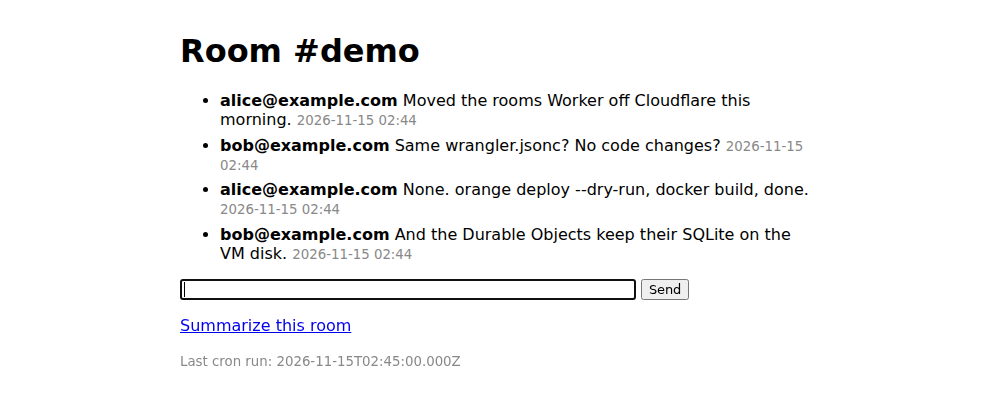
The code is index.js
and wrangler.jsonc,
in ~/app on the VM. They'd run as they are on Cloudflare too.
Here is what runs where, all in ~/orange:
compose.yamlruns the Engine (rivet) and your Worker (worker), both restarted after a crash or reboot. The Worker answers on port 8000, which the proxy serves. The Engine's API, on port 6420, is open only to the VM itself.data/is the Engine's storage: every Durable Object, KV namespace, D1 database and queue.rivet.jsonkeeps it on this disk..envholdsRIVET_TOKEN, the Engine's admin token, and the image the Worker runs.secrets.envholds the Worker's secrets.deploybuilds a Worker project and swaps it in. Your data stays in the Engine.
Deploy your own Worker#
On the VM, get your project and its packages, the way you'd install them
for wrangler deploy (npm ci, pnpm install, and so on): OpenOrange bundles
them into the image. With exe.dev's GitHub integration,
a private repository clones with no token on the VM:
git clone https://github.com/you/my-worker.git ~/my-worker
cd ~/my-worker && npm ci
orange doctor
orange doctor lists every binding and what it runs on (runs as is,
needs a service, or not supported), and each Durable Object class that
orange migrate can move. Try the Worker with orange dev, which keeps its
data in .open-orange/ in the project, apart from the deployed Worker's:
orange dev --ip 0.0.0.0
Open https://my-workers.exe.xyz:8787/, which is private to you; Ctrl-C
stops it. Then put your Worker's secrets in ~/orange/secrets.env, one
NAME=value per line, and deploy:
~/orange/deploy ~/my-worker
Expect deployed worker:<time>. Run it again after each change. The Worker
is down for a few seconds while the container restarts, and the objects pick
up where they were.
Note
One VM runs one Worker this way. The sample's Durable Objects and KV stay in the Engine when you replace it; to start empty, run the reset in Troubleshooting first. For a second Worker, use a second VM.
Secrets and bindings#
Each line of ~/orange/secrets.env becomes env.NAME in your Worker, as
wrangler secret put did; vars from wrangler.jsonc work as before.
deploy reads the names, so add a line and run ~/orange/deploy again. The
file is mode 600 and never goes into the image.
What your bindings run on, from OpenOrange's bindings reference:
| Binding | On this VM |
|---|---|
| Durable Objects, KV, D1, Queues, Rate Limiting, Cron Triggers | In the Engine, on the VM's disk. Nothing to set. Durable Objects lack stub.connect(), point-in-time recovery and read replicas. |
| Workflows, Cache, Tail Workers | In the Engine, with differences listed on each binding's page |
| R2 | In the Engine by default; or any S3-compatible bucket with ORANGE_R2_<BUCKET>_S3_ENDPOINT and its keys in secrets.env |
| Workers AI | An OpenAI-compatible API: here, exe.dev's LLM integration |
| Send Email | Your SMTP server, in ORANGE_EMAIL_SMTP_URL |
| Hyperdrive | A direct connection to your Postgres or MySQL |
| Browser Rendering | A Chrome DevTools endpoint, in ORANGE_BROWSER_CDP_URL |
| Vectorize, Images, Analytics Engine, Pipelines, AI Search, VPC, mTLS | Not supported: the binding loads and its calls throw |
The sample's secrets.env points Workers AI at the LLM integration and maps
the model its code asks for to one the integration serves:
ORANGE_AI_BASE_URL=https://llm.int.exe.xyz/v1
ORANGE_AI_MODELS={"@cf/meta/llama-3.1-8b-instruct":{"model":"gpt-5.4-mini","task":"text"}}
Map every @cf/... model your Worker uses; curl https://llm.int.exe.xyz/v1/models
lists what's available. Embedding models should map to the same model you
used before, or your stored vectors won't match.
For other APIs your Worker calls with a key, you can keep the key off the VM too. An HTTP proxy integration adds it to each request on the way out. On your computer:
printf '%s' "$STRIPE_SECRET_KEY" | ssh exe.dev integrations add http-proxy \
  --name stripe --target https://api.stripe.com --bearer=- --attach vm:my-workers
Then point the Worker at https://stripe.int.exe.xyz instead of
https://api.stripe.com (a vars entry is a good place for the base URL),
and leave the key out of secrets.env.
Open it up#
The Worker is private: only people you share the VM with can reach it, after signing in to exe.dev. For a public API or site, on your computer:
ssh exe.dev share set-public my-workers
Only port 8000 becomes public; orange dev on 8787 and the Engine stay
private. Public visitors reach your Worker without the X-ExeDev-Email
header, unless you send them to /__exe.dev/login first; see
Login with exe.
For your own domain, add a DNS record api.example.com CNAME my-workers.exe.xyz (proxy off, if the domain is on Cloudflare), then:
ssh exe.dev domain add my-workers api.example.com
exe.dev issues the certificate. See custom domains.
Move a Worker off Cloudflare#
orange migrate moves SQLite-backed Durable Objects without downtime: once
your domain points at the VM, each object copies itself from Cloudflare on
its first request, and a backfill copies the rest. D1 databases move too,
with writes paused for about 3 minutes per GB. KV, R2 and queues don't; copy
R2 with rclone or aws s3 sync. OpenOrange's
migration guide
has every step and the rollback, written for Rivet Cloud. On this VM, the
orange deploy and rivet cluster steps become lines in secrets.env:
-
Prepare. In your project on the VM, run
orange doctor, thenorange migrate prepare, and deploy the prepared Worker to Cloudflare with the twowranglercommands it prints (asnpx wrangler ..., withCLOUDFLARE_API_TOKENandCLOUDFLARE_ACCOUNT_IDin your shell). For the secret it asks for, generate a token withopenssl rand -hex 32. Your users see no change. -
Turn the migration on. Add these to
~/orange/secrets.env, and run~/orange/deploy ~/my-worker. Theworkers.devaddress keeps reaching Cloudflare after your domain moves:ORANGE_MIGRATE_WORKER_URL=https://my-worker.you.workers.dev WORKER_MIGRATOR_TOKEN=<the token from step 1> ORANGE_CRONS=offDon't use the Worker on the VM before this: an object that already has data on the VM won't copy itself. If you deployed and tried it earlier, start over with empty data (see Troubleshooting).
-
Move D1, if you use it, with
orange migrate d1 <BINDING> --url https://my-workers.exe.xyz. Cloudflare has to reach that address, so open it up first. -
Point your domain at the VM, as in Open it up. Each object moves on its first request. Then remove the Worker's cron triggers on Cloudflare, delete the
ORANGE_CRONSline, and run~/orange/deploy ~/my-worker, so each cron runs in one place. -
Backfill the objects that got no request. With
ORANGE_MIGRATE_WORKER_URL,WORKER_MIGRATOR_TOKEN,CLOUDFLARE_API_TOKENandCLOUDFLARE_ACCOUNT_IDin your shell, repeat this a few minutes apart until every class prints0 moved, 0 failed:cd ~/my-worker && orange migrate backfill --url http://localhost:8000 -
Finish. When no traffic reaches Cloudflare, take
ORANGE_MIGRATE_WORKER_URLout ofsecrets.envand run~/orange/deployagain. OpenOrange deletes nothing on Cloudflare: delete the Worker and its data there when you trust the move.
Want every object checked before the switch, or a bucket under your Durable Objects? Migrate a Durable Object from Cloudflare moves them to celld instead, with a short freeze.
Use Shelley#
Shelley, the agent on every exe.dev VM, works on the same files: open
https://my-workers.shelley.exe.xyz/ and ask it to run orange doctor on
your project, fix what it reports, or add a route and run ~/orange/deploy.
It uses the LLM integration, so there's no key to paste.
The nuts and bolts#
Install by hand
Create the VM#
On your computer (pick any free name; my-workers is the example):
ssh exe.dev new --name=my-workers
ssh my-workers.exe.xyz
Everything below runs on the VM.
Install OpenOrange#
OpenOrange needs Node.js 22 or newer; install 24 from NodeSource, then the
orange command (the open-orange package, which the project's README
installs with pnpm add -g). Docker comes with the VM; make it start at
boot, so the containers come back after a reboot:
curl -fsSL https://deb.nodesource.com/setup_24.x | sudo -E bash -
sudo apt-get install -y nodejs
sudo npm install -g open-orange@1
sudo systemctl enable --now docker.service
orange --version
Expect 1.0.2 or a later 1.x.
Write the sample Worker#
mkdir -p ~/app/src && cd ~/app
curl -fsSL -o wrangler.jsonc https://exe.dev/deploy/cloudflare-workers/wrangler.jsonc
curl -fsSL -o src/index.js https://exe.dev/deploy/cloudflare-workers/index.js
printf '{ "name": "rooms", "private": true, "type": "module" }\n' > package.json
cat > .dev.vars <<'EOF'
ORANGE_AI_BASE_URL=https://llm.int.exe.xyz/v1
ORANGE_AI_MODELS={"@cf/meta/llama-3.1-8b-instruct":{"model":"gpt-5.4-mini","task":"text"}}
EOF
orange doctor
.dev.vars is what orange dev reads, as wrangler dev does. Expect
Ready for orange dev, with env.AI · https://llm.int.exe.xyz/v1.
Start the Rivet Engine#
Fetch the Compose file, the Engine's config and the deploy script, and
generate the Engine's admin token. The Worker's secrets start as a copy of
.dev.vars:
mkdir -p ~/orange/data && cd ~/orange
for f in compose.yaml rivet.json deploy; do
  curl -fsSLO https://exe.dev/deploy/cloudflare-workers/$f
done
chmod +x deploy
(umask 077; echo "RIVET_TOKEN=$(openssl rand -hex 32)" > .env; cp ~/app/.dev.vars secrets.env)
docker compose up -d rivet
until curl -fs localhost:6420/health; do sleep 2; done; echo
Expect {"architecture":"v3","runtime":"engine","status":"ok","version":"3.1.1"}.
The Engine refuses a node whose pool doesn't exist, so create the default
pool. It retries while the Engine finishes creating its storage:
. ./.env
until curl -fsS -X PUT "http://localhost:6420/pools/default?namespace=default" \
  -H "Authorization: Bearer $RIVET_TOKEN" -H 'Content-Type: application/json' -d '{}'; do
  sleep 2
done; echo
Expect {"pool":{..."name":"default"}}.
Deploy the Worker#
deploy runs orange deploy --dry-run --outdir ~/orange/build, builds the
image it writes with docker build, and starts the worker container on
it. The first build takes a minute or two:
~/orange/deploy ~/app
Check it. The Engine lists one connected node, and a message posted as alice comes back from the room's Durable Object:
curl -s -H "Authorization: Bearer $RIVET_TOKEN" "http://localhost:6420/pools/default/nodes?namespace=default"; echo
curl -s -H 'X-ExeDev-Email: alice@example.com' -d text=hello -o /dev/null localhost:8000/room/lobby
curl -s localhost:8000/api/room/lobby; echo
curl -s localhost:8000/room/lobby/summary
Expect "connected":true, then {"room":"lobby","messages":[{"author":"alice@example.com","text":"hello",...}],"count":1},
then a sentence about alice's message.
Back up and restore
Everything that matters is in ~/orange (the Engine's data, .env,
secrets.env) and your code. The Engine keeps recent writes in
data/log before they reach data/objects, so copy both with the Engine
stopped. That takes the Worker offline for a few seconds:
mkdir -p ~/backups && cd ~/orange
docker compose stop
sudo tar -czf ~/backups/orange-$(date -u +%F).tar.gz -C ~ --exclude=orange/build orange app
docker compose start
sudo chown $USER: ~/backups/*.tar.gz && chmod 600 ~/backups/*.tar.gz
Add your own project's directory after app if it lives elsewhere. The
archive holds your secrets and RIVET_TOKEN, so keep it somewhere private,
off the VM too, for example with scp my-workers.exe.xyz:backups/*.tar.gz .
on your computer. For the whole disk, see VM backups.
To restore, on a new VM do Install OpenOrange above, copy the archive over, then unpack it and rebuild the Worker, which starts the Engine with the data it had:
sudo tar -xzf orange-2026-11-15.tar.gz -C ~
~/orange/deploy ~/app
Never run two Engines on the same data at once.
Update
Upgrade the Engine before OpenOrange: a new OpenOrange can bring a newer RivetKit, which an older Engine may not understand. Check Rivet's releases and the OpenOrange changelog, and make a backup first.
For the Engine, change rivetdev/engine:3.1.1 in ~/orange/compose.yaml
to the new version, then:
cd ~/orange
docker compose pull rivet
docker compose stop && docker compose up -d
Then OpenOrange, and rebuild your Worker on it:
sudo npm install -g open-orange@1
~/orange/deploy ~/app
To roll back a Worker deploy, deploy keeps the previous image. Put its tag
back and raise the node version, so objects wake on it:
cd ~/orange
docker images worker
sed -i "s|^WORKER_IMAGE=.*|WORKER_IMAGE=worker:<previous tag>|; s|^RIVET_NODE_VERSION=.*|RIVET_NODE_VERSION=$(date +%s)|" .env
docker compose up -d
Troubleshooting
The page doesn't load, or curl localhost:8000 fails. Check
cd ~/orange && docker compose ps and docker compose logs worker. A
worker that keeps restarting with a pool error means the default pool is
missing: run the PUT /pools/default step in Start the Rivet Engine.
env.MY_SECRET is undefined. It must be a NAME=value line in
~/orange/secrets.env, and you must run ~/orange/deploy after editing
it. grep ORANGE_WORKER_SECRETS ~/orange/.env lists the names the Worker
gets.
Unsupported Wrangler configuration. Some keys change how a Worker
runs and stop OpenOrange, such as define, site and
legacy_assets. Move them out of the configuration; orange doctor names
them.
A binding throws is not supported by OpenOrange. The binding has no
backend here, such as Vectorize or Images. The error names an alternative.
Workers AI throws has no OpenOrange mapping. Add the model to
ORANGE_AI_MODELS in secrets.env and redeploy.
The Engine won't start. docker compose logs rivet. It needs at least
10% of the disk free, and no less than 4 GiB; check df -h /.
Start over with empty data. This deletes every Durable Object, KV value and D1 row on the VM:
cd ~/orange && docker compose down
sudo rm -rf ~/orange/data && mkdir ~/orange/data
Then run Start the Rivet Engine from docker compose up -d rivet, and
~/orange/deploy your Worker.
Frequently asked questions#
Does my Worker's code change?
No. OpenOrange reads the same wrangler.jsonc (or .json, or .toml) and runs the same code on Node.js. Bindings it has no backend for, such as Vectorize or Analytics Engine, still load, but their calls throw (Analytics Engine drops its writes). orange doctor lists each binding of your project and what it runs on.
Is it ready for production?
OpenOrange 1.0.0 shipped on November 12, 2026, and 1.0.2 a day later, so it's new. This recipe runs one Rivet Engine with its data on the VM's disk, which Rivet calls the fastest way to try it: one copy of your data. For more, Rivet's guides run three or more Engine instances backed by a bucket. Keep backups, and read the production checklist.
Do I need a Rivet or Cloudflare account?
Neither. Everything here is open source (Apache-2.0) and runs on the VM: orange deploy --dry-run calls no API. You need Cloudflare only to move data off it, and Rivet Cloud only if you want Rivet to run the cluster for you.
What does it cost?
OpenOrange and the Rivet Engine are free. You pay for the VM as part of your exe.dev plan, and Workers AI calls through the LLM integration are billed to your exe.dev account. There's no per-request or per-GB-hour meter.
OpenOrange or celld?
Both run Workers and Durable Objects on your own machine. OpenOrange runs on Node.js and covers more bindings (KV, D1, Queues, Workflows, Workers AI, Send Email) with no code changes, and its orange migrate moves Durable Objects while Cloudflare keeps serving. celld keeps every write in your bucket before it answers; Migrate a Durable Object from Cloudflare moves data to it with a short freeze, checking each object.
Something's not working. Where do I look?
cd ~/orange && docker compose logs worker shows your Worker's console.log output and its errors; docker compose logs rivet shows the Engine. Troubleshooting covers the usual problems.
Updated Nov 15, 2026 · tested end to end Nov 15, 2026 · Markdown · manifest.json · Something wrong? Tell us