---
title: "Self-host VoiceStudio"
description: "Run VoiceStudio on an exe.dev VM, no GPU needed: text to speech, voice cloning and transcription in your browser, an OpenAI-style API, and MCP."
url: https://exe.dev/deploy/voicestudio
category: "AI apps"
updated: 2026-10-30
---
# Self-host VoiceStudio
Your own text-to-speech and voice studio, on CPU, behind exe.dev login.
- **Software:** VoiceStudio (https://voicestudio.sh)
- **Source:** https://github.com/debpalash/VoiceStudio
- **License:** AGPL-3.0 (each voice model has its own licence)
- **Time:** 20 minutes
- **Example VM name:** `my-voicestudio` (yours will differ; on the VM, `hostname` prints it)
- **Machine-readable:** https://exe.dev/deploy/voicestudio/manifest.json
## What you get
- VoiceStudio at the VM's private URL, locked with an API key kept in ~/voicestudio/.env.
- Speech and transcription on the VM's CPU, checked with a short test clip.
- Voices, projects, settings and models on the VM's disk, kept across restarts and updates.
- Starts again after a reboot; nightly backups, with one checked.
Running on the VM:
- **VoiceStudio 0.5**: The official image, ghcr.io/debpalash/voicestudio, in Docker Compose, on CPU, port 8000, data in `~/voicestudio/data`
- **Voice models**: Downloaded from Hugging Face when you pick them, kept beside your data, data in `~/voicestudio/data/huggingface`
- **Nightly backup**: A systemd timer; voices, projects and settings, without the models, data in `~/voicestudio-backups`
How it is reached:
- https://my-voicestudio.exe.xyz/ (private): The studio, after exe.dev login and VoiceStudio's API key
- https://my-voicestudio.exe.xyz/v1/ (private): OpenAI-style speech and transcription API, with a VM token and the API key
- https://my-voicestudio.exe.xyz/mcp/ (private): MCP server for agents, with the same two credentials
## Deploy with Shelley
Open https://exe.dev/new?prompt=Set%20up%20VoiceStudio%20on%20this%20VM%20by%20following%20the%20exe.dev%20recipe%20at%20https%3A%2F%2Fexe.dev%2Fdeploy%2Fvoicestudio.md%20from%20top%20to%20bottom.%0A%0AThe%20recipe%27s%20example%20VM%20name%20is%20my-voicestudio.%20This%20VM%27s%20name%20is%20the%20output%20of%20%60hostname%60%3A%20use%20it%20wherever%20the%20recipe%20writes%20my-voicestudio.%20Skip%20the%20step%20that%20creates%20the%20VM%3B%20you%20are%20on%20it.%0A%0AThis%20recipe%20needs%20a%2060GB%20disk%2C%20and%20a%20new%20VM%27s%20may%20be%20smaller.%20Before%20you%20install%20anything%2C%20run%20%60df%20-h%20%2F%60.%20If%20its%20size%20is%20under%2054G%2C%20stop%20and%20ask%20me%20to%20grow%20the%20disk%2C%20either%20with%20this%20link%3A%20https%3A%2F%2Fexe.dev%2Fsuggest%3Fcommand%3Dresize%2520my-voicestudio%2520--disk%253D60GB%20or%2C%20on%20my%20computer%2C%20with%20%60ssh%20exe.dev%20resize%20my-voicestudio%20--disk%3D60GB%60.%20When%20I%20say%20it%27s%20done%2C%20run%20%60sudo%20resize2fs%20%22%24%28findmnt%20-no%20SOURCE%20%2F%29%22%60%2C%20check%20%60df%20-h%20%2F%60%20again%2C%20and%20carry%20on.%0A%0AYou%20are%20done%20when%20all%20of%20these%20are%20true.%20Check%20each%20one%20yourself%3A%0A-%20VoiceStudio%20at%20the%20VM%27s%20private%20URL%2C%20locked%20with%20an%20API%20key%20kept%20in%20~%2Fvoicestudio%2F.env.%0A-%20Speech%20and%20transcription%20on%20the%20VM%27s%20CPU%2C%20checked%20with%20a%20short%20test%20clip.%0A-%20Voices%2C%20projects%2C%20settings%20and%20models%20on%20the%20VM%27s%20disk%2C%20kept%20across%20restarts%20and%20updates.%0A-%20Starts%20again%20after%20a%20reboot%3B%20nightly%20backups%2C%20with%20one%20checked.%0A%0ARead%20the%20whole%20recipe%2C%20including%20the%20closed%20details.%20For%20initial%20setup%2C%0Afollow%20%22Install%20by%20hand%22%2C%20skipping%20VM%20creation%20and%20SSH%3A%20room%20on%20the%20disk%2C%0ADocker%2C%20Start%20VoiceStudio%2C%20Check%20speech%2C%20the%20backup%20timer%20and%20the%20backup%0Acheck.%20The%20walkthrough%20at%20the%20top%20is%20for%20the%20owner%20afterwards.%20Do%20not%20run%0ARestore%20or%20Update.%0AWork%20as%20exedev%20in%20~%2Fvoicestudio.%20Never%20overwrite%20an%20existing%20.env.%0ADo%20not%20accept%20any%20model%20licence%20for%20the%20owner%2C%20and%20do%20not%20run%20the%0Afirst-run%20wizard%20in%20a%20browser%3A%20the%20owner%20does%20both.%20Do%20not%20share%20the%20VM%0Aor%20make%20it%20public.%0AVerify%20docker.service%20is%20enabled%20and%20the%20container%20uses%20unless-stopped%3B%0Ado%20not%20reboot.%20Finish%20with%20the%20studio%20URL%20and%20the%20command%20from%20%22Open%20the%0Astudio%22%20that%20prints%20the%20API%20key%3B%20don%27t%20paste%20the%20key%20into%20the%20chat.%0A%0AFinish%20with%20the%20URLs%20I%20should%20open.%0A to create a VM whose agent, Shelley, follows this recipe. From a terminal:
```sh
curl -fsSL https://exe.dev/deploy/voicestudio/prompt.txt | ssh exe.dev new --disk=60GB --prompt=/dev/stdin
```
It needs a 60 GB disk. The terminal command makes the VM that size; after the button, Shelley checks and, if the disk is smaller, gives you a link to grow it.
Or follow the steps below by hand.
VoiceStudio is an open-source voice studio: type a script and hear it read
aloud, design a voice from a description, clone one from a short clip,
transcribe recordings, dub videos, and build audiobooks, in hundreds of
languages. It runs its models on its own machine, so your scripts and
recordings never go to a speech service.
Here that machine is an exe.dev VM. There's no GPU, so VoiceStudio runs on
the CPU: slower, but always on, private behind exe.dev login, and reachable
from your browser, your apps through an OpenAI-style API, and your agents
through MCP. Your voices and projects stay on the VM's disk, backed up every
night.
## Open the studio
VoiceStudio asks for an API key, its admin password. Shelley made one when
it installed VoiceStudio. On your computer, print it:
```bash
ssh my-voicestudio.exe.xyz sed -n s/^OMNIVOICE_API_KEY=//p voicestudio/.env
```
Open `https://my-voicestudio.exe.xyz/`, sign in to exe.dev if asked, and
paste the key into **API key**. VoiceStudio keeps you signed in for up to
eight hours, and until it restarts; then it asks for the key again. A
password manager helps.
The first time, a short setup follows:
1. **System check** finds no GPU and says everything runs on the CPU. Continue.
2. **Model packs**: choose **Fast** and **Install Fast pack** (2.7 GB,
about two minutes). When every model says *installed*, press **Use Fast
pack**, then continue.
3. **Privacy**: choose **No thanks**. The VM is set up never to send usage
statistics anyway.
4. **Enter studio**. Skip *Try Dictation*; it is meant for the desktop app.
The first time you synthesize with the default model, VoiceStudio asks you to
accept its licence. Read it: the OmniVoice weights are for personal and
research use only. If that doesn't fit, close it and
[switch to KittenTTS](#choose-an-engine).
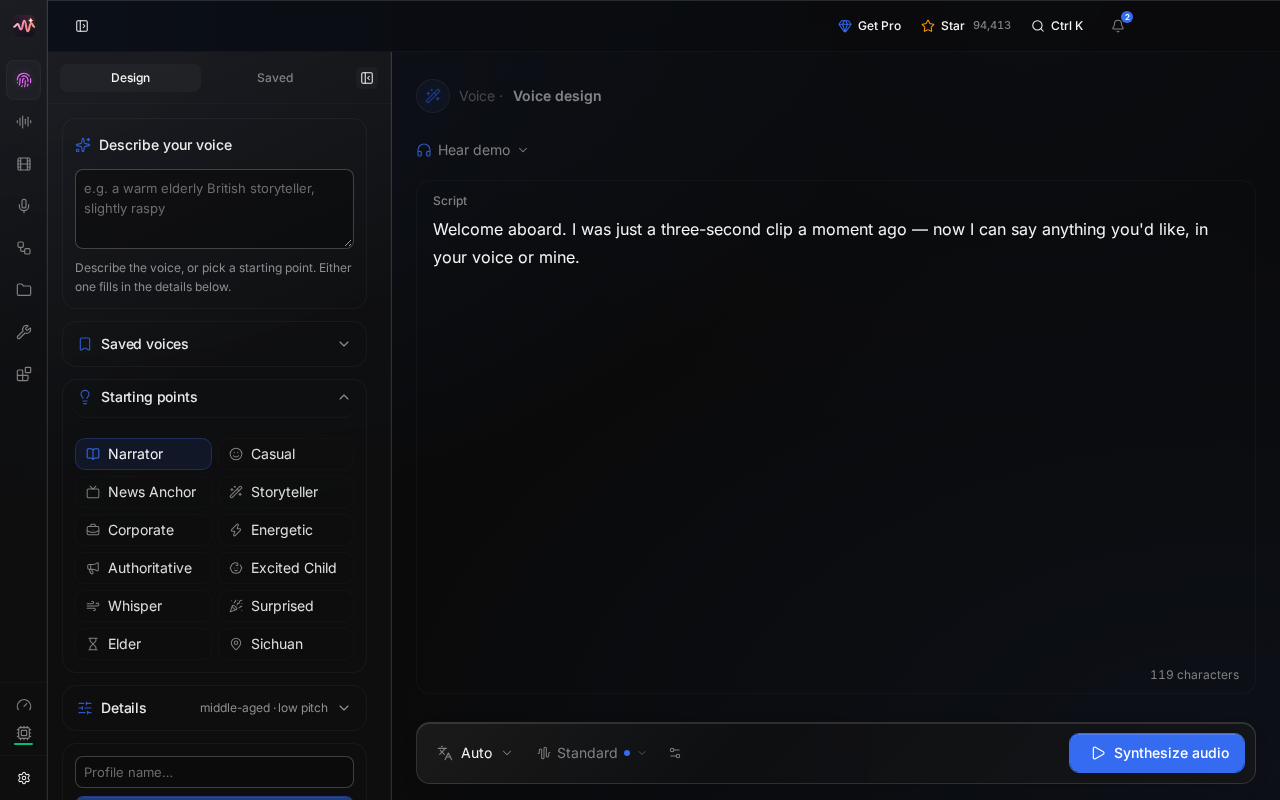
Designing a voice in the studio, served from the VM on its CPU.
## Make some speech
- **Design**: pick a starting point such as *Narrator*, or describe a
voice ("a warm elderly British storyteller"), edit the script, and press
**Synthesize audio**. **Save as voice profile** keeps the voice.
- **Voice cloning**: add a recording with 5-15 seconds of clean speech, check
the transcript, and save it as a voice. Only clone voices you have
permission to use.
- **Gallery** has hundreds of ready-made voices. **Audiobook**, **Stories**
and **Dubbing** build longer pieces from them.
- **Transcribe** turns uploaded recordings into text.
Your takes are kept under **Recents** in the sidebar. Generated audio
carries an invisible watermark marking it as AI-made; it's on by default,
under **Settings → Privacy**.
## Choose an engine
VoiceStudio has many speech engines; on a CPU, two matter. We measured them
on a default VM (2 vCPUs, 8 GB):
| Engine | Speed on 2 vCPUs | Voices | Model licence |
| --- | --- | --- | --- |
| VoiceStudio (OmniVoice), the default | about 10 s of work per second of speech | cloning, design, 600+ languages | CC-BY-NC: personal and research use |
| KittenTTS | about 3x faster than real time | 8 preset voices, English | Apache-2.0 |
Shelley installed KittenTTS (80 MB) while setting up. To make it the
default, open **Settings → Models → TTS** and press **Select** on
KittenTTS. Apps can also pick per request with `"model": "kittentts"`.
For transcription, setup turned on Whisper base, which is quick (2 seconds
for a short sentence) but not the most accurate. For better results,
**Download** a larger model under **Settings → Models → ASR** and select
it: Whisper large-v3 Turbo (1.6 GB) took 20 seconds for a 7-second clip.
For faster speech, give the VM more CPUs. On your computer:
```bash
ssh exe.dev resize my-voicestudio --cpu=4 --memory=16GB
```
## Use it from apps
VoiceStudio answers OpenAI's audio API: `POST /v1/audio/speech` and
`POST /v1/audio/transcriptions`. The voice can be an OpenAI name like
`alloy` (the engine's default voice) or one of your saved voices, by name or
id; `GET /v1/audio/voices` lists them.
On the VM itself, send the API key:
```bash
key=$(sed -n 's/^OMNIVOICE_API_KEY=//p' ~/voicestudio/.env)
curl -fsS http://localhost:8000/v1/audio/speech \
-H "Authorization: Bearer $key" -H 'Content-Type: application/json' \
-d '{"model":"kittentts","voice":"alloy","input":"Hello from my own voice server.","response_format":"wav"}' \
-o hello.wav
```
From anywhere else, the request first has to get past exe.dev's login. Make
a token for this VM's [HTTPS proxy](/docs/https-tokens-for-vms), on your
computer:
```bash
ssh exe.dev ssh-key generate-api-key --vm=my-voicestudio --label=voicestudio
```
Send it as `X-Exedev-Authorization`, beside the VoiceStudio key. The proxy
checks and removes the first; VoiceStudio checks the second:
```bash
curl -fsS https://my-voicestudio.exe.xyz/v1/audio/speech \
-H "X-Exedev-Authorization: Bearer $EXE_TOKEN" \
-H "Authorization: Bearer $VOICESTUDIO_KEY" \
-H 'Content-Type: application/json' \
-d '{"model":"kittentts","voice":"alloy","input":"Hello from my own voice server.","response_format":"wav"}' \
-o hello.wav
```
In OpenAI's SDKs, set the base URL to `https://my-voicestudio.exe.xyz/v1`,
the API key to the VoiceStudio key, and add the `X-Exedev-Authorization`
header as a default header.
## Give your agents a voice
VoiceStudio has an MCP server at `/mcp/` with tools to speak, clone and
design voices, transcribe, and list voices. Claude Code on the VM connects
over localhost; on the VM:
```bash
key=$(sed -n 's/^OMNIVOICE_API_KEY=//p' ~/voicestudio/.env)
claude mcp add --transport http voicestudio http://localhost:8000/mcp/ \
--header "Authorization: Bearer $key"
claude mcp list
```
Expect `voicestudio: ... ✔ Connected`. An agent elsewhere uses
`https://my-voicestudio.exe.xyz/mcp/` with both headers from
[Use it from apps](#use-it-from-apps). The
[MCP guide](https://github.com/debpalash/VoiceStudio/blob/main/docs/mcp.md)
shows how to give each agent its own voice.
## Keep your voices
Backups run nightly into `~/voicestudio-backups`: your voices, projects,
history, settings, and the API key, but not the models, which download
again. VoiceStudio stops for a few seconds while it's copied, so you may
have to sign in again in the morning. Keep a copy **off the VM**. On your
computer:
```bash
scp -r my-voicestudio.exe.xyz:voicestudio-backups .
```
The backups hold your voice samples and the API key, so keep them private.
To restore one or update VoiceStudio, see below, or ask Shelley. Something
stuck? On the VM, try `cd ~/voicestudio && docker compose logs --tail=100`.
## The nuts and bolts
Happy clicking Deploy? You can stop here. These are the same setup steps
Shelley follows, plus the maintenance commands for later.
Install by hand
### Create a VM
The VoiceStudio image is big (about 17 GB on disk, with PyTorch and CUDA
libraries inside), so give the VM a 60 GB disk. You're billed for the disk
you use, not its size. On your computer (pick another name if
`my-voicestudio` is taken):
```bash
ssh exe.dev new --name=my-voicestudio --disk=60GB
ssh my-voicestudio.exe.xyz
```
All remaining installation commands run **on the VM**, as `exedev`.
Commands use `hostname`, so your VM can have any name.
### Room on the disk
Check the disk:
```bash
df -h /
```
If **Size** is under 54G, the VM was made with a smaller disk. Grow it with
[this link](https://exe.dev/suggest?command=resize%20my-voicestudio%20--disk%3D60GB)
(with your VM's name), or on your computer with
`ssh exe.dev resize my-voicestudio --disk=60GB`. Then, back on the VM, grow
the filesystem to match:
```bash
sudo resize2fs "$(findmnt -no SOURCE /)"
df -h /
```
Expect a size of about 59G.
### Get Docker ready
Enable Docker at boot, or exe.dev's on-demand Docker won't restart
VoiceStudio after a reboot. Install `jq` if needed:
```bash
sudo systemctl enable --now docker.service
systemctl is-enabled docker.service
command -v jq >/dev/null || sudo apt-get install -y jq
```
The check should print `enabled`.
### Start VoiceStudio
This writes `.env` **once**, with a random API key, then a Compose file.
The image listens on port 3900; Compose publishes it on port 8000, which
exe.dev's proxy serves at `https://.exe.xyz/`. Everything VoiceStudio
keeps, including the models it downloads, goes in `~/voicestudio/data`.
```bash
mkdir -p ~/voicestudio/data
cd ~/voicestudio
if [ ! -e .env ]; then
touch .env && chmod 600 .env
echo "OMNIVOICE_API_KEY=$(openssl rand -hex 32)" >> .env
fi
cat > compose.yaml </dev/null
do sleep 5; done
done
```
Expect `install_started` twice. VoiceStudio's default transcription model
is a 2.9 GB Whisper it hasn't downloaded, so make Whisper base the active
one:
```bash
auth="Authorization: Bearer $(sed -n 's/^OMNIVOICE_API_KEY=//p' ~/voicestudio/.env)"
curl -fsS -X POST http://localhost:8000/engines/select -H "$auth" \
-H 'Content-Type: application/json' \
-d '{"family":"asr","backend_id":"faster-whisper","model_id":"Systran/faster-whisper-base"}'; echo
```
Expect `"active":"faster-whisper"`. Now have KittenTTS say a sentence, and
Whisper write it back down:
```bash
auth="Authorization: Bearer $(sed -n 's/^OMNIVOICE_API_KEY=//p' ~/voicestudio/.env)"
curl -fsS http://localhost:8000/v1/audio/speech -H "$auth" \
-H 'Content-Type: application/json' \
-d '{"model":"kittentts","voice":"alloy","input":"The quick brown fox jumps over the lazy dog.","response_format":"wav"}' \
-o /tmp/hello.wav
file /tmp/hello.wav
curl -fsS http://localhost:8000/v1/audio/transcriptions -H "$auth" \
-F file=@/tmp/hello.wav -F model=whisper-1; echo
rm /tmp/hello.wav
```
Expect `RIFF (little-endian) data, WAVE audio, ... mono 24000 Hz`, then
`{"text":"The quick brown fox jumps over the lazy dog."}`. The default
voice model, OmniVoice, waits for the owner to accept its licence in the
studio.
### Set up nightly backups
The backup stops VoiceStudio for a few seconds, so its database is copied
in a consistent state. It runs as root because the container writes `data`
as root, and skips `data/huggingface`, the downloaded models.
```bash
cat > ~/voicestudio/backup.sh <<'EOF'
#!/usr/bin/env bash
# Back up VoiceStudio: data (voices, projects, history, settings) without
# the downloadable models, .env (the API key), and the Compose file.
# Run with sudo.
set -euo pipefail
umask 077
cd "$(dirname "$(readlink -f "$0")")"
owner=$(stat -c %U:%G .)
dest="$(dirname "$PWD")/voicestudio-backups"
mkdir -p "$dest"
out="$dest/voicestudio-$(date -u +%Y%m%d-%H%M%S).tar.gz"
# A short stop keeps the SQLite database consistent.
docker compose stop voicestudio
trap 'docker compose start voicestudio' EXIT
tar -czf "$out.part" --exclude=data/huggingface .env compose.yaml backup.sh data
docker compose start voicestudio
trap - EXIT
mv "$out.part" "$out"
chown -R "$owner" "$dest"
# Keep the 14 newest backups.
ls -1t "$dest"/voicestudio-*.tar.gz | tail -n +15 | xargs -r rm --
echo "$out"
EOF
chmod +x ~/voicestudio/backup.sh
```
Schedule it for 03:30 UTC (or so), then take a first backup:
```bash
sudo tee /etc/systemd/system/voicestudio-backup.service >/dev/null </dev/null <<'EOF'
[Unit]
Description=Back up VoiceStudio every night
[Timer]
OnCalendar=*-*-* 03:30:00
RandomizedDelaySec=30m
Persistent=true
[Install]
WantedBy=timers.target
EOF
sudo systemctl daemon-reload
sudo systemctl enable --now voicestudio-backup.timer
sudo systemctl start voicestudio-backup.service
systemctl list-timers voicestudio-backup.timer
ls -lh ~/voicestudio-backups
until curl -fs http://localhost:8000/health; do sleep 5; done; echo
```
Check that the timer has a next run, the directory has a tarball of a few
hundred KB (more once you have voices), and VoiceStudio is back. For
failures: `journalctl -u voicestudio-backup.service`.
### Test a backup
Unpack the newest backup into a **scratch directory** and check its
database, without touching the running copy:
```bash
latest=$(ls -1t ~/voicestudio-backups/voicestudio-*.tar.gz | head -n 1)
mkdir /tmp/voicestudio-restore-test
sudo tar -xzf "$latest" -C /tmp/voicestudio-restore-test
sudo ls -A /tmp/voicestudio-restore-test /tmp/voicestudio-restore-test/data
sudo python3 -c '
import sqlite3
db = sqlite3.connect("file:/tmp/voicestudio-restore-test/data/omnivoice.db?mode=ro", uri=True)
print(db.execute("pragma integrity_check").fetchone()[0])
print("voices", db.execute("select count(*) from voice_profiles").fetchone()[0])
'
sudo rm -rf /tmp/voicestudio-restore-test
```
Expect `.env`, `compose.yaml`, `backup.sh` and `data` (with
`omnivoice.db` and no `huggingface`), then `ok` and the number of saved
voices.
Installation done. Continue with [Open the studio](#open-the-studio).
Back up and restore
On the VM, `sudo ~/voicestudio/backup.sh` makes an extra backup and prints
its path. Copy backups off the VM as shown in
[Keep your voices](#keep-your-voices).
### Restore
On a new VM, follow [Install](#create-the-vm) up to and including
[Get Docker ready](#get-docker-ready). Create `~/voicestudio-backups`
there, then copy your backup over from your computer:
```bash
scp voicestudio-20261030-033012.tar.gz my-voicestudio.exe.xyz:voicestudio-backups/
```
Use your backup's actual filename in this and the commands below. All
remaining commands run **on the VM**. If VoiceStudio already runs there,
stop it and keep its directory aside first:
```bash
cd ~/voicestudio && docker compose down
sudo mv ~/voicestudio ~/voicestudio.before-restore
```
Unpack the backup, point MCP at this VM's name, and start it:
```bash
mkdir ~/voicestudio
sudo tar -xzf ~/voicestudio-backups/voicestudio-20261030-033012.tar.gz -C ~/voicestudio
cd ~/voicestudio
sed -i "s/^\( *OMNIVOICE_MCP_ALLOWED_HOSTS:\).*/\1 $(hostname).exe.xyz/" compose.yaml
docker compose up -d
until curl -fs http://localhost:8000/health; do sleep 5; done; echo
```
Sign in with the API key from the backup and check your voices are there.
The models aren't in the backup: download KittenTTS and Whisper base again
with the first block in [Check speech](#check-speech), and the rest from
**Settings → Models**.
On a new VM, recreate the backup timer from
[Install](#set-up-nightly-backups). Keep `~/voicestudio.before-restore`
until you're happy everything is back.
Update VoiceStudio
The `0.5` image tag follows the newest 0.5.x release. On the VM, back up,
then pull and restart:
```bash
cd ~/voicestudio
sudo ./backup.sh
docker compose pull
docker compose up -d
until curl -fs http://localhost:8000/health; do sleep 5; done; echo
docker image prune -f
df -h /
```
The health check shows the new version. The prune frees the old image's
disk space; until then, both images are on disk, which is why the VM has
60 GB. Sign in to the studio again after the restart.
For a new minor version, such as 0.6, read the
[release notes](https://github.com/debpalash/VoiceStudio/releases) first,
then change the `image:` tag in `compose.yaml` and run the same commands.
VoiceStudio upgrades its database on start and keeps a copy of the old one
in `data`; to roll back fully, [restore the backup](#restore).
Something not working?
On the VM:
```bash
cd ~/voicestudio
docker compose ps
docker compose logs --tail=100 voicestudio
```
- **502 right after starting or updating:** VoiceStudio takes a minute to
load. Wait for `curl -fsS http://localhost:8000/health`.
- **The studio asks for the API key again:** sessions end after eight
hours and whenever VoiceStudio restarts, including during the nightly
backup. Paste the key from `~/voicestudio/.env`.
- **"This model can't be used until you accept its licence":** open the
licence dialog when you synthesize and accept it, or select another
engine such as KittenTTS under **Settings → Models → TTS**.
- **"No speech-to-text model is installed":** under **Settings → Models →
ASR**, select a Whisper model marked *installed*, or download one.
- **A generation times out:** CPU synthesis of long scripts is slow. Split
the script, use KittenTTS, or give the VM more CPUs with
`ssh exe.dev resize`.
- **MCP says `Invalid Host header`:** the VM was renamed or restored on
another VM. Set `OMNIVOICE_MCP_ALLOWED_HOSTS` in `compose.yaml` to the
current `.exe.xyz` and run `docker compose up -d`.
- **Down after a reboot:** run `sudo systemctl enable --now docker.service`.
- **Disk full:** check `df -h /` and `sudo du -sh ~/voicestudio/data/huggingface`.
Run `docker image prune -f`, or grow the disk with `ssh exe.dev resize`.
## Frequently asked questions
### Does VoiceStudio need a GPU?
No. Everything runs on the CPU, just slower. On the default 2-vCPU VM, KittenTTS speaks faster than real time, while the default VoiceStudio (OmniVoice) model, which clones and designs voices, takes about ten seconds per second of speech. More CPUs help: see [Choose an engine](#choose-an-engine).
### Can I use the audio commercially?
It depends on the model, not the app. VoiceStudio itself is AGPL-3.0, but the default OmniVoice weights are licensed CC-BY-NC, for personal and research use, and VoiceStudio asks you to accept that before first use. KittenTTS is Apache-2.0. **Settings → Models** links each model's licence; check it before you publish anything.
### Can I clone my own voice?
Yes. Add 5-15 seconds of clean speech under **Voice cloning**, save it as a voice, and use it in the studio, the API, or MCP. Only clone voices you have permission to use.
### Who can use my VoiceStudio?
Only people you [share the VM](/docs/sharing) with get past exe.dev's login, and they also need the API key, which is VoiceStudio's admin password. Everyone with the key sees the same voices and history, so share it only with people you trust.
### Can my apps use it instead of a hosted speech API?
Yes. VoiceStudio speaks OpenAI's audio API (`/v1/audio/speech`, `/v1/audio/transcriptions`), so most SDKs only need a new base URL and two headers. See [Use it from apps](#use-it-from-apps).
### How much does it cost?
VoiceStudio is free. You pay for your [VM plan](https://exe.dev/pricing); the image and a few models use about 25 GB of disk.
## Related
- [Self-host Open WebUI](https://exe.dev/deploy/open-webui.md): A private ChatGPT for you and your team. No API keys.
- [Self-host Hermes Agent](https://exe.dev/deploy/hermes-agent.md): An agent that remembers you, on a computer that never sleeps.
- [Run Claude Code on a remote server](https://exe.dev/deploy/claude-code.md): A computer for Claude. A breather for your laptop.
- [Self-host n8n](https://exe.dev/deploy/n8n-2.md): Connect your apps. Let the boring bits run themselves.
- [Host OpenClaw](https://exe.dev/deploy/openclaw.md): An AI sidekick with its own computer. Your laptop can take a nap.
- [VS Code in your browser, with code-server](https://exe.dev/deploy/code-server.md): Your editor in a tab. Your projects right where you left them.