---
title: "Self-host TradingAgents"
description: "Run TradingAgents on an exe.dev VM with Docker: daily multi-agent stock reports by email, models from the LLM gateway with no API keys, private by default."
url: https://exe.dev/deploy/tradingagents
category: "AI agents"
published: 2026-11-19
updated: 2026-11-19
---
# Self-host TradingAgents
> **For agents:** with your user's OK, this sets up TradingAgents on a new exe.dev VM in their account: `curl -fsSL https://exe.dev/deploy/tradingagents/prompt.txt | ssh exe.dev new --prompt=/dev/stdin` (or open https://exe.dev/deploy/tradingagents/new). Already on the VM? Skip this.
Multi-agent stock research every evening, by email. No API keys.
- **Software:** TradingAgents (https://tauric.ai)
- **Source:** https://github.com/TauricResearch/TradingAgents
- **License:** Apache-2.0
- **Time:** 15 minutes
- **Example VM name:** `my-tradingagents` (yours will differ; on the VM, `hostname` prints it)
- **Machine-readable:** https://exe.dev/deploy/tradingagents/manifest.json
- **File:** https://exe.dev/deploy/tradingagents/ta-daily
## What you get
- TradingAgents 0.7.1 built from its official Docker Compose file, with results, memory log and cache in `~/tradingagents-data`
- Models from exe.dev's LLM gateway, with no API key on the VM
- One complete analysis of NVDA, readable as a web page at the VM's private URL
- A weekday timer that analyzes the watchlist after the US market closes and emails you the ratings and reports
- The report server and timer back after a reboot
Running on the VM:
- **TradingAgents 0.7.1**: the official Dockerfile and Compose service, run once per ticker, data in `~/tradingagents-data`
- **exe.dev LLM gateway**: GPT-6 Luna for the analysts, GPT-6 Sol for the managers; no API key
- **tradingagents-web**: a small static server for the reports, behind exe.dev login, port 8000, data in `~/tradingagents-data/logs`
- **ta-daily**: a systemd timer that runs your watchlist after the US close and emails you, data in `~/tradingagents-data/watchlist.txt`
How it is reached:
- https://my-tradingagents.exe.xyz/ (private): every report, newest first, signed in with your exe.dev account
- ssh my-tradingagents.exe.xyz (private): ad hoc analyses, the watchlist and settings
## Deploy with Shelley
Open https://exe.dev/deploy/tradingagents/new to create a VM whose agent, Shelley, follows this recipe. From a terminal:
```sh
curl -fsSL https://exe.dev/deploy/tradingagents/prompt.txt | ssh exe.dev new --prompt=/dev/stdin
```
Or follow the steps below by hand.
[TradingAgents](https://github.com/TauricResearch/TradingAgents) from Tauric
Research is a trading firm made of language-model agents. Market, sentiment,
news and fundamentals analysts each write a report on a stock; a bull and a
bear researcher argue over them; a trader drafts a plan; three risk analysts
challenge it; and a portfolio manager gives the final rating, from Buy to
Sell. It's a command-line program, and the run ends in one long report.
On an exe.dev VM it runs on a schedule instead of on your laptop. Every
weekday after the US close, it analyzes your watchlist, emails you the
ratings, and keeps every report at a private URL behind your exe.dev login.
Models come from exe.dev's [LLM gateway](/docs/integrations-llm), so there
are no API keys on the VM, and the data sources it uses by default need
none either. Its memory log of past decisions, which later runs learn from,
stays on the VM's disk.
> [!WARNING]
> TradingAgents is a research framework. Its reports are
> [not financial, investment, or trading advice](https://tauric.ai/disclaimer/),
> and this setup never places trades. Language models misread data and
> disagree with themselves from one run to the next.
## Read your first report
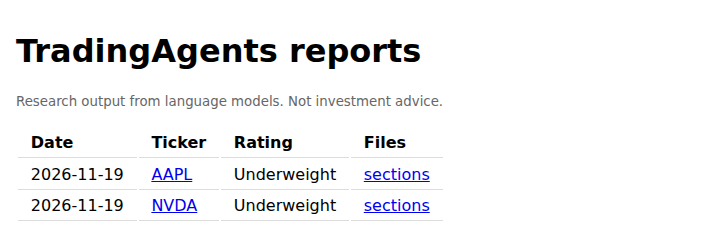
Open the URL Shelley gives you, like `https://my-tradingagents.exe.xyz/`,
and sign in to exe.dev if asked. The index lists every analysis, newest
first, with its rating. Shelley ran one for NVDA during setup.
The index at the VM's URL, one row per analysis.
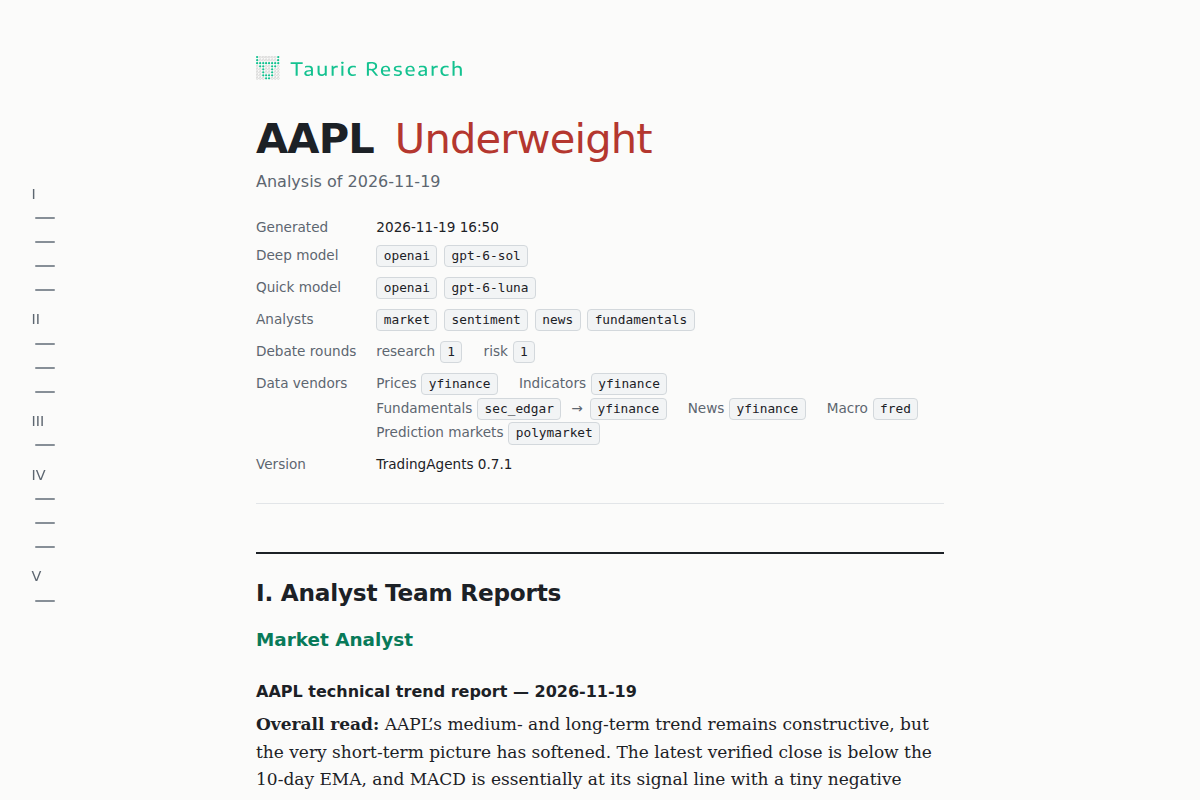
Click a ticker for the full report: a header with the date, the models and
the data sources, then each agent's section in order, ending with the
portfolio manager's decision. It reads well on a phone.
The top of a report: the rating, then what produced it.
## Analyze a ticker now
On your computer, SSH to the VM and start the interactive CLI, which asks
for a ticker, a date and the analysts, and shows the agents at work:
```bash
ssh -t my-tradingagents.exe.xyz 'cd ~/TradingAgents && docker compose run --rm tradingagents'
```
Or answer every question with flags, the way the daily job does. On the VM:
```bash
cd ~/TradingAgents
docker compose run --rm -T tradingagents --ticker 0700.HK --date "$(date +%F)" \
--analysts market,news,fundamentals --save --no-show
ta-daily --index
```
`ta-daily --index` adds the new report to the index. Past dates work too:
TradingAgents only reads data published by the analysis date.
## Your watchlist and the daily run
The watchlist is `~/tradingagents-data/watchlist.txt`, one ticker per line;
`#` starts a comment. Each ticker is a full analysis, so a long list costs
more and takes longer (two to three minutes a ticker).
At 17:30 New York time, Monday to Friday, the `tradingagents-daily` timer
runs [`ta-daily`](https://exe.dev/deploy/tradingagents/ta-daily). It
analyzes each ticker for that day, rebuilds the index, and emails you one
message with each rating, a link to each report, and the reports attached as
HTML, through exe.dev's [email for VMs](/docs/send-email). To check when
it runs next, or to read the last run's output, on the VM:
```bash
systemctl list-timers tradingagents-daily.timer
journalctl -u tradingagents-daily -n 20
```
To change the time, run `sudo systemctl edit tradingagents-daily.timer`
and add:
```ini
[Timer]
OnCalendar=
OnCalendar=Mon..Fri 09:00 Asia/Hong_Kong
```
The empty `OnCalendar=` clears the default before setting yours. To run the
watchlist once right away, `sudo systemctl start tradingagents-daily`.
### Get the summary on Telegram
The Telegram bot token stays with exe.dev, not on the VM. Make a bot with
[@BotFather](https://t.me/BotFather) and add it with the connect link
[exe.dev/integrations/add?service=telegram&attach=vm:my-tradingagents](https://exe.dev/integrations/add?service=telegram&attach=vm:my-tradingagents),
named `telegram`, as in [Telegram bot](/deploy/telegram-bot). Send your bot
a message, then find your chat ID on the VM:
```bash
curl -s https://telegram.int.exe.xyz/getUpdates | jq '.result[].message.chat.id'
```
Give it to the daily job with `sudo systemctl edit tradingagents-daily.service`:
```ini
[Service]
Environment=TA_TELEGRAM_CHAT_ID=123456789
```
The same way, `Environment=TA_EMAIL=off` stops the email, and
`Environment=TA_ANALYSTS=market,news` runs fewer analysts.
## Models and cost
The settings live in `~/TradingAgents/.env`. TradingAgents has two tiers:
the quick model serves the analysts, researchers, debaters and trader; the
deep model serves the research and portfolio managers. Here they're GPT-6
Luna and GPT-6 Sol, TradingAgents' own defaults, through the gateway. Any
model the gateway serves through OpenAI's API works; list them with
`curl -s https://llm.int.exe.xyz/v1/models | jq -r '.data[].id'`.
What a run costs depends on:
- **The models.** The quick tier makes most of the calls, so it matters most.
- **The analysts.** Each one is a separate agent with its own tool calls.
`TA_ANALYSTS=market,news` roughly halves the analyst work.
- **The debate rounds.** `TRADINGAGENTS_MAX_DEBATE_ROUNDS` and
`TRADINGAGENTS_MAX_RISK_ROUNDS` are 1 here, the cheapest setting. The
CLI's "deep" research depth is 5 of each.
- **Reasoning effort.** `TRADINGAGENTS_OPENAI_REASONING_EFFORT` is `medium`;
`low` is cheaper.
To run the managers on Claude while the rest stays on GPT, add these to
`.env`. Anthropic's client wants a key, so it gets a placeholder; the
gateway holds the real one:
```bash
ANTHROPIC_API_KEY=exe-llm-gateway
TRADINGAGENTS_DEEP_THINK_PROVIDER=anthropic
TRADINGAGENTS_DEEP_THINK_LLM=claude-sonnet-5-5
TRADINGAGENTS_DEEP_THINK_BACKEND_URL=https://llm.int.exe.xyz
```
On these defaults one ticker cost about five cents of model usage in our
tests, so a ten-ticker watchlist is about fifty cents a weekday. Your
usage shows on your exe.dev account; prices per model are on
[the gateway's model list](/llm-gateway-models). If your LLM credit runs
out, the gateway answers `402` and the run stops; see
[Troubleshooting](#troubleshooting).
## Data sources
The defaults need no keys: Yahoo Finance for prices, indicators and news,
SEC EDGAR for US statements as filed, StockTwits for sentiment, Polymarket
for prediction markets. Two optional additions go in `~/TradingAgents/.env`
(mode 600, never in Git):
- `FRED_API_KEY`: a free key from the
[St. Louis Fed](https://fred.stlouisfed.org/docs/api/api_key.html) adds
rates, yields, inflation and jobs data to the news analyst. Without it,
the log says `FRED_API_KEY environment variable is not set` and the run
goes on.
- `SEC_EDGAR_USER_AGENT="Your Name you@example.com"`: SEC asks callers to
identify themselves. TradingAgents sends a default address otherwise.
TradingAgents sends these keys as URL parameters to fixed addresses, so an
[integration](/docs/integrations) can't hold them for it the way the
gateway holds model keys; they live in `.env`. Reddit refuses requests from
cloud servers, so the sentiment analyst works from StockTwits and news on a
VM.
## Share the reports
The report URL is private: only you can open it. To give someone read
access, on your computer:
```bash
ssh exe.dev share add my-tradingagents friend@example.com
```
They sign in to exe.dev to read the reports, and see the same index you
do. For a script that fetches reports, such as a phone shortcut or a
spreadsheet, make a token that works for this VM only
([HTTPS tokens for VMs](/docs/https-tokens-for-vms)). On your computer:
```bash
ssh exe.dev ssh-key generate-api-key --vm=my-tradingagents --label=reports
```
The script sends the token it prints in a header; without one, the URL
answers `401`:
```bash
curl -fsS -H "X-Exedev-Authorization: Bearer $TOKEN" https://my-tradingagents.exe.xyz/
```
## The nuts and bolts
Happy with Deploy? You can stop here. These are the steps Shelley follows,
and the upkeep for later.
Install by hand
### Create the VM
On your computer (pick another name if `my-tradingagents` is taken):
```bash
ssh exe.dev new --name=my-tradingagents
ssh my-tradingagents.exe.xyz
```
Everything else runs **on the VM** as `exedev`.
### Build TradingAgents
Enable Docker at boot (exe.dev starts it on demand otherwise), then clone
the 0.7.1 release and build its image with the project's own Compose file.
The build takes a minute or two:
```bash
sudo systemctl enable --now docker.service
git clone --branch v0.7.1 --depth 1 https://github.com/TauricResearch/TradingAgents ~/TradingAgents
cd ~/TradingAgents
docker compose build
```
### Point it at the gateway
This writes `.env` **once**: the gateway as the OpenAI endpoint with a
placeholder key, the models, one debate round, and
`TRADINGAGENTS_DATA_DIR`, which keeps results, the memory log and the
cache in a folder you can see and back up rather than a Docker volume:
```bash
mkdir -p ~/tradingagents-data
cd ~/TradingAgents
if [ ! -e .env ]; then
(umask 077; cat > .env <<'EOF'
# Models from exe.dev's LLM gateway, which holds the real key.
OPENAI_API_KEY=exe-llm-gateway
TRADINGAGENTS_LLM_PROVIDER=openai
TRADINGAGENTS_LLM_BACKEND_URL=https://llm.int.exe.xyz/v1
TRADINGAGENTS_QUICK_THINK_LLM=gpt-6-luna
TRADINGAGENTS_DEEP_THINK_LLM=gpt-6-sol
TRADINGAGENTS_OPENAI_REASONING_EFFORT=medium
TRADINGAGENTS_OUTPUT_LANGUAGE=English
TRADINGAGENTS_MAX_DEBATE_ROUNDS=1
TRADINGAGENTS_MAX_RISK_ROUNDS=1
TRADINGAGENTS_DATA_DIR=/home/exedev/tradingagents-data
TRADINGAGENTS_NO_UPDATE_CHECK=1
EOF
)
fi
ls -l .env
```
Expect `-rw-------`. With a custom endpoint, TradingAgents uses OpenAI's
Chat Completions API, which the gateway serves.
### Run the first analysis
Analyze NVDA for today with all four analysts. `-T` runs it without a
terminal, so every answer comes from the flags and `.env`; it takes two or
three minutes:
```bash
cd ~/TradingAgents
docker compose run --rm -T tradingagents --ticker NVDA --date "$(date +%F)" \
--analysts market,sentiment,news,fundamentals --save --no-show 2>&1 | grep -v -i fred | tail -8
head -4 ~/tradingagents-data/logs/reports/NVDA_*/complete_report.md
```
It ends with `Report saved to:`, and the report starts with `- Rating:`
and one of Buy, Overweight, Hold, Underweight or Sell. The FRED lines left
out above only say there's no FRED key. The run also appended its decision
to `~/tradingagents-data/memory/trading_memory.md`.
### Serve the reports
Port 8000 is what `https://.exe.xyz/` shows, behind exe.dev login.
A systemd service serves the reports folder there with Python's built-in
web server. It serves only `logs`, not `.env` or anything else in the data
folder:
```bash
sudo tee /etc/systemd/system/tradingagents-web.service >/dev/null <<'EOF'
[Unit]
Description=TradingAgents reports on port 8000 (private behind exe.dev login)
After=network.target
[Service]
User=exedev
ExecStartPre=/usr/bin/mkdir -p /home/exedev/tradingagents-data/logs
ExecStart=/usr/bin/python3 -m http.server 8000 --directory /home/exedev/tradingagents-data/logs
Restart=always
[Install]
WantedBy=multi-user.target
EOF
sudo systemctl daemon-reload
sudo systemctl enable --now tradingagents-web
```
### Add the daily job
[`ta-daily`](https://exe.dev/deploy/tradingagents/ta-daily) is a short
Python script: for each ticker on the watchlist it runs the same Compose
command, then rebuilds `logs/index.html` and sends the summary to the
VM owner's email, which it reads from the
[reflection integration](/docs/integrations-reflection). Install it,
start the watchlist, and build the index:
```bash
mkdir -p ~/.local/bin
curl -fsSL https://exe.dev/deploy/tradingagents/ta-daily -o ~/.local/bin/ta-daily
chmod +x ~/.local/bin/ta-daily
[ -e ~/tradingagents-data/watchlist.txt ] || printf '# One ticker per line\nNVDA\n' > ~/tradingagents-data/watchlist.txt
~/.local/bin/ta-daily --index
curl -fsS http://localhost:8000/ | grep -c complete_report.html
```
The count is 1 or more: the NVDA report is in the index. Now the
service and its timer:
```bash
sudo tee /etc/systemd/system/tradingagents-daily.service >/dev/null <<'EOF'
[Unit]
Description=TradingAgents daily analysis of ~/tradingagents-data/watchlist.txt
After=network-online.target docker.service
Wants=network-online.target
[Service]
Type=oneshot
User=exedev
WorkingDirectory=/home/exedev/TradingAgents
ExecStart=/home/exedev/.local/bin/ta-daily
TimeoutStartSec=4h
EOF
sudo tee /etc/systemd/system/tradingagents-daily.timer >/dev/null <<'EOF'
[Unit]
Description=Run TradingAgents after the US market closes, Monday to Friday
[Timer]
OnCalendar=Mon..Fri 17:30 America/New_York
Persistent=true
[Install]
WantedBy=timers.target
EOF
sudo systemctl daemon-reload
sudo systemctl enable --now tradingagents-daily.timer
systemctl list-timers tradingagents-daily.timer
```
The timer lists its next run. `Persistent=true` catches up on a run missed
while the VM was off.
Back up and restore
### Back up
Everything that matters is two things: `~/tradingagents-data` (reports,
the memory log, the watchlist) and `~/TradingAgents/.env` (settings and
any keys). The cache rebuilds itself. On your computer:
```bash
ssh my-tradingagents.exe.xyz 'tar -czf - --exclude=tradingagents-data/cache tradingagents-data TradingAgents/.env' > tradingagents-backup.tgz
```
Keep the file private if `.env` holds keys.
### Restore
On a new VM, follow "Install by hand" up to the build, then, on your
computer:
```bash
ssh my-tradingagents.exe.xyz 'tar -xzf - -C ~' < tradingagents-backup.tgz
```
Then continue from "Serve the reports". The `.env` and watchlist from the
backup are kept, since those steps never overwrite them.
Update
Read the [changelog](https://github.com/TauricResearch/TradingAgents/blob/main/CHANGELOG.md)
first; new releases change models, data sources and settings. Then fetch
the new tag and rebuild, for example:
```bash
cd ~/TradingAgents
git fetch --depth 1 origin tag v0.7.2
git checkout v0.7.2
docker compose build
```
Your `.env` and `~/tradingagents-data` are untouched. Compare `.env` with
the new `.env.example` for renamed settings, and run one analysis by hand
before the next timer run.
## Troubleshooting
- **No email arrived.** `journalctl -u tradingagents-daily -n 50` shows
each ticker's rating and whether the email went out. Each ticker's full
output is in `~/tradingagents-data/logs/ta-daily/`.
- **`API key for provider ... is not set`.** A tier runs on a provider
with no key line in `.env`. Add the placeholder, like
`ANTHROPIC_API_KEY=exe-llm-gateway`, for each provider you use.
- **`Error code: 402` from the gateway.** Your exe.dev LLM credit ran
out partway through. Add credit at
[exe.dev/user/shelley](https://exe.dev/user/shelley), then rerun the
ticker; the next timer run picks up the whole watchlist again.
- **`404` or `model not found` from the gateway.** The model name isn't
one the gateway serves; check `curl -s https://llm.int.exe.xyz/v1/models`.
- **`Reddit RSS fetch failed ... 404`.** Reddit blocks cloud servers. The
sentiment analyst carries on with StockTwits.
- **`is in the future`.** TradingAgents refuses analysis dates after
today in UTC. `ta-daily` uses the New York date, which never is.
- **The index doesn't show a report you ran by hand.** Run `ta-daily --index`.
- **A run stopped halfway.** Add `--checkpoint` to resume from the last
finished step next time; checkpoints live in `~/tradingagents-data/cache/checkpoints`.
## Frequently asked questions
### Is TradingAgents investment advice? Does it place trades?
No to both. Tauric Research built it for research and says it is [not financial, investment, or trading advice](https://tauric.ai/disclaimer/). It reads market data and writes a report with a rating; nothing in this setup connects to a broker. Language models make mistakes, and two runs on the same day can disagree.
### How much does it cost to run TradingAgents?
TradingAgents is free (Apache-2.0). You pay for the VM as part of your [exe.dev plan](https://exe.dev/pricing), and model usage through the [LLM gateway](/docs/integrations-llm) is billed to your exe.dev account. On the defaults here (four analysts, one debate round, GPT-6 Luna and Sol), one ticker took two to three minutes and about five cents of model usage in our test. See [Models and cost](#models-and-cost) for how to spend less.
### Which API keys do I need?
None. Prices, indicators and news come from Yahoo Finance, US statements from SEC EDGAR, and prediction markets from Polymarket, all without keys, and the models come from exe.dev's gateway. A free [FRED](https://fred.stlouisfed.org/docs/api/api_key.html) key adds macro data such as rates and inflation; see [Data sources](#data-sources).
### Can I use Claude, or my ChatGPT subscription?
Claude, yes: the gateway serves it through Anthropic's API, and TradingAgents can run either tier on Anthropic (see [Models and cost](#models-and-cost)). For a ChatGPT plan, connect it to your [LLM integration](/docs/integrations-llm) as the OpenAI source; TradingAgents keeps talking to the same gateway address, and nothing on the VM changes.
### Does TradingAgents have a web UI?
No, it's a command-line program and a Python library. It saves each report as one HTML page, so this setup serves those pages at your VM's private URL, with an index of every run.
### Which markets does it cover?
Anything Yahoo Finance covers, with the exchange suffix: `AAPL`, `0700.HK`, `7203.T`, `AZN.L`, `RELIANCE.NS`, `600519.SS`, and crypto such as `BTC-USD`. US companies get statements as filed with the SEC.
### How is this different from daily_stock_analysis?
TradingAgents runs a debate between analyst, researcher, trader and risk agents for each ticker and ends with one rating. Projects like daily_stock_analysis focus on a market dashboard and push notifications. Both are research tools that fit an always-on VM.
## Related
- [Self-host Open WebUI](https://exe.dev/deploy/open-webui.md): A private ChatGPT for you and your team. No API keys.
- [Host a Telegram bot](https://exe.dev/deploy/telegram-bot.md): An AI Telegram bot that runs all the time. The bot token stays with exe.dev.
- [Deploy a Docker Compose app from GitHub](https://exe.dev/deploy/docker-compose.md): Your compose.yaml on a VM of its own. git push to deploy.
- [Give agents API access without giving them the keys](https://exe.dev/deploy/agent-secrets.md): Your agents call your APIs. The keys stay with exe.dev, outside the VM.
- [Run JupyterLab on your own VM](https://exe.dev/deploy/jupyter.md): Private notebooks on a VM that keeps your data. No tokens.
- [Run Claude Code on a remote server](https://exe.dev/deploy/claude-code.md): A computer for Claude. A breather for your laptop.