---
title: "Self-host Strapi"
description: "Run the Strapi headless CMS on an exe.dev VM with PostgreSQL: the admin panel behind exe.dev login, a public content API, email, and nightly backups."
url: https://exe.dev/deploy/strapi
category: "Web apps"
updated: 2026-11-18
---

# Self-host Strapi

> **For agents:** with your user's OK, this sets up Strapi on a new exe.dev VM in their account: `curl -fsSL https://exe.dev/deploy/strapi/prompt.txt | ssh exe.dev new --prompt=/dev/stdin` (or open https://exe.dev/deploy/strapi/new). Already on the VM? Skip this.

A headless CMS whose admin panel never faces the internet.

- **Software:** Strapi (https://strapi.io)
- **Source:** https://github.com/strapi/strapi
- **License:** MIT (Community Edition)
- **Time:** 15 minutes
- **Example VM name:** `my-strapi` (yours will differ; on the VM, `hostname` prints it)
- **Machine-readable:** https://exe.dev/deploy/strapi/manifest.json

## What you get

- Strapi 5 on Node.js 26 and PostgreSQL 17, under systemd, back after a reboot.
- An admin panel on port 8337 that only people signed in to exe.dev can reach.
- A content API on port 8000 that is safe to make public, with drafts kept private.
- An example Article type with a cover image, ready to edit or delete.
- Strapi's email (password resets, invitations) sent through exe.dev, no SMTP server.
- Nightly backups of the database, uploads, and secrets, and a tested restore.

Running on the VM:

- **Strapi 5.63**: A TypeScript project from create-strapi, run by systemd, port 8337, data in `~/cms`
- **PostgreSQL 17**: Content, users, and settings
- **Public content port**: nginx; /api and /uploads only, never the admin, port 8000
- **Uploads**: Media Library files on the VM's disk, data in `~/cms/public/uploads`
- **Nightly backups**: A database dump and the project, 14 kept, data in `~/strapi-backups`

How it is reached:

- https://my-strapi.exe.xyz:8337/admin (private): The admin panel, for you and the editors you share with
- https://my-strapi.exe.xyz/api/articles (private): The content API and uploads; public once you share it

## Deploy with Shelley

Open https://exe.dev/deploy/strapi/new to create a VM whose agent, Shelley, follows this recipe. From a terminal:

```sh
curl -fsSL https://exe.dev/deploy/strapi/prompt.txt | ssh exe.dev new --prompt=/dev/stdin
```

Or follow the steps below by hand.

[Strapi](https://strapi.io) is a headless CMS: editors write in a polished
admin panel, and your website, app, or static site generator reads the
content from a REST API. It's a Node.js project with a database and a
folder of uploads, which is exactly what an exe.dev VM is good at: one
machine, a disk that stays put, and nothing to wire together.

exe.dev adds what Strapi leaves to you. HTTPS and a login wall come from
the [HTTPS proxy](/docs/proxy), so the admin panel is private from the
first minute, and it stays private when you make the content API
[public](/docs/sharing). Editors get in with their exe.dev sign-in before
they ever see Strapi's login. Strapi's password resets and invitations go
through exe.dev's [email gateway](/docs/send-email), with no SMTP account,
and server code on the VM can [call LLMs](/docs/integrations-llm) without
an API key. Shelley, the agent on your VM, can build your content types and
write the code around them. A copy of the whole VM, for trying an upgrade
or a new content model, takes one command.

## Sign in to the admin panel

Open `https://my-strapi.exe.xyz:8337/admin` and sign in to exe.dev.
Strapi asks you to make the first administrator: your name, email, and a
password. Only you can reach this page, so nobody can beat you to it.

<figure>
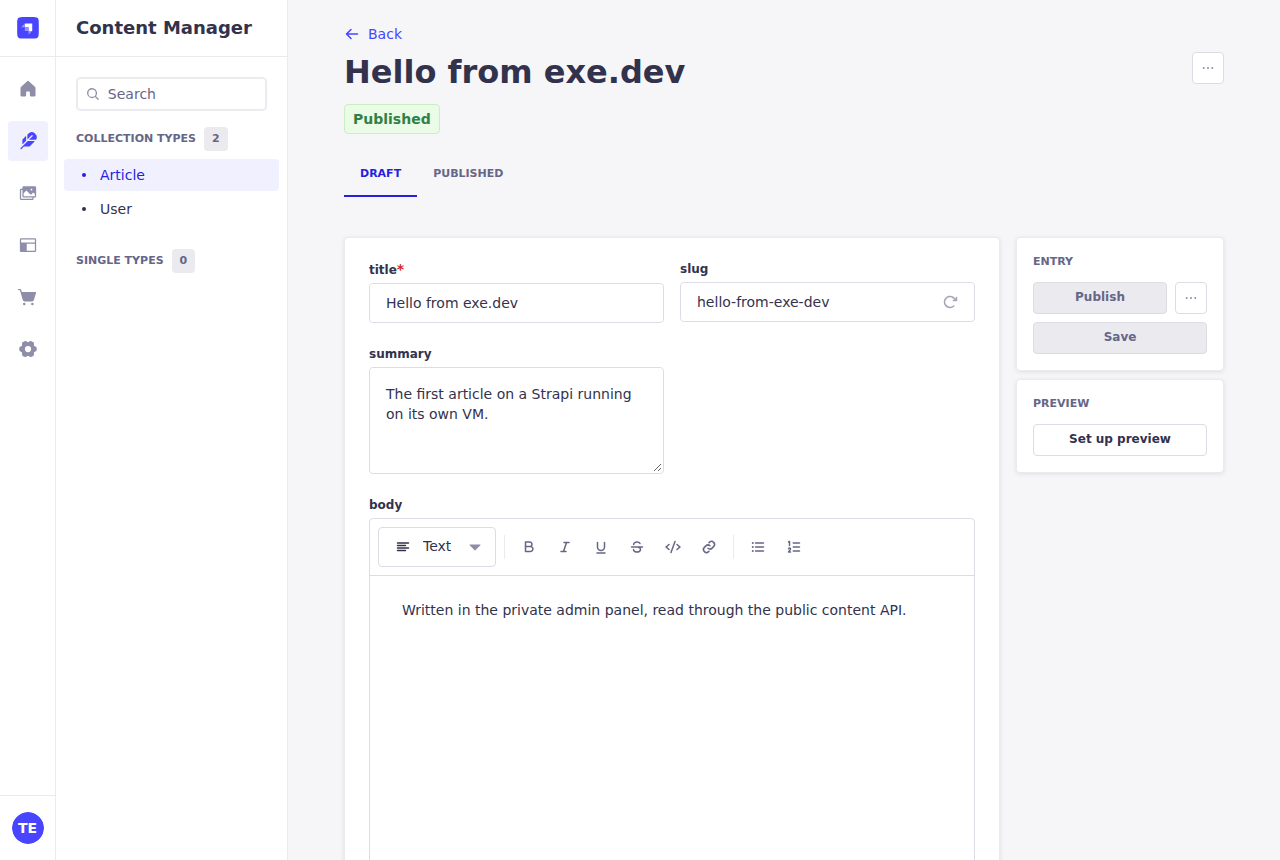
<img src="https://exe.dev/deploy/strapi/editor.png" alt="Strapi's Content Manager editing an article titled Hello from exe.dev, with title, slug, summary, and body fields, marked Published" width="1280" height="860" loading="lazy">
<figcaption>The Content Manager, editing the example Article type.</figcaption>
</figure>

The recipe made one example content type, **Article**: a title, a slug, a
summary, a rich-text body, and a cover image. Open **Content Manager →
Article**, click **Create new entry**, write something, and click
**Publish**. Images you add go to the **Media Library**, which keeps them
on the VM's disk.

## Read it from your site

The content API starts closed. To let anyone read published articles, go
to **Settings → Users & Permissions plugin → Roles → Public**, tick
**find** and **findOne** under **Article**, and click **Save**.

The API lives on port 8000, the VM's main address. While the VM is
private, programs need an exe.dev token to reach it. Make one on your
computer:

```bash
ssh exe.dev ssh-key generate-api-key --vm=my-strapi --label=content
```

Put the token it prints in `EXE_TOKEN` and read your articles:

```bash
curl -H "X-Exedev-Authorization: Bearer $EXE_TOKEN" \
  'https://my-strapi.exe.xyz/api/articles?populate=cover'
```

exe.dev checks the token and strips it before Strapi sees the request.
Once the VM is public (below), the same URL works with no token at all.
Image URLs in the response are relative, such as `/uploads/hello.png`:
prefix them with `https://my-strapi.exe.xyz`.

A site builder that must also see drafts needs a Strapi **API token**:
**Settings → API Tokens → Create new API Token**, type **Read-only**. Send
it as `Authorization: Bearer ...` and add `status=draft` to the query:

```bash
curl -H "X-Exedev-Authorization: Bearer $EXE_TOKEN" \
  -H "Authorization: Bearer $STRAPI_TOKEN" \
  'https://my-strapi.exe.xyz/api/articles?status=draft'
```

In Strapi 5, anyone allowed to read a content type can ask for its drafts
this way, the Public role included. The recipe adds a small middleware
that refuses `status=draft` without a token, so unpublished work stays
unpublished.

## Go public

Before you open the API to the internet, turn off public sign-ups: in
**Settings → Users & Permissions plugin → Advanced settings**, set
**Enable sign-ups** to off and click **Save**. Strapi ships with it on,
which lets anyone create an API user account. Then check the **Public**
role grants only what you mean to publish.

On your computer:

```bash
ssh exe.dev share set-public my-strapi
```

Now anyone can read `https://my-strapi.exe.xyz/api/...` and
`https://my-strapi.exe.xyz/uploads/...`. Everything else on port 8000,
the admin panel included, answers 404, and port 8337 keeps asking for
exe.dev login. To close up again: `ssh exe.dev share set-private my-strapi`.

## Let editors in

An editor needs two things: access to the VM and a Strapi admin account.
On your computer:

```bash
ssh exe.dev share add my-strapi editor@example.com
```

They sign in to exe.dev at `https://my-strapi.exe.xyz:8337/admin`. In the
admin panel, **Settings → Administration Panel → Users → Invite new user**
makes their Strapi account with a role such as **Editor** or **Author**,
and shows an invitation link you can send them. Once they've signed in to
the VM through exe.dev, Strapi can email them, too. See
[sharing](/docs/sharing) for teams and share links.

## Change your content types

In production Strapi locks the **Content-Type Builder**: a schema change
rewrites files under `~/cms/src` and restarts the server, so it only runs
in development mode. To change your model, on the VM:

```bash
sudo systemctl stop strapi
cd ~/cms && npm run develop
```

Open `https://my-strapi.exe.xyz:8337/admin`, edit the types, and press
Ctrl-C when you're done. Then build and start production again:

```bash
NODE_ENV=production npm run build && sudo systemctl start strapi
```

The schema lands in `~/cms/src/api/*/content-types/*/schema.json`, which
belongs in git with the rest of the project; `.env` is kept out of git.
Rather not click? Ask Shelley at `https://my-strapi.shelley.exe.xyz/`:
"Add a Category type with a name and slug, and relate articles to it."
Shelley can write the schema files, rebuild, and test the API.

## Write summaries with an LLM

Strapi runs your server code too. This lifecycle hook fills in an
article's **summary** when an editor leaves it empty, by asking an LLM
through exe.dev's [LLM gateway](/docs/integrations-llm): no API key on the
VM, billed to your exe.dev account. On the VM:

```bash
cat > ~/cms/src/api/article/content-types/article/lifecycles.ts <<'EOF'
// When an article is saved without a summary, ask an LLM to write one.
// The VM calls exe.dev's LLM gateway: no API key, billed to your account.
const LLM = 'https://llm.int.exe.xyz/v1/chat/completions';

// Rich text (Blocks) is JSON; pull out the plain text.
function blocksText(blocks: unknown): string {
  if (typeof blocks === 'string') return blocks;
  const out: string[] = [];
  const walk = (node: any) => {
    if (!node) return;
    if (Array.isArray(node)) return node.forEach(walk);
    if (typeof node.text === 'string') out.push(node.text);
    walk(node.children);
  };
  walk(blocks);
  return out.join(' ');
}

async function fillSummary(event: any) {
  const data = event.params.data;
  if (!data || data.summary || !data.body) return;
  const text = blocksText(data.body).slice(0, 8000);
  if (!text.trim()) return;
  try {
    const res = await fetch(LLM, {
      method: 'POST',
      headers: { 'Content-Type': 'application/json' },
      body: JSON.stringify({
        model: 'gpt-6-luna',
        messages: [{
          role: 'user',
          content: `Write a one-sentence summary of this article, under 160 characters, no quotes:\n\n${text}`,
        }],
      }),
      signal: AbortSignal.timeout(30_000),
    });
    if (!res.ok) throw new Error(`HTTP ${res.status}`);
    const json: any = await res.json();
    data.summary = json.choices[0].message.content.trim();
  } catch (err) {
    // Never block a save on the LLM; the editor can write one by hand.
    strapi.log.warn(`article summary: ${err}`);
  }
}

export default {
  beforeCreate: fillSummary,
  beforeUpdate: fillSummary,
};
EOF
cd ~/cms && NODE_ENV=production npm run build && sudo systemctl restart strapi
```

Save an article with a body and no summary, and the summary appears. On
the VM, `curl -s https://llm.int.exe.xyz/v1/models` lists the models you
can use.

## Email

Strapi sends email for admin password resets and invitations. The recipe
installs a small provider, `~/cms/providers/strapi-provider-email-exe`,
that hands it to exe.dev's [email gateway](/docs/send-email) as plain
text. The gateway only delivers to you, your exe.dev team, and people
you've shared the VM with who have signed in, and it's rate-limited:
right for your editors, not for newsletters. Try it at **Settings → Email
→ Send test email**.

For email to anyone, install a provider such as
`@strapi/provider-email-nodemailer` with your SMTP details and point
`email.config.provider` at it in `~/cms/config/env/production/plugins.ts`;
see [Strapi's email docs](https://docs.strapi.io/cms/features/email).

## Media files

Uploads go to `~/cms/public/uploads`, on the VM's disk, and Strapi serves
them at `/uploads/...`. Strapi makes smaller copies of each image for
responsive sizes. The disk is persistent and the backups include it.

To keep media in S3 or another S3-compatible store instead, on the VM:

```bash
cd ~/cms && npm install @strapi/provider-upload-aws-s3
```

Then add an `upload` entry to `~/cms/config/env/production/plugins.ts`,
with your bucket's details in `.env`:

```ts
  upload: {
    config: {
      provider: 'aws-s3',
      providerOptions: {
        baseUrl: env('CDN_URL'),
        s3Options: {
          credentials: {
            accessKeyId: env('AWS_ACCESS_KEY_ID'),
            secretAccessKey: env('AWS_ACCESS_SECRET'),
          },
          region: env('AWS_REGION'),
          params: { Bucket: env('AWS_BUCKET') },
        },
      },
    },
  },
```

Rebuild and restart, and allow the bucket's host in the `strapi::security`
middleware's `img-src` so the admin panel can show the images; see
[Strapi's S3 provider docs](https://docs.strapi.io/cms/configurations/media-library-providers/amazon-s3).
Files already uploaded stay on disk.

## Keep your content

Every night at about 03:30 UTC, `~/cms/backup.sh` writes
`~/strapi-backups/strapi-<time>.tar.gz`: a PostgreSQL dump, plus the
project with `.env` (its keys and database password) and your uploads. It
keeps the 14 newest. Copy them **off the VM**, too. On your computer:

```bash
scp 'my-strapi.exe.xyz:strapi-backups/*.tar.gz' .
```

The archives hold your secrets, so keep them somewhere private.
[VM backups](/docs/vm-backups) can save the whole VM to your own bucket.

Strapi also has its own `export` and `import`, for moving content, not
the whole site: entries, media, and settings go across, but admin users
and API tokens don't. An import replaces everything already there. On the
VM:

```bash
cd ~/cms
npm run strapi export -- --no-encrypt -f ~/content
npm run strapi import -- --force -f ~/content.tar.gz
```

## Dev, test, and prod

A copy of the VM is a staging site in about a second, with the same
content, users, and code. On your computer:

```bash
ssh exe.dev cp my-strapi my-strapi-dev
ssh my-strapi-dev.exe.xyz
```

On the copy, point Strapi at its own address and restart:

```bash
cd ~/cms
sed -i "s|^PUBLIC_URL=.*|PUBLIC_URL=https://$(hostname).exe.xyz:8337|" .env
sudo systemctl restart strapi
```

Try an upgrade or a new content model there. Code changes go back through
git, and content you wrote on the copy can move with `strapi export` and
`strapi import`. Delete the copy when you're done:
`ssh exe.dev rm my-strapi-dev`. See [dev, test, prod](/deploy/dev-test-prod).

## The nuts and bolts

Happy clicking Deploy? You can stop here. These are Shelley's setup steps
and your maintenance reference.

<details id="create-the-vm" data-manual-setup class="dp-details">
<summary>Install by hand</summary>

### Create a VM

On your computer (pick another name if `my-strapi` is taken):

```bash
ssh exe.dev new --name=my-strapi
ssh my-strapi.exe.xyz
```

All remaining installation commands run **on the VM**, as `exedev`.

### Install Node.js and PostgreSQL

Strapi 5 supports Node.js 22, 24, and 26, and recommends PostgreSQL 17.
Install Node.js 26 from NodeSource and PostgreSQL 17 from the PostgreSQL
project's own repository:

```bash
curl -fsSL https://deb.nodesource.com/setup_26.x | sudo -E bash -
sudo apt-get install -y nodejs postgresql-common
sudo /usr/share/postgresql-common/pgdg/apt.postgresql.org.sh -y
sudo apt-get install -y postgresql-17
node --version && psql --version
```

Make a database and a role with a random password:

```bash
DB_PASSWORD=$(openssl rand -hex 24)
sudo -u postgres psql -v ON_ERROR_STOP=1 -q <<SQL
CREATE ROLE strapi LOGIN PASSWORD '$DB_PASSWORD';
CREATE DATABASE strapi OWNER strapi;
SQL
```

### Create the Strapi project

`create-strapi` writes a TypeScript project to `~/cms`, installs its
packages, and puts the database settings and fresh secret keys in
`~/cms/.env`. Pin the version you tested; it takes about five minutes:

```bash
cd ~
npx -y create-strapi@5.63.0 cms --non-interactive --skip-cloud --ts \
  --use-npm --no-example --git-init \
  --dbclient=postgres --dbhost=127.0.0.1 --dbport=5432 \
  --dbname=strapi --dbusername=strapi --dbpassword="$DB_PASSWORD"
chmod 600 ~/cms/.env
```

`.env` holds the database password and the keys that sign sessions and
tokens, so it's readable only by you, and the project's `.gitignore`
keeps it out of git. npm may warn that some packages' install scripts
aren't covered by `allowScripts`; the build works regardless.

### Set it up for exe.dev

Strapi's default port, 1337, isn't one exe.dev's proxy forwards. Move it
to 8337, tell Strapi its public address, and trust exe.dev's
`X-Forwarded-*` headers, so it knows requests arrive over HTTPS and sets
secure cookies:

```bash
cd ~/cms
sed -i 's/^PORT=.*/PORT=8337/' .env
printf '\n# The admin panel address, behind exe.dev login\nPUBLIC_URL=https://%s.exe.xyz:8337\n' "$(hostname)" >> .env
cat > config/server.ts <<'EOF'
import type { Core } from '@strapi/strapi';

const config = ({ env }: Core.Config.Shared.ConfigParams): Core.Config.Server => ({
  host: env('HOST', '0.0.0.0'),
  port: env.int('PORT', 8337),
  // Where the admin panel lives, behind exe.dev login.
  url: env('PUBLIC_URL'),
  // Trust exe.dev's X-Forwarded-* headers: one proxy in front.
  proxy: { koa: true, maxIpsCount: 1 },
  app: {
    keys: env.array('APP_KEYS')!,
  },
});

export default config;
EOF
```

### Add the example content type

Content types are files, so the recipe can make the Article type without
the admin panel. Edit it or delete it later:

```bash
cd ~/cms
mkdir -p src/api/article/{content-types/article,controllers,routes,services}
cat > src/api/article/content-types/article/schema.json <<'EOF'
{
  "kind": "collectionType",
  "collectionName": "articles",
  "info": {
    "singularName": "article",
    "pluralName": "articles",
    "displayName": "Article",
    "description": "An example content type: edit it or delete it."
  },
  "options": {
    "draftAndPublish": true
  },
  "attributes": {
    "title": { "type": "string", "required": true },
    "slug": { "type": "uid", "targetField": "title" },
    "summary": { "type": "text" },
    "body": { "type": "blocks" },
    "cover": { "type": "media", "multiple": false, "allowedTypes": ["images"] }
  }
}
EOF
for kind in Controller:controllers Router:routes Service:services; do
  cat > "src/api/article/${kind#*:}/article.ts" <<EOF
import { factories } from '@strapi/strapi';

export default factories.createCore${kind%%:*}('api::article.article');
EOF
done
```

### Keep drafts private

Strapi 5 returns drafts to any caller allowed to read a content type who
adds `?status=draft`, the Public role included. This middleware refuses
those requests unless they carry a token, which Strapi then checks:

```bash
cd ~/cms
mkdir -p src/middlewares
cat > src/middlewares/public-drafts.ts <<'EOF'
// Strapi 5's REST API hands drafts to anyone allowed to read a content
// type who asks for ?status=draft, the Public role included. This
// middleware refuses such requests unless they carry a token (an API
// token or a signed-in user's JWT), which Strapi then checks as usual.
import type { Core } from '@strapi/strapi';

const publicDrafts: Core.MiddlewareFactory = () => async (ctx, next) => {
  const status = ctx.query?.status;
  if (ctx.path.startsWith('/api/') && status !== undefined && status !== 'published' && !ctx.get('authorization')) {
    ctx.status = 403;
    ctx.body = {
      data: null,
      error: { status: 403, name: 'ForbiddenError', message: 'Reading drafts needs an API token', details: {} },
    };
    return;
  }
  await next();
};

export default publicDrafts;
EOF
sed -i "s/  'strapi::query',/  'strapi::query',\n  'global::public-drafts',/" config/middlewares.ts
grep -A1 "strapi::query" config/middlewares.ts
```

The last line should show `'global::public-drafts'` after
`'strapi::query'`.

### Send email through exe.dev

A local email provider sends Strapi's email through exe.dev's
[email gateway](/docs/send-email), only in production:

```bash
cd ~/cms
mkdir -p providers/strapi-provider-email-exe config/env/production
cat > providers/strapi-provider-email-exe/index.js <<'EOF'
// strapi-provider-email-exe: send Strapi's email through exe.dev's email
// gateway (https://exe.dev/docs/send-email), with no SMTP server or keys.
//
// The gateway sends plain text, and only to people allowed to get mail
// from this VM: you, your exe.dev team, and people you've shared the VM
// with who have signed in. That covers Strapi's admin emails (password
// resets, invitations) when your editors reach the admin through exe.dev.
'use strict';

const GATEWAY = 'http://169.254.169.254/gateway/email/send';

// Turn an HTML email into readable text, keeping link addresses.
function htmlToText(html) {
  return String(html)
    .replace(/<a\s[^>]*href="([^"]*)"[^>]*>(.*?)<\/a>/gis, '$2 ($1)')
    .replace(/<(br|\/p|\/div|\/h\d|\/li|\/tr)\s*\/?>/gi, '\n')
    .replace(/<[^>]+>/g, '')
    .replace(/&nbsp;/g, ' ').replace(/&lt;/g, '<').replace(/&gt;/g, '>')
    .replace(/&quot;/g, '"').replace(/&#39;/g, "'").replace(/&amp;/g, '&')
    .replace(/\n{3,}/g, '\n\n')
    .trim();
}

module.exports = {
  init(providerOptions = {}, settings = {}) {
    const url = providerOptions.url || GATEWAY;
    return {
      async send(options) {
        const body = options.text || htmlToText(options.html || '');
        const replyTo = options.replyTo || settings.defaultReplyTo;
        const recipients = [].concat(options.to || []);
        for (const to of recipients) {
          const res = await fetch(url, {
            method: 'POST',
            headers: { 'Content-Type': 'application/json' },
            body: JSON.stringify({
              to,
              subject: options.subject,
              body,
              ...(replyTo ? { reply_to: replyTo } : {}),
            }),
          });
          if (!res.ok) {
            throw new Error(`exe.dev email gateway: ${res.status} ${await res.text()}`);
          }
        }
      },
    };
  },
};
EOF
cat > providers/strapi-provider-email-exe/package.json <<'EOF'
{
  "name": "strapi-provider-email-exe",
  "version": "1.0.0",
  "description": "Send Strapi email through exe.dev's email gateway",
  "main": "index.js",
  "license": "MIT"
}
EOF
npm install --save ./providers/strapi-provider-email-exe
cat > config/env/production/plugins.ts <<'EOF'
import type { Core } from '@strapi/strapi';

// Production-only plugin settings, merged over config/plugins.ts.
const config = ({ env }: Core.Config.Shared.ConfigParams): Core.Config.Plugin => ({
  email: {
    config: {
      // providers/strapi-provider-email-exe: exe.dev's email gateway
      provider: 'strapi-provider-email-exe',
      settings: {
        // exe.dev sets the real sender; Strapi wants a default.
        defaultFrom: env('EMAIL_FROM', 'strapi@exe.xyz'),
      },
    },
  },
});

export default config;
EOF
```

### Build and run it with systemd

Build the admin panel (about a minute and a half), then run Strapi as a
service that waits for PostgreSQL and comes back after a reboot:

```bash
cd ~/cms
NODE_ENV=production npm run build
sudo tee /etc/systemd/system/strapi.service >/dev/null <<EOF
[Unit]
Description=Strapi (~/cms)
Requires=postgresql.service
After=network.target postgresql.service

[Service]
User=$USER
WorkingDirectory=$HOME/cms
Environment=NODE_ENV=production
ExecStart=$HOME/cms/node_modules/.bin/strapi start
Restart=always
RestartSec=5

[Install]
WantedBy=multi-user.target
EOF
sudo systemctl daemon-reload
sudo systemctl enable --now strapi
until curl -fs -o /dev/null http://localhost:8337/_health; do sleep 2; done
curl -s -o /dev/null -w '%{http_code}\n' http://localhost:8337/_health
```

The last line prints `204`. The admin panel is at
`https://my-strapi.exe.xyz:8337/admin`; the first person to open it
creates the first administrator, and only you can reach it.

### Open the public port

Port 8000 is the one port exe.dev can make public. nginx serves Strapi's
content API and uploads there, and nothing else:

```bash
sudo tee /etc/nginx/sites-available/strapi-public >/dev/null <<'EOF'
# Port 8000 is the one port exe.dev can make public. Serve Strapi's
# content API and uploaded files there, and nothing else: the admin
# panel and its API stay on port 8337, behind exe.dev login.
server {
    listen 8000;
    listen [::]:8000;
    server_tokens off;
    client_max_body_size 100m;

    location ~ ^/(api|uploads)/ {
        # Check the raw path too, so encoded tricks such as
        # /api/..%2Fadmin can't reach anything else.
        if ($request_uri !~ ^/(api|uploads)/) {
            return 404;
        }
        proxy_pass http://127.0.0.1:8337;
        proxy_http_version 1.1;
        proxy_set_header Host $host;
        # Pass exe.dev's forwarding headers through unchanged, so Strapi
        # sees one proxy here and on the admin port.
        proxy_set_header X-Forwarded-For $http_x_forwarded_for;
        proxy_set_header X-Forwarded-Host $http_x_forwarded_host;
        proxy_set_header X-Forwarded-Proto $http_x_forwarded_proto;
    }

    location / {
        return 404;
    }
}
EOF
sudo rm -f /etc/nginx/sites-enabled/default
sudo ln -sf /etc/nginx/sites-available/strapi-public /etc/nginx/sites-enabled/
sudo nginx -t && sudo systemctl enable --now nginx && sudo systemctl reload nginx
for p in /api/articles /admin /_health; do
  echo "$p $(curl -s -o /dev/null -w '%{http_code}' "http://localhost:8000$p")"
done
```

Expect `403` for `/api/articles` (Strapi is answering, and the Public
role can't read yet) and `404` for the other two.

### Set up nightly backups

This script saves a PostgreSQL dump and the project, with `.env` and
uploads, in one private archive. It leaves out `node_modules` and the
build, which `npm ci` and `npm run build` recreate:

```bash
cat > ~/cms/backup.sh <<'EOF'
#!/usr/bin/env bash
# Back up Strapi into one tarball: a PostgreSQL dump, the project
# (code, config, .env with its secrets, uploads), without node_modules
# and build output, which npm ci and npm run build recreate.
set -euo pipefail
umask 077
app="$HOME/cms"
dest="$HOME/strapi-backups"
mkdir -p "$dest"
work=$(mktemp -d "$dest/.tmp-XXXXXX")
trap 'rm -rf "$work"' EXIT

# Database settings come from Strapi's own .env.
env_get() { sed -n "s/^$1=//p" "$app/.env" | tail -n 1; }
PGPASSWORD=$(env_get DATABASE_PASSWORD) pg_dump --format=custom \
  -h "$(env_get DATABASE_HOST)" -p "$(env_get DATABASE_PORT)" \
  -U "$(env_get DATABASE_USERNAME)" -d "$(env_get DATABASE_NAME)" > "$work/strapi.dump"

tar -cf "$work/cms.tar" -C "$HOME" \
  --exclude=cms/node_modules --exclude=cms/dist --exclude=cms/.strapi \
  --exclude=cms/.cache --exclude=cms/.tmp cms

out="$dest/strapi-$(date -u +%Y%m%d-%H%M%S).tar.gz"
tar -czf "$out.part" -C "$work" strapi.dump cms.tar
mv "$out.part" "$out"

# Keep the 14 newest backups.
ls -1t "$dest"/strapi-*.tar.gz | tail -n +15 | xargs -r rm --
echo "$out"
EOF
chmod +x ~/cms/backup.sh
```

Schedule it, then take a first backup:

```bash
sudo tee /etc/systemd/system/strapi-backup.service >/dev/null <<EOF
[Unit]
Description=Back up Strapi (database, project, uploads) to ~/strapi-backups
Requires=postgresql.service
After=postgresql.service

[Service]
Type=oneshot
User=$USER
ExecStart=$HOME/cms/backup.sh
EOF
sudo tee /etc/systemd/system/strapi-backup.timer >/dev/null <<'EOF'
[Unit]
Description=Back up Strapi every night

[Timer]
OnCalendar=*-*-* 03:30:00
RandomizedDelaySec=30m
Persistent=true

[Install]
WantedBy=timers.target
EOF
sudo systemctl daemon-reload
sudo systemctl enable --now strapi-backup.timer
sudo systemctl start strapi-backup.service
systemctl list-timers strapi-backup.timer
ls -lh ~/strapi-backups
```

Check that the timer has a next run and the directory holds a tarball.
For failures: `journalctl -u strapi-backup.service`.

### Test a backup

Restore the newest backup into a **scratch database**, not the running
one, and check it holds Strapi's tables:

```bash
latest=$(ls -1t ~/strapi-backups/strapi-*.tar.gz | head -n 1)
rm -rf /tmp/strapi-restore-test && mkdir /tmp/strapi-restore-test
tar -xzf "$latest" -C /tmp/strapi-restore-test
cd /tmp/strapi-restore-test && tar -xf cms.tar
grep -c '^APP_KEYS=' cms/.env
sudo -u postgres createdb -O strapi strapi_restore_test
sudo -u postgres pg_restore -d strapi_restore_test --no-owner --role=strapi \
  --exit-on-error < strapi.dump
sudo -u postgres psql -d strapi_restore_test -Atc 'SELECT count(*) FROM articles'
sudo -u postgres dropdb strapi_restore_test
cd ~ && rm -rf /tmp/strapi-restore-test
```

`grep` prints `1`, and `psql` prints a number (`0` before anyone has
written an article) instead of an error.

</details>

<details id="back-up-and-restore" class="dp-details">
<summary>Restore a backup</summary>

A backup holds `strapi.dump`, a PostgreSQL dump in custom format, and
`cms.tar`, the project with `.env` and `public/uploads`. To restore onto
this VM or a fresh one set up with the steps above, on the VM, with the
archive in `~`:

```bash
sudo systemctl stop strapi
mkdir -p /tmp/restore && tar -xzf ~/strapi-YYYYMMDD-HHMMSS.tar.gz -C /tmp/restore
mv ~/cms ~/cms.old && tar -xf /tmp/restore/cms.tar -C ~
sudo -u postgres dropdb strapi
sudo -u postgres createdb -O strapi strapi
sudo -u postgres pg_restore -d strapi --no-owner --role=strapi \
  --exit-on-error < /tmp/restore/strapi.dump
cd ~/cms && npm ci && NODE_ENV=production npm run build
sudo systemctl start strapi
```

The restored `.env` carries the old database password. On a new VM, set
the role's password to match it:

```bash
sudo -u postgres psql -c "ALTER ROLE strapi PASSWORD '$(sed -n 's/^DATABASE_PASSWORD=//p' ~/cms/.env)'"
```

If the VM's name changed, update `PUBLIC_URL` in `~/cms/.env` too. Remove
`~/cms.old` once the restored site works.

</details>

<details id="update" class="dp-details">
<summary>Update Strapi</summary>

Strapi releases often. Try updates on a copy of the VM first
(`ssh exe.dev cp my-strapi my-strapi-try`), and take a backup on the real
one before you start. On the VM:

```bash
cd ~/cms
~/cms/backup.sh
npx @strapi/upgrade minor --dry
npx @strapi/upgrade minor -y
NODE_ENV=production npm run build && sudo systemctl restart strapi
```

`minor` stays within Strapi 5; `latest` crosses to a new major version
when there is one and runs its code migrations. Read
[Strapi's upgrade guide](https://docs.strapi.io/cms/upgrades) before a
major one. Strapi migrates the database itself the first time it starts.

</details>

<details id="troubleshooting" class="dp-details">
<summary>Troubleshooting</summary>

**The service won't start.** `journalctl -u strapi -n 50` shows why.
Database errors mean PostgreSQL is down (`systemctl status postgresql`)
or `.env` has the wrong password.

**"The Content-Type Builder is disabled in production."** Expected:
stop the service and use `npm run develop`; see
[Change your content types](#change-your-content-types).

**Changes to code or config don't show up.** Production runs the build in
`~/cms/dist`. Run `NODE_ENV=production npm run build` and restart.

**I'm locked out of the admin panel.** On the VM:
`cd ~/cms && npm run strapi admin:reset-user-password -- --email=you@example.com --password='NewPassw0rd!'`.

**A test email fails.** `journalctl -u strapi` shows the gateway's reason.
It only delivers to you, your team, and people you've shared the VM with
who have signed in.

**A program gets 401 from exe.dev.** The VM is private: send
`X-Exedev-Authorization: Bearer <token>`, or make it public. A 401 or 403
with a JSON error body comes from Strapi instead: check the role's
permissions or the API token.

</details>

## Frequently asked questions

### Is Strapi free?

The Community Edition is open source under the MIT license, and it's what this recipe installs. Strapi sells a paid Growth and Enterprise license for features such as SSO, audit logs, and review workflows. You pay exe.dev only for the VM; see [exe.dev pricing](https://exe.dev/pricing).

### Why is the admin panel on port 8337 and not my main URL?

exe.dev can make one port public. Port 8000 gets only Strapi's content API and uploaded files, through nginx. The admin panel stays on 8337, where exe.dev lets in only you and people you share the VM with, so a leaked admin password can't be tried from the internet. Strapi's own default port, 1337, isn't one exe.dev's proxy forwards.

### Why can't I add fields to a content type?

Strapi only lets the Content-Type Builder change your schema while it runs in development mode, because a schema change writes files and restarts the server. Stop the service, run `npm run develop`, make the change, then build and start again; see [Change your content types](#change-your-content-types).

### Should I use SQLite or PostgreSQL?

This recipe uses PostgreSQL, Strapi's recommended database, and it runs on the same VM. SQLite works too and is fine for a small site with a few editors: pass `--dbclient=sqlite` to create-strapi and back up `~/cms/.tmp/data.db` with `sqlite3 .backup`. See [SQLite](/deploy/sqlite) and [PostgreSQL](/deploy/postgres).

### How do Next.js, Astro, or a mobile app read the content?

Over HTTPS from `https://my-strapi.exe.xyz/api/...`. Once the VM is public, published entries need no token. While it's private, send an exe.dev token in `X-Exedev-Authorization`; for drafts, add a Strapi API token in `Authorization`.

### Can I use my own domain?

Yes, for the public content API: share port 8000 and follow the [custom domain guide](/docs/cnames). The admin panel keeps its exe.xyz address on port 8337.


## Related

- [Self-host PostgreSQL](https://exe.dev/deploy/postgres.md): Your own Postgres on a real disk, with backups you've actually restored.
- [Deploy a Node.js app](https://exe.dev/deploy/nodejs.md): Your Express app on a server of its own. git push to deploy.
- [Self-host WordPress](https://exe.dev/deploy/wordpress.md): Your WordPress on a computer of its own, with wp-admin only you can reach.
- [SQLite in production](https://exe.dev/deploy/sqlite.md): One file on a real disk, streamed to your own bucket every second.
- [Self-host n8n](https://exe.dev/deploy/n8n-2.md): Connect your apps. Let the boring bits run themselves.
- [Run Claude Code on a remote server](https://exe.dev/deploy/claude-code.md): A computer for Claude. A breather for your laptop.