---
title: "Run Qwen Code on a remote server"
description: "Run Qwen Code's daemon and built-in Web Shell on an exe.dev VM. Private HTTPS for your browser or phone, Qwen models without API keys, persistent projects."
url: https://exe.dev/deploy/qwen-code
category: "AI agents"
updated: 2026-11-02
---
# Run Qwen Code on a remote server
Qwen Code in your browser, working on a VM while your laptop sleeps.
- **Software:** Qwen Code (https://qwenlm.github.io/qwen-code-docs/)
- **Source:** https://github.com/QwenLM/qwen-code
- **License:** Apache-2.0
- **Time:** 10 minutes
- **Example VM name:** `my-qwen-code` (yours will differ; on the VM, `hostname` prints it)
- **Machine-readable:** https://exe.dev/deploy/qwen-code/manifest.json
## What you get
- Qwen Code's Web Shell on port 4170, reachable through private HTTPS
- A stable, owner-only daemon token in ~/.qwen/serve.env, not in the service unit
- Qwen3.8 through exe.dev's LLM integration, verified with a short prompt
- qwen-serve.service enabled and healthy, restarted after a crash or reboot
- Project files and saved sessions on persistent disk, plus a checked backup
Running on the VM:
- **Qwen Code 0.26.6**: qwen serve, built-in Web Shell, HTTP + SSE and WebSockets; systemd, port 4170, data in `~/.qwen`
- **Your project**: Code and files stay on the VM, data in `~/project`
- **exe.dev LLM integration**: Qwen via Fireworks, plus Claude and GPT; no provider keys on the VM
How it is reached:
- https://my-qwen-code.exe.xyz:4170/ (private): Web Shell, behind exe.dev login and Qwen Code's bearer token
- ssh my-qwen-code.exe.xyz (private): Terminal access to your VM
## Deploy with Shelley
Open https://exe.dev/new?prompt=Set%20up%20Qwen%20Code%20on%20this%20VM%20by%20following%20the%20exe.dev%20recipe%20at%20https%3A%2F%2Fexe.dev%2Fdeploy%2Fqwen-code.md%20from%20top%20to%20bottom.%0A%0AThe%20recipe%27s%20example%20VM%20name%20is%20my-qwen-code.%20This%20VM%27s%20name%20is%20the%20output%20of%20%60hostname%60%3A%20use%20it%20wherever%20the%20recipe%20writes%20my-qwen-code.%20Skip%20the%20step%20that%20creates%20the%20VM%3B%20you%20are%20on%20it.%0A%0AYou%20are%20done%20when%20all%20of%20these%20are%20true.%20Check%20each%20one%20yourself%3A%0A-%20Qwen%20Code%27s%20Web%20Shell%20on%20port%204170%2C%20reachable%20through%20private%20HTTPS%0A-%20A%20stable%2C%20owner-only%20daemon%20token%20in%20~%2F.qwen%2Fserve.env%2C%20not%20in%20the%20service%20unit%0A-%20Qwen3.8%20through%20exe.dev%27s%20LLM%20integration%2C%20verified%20with%20a%20short%20prompt%0A-%20qwen-serve.service%20enabled%20and%20healthy%2C%20restarted%20after%20a%20crash%20or%20reboot%0A-%20Project%20files%20and%20saved%20sessions%20on%20persistent%20disk%2C%20plus%20a%20checked%20backup%0A%0AFollow%20%22Install%20by%20hand%22%20first%2C%20including%20the%20closed%20details%2C%20skipping%0AVM%20creation.%20Do%20not%20run%20optional%20model-provider%20setup%2C%20restore%2C%20or%20update.%0AKeep%20the%20VM%20and%20port%204170%20private%3A%20never%20share%20set-public.%20Ask%20before%0Areplacing%20existing%20~%2F.qwen%2Fsettings.json%2C%20serve.env%2C%20qwen-serve.service%2C%0Aor%20a%20listener%20on%204170%3B%20preserve%20existing%20model%20entries%20if%20applicable.%0AUse%20the%20official%20standalone%20installer%20pinned%20to%200.26.6.%20Verify%20qwen%27s%0Aversion%2C%20the%20Qwen%20model%27s%20OK%20reply%2C%20systemd%20enabled%2Factive%2C%20HTTP%20401%0Awithout%20the%20bearer%2C%20health%20OK%20with%20it%2C%20and%20a%20backup%20containing%0A.qwen%2Fsettings.json%20and%20.qwen%2Fserve.env.%20Do%20not%20start%20an%20interactive%0Aagent%2C%20enable%20YOLO%2C%20or%20print%20a%20secret-bearing%20QR%20into%20logs.%20Finish%20with%0Athe%20private%20HTTPS%20URL%2C%20the%20SSH%20command%20to%20read%20the%20token%2C%20and%20where%0Ato%20select%20the%20project.%20Explain%20the%20second%20sign-in%2C%20not%20just%20exe.dev.%0A%0AFinish%20with%20the%20URLs%20I%20should%20open.%0A to create a VM whose agent, Shelley, follows this recipe. From a terminal:
```sh
curl -fsSL https://exe.dev/deploy/qwen-code/prompt.txt | ssh exe.dev new --prompt=/dev/stdin
```
Or follow the steps below by hand.
[Qwen Code](https://github.com/QwenLM/qwen-code) is an open-source coding
agent with a terminal CLI and a built-in browser interface. Its experimental
`qwen serve` daemon keeps sessions on the server, streams responses over
HTTP + SSE, and lets multiple clients watch and answer permission requests
in the same session.
Put the daemon on an exe.dev VM and use its Web Shell from a browser,
without keeping your laptop awake or exposing a LAN address. The VM keeps
your projects and saved conversations; exe.dev supplies private HTTPS.
Qwen models come through the [LLM integration](/docs/integrations-llm),
with no provider key to paste onto the VM. Qwen Code's own daemon token
remains a second lock.
## Open your Web Shell
After setup, open `https://my-qwen-code.exe.xyz:4170/`. Sign in to exe.dev
if asked. Qwen Code then shows **Connect to Qwen Code**. Leave the daemon
address unchanged and enter your bearer token. Read it from your computer:
```bash
ssh my-qwen-code.exe.xyz 'sed -n "s/^QWEN_SERVER_TOKEN=//p" ~/.qwen/serve.env'
```
That token is a secret: it grants control of the daemon and command execution
on the VM. The browser keeps it per tab, so a new tab, browser, or installed
home-screen app may ask again.
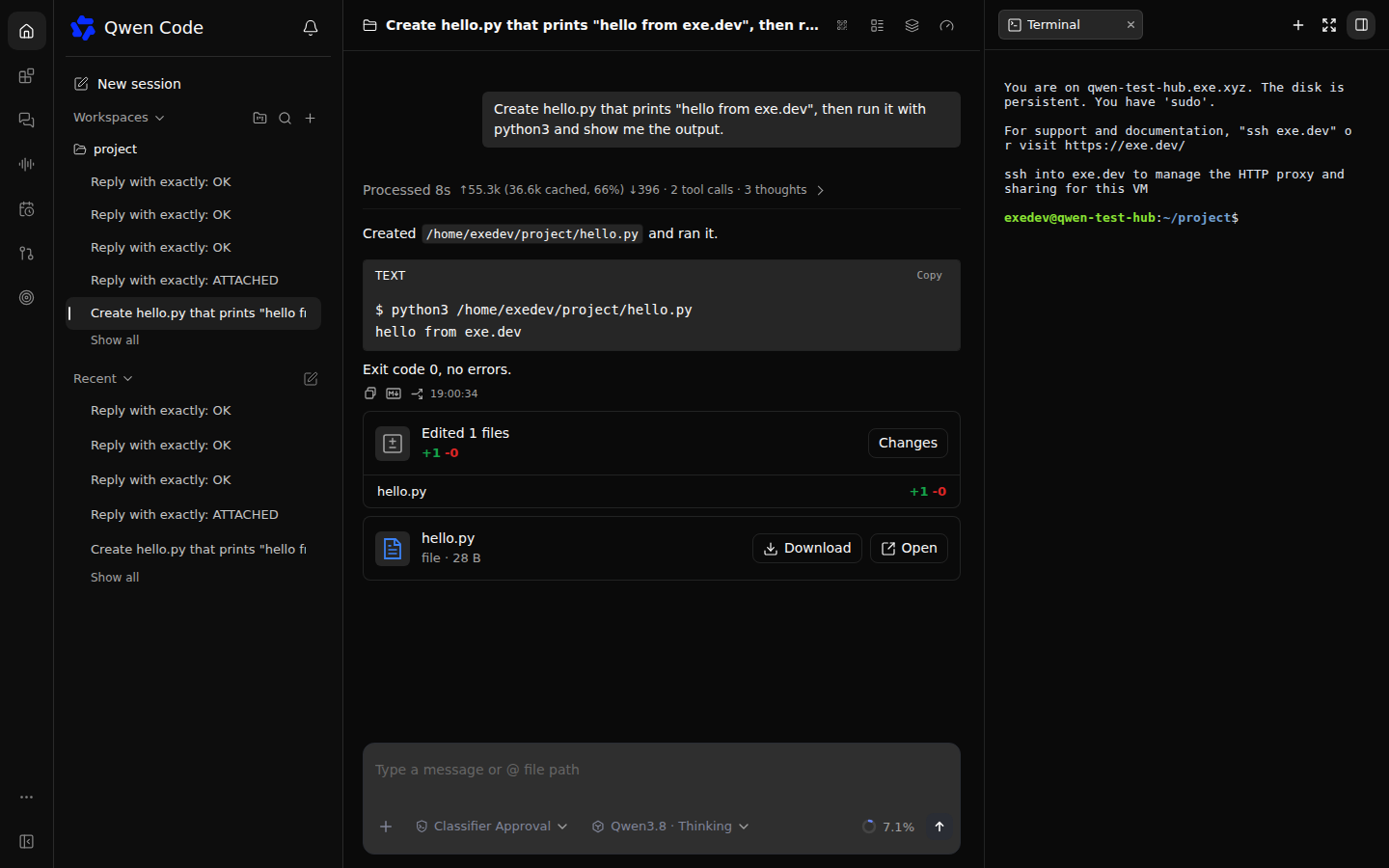
Choose **New session** and the **project** workspace. Try:
> Create hello.py that prints "hello from exe.dev", then run it with python3
> and show me the output.
Review tool approvals as they appear. The file is in `~/project` on the VM,
not on your phone or laptop. Select **Toggle right panel → Terminal** for a
shell on the same machine. The model chip switches between Qwen, Claude
and GPT configured below.
Qwen Code 0.26.6: the conversation and WebSocket terminal both run on the VM.
## Come back from another device
Open the same HTTPS URL, sign in, and enter the same daemon token. Your
saved sessions are in the sidebar; select one to carry on. Closing a tab
or losing your connection doesn't stop a running prompt. Two browsers
can view the same session, and the first to answer a pending permission
request resolves it for both.
On a phone, use the HTTPS URL and paste the token rather than the Web
Shell's **Mobile access** QR. Upstream documents a pairing-origin mismatch
behind TLS-terminating proxies. **Add to Home Screen** or **Install app**
uses the same web interface; it isn't an offline agent.
exe.dev's HTTPS makes the browser a secure context for microphone access.
That alone doesn't configure Qwen Live: voice still needs a supported
provider/model and credentials. This recipe verifies text chat and the
terminal, not voice.
> [!WARNING]
> Keep the VM private. Anyone with VM web access **and** the daemon token
> can steer the agent and use the terminal as `exedev`, who has sudo.
> A workspace is not a sandbox or a separate user's security boundary.
## Bring your own project
Connect a repository with the [GitHub integration](/docs/integrations-github)
and clone it onto the VM without putting a GitHub token in the agent's
files. Use **Add workspace** in the sidebar to register the clone's absolute
path. Only trust repositories whose instructions and hooks you intend to run.
To preview an app Qwen builds, have it listen on `0.0.0.0:8000` and open
`https://my-qwen-code.exe.xyz/`. Port 4170 stays reserved for the agent's
Web Shell. [More about the HTTPS proxy](/docs/proxy).
Install by hand
### Create the VM
On your computer, pick any free name. If you already clicked Deploy,
skip creation and connect to that VM instead:
```bash
ssh exe.dev new --name=my-qwen-code
ssh my-qwen-code.exe.xyz
```
All remaining installation commands run **on the VM** as `exedev`.
### Install Qwen Code
Use the official standalone installer, pinned to the tested release. It
includes its own Node runtime, so you don't need to replace the VM's Node
installation:
```bash
curl -fsSL https://qwen-code-assets.oss-cn-hangzhou.aliyuncs.com/installation/install-qwen-standalone.sh \
-o /tmp/install-qwen-code.sh
bash /tmp/install-qwen-code.sh --method standalone --mirror github --version 0.26.6
export PATH="$HOME/.local/bin:$PATH"
qwen --version
```
The version should be `0.26.6`. The launcher is `~/.local/bin/qwen`; the
standalone runtime lives in `~/.local/lib/qwen-code`.
### Connect models without provider keys
Check that the VM has an attached LLM integration:
```bash
curl -fsS https://llm.int.exe.xyz/v1/models > /tmp/qwen-models.json
python3 - <<'PY'
import json
models = {m['id'] for m in json.load(open('/tmp/qwen-models.json'))['data']}
assert 'fireworks/qwen3p8-2p4t-a95b' in models, 'Qwen model unavailable: check your LLM integration'
print('Qwen model available')
PY
```
If this fails, check the integration's Fireworks provider and the
[current model catalog](https://exe.dev/llm-gateway-models) before continuing.
Create the following settings **on a fresh installation**. On an existing
one, merge the model entries instead of replacing your configuration:
```bash
mkdir -p ~/.qwen ~/project
cat > ~/.qwen/settings.json <<'JSON'
{
"modelProviders": {
"openai": [
{
"id": "accounts/fireworks/models/qwen3p8-2p4t-a95b",
"name": "Qwen3.8 (Fireworks, via exe.dev)",
"baseUrl": "https://llm.int.exe.xyz/fireworks/inference/v1",
"envKey": "EXE_LLM_GATEWAY"
},
{
"id": "gpt-5.5",
"name": "GPT-5.5 (via exe.dev)",
"baseUrl": "https://llm.int.exe.xyz/openai/v1",
"wireApi": "responses",
"envKey": "EXE_LLM_GATEWAY"
}
],
"anthropic": [
{
"id": "claude-sonnet-5-5",
"name": "Claude Sonnet 5.5 (via exe.dev)",
"baseUrl": "https://llm.int.exe.xyz/anthropic",
"envKey": "EXE_LLM_GATEWAY"
}
]
},
"env": { "EXE_LLM_GATEWAY": "exe-gateway" },
"security": { "auth": { "selectedType": "openai" } },
"model": { "name": "accounts/fireworks/models/qwen3p8-2p4t-a95b" }
}
JSON
```
`exe-gateway` is a harmless placeholder for SDKs that require a key-shaped
value, not a provider secret. Qwen Code uses the OpenAI-compatible protocol
for Fireworks and the Responses API for GPT. Verify a real request from
inside the project:
```bash
cd ~/project
qwen -p 'Reply with exactly: OK'
```
Expect `OK`. Claude and GPT need those providers enabled in your LLM
integration; Qwen only needs Fireworks. Optional checks:
```bash
qwen --auth-type anthropic -m claude-sonnet-5-5 -p 'Reply with exactly: OK'
qwen -m gpt-5.5 -p 'Reply with exactly: OK'
```
### Create a stable daemon token
The token below belongs to Qwen Code, not your model provider. Keep it
across restarts so you don't have to reconnect every browser:
```bash
(umask 077; test -f ~/.qwen/serve.env || \
printf 'QWEN_SERVER_TOKEN=%s\n' "$(openssl rand -hex 32)" > ~/.qwen/serve.env)
chmod 600 ~/.qwen/serve.env
```
### Start on boot
Check port 4170 is free before starting. If something already listens
there, stop and choose another port consistently in the unit, origin,
verification commands, and browser URL:
```bash
sudo ss -ltnp 'sport = :4170'
```
Create a system service. Don't also run `qwen daemon start`: systemd
supervises the foreground `qwen serve` process here.
```bash
sudo tee /etc/systemd/system/qwen-serve.service >/dev/null <
## Back up and restore
Your work is in `~/project`. Qwen's settings, saved transcripts, workspace
registrations, and token are under `~/.qwen` (including
`~/.qwen/projects/.../chats`). The service is in
`/etc/systemd/system/qwen-serve.service`. Commit and push project code;
back up the state as well. If you added workspaces outside `~/project`,
back up those clone directories too: this archive only includes the
original project and Qwen's own state.
Take a consistent backup and restore it
On the VM, stop the agent so it isn't writing while you copy. Wait for
active work to finish first:
```bash
mkdir -p ~/qwen-backups
chmod 700 ~/qwen-backups
backup="$HOME/qwen-backups/qwen-$(date -u +%Y%m%dT%H%M%SZ).tar.gz"
sudo systemctl stop qwen-serve
(umask 077; tar -czf "$backup" -C "$HOME" .qwen project)
sudo systemctl start qwen-serve
cp /etc/systemd/system/qwen-serve.service ~/qwen-backups/qwen-serve.service
tar -tzf "$backup" | grep -E '^\.qwen/(settings.json|serve.env)$'
printf 'Backup: %s\n' "$backup"
```
Both paths should be listed. The archive contains the daemon token,
conversations, and any other credentials you added later. Keep it private.
Download it to your computer, replacing the timestamp with the one printed:
```bash
scp my-qwen-code.exe.xyz:qwen-backups/qwen-TIMESTAMP.tar.gz .
```
To restore **on the VM**, choose the archive below. On a replacement VM,
first follow the installation section with the same Qwen Code version and
that VM's hostname, then upload the archive to `~/qwen-backups`. Stop the
service and move current state out of the way. This preserves it rather
than merging old and new transcripts:
```bash
backup="$HOME/qwen-backups/qwen-TIMESTAMP.tar.gz"
sudo systemctl stop qwen-serve
stamp=$(date -u +%Y%m%dT%H%M%SZ)
mv ~/.qwen "$HOME/.qwen-before-restore-$stamp"
mv ~/project "$HOME/project-before-restore-$stamp"
tar -xzf "$backup" -C "$HOME"
chmod 600 ~/.qwen/serve.env
sudo systemctl start qwen-serve
```
On a new VM, recreate the service from the installation section rather
than copying an old `--allow-origin` with the wrong hostname. Reattach
VM-specific integrations. Open a saved session and confirm a project file
before removing the before-restore copies. An archive on the same VM isn't
a disaster-recovery copy: download it or store it elsewhere.
Use your own QwenCloud or ModelStudio API access (optional)
This isn't required for the keyless Fireworks setup. If you already have
provider API access, keep the key at exe.dev's edge rather than in
`settings.json`. Don't create a third-party account just to follow this
recipe.
For example, for an **Alibaba ModelStudio international Standard API key**,
on your computer:
```bash
ssh exe.dev integrations add http-proxy --name modelstudio \
--target https://dashscope-intl.aliyuncs.com --bearer=- \
--attach vm:my-qwen-code
```
Enter your key when prompted. Different regions and subscription plans use
different endpoints; check [Qwen Code's authentication guide](https://github.com/QwenLM/qwen-code/blob/main/docs/users/configuration/auth.md)
for your account instead of mixing a plan key with a Standard API endpoint.
On the VM, add an entry under `modelProviders.openai` in
`~/.qwen/settings.json`, using a model enabled for your account:
```json
{
"id": "YOUR_ENABLED_MODEL_ID",
"name": "ModelStudio via exe.dev",
"baseUrl": "https://modelstudio.int.exe.xyz/compatible-mode/v1",
"envKey": "EXE_LLM_GATEWAY"
}
```
Keep the harmless placeholder; the integration injects the real bearer.
Test with `qwen -m YOUR_ENABLED_MODEL_ID -p 'Reply with exactly: OK'`
from `~/project`, then restart `qwen-serve` and select that model in the
Web Shell. This third-party-account path wasn't exercised in the recipe's
test; the keyless Qwen, Claude, and GPT paths were.
Update Qwen Code
Back up first and wait for active prompts to finish. Read the
[release notes](https://github.com/QwenLM/qwen-code/releases) and select
an exact version. On the VM:
```bash
sudo systemctl stop qwen-serve
curl -fsSL https://qwen-code-assets.oss-cn-hangzhou.aliyuncs.com/installation/install-qwen-standalone.sh \
-o /tmp/install-qwen-code.sh
# Replace 0.26.6 below with the release you reviewed.
bash /tmp/install-qwen-code.sh --method standalone --mirror github --version 0.26.6
sudo systemctl start qwen-serve
~/.local/bin/qwen --version
```
Recheck health, a short model prompt, a saved session, and the browser's
Terminal panel. Don't run `qwen daemon restart` for this setup: use
`sudo systemctl restart qwen-serve` so the supervised process receives the
same flags and environment.
## Troubleshooting
Connection, model, and session problems
- **502 from exe.dev:** check `systemctl status qwen-serve --no-pager` and
`journalctl -u qwen-serve -n 80 --no-pager`. The service must listen on
`0.0.0.0:4170`, not only loopback. The standalone launcher's full path
matters because systemd doesn't read your shell profile.
- **The UI loads, but Connect fails or the terminal reconnects forever:**
make the browser's origin match `--allow-origin` exactly, including
`https` and `:4170`. A different domain or port needs its own allowlist
entry. Restart the service after editing the unit with
`sudo systemctl daemon-reload && sudo systemctl restart qwen-serve`.
- **Invalid Host header:** don't switch back to `--hostname 127.0.0.1`;
Qwen's loopback Host guard rejects the public VM hostname even with an
origin allowlist.
- **401 from Qwen:** use the token from `~/.qwen/serve.env`, not a model API
key. Static Web Shell assets load before Qwen auth; that doesn't mean
the API is unlocked. After rotating the token, restart systemd and
reconnect each browser.
- **GPT says max_tokens isn't supported:** keep `"wireApi": "responses"`
on its model entry. The Qwen/Fireworks entry uses Chat Completions.
- **Model requests fail:** run the same short `qwen -p` check over SSH.
Check your LLM integration, provider enablement, billing allocation,
and the [available models](https://exe.dev/llm-gateway-models).
- **Session missing after reboot:** select its original workspace and
saved sidebar entry. The service restarting doesn't resume an active
turn automatically. Check `~/.qwen/projects` and your backup before
changing session settings or deleting state.
## Frequently asked questions
### Is this hosting a Qwen model?
No. It runs the Qwen Code coding agent, not model weights or a GPU inference server. The default model is Qwen3.8 hosted by Fireworks, reached through exe.dev's LLM integration. Your VM plan and model usage are billed separately by exe.dev.
### Why do I need a token after signing in to exe.dev?
exe.dev decides who can reach the VM. Qwen Code doesn't consume exe.dev's identity headers and requires its own bearer on remote listeners. Both checks stay enabled. Every holder of that bearer has the same daemon authority; this is not per-user access control.
### Can I use QwenCloud or Alibaba ModelStudio instead?
Yes, with your own account and API access. Use an [HTTP proxy integration](/docs/integrations-http-proxy) to keep the provider key off the VM; the optional setup below shows the pattern. Qwen Code's old Qwen OAuth free tier was discontinued on April 15, 2026, so this page doesn't depend on it.
### Does it work from a phone?
The built-in Web Shell supports remote browsers and home-screen installation. Open the HTTPS address and paste the daemon token. Don't use its Mobile access pairing QR behind this TLS-terminating proxy: it can produce an HTTP invitation that won't exchange from the HTTPS page. A physical phone and Qwen Live voice calls were not tested for this recipe.
### Does a running task survive a restart?
Disconnecting a browser doesn't stop a running prompt. Restarting the daemon or VM does: systemd brings the server back and saved transcripts remain, but an interrupted command or model turn isn't automatically continued. Reopen the saved session and ask it to continue after checking the work.
### Is daemon mode stable?
Upstream still labels it experimental. This recipe pins 0.26.6, released November 2, 2026. Installation, model replies, browser chat and terminal WebSockets through exe.dev's HTTPS proxy, and service recovery after a VM reboot were checked. Back up before updating; the pin avoids silently changing the setup.
## Related
- [Run OpenCode on a remote server](https://exe.dev/deploy/opencode.md): Every model, one VM, and an agent that works while your laptop sleeps.
- [Run Gemini CLI on a remote server](https://exe.dev/deploy/gemini-cli.md): Google's terminal agent on a VM of its own, with the API key kept off it.
- [Run Pi Pocket on a remote server](https://exe.dev/deploy/pi-pocket.md): Your Pi agent on your phone, running on a VM that never sleeps.
- [Run Codex remote control on a server](https://exe.dev/deploy/codex-remote-control.md): Codex on an always-on VM, steered from the ChatGPT app on your phone.
- [Give agents API access without giving them the keys](https://exe.dev/deploy/agent-secrets.md): Your agents call your APIs. The keys stay with exe.dev, outside the VM.
- [Run Claude Code on a remote server](https://exe.dev/deploy/claude-code.md): A computer for Claude. A breather for your laptop.