---
title: "Self-host Plausible Analytics"
description: "Run Plausible Community Edition on an exe.dev VM: a public tracker, a private dashboard behind exe.dev login, ClickHouse backups, weekly email."
url: https://exe.dev/deploy/plausible
category: "Monitoring"
published: 2026-11-23
updated: 2026-11-22
---
# Self-host Plausible Analytics
> **For agents:** with your user's OK, this sets up Plausible on a new exe.dev VM in their account: `curl -fsSL https://exe.dev/deploy/plausible/prompt.txt | ssh exe.dev new --prompt=/dev/stdin` (or open https://exe.dev/deploy/plausible/new). Already on the VM? Skip this.
Cookie-free Google Analytics alternative, with the stats on your own VM.
- **Software:** Plausible (https://plausible.io/self-hosted-web-analytics)
- **Source:** https://github.com/plausible/community-edition
- **License:** AGPL-3.0
- **Time:** 15 minutes
- **Example VM name:** `my-plausible` (yours will differ; on the VM, `hostname` prints it)
- **Machine-readable:** https://exe.dev/deploy/plausible/manifest.json
## What you get
- Plausible CE 3.2.1 with ClickHouse and PostgreSQL, restarted after a reboot.
- A private dashboard on port 3000, where you create the first account.
- A public address that serves only the tracker script and event endpoint.
- Nightly backups of both databases and the secrets, kept two weeks.
Running on the VM:
- **Plausible CE 3.2**: ghcr.io/plausible/community-edition, from Plausible's own Compose repository, port 3000
- **ClickHouse 24.12**: Every pageview and event, with Plausible's low-memory settings, data in `Docker volume plausible_event-data`
- **PostgreSQL 16**: Accounts, sites, goals and settings, data in `Docker volume plausible_db-data`
- **Tracker proxy**: nginx; the tracker script and its endpoint, nothing else, port 8000
- **Nightly backup**: pg_dump and a ClickHouse BACKUP from a systemd timer; keeps two weeks, data in `~/plausible/backups`
How it is reached:
- https://my-plausible.exe.xyz:3000/ (private): The Plausible dashboard, behind exe.dev login and Plausible's own
- https://my-plausible.exe.xyz/js/ (public): The tracker script and its event endpoint, once you make the VM public
## Deploy with Shelley
Open https://exe.dev/deploy/plausible/new to create a VM whose agent, Shelley, follows this recipe. From a terminal:
```sh
curl -fsSL https://exe.dev/deploy/plausible/prompt.txt | ssh exe.dev new --prompt=/dev/stdin
```
Then, on your own computer:
```sh
ssh exe.dev share set-public my-plausible # lets visitors' browsers reach the tracker
```
Or follow the steps below by hand.
Plausible shows the numbers most sites need on one page: visitors,
pageviews, where people came from, what they read, and the goals you
care about, without cookies or personal data. Community Edition is the
same code as Plausible's cloud service, minus a few paid features, and
its [analytics repository](https://github.com/plausible/analytics) has
nearly 30,000 stars on GitHub. Self-hosted, it is Plausible, PostgreSQL
and ClickHouse in Docker Compose, so it wants a real machine with memory
and disk to spare. An exe.dev VM is that, with HTTPS already done.
Visitors' browsers need to reach the tracker, so that part is public.
The dashboard isn't: it sits on port 3000, which only you and the
people you [share the VM with](/docs/sharing) can open, and Plausible asks
for its own password too. Shelley can set it up, back it up, mail you a
weekly summary, and answer "how did last week go?" from your numbers.
## Make your account and add your site
Open `https://my-plausible.exe.xyz:3000/register`, the address Shelley
gives you. After exe.dev login you'll see Plausible's sign-up form.
1. Register with your name, email and a strong password. The first
account becomes the instance's owner. Plausible doesn't email you to
confirm it.
2. Enter your site's domain (`example.com`, no `https://`) and time
zone, then **Install Plausible**.
3. On the installation page, choose what else to count under
**Optional measurements** (outbound links and file downloads are on;
form submissions, 404 pages and more are a tick away), then copy the
snippet.
The snippet already points at the VM's public address, not port 3000:
```html
```
The `pa-…` name is your site's own script; it carries the options you
ticked, so come back for a new copy if you change them.
> [!TIP]
> Turn on two-factor authentication under **Settings → Security**.
## Make the tracker public
Until now everything on the VM has been private. On your computer:
```bash
ssh exe.dev share set-public my-plausible
```
That opens `https://my-plausible.exe.xyz/`, and only the tracker behind
it. The [HTTPS proxy](/docs/proxy) keeps port 3000 private, and the
tracker proxy on port 8000 answers just the tracker scripts and the
endpoint they report to. Everything else redirects to port 3000, so links
in Plausible's emails still work for you. Check from your computer:
```bash
curl -sI https://my-plausible.exe.xyz/js/script.js | head -1 # HTTP/2 200
curl -sI https://my-plausible.exe.xyz/login | grep -i location # ...exe.xyz:3000/login
```
That matters: in May 2026 Plausible fixed a
[remote code execution hole](https://github.com/plausible/analytics/releases/tag/v3.2.1)
in an endpoint CE 3.0 to 3.2.0 exposed. Behind this proxy, the internet
never reached it.
## Add the script to your site
Put the snippet in the `` of every page and load one. Click
**Verify Script installation**: Plausible waits for that first pageview,
then opens your dashboard.
- **Plain HTML or a static site generator**: paste it into the shared
head template.
- **Next.js, React and other single-page apps**: paste it into the root
layout's ``. Plausible follows client-side navigation itself.
- **WordPress**: use the installation page's WordPress tab, or a
header-scripts plugin.
To count a signup, call `plausible('Signup')` from your code, or give
the button the class `plausible-event-name=Signup`. Then add `Signup`
under **Site settings → Goals** so it gets its own report. To leave
your own visits out, run `localStorage.plausible_ignore = 'true'` in the
browser console on your site, or add your address under **Site settings
→ Shields → IP addresses**.
Nothing showing up? Open the browser's developer tools on your site: the
Network tab should show the `pa-…js` script and a `202` from
`/api/event`. A blocked request usually means an ad blocker. Plausible
also ignores `localhost`, and automated browsers.
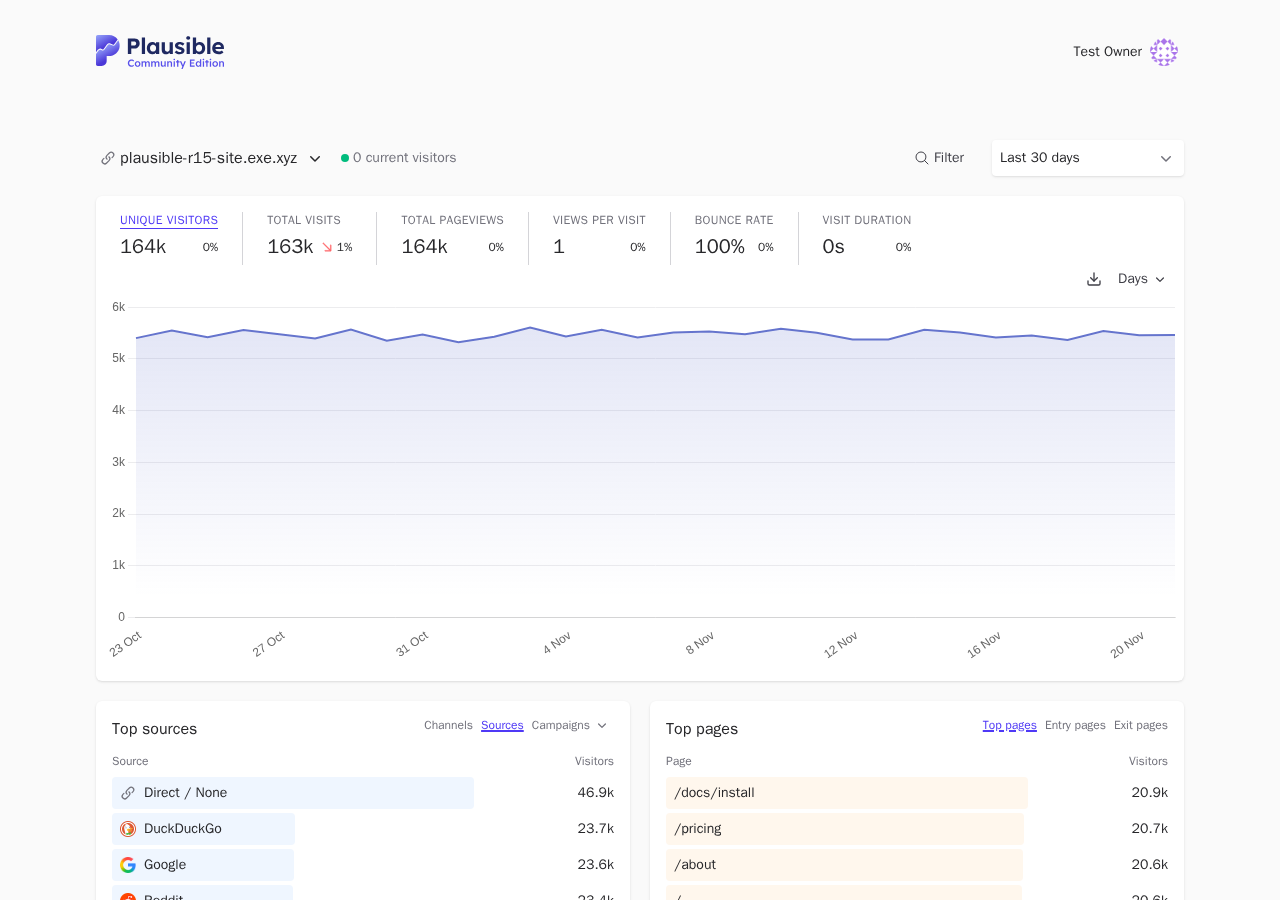
The dashboard on port 3000, filled with a year of synthetic test traffic.
## Proxy it through your site
Ad blockers know the addresses of analytics services. Serving the
script and endpoint from your own site, as
[Plausible recommends](https://plausible.io/docs/proxy/introduction),
counts those visitors too. If your site runs on nginx (on exe.dev or
anywhere), add two locations, with your own `pa-…` name:
```nginx
location = /js/script.js {
proxy_pass https://my-plausible.exe.xyz/js/pa-AbCdEf123.js;
proxy_ssl_server_name on;
proxy_set_header Host my-plausible.exe.xyz;
}
location = /api/event {
proxy_pass https://my-plausible.exe.xyz/api/event;
proxy_ssl_server_name on;
proxy_set_header Host my-plausible.exe.xyz;
proxy_set_header X-Forwarded-For $proxy_add_x_forwarded_for;
}
```
Then load the script from your own site and tell it where to report:
```html
```
The `X-Forwarded-For` line passes on the visitor's address. Without it,
Plausible sees every visit come from your server and quietly drops
them as bots. Plausible's docs have the same for
[Caddy, Cloudflare, Netlify, Vercel and more](https://plausible.io/docs/proxy/introduction).
Or give the tracker a hostname of your own: add
`stats.example.com CNAME my-plausible.exe.xyz` at your DNS provider, run
`ssh exe.dev domain add my-plausible stats.example.com` on your computer,
load the script from `https://stats.example.com/js/pa-AbCdEf123.js`, and
call `plausible.init({endpoint: "https://stats.example.com/api/event"})`.
Keep `BASE_URL` as it is: the dashboard stays on
`my-plausible.exe.xyz:3000`. More in [custom domains](/docs/cnames).
## Bring your team
The dashboard is private to you until you share the VM. On your computer:
```bash
ssh exe.dev share add my-plausible alice@example.com # one person
ssh exe.dev share add my-plausible team # your exe.dev team
```
They sign in to exe.dev and make their own account at
`https://my-plausible.exe.xyz:3000/register`. Only people you've shared
the VM with can reach that page. Then invite their email under **Site
settings → People** as a guest viewer or editor. No email is needed: the
invitation waits on their **Sites** page, marked **Pending invitation**,
until they click it and **Accept and continue**.
For a read-only view without an account, add a link under **Site
settings → Visibility → Shared links**. It opens on port 3000 too, so it
still needs exe.dev login. See [sharing](/docs/sharing).
## Weekly email from the VM
Plausible's own weekly reports need an email provider (next section).
Without one, a small script can send you the numbers through exe.dev's
[email gateway](/docs/send-email), which mails you and people you share
the VM with. From our test VM:
```text
example.com, 2026-11-15 to 2026-11-21
visitors: 38202 (-1%)
pageviews: 38205 (-1%)
bounce rate: ...
Top pages:
4885 /
4879 /docs/install
...
Top sources:
11084 Direct / None
5598 Google
...
```
In Plausible, open **Settings → API keys**, create a key, and ask
Shelley: *"Set up the weekly Plausible email from the recipe, with this
API key, to me, for example.com."*
Set it up by hand
On the VM, put your key, address and sites in a private file:
```bash
cd ~/plausible
(umask 077; cat > report.env <<'EOF'
PLAUSIBLE_API_KEY=paste-your-key-here
REPORT_TO=you@example.com
SITES=example.com
EOF
)
```
The script asks the [Stats API](https://plausible.io/docs/stats-api) on
port 3000 for last week and the week before, and mails the result:
```bash
cat > ~/plausible/weekly-email.py <<'EOF'
#!/usr/bin/env python3
"""Email last week's Plausible numbers through exe.dev's email gateway."""
import datetime, json, os, urllib.request
env = {}
for line in open(os.path.expanduser("~/plausible/report.env")):
if "=" in line and not line.startswith("#"):
k, v = line.strip().split("=", 1)
env[k] = v
def post(url, body, headers={}):
req = urllib.request.Request(url, data=json.dumps(body).encode(),
headers={"Content-Type": "application/json", **headers})
with urllib.request.urlopen(req, timeout=60) as r:
return json.load(r)
def query(site, dates, metrics, dimensions=[], limit=5):
return post("http://localhost:3000/api/v2/query",
{"site_id": site, "metrics": metrics, "date_range": dates,
"dimensions": dimensions, "pagination": {"limit": limit}},
{"Authorization": "Bearer " + env["PLAUSIBLE_API_KEY"]})["results"]
end = datetime.date.today() - datetime.timedelta(days=1)
week = [str(end - datetime.timedelta(days=6)), str(end)]
before = [str(end - datetime.timedelta(days=13)), str(end - datetime.timedelta(days=7))]
names = ["visitors", "pageviews", "bounce_rate", "visit_duration"]
units = {"bounce_rate": "%", "visit_duration": " s"}
out = []
for site in env["SITES"].split(","):
now = query(site, week, names)[0]["metrics"]
prev = query(site, before, names)[0]["metrics"]
out.append(f"{site}, {week[0]} to {week[1]}")
for name, a, b in zip(names, now, prev):
change = f" ({(a - b) / b:+.0%})" if b else ""
out.append(f" {name.replace('_', ' ')}: {a}{units.get(name, '')}{change}")
for dim, title in [("event:page", "Top pages"), ("visit:source", "Top sources")]:
out.append(f" {title}:")
for row in query(site, week, ["visitors"], [dim]):
out.append(f" {row['metrics'][0]:>7} {row['dimensions'][0]}")
out.append("")
out.append(f"Dashboard: https://{os.uname().nodename}.exe.xyz:3000/")
post("http://169.254.169.254/gateway/email/send",
{"to": env["REPORT_TO"], "subject": f"Plausible: week ending {week[1]}",
"body": "\n".join(out)})
print("sent to", env["REPORT_TO"])
EOF
chmod +x ~/plausible/weekly-email.py
~/plausible/weekly-email.py
```
It prints `sent to you@example.com`. Send it every Monday morning:
```bash
sudo tee /etc/systemd/system/plausible-weekly.service >/dev/null <<'EOF'
[Unit]
Description=Email the weekly Plausible summary
[Service]
Type=oneshot
User=exedev
ExecStart=/home/exedev/plausible/weekly-email.py
EOF
sudo tee /etc/systemd/system/plausible-weekly.timer >/dev/null <<'EOF'
[Unit]
Description=Weekly Plausible summary
[Timer]
OnCalendar=Mon 08:00
Persistent=true
[Install]
WantedBy=timers.target
EOF
sudo systemctl daemon-reload
sudo systemctl enable --now plausible-weekly.timer
systemctl list-timers plausible-weekly.timer
```
## Ask Shelley about your traffic
Shelley on the VM can query the same Stats API with that key, so your
numbers never leave the machine. Ask *"Which pages got the most visitors
last month?"* or *"Where did Tuesday's spike come from?"*
Scripts on your own computer can reach it too, with an exe.dev
[API token](/docs/https-tokens-for-vms) for the VM in front of the
Plausible key. On your computer:
```bash
ssh exe.dev ssh-key generate-api-key --vm=my-plausible --label=stats
```
It prints a token starting with `exe1.`; keep it in a file only you can
read, such as `~/.plausible-vm-token` with `chmod 600`, and the Plausible
key in `~/.plausible-key`:
```bash
curl https://my-plausible.exe.xyz:3000/api/v2/query \
-H "X-Exedev-Authorization: Bearer $(cat ~/.plausible-vm-token)" \
-H "Authorization: Bearer $(cat ~/.plausible-key)" \
-H 'Content-Type: application/json' \
-d '{"site_id":"example.com","metrics":["visitors","pageviews"],"date_range":"7d"}'
```
## Email (optional)
Out of the box this setup sends no email. Plausible uses it for password
resets, invitations, weekly and monthly reports, and traffic spike
alerts. Give it an SMTP account from your provider (Postmark, Mailgun,
Amazon SES, Fastmail, Gmail with an app password): ask Shelley to replace
the `MAILER_ADAPTER` line in `~/plausible/.env` with these and restart:
```bash
MAILER_ADAPTER=Bamboo.Mua
MAILER_EMAIL=plausible@example.com
MAILER_NAME=Plausible
SMTP_HOST_ADDR=smtp.example.com
SMTP_HOST_PORT=587
SMTP_USER_NAME=...
SMTP_USER_PWD=...
```
Then `docker compose up -d` in `~/plausible`, and try **Forgot
password?** on the login page. Links in the emails use the public address
and redirect to port 3000. Use port `465` if your provider wants SSL from
the start. The [configuration page](https://github.com/plausible/community-edition/wiki/configuration#mailersmtp-setup)
lists Postmark, Mailgun and other API adapters.
## Privacy
Plausible is built to need no personal data, but the details matter:
- **No cookies.** The tracker stores nothing in the browser.
- **No IP addresses kept.** Plausible counts a visitor with a hash of
the IP address, browser, site and a salt that it replaces every day,
so the same person tomorrow is a new visitor. The address is used to
look up the country, with a database bundled in the image, and thrown
away.
- **No access logs on the public side.** The tracker proxy runs with
`access_log off`.
- **Your data stays on your VM**, until you delete it under **Site
settings → Danger zone**.
Whether you need consent for analytics is a legal question about your
whole site, not just Plausible. Plausible's
[data policy](https://plausible.io/data-policy) explains what it
collects.
## Umami or Plausible
Both are good, cookie-free choices. Pick Plausible for its one-page
dashboard, its Google Search Console and Google Analytics import, and
ClickHouse, which keeps reports quick when you count millions of
pageviews. Pick [Umami](/deploy/umami) when you want one PostgreSQL
database instead of two, an MIT license, session replay, or a
dashboard that answers Shelley over MCP. Both recipes put the dashboard
behind exe.dev login and leave only the tracker public.
## Keep your history
Every night a backup of both databases goes to `~/plausible/backups`,
with a copy of `.env`. Keep a copy **off the VM** too. On your computer:
```bash
scp -r my-plausible.exe.xyz:plausible/backups .
```
`.env` holds the key that signs logins and encrypts two-factor secrets,
so treat the backups as private. For updates or problems, ask Shelley,
or open the instructions below.
## The nuts and bolts
These are Shelley's setup steps and your maintenance reference. Tested
with Plausible CE 3.2.1, ClickHouse 24.12, PostgreSQL 16 and nginx 1.30
on November 22, 2026.
Install by hand
### Create a VM
On your computer (pick another name if `my-plausible` is taken):
```bash
ssh exe.dev new --name=my-plausible
ssh my-plausible.exe.xyz
```
The remaining commands run **on the VM**, as `exedev`.
### Get Plausible
Plausible's [Compose repository](https://github.com/plausible/community-edition)
holds its `compose.yml` and ClickHouse's low-memory settings, one
branch per release:
```bash
sudo systemctl enable --now docker.service
git clone -b v3.2.1 --single-branch \
https://github.com/plausible/community-edition ~/plausible
cd ~/plausible && git log --oneline -1
```
The last line shows `Update v3.2.1`. Enabling `docker.service` brings
the containers back after a reboot; Plausible's Compose file restarts
them `always`.
### Write the settings
`BASE_URL` is the public address, which the tracker snippet and email
links use. `SECRET_KEY_BASE` signs logins and `TOTP_VAULT_KEY` encrypts
two-factor secrets. Registration stays open, because the sign-up page is
on port 3000, behind exe.dev login. Email stays off until you give
Plausible an SMTP account: without one it tries to deliver straight to
recipients' mail servers, which times out from a VM and stalls the page
that sent it. The file is created only once, so running this again keeps
your keys:
```bash
cd ~/plausible
if [ ! -f .env ]; then
(umask 077; cat > .env < compose.override.yml <<'EOF'
services:
plausible:
ports: ["3000:8000"]
plausible_events_db:
volumes:
- ./clickhouse/backups.xml:/etc/clickhouse-server/config.d/backups.xml:ro
tracker:
image: nginx:1.30-alpine
restart: always
ports: ["8000:8000"]
volumes: ["./tracker.conf:/etc/nginx/conf.d/default.conf:ro"]
depends_on: [plausible]
EOF
cat > clickhouse/backups.xml <<'EOF'
local/var/lib/clickhouse/backups/backups
EOF
cat > tracker.conf < backup.sh <<'EOF'
#!/bin/sh
# Back up Plausible: PostgreSQL (accounts, sites, goals) and ClickHouse (the stats).
set -eu
umask 077
cd "$(dirname "$0")"
mkdir -p backups
stamp=$(date +%Y%m%d-%H%M%S)
pg="backups/postgres-$stamp.dump"
ch="backups/clickhouse-$stamp.zip"
docker compose exec -T plausible_db pg_dump -U postgres -d plausible_db -Fc > "$pg.tmp"
docker compose exec -T plausible_db pg_restore --list < "$pg.tmp" > /dev/null
mv "$pg.tmp" "$pg"
docker compose exec -T plausible_events_db clickhouse-client -q \
"BACKUP DATABASE plausible_events_db TO Disk('backups', 'latest.zip')" > /dev/null
docker compose exec -T plausible_events_db cat /var/lib/clickhouse/backups/latest.zip > "$ch.tmp"
docker compose exec -T plausible_events_db rm /var/lib/clickhouse/backups/latest.zip
mv "$ch.tmp" "$ch"
cp .env backups/plausible.env
find backups -name 'postgres-*.dump' -mtime +14 -delete
find backups -name 'clickhouse-*.zip' -mtime +14 -delete
EOF
chmod +x backup.sh
sudo tee /etc/systemd/system/plausible-backup.service >/dev/null <<'EOF'
[Unit]
Description=Back up Plausible
After=docker.service
[Service]
Type=oneshot
User=exedev
ExecStart=/home/exedev/plausible/backup.sh
EOF
sudo tee /etc/systemd/system/plausible-backup.timer >/dev/null <<'EOF'
[Unit]
Description=Back up Plausible nightly
[Timer]
OnCalendar=daily
Persistent=true
[Install]
WantedBy=timers.target
EOF
sudo systemctl daemon-reload
sudo systemctl enable --now plausible-backup.timer
sudo systemctl start plausible-backup.service
systemctl list-timers plausible-backup.timer
ls -l backups
```
The timer lists its next run, and `backups` holds a `.dump`, a `.zip`
and `plausible.env`. In our test, a year of 2 million pageviews backed
up in under 4 seconds to a 98 MB zip. Now open the sign-up page and
follow the walkthrough at the top.
Back up and restore
For an extra backup, on the VM: `~/plausible/backup.sh`.
### Restore
On a new VM, run **Install by hand** up to **Write the settings**, then
replace `~/plausible/.env` with the old `plausible.env` and copy a
`.dump` and its `.zip` into `~/plausible/backups/` (with `scp`). If the
new VM has a different name, change `BASE_URL` in `.env` to match. With
the same keys, two-factor settings and Stats API keys carry over. Finish
**Install by hand**.
On the VM, substitute your backup's timestamp:
```bash
cd ~/plausible
stamp=YYYYMMDD-HHMMSS
sudo systemctl stop plausible-backup.timer
docker compose stop plausible tracker
docker compose exec -T plausible_db pg_restore -U postgres -d plausible_db \
--clean --if-exists --no-owner < backups/postgres-$stamp.dump
docker compose exec -T plausible_events_db sh -c \
'cat > /var/lib/clickhouse/backups/restore.zip' < backups/clickhouse-$stamp.zip
docker compose exec -T plausible_events_db clickhouse-client -q \
"DROP DATABASE plausible_events_db SYNC"
docker compose exec -T plausible_events_db clickhouse-client -q \
"RESTORE DATABASE plausible_events_db FROM Disk('backups', 'restore.zip')"
docker compose exec -T plausible_events_db rm /var/lib/clickhouse/backups/restore.zip
docker compose up -d --wait
sudo systemctl start plausible-backup.timer
timeout 300 sh -c 'until curl -fs localhost:3000/api/system/health/ready; do sleep 3; done'; echo
```
`RESTORE` prints `RESTORED`, and the health check `"ok"` four times.
Restoring a year of 2 million pageviews took under 30 seconds in our
test. Sign in with the password you had when the
backup was taken; your sites and their history are back.
Update
Each Plausible release has a branch in the Compose repository; read its
[release notes](https://github.com/plausible/analytics/releases) first.
On the VM, back up, then switch to the new branch (here `v3.2.2`) and
restart:
```bash
cd ~/plausible
new=v3.2.2
./backup.sh
git fetch origin $new:$new && git checkout $new
docker compose up -d --wait
timeout 300 sh -c 'until curl -fs localhost:3000/api/system/health/ready; do sleep 3; done'; echo
docker compose images plausible
```
The last line shows the new tag; we tested this going from 3.2.0 to
3.2.1. Plausible runs its database migrations
as it starts. Your `.env`, `compose.override.yml`, `tracker.conf` and
`clickhouse/backups.xml` aren't part of the repository, so they carry
over. If a release changes ClickHouse or PostgreSQL major versions, its
notes say what to do; ask Shelley when the time comes.
Troubleshooting
Start with the logs, on the VM:
```bash
cd ~/plausible
docker compose ps
docker compose logs plausible --tail=50
curl -s localhost:3000/api/system/health/ready; echo
```
- **No visits recorded?** Check the VM is public
(`ssh exe.dev share show my-plausible` on your computer), the script
address has no `:3000`, and the browser's Network tab shows
`/api/event` returning `202`. Plausible answers `202` even when it
drops a request as a bot, so test with a real browser, not `curl`.
- **Every visit through your own proxy missing?** It isn't passing
`X-Forwarded-For`; see [Proxy it through your site](#proxy-it-through-your-site).
- **Fewer visits than you expected?** Ad blockers block some visitors;
proxy the tracker through your site.
- **Dashboard won't load on a custom domain?** Use
`https://my-plausible.exe.xyz:3000/`. Custom domains reach the
tracker proxy only, and `BASE_URL` stays on the `exe.xyz` name.
- **Down after a reboot?** Run `sudo systemctl enable --now docker.service`.
- **A page hangs for a while, and the log says `Mua.TransportError`
timeout?** Plausible is trying to send email with no SMTP account. Set
one up, or put `MAILER_ADAPTER=Bamboo.LocalAdapter` back in `.env`.
- **Forgot the password?** Set up email and use **Forgot password?**,
or ask Shelley to reset it.
## Frequently asked questions
### Is Plausible Community Edition free?
Yes. Plausible CE is open source under the AGPL-3.0, with no limits on sites or pageviews when you host it. You pay for the VM; see [exe.dev plans](https://exe.dev/pricing). Plausible's paid cloud adds features CE doesn't have, such as funnels.
### Does Plausible use cookies? Do I need a cookie banner?
The tracker sets no cookies and Plausible doesn't store IP addresses; visitors are counted with a hash that changes every day. Whether your site needs a banner depends on everything else on it and the law where you and your visitors are. See [Privacy](#privacy).
### How much memory and disk does it need?
Plausible asks for at least 2 GB of RAM and a CPU with SSE 4.2, which every exe.dev VM has. In our tests the stack used 750 to 900 MB of memory, on a 2 GB VM too, and a year of 2 million pageviews took 160 MB of ClickHouse disk, with reports over all of it under half a second. Grow the disk later with `ssh exe.dev resize my-plausible --disk=50GB`.
### Umami or Plausible?
Both count visits without cookies. Plausible has the more polished single-page dashboard, Search Console and Google Analytics import, and ClickHouse underneath, which stays quick with millions of pageviews. [Umami](/deploy/umami) is lighter (one PostgreSQL), MIT-licensed, and has session replay. See [Umami or Plausible](#umami-or-plausible).
### Can I import my Google Analytics history?
Yes, from GA4 once you connect a Google Cloud OAuth client, as the CE wiki's [Google integration](https://github.com/plausible/community-edition/wiki/google-integration) page explains; the redirect URL is `https://my-plausible.exe.xyz/auth/google/callback`. CSV exports from another Plausible import without Google.
### Can my teammates see the stats?
Yes. Share the VM with them; they make a Plausible account on port 3000 and you invite them to your sites. See [Bring your team](#bring-your-team).
## Related
- [Self-host Umami analytics](https://exe.dev/deploy/umami.md): Cookie-free web analytics. Your visitors' data stays on your VM.
- [Self-host ClickHouse](https://exe.dev/deploy/clickhouse.md): Fast SQL analytics on events and logs, on a real disk, private by default.
- [Self-host PostgreSQL](https://exe.dev/deploy/postgres.md): Your own Postgres on a real disk, with backups you've actually restored.
- [Self-host Uptime Kuma](https://exe.dev/deploy/uptime-kuma.md): A little lookout for your websites. Green bars encouraged.
- [Self-host Sentry-compatible error tracking with GlitchTip](https://exe.dev/deploy/sentry-glitchtip.md): Your apps' exceptions on your own VM, sent by the Sentry SDKs you already use.
- [Self-host Sentry](https://exe.dev/deploy/sentry.md): All of Sentry on your own VM, behind exe.dev login.