---
title: "Self-host OpenProject"
description: "Run OpenProject Community on an exe.dev VM: work packages, Gantt charts, boards and a wiki that sign your team in with exe.dev, an API for agents, nightly backups."
url: https://exe.dev/deploy/openproject
category: "Productivity"
updated: 2026-11-17
---
# Self-host OpenProject
> **For agents:** with your user's OK, this sets up OpenProject on a new exe.dev VM in their account: `curl -fsSL https://exe.dev/deploy/openproject/prompt.txt | ssh exe.dev new --prompt=/dev/stdin` (or open https://exe.dev/deploy/openproject/new). Already on the VM? Skip this.
Work packages, Gantt charts and boards that sign your team in with exe.dev.
- **Software:** OpenProject (https://www.openproject.org)
- **Source:** https://github.com/opf/openproject
- **License:** GPL-3.0
- **Time:** 15 minutes
- **Example VM name:** `my-openproject` (yours will differ; on the VM, `hostname` prints it)
- **Machine-readable:** https://exe.dev/deploy/openproject/manifest.json
- **File:** https://exe.dev/deploy/openproject/exe-ldap.py
## What you get
- OpenProject 17 Community at `https://my-openproject.exe.xyz/`, behind your exe.dev login, back after a reboot.
- exe.dev login as OpenProject login: you are an admin, and anyone you share the VM with gets an account on first visit. No OpenProject passwords; the default `admin` account is locked.
- An `Agent` user with an API token in `~/openproject/.env` and an `op-api` helper, checked by creating, commenting on, closing and deleting a work package.
- Nightly backups of the database, attachments and secrets to `~/openproject/backups`, the first one checked.
Running on the VM:
- **OpenProject 17 Community**: the official all-in-one image `openproject/openproject:17` in Docker Compose: Rails, PostgreSQL 17, memcached and Apache in one container, on 127.0.0.1 only, signing people in from exe.dev's `X-ExeDev-Email` header, port 8000, data in `~/openproject/pgdata, ~/openproject/assets`
- **exe-ldap**: a 180-line read-only LDAP directory in Python (python:3.13-alpine), which OpenProject's header sign-in needs to create accounts; it answers for any email, refuses every password, and publishes no port, data in `~/openproject/exe-ldap.py, ~/openproject/names.txt`
- **Nightly backup**: a systemd timer; database dump, attachments and secrets; keeps two weeks, data in `~/openproject/backups`
How it is reached:
- https://my-openproject.exe.xyz/ (private): OpenProject; exe.dev's login signs you in as its admin
- https://my-openproject.exe.xyz/ (shared): teammates you share the VM with, signed in as themselves, with an account made on their first visit
- https://my-openproject.exe.xyz/api/v3/ (private): API v3 for agents elsewhere, with an exe.dev VM token and an OpenProject API token
## Deploy with Shelley
Open https://exe.dev/deploy/openproject/new to create a VM whose agent, Shelley, follows this recipe. From a terminal:
```sh
curl -fsSL https://exe.dev/deploy/openproject/prompt.txt | ssh exe.dev new --prompt=/dev/stdin
```
Or follow the steps below by hand.
[OpenProject](https://www.openproject.org) is open-source project
management: work packages (tasks, bugs, features, epics), Gantt charts,
kanban and other boards, backlogs and sprints, time tracking, meetings and
a wiki. It's been around since 2012 and is what many European public
bodies run instead of Jira or Microsoft Project.
On an exe.dev VM it runs as the official all-in-one Docker image, with its
PostgreSQL database on the VM's disk. exe.dev's [HTTPS proxy](/docs/proxy)
gives it a certificate and keeps it private, and its
[login](/docs/login-with-exe) is OpenProject's login: you and the people
you [share the VM](/docs/sharing) with are signed in as yourselves, with
no OpenProject passwords. Agents, on the VM or anywhere else, file and
close work through OpenProject's REST API.
## Sign in and start a project
Open `https://my-openproject.exe.xyz/`. exe.dev's login signs you in, and
you land in OpenProject as an administrator, under your exe.dev email.
OpenProject starts with two sample projects, **Demo project** and **Scrum
project**. Look around in them, then **+ Project** to make your own. Under
**Project settings → Modules**, turn on what you need (Gantt charts,
boards, backlogs, wiki, time tracking) and leave off the rest; the menu
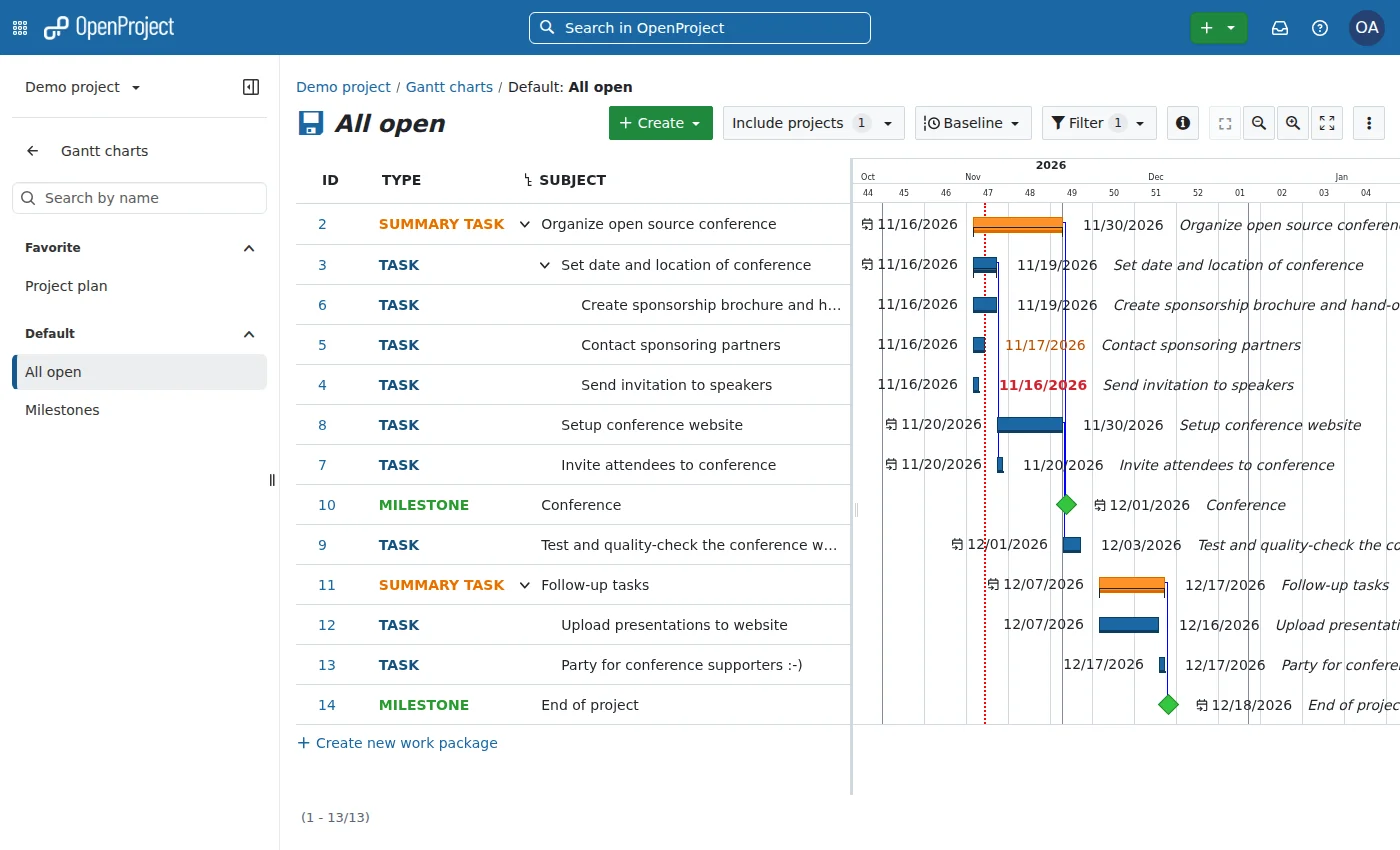
stays short. **Work packages → + Create** adds a task; the **Gantt** view
of the same list sets dates and dependencies by dragging.
The Gantt view of the sample Demo project, fresh after setup.
**Sign out** (under your avatar) leads to exe.dev's log-out page; sign out
there too, or OpenProject signs you straight back in.
## Invite your team
On your computer, let them through exe.dev:
```bash
ssh exe.dev share add my-openproject teammate@example.com
```
When they open `https://my-openproject.exe.xyz/` and pass exe.dev's login,
OpenProject makes their account. After that first visit, add them to a
project under **Project settings → Members**. They aren't admins; make
someone one under **Administration → Users**. Don't use OpenProject's
**Invite user** for someone who hasn't visited yet: an invited account
isn't linked to exe.dev's sign-in, and they'd get a "Create an account …
Email has already been taken" page (see **Something not working?**). Until
you add them, they can look at, but not change, the two public sample
projects.
OpenProject takes people's names from their email: `ana.lima@example.com`
becomes Ana Lima, `ana@example.com` becomes "Ana example.com". To set a
name, yours included, add a line to `~/openproject/names.txt` on the VM, such as
`ana@example.com Ana Lima` (append with `echo '…' >> names.txt`, or run
`docker compose restart exe-ldap` after editing it); it applies the next
time they sign in.
To take someone's access away, `ssh exe.dev share remove my-openproject
teammate@example.com`, and lock their account under **Administration →
Users** if you like.
## Let agents work on it
Agents use [API v3](https://www.openproject.org/docs/api/) as the
OpenProject user **Agent**, an administrator, with an API token that
Shelley keeps in `~/openproject/.env`. Their work shows up under that
name. For narrower access, take away Agent's admin rights under
**Administration → Users** and add it to just the projects it may touch.
### On the VM
Shelley, Claude Code and Codex on this VM can call the API through
`~/openproject/op-api`, which adds the token and the headers OpenProject
wants. Try asking Shelley:
> In OpenProject's Demo project, file a task "Login page is slow", comment
> with what you'd check first, then mark it as a duplicate of #7 and close it.
Or by hand:
```bash
cd ~/openproject
./op-api GET /projects | jq -r '._embedded.elements[] | "\(.identifier) \(.name)"'
./op-api POST /projects/demo-project/work_packages '{"subject":"Hello from the API"}' | jq '{id, subject}'
```
### From another VM or your laptop
Through exe.dev's proxy, an agent sends two tokens: an exe.dev VM token in
`X-Exedev-Authorization`, which gets it past exe.dev's login
([HTTPS tokens for VMs](/docs/https-tokens-for-vms)), and the OpenProject
API token, as the password of the user `apikey`. Make the first on your
computer:
```bash
ssh exe.dev ssh-key generate-api-key --vm=my-openproject --label=openproject-agents --exp=90d
```
then, wherever the agent runs (paste your two tokens; the second is
`OPENPROJECT_API_TOKEN` in `~/openproject/.env` on the VM):
```bash
export EXE_TOKEN=exe1.paste-yours-here OP_TOKEN=opapi-paste-yours-here
curl -s -H "X-Exedev-Authorization: Bearer $EXE_TOKEN" -u "apikey:$OP_TOKEN" \
https://my-openproject.exe.xyz/api/v3/projects | jq -r '._embedded.elements[].name'
```
Expect your project names. Tell the agent the base URL, both headers and
that the API is OpenProject's API v3 (HAL+JSON); it knows the rest.
## The nuts and bolts
Happy with what Shelley set up? Stop here. Below are the steps it
followed, and maintenance for later.
Set up by hand
### Create the VM
On your computer (pick another name if `my-openproject` is taken):
```bash
ssh exe.dev new --name=my-openproject
ssh my-openproject.exe.xyz
```
Everything else runs **on the VM**.
### Start OpenProject
Docker on exe.dev VMs starts on demand; enable it so OpenProject comes
back after a reboot. Then make the data folders and the secrets file.
You, the VM's owner, will be OpenProject's admin, so the file holds your
exe.dev email (from the VM's reflection integration), next to the Rails
secret key, which encrypts parts of the database.
```bash
sudo systemctl enable --now docker.service
mkdir -p ~/openproject/{pgdata,assets,backups}
cd ~/openproject
owner=$(curl -fsS https://reflection.int.exe.xyz/email | jq -r '.email // empty' | tr A-Z a-z)
echo "OpenProject admin: ${owner:?no owner email; set owner=you@example.com and rerun}"
(umask 077; cat > .env < compose.yaml <<'EOF'
name: openproject
services:
openproject:
image: openproject/openproject:17
restart: unless-stopped
ports: ["127.0.0.1:8000:80"]
environment:
OPENPROJECT_HOST__NAME: ${OPENPROJECT_HOST__NAME}
OPENPROJECT_HTTPS: "true"
OPENPROJECT_DEFAULT__LANGUAGE: en
SECRET_KEY_BASE: ${SECRET_KEY_BASE}
OPENPROJECT_SEED_ADMIN_USER_LOCKED: "true"
OPENPROJECT_AUTH__SOURCE__SSO_HEADER: X-ExeDev-Email
OPENPROJECT_AUTH__SOURCE__SSO_OPTIONAL: "true"
OPENPROJECT_AUTH__SOURCE__SSO_LOGOUT__URL: https://${OPENPROJECT_HOST__NAME}/__exe.dev/logout
OPENPROJECT_SEED_LDAP_EXE_HOST: exe-ldap
OPENPROJECT_SEED_LDAP_EXE_PORT: "3890"
OPENPROJECT_SEED_LDAP_EXE_SECURITY: plain_ldap
OPENPROJECT_SEED_LDAP_EXE_BASEDN: ou=people,dc=exe,dc=dev
OPENPROJECT_SEED_LDAP_EXE_SYNC__USERS: "true"
OPENPROJECT_SEED_LDAP_EXE_LOGIN__MAPPING: mail
OPENPROJECT_SEED_LDAP_EXE_FIRSTNAME__MAPPING: givenName
OPENPROJECT_SEED_LDAP_EXE_LASTNAME__MAPPING: sn
OPENPROJECT_SEED_LDAP_EXE_MAIL__MAPPING: mail
volumes:
- ./pgdata:/var/openproject/pgdata
- ./assets:/var/openproject/assets
depends_on: [exe-ldap]
exe-ldap:
image: python:3.13-alpine
restart: unless-stopped
user: "65534:65534"
command: ["python", "-u", "/app/exe-ldap.py"]
volumes:
- ./exe-ldap.py:/app/exe-ldap.py:ro
- ./names.txt:/data/names.txt:ro
EOF
docker compose up -d --quiet-pull
```
The first start creates the database and loads the sample projects, which
takes about four minutes. Wait for the health check (it needs the
headers exe.dev's proxy would send):
```bash
. ./.env
until curl -sf -o /dev/null -H "Host: $OPENPROJECT_HOST__NAME" -H "X-Forwarded-Proto: https" \
http://localhost:8000/health_checks/default; do sleep 10; done; echo ready
```
Expect `ready`.
### Make yourself admin and give agents a token
Create your account as an administrator, linked to exe-ldap, and an
`Agent` administrator with an API token, which goes into the secrets
file. Rails takes about a minute to load:
```bash
cd ~/openproject && . ./.env
token=$(docker compose exec -T openproject bundle exec rails runner '
exe = LdapAuthSource.find_by!(name: "exe")
owner = User.find_by(login: ARGV[0]) || User.new(login: ARGV[0], mail: ARGV[0], firstname: "Owner", lastname: "(exe.dev)")
owner.update!(admin: true, status: :active, ldap_auth_source: exe)
agent = User.find_by(login: "agent") || User.new(login: "agent", mail: "agent@" + ARGV[1], firstname: "Agent", lastname: "(API)")
agent.update!(admin: true, status: :active)
puts "TOKEN=" + Token::API.create!(user: agent, token_name: "agents").plain_value
' "$OWNER_EMAIL" "$OPENPROJECT_HOST__NAME" | sed -n 's/^TOKEN=//p')
[ -n "$token" ] && echo "OPENPROJECT_API_TOKEN=$token" >> .env && echo saved
```
Check that OpenProject takes your email from the header, as it will from
exe.dev's proxy:
```bash
curl -s -o /dev/null -w '%{redirect_url}\n' -H "Host: $OPENPROJECT_HOST__NAME" \
-H "X-Forwarded-Proto: https" -H "X-ExeDev-Email: $OWNER_EMAIL" http://localhost:8000/
```
Expect a URL ending in `/two_factor_authentication/request`, OpenProject's
next sign-in step (it lets you through without a second factor). One
ending in `/sso` means the lookup failed; see **Something not working?**
below.
Then a small helper, so agents on the VM don't have to remember the
headers:
```bash
cat > op-api <<'EOF'
#!/bin/sh
# OpenProject API v3 from this VM: op-api METHOD PATH [JSON]
# op-api GET /projects
# op-api POST /projects/demo-project/work_packages '{"subject":"Hi"}'
set -eu
. "$HOME/openproject/.env"
method=$1 path=$2
curl -sSg --fail-with-body -X "$method" -u "apikey:$OPENPROJECT_API_TOKEN" \
-H "Host: $OPENPROJECT_HOST__NAME" -H "X-Forwarded-Proto: https" \
-H "Content-Type: application/json" ${3:+--data "$3"} \
"http://localhost:8000/api/v3$path"
EOF
chmod +x op-api
```
Check it the way an agent would: create a work package, comment, close
it, and delete it again:
```bash
id=$(./op-api POST /projects/demo-project/work_packages '{"subject":"Setup check"}' | jq .id)
./op-api POST /work_packages/$id/activities '{"comment":{"raw":"Commented over API v3."}}' >/dev/null
closed=$(./op-api GET /statuses | jq -r '._embedded.elements[] | select(.name=="Closed") | ._links.self.href')
lock=$(./op-api GET /work_packages/$id | jq .lockVersion)
./op-api PATCH /work_packages/$id "{\"lockVersion\":$lock,\"_links\":{\"status\":{\"href\":\"$closed\"}}}" \
| jq -r '"#\(.id) \(.subject): \(._links.status.title)"'
./op-api GET /work_packages/$id/activities | jq -r '._embedded.elements[].comment.raw | select(. != "")'
./op-api DELETE /work_packages/$id && echo deleted
```
Expect `# Setup check: Closed`, the comment, and `deleted`.
### Back up nightly
This script dumps the database with `pg_dump` inside the container (as
OpenProject's backup guide does), and adds the attachments, the secrets
file and `names.txt`. It keeps the 14 newest:
```bash
cat > backup.sh <<'EOF'
#!/bin/bash
# Back up OpenProject to ~/openproject/backups/openproject-Back up and restore
On the VM, `~/openproject/backup.sh` makes a backup now and prints its
path. Copy backups off the VM now and then; on your computer:
```bash
scp 'my-openproject.exe.xyz:openproject/backups/openproject-*.tar.gz' .
```
They hold everything in OpenProject and the secrets file, so keep them
private.
### Restore
On the VM, with OpenProject running, pick an archive. The restore stops
the web and background processes, replaces the database and attachments,
takes the secrets and names from the backup (keeping this VM's host
name), and restarts. The current attachments are kept in `assets.before-restore`;
run `./backup.sh` first if you may want the current state back.
```bash
cd ~/openproject
backup=backups/openproject-YYYYMMDD-HHMMSS.tar.gz
rm -rf /tmp/op-restore && mkdir -m 700 /tmp/op-restore
tar -xzf "$backup" -C /tmp/op-restore
docker compose exec -T openproject sh -c 'printf "[supervisorctl]\nserverurl=unix:///var/run/supervisor.sock\n" > /tmp/sc.ini && supervisorctl -c /tmp/sc.ini stop web worker hocuspocus'
docker compose exec -T openproject su - postgres -c "psql -q -c 'DROP DATABASE openproject WITH (FORCE)' -c 'CREATE DATABASE openproject OWNER openproject'"
docker compose exec -T -e PGPASSWORD=openproject openproject \
psql -q -v ON_ERROR_STOP=1 -h 127.0.0.1 -U openproject -d openproject < /tmp/op-restore/openproject.sql >/dev/null
sudo rm -rf assets.before-restore && sudo mv assets assets.before-restore && mkdir assets
tar -xf /tmp/op-restore/assets.tar -C assets
{ grep '^OPENPROJECT_HOST__NAME=' .env; grep -v '^OPENPROJECT_HOST__NAME=' /tmp/op-restore/env; } > .env.new
chmod 600 .env.new && mv .env.new .env
cp /tmp/op-restore/names.txt names.txt
rm -rf /tmp/op-restore
docker compose up -d --force-recreate
```
Wait for `ready` with the health check from the setup, then open the
site: your projects and accounts are as they were at the backup. On a new
VM, do **Set up by hand** up to the health check first, copy the archive over
with `scp`, and restore the same way. A backup restores into the same
OpenProject version or a newer one, not an older one.
Update
The `17` tag follows OpenProject 17's minor and patch releases. On the VM,
back up, pull (OpenProject and the Python image exe-ldap runs on), and
restart; migrations run on start:
```bash
cd ~/openproject
./backup.sh && docker compose pull --quiet && docker compose up -d
docker compose logs --tail=20 openproject
```
Then wait for `ready` with the health check from the setup.
**Administration → Information** shows the version.
For the next major version, read the
[upgrade notes](https://www.openproject.org/docs/installation-and-operations/operation/upgrading/)
first: OpenProject only upgrades one major version at a time, and a new
major can come with a newer PostgreSQL, whose data the all-in-one image
won't convert by itself (see their PostgreSQL migration guide). Then
change `:17` in `compose.yaml` and update the same way. After an update,
check that exe.dev sign-in still works for you before you leave it.
Something not working?
On the VM, the containers and their logs:
```bash
cd ~/openproject
docker compose ps
docker compose logs --tail=50 openproject
docker compose logs --tail=20 exe-ldap
```
**"Single Sign-On (SSO) for user … failed".** OpenProject couldn't look
the email up in exe-ldap. Check that `exe-ldap` is `Up` in
`docker compose ps` and its log says `listening`; `docker compose up -d`
starts it. The same message comes for an email that already belongs to an
OpenProject account not linked to exe-ldap (made by hand under
**Administration → Users**): delete or rename that account.
**"Create an account … Email has already been taken".** The person was
invited by email (**Invite user**) before their first visit, so their
account isn't linked to exe-ldap. Link it, on the VM, and they're signed
in on their next visit:
```bash
cd ~/openproject
docker compose exec -T openproject bundle exec rails runner \
'User.find_by!(login: ARGV[0].downcase).update!(ldap_auth_source: LdapAuthSource.find_by!(name: "exe")); puts "ok"' teammate@example.com
```
**Signed in, but not as an admin.** The email you sign in to exe.dev with
isn't `OWNER_EMAIL` in `.env`. Any admin can change that under
**Administration → Users**; or, on the VM, after visiting once:
```bash
cd ~/openproject
docker compose exec -T openproject bundle exec rails runner \
'User.find_by!(login: ARGV[0].downcase).update!(admin: true); puts "ok"' you@example.com
```
**Sign out signs you straight back in.** Sign out of exe.dev too, on the
page OpenProject sends you to. That page belongs to exe.dev, not
OpenProject.
**Someone's name is wrong.** Names come from exe-ldap on each sign-in, so
editing them in OpenProject doesn't stick; add a line such as
`ana@example.com Ana Lima` to `names.txt`, and it applies the next time
they sign in.
**`503 Service Unavailable` for a few minutes after a start.** OpenProject
runs migrations before it serves, so it takes about three minutes after
a reboot or update; on a first start it also creates the database. Watch
the log until Puma says `Listening on http://0.0.0.0:8080`.
**`400 Bad Request` or "Blocked hosts".** The address doesn't match
`OPENPROJECT_HOST__NAME`, for example after renaming the VM or adding a
[custom domain](/docs/cnames). Fix it in `.env`, then
`docker compose up -d`.
**`curl http://localhost:8000/...` gets `400` or a redirect to `https://`.**
OpenProject runs in HTTPS mode for the VM's host name and expects the
proxy's headers. Use
`op-api`, or send `Host` and `X-Forwarded-Proto: https` as it does.
**An agent gets a `307` redirect to exe.dev's login, or a plain-text
`401` "invalid or missing authentication".** exe.dev's proxy didn't get
or didn't accept the VM token: check `X-Exedev-Authorization: Bearer ...`
and the token's expiry. A JSON `401` (`Unauthenticated`) comes from OpenProject:
check the API token and that it's sent as the password of `apikey`.
**Down after a reboot.** Run `sudo systemctl enable --now docker.service`.
**Emails never arrive.** OpenProject has no mail server here; see the FAQ
below.
## Frequently asked questions
### Is OpenProject free?
The Community edition is free and open source (GPL-3.0), with no user limit. OpenProject GmbH sells Enterprise plans (Basic, Professional, Premium, Corporate) that unlock add-ons in the same code with a license key, plus support. On exe.dev you pay only for the [VM](https://exe.dev/pricing).
### What's paywalled in the Community edition?
As of 17.9: single sign-on with OpenID Connect or SAML, the built-in MCP server, internal comments and sharing work packages with outside users need Professional; the team planner, baseline comparisons, custom actions, placeholder users, hierarchy custom fields, custom theme and logo, and multiple active sprints need Basic; portfolio management, LDAP group sync and resource management need Premium. Work packages, Gantt charts, all board types (since 17.3), backlogs and sprints, date alerts (since 17.9), time and cost tracking, wiki, meetings, the API and webhooks are free. The [Enterprise guide](https://www.openproject.org/docs/enterprise-guide/) has the current table.
### How does the exe.dev sign-in work without Enterprise?
OpenProject Community has a free header-based sign-in (`OPENPROJECT_AUTH__SOURCE__SSO`), set here to read exe.dev's `X-ExeDev-Email`. It only accepts people it can look up in an LDAP directory, so the setup runs a tiny one, [exe-ldap.py](https://exe.dev/deploy/openproject/exe-ldap.py), that answers for any email with a name made from it, and refuses every password. Both are documented OpenProject settings, no patches. OpenID Connect and SAML, the usual ways, are Enterprise add-ons.
### Can someone fake the exe.dev login header?
Not from outside. exe.dev's [proxy](/docs/proxy) removes any `X-ExeDev-*` headers a browser sends and adds its own for the signed-in user. OpenProject listens only on 127.0.0.1, so only the proxy and programs on the VM itself can reach it; anyone with SSH or root access to the VM can already do anything there. exe-ldap can't be used to sign in with a password, and OpenProject's default `admin` account is locked.
### Does OpenProject have an MCP server?
Yes, built in since 17.2 and able to create and update work packages since 17.8, but it's an Enterprise add-on (Professional plan and up). Community-maintained MCP servers for the Community edition exist, such as [openproject-ce-mcp](https://github.com/jtauschl/openproject-ce-mcp); this page wasn't tested with them. Any agent can use API v3 with the `op-api` helper or curl, as shown above.
### How much memory does it need?
About 2 to 2.7 GB once started and in use, measured on fresh installs (two web workers, the background worker, PostgreSQL, memcached), plus about 15 MB for exe-ldap: fine on a default exe.dev VM, alongside a few smaller things. The image takes 3.3 GB of disk. Setting `OPENPROJECT_WEB_WORKERS: 1` in `compose.yaml` runs one web worker instead of two and uses less.
### Can I move from Jira?
OpenProject has a Jira Migrator under *Administration → Import*. In 17.9 it's a beta, for Jira Data Center 10 and 11 only (not Jira Cloud), and OpenProject says to use it on test setups for now. It isn't an Enterprise add-on. Back up before an import.
### Can OpenProject send email?
Only with an SMTP server of yours: exe.dev's [email gateway](/docs/send-email) is an HTTP API, not SMTP. Without one, notifications stay in OpenProject's in-app inbox, which is fine since nobody needs a password email. To add SMTP, put the `OPENPROJECT_SMTP__*` settings from the [configuration guide](https://www.openproject.org/docs/installation-and-operations/configuration/) in `compose.yaml`, with `OPENPROJECT_EMAIL__DELIVERY__METHOD: smtp`.
## Related
- [Self-hosted issue tracker](https://exe.dev/deploy/issue-tracker.md): Choose an issue tracker to run on your own VM, for your team and your agents.
- [Self-host Kanboard](https://exe.dev/deploy/kanboard.md): A small, sturdy kanban board that signs your team in with exe.dev.
- [Self-host Kaneo](https://exe.dev/deploy/kaneo.md): A light, fully open-source issue tracker that your agents can work from too.
- [Forgejo](https://exe.dev/deploy/forgejo.md): Self-hosted Git forge with exe.dev SSO
- [Gitea](https://exe.dev/deploy/gitea.md): Self-hosted Git forge with exe.dev SSO
- [Cal.diy](https://exe.dev/deploy/cal-diy.md): Open-source scheduling app on exe.dev