---
title: "Self-host Odoo Community"
description: "Self-host Odoo Community 20 with Docker on an exe.dev VM: CRM, Sales and Invoicing behind exe.dev login, a customer portal when you want one, and nightly backups."
url: https://exe.dev/deploy/odoo
category: "Productivity"
published: 2026-11-21
updated: 2026-11-20
---
# Self-host Odoo Community
> **For agents:** with your user's OK, this sets up Odoo on a new exe.dev VM in their account: `curl -fsSL https://exe.dev/deploy/odoo/prompt.txt | ssh exe.dev new --prompt=/dev/stdin` (or open https://exe.dev/deploy/odoo/new). Already on the VM? Skip this.
Open-source ERP and CRM for a small business, on a VM you own.
- **Software:** Odoo (https://www.odoo.com/)
- **Source:** https://github.com/odoo/odoo
- **License:** LGPL-3.0
- **Time:** 20 minutes
- **Example VM name:** `my-odoo` (yours will differ; on the VM, `hostname` prints it)
- **Machine-readable:** https://exe.dev/deploy/odoo/manifest.json
## What you get
- Odoo 20.0 Community on PostgreSQL 17, behind exe.dev login, that starts again after a reboot.
- An administrator login for your email, with a random password kept in a file on the VM.
- The database manager switched off and refused, under a hashed master password.
- Live updates (chat, notifications) working through exe.dev's HTTPS proxy.
- Styled PDF quotes and invoices, even while the VM is private.
- Nightly backups of the database and files, with one restored into a scratch database.
Running on the VM:
- **Odoo 20.0 Community**: The official odoo image in Docker Compose; three HTTP workers, cron, and a live-updates worker, port 8069, data in `~/odoo/data`
- **PostgreSQL 17**: postgres:17 in Docker Compose; Odoo connects as its own role, not a superuser, data in `~/odoo/postgres`
- **nginx**: The front door; sends /websocket to Odoo's live-updates port 8072 and refuses the database manager, port 8000
- **Nightly backup**: A systemd timer; Odoo's own dump of the database and files, plus settings and secrets, kept two weeks, data in `~/odoo/backups`
How it is reached:
- https://my-odoo.exe.xyz/ (private): Odoo, for you and the people you share the VM with, each with their own Odoo login
- https://my-odoo.exe.xyz/my (public): Only if you open the VM up, for the customer portal and quotation links
## Deploy with Shelley
Open https://exe.dev/deploy/odoo/new to create a VM whose agent, Shelley, follows this recipe. From a terminal:
```sh
curl -fsSL https://exe.dev/deploy/odoo/prompt.txt | ssh exe.dev new --prompt=/dev/stdin
```
Then, on your own computer:
```sh
ssh my-odoo.exe.xyz cat odoo/admin-password
```
Or follow the steps below by hand.
Odoo is a suite of business apps that share one database: CRM, Sales,
Invoicing, Inventory, Purchase, Project, Website and dozens more. Odoo
Community is the open-source edition: no per-user fees, no user limit, and
the data stays in a PostgreSQL database you can dump whenever you like.
On an exe.dev VM it gets a persistent disk, HTTPS, and a login in front of
it with no setup: only you and the people you share the VM with can even
reach Odoo's sign-in page. When you want customers to accept quotes
online, you open the VM up, and the setup is ready for it. Shelley installs
it, and can take the backups and updates off your hands later.
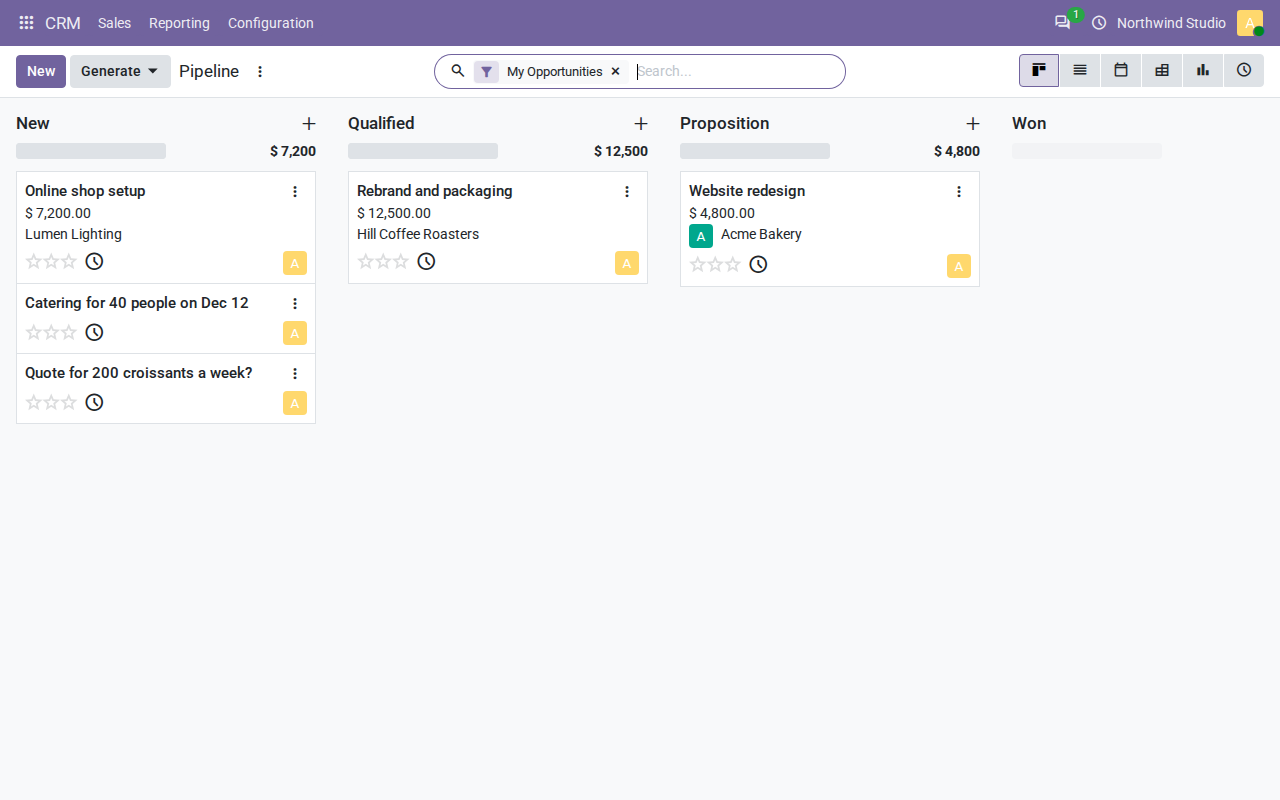
The CRM pipeline on a test VM. The two leads without amounts arrived by email.
> [!NOTE]
> This is Odoo **Community**. Apps marked **Upgrade** in the Apps menu,
> such as Accounting, Studio and the AI features, are Enterprise and need
> a paid subscription from Odoo S.A. Moving to a new major version of Odoo
> later is real work; see [Next major version](#next-major-version) before
> you put years of books in it.
## Choose who can reach it
- **Private** (this guide's default). Odoo is at `https://my-odoo.exe.xyz/`,
but exe.dev asks for a login first, and lets in only you and the people
you share the VM with. Then each person signs in to Odoo with their own
Odoo user. Pick this for an internal CRM, sales and invoicing tool.
- **Public.** Anyone can reach Odoo's pages, which is what customers need
to open a quotation link, sign and accept it, see their invoices in the
portal, or browse an Odoo website. Odoo's own login protects everything
else. See [Let customers in](#let-customers-in).
You can switch between them at any time; nothing on the VM changes.
## Sign in
The administrator is your email address, with a random password. On your
computer:
```bash
ssh my-odoo.exe.xyz cat odoo/admin-password
```
Open `https://my-odoo.exe.xyz/`, sign in to exe.dev if asked, then sign in
to Odoo with your email and that password. Store the password in your
password manager. Then, from your avatar at the top right, open **My
Preferences** → **Security** and **Enable 2FA**.
## Activate your apps
A new database has only Discuss and the basics. Open **Apps** and click
**Activate** on what you need, one at a time; each takes a few seconds:
- **CRM**: leads and opportunities, the pipeline above.
- **Sales**: quotations and sales orders.
- **Invoicing**: invoices, bills and payments. It also installs your
country's taxes and chart of accounts, from the country set at install.
Then open **Settings** → **General Settings** and fill in your company's
name, address and logo: they go on every quote and invoice.
## Make a quote
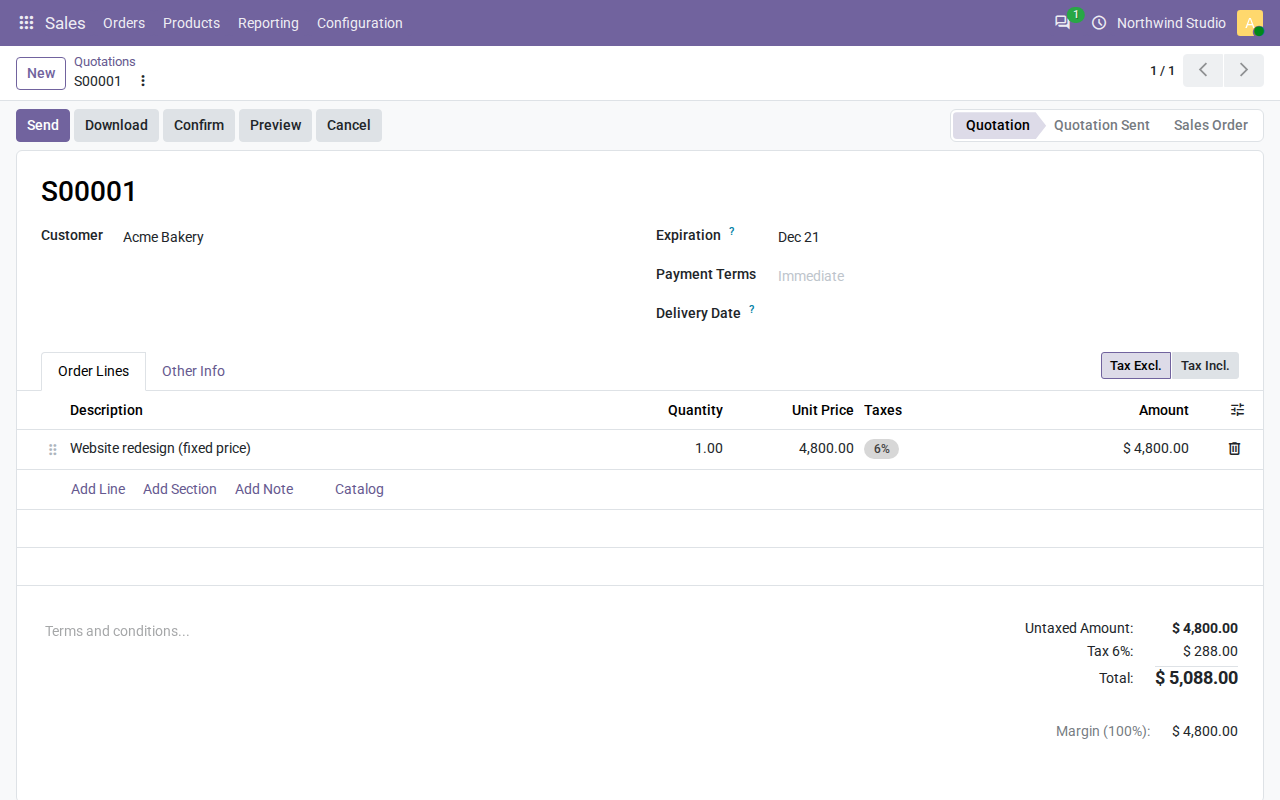
In **CRM**, click **New**, name the opportunity, add the customer, and
open it. **New Quotation** starts a quote for that customer. Add a line
with a product or service and a price, and save.
A quotation on the test VM, made from a CRM opportunity.
**Download** gives you a PDF to send yourself. **Send** emails it, once
you've set up [outgoing email](#send-email). The email carries a link to
the quote online, where the customer can sign and accept it; that link
works only when the VM is [public](#let-customers-in). **Confirm** turns
the quote into a sales order, and from there, an invoice.
## Bring your team
Each person needs two things: access to the VM, and an Odoo user.
1. On your computer, share the VM with them (or with your whole exe.dev
team, with `team` instead of an email):
```bash
ssh exe.dev share add my-odoo alice@example.com
```
2. In Odoo, open **Settings** → **Users & Companies** → **Users**, click
**New**, and enter their name and email. Pick a **Role** (**User**,
or **Administrator** for people who manage settings) and the access
level for each app, then save.
3. Until email is set up, Odoo can't send them an invitation. On the user,
open the **Security** tab, click **Change password**, set a temporary
one, and tell them to change it under **My Preferences**.
They sign in to exe.dev with their own account, and then to Odoo with
their email and password. Removing someone takes both:
`ssh exe.dev share remove my-odoo alice@example.com`, and archiving their
Odoo user.
## Let customers in
On your computer:
```bash
ssh exe.dev share set-public my-odoo
```
Now Odoo's own login is the only lock, so the install has already closed
the usual holes:
- **No database manager.** It's switched off, nginx refuses
`/web/database/...` with a 404, and its master password is stored only
as a hash.
- **No self-signup.** Customers get portal accounts only when you invite
them (from a contact, **Grant portal access**). Odoo 20 otherwise lets
anyone sign up for one.
- **Slow guessing.** After ten wrong passwords from one address, Odoo makes
it wait a minute.
Turn on two-factor sign-in for every internal user (each person does it in
**My Preferences** → **Security**), and update when Odoo publishes fixes.
Quotation links in emails carry a secret token, so a customer can open,
sign and accept their quote without an account. The **Website** and
**eCommerce** apps publish pages at the same address, for anyone.
`ssh exe.dev share set-private my-odoo` closes it again. While it's
private, links you've sent stop working for customers.
> [!WARNING]
> Public means all of Odoo's pages, not just the portal: exe.dev can't open
> some paths and keep others behind its login. If you'd rather not put
> Odoo's login page on the internet, stay private and send customers PDFs.
## Email
### Receive email
exe.dev can [deliver mail](/docs/receive-email) sent to any address at
`my-odoo.exe.xyz` to the VM. With it, mail to
`leads@my-odoo.exe.xyz` becomes a CRM lead, and customers' replies land
on the quote they're about. On your computer:
```bash
ssh exe.dev share receive-email my-odoo on
```
Then ask Shelley to set up "Receive email" in the
[Install by hand](#create-the-vm) steps below, or follow them yourself.
It needs CRM activated first. There's no spam filter, and exe.dev pauses
delivery if more than 1000 messages pile up unprocessed, which the watcher
prevents.
### Send email
Odoo sends quotes, invoices, invitations and password resets by email.
exe.dev doesn't relay mail to your customers, so you need an SMTP server
from a mail provider (your Google Workspace or Microsoft 365, or a
transactional service like Postmark, Mailgun or Amazon SES).
In **Settings** → **General Settings** → **Emails**:
1. Set **Alias Domain** to a domain you own, such as `example.com`. Odoo
sends as `notifications@` that domain, and replies come back to
aliases there. Your provider has to be allowed to send for it, with
the SPF and DKIM records it gives you; it can't send for `exe.xyz`.
2. Turn on **Custom Email Servers**, open **Outgoing Email Servers**, and
add your provider's SMTP host, port (usually 587) and login.
**Test Connection**, then save.
If you also want replies to reach Odoo, point that domain's mail at your
provider and fetch it with an **Incoming Email Server**, or forward it to
`@my-odoo.exe.xyz`.
## Connect scripts
Odoo 20's [JSON-2 API](https://www.odoo.com/documentation/20.0/developer/reference/external_api.html)
reads and writes any record. Make an Odoo API key from **My Preferences**
→ **Security** → **Create API Key**. While the VM is private, also make a
[VM token](/docs/https-tokens-for-vms) for exe.dev; on your computer:
```bash
ssh exe.dev ssh-key generate-api-key --vm=my-odoo --label=odoo-api
```
Send both, each in its own header:
```bash
curl -s https://my-odoo.exe.xyz/json/2/res.partner/search_read \
-H "X-Exedev-Authorization: Bearer $EXE_TOKEN" \
-H "Authorization: bearer $ODOO_API_KEY" \
-H 'Content-Type: application/json' \
-d '{"domain": [["is_company", "=", true]], "fields": ["name"]}'
```
You get a JSON list of companies. A public VM needs only the Odoo key.
When you make a key, Odoo asks how long it should last: administrators
can pick **Never**, everyone else three months at most.
## Add modules
Third-party and in-house modules go in `~/odoo/addons` on the VM, one
directory per module, for the same Odoo version (20.0); the
[OCA](https://github.com/OCA) publishes hundreds. Then, on the VM:
```bash
cd ~/odoo
docker compose restart odoo
docker compose exec -T odoo odoo module install MODULE_NAME
```
The module is in **Apps** afterwards. Modules with Python dependencies the
image doesn't have need a custom image; ask Shelley. Modules come with the
backups.
## Keep your data safe
Every night at about 03:30 UTC, a timer saves the database, attached
files, settings and passwords into `~/odoo/backups`, and keeps two weeks.
A backup of a small company's Odoo is a few megabytes.
They're on the same disk, so copy them off the VM too. On your computer:
```bash
rsync -av my-odoo.exe.xyz:odoo/backups/ ./odoo-backups/
```
The files hold your passwords; keep the copies somewhere private. To copy
the whole disk to your own S3 bucket, see [VM backups](/docs/vm-backups).
## Next major version
Odoo ships a major version each autumn and supports each for three years;
20.0 is supported until September 2029. A self-hosted Odoo can stay on its
version for as long as you like. [Update](#update) brings fixes within
20.0, and that's routine.
Moving to 21.0 is not routine. The database has to be migrated, and every
added module needs a 21.0 version. For Community, the usual tool is the
OCA's [OpenUpgrade](https://github.com/OCA/OpenUpgrade), which migrates
one version at a time and takes a few months after each release to cover
the core apps. Odoo S.A.'s [upgrade service](https://upgrade.odoo.com/) is
for Enterprise. Either way: try it on a copy of the VM
(`ssh exe.dev cp my-odoo my-odoo-21`), check your data, then move.
## Use your own domain
To serve Odoo at, say, `erp.example.com`, point a CNAME at
`my-odoo.exe.xyz` and register it, on your computer, as described in
[custom domains](/docs/cnames):
```bash
ssh exe.dev domain add my-odoo erp.example.com
```
Then sign in to Odoo at the new address as the administrator: Odoo picks
up the new address for links in emails and PDFs from that sign-in.
## The nuts and bolts
Happy clicking Deploy? You can stop here. These are the same setup steps
Shelley follows, plus the maintenance commands for later. Tested with Odoo
20.0 (image `odoo:20.0`, build 20261112) and PostgreSQL 17.12 on a default
VM (2 CPUs, 8 GB memory, 25 GB disk).
Install by hand
### Create a VM
On your computer (pick another name if `my-odoo` is taken):
```bash
ssh exe.dev new --name=my-odoo
ssh my-odoo.exe.xyz
```
All remaining installation commands run **on the VM**, as `exedev`. They
use `hostname`, so your VM can have any name. The images take about 4 GB;
after installing, about 10 GB of the 25 GB disk is in use.
### Get Docker ready
Enable Docker at boot, or exe.dev's on-demand Docker won't restart Odoo
after a reboot:
```bash
sudo systemctl enable --now docker.service
systemctl is-enabled docker.service
```
Expect `enabled`.
### Make the passwords
Three random secrets, readable only by you: the Odoo administrator's
password, the master password (which guards database operations), and
the PostgreSQL passwords. It won't overwrite existing ones.
```bash
mkdir -p ~/odoo/addons ~/odoo/backups ~/odoo/initdb && cd ~/odoo
if [ ! -f .env ]; then
(
umask 077
openssl rand -base64 24 | tr -d '/+=' > admin-password
openssl rand -base64 24 | tr -d '/+=' > master-password
cat > .env < initdb/10-odoo-role.sh <<'EOF'
#!/bin/bash
# Runs once, when the PostgreSQL data directory is first created:
# Odoo's own role, which may create databases but is not a superuser.
set -e
psql -v ON_ERROR_STOP=1 --username postgres -v pw="$ODOO_DB_PASSWORD" <<'SQL'
CREATE ROLE odoo LOGIN CREATEDB PASSWORD :'pw';
SQL
EOF
chmod 755 initdb/10-odoo-role.sh
```
`odoo.conf` serves one database, named `odoo`, with the database manager
switched off. Its master password is stored as a PBKDF2 hash, made with
the same library Odoo uses. `proxy_mode` makes Odoo trust the
`X-Forwarded-*` headers from exe.dev's proxy, for the right `https://`
links and the real client address. `workers = 3` runs Odoo in
multi-process mode, which also starts the live-updates (WebSocket) server
on port 8072.
```bash
cd ~/odoo
HASH=$(docker run --rm -i --entrypoint python3 odoo:20.0 -c \
'import sys; from passlib.context import CryptContext; print(CryptContext(["pbkdf2_sha512"]).hash(sys.stdin.read().strip()))' < master-password)
cat > odoo.conf < compose.yaml <<'EOF'
services:
db:
image: postgres:17
restart: unless-stopped
environment:
POSTGRES_USER: postgres
POSTGRES_PASSWORD: ${POSTGRES_PASSWORD}
ODOO_DB_PASSWORD: ${ODOO_DB_PASSWORD}
volumes:
- ./postgres:/var/lib/postgresql/data
- ./initdb:/docker-entrypoint-initdb.d:ro
healthcheck:
test: ["CMD", "pg_isready", "-U", "postgres"]
interval: 5s
retries: 20
odoo:
image: odoo:20.0
restart: unless-stopped
depends_on:
db:
condition: service_healthy
environment:
PGHOST: db
PGPORT: "5432"
PGUSER: odoo
PGPASSWORD: ${ODOO_DB_PASSWORD}
volumes:
- ./odoo.conf:/etc/odoo/odoo.conf:ro
- ./data:/var/lib/odoo
- ./addons:/mnt/extra-addons:ro
- ./backups:/mnt/backups:ro
- ./inbox:/mnt/inbox:ro
ports:
- "127.0.0.1:8069:8069"
- "127.0.0.1:8072:8072"
EOF
mkdir -p data inbox && sudo chown 100:101 data
docker compose up -d db
until [ "$(docker compose ps --format '{{.Health}}' db)" = healthy ]; do sleep 2; done
docker compose exec -T db psql -U postgres -tAc \
"SELECT rolname, rolsuper, rolcreatedb FROM pg_roles WHERE rolname = 'odoo'"
```
Expect `odoo|f|t`: a role that isn't a superuser and can create
databases. (`100:101` is the image's `odoo` user, which writes attachments
and sessions to `data`.)
### Create the database
The administrator's login is your exe.dev email, read from the VM's
[reflection integration](/docs/integrations-reflection). Set your
company's country code: it picks the currency, and the taxes and chart of
accounts Invoicing installs. Demo data is off by default.
```bash
cd ~/odoo
ODOO_ADMIN=$(curl -fsS https://reflection.int.exe.xyz/email | jq -r .email)
ODOO_COUNTRY=US
echo "$ODOO_ADMIN $ODOO_COUNTRY"
docker compose run --rm -T odoo odoo db init odoo \
--username "$ODOO_ADMIN" --password "$(cat admin-password)" --country "$ODOO_COUNTRY"
```
Check the echoed email and country before the last command runs; it takes
about half a minute. Then start Odoo:
```bash
cd ~/odoo
docker compose up -d
until curl -fs localhost:8069/web/health; do sleep 2; done; echo
```
Expect `{"status": "pass"}`.
Two settings Odoo keeps in the database. `report.url` makes the PDF
renderer fetch its stylesheets from Odoo directly: by default it goes
through the public address, where exe.dev's login stops it while the VM
is private, and quotes come out unstyled. `invitation_scope` turns off
Odoo 20's default of letting anyone sign up for a portal account.
```bash
cd ~/odoo
docker compose exec -T odoo odoo shell --no-http --log-level=warn <<'EOF'
params = env['ir.config_parameter']
params.set_str('report.url', 'http://localhost:8069')
params.set_str('auth_signup.invitation_scope', 'b2b')
env.cr.commit()
print(params.get_str('report.url'), params.get_str('auth_signup.invitation_scope'))
EOF
```
Expect `http://localhost:8069 b2b`.
### Put nginx in front
exe.dev's proxy sends HTTPS traffic to port 8000. nginx passes it to Odoo,
sends `/websocket` to the live-updates port, keeps exe.dev's
`X-Forwarded-*` headers for `proxy_mode`, and refuses the database
manager outright. The timeouts follow Odoo's deployment guide.
```bash
sudo tee /etc/nginx/sites-available/odoo >/dev/null <<'EOF'
# exe.dev's HTTPS proxy -> nginx :8000 -> Odoo: HTTP workers on :8069,
# live updates (/websocket) on the gevent worker at :8072.
map $http_upgrade $connection_upgrade {
default upgrade;
'' close;
}
server {
listen 8000 default_server;
listen [::]:8000 default_server;
server_name _;
client_max_body_size 128m;
proxy_read_timeout 720s;
proxy_connect_timeout 720s;
proxy_send_timeout 720s;
proxy_set_header Host $http_host;
proxy_set_header X-Forwarded-Host $http_host;
proxy_set_header X-Forwarded-Proto $http_x_forwarded_proto;
proxy_set_header X-Forwarded-For $http_x_forwarded_for;
# The database manager is off in odoo.conf; refuse it here too.
location ^~ /web/database {
return 404;
}
location /websocket {
proxy_pass http://127.0.0.1:8072;
proxy_http_version 1.1;
proxy_set_header Upgrade $http_upgrade;
proxy_set_header Connection $connection_upgrade;
proxy_set_header Host $http_host;
proxy_set_header X-Forwarded-Host $http_host;
proxy_set_header X-Forwarded-Proto $http_x_forwarded_proto;
proxy_set_header X-Forwarded-For $http_x_forwarded_for;
}
location / {
proxy_pass http://127.0.0.1:8069;
proxy_redirect off;
}
gzip on;
gzip_types text/css text/plain application/json application/javascript text/xml;
}
EOF
sudo rm -f /etc/nginx/sites-enabled/default
sudo ln -sf /etc/nginx/sites-available/odoo /etc/nginx/sites-enabled/odoo
sudo nginx -t && sudo systemctl enable --now nginx && sudo systemctl reload nginx
for path in /web/health /web/login /web/database/manager /web/signup; do
echo "$path $(curl -s -o /dev/null -w '%{http_code}' localhost:8000$path)"
done
```
Expect `200` for the first two and `404` for the database manager and
signup.
### Set up nightly backups
`odoo db dump` writes Odoo's own backup format: a zip with the SQL dump
and the filestore (attachments and images, which live outside the
database). The script adds the settings, secrets and custom modules, so
one file rebuilds the whole thing.
```bash
cat > ~/odoo/backup.sh <<'EOF'
#!/bin/bash
# Back up Odoo: the database and its filestore (Odoo's own zip format,
# what `odoo db load` restores), plus the settings, secrets and custom
# addons, in one tar file. Keeps 14 days.
set -euo pipefail
cd /home/exedev/odoo
stamp=$(date -u +%Y%m%d-%H%M%S)
work=$(mktemp -d)
trap 'rm -rf "$work"' EXIT
docker compose exec -T odoo odoo db dump odoo - > "$work/odoo.zip" 2> "$work/dump.log" \
|| { cat "$work/dump.log" >&2; exit 1; }
unzip -tq "$work/odoo.zip" >/dev/null
cp -a compose.yaml odoo.conf .env admin-password master-password initdb addons "$work/"
umask 077
tar -C "$work" -cf "backups/odoo-$stamp.tar" odoo.zip compose.yaml odoo.conf .env admin-password master-password initdb addons
find backups -name 'odoo-*.tar' -mtime +13 -delete
echo "backups/odoo-$stamp.tar"
EOF
chmod 755 ~/odoo/backup.sh
sudo tee /etc/systemd/system/odoo-backup.service >/dev/null <<'EOF'
[Unit]
Description=Back up Odoo
After=docker.service
[Service]
Type=oneshot
User=exedev
ExecStart=/home/exedev/odoo/backup.sh
EOF
sudo tee /etc/systemd/system/odoo-backup.timer >/dev/null <<'EOF'
[Unit]
Description=Back up Odoo every night
[Timer]
OnCalendar=*-*-* 03:30:00
RandomizedDelaySec=30m
Persistent=true
[Install]
WantedBy=timers.target
EOF
sudo systemctl daemon-reload
sudo systemctl enable --now odoo-backup.timer
sudo systemctl start odoo-backup.service
ls -l ~/odoo/backups
```
Expect one `odoo-.tar` with `-rw-------`.
### Test a backup
This loads the newest backup into a scratch database next to the real
one, counts what's in it, and drops it again:
```bash
cat > ~/odoo/test-restore.sh <<'EOF'
#!/bin/bash
# Load the newest backup into a scratch database next to the real one,
# count what's in it, and drop it again. The live database isn't touched.
set -euo pipefail
cd /home/exedev/odoo
latest=$(ls -1t backups/odoo-*.tar | head -n 1)
echo "Testing $latest"
rm -rf backups/restore-test && mkdir backups/restore-test
trap 'rm -rf backups/restore-test' EXIT
tar -C backups/restore-test -xf "$latest" odoo.zip
docker compose exec -T odoo odoo db load odoo_restore_test /mnt/backups/restore-test/odoo.zip >/dev/null 2>&1
docker compose exec -T db psql -U postgres -d odoo_restore_test -tAc \
"SELECT count(*) || ' contacts' FROM res_partner; SELECT count(*) || ' installed modules' FROM ir_module_module WHERE state = 'installed';"
docker compose exec -T odoo odoo db drop odoo_restore_test >/dev/null 2>&1
echo "Restore test passed"
EOF
chmod 755 ~/odoo/test-restore.sh
~/odoo/test-restore.sh
```
Expect a few contacts, a few dozen installed modules, and `Restore test
passed`. Run it again now and then, after `~/odoo/backup.sh`.
Installation done. Leave the rest to the owner; continue with
[Sign in](#sign-in).
### Receive email (optional)
Only after the owner has run `ssh exe.dev share receive-email my-odoo on`
and activated CRM. exe.dev writes each message to `~/Maildir/new`; a
systemd path unit notices and hands it to Odoo's mail gateway, the same
code Odoo's own `odoo-mailgate` script calls. Odoo routes it by alias:
a new lead, or a reply on the record it answers.
First make `my-odoo.exe.xyz` the alias domain, and give the sales team
the alias `leads` (Invoicing already uses `sales@` for its sales journal):
```bash
mkdir -p ~/Maildir/new ~/Maildir/cur
cd ~/odoo
docker compose exec -T odoo odoo shell --no-http --log-level=warn < mail-in.py <<'EOF'
# Run by mail-in.sh inside `odoo shell`: hand each message in /mnt/inbox
# to Odoo's mail gateway, which routes it by alias (a lead, a reply on a
# quotation's chatter, ...). Prints one line per message.
import os
for name in sorted(os.listdir('/mnt/inbox')):
with open(os.path.join('/mnt/inbox', name), 'rb') as f:
raw = f.read()
try:
with env.cr.savepoint():
env['mail.thread'].message_process(False, raw)
env.cr.commit()
print('OK', name)
except Exception as e:
env.cr.rollback()
print('FAILED', name, str(e).splitlines()[0][:200])
EOF
cat > mail-in.sh <<'EOF'
#!/bin/bash
# Move new mail from ~/Maildir/new (where exe.dev delivers it) into Odoo.
# Delivered messages go to ~/Maildir/cur; ones Odoo refused, to ~/odoo/inbox-failed.
set -euo pipefail
cd /home/exedev/odoo
shopt -s nullglob
files=(/home/exedev/Maildir/new/*)
[ ${#files[@]} -eq 0 ] && exit 0
mkdir -p inbox inbox-failed
mv "${files[@]}" inbox/
chmod 644 inbox/*
docker compose exec -T odoo odoo shell --no-http --log-level=warn < mail-in.py 2>/dev/null |
while read -r status name rest; do
case "$status" in
OK) mv "inbox/$name" /home/exedev/Maildir/cur/ ;;
FAILED) mv "inbox/$name" inbox-failed/; echo "Odoo refused $name: $rest" ;;
esac
done
EOF
chmod 755 mail-in.sh
sudo tee /etc/systemd/system/odoo-mail-in.service >/dev/null <<'EOF'
[Unit]
Description=Deliver new mail from ~/Maildir to Odoo
[Service]
Type=oneshot
User=exedev
ExecStart=/home/exedev/odoo/mail-in.sh
EOF
sudo tee /etc/systemd/system/odoo-mail-in.path >/dev/null <<'EOF'
[Unit]
Description=Watch ~/Maildir/new for mail to Odoo
[Path]
DirectoryNotEmpty=/home/exedev/Maildir/new
[Install]
WantedBy=paths.target
EOF
sudo systemctl daemon-reload
sudo systemctl enable --now odoo-mail-in.path
```
Send a message to `leads@my-odoo.exe.xyz` from any mailbox. Within
seconds it's a lead in the CRM pipeline's **New** column, with the
sender's address on it.
Back up and restore
On the VM, `~/odoo/backup.sh` makes an extra backup and prints its path.
Copy backups off the VM as in [Keep your data safe](#keep-your-data-safe).
### Restore
This replaces the live database and its files with a backup; everything
since that backup is lost. On the VM, with the backup's name in place of
the example:
```bash
cd ~/odoo
backup=backups/odoo-20261121-033012.tar
mkdir -p backups/restore && tar -C backups/restore -xf "$backup" odoo.zip
docker compose stop odoo
docker compose run --rm odoo odoo db load -f --move odoo /mnt/backups/restore/odoo.zip
docker compose up -d
rm -rf backups/restore
until curl -fs localhost:8000/web/health; do sleep 2; done; echo
```
`-f` drops the current database first; `--move` keeps the database's
identity, so Odoo treats it as the same database rather than a copy.
Expect `RESTORE DB: odoo` near the end of the load, then
`{"status": "pass"}`.
To restore onto a **new VM**, copy the backup there, run [Get Docker
ready](#create-the-vm), unpack it with `mkdir -p ~/odoo && tar -C ~/odoo
-xf odoo-.tar` (it brings `compose.yaml`, `odoo.conf`, the
passwords and modules), then, in `~/odoo`, `mkdir -p backups/restore
inbox data && sudo chown 100:101 data && mv odoo.zip backups/restore/`,
`docker compose up -d db`, and the `db load` line above without `-f`.
Finish with nginx and the backup timer from the install steps. If the
VM's name changed, update the alias domain under **Settings** →
**General Settings** → **Emails**.
Update Odoo
The `odoo:20.0` tag follows Odoo's 20.0 builds, which carry bug and
security fixes, and `postgres:17` follows PostgreSQL 17's minor releases.
On the VM: back up, pull, update the modules whose version changed, and
restart.
```bash
cd ~/odoo
./backup.sh
docker compose pull
docker compose stop odoo
docker compose run --rm odoo odoo module upgrade all --outdated
docker compose up -d
until curl -fs localhost:8000/web/health; do sleep 2; done; echo
docker compose exec odoo odoo --version
docker image prune -f
```
Expect `{"status": "pass"}` and `Odoo Server 20.0-`. If something
breaks, [restore](#restore) the backup. To pin an exact build instead,
use a dated tag such as `odoo:20.0-20261112` in `compose.yaml`.
A new major version (21.0) is a migration, not an update: see
[Next major version](#next-major-version).
Something not working?
On the VM:
```bash
cd ~/odoo
docker compose ps
docker compose logs --tail=100 odoo
```
- **A script or tool gets `401` or exe.dev's login page:** the VM is
private. Send a [VM token](#connect-scripts) as well, or make the VM
public.
- **Quote and invoice PDFs have no styling:** the `report.url` setting
is missing. Run the `odoo shell` command in
[Create the database](#create-the-vm) again.
- **Chat and notifications only show up after a reload:** live updates
aren't getting through. The log should have `GET /websocket` lines
ending in `101`; if not, check the `/websocket` block in
`/etc/nginx/sites-available/odoo` and `sudo nginx -t`.
- **"The database manager has been disabled by the administrator":**
by design. Use the `odoo db` commands in these steps.
- **"Too many login failures, please wait a bit before trying again":**
ten wrong passwords from one address; wait a minute.
- **The log shows `172.x` addresses instead of real visitors:** nginx
isn't passing `X-Forwarded-For`, or `proxy_mode` is off; Odoo's login
throttle then lumps everyone together.
- **A new module isn't in Apps:** check it's for 20.0, sits directly
under `~/odoo/addons//` with a `__manifest__.py`, and that you
restarted Odoo.
- **Mail doesn't become leads:** check
`journalctl -u odoo-mail-in.service`, and `~/odoo/inbox-failed` for
messages Odoo refused (usually an alias that doesn't exist). Messages
left in `~/odoo/inbox` are retried with the next delivery.
- **Down after a reboot:** run `sudo systemctl enable --now docker.service`.
## Frequently asked questions
### Is Odoo Community free?
Yes. Odoo Community is open source (LGPL-3.0), with no user limit: CRM, Sales, Invoicing, Inventory, Purchase, Project, Website, eCommerce, Point of Sale and more. You pay for your [exe.dev plan](https://exe.dev/pricing). Odoo Enterprise is a paid subscription from Odoo S.A. with extra apps; this recipe doesn't cover it.
### What's missing from Community compared with Enterprise?
Enterprise adds full Accounting (Community has Invoicing), Studio, Knowledge, Sign, Payroll, the AI features and manufacturing extras such as PLM and Quality, plus Odoo's support and upgrade service. In Apps, those show an **Upgrade** button instead of **Activate**. Many gaps are filled by free modules from the [Odoo Community Association](https://odoo-community.org/).
### How many users can it take?
Odoo's own rule of thumb is about six people working at once per HTTP worker. This setup has three workers on a 2-CPU VM and idles at about 400 MB of memory, so it's comfortable for a small team. For more, `ssh exe.dev resize` the VM and raise `workers` in `odoo.conf`.
### Can I upgrade to Odoo 21 later?
Not by changing the image tag. A major version changes the database, and Community has no built-in migration. You can stay on 20.0 for as long as you like (Odoo supports it until September 2029), and when you move, it's a project: see [Next major version](#next-major-version).
### Do customers need an exe.dev account?
Only while the VM is private. Your team signs in to exe.dev and then to Odoo. Customers following a quotation link, or using the portal or your Odoo website, need the VM [public](#let-customers-in).
### Can I keep Odoo private and still use its API?
Yes. Send a [VM token](/docs/https-tokens-for-vms) in `X-Exedev-Authorization` and your Odoo API key in `Authorization`; both together work, as in [Connect scripts](#connect-scripts).
### Does it send email?
Only once you add an SMTP server from a mail provider, ideally on a domain you own. Until then, share quotes as links or PDFs. Receiving is easier: exe.dev can deliver mail for `@my-odoo.exe.xyz` to the VM, which can turn it into CRM leads. See [Email](#email).
## Related
- [Self-host PostgreSQL](https://exe.dev/deploy/postgres.md): Your own Postgres on a real disk, with backups you've actually restored.
- [Deploy a Docker Compose app from GitHub](https://exe.dev/deploy/docker-compose.md): Your compose.yaml on a VM of its own. git push to deploy.
- [Self-host Chatwoot](https://exe.dev/deploy/chatwoot.md): Website chat, email and API conversations in one inbox you own.
- [Self-host Metabase](https://exe.dev/deploy/metabase.md): Charts for the whole team. Questions answered before the meeting.
- [Self-host OpenProject](https://exe.dev/deploy/openproject.md): Work packages, Gantt charts and boards that sign your team in with exe.dev.
- [Cal.diy](https://exe.dev/deploy/cal-diy.md): Open-source scheduling app on exe.dev