---
title: "Self-host Metabase"
description: "Run Metabase on exe.dev: private dashboards behind exe.dev login, PostgreSQL for its settings, email subscriptions, and Metabot with no API key."
url: https://exe.dev/deploy/metabase
category: "Databases"
updated: 2026-11-16
---
# Self-host Metabase
Charts for the whole team. Questions answered before the meeting.
- **Software:** Metabase (https://www.metabase.com)
- **Source:** https://github.com/metabase/metabase
- **License:** AGPL-3.0
- **Time:** 15 minutes
- **Example VM name:** `my-metabase` (yours will differ; on the VM, `hostname` prints it)
- **Machine-readable:** https://exe.dev/deploy/metabase/manifest.json
- **File:** https://exe.dev/deploy/metabase/smtp-relay.py
## What you get
- Metabase with its sample dashboards, behind exe.dev login.
- PostgreSQL as Metabase's database, with its keys in a private file.
- Metabot, Metabase's AI helper, through exe.dev's LLM gateway.
- Invites and dashboard subscriptions by email, with no mail service.
- Nightly backups; everything restarts after a reboot.
Running on the VM:
- **Metabase 0.65**: Open-source edition, Docker Compose, port 8000
- **PostgreSQL 18**: Metabase's own database; questions, dashboards, people, data in `~/metabase/postgres`
- **smtp-relay**: Turns Metabase's email into exe.dev email
- **Nightly backup**: A systemd timer; keeps two weeks of copies, data in `~/metabase/backups`
How it is reached:
- https://my-metabase.exe.xyz/ (private): Metabase, after exe.dev login, for you and anyone you share it with
## Deploy with Shelley
Open https://exe.dev/new?prompt=Set%20up%20Metabase%20on%20this%20VM%20by%20following%20the%20exe.dev%20recipe%20at%20https%3A%2F%2Fexe.dev%2Fdeploy%2Fmetabase.md%20from%20top%20to%20bottom.%0A%0AThe%20recipe%27s%20example%20VM%20name%20is%20my-metabase.%20This%20VM%27s%20name%20is%20the%20output%20of%20%60hostname%60%3A%20use%20it%20wherever%20the%20recipe%20writes%20my-metabase.%20Skip%20the%20step%20that%20creates%20the%20VM%3B%20you%20are%20on%20it.%0A%0AYou%20are%20done%20when%20all%20of%20these%20are%20true.%20Check%20each%20one%20yourself%3A%0A-%20Metabase%20with%20its%20sample%20dashboards%2C%20behind%20exe.dev%20login.%0A-%20PostgreSQL%20as%20Metabase%27s%20database%2C%20with%20its%20keys%20in%20a%20private%20file.%0A-%20Metabot%2C%20Metabase%27s%20AI%20helper%2C%20through%20exe.dev%27s%20LLM%20gateway.%0A-%20Invites%20and%20dashboard%20subscriptions%20by%20email%2C%20with%20no%20mail%20service.%0A-%20Nightly%20backups%3B%20everything%20restarts%20after%20a%20reboot.%0A%0ARead%20the%20whole%20recipe%2C%20including%20closed%20details%2C%20and%20follow%20%22Install%20by%0Ahand%22%20first.%20The%20opening%20walkthrough%20is%20for%20the%20owner%20afterwards.%0ADo%20not%20create%20the%20Metabase%20admin%20account%3A%20whoever%20finishes%20setup%20first%0Abecomes%20the%20admin%2C%20so%20leave%20it%20to%20the%20owner%20and%20don%27t%20share%20the%20VM%20before%0Athey%20have.%20Don%27t%20connect%20databases%2C%20invite%20people%2C%20or%20send%20email.%20Do%20not%0Arun%20the%20later%20Restore%20or%20Update%20instructions.%0AWork%20as%20exedev%20in%20~%2Fmetabase.%20Verify%20docker.service%20is%20enabled%2C%20all%20three%0Acontainers%20are%20up%20with%20metabase%20and%20postgres%20healthy%2C%20and%0Acurl%20-fs%20localhost%3A8000%2Fapi%2Fhealth%20returns%20%7B%22status%22%3A%22ok%22%7D.%20Check%20that%20the%0Abackup%20timer%20is%20enabled%20and%20the%20first%20archive%20lists%20metabase.dump.%0AFinish%20with%20https%3A%2F%2F%3Cvm%3E.exe.xyz%2F%20and%20invite%20the%20owner%20to%20create%20their%0Aadmin%20account%2C%20then%20open%20Examples%20%E2%86%92%20E-commerce%20Insights.%0A%0AFinish%20with%20the%20URLs%20I%20should%20open.%0A to create a VM whose agent, Shelley, follows this recipe. From a terminal:
```sh
curl -fsSL https://exe.dev/deploy/metabase/prompt.txt | ssh exe.dev new --prompt=/dev/stdin
```
Or follow the steps below by hand.
Metabase turns "can someone pull the numbers?" into a dashboard anyone can
open. Point it at your database, click together a question (or write SQL),
and pin the answer to a dashboard that stays up to date.
On exe.dev it's private from the first minute: exe.dev login sits in front
of it, HTTPS comes with the VM, and you share it by email address. Metabot
answers questions in plain English through exe.dev's LLM gateway, and
dashboards arrive by email, without an API key or a mail service in sight.
## Create your admin account
Open the URL Shelley gives you, like `https://my-metabase.exe.xyz/`, and
sign in to exe.dev. Metabase's setup asks for your name, email, and a
password: you're its first admin. At **Add your data**, choose **Continue
with sample data**; your own comes [later](#connect-your-database). The
last step lets you turn off Metabase's anonymous usage statistics.
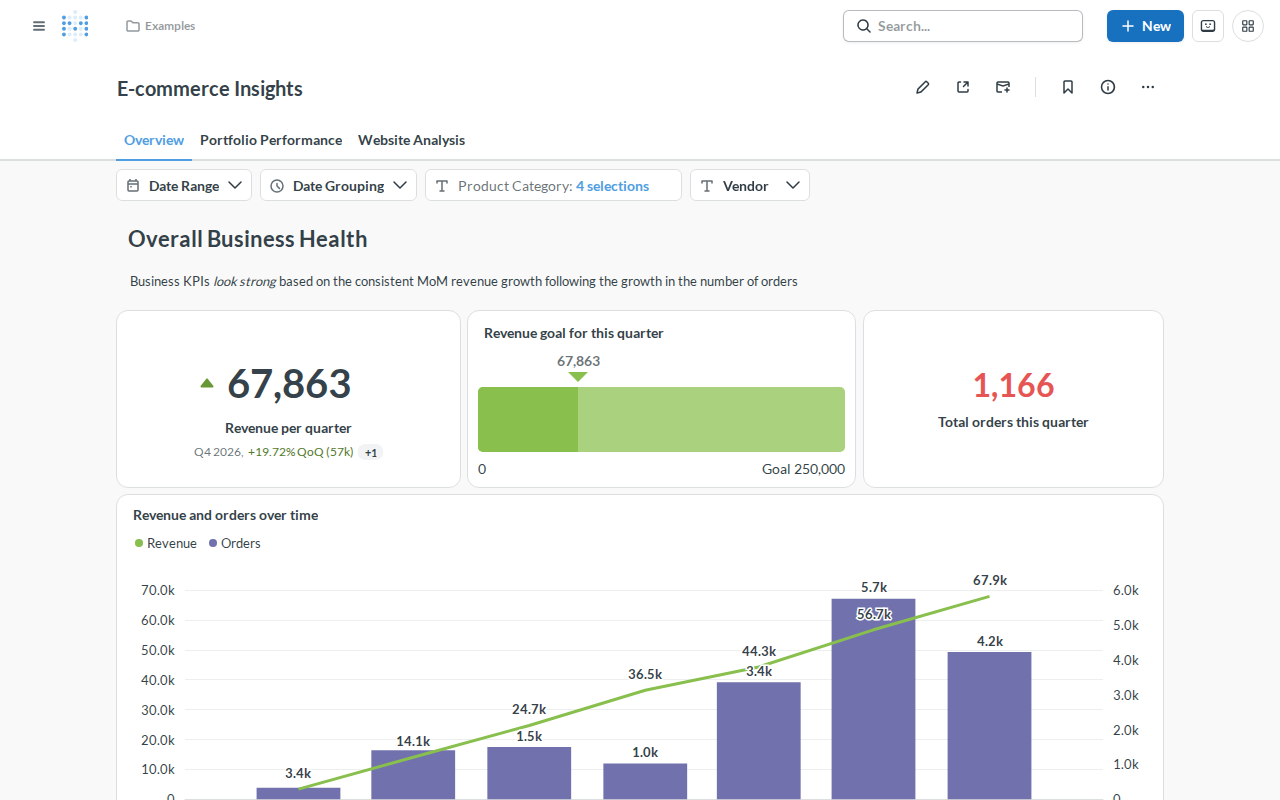
Then open **Examples → E-commerce Insights** from the sidebar. It's a
finished dashboard on Metabase's sample database. Click any chart to see
the question behind it, change a filter, or press **New → Question** to
make your own.
The sample dashboard, a good place to learn your way around.
## Ask Metabot
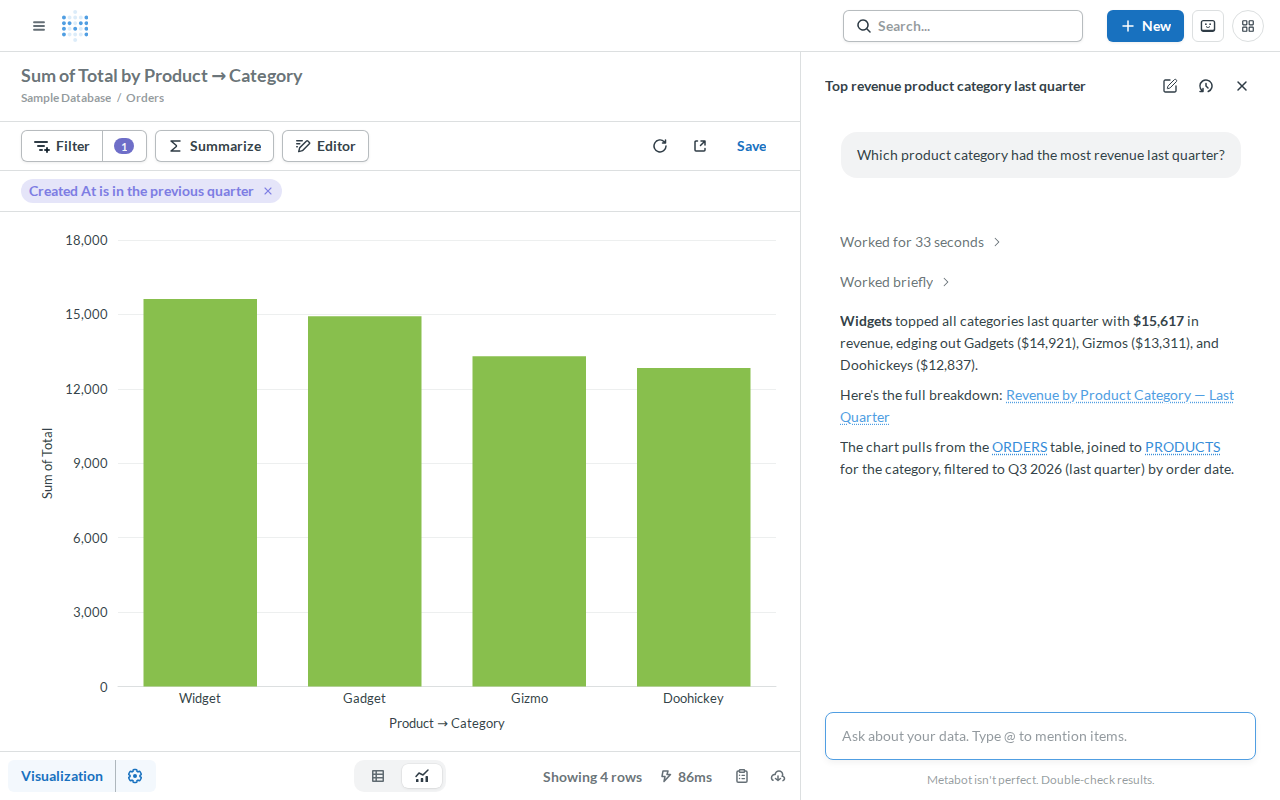
Press **Ctrl+E** (or the chat button at the top right) and ask a question
about your data, like *Which product category had the most revenue last
quarter?* Metabot writes the query, runs it, and links the chart it made,
which you can save or tweak like any other question.
Metabot answers, and shows the question it built.
Metabot runs on Claude Sonnet 4.6 through exe.dev's
[LLM gateway](/docs/integrations-llm), so there's no API key to paste.
Under **Admin → AI** the default model reads *Select a model*, but Claude is
what answers; pick a GPT model there to switch.
> [!NOTE]
> Metabot sends your question, table and column names, and query results
> to the model provider. Turn off **Allow Metabot to read query results**,
> or **Disable all AI features**, under **Admin → AI** if that's not OK.
> A question uses around 50,000 input tokens, mostly cached.
## Connect your database
Give Metabase a login that can only read. For a database from the
[PostgreSQL recipe](/deploy/postgres), on **that** VM:
```bash
pw=$(openssl rand -hex 24); echo "metabase_ro password: $pw"
psql -d app -v ON_ERROR_STOP=1 -v pw="$pw" <<'EOF'
CREATE ROLE metabase_ro LOGIN PASSWORD :'pw';
GRANT CONNECT ON DATABASE app TO metabase_ro;
GRANT USAGE ON SCHEMA public TO metabase_ro;
GRANT SELECT ON ALL TABLES IN SCHEMA public TO metabase_ro;
ALTER DEFAULT PRIVILEGES FOR ROLE app IN SCHEMA public GRANT SELECT ON TABLES TO metabase_ro;
EOF
```
The open-source edition can't limit what someone sees within a database,
so this login is the line Metabase can't cross.
exe.dev VMs don't share a private network or expose database ports, so
Metabase reaches another VM one of two ways:
- **Tailscale.** Put both VMs on your tailnet as in
[Connect from another VM](/deploy/postgres#connect-from-another-vm)
([MySQL too](/deploy/mysql#connect-from-another-vm)). Metabase runs in
Docker, which doesn't use Tailscale's DNS, so in the **Host** field use
the database VM's address from `tailscale ip -4 my-postgres`.
- **SSH tunnel**, built into Metabase. On the Metabase VM, make a key:
```bash
ssh-keygen -t ed25519 -N '' -C metabase-tunnel -f ~/metabase/tunnel-key
cat ~/metabase/tunnel-key.pub
```
On your computer, let that key into the database VM, and only that VM
(a [VM-scoped key](/docs/vm-scoped-ssh-keys)), pasting the line it
printed:
```bash
echo 'ssh-ed25519 AAAA... metabase-tunnel' | ssh exe.dev ssh-key add --vm=my-postgres
```
In Metabase, use **Host** `localhost`, turn on **Use an SSH tunnel**, and
enter `my-postgres.exe.xyz`, port `22`, username `exedev`, and the
private key from `cat ~/metabase/tunnel-key`.
Then go to **Admin → Databases → Add a database**, enter the database name,
`metabase_ro`, and its password, and **Save**. Metabase scans the tables;
your data appears under **Browse → Databases** a minute later.
## Bring in your team
People need two things: access to the VM, then a Metabase account. On your
computer, share the VM with a person or your whole team:
```bash
ssh exe.dev share add my-metabase alice@example.com
ssh exe.dev share add my-metabase team
```
Alice gets an email from exe.dev. Once she has opened the link and signed
in, add her under **Admin → People → Invite someone**; Metabase emails her
an invitation. Teammates can be invited straight away.
The open-source edition has no way to trust exe.dev's login, so each person
also has a Metabase password. Use **Groups** and **Collections** to decide
who sees which dashboards.
> [!TIP]
> Removing someone? Deactivate them in **Admin → People**, then on your
> computer run `ssh exe.dev share remove my-metabase alice@example.com`.
## Get dashboards by email
On any dashboard, click the **Subscriptions** button at the top, choose
**Email it**, add people, and set a schedule. Metabase's mail goes through
`smtp-relay`, a small program next to it, out of exe.dev's
[email gateway](/docs/send-email). There's no SMTP server to configure;
**Admin → Settings → Email** shows it's set up.
exe.dev only delivers to you, your team, and people you've shared the VM
with who have signed in, and it limits how much and how often. Emails are
plain text with the charts attached as images, ten at most and 1 MB in
all; a bigger dashboard arrives with a note listing what was left out.
CSV and Excel attachments come first.
## Keep your data
Your questions, dashboards, and people live in Metabase's PostgreSQL
database in `~/metabase/postgres`, and nightly backups go to
`~/metabase/backups`. Your business data stays in your own database.
Keep a copy **off the VM**. On your computer:
```bash
scp -r my-metabase.exe.xyz:metabase/backups .
```
Backups hold the key that unlocks the database passwords Metabase saved,
so keep them private. For updates or trouble, ask Shelley, or open the
instructions below.
## The nuts and bolts
Happy clicking Deploy? You can stop here. These are Shelley's setup steps
and your maintenance reference.
Install by hand
### Create a VM
On your computer (pick another name if `my-metabase` is taken):
```bash
ssh exe.dev new --name=my-metabase
ssh my-metabase.exe.xyz
```
The default VM (8 GB) suits a team. All remaining installation commands
run **on the VM**, as `exedev`.
### Write the secrets
Metabase uses an encryption key for the database passwords it saves and a
session key for logins. This writes them, and PostgreSQL's password, to a
file only you can read, once:
```bash
mkdir -p ~/metabase && cd ~/metabase
if [ ! -e .env ]; then
touch .env && chmod 600 .env
cat >> .env < compose.yaml <<'EOF'
# Metabase behind exe.dev's HTTPS proxy, with PostgreSQL as its
# application database. Secrets come from .env in this directory.
name: metabase
services:
metabase:
# v0.65.x follows the newest 0.65 release.
image: metabase/metabase:v0.65.x
restart: unless-stopped
ports:
- "8000:3000"
env_file: .env
environment:
MB_DB_TYPE: postgres
MB_DB_HOST: postgres
MB_DB_PORT: 5432
MB_DB_DBNAME: metabase
MB_DB_USER: metabase
MB_DISABLE_LEGACY_STARTUP_ENCRYPTION: "true"
# Half the VM's memory for Java's heap; it follows a resize.
JAVA_OPTS: -XX:MaxRAMPercentage=50
# Email through exe.dev's email gateway, by way of smtp-relay.
MB_EMAIL_SMTP_HOST: smtp-relay
MB_EMAIL_SMTP_PORT: 2525
MB_EMAIL_SMTP_SECURITY: none
MB_EMAIL_FROM_NAME: Metabase
# Metabot through exe.dev's LLM gateway: no real key needed.
# The gateway's address is link-local, hence allow-all.
MB_LLM_ANTHROPIC_API_KEY: exe-llm-gateway
MB_LLM_ANTHROPIC_API_BASE_URL: https://llm.int.exe.xyz
MB_LLM_OPENAI_API_KEY: exe-llm-gateway
MB_LLM_OPENAI_API_BASE_URL: https://llm.int.exe.xyz
MB_LLM_ALLOWED_NETWORKS: allow-all
depends_on:
postgres:
condition: service_healthy
healthcheck:
test: ["CMD", "curl", "-fs", "http://localhost:3000/api/health"]
interval: 15s
timeout: 5s
retries: 5
start_period: 3m
postgres:
image: postgres:18
restart: unless-stopped
environment:
POSTGRES_USER: metabase
POSTGRES_DB: metabase
POSTGRES_PASSWORD: ${MB_DB_PASS:?set in .env}
volumes:
- ./postgres:/var/lib/postgresql
healthcheck:
test: ["CMD", "pg_isready", "-U", "metabase", "-d", "metabase"]
interval: 10s
timeout: 5s
retries: 5
smtp-relay:
image: python:3.13-alpine
restart: unless-stopped
command: ["python3", "-u", "/smtp-relay.py"]
environment:
SMTP_RELAY_LISTEN: 0.0.0.0
volumes:
- ./smtp-relay.py:/smtp-relay.py:ro
EOF
docker compose config --quiet && echo compose ok
```
Enable Docker at boot, download the images (about 2.7 GB), and start.
Metabase's first start takes a minute or two while it sets up its
database:
```bash
sudo systemctl enable --now docker.service
docker compose pull -q
docker compose up -d --wait --wait-timeout 300
curl -fs localhost:8000/api/health; echo
printf 'Metabase: https://%s.exe.xyz/\n' "$(hostname)"
```
`curl` should print `{"status":"ok"}`. The
[HTTPS proxy](/docs/proxy) adds HTTPS and exe.dev login in front of
port 8000.
> [!WARNING]
> Until someone finishes Metabase's setup, whoever opens the URL first
> becomes its admin. The VM is private, so that's you; create your account
> before you share it.
### Set up nightly backups
This dumps Metabase's database while it runs, checks the dump, saves it
with `.env` and `compose.yaml`, and keeps two weeks of backups:
```bash
cd ~/metabase
cat > backup.sh <<'EOF'
#!/bin/sh
# Back up Metabase: its application database and the .env with its keys.
set -eu
umask 077
cd "$(dirname "$0")"
mkdir -p -m 700 backups
out="backups/metabase-$(date +%Y%m%d-%H%M%S).tar.gz"
work=$(mktemp -d)
trap 'rm -rf "$work"' EXIT
docker compose exec -T postgres pg_dump -U metabase -d metabase -Fc > "$work/metabase.dump"
docker compose exec -T postgres pg_restore --list < "$work/metabase.dump" > /dev/null
cp .env compose.yaml "$work/"
tar -C "$work" -czf "$out.tmp" .
mv "$out.tmp" "$out"
find backups -name 'metabase-*.tar.gz' -mtime +14 -delete
EOF
chmod +x backup.sh
sudo tee /etc/systemd/system/metabase-backup.service >/dev/null <<'EOF'
[Unit]
Description=Back up Metabase
After=docker.service
[Service]
Type=oneshot
User=exedev
ExecStart=/home/exedev/metabase/backup.sh
EOF
sudo tee /etc/systemd/system/metabase-backup.timer >/dev/null <<'EOF'
[Unit]
Description=Back up Metabase nightly
[Timer]
OnCalendar=daily
Persistent=true
[Install]
WantedBy=timers.target
EOF
sudo systemctl daemon-reload
sudo systemctl enable --now metabase-backup.timer
sudo systemctl start metabase-backup.service
systemctl list-timers metabase-backup.timer
tar -tzf backups/metabase-*.tar.gz
```
The timer should list its next run, and the archive should hold
`metabase.dump`, `.env`, and `compose.yaml`. You're ready: create your
admin account and try the walkthrough above.
Back up and restore
To take an extra backup, on the VM:
```bash
cd ~/metabase
./backup.sh
```
### Restore
Pick an archive in `backups/` and substitute its filename below. On a new
VM, run **Install by hand** first and copy your archive into that folder.
These commands run **on the VM**. They take Metabase's keys from the
backup, keep this VM's PostgreSQL password, and set the current database
aside rather than delete it:
```bash
cd ~/metabase
backup=backups/metabase-YYYYMMDD-HHMMSS.tar.gz
work=$(mktemp -d)
tar -C "$work" -xzf "$backup" &&
docker compose exec -T postgres pg_restore --list < "$work/metabase.dump" >/dev/null &&
sudo systemctl stop metabase-backup.timer metabase-backup.service &&
docker compose stop metabase &&
cp -p .env ".env.before-restore-$(date +%s)" &&
for key in MB_ENCRYPTION_SECRET_KEY MB_SESSION_SECRET_KEY; do
line=$(grep "^$key=" "$work/.env") && sed -i "s|^$key=.*|$line|" .env
done &&
docker compose exec -T postgres psql -U metabase -d postgres \
-c "ALTER DATABASE metabase RENAME TO metabase_before_restore_$(date +%s)" \
-c "CREATE DATABASE metabase" &&
docker compose exec -T postgres pg_restore -U metabase -d metabase --exit-on-error < "$work/metabase.dump" &&
docker compose up -d --wait &&
sudo systemctl start metabase-backup.timer &&
rm -rf "$work"
```
Sign in and check your dashboards and **Admin → Databases**. Once you're
happy, drop the set-aside database; list it with
`docker compose exec postgres psql -U metabase -d postgres -c '\l'`, then
`docker compose exec postgres dropdb -U metabase metabase_before_restore_...`.
Update
The `v0.65.x` tag gets each 0.65 bug-fix release. On the VM, back up
first, then pull and restart; Metabase updates its database on start:
```bash
cd ~/metabase
./backup.sh && docker compose pull && docker compose up -d --wait --wait-timeout 300
```
For a new major version, read the
[release notes](https://github.com/metabase/metabase/releases), change the
tag in `compose.yaml` (to `v0.66.x`, say), and run the same command. Going
up several versions? Step through each one's latest release. Metabase
can't go back to an older version on an upgraded database: to undo an
update, put the old tag back and [restore](#back-up-and-restore) the backup
you took first.
Something's not happy?
Start with the logs. On the VM:
```bash
cd ~/metabase
docker compose ps
docker compose logs --tail=50 metabase
```
- **502 right after a start?** Metabase takes about a minute to boot.
- **Down after a reboot?** Run `sudo systemctl enable --now docker.service`.
- **Slow, or `OutOfMemoryError` in the logs?** Give the VM more memory on
your computer with `ssh exe.dev resize my-metabase --memory=16GB`;
Metabase's heap grows with it.
- **No email?** Check `docker compose logs smtp-relay`. A recipient
outside your team must accept the VM share and sign in first.
- **Metabot says it can't connect?** Check that `curl -s
https://llm.int.exe.xyz/v1/models` works on the VM; your
[LLM integration](/docs/integrations-llm) must be attached to it.
- **Can't reach a database?** From the VM, try it outside Docker first,
e.g. `nc -zv 100.x.y.z 5432` over Tailscale.
- **Locked out?** Another admin can reset your password in
**Admin → People**, or Metabase can email you a reset link.
## Frequently asked questions
### Is Metabase free?
The open-source edition is, under the AGPL. You pay for your [VM plan](https://exe.dev/pricing), and Metabot uses your exe.dev [LLM allocation](/docs/integrations-llm). Metabase's paid plans add SSO, row-level permissions, and white-labelling.
### Can people sign in with their exe.dev login alone?
Not in the open-source edition. exe.dev decides who can reach the VM; Metabase still asks for its own account. Metabase's single sign-on (JWT, SAML, OIDC) is a paid feature. Google Sign-In and LDAP are free.
### Why PostgreSQL instead of the built-in H2 database?
Metabase says not to run H2 in production. It's a single file that Metabase keeps open, so a crash can corrupt it, it can't be backed up while Metabase runs, and upgrades are riskier. PostgreSQL costs about 100 MB of memory and backs up live with `pg_dump`.
### How big a VM do I need?
The default 8 GB VM gives Metabase a 4 GB Java heap, plenty for a team. Metabase takes half the VM's memory, so `ssh exe.dev resize` is all it takes to give it more. Below 4 GB, expect it to slow down.
### Does my data leave the VM?
Queries go straight from the VM to your database. Metabot sends your question, table and column names, and (unless you turn it off) query results to the model provider through exe.dev's gateway. Emailed dashboards go out through exe.dev's email gateway.
### Can Metabase reach a database on another exe.dev VM?
Yes, over Tailscale or Metabase's built-in SSH tunnel. VMs don't share a private network and have no public database ports. See [Connect your database](#connect-your-database).
## Related
- [Self-host PostgreSQL](https://exe.dev/deploy/postgres.md): Your own Postgres on a real disk, with backups you've actually restored.
- [Self-host MySQL](https://exe.dev/deploy/mysql.md): Your own MySQL on a real disk, private by default, with backups you've restored.
- [Self-host Open WebUI](https://exe.dev/deploy/open-webui.md): A private ChatGPT for you and your team. No API keys.
- [Self-host MongoDB](https://exe.dev/deploy/mongodb.md): Your own MongoDB on a real disk, locked down, with backups you've restored.
- [Self-host PocketBase](https://exe.dev/deploy/pocketbase.md): A whole backend in one file, on a disk that stays put.
- [Self-host Redis](https://exe.dev/deploy/redis.md): Your own Redis on a real disk, private by default, with backups you've restored.