---
title: "Self-host Medusa"
description: "Self-host Medusa 2 on a VM without Docker: a public Next.js storefront, the admin behind exe.dev login, PostgreSQL, Redis, order emails, backups."
url: https://exe.dev/deploy/medusa
category: "Web apps"
published: 2026-11-21
updated: 2026-11-21
---
# Self-host Medusa
> **For agents:** with your user's OK, this sets up Medusa on a new exe.dev VM in their account: `curl -fsSL https://exe.dev/deploy/medusa/prompt.txt | ssh exe.dev new --prompt=/dev/stdin` (or open https://exe.dev/deploy/medusa/new). Already on the VM? Skip this.
Medusa's server, admin, and Next.js storefront on one VM of their own.
- **Software:** Medusa (https://medusajs.com)
- **Source:** https://github.com/medusajs/medusa
- **License:** MIT (Enterprise features under a commercial license)
- **Time:** 20 minutes
- **Example VM name:** `my-medusa` (yours will differ; on the VM, `hostname` prints it)
- **Machine-readable:** https://exe.dev/deploy/medusa/manifest.json
- **File:** https://exe.dev/deploy/medusa/medusa-backup
- **File:** https://exe.dev/deploy/medusa/medusa-cli
- **File:** https://exe.dev/deploy/medusa/medusa-config.ts
- **File:** https://exe.dev/deploy/medusa/medusa-deploy
- **File:** https://exe.dev/deploy/medusa/medusa.nginx
- **File:** https://exe.dev/deploy/medusa/order-placed-email.ts
- **File:** https://exe.dev/deploy/medusa/us-region.ts
## What you get
- Medusa 2.23 with its admin and worker on port 9000, and the Next.js starter storefront behind nginx on port 8000, restarting after a reboot.
- PostgreSQL and Redis on the VM, and uploads in ~/medusa-data, backed up every night and before every deploy.
- A storefront you can make public in one command, while the admin and admin API stay on a private port behind exe.dev login.
- An email to you through exe.dev for every order, with no mail provider, and a note in the admin's notification bell.
- ~/store as the one place to change the server and the storefront, and ~/bin/medusa-deploy to build, back up, migrate, and switch, with rollback.
Running on the VM:
- **nginx**: the public port, sending shoppers to the storefront and the Store API, never to the admin, port 8000
- **Next.js storefront**: Medusa's starter storefront on Next.js 16, as storefront.service, port 8001, data in `~/store/apps/storefront → a release in ~/releases`
- **Medusa 2.23**: the server, the admin dashboard, and the background worker, as medusa.service, port 9000, data in `~/store/apps/backend → a release in ~/releases`
- **PostgreSQL 16**: Ubuntu's package; products, orders, customers, port 5432, data in `/var/lib/postgresql`
- **Redis 7**: sessions, events, workflows, and locks, port 6379
- **Uploads**: product images, on the VM's disk; S3 if you'd rather, data in `~/medusa-data`
- **Nightly backup**: database, uploads, settings, and the store's git history, data in `~/backups`
How it is reached:
- https://my-medusa.exe.xyz/ (private): the storefront and the Store API, until you make the VM public
- https://my-medusa.exe.xyz:9000/app (private): Medusa's admin and admin API, for people with access to the VM, even when the store is public
## Deploy with Shelley
Open https://exe.dev/deploy/medusa/new to create a VM whose agent, Shelley, follows this recipe. From a terminal:
```sh
curl -fsSL https://exe.dev/deploy/medusa/prompt.txt | ssh exe.dev new --prompt=/dev/stdin
```
Then, on your own computer:
```sh
ssh exe.dev share set-public my-medusa
```
Or follow the steps below by hand.
[Medusa](https://medusajs.com) is an open-source commerce platform in
TypeScript: a server with a Store API for shoppers and an Admin API for
you, an admin dashboard for products, orders, and customers, and a
Next.js storefront to start from. It is three programs, a PostgreSQL
database, and Redis, which is a lot for a serverless host and just right
for a VM of its own. Here they all run on one exe.dev VM, around the
clock, with the data on its persistent disk and nightly backups.
The VM is private until you say otherwise. When you make it public, only
the storefront and what shoppers need go public: the admin and the Admin
API stay on a second port that exe.dev keeps behind its login, so your
staff sign in twice and strangers can't knock on the door at all. Every
order sends you an email through exe.dev, with no mail provider, and
Shelley works next to the code, so "add a size guide to the product page"
is a request, a commit, and a deploy.
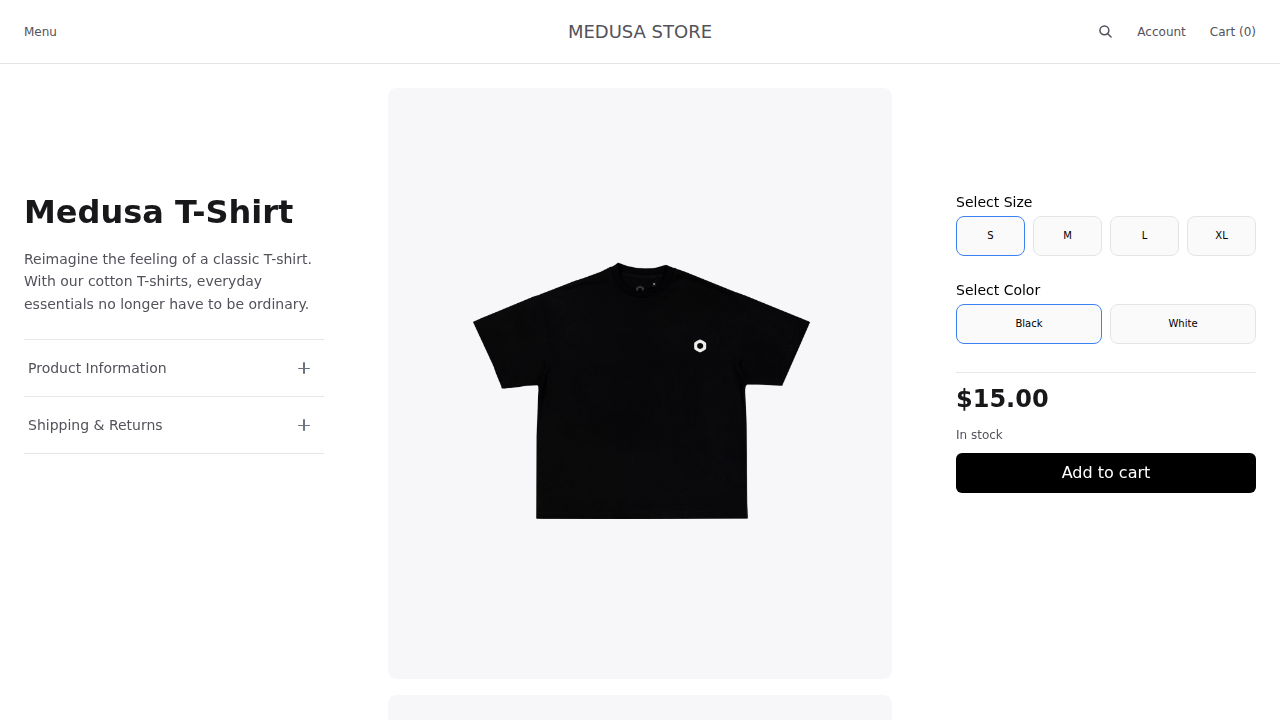
The starter storefront on a new VM, opening on the US region.
## Sign in to the admin
Medusa has its own admin accounts, made from the command line. On the
VM, invite yourself (Shelley does this for you at the end of setup):
```bash
medusa-cli user -e you@example.com --invite
```
It prints an invite token. Open
**https://my-medusa.exe.xyz:9000/app/invite?token=** followed by the
token, within 24 hours. You'll sign in to exe.dev if you haven't, then
choose a password for Medusa. From then on the admin is at
**https://my-medusa.exe.xyz:9000/app**.
To set a password straight away instead, use
`medusa-cli user -e you@example.com -p 'a long password'`. Invite
colleagues from **Settings → Users** in the admin, after
[giving them access to the VM](#who-can-reach-what).
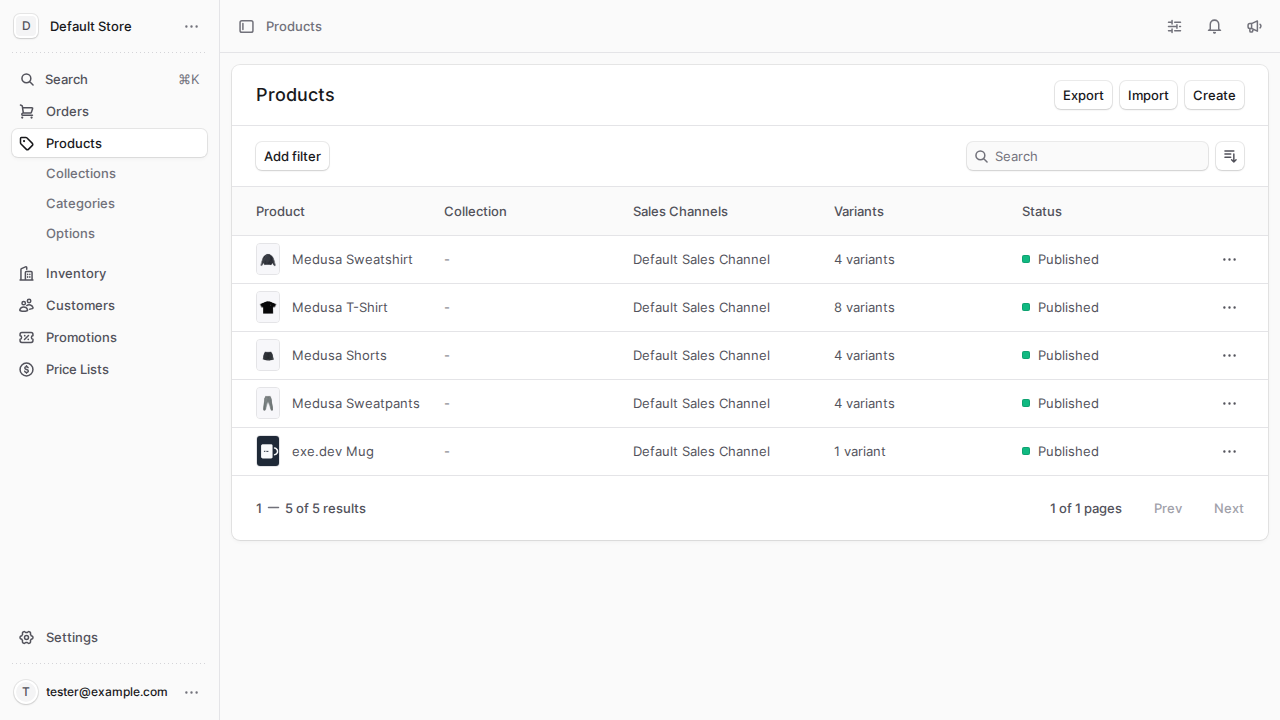
The admin on port 9000: the four demo products and one of our own.
## Make your store yours
The store starts with Medusa's demo data and one addition: two regions,
United States (dollars) and Europe (euros; the UK, Germany, Denmark,
Sweden, France, Spain, and Italy), each with Standard and Express
shipping at 10 in its currency, manual payment, a warehouse, and four
sample products priced in both. The US region comes from
[us-region.ts](https://exe.dev/deploy/medusa/us-region.ts), a migration
script that runs once on the first deploy. In the admin:
- **Settings → Store** for the name and currencies, **Settings →
Regions** for the countries you sell to, their currency and taxes, and
**Settings → Locations & Shipping** for where you ship from and what
it costs.
- **Products → Create** for your products. Images go to
`~/medusa-data/static` and are served from
`https://my-medusa.exe.xyz/static/`.
- Delete or unpublish the demo products.
The storefront lists your products at once: open
**https://my-medusa.exe.xyz/** and go through a checkout with manual
payment. The order lands in **Orders** in the admin and in your inbox.
The storefront opens on the region of `NEXT_PUBLIC_DEFAULT_REGION` in
`~/storefront.env`, a country code: `us`, so `https://my-medusa.exe.xyz/`
shows dollar prices and `/de` shows euros. To open on another country,
change it and run `~/bin/medusa-deploy`.
## Make it public
When the store is ready for shoppers, on your computer:
```bash
ssh exe.dev share set-public my-medusa
```
Now anyone can open `https://my-medusa.exe.xyz/`, browse, sign up as a
customer, and check out. The admin isn't part of it: port 9000 stays
private, and nginx on the public port answers `404` for `/app`,
`/admin`, and admin sign-in. `ssh exe.dev share set-private my-medusa`
closes the store again.
## Who can reach what
| Address | Who | What |
|---|---|---|
| `https://my-medusa.exe.xyz/` | you, or everyone once public | the storefront |
| `https://my-medusa.exe.xyz/store/…`, `/auth/customer/…`, `/hooks/…`, `/static/…` | same | the Store API, customer sign-in, payment webhooks, product images |
| `https://my-medusa.exe.xyz:9000/app` | people with access to the VM, then a Medusa admin account | the admin |
| `https://my-medusa.exe.xyz:9000/admin/…` | same, or scripts with a VM token | the Admin API |
To let a colleague into the admin, share the VM with them, on your
computer:
```bash
ssh exe.dev share add my-medusa colleague@example.com
```
That gives them web access to the VM's private ports (no shell), and an
email invitation if they have no exe.dev account. Then invite them in
**Settings → Users**, then **Copy invite link** next to the pending invite
(Medusa has no mail provider here to send it) and send it to them; they open it and choose a
password. `ssh exe.dev share remove my-medusa colleague@example.com`
takes the first door away, whatever Medusa says.
## Call the Admin API from scripts
The Admin API on port 9000 is behind exe.dev, so a script needs two
keys: an exe.dev [VM token](/docs/https-tokens-for-vms) to get through
the proxy, and a Medusa secret API key to get into Medusa. Make the
token on your computer:
```bash
ssh exe.dev ssh-key generate-api-key --vm=my-medusa --label=medusa-scripts
```
Make the API key in the admin under **Settings → Secret API Keys**. Then:
```bash
curl -H "X-Exedev-Authorization: Bearer $EXE_TOKEN" -u "$MEDUSA_SECRET_KEY:" \
'https://my-medusa.exe.xyz:9000/admin/products?limit=5&fields=title,status'
```
exe.dev strips the `X-Exedev-Authorization` header before the request
reaches Medusa, which reads the secret key from basic auth. Without the
VM token the answer is `401` from exe.dev, before Medusa sees anything.
On the VM itself, scripts can skip the proxy and call
`http://localhost:9000` with just the API key.
## Get an email for every order
`apps/backend/src/subscribers/order-placed-email.ts` listens for
Medusa's `order.placed` event. It puts a note in the admin's
notification bell and sends you an email through exe.dev's
[email gateway](/docs/send-email), with the items, the total, and a link
to the order. It goes to `ORDER_ALERT_EMAIL` in `~/medusa.env`, the
email of your exe.dev account; you can change it to anyone you've
shared the VM with.
exe.dev only mails you and the people you share the VM with, so it
can't send customers their order confirmations or password resets. For
those, add a notification provider such as SendGrid
(`@medusajs/medusa/notification-sendgrid`, built in) or Resend, as in
Medusa's [notification docs](https://docs.medusajs.com/resources/infrastructure-modules/notification).
Shelley can write the subscriber and templates; the starter's
confirmation page says an email was sent even when none was.
## Take card payments with Stripe
The storefront already knows Stripe's payment form; Medusa needs your
keys. From the [Stripe dashboard](https://dashboard.stripe.com/apikeys),
add the secret key to `~/medusa.env` and the publishable key to
`~/storefront.env`:
```bash
echo 'STRIPE_API_KEY=sk_test_...' >> ~/medusa.env
echo 'NEXT_PUBLIC_STRIPE_KEY=pk_test_...' >> ~/storefront.env
```
In `~/store/apps/backend/medusa-config.ts`, add the provider to the
`modules` list:
```ts
{
resolve: '@medusajs/medusa/payment',
options: {
providers: [
{
resolve: '@medusajs/medusa/payment-stripe',
id: 'stripe',
options: {
apiKey: process.env.STRIPE_API_KEY,
webhookSecret: process.env.STRIPE_WEBHOOK_SECRET,
},
},
],
},
},
```
Commit and run `~/bin/medusa-deploy`, then in the admin open **Settings
→ Regions**, edit each region, and add **Stripe** to its payment
providers. Stripe confirms payments through a webhook: in Stripe's
dashboard, add an endpoint at
`https://my-medusa.exe.xyz/hooks/payment/stripe_stripe` for
`payment_intent.succeeded`, `payment_intent.amount_capturable_updated`,
`payment_intent.payment_failed`, and `payment_intent.partially_funded`,
put its signing secret in `~/medusa.env` as `STRIPE_WEBHOOK_SECRET`,
and deploy again. Stripe can only reach the webhook once the VM is
public; until then, test with Stripe's test keys and cards.
## Change the store with Shelley
`~/store` holds the server (`apps/backend`) and the storefront
(`apps/storefront`) in one git repository, with an `AGENTS.md` that
tells Shelley how it's laid out. Ask for what you want ("show stock
levels on the product page", "add a module for gift messages", "a
subscriber that posts orders to Slack"); Shelley edits, commits, and
deploys:
```bash
cd ~/store
# ...edit, then:
git commit -am "Gift messages"
~/bin/medusa-deploy
```
[medusa-deploy](https://exe.dev/deploy/medusa/medusa-deploy) builds
the last commit into a new release while the old one keeps serving:
packages, the Medusa build, a backup, database migrations, then a
restart of Medusa, and only then the storefront build, which reads
products and regions from the new server. It takes about a minute. If
something looks wrong afterwards, `~/bin/medusa-deploy --rollback` puts
the previous release back (code only; migrations stay, so restore a
backup if a migration was the problem).
For bigger changes, try them on a copy of the whole VM first:
`ssh exe.dev cp my-medusa my-medusa-test` copies the disk, store and
all, to a new private VM; see [dev, test, and prod](/deploy/dev-test-prod).
On the copy, fix the addresses in both env files before deploying.
## Product images in S3
Images live on the VM's disk, which is simple and backed up with
everything else. To keep them in a bucket instead (say, for a CDN), swap
the `file-local` provider in `medusa-config.ts` for Medusa's S3
provider:
```ts
{
resolve: '@medusajs/medusa/file-s3',
id: 's3',
options: {
file_url: process.env.S3_FILE_URL,
access_key_id: process.env.S3_ACCESS_KEY_ID,
secret_access_key: process.env.S3_SECRET_ACCESS_KEY,
region: process.env.S3_REGION,
bucket: process.env.S3_BUCKET,
endpoint: process.env.S3_ENDPOINT,
},
},
```
Put the values in `~/medusa.env` and deploy. Any S3-compatible store
works; see [S3 storage on exe.dev](/deploy/s3-storage). Images already
uploaded keep their old URLs, so copy `~/medusa-data/static` to the
bucket or leave `/static/` served as it is.
## Keep your data
Every night, and before every deploy,
[medusa-backup](https://exe.dev/deploy/medusa/medusa-backup) saves a
folder in `~/backups` with the database (`pg_dump`), the uploads, both
env files, and a git bundle of `~/store`, keeping the newest 14. On the
same disk, a backup won't survive losing the VM, so keep a copy **off
the VM**. On your computer:
```bash
scp -r my-medusa.exe.xyz:backups medusa-backups
```
The backups hold your customers' details and Medusa's secrets, so keep
them private. exe.dev's [VM backups](/docs/vm-backups) (in preview) can
also copy the whole disk to your own S3 bucket. Run `~/bin/medusa-backup`
on the VM before anything risky. To restore, see
[Restore a backup](#restore).
Something odd? On the VM, `journalctl -u medusa -n 50` or
`journalctl -u storefront -n 50` usually explains it, or ask Shelley to
look.
## The nuts and bolts
Everything below is what Shelley runs to set up the VM. Read it to see
how the pieces fit, or run it yourself.
Set up by hand
### Create the VM
On your computer (pick another name if `my-medusa` is taken):
```bash
ssh exe.dev new --name=my-medusa
ssh my-medusa.exe.xyz
```
Everything else runs **on the VM**, as `exedev`.
### Install the tools
Medusa 2.23 needs Node.js 22.23.4 or later. Install Node.js 24, the
current LTS release, from NodeSource, pnpm 10 through Corepack, and
Ubuntu's PostgreSQL, Redis, and nginx:
```bash
curl -fsSL https://deb.nodesource.com/setup_24.x | sudo -E bash -
sudo apt-get install -y nodejs postgresql redis-server nginx jq
sudo npm install -g corepack
sudo corepack enable
corepack install -g pnpm@10.34.9
node --version; pnpm --version
systemctl is-active postgresql redis-server
```
Expect `v24.` (22.3 or later), `10.34.9`, and `active` twice. Corepack's
own default would be pnpm 12, which refuses to run the build scripts of
Medusa's packages.
### Create the database
A PostgreSQL role and database for Medusa, with a random password that
goes straight into Medusa's settings file, `~/medusa.env`:
```bash
dbpw=$(openssl rand -hex 24)
sudo -u postgres psql -qc "CREATE ROLE medusa LOGIN PASSWORD '$dbpw'"
sudo -u postgres createdb -O medusa medusa
vm=$(hostname)
umask 077
[ -e ~/medusa.env ] || cat > ~/medusa.env < ~/storefront.env <> .gitignore
grep -c 'process.env.MEDUSA_BACKEND_URL' apps/storefront/src/lib/config.ts apps/storefront/src/middleware.ts
```
Expect `:2` after `config.ts` and `:1` after `middleware.ts`. The
`.env` files `create-medusa-app` wrote held development settings with
weak secrets; `~/medusa.env` and `~/storefront.env` replace them.
### Tell Shelley about the store
The starter has an `AGENTS.md` for coding agents; add what's different
here, and make `~/store` a git repository:
```bash
cat >> ~/store/AGENTS.md <<'EOF'
## On this exe.dev VM
Set up from https://exe.dev/deploy/medusa.
- Production: medusa.service runs the built server and admin from
~/current/apps/backend/.medusa/server on port 9000 (private: the admin is
https://.exe.xyz:9000/app). storefront.service runs `next start`
from ~/current-storefront/apps/storefront on 127.0.0.1:8001. nginx on
port 8000 (the public port) serves the storefront plus /store, /auth/customer,
/hooks and /static from Medusa, and 404s the admin.
- Settings: ~/medusa.env and ~/storefront.env, never committed. Uploads:
~/medusa-data. Logs: journalctl -u medusa / -u storefront.
- Deploy: commit, then ~/bin/medusa-deploy (install, build, backup,
db:migrate, restart, storefront build). ~/bin/medusa-deploy --rollback
goes back one release. Generate migrations for new modules with
`pnpm medusa db:generate ` in apps/backend and commit them.
- ~/bin/medusa-cli runs Medusa's CLI against production (users, invites).
- Email: src/subscribers/order-placed-email.ts uses exe.dev's gateway, which
only reaches the VM's owner and people it's shared with; customer emails
need a notification provider.
EOF
cd ~/store
git init -q -b main
git add -A
git commit -qm "Medusa 2.23 store from create-medusa-app, set up for exe.dev"
git log --oneline
```
### Add the scripts
[medusa-deploy](https://exe.dev/deploy/medusa/medusa-deploy) builds and
switches releases, as in [Change the store with
Shelley](#change-the-store-with-shelley);
[medusa-backup](https://exe.dev/deploy/medusa/medusa-backup) makes a
backup; [medusa-cli](https://exe.dev/deploy/medusa/medusa-cli) runs
Medusa's command line in the live release with the production settings.
```bash
for f in medusa-deploy medusa-backup medusa-cli; do
curl -fsSL -o ~/bin/$f https://exe.dev/deploy/medusa/$f
done
chmod +x ~/bin/medusa-*
```
### Add the services
`medusa.service` runs the server, the admin, and the background worker
in one process on port 9000. `storefront.service` runs the storefront on
localhost only. [nginx](https://exe.dev/deploy/medusa/medusa.nginx)
listens on port 8000, exe.dev's default, and decides what the public
port shows. A timer takes a backup every night.
```bash
sudo tee /etc/systemd/system/medusa.service >/dev/null <<'EOF'
[Unit]
Description=Medusa server, admin and worker
After=network-online.target postgresql.service redis-server.service
Wants=postgresql.service redis-server.service
[Service]
User=exedev
WorkingDirectory=/home/exedev/current/apps/backend/.medusa/server
EnvironmentFile=/home/exedev/medusa.env
ExecStart=/home/exedev/current/apps/backend/node_modules/.bin/medusa start --port 9000
Restart=always
RestartSec=5
[Install]
WantedBy=multi-user.target
EOF
sudo tee /etc/systemd/system/storefront.service >/dev/null <<'EOF'
[Unit]
Description=Medusa Next.js storefront
After=network-online.target medusa.service
[Service]
User=exedev
WorkingDirectory=/home/exedev/current-storefront/apps/storefront
Environment=NODE_ENV=production NEXT_TELEMETRY_DISABLED=1
ExecStart=/home/exedev/current-storefront/apps/storefront/node_modules/.bin/next start -H 127.0.0.1 -p 8001
Restart=always
RestartSec=5
[Install]
WantedBy=multi-user.target
EOF
sudo tee /etc/systemd/system/medusa-backup.service >/dev/null <<'EOF'
[Unit]
Description=Back up Medusa's database, uploads, settings and code
[Service]
Type=oneshot
User=exedev
ExecStart=/home/exedev/bin/medusa-backup
EOF
sudo tee /etc/systemd/system/medusa-backup.timer >/dev/null <<'EOF'
[Unit]
Description=Back up Medusa every night
[Timer]
OnCalendar=*-*-* 03:00:00 UTC
RandomizedDelaySec=30m
Persistent=true
[Install]
WantedBy=timers.target
EOF
sudo curl -fsSL -o /etc/nginx/sites-available/medusa https://exe.dev/deploy/medusa/medusa.nginx
sudo rm -f /etc/nginx/sites-enabled/default
sudo ln -sfn /etc/nginx/sites-available/medusa /etc/nginx/sites-enabled/medusa
sudo nginx -t
sudo systemctl daemon-reload
sudo systemctl enable medusa storefront
sudo systemctl enable --now nginx medusa-backup.timer
sudo systemctl restart nginx
```
Expect `syntax is ok` from nginx. Ubuntu's default nginx site listens
on port 8000 as well as 80 on exe.dev's image, so it has to go.
### Deploy and check
The first deploy builds everything, creates the tables, loads the demo
data (regions, shipping, the publishable API key the storefront needs,
four products), and starts both services, in about two minutes:
```bash
~/bin/medusa-deploy
```
Expect `Live: /home/exedev/releases/...` at the end. Then check the
pieces:
```bash
systemctl is-active medusa storefront nginx
curl -s http://localhost:9000/health; echo
curl -s -o /dev/null -w '%{http_code}\n' http://localhost:8000/
pk=$(grep ^NEXT_PUBLIC_MEDUSA_PUBLISHABLE_KEY ~/storefront.env | cut -d= -f2)
curl -s -H "x-publishable-api-key: $pk" http://localhost:8000/store/products?fields=title | jq -r '.products[].title'
curl -s -H "x-publishable-api-key: $pk" http://localhost:8000/store/regions?fields=name | jq -r '.regions[].name'
curl -s -o /dev/null -w '%{http_code}\n' http://localhost:8000/app
ls ~/backups
```
Expect `active` three times, `OK`, `200`, the four demo products,
`Europe` and `United States`, `404` (no admin on the public port), and one backup. Then invite
yourself as in [Sign in to the admin](#sign-in-to-the-admin):
```bash
~/bin/medusa-cli user -e "$(grep ^ORDER_ALERT_EMAIL ~/medusa.env | cut -d= -f2)" --invite 2>&1 | grep -o 'token=[^"\\ ]*' | head -1
```
and open `https://.exe.xyz:9000/app/invite?` followed by what it
prints.
Restore a backup
Each folder in `~/backups` has `medusa.dump` (the database),
`medusa-data.tar.gz` (uploads), `medusa.env`, `storefront.env`, and
`store.bundle`, the whole git history of `~/store`.
### On the same VM
Put the database and uploads back as they were. Take a backup of the
present state first, in case you want it back. On the VM:
```bash
~/bin/medusa-backup
b=~/backups/20261121-030000 # the backup to restore
sudo systemctl stop storefront medusa
sudo -u postgres dropdb medusa
sudo -u postgres createdb -O medusa medusa
set -a; . ~/medusa.env; set +a
pg_restore --no-owner --exit-on-error -d "$DATABASE_URL" $b/medusa.dump
rm -rf ~/medusa-data
tar -C ~ -xzf $b/medusa-data.tar.gz
sudo systemctl start medusa storefront
```
If the backup is from before a migration you want to undo, also go back
to the code of that time: `~/bin/medusa-deploy --rollback`, or check out
the old commit in `~/store` and deploy.
### On a new VM
Copy the backup folder to the new VM's home directory (`scp -r`), then
follow [Set up by hand](#create-the-vm) with three changes:
1. Before "Create the database", put the old settings in place, so the
setup keeps them; change the VM name in both files if it differs:
```bash
b=~/20261121-030000 # the copied backup folder
install -m 600 $b/medusa.env ~/medusa.env
cp $b/storefront.env ~/storefront.env
```
and in "Create the database", set `dbpw` to the password in the old
`DATABASE_URL` instead of a new one.
2. Instead of "Create the store" and "Tell Shelley about the store",
clone the store from the backup, restore the database and the uploads,
and install the packages:
```bash
git clone -q -b main $b/store.bundle ~/store
set -a; . ~/medusa.env; set +a
pg_restore --no-owner --exit-on-error -d "$DATABASE_URL" $b/medusa.dump
tar -C ~ -xzf $b/medusa-data.tar.gz
```
3. Carry on from "Add the scripts". The first `medusa-deploy` finds the
restored tables, migrates only what's new, and leaves your data alone.
Update Medusa and Node.js
Medusa releases often, and its minor versions can include breaking
changes, so read the [release
notes](https://github.com/medusajs/medusa/releases) between your version
and the new one first. Then move every `@medusajs/*` package that is on
Medusa's version to the new one, in both apps, and deploy, which backs
up and migrates (`@medusajs/ui` has versions of its own; the release
notes say when it needs a bump):
```bash
cd ~/store
v=2.23.0 # the version to move to
old=$(jq -r '.dependencies["@medusajs/medusa"]' apps/backend/package.json)
sed -i -E "s#(\"@medusajs/[a-z0-9-]+\": \")$old\"#\\1$v\"#" apps/*/package.json package.json
git diff --stat
pnpm install
git commit -qam "Medusa $v"
~/bin/medusa-deploy
```
Or ask Shelley to do it and to read the release notes first. If the
new version misbehaves, `~/bin/medusa-deploy --rollback` brings back the
old code, and [Restore a backup](#restore) brings back the database
from before the migration.
Node.js updates come with `sudo apt-get upgrade`; restart both services
afterwards with `sudo systemctl restart medusa storefront`. A new
Node.js major version needs NodeSource's script for that version.
Something not working?
**The storefront shows an error, or no products.** The storefront reads
regions and products from Medusa when it builds and when it serves.
`journalctl -u storefront -n 50` and `curl -s localhost:9000/health`;
if Medusa isn't answering, `journalctl -u medusa -n 50`. An empty
`NEXT_PUBLIC_MEDUSA_PUBLISHABLE_KEY` in `~/storefront.env` means the
first deploy didn't finish; run it again.
**`pnpm install` fails with ERR_PNPM_IGNORED_BUILDS.** That's pnpm 12;
run `corepack install -g pnpm@10.34.9` and deploy again.
**The admin says the session expired, or login loops.** Open it at
`https://my-medusa.exe.xyz:9000/app`, not through the public port, and
check that `ADMIN_CORS` and `AUTH_CORS` in `~/medusa.env` have that
address.
**Images don't show.** `MEDUSA_FILE_URL` in `~/medusa.env` must be
`https://.exe.xyz/static`, and
`ls ~/current/apps/backend/.medusa/server/static` should list the
uploads (it links to `~/medusa-data/static`).
**Port 8000 shows nginx's welcome page.** The default site is still
enabled: `sudo rm /etc/nginx/sites-enabled/default` and
`sudo systemctl reload nginx`.
**A migration failed during a deploy.** The old release is still live,
and a backup from just before is in `~/backups`. Read the error, fix
the code, and deploy again, or restore.
## Frequently asked questions
### Is Medusa free to self-host?
Yes. Medusa is open source under the MIT license, apart from its Enterprise features (role-based access and single sign-on for the admin), which need a commercial agreement; this recipe uses none of them. You pay for the VM; see [exe.dev plans](https://exe.dev/pricing). Payment providers such as Stripe charge their usual fees.
### Do I need Docker to self-host Medusa?
No. Medusa is a Node.js app, and so is the storefront. Here they run as two systemd services next to Ubuntu's PostgreSQL and Redis, which makes deploys, logs, and backups plain files and commands on one VM. Medusa's own docs don't ship an official image either.
### How big a VM does Medusa need?
The default VM is plenty for a small store. Medusa uses about 300 MB of memory and the storefront about 150 MB; a deploy takes about a minute and up to 2 GB while it builds. Three releases and pnpm's package store take about 3 GB of disk. Uploads take what they take; `ssh exe.dev resize my-medusa --disk=50GB` grows the disk.
### Can customers check out with a card?
Yes, once you add a payment provider. The store starts with Medusa's manual payment (pay on delivery or by invoice), so you can try orders end to end; [Take card payments with Stripe](#take-card-payments-with-stripe) adds Stripe with your own keys.
### Why isn't the admin on the public address?
exe.dev makes one port of a VM public, and every other port stays behind exe.dev login. The storefront and the Store API are on the public port 8000; the admin, the admin API, and admin sign-in are only on port 9000, so nobody can even try a password unless you've shared the VM with them.
### Can I use my own domain?
Yes. Point a CNAME at `my-medusa.exe.xyz` as in [custom domains](/docs/cnames), then change the addresses in `~/medusa.env` and `~/storefront.env` and run `~/bin/medusa-deploy`. The admin stays at `https://my-medusa.exe.xyz:9000/app`.
## Related
- [Self-host PostgreSQL](https://exe.dev/deploy/postgres.md): Your own Postgres on a real disk, with backups you've actually restored.
- [Self-host Redis](https://exe.dev/deploy/redis.md): Your own Redis on a real disk, private by default, with backups you've restored.
- [Deploy Next.js on your own server](https://exe.dev/deploy/nextjs.md): Your Next.js app on a server of its own. git push to deploy.
- [Self-hosted S3 storage](https://exe.dev/deploy/s3-storage.md): Your own S3 bucket on a real disk. RustFS, Garage or SeaweedFS, tested.
- [Self-host Payload CMS](https://exe.dev/deploy/payload.md): Payload's admin, API, and Next.js site on a computer of their own.
- [Dev, Test, Prod: Choose One, Two, or Three](https://exe.dev/deploy/dev-test-prod.md): You can build, test, and deploy on exe.dev.