---
title: "Self-host Kanboard"
description: "Run Kanboard on an exe.dev VM: a private kanban board that signs in everyone you share the VM with, a JSON-RPC API for agents, nightly backups."
url: https://exe.dev/deploy/kanboard
category: "Productivity"
updated: 2026-11-17
---
# Self-host Kanboard
> **For agents:** with your user's OK, this sets up Kanboard on a new exe.dev VM in their account: `curl -fsSL https://exe.dev/deploy/kanboard/prompt.txt | ssh exe.dev new --prompt=/dev/stdin` (or open https://exe.dev/deploy/kanboard/new). Already on the VM? Skip this.
A small, sturdy kanban board that signs your team in with exe.dev.
- **Software:** Kanboard (https://kanboard.org)
- **Source:** https://github.com/kanboard/kanboard
- **License:** MIT
- **Time:** 10 minutes
- **Example VM name:** `my-kanboard` (yours will differ; on the VM, `hostname` prints it)
- **Machine-readable:** https://exe.dev/deploy/kanboard/manifest.json
## What you get
- Kanboard 1.2 at `https://my-kanboard.exe.xyz/`, restarted after a reboot, with SQLite in `~/kanboard/data`.
- exe.dev login as Kanboard login: the owner is a Kanboard admin, and anyone the VM is shared with gets an account on first visit. No passwords, and Kanboard's default `admin` account removed.
- An API token in `~/kanboard/kanboard.env` (mode 600) and a `~/kanboard/kb` helper, checked by creating, commenting on and closing a task as the `agent` user.
- Nightly backups of the database and attachments in `~/kanboard/backups`.
Running on the VM:
- **Kanboard 1.2**: kanboard/kanboard in Docker Compose: nginx, PHP and SQLite in one container, on 127.0.0.1 only, port 8000, data in `~/kanboard/data`
- **Nightly backup**: A systemd timer; keeps two weeks of copies, data in `~/kanboard/backups`
How it is reached:
- https://my-kanboard.exe.xyz/ (private): The board, for you and anyone you share the VM with, signed in by exe.dev
- https://my-kanboard.exe.xyz/jsonrpc.php (private): The JSON-RPC API, for agents with an exe.dev VM token and the Kanboard API token
## Deploy with Shelley
Open https://exe.dev/deploy/kanboard/new to create a VM whose agent, Shelley, follows this recipe. From a terminal:
```sh
curl -fsSL https://exe.dev/deploy/kanboard/prompt.txt | ssh exe.dev new --prompt=/dev/stdin
```
Or follow the steps below by hand.
[Kanboard](https://kanboard.org) is a kanban board and lightweight issue
tracker: projects, columns, swimlanes, tasks with comments, subtasks,
attachments and due dates, a calendar and a Gantt view, automatic
actions, and a JSON-RPC API that covers nearly all of it. It's PHP and
SQLite, idles at a few tens of megabytes, and has looked the same for
years. That's the point: it's finished software that keeps working.
On an exe.dev VM, Kanboard sits behind exe.dev's [HTTPS proxy](/docs/proxy),
private until you share it. Kanboard can take its sign-in from a reverse
proxy, so this setup uses your exe.dev login as the Kanboard login: you
are the admin, and anyone you [share the VM](/docs/sharing) with is
signed in the first time they open it. Nobody manages Kanboard
passwords. Agents on the VM, or anywhere with a VM token, create and
close tasks through the API.
## Open your board
Open `https://my-kanboard.exe.xyz/` and sign in to exe.dev if asked.
Kanboard opens on your dashboard, signed in as your exe.dev email, with
admin rights. There's no Kanboard password to set.
1. Choose **New project**, name it, and **Save**.
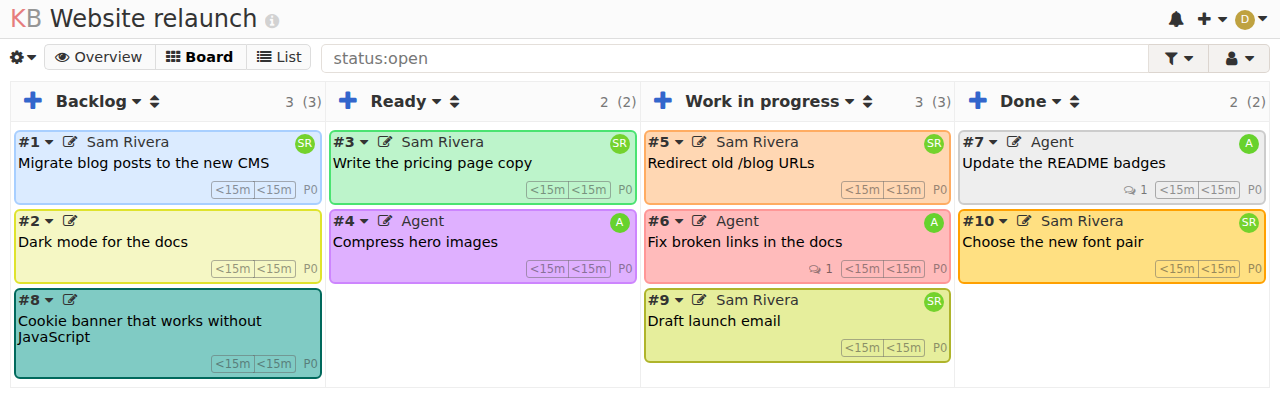
2. Press **+** in the **Backlog** column to add a task, then drag it
across the board.
3. Open a task to add comments, subtasks, attachments or a due date.
A project board. Cards marked Agent were created, and commented on, over the API.
## Bring your team
On your computer, share the VM with each teammate's email:
```bash
ssh exe.dev share add my-kanboard alice@example.com
```
exe.dev emails them an invitation. When they open
`https://my-kanboard.exe.xyz/` and sign in to exe.dev, Kanboard creates
their account (a normal user, named after their email). Then, in your
project, open **Permissions** and add them: Kanboard shows people only
the projects they're members of. `ssh exe.dev share add my-kanboard team`
shares with your whole [exe.dev team](/docs/teams/vms).
To take access away, run `ssh exe.dev share remove my-kanboard
alice@example.com`. Their Kanboard account stays, so their name stays on
what they wrote, but they can't reach the board. You can also disable
the account under **Users**.
## Let agents work the board
Kanboard's [JSON-RPC API](https://docs.kanboard.org/v1/api/) takes an
application token, which setup put in `~/kanboard/kanboard.env`, and
`~/kanboard/kb` wraps it: `kb ''`. Things an agent
does are signed by a Kanboard user called `agent`.
### On the VM
Shelley, Claude Code or Codex on this VM can use `kb` directly. Try it
yourself, on the VM:
```bash
cd ~/kanboard
agent=$(./kb getUserByName '{"username":"agent"}' | jq .result.id)
project=$(./kb createProject '{"name":"API demo"}' | jq .result)
./kb addProjectUser "{\"project_id\":$project,\"user_id\":$agent}"
task=$(./kb createTask "{\"project_id\":$project,\"title\":\"Try the API\",\"creator_id\":$agent}" | jq .result)
./kb createComment "{\"task_id\":$task,\"user_id\":$agent,\"content\":\"Done from the API.\"}"
./kb closeTask "{\"task_id\":$task}"
./kb getTask "{\"task_id\":$task}" | jq -c '.result | {title, is_active}'
```
Each call prints `"result"`: an ID, or `true`. `false` usually means a
missing permission: like people, the `agent` user can only create and
sign tasks in projects it's a member of, so `addProjectUser` (or the
project's **Permissions** page) comes first. The last line shows
`"is_active":0`: the task is closed. Closed tasks are hidden from the
board, so open **API demo** (under **Project management**: you aren't a
member of it), choose **List**, and search `status:closed` to see it
with the agent's comment. Then remove the project (**Remove** in the
project's menu) or keep it to play with.
Or just ask Shelley:
> Use ~/kanboard/kb (Kanboard JSON-RPC) to file a task in project Website
> for each TODO in the README, created by the agent user (add it to the
> project first). Then list the open tasks in that project.
The application token can do everything the API can, across all
projects. Keep `kanboard.env` private, and see
[Troubleshooting](#troubleshooting) to rotate the token.
### From your computer or another VM
The API is behind exe.dev's proxy too, so a remote agent needs two
things: an exe.dev [VM token](/docs/https-tokens-for-vms) for the proxy,
and the Kanboard token. Create the VM token on your computer:
```bash
ssh exe.dev ssh-key generate-api-key --vm=my-kanboard --label=kanboard-agents --exp=90d
```
Then, with both tokens (`cat ~/kanboard/kanboard.env` on the VM shows the
Kanboard one):
```bash
curl -sS https://my-kanboard.exe.xyz/jsonrpc.php \
-H "X-Exedev-Authorization: Bearer exe1.paste-vm-token-here" \
-u "jsonrpc:paste-kanboard-token-here" \
-d '{"jsonrpc":"2.0","method":"getAllProjects","id":1}'
```
The proxy checks and removes `X-Exedev-Authorization`; Kanboard checks
the `-u` credentials. An agent with no shell on the VM can make the same
calls with any HTTP client.
## Keep your board
Tasks, comments and attachments live in `~/kanboard/data`. A nightly
timer copies them to `~/kanboard/backups`. Keep a copy **off the VM**,
with the token file. On your computer:
```bash
scp -r my-kanboard.exe.xyz:kanboard/backups my-kanboard.exe.xyz:kanboard/kanboard.env .
```
For updates or hiccups, ask Shelley, or open the instructions below.
## The nuts and bolts
Happy with what Shelley set up? Stop here. Below are the steps it
followed, and maintenance for later.
Install by hand
### Create the VM
On your computer (pick another name if `my-kanboard` is taken):
```bash
ssh exe.dev new --name=my-kanboard
ssh my-kanboard.exe.xyz
```
All remaining commands run **on the VM**, as `exedev`.
### Write the settings
Kanboard's admin will be the VM owner's exe.dev email, which the
[reflection integration](/docs/integrations-reflection) knows. The API
token is generated here. Both go in one file only you can read:
```bash
sudo systemctl enable --now docker.service
mkdir -p ~/kanboard && cd ~/kanboard
owner=$(curl -fsS https://reflection.int.exe.xyz/email | jq -r '.email // empty')
echo "Kanboard admin: ${owner:?no owner email; set owner=you@example.com and rerun}"
if [ ! -f kanboard.env ]; then
(umask 077; printf 'REVERSE_PROXY_DEFAULT_ADMIN=%s\nAPI_AUTHENTICATION_TOKEN=%s\n' \
"$owner" "$(openssl rand -hex 32)" > kanboard.env)
fi
ls -l kanboard.env
```
The admin line should show the email you sign in to exe.dev with. If the
reflection integration is missing, set `owner=` to that email yourself
and rerun the block. `kanboard.env` should be `-rw-------`.
### Start Kanboard
Usernames are exe.dev emails, but Kanboard lets everyone rename their
own account. A teammate could rename theirs to a colleague's email
before that colleague's first visit, and keep reading it with a personal
API token. A tiny plugin lets only admins change usernames. Kanboard's
**Logout** can't sign you out of exe.dev (it just shows an empty page),
so it's hidden:
```bash
cd ~/kanboard
mkdir -p data plugins/ExeLogin
printf " data/config.php
cat > plugins/ExeLogin/Plugin.php <<'EOF'
container['userValidator'] = function ($c) {
return new LockedUsernameValidator($c);
};
}
public function getPluginName() { return 'ExeLogin'; }
public function getPluginDescription() { return 'Only admins can change usernames'; }
public function getPluginAuthor() { return 'exe.dev'; }
public function getPluginVersion() { return '1.0.0'; }
}
EOF
cat > plugins/ExeLogin/LockedUsernameValidator.php <<'EOF'
userSession->isAdmin()) {
$user = $this->userModel->getById($values['id']);
if (empty($user) || $values['username'] !== $user['username']) {
return array(false, array('username' => array(t('Your username is your exe.dev email. Ask an admin to change it.'))));
}
}
return array($valid, $errors);
}
}
EOF
```
Then the container:
```bash
cd ~/kanboard
cat > compose.yaml <<'EOF'
name: kanboard
services:
kanboard:
image: kanboard/kanboard:v1.2.57
restart: unless-stopped
# Only the exe.dev proxy (which connects from 127.0.0.1) reaches Kanboard.
ports: ["127.0.0.1:8000:80"]
env_file: kanboard.env
environment:
# Sign people in with the email exe.dev's proxy puts in X-ExeDev-Email.
REVERSE_PROXY_AUTH: "true"
REVERSE_PROXY_USER_HEADER: HTTP_X_EXEDEV_EMAIL
REVERSE_PROXY_EMAIL_HEADER: HTTP_X_EXEDEV_EMAIL
# Trust that header only from Docker's gateway, i.e. from the VM itself.
TRUSTED_PROXY_NETWORKS: 172.30.80.1/32
HIDE_LOGIN_FORM: "true"
volumes:
- ./data:/var/www/app/data
- ./plugins:/var/www/app/plugins
networks:
default:
ipam:
config:
- subnet: 172.30.80.0/24
gateway: 172.30.80.1
EOF
docker compose up -d --wait --wait-timeout 180
curl -fsS http://localhost:8000/healthcheck.php; echo
```
Expect `{"status":200,"message":"Database connection is OK"}`. Kanboard
created its database in `~/kanboard/data/db.sqlite`.
### Add the API helper and the agent user
`kb` calls the API with the application token. A fresh Kanboard also
has an `admin` account with the password `admin`; exe.dev login replaces
it, so delete it:
```bash
cd ~/kanboard
cat > kb <<'EOF'
#!/bin/sh
# kb METHOD [JSON-PARAMS]: call Kanboard's JSON-RPC API with the app token.
set -eu
token=$(sed -n 's/^API_AUTHENTICATION_TOKEN=//p' "$HOME/kanboard/kanboard.env")
curl -fsS -u "jsonrpc:$token" -H 'Content-Type: application/json' \
--data "{\"jsonrpc\":\"2.0\",\"method\":\"$1\",\"id\":1,\"params\":${2:-[]}}" \
http://localhost:8000/jsonrpc.php
echo
EOF
chmod +x kb
admin=$(./kb getUserByName '{"username":"admin"}' | jq -r '.result.id // empty')
[ -z "$admin" ] || ./kb removeUser "{\"user_id\":$admin}"
./kb getUserByName '{"username":"agent"}' | jq -e .result.id >/dev/null ||
./kb createUser "{\"username\":\"agent\",\"name\":\"Agent\",\"password\":\"$(openssl rand -hex 24)\"}"
./kb getAllUsers | jq -c '[.result[] | {username, role}]'
```
The last line should list only `agent` (an `app-user`). Nobody knows its
password: agents act as it through the application token.
### Check the exe.dev login
The proxy will send your email in `X-ExeDev-Email`. Send the same header
from the VM to create your account now and check you're an admin:
```bash
cd ~/kanboard
owner=$(sed -n 's/^REVERSE_PROXY_DEFAULT_ADMIN=//p' kanboard.env)
curl -fsS -o /dev/null -w '%{http_code}\n' -H "X-ExeDev-Email: $owner" http://localhost:8000/
./kb getUserByName "{\"username\":\"$owner\"}" | jq -c '.result | {username, role}'
curl -sS -o /dev/null -w '%{http_code} %{redirect_url}\n' http://localhost:8000/
printf 'Kanboard: https://%s.exe.xyz/\n' "$(hostname)"
```
Expect `200`, your email with `"role":"app-admin"`, then `302` to
`/login` for a request without the header. Kanboard's login form is
hidden: the only way in is exe.dev.
### Back up nightly
`backup.sh` makes a consistent copy of the SQLite database with
`VACUUM INTO`, checks it, and packs it with the attachments:
```bash
cd ~/kanboard
cat > backup.sh <<'EOF'
#!/bin/sh
# Back up Kanboard: a checked copy of the SQLite database, plus attachments.
set -eu
umask 077
cd "$(dirname "$0")"
mkdir -p backups
out="backups/kanboard-$(date +%Y%m%d-%H%M%S).tar.gz"
docker compose exec -T kanboard php <<'PHP'
exec("VACUUM INTO '$copy'");
$check = (new PDO("sqlite:$copy"))->query('PRAGMA integrity_check')->fetchColumn();
if ($check !== 'ok') { fwrite(STDERR, "integrity_check: $check\n"); exit(1); }
PHP
docker compose exec -T kanboard sh -c \
'cd /var/www/app/data && tar -czf - backup.sqlite $(ls -d files config.php 2>/dev/null); rm -f backup.sqlite' > "$out.tmp"
mv "$out.tmp" "$out"
find backups -name 'kanboard-*.tar.gz' -mtime +14 -delete
echo "$out"
EOF
chmod +x backup.sh
sudo tee /etc/systemd/system/kanboard-backup.service >/dev/null <<'EOF'
[Unit]
Description=Back up Kanboard
After=docker.service
[Service]
Type=oneshot
User=exedev
ExecStart=/home/exedev/kanboard/backup.sh
EOF
sudo tee /etc/systemd/system/kanboard-backup.timer >/dev/null <<'EOF'
[Unit]
Description=Back up Kanboard nightly
[Timer]
OnCalendar=daily
Persistent=true
[Install]
WantedBy=timers.target
EOF
sudo systemctl daemon-reload
sudo systemctl enable --now kanboard-backup.timer
sudo systemctl start kanboard-backup.service
systemctl list-timers kanboard-backup.timer
gzip -t backups/*.tar.gz && ls -l backups
```
The timer should list its next run, and `backups` should hold one
archive. Kanboard is ready: open the URL printed above.
Back up and restore
To take a backup now, on the VM:
```bash
~/kanboard/backup.sh
```
Each archive holds `backup.sqlite` (the database), `files/` (task
attachments) and `config.php`. Kanboard's own **Settings → Download the database** gives
you a compressed copy of the database alone, from the browser.
### Restore
Pick an archive and put its name below. On a new VM, run **Install by
hand** first, copy your old `kanboard.env` over the new one (so the API
token carries over), and copy the archive into `~/kanboard/backups`.
On the VM; this sets the current data aside rather than deleting it:
```bash
cd ~/kanboard
backup=backups/kanboard-YYYYMMDD-HHMMSS.tar.gz
tar -tzf "$backup" >/dev/null &&
sudo systemctl stop kanboard-backup.timer &&
docker compose stop kanboard &&
sudo mv data "data.before-restore-$(date +%s)" &&
mkdir data &&
tar -C data -xzf "$backup" &&
mv data/backup.sqlite data/db.sqlite &&
docker compose up -d --wait &&
sudo systemctl start kanboard-backup.timer
```
Open the board and check your projects. The container gives `data` back
to its own user when it starts.
Update
Kanboard publishes only exact version tags (`v1.2.57`), so updating means
changing the tag. Check the
[releases](https://github.com/kanboard/kanboard/releases) for the latest
one, then on the VM, back up first:
```bash
cd ~/kanboard
version=v1.2.58 # the release you want
./backup.sh
sed -i "s|kanboard/kanboard:v[0-9.]*|kanboard/kanboard:$version|" compose.yaml
docker compose pull && docker compose up -d --wait
curl -fsS http://localhost:8000/healthcheck.php; echo
```
Kanboard migrates its
database on the first request after an update. To go back, restore the
backup you just took with the old tag.
Troubleshooting
Start with the container and its logs. On the VM:
```bash
cd ~/kanboard
docker compose ps
docker compose logs --tail=50 kanboard
```
- **Down after a reboot?** Run `sudo systemctl enable --now docker.service`.
- **An empty login page instead of the board?** Kanboard didn't accept
your email. Open the board through `https://my-kanboard.exe.xyz/`, not
an SSH tunnel or a public share (anonymous visitors have no email to
sign in with). Kanboard trusts the header only from the gateway in
`compose.yaml`, so if you changed the subnet, `TRUSTED_PROXY_NETWORKS`
must be the new gateway.
- **`Pool overlaps with other one on this address space`?** Another
Docker network on this VM uses `172.30.80.0/24`. Pick a free `/24` and
change the subnet, gateway and `TRUSTED_PROXY_NETWORKS` in
`compose.yaml` to match.
- **You're not an admin?** `REVERSE_PROXY_DEFAULT_ADMIN` in `kanboard.env`
must be exactly the email you sign in to exe.dev with. Fix it, run
`docker compose up -d`, and reload the page.
- **`kb` prints `curl: (22) ... 401`?** The token in `kanboard.env` and the
container's differ. Run `docker compose up -d` after changing
`kanboard.env`.
- **Rotate the API token:** replace the `API_AUTHENTICATION_TOKEN` line
with a new `openssl rand -hex 32`, run `docker compose up -d`, and give
agents the new token.
## Frequently asked questions
### Is Kanboard free?
Yes. Kanboard is MIT-licensed, with no paid edition and no features held back; extra features come from community plugins. You pay only for your VM; see [exe.dev pricing](https://exe.dev/pricing). It idles at about 30 MB of memory, so it can share a VM with other apps.
### Is kanboard.io the same thing?
No. kanboard.io is an unrelated hosted product with a similar name and its own paid MCP server. This page is about Kanboard from [kanboard.org](https://kanboard.org), the open source project by Frédéric Guillot.
### Is Kanboard still maintained?
Its README calls it "in maintenance mode": no big new features, but releases keep coming with fixes and small additions (1.2.57 came out in October 2026). That makes it a stable choice, not a fast-moving one. If you want a modern UI with cycles and pages, look at [Plane](/deploy/plane).
### Can someone fake the exe.dev login header?
Not from outside. exe.dev's [proxy](/docs/proxy) removes any `X-ExeDev-*` headers a browser sends and adds its own for the signed-in user. Kanboard listens only on 127.0.0.1 and trusts the header only from Docker's gateway, so only the proxy and programs on the VM itself can set it. Anyone with SSH or root access to the VM can already do anything there.
### Is there an MCP server for Kanboard?
Not from the Kanboard project. Several community MCP servers wrap its JSON-RPC API, but none is maintained by Kanboard. The API is small and well documented, so agents do fine with `curl` and the `kb` helper on this page.
### Why can't my teammate see my project?
Kanboard shows people only the projects they're members of. Open the project, choose **Permissions**, and add them after they've visited the board once (that creates their account). As an admin, you can also make them a manager under **Users**.
### How do I sign out or switch accounts?
Sign out of exe.dev: open `https://my-kanboard.exe.xyz/__exe.dev/logout` and confirm. Kanboard follows whoever exe.dev says you are, so the next visit signs you in as the account you sign in to exe.dev with. Kanboard's own **Logout** is hidden because it can't do that.
### Can I use PostgreSQL instead of SQLite?
Kanboard supports PostgreSQL and MySQL, but SQLite is its default and plenty for a team board. Stay with SQLite unless you already run a database you back up.
## Related
- [Self-hosted issue tracker](https://exe.dev/deploy/issue-tracker.md): Choose an issue tracker to run on your own VM, for your team and your agents.
- [Self-host Kaneo](https://exe.dev/deploy/kaneo.md): A light, fully open-source issue tracker that your agents can work from too.
- [Self-host Plane](https://exe.dev/deploy/plane.md): Linear-style issue tracking for your team and your agents, on your own VM.
- [Self-host OpenProject](https://exe.dev/deploy/openproject.md): Work packages, Gantt charts and boards that sign your team in with exe.dev.
- [Self-host Kanzo, one kanban board for you and your agents](https://exe.dev/deploy/kanzo.md): One kanban board, behind your exe.dev login, that all your agents work from.
- [Forgejo](https://exe.dev/deploy/forgejo.md): Self-hosted Git forge with exe.dev SSO