---
title: "Self-host Huly"
description: "Run Huly on an exe.dev VM: issues, chat, docs and a planner in one private workspace with exe.dev sign-in, an MCP server for agents, and nightly backups."
url: https://exe.dev/deploy/huly
category: "Productivity"
updated: 2026-11-17
---
# Self-host Huly
> **For agents:** with your user's OK, this sets up Huly on a new exe.dev VM in their account: `curl -fsSL https://exe.dev/deploy/huly/prompt.txt | ssh exe.dev new --prompt=/dev/stdin` (or open https://exe.dev/deploy/huly/new). Already on the VM? Skip this.
Issues, chat and docs in one open source workspace, private on your VM.
- **Software:** Huly (https://huly.io)
- **Source:** https://github.com/hcengineering/platform
- **License:** EPL-2.0
- **Time:** 20 minutes
- **Example VM name:** `my-huly` (yours will differ; on the VM, `hostname` prints it)
- **Machine-readable:** https://exe.dev/deploy/huly/manifest.json
## What you get
- Huly 0.7 at `https://my-huly.exe.xyz/`, behind exe.dev login, back after a reboot.
- Sign-in with exe.dev, through Dex: you own a workspace called Team, with Huly's sample projects, and everyone you share the VM with joins it as a member when they first sign in. Huly's password sign-up is off.
- An `agent` account and the `huly` command on the VM, checked by creating, commenting on and closing an issue.
- The Huly MCP server on port 8100, added to Shelley on the VM and reachable from your computer with two tokens.
- Nightly backups of all Huly data and its settings in `~/huly/backups`.
Running on the VM:
- **Huly 0.7**: hardcoreeng images v0.7.426 from huly-selfhost: 14 containers in Docker Compose behind nginx, port 8000, data in `Docker volumes huly_v7_*`
- **CockroachDB, Elasticsearch, Redpanda, MinIO**: Huly's database, search index, event queue and file store, in the same Compose project, data in `Docker volumes huly_v7_*`
- **Dex**: ghcr.io/dexidp/dex v2.46.1: an OpenID Connect provider that signs people in to Huly from exe.dev's login headers
- **Huly MCP server**: @firfi/huly-mcp 0.56 (community, MIT) on Node.js, a systemd service, port 8100
- **Nightly backup**: A systemd timer; stops Huly for a minute, keeps a week of copies, data in `~/huly/backups`
How it is reached:
- https://my-huly.exe.xyz/ (private): Huly, for you and the people you share the VM with, signed in with exe.dev
- https://my-huly.exe.xyz:8100/mcp (private): The MCP server, for agents with an exe.dev VM token and the MCP token
## Deploy with Shelley
Open https://exe.dev/deploy/huly/new to create a VM whose agent, Shelley, follows this recipe. From a terminal:
```sh
curl -fsSL https://exe.dev/deploy/huly/prompt.txt | ssh exe.dev new --prompt=/dev/stdin
```
Or follow the steps below by hand.
[Huly](https://huly.io) is an open source workspace for teams: an issue
tracker in the style of Linear (projects, milestones, sub-issues, time
estimates), channels and direct messages, collaborative documents, a
planner, a drive and a knowledge base, all linked to each other. It runs
as about a dozen containers with CockroachDB, Elasticsearch, Redpanda and
MinIO under them, which makes it heavier than a plain issue tracker but
still fits on a new exe.dev VM.
This setup keeps Huly private behind exe.dev's [HTTPS proxy](/docs/proxy):
only you and the people you [share the VM](/docs/sharing) with can reach
it, and they sign in with their exe.dev login, with no Huly password to
manage. Sharing the VM is all it takes to join your workspace. An
`agent` account works in the same workspace: agents on the VM use the
`huly` command or the MCP server, and agents elsewhere reach the MCP
server with a VM token.
## Open your workspace
Open `https://my-huly.exe.xyz/` and sign in to exe.dev if asked. On
Huly's login page, press **Continue with exe.dev**. Huly knows you by
your exe.dev email and opens **Team**, the workspace you own. Huly fills a
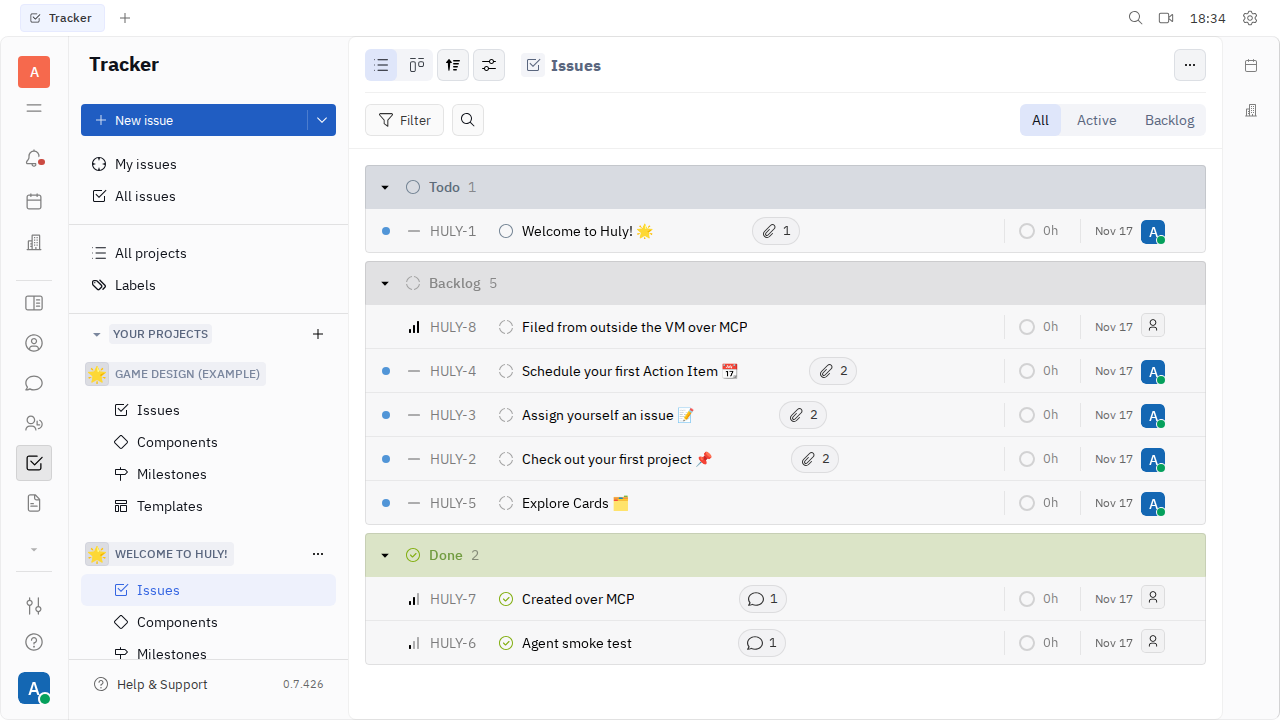
new workspace with two sample projects, **Welcome to Huly!** and **Game
Design (Example)**, so there's something to click on:
1. The tracker opens first. Press **New issue** (or `C`) to file one.
2. Open an issue to change its status, assign it, add sub-issues, or
comment.
3. The icons in the left bar open the rest: chat, documents, the
planner, the drive, contacts. Hover over one to see its name.
Change your name under your profile picture, bottom left, then
**Settings**. Archive the sample projects whenever you like. Your account
also has a password, `OWNER_PASSWORD` in `~/huly/huly_v7.conf`, for the
email form on Huly's login page; you need it only if exe.dev sign-in
ever stops working. Ignore **Login with code** and **Continue as a guest** there:
neither works on this setup.
The tracker. The issues without an avatar came from the agent account, through the CLI and the MCP server.
## Bring your team
To bring in a teammate, share the VM with them. On your computer:
```bash
ssh exe.dev share add my-huly alice@example.com
```
exe.dev emails them a link. When they open Huly and press **Continue
with exe.dev**, Huly creates their account and adds them to **Team** as a
member; there's no invite or password to pass around. Their name starts
out as the part of their email before the `@`, and they can change it
under **Settings**.
`ssh exe.dev share add my-huly team` shares with your whole
[exe.dev team](/docs/teams/vms). To remove someone, run `ssh exe.dev
share remove my-huly alice@example.com`; they can no longer reach Huly,
and their name stays on what they wrote. Removing them inside Huly isn't
enough: while they can reach the VM, signing in adds them back.
> [!NOTE]
> Anyone with a Huly account on your server can also create workspaces
> of their own from the workspace picker. That's harmless on a VM only
> your team can reach, but it's why sharing the VM is the real gate.
## Let agents work in Huly
Setup created an `agent` account in the Team workspace, so everything
agents do shows up under its name. Its password and the MCP token are
in `~/huly/huly_v7.conf`, with the rest of the secrets.
### On the VM
The `huly` command reads that file and talks to Huly as the agent. Try
it, on the VM:
```bash
huly projects list
huly issues create --project HULY --title "Try the Huly CLI" --priority low
huly issues list --project HULY --limit 3
```
`issues create` prints the new issue's identifier, such as `HULY-7`.
Huly's client library also logs some chatter to stderr; add
`2>/dev/null` to see only the results. Comment on the issue and close
it (use your identifier):
```bash
huly comments add --project HULY --issue-identifier HULY-7 --body "Done from the CLI."
huly issues update HULY HULY-7 --status Done
huly issues get HULY HULY-7 --json 2>/dev/null | jq -c '.result | {identifier, status}'
```
The last command shows `"status":"Done"`, and the issue in Huly has
the agent's comment. `--json` makes any command print JSON, and `huly
--help` lists the rest: documents, channels, milestones, labels, the
planner, time tracking.
Shelley on this VM also has Huly's MCP server, added as `huly`, so you
can simply ask:
> Using the huly MCP server, file an issue in project HULY for each TODO
> in ~/app/README.md, then list the open issues in HULY.
The MCP server shows a handful of tools (`search_tools`,
`get_tool_schema`, `invoke_tool`) that reach all of Huly's operations,
about 600 of them, which keeps an agent's context small. Claude Code or
Codex on the VM can use the `huly` command, or add the server the same way
(the URL is `http://localhost:8100/mcp`, with the header
`Authorization: Bearer` and `MCP_AUTH_TOKEN` from the settings file).
### From your computer or another VM
Port 8100 is behind exe.dev's proxy too, so a remote agent needs two
tokens: an exe.dev [VM token](/docs/https-tokens-for-vms) for the proxy,
and the MCP token. Create the VM token on your computer:
```bash
ssh exe.dev ssh-key generate-api-key --vm=my-huly --label=huly-agents --exp=90d
```
Get the MCP token with `grep ^MCP_AUTH_TOKEN ~/huly/huly_v7.conf` on the
VM. Then add the server to Claude Code, on your computer:
```bash
claude mcp add --transport http --scope user huly https://my-huly.exe.xyz:8100/mcp \
--header "X-Exedev-Authorization: Bearer exe1.paste-vm-token-here" \
--header "Authorization: Bearer paste-mcp-token-here"
```
Or to Shelley on another VM:
```bash
shelley mcp add huly -d "Huly" \
-H "X-Exedev-Authorization: Bearer exe1.paste-vm-token-here" \
-H "Authorization: Bearer paste-mcp-token-here" \
https://my-huly.exe.xyz:8100/mcp
```
The proxy checks and removes `X-Exedev-Authorization`; the MCP server
checks `Authorization`. With either one missing, the request is refused.
> [!WARNING]
> The agent can do anything a workspace member can, in every project.
> Keep `huly_v7.conf` private, and see [Troubleshooting](#troubleshooting)
> to change the MCP token or the agent's password.
## Keep your data
Everything Huly stores lives in Docker volumes named `huly_v7_*`. Every
night at 04:30 UTC a timer stops Huly for about a minute and packs those
volumes, with the settings file, into `~/huly/backups`, keeping a week
of archives. Keep a copy **off the VM**: the archive includes
`huly_v7.conf`, so it holds every secret too. On your computer:
```bash
scp -r my-huly.exe.xyz:huly/backups .
```
For updates or hiccups, ask Shelley, or open the instructions below.
## The nuts and bolts
Happy with what Shelley set up? Stop here. Below are the steps it
followed, and maintenance for later.
Install by hand
### Create the VM
On your computer (pick another name if `my-huly` is taken):
```bash
ssh exe.dev new --name=my-huly
ssh my-huly.exe.xyz
```
A new VM has 2 CPUs, 8 GB of memory and a 25 GB disk, which is enough.
All remaining commands run **on the VM**, as `exedev`.
### Write the settings
Huly's self-hosting kit, [huly-selfhost](https://github.com/hcengineering/huly-selfhost),
has no releases, so this pins a commit, and the Huly version it was
tested with. Every setting and secret goes in one file only you can
read, `~/huly/huly_v7.conf`, which Docker Compose reads as its `.env`.
The owner is the VM owner's exe.dev email, from the
[reflection integration](/docs/integrations-reflection):
```bash
sudo systemctl enable --now docker.service
[ -d ~/huly ] || git clone -q https://github.com/hcengineering/huly-selfhost.git ~/huly
cd ~/huly
git -c advice.detachedHead=false checkout ca3808a57c83518b971343df7d073753f38796ed
owner=$(curl -fsS https://reflection.int.exe.xyz/email | jq -r '.email // empty')
echo "Huly owner: ${owner:?no owner email; set owner=you@example.com and rerun}"
if [ ! -f huly_v7.conf ]; then
cr=$(openssl rand -hex 24)
(umask 077; cat > huly_v7.conf < nginx-exe.conf <<'EOF'
# Huly behind the exe.dev HTTPS proxy. Requests that arrive as
# localhost:8000 (agents on this VM) get local URLs in /config.json
# and from the account service; everyone else gets https://HULY_HOST.
map $http_host $huly_http { default https://HULY_HOST; localhost:8000 http://localhost:8000; }
map $http_host $huly_ws { default wss://HULY_HOST; localhost:8000 ws://localhost:8000; }
# Dex signs people in from the exe.dev proxy's headers. Their name in
# Huly starts out as the part of their email before the @.
map $http_x_exedev_email $exe_name { ~^(?[^@]+)@ $name; default ""; }
# Port 8000, published on 127.0.0.1: where the exe.dev proxy connects.
server {
listen 8000;
server_name _;
client_max_body_size 100M;
proxy_http_version 1.1;
proxy_set_header Host $host;
proxy_set_header X-Forwarded-For $proxy_add_x_forwarded_for;
sub_filter_types application/json;
sub_filter_once off;
location / {
proxy_pass http://front:8080;
}
location = /config.json {
proxy_set_header Accept-Encoding "";
sub_filter "https://HULY_HOST" $huly_http;
sub_filter "wss://HULY_HOST" $huly_ws;
proxy_pass http://front:8080;
}
# Signing in with exe.dev also joins the Team workspace as a member,
# so sharing the VM is all it takes to let someone in.
location = /_accounts/auth/openid {
absolute_redirect off;
if ($arg_inviteId = "") {
return 302 /_accounts/auth/openid?inviteId=HULY_TEAM_INVITE&$args;
}
proxy_pass http://account:3000/auth/openid;
}
location /_accounts {
proxy_set_header Accept-Encoding "";
sub_filter "https://HULY_HOST" $huly_http;
sub_filter "wss://HULY_HOST" $huly_ws;
rewrite ^/_accounts(/.*)$ $1 break;
proxy_pass http://account:3000/;
}
location /dex/ {
proxy_set_header Host $host;
proxy_set_header X-Huly-Name $exe_name;
proxy_pass http://dex:5556;
}
location /_transactor {
proxy_set_header Upgrade $http_upgrade;
proxy_set_header Connection "upgrade";
proxy_read_timeout 1h;
rewrite ^/_transactor(/.*)$ $1 break;
proxy_pass http://transactor:3333/;
}
location ~ ^/eyJ {
proxy_set_header Upgrade $http_upgrade;
proxy_set_header Connection "upgrade";
proxy_read_timeout 1h;
proxy_pass http://transactor:3333;
}
location /_collaborator {
proxy_set_header Upgrade $http_upgrade;
proxy_set_header Connection "upgrade";
proxy_read_timeout 1h;
rewrite ^/_collaborator(/.*)$ $1 break;
proxy_pass http://collaborator:3078/;
}
location /_rekoni {
rewrite ^/_rekoni(/.*)$ $1 break;
proxy_pass http://rekoni:4004/;
}
location /_stats {
rewrite ^/_stats(/.*)$ $1 break;
proxy_pass http://stats:4900/;
}
}
# Port 80, inside Docker only, where HULY_HOST means this container:
# Huly's account service checks sign-ins with Dex here. Only Dex's
# discovery, keys, token and userinfo; the sign-in pages, which believe
# the exe.dev headers, are on port 8000 alone.
server {
listen 80;
server_name _;
location ~ ^/dex/(\.well-known/openid-configuration|keys|token|userinfo)$ {
proxy_pass http://dex:5556;
}
location / {
return 404;
}
}
EOF
cat > dex.yaml <<'EOF'
# Dex: turns the exe.dev proxy's login headers into OpenID Connect for Huly.
issuer: http://HULY_HOST/dex
storage:
type: memory
web:
http: 0.0.0.0:5556
oauth2:
skipApprovalScreen: true
connectors:
- type: authproxy
id: exe
name: exe.dev
config:
userIDHeader: X-ExeDev-UserID
emailHeader: X-ExeDev-Email
userHeader: X-Huly-Name
staticClients:
- id: huly
name: Huly
secretEnv: OPENID_CLIENT_SECRET
redirectURIs:
- https://HULY_HOST/_accounts/auth/openid/callback
EOF
cat > account-start.sh <<'EOF'
#!/bin/sh
# Starts Huly's account service for exe.dev sign-in (mounted into the
# account container; Docker Compose runs it instead of `node bundle.js`).
set -e
cd /usr/src/app
# People get accounts by signing in with exe.dev, so remove the three ways
# to make an account with a password and any email, and the way to attach
# any unverified email to your own account (exe.dev sign-in would then put
# that email's owner into your account): those would let anyone who can
# reach Huly claim a teammate's email before the teammate signs in.
sed -i -e 's/\.\.\.hasSignUp ? { signUp: /...false ? { signUp: /' \
-e 's/\.\.\.hasSignUp ? { signUpOtp: /...false ? { signUpOtp: /' \
-e 's/^\( *\)signUpJoin: (0, import_utils6.wrap)(signUpJoin),$/\1\/\/ signUpJoin removed for exe.dev sign-in/' \
-e 's/^\( *\)addEmailSocialId: (0, import_utils6.wrap)(addEmailSocialId),$/\1\/\/ addEmailSocialId removed for exe.dev sign-in/' bundle.js
if [ "$(grep -c -e '\.\.\.false ? { signUp' -e 'removed for exe.dev sign-in' bundle.js)" != 4 ]; then
echo "account-start.sh: this Huly version needs a new sign-up patch; not starting" >&2
exit 1
fi
# Huly looks up Dex only once, at start, so wait up to two minutes for it.
for i in $(seq 60); do
node -e 'fetch(process.env.OPENID_ISSUER + "/keys").then(r => process.exit(r.ok ? 0 : 1), () => process.exit(1))' && break
sleep 2
done
exec node bundle.js
EOF
chmod +x account-start.sh
cat > compose.override.yml <<'EOF'
# exe.dev changes to huly-selfhost's compose.yml (merged automatically)
services:
nginx:
volumes: !override
- ./nginx-exe.conf:/etc/nginx/conf.d/default.conf:ro
ports: !override
- ${HTTP_BIND}:${HTTP_PORT}:8000
networks: !override
huly_net:
aliases: [HULY_HOST]
dex_net: {}
dex:
image: ghcr.io/dexidp/dex:v2.46.1
command: [dex, serve, /etc/dex/config.yaml]
environment:
- OPENID_CLIENT_SECRET=${OPENID_CLIENT_SECRET}
volumes:
- ./dex.yaml:/etc/dex/config.yaml:ro
restart: unless-stopped
networks: [dex_net]
redpanda:
restart: unless-stopped
kvs:
ports: !reset []
transactor:
environment:
- FRONT_URL=https://HULY_HOST
account:
command: [/usr/src/app/account-start.sh]
volumes:
- ./account-start.sh:/usr/src/app/account-start.sh:ro
environment:
- OPENID_DISPLAY_NAME=exe.dev
- OPENID_CLIENT_ID=huly
- OPENID_CLIENT_SECRET=${OPENID_CLIENT_SECRET}
- OPENID_ISSUER=http://HULY_HOST/dex
front:
environment:
- DISABLE_SIGNUP=true
networks:
dex_net: {}
EOF
sed -i "s/HULY_HOST/$(hostname).exe.xyz/g" nginx-exe.conf dex.yaml compose.override.yml
docker compose config --quiet && echo "compose config OK"
```
Expect `compose config OK`.
### Start Huly
The images add up to about 9 GB, so the pull takes a few minutes:
```bash
cd ~/huly
docker compose pull --quiet
docker compose up -d
until curl -fsS -o /dev/null http://localhost:8000/config.json; do sleep 5; done
curl -fsS http://localhost:8000/config.json | jq -r .ACCOUNTS_URL
curl -fsS -H "Host: $(hostname).exe.xyz" http://localhost:8000/config.json | jq -r .ACCOUNTS_URL
docker compose ps --format '{{.Service}}: {{.Status}}'
```
The two addresses should be `http://localhost:8000/_accounts` and
`https://my-huly.exe.xyz/_accounts`, followed by 15 services, all `Up`.
### Create your workspace and the agent
The owner account is created with Huly's admin tool, then signs in
through Huly's account API and creates the **Team** workspace, the same
way the sign-up page would. The agent account joins it as a member.
Last, a standing invite to Team, with no expiry or use limit, goes into
the settings file and nginx, for everyone who signs in with exe.dev:
```bash
cd ~/huly
set -a; . ./huly_v7.conf; set +a
rpc() { curl -sS -H 'Content-Type: application/json' ${2:+-H "Authorization: Bearer $2"} -d "$1" http://localhost:8000/_accounts; }
until rpc '{"method":"getRegionInfo","params":{}}' | jq -e . >/dev/null 2>&1; do sleep 5; done
./run-tool.sh create-account "$OWNER_EMAIL" -p "$OWNER_PASSWORD" -f "${OWNER_EMAIL%%@*}" -l Owner | tail -1
token=$(rpc "$(jq -nc --arg e "$OWNER_EMAIL" --arg p "$OWNER_PASSWORD" \
'{method:"login",params:{email:$e,password:$p}}')" | jq -r .result.token)
ws=$(rpc '{"method":"createWorkspace","params":{"workspaceName":"Team"}}' "$token" | jq -r .result.workspaceUrl)
echo "Workspace: $ws"
until rpc '{"method":"getUserWorkspaces","params":{}}' "$token" |
jq -e --arg ws "$ws" '.result[] | select(.url == $ws) | .status.mode == "active"' >/dev/null; do sleep 5; done
sed -i "s/^HULY_WORKSPACE=.*/HULY_WORKSPACE=$ws/" huly_v7.conf
./run-tool.sh create-account "$HULY_EMAIL" -p "$HULY_PASSWORD" -f Agent -l Bot | tail -1
./run-tool.sh assign-workspace "$HULY_EMAIL" "$ws" | tail -1
sel=$(rpc "$(jq -nc --arg ws "$ws" '{method:"selectWorkspace",params:{workspaceUrl:$ws,kind:"external"}}')" "$token")
echo "$sel" | jq -c '.result | {workspaceUrl, role}'
if ! grep -q '^HULY_TEAM_INVITE=' huly_v7.conf; then
invite=$(rpc '{"method":"createInvite","params":{"exp":-1,"limit":-1,"role":"USER"}}' \
"$(echo "$sel" | jq -r .result.token)" | jq -r '.result // empty')
echo "HULY_TEAM_INVITE=${invite:?no invite}" >> huly_v7.conf
fi
. ./huly_v7.conf
sed -i "s/HULY_TEAM_INVITE/$HULY_TEAM_INVITE/" nginx-exe.conf
docker compose restart nginx
```
The workspace takes about a minute to build. Expect `Workspace: team`
and then `{"workspaceUrl":"team","role":"OWNER"}`. The first
`run-tool.sh` downloads Huly's tool image, about 400 MB.
### Check exe.dev sign-in
Huly should offer exe.dev as a way to sign in, send it through the Team
invite to Dex, and its account service should reach Dex's keys but not
the sign-in pages:
```bash
cd ~/huly
curl -fsS http://localhost:8000/_accounts/providers; echo
curl -sS -o /dev/null -w '%{redirect_url}\n' http://localhost:8000/_accounts/auth/openid
docker compose exec -T account node -e '(async () => { for (const p of ["keys", "auth/exe"])
console.log(p, (await fetch(process.env.OPENID_ISSUER + "/" + p)).status) })()'
```
Expect `[{"name":"openid","displayName":"exe.dev"}]`, an address ending
in `inviteId=`, a long number and `&`, then `keys 200` and `auth/exe 404`.
If the first line is `[]`, the account service started before Dex
answered: run `docker compose restart account` and check again.
### Install the CLI and the MCP server
[huly-mcp](https://github.com/dearlordylord/huly-mcp) and its CLI need a
newer Node.js than the VM has, so this installs one in `~/node`. A small
`huly` wrapper loads the agent's credentials from the settings file, and
a systemd service runs the MCP server on port 8100:
```bash
test -x ~/node/bin/node || uvx nodeenv -n 26.13.1 ~/node
export PATH=$HOME/node/bin:$PATH
npm install -g --no-fund --no-audit @firfi/huly-mcp@0.56.0 @firfi/huly-cli@0.54.0 | tail -1
mkdir -p ~/.local/bin
cat > ~/.local/bin/huly <<'EOF'
#!/bin/sh
# huly: Huly's CLI, signed in as the agent account from ~/huly/huly_v7.conf
set -a; . "$HOME/huly/huly_v7.conf"; set +a
PATH="$HOME/node/bin:$PATH" exec "$HOME/node/bin/huly" "$@"
EOF
chmod +x ~/.local/bin/huly
sudo tee /etc/systemd/system/huly-mcp.service >/dev/null <<'EOF'
[Unit]
Description=Huly MCP server for agents
After=docker.service network-online.target
[Service]
User=exedev
EnvironmentFile=/home/exedev/huly/huly_v7.conf
Environment=PATH=/home/exedev/node/bin:/usr/bin:/bin
ExecStart=/home/exedev/node/bin/huly-mcp
Restart=always
RestartSec=5
[Install]
WantedBy=multi-user.target
EOF
sudo systemctl daemon-reload
sudo systemctl enable --now huly-mcp.service
until curl -s -o /dev/null http://localhost:8100/mcp; do sleep 2; done
shelley mcp add huly -d "Huly: issues, docs and chat" \
-H "Authorization: Bearer $(sed -n 's/^MCP_AUTH_TOKEN=//p' ~/huly/huly_v7.conf)" \
http://localhost:8100/mcp
shelley mcp list huly | grep -c '^function'
```
The last line counts the MCP tools Shelley sees: `6`.
### Check the agent
File an issue as the agent, comment on it and close it:
```bash
id=$(huly issues create --project HULY --title "Agent check" --json | jq -r .identifier)
huly comments add --project HULY --issue-identifier "$id" --body "Checked by setup." --json | jq -c .
huly issues update HULY "$id" --status Done --json | jq -c .
huly issues get HULY "$id" --json | jq -c '.result | {identifier, title, status}'
```
The last line should end in `"status":"Done"`. You'll find the issue,
with the agent's comment, among the done issues of **Welcome to Huly!**
### Back up nightly
`backup.sh` stops Huly, archives its five Docker volumes and the
settings files, and starts it again; a consistent copy of CockroachDB,
Elasticsearch and MinIO this way takes about 30 seconds plus a minute
for Huly to come back:
```bash
cd ~/huly
cat > backup.sh <<'EOF'
#!/bin/sh
# Stops Huly for a minute, archives its data volumes and settings, starts it again.
set -eu
umask 077
cd "$(dirname "$0")"
mkdir -p backups
name="huly-$(date +%Y%m%d-%H%M%S).tar.gz"
docker compose stop
trap 'docker compose start >/dev/null' EXIT
docker run --rm \
-v huly_v7_cr_data:/huly/cr_data:ro -v huly_v7_cr_certs:/huly/cr_certs:ro \
-v huly_v7_files:/huly/files:ro -v huly_v7_elastic:/huly/elastic:ro \
-v huly_v7_redpanda:/huly/redpanda:ro \
-v "$PWD:/config:ro" -v "$PWD/backups:/out" -e owner="$(id -u):$(id -g)" alpine:3 \
sh -c "mkdir /huly/config && cp /config/huly_v7.conf /config/compose.override.yml /config/nginx-exe.conf \
/config/dex.yaml /config/account-start.sh /huly/config/ &&
tar -C /huly -czf /out/$name.tmp . && chown \$owner /out/$name.tmp &&
chmod 600 /out/$name.tmp && mv /out/$name.tmp /out/$name"
find backups -name 'huly-*.tar.gz' -mtime +7 -delete
echo "backups/$name"
EOF
chmod +x backup.sh
sudo tee /etc/systemd/system/huly-backup.service >/dev/null <<'EOF'
[Unit]
Description=Back up Huly
After=docker.service
[Service]
Type=oneshot
User=exedev
ExecStart=/home/exedev/huly/backup.sh
EOF
sudo tee /etc/systemd/system/huly-backup.timer >/dev/null <<'EOF'
[Unit]
Description=Back up Huly nightly
[Timer]
OnCalendar=*-*-* 04:30
Persistent=true
[Install]
WantedBy=timers.target
EOF
sudo systemctl daemon-reload
sudo systemctl enable --now huly-backup.timer
sudo systemctl start huly-backup.service
systemctl list-timers huly-backup.timer --no-pager
gzip -t backups/*.tar.gz && ls -l backups
printf 'Huly: https://%s.exe.xyz/\n' "$(hostname)"
```
The timer should list its next run, and `backups` should hold one
archive of roughly 80 MB. Huly is ready: open the URL printed last and
press **Continue with exe.dev**.
Back up and restore
To take a backup now, on the VM (Huly is down for about a minute):
```bash
~/huly/backup.sh
```
Each archive holds the five volumes (`cr_data` and `cr_certs` for
CockroachDB, `files` for MinIO, `elastic`, `redpanda`) and `config/`
with `huly_v7.conf`, `compose.override.yml`, `nginx-exe.conf`,
`dex.yaml` and `account-start.sh`.
### Restore
This replaces all of Huly's data and settings with the archive's, after
taking one more backup of the current state. On a new VM, run **Install
by hand** first, then copy the archive into `~/huly/backups`. Put the
archive's name below, then on the VM:
```bash
cd ~/huly
backup=backups/huly-YYYYMMDD-HHMMSS.tar.gz
tar -xzf "$backup" ./config &&
old=$(sed -n 's/^HOST_ADDRESS=//p' config/huly_v7.conf) &&
sed -i "s/$old/$(hostname).exe.xyz/g" config/* &&
./backup.sh &&
docker compose down -v &&
cp config/* . && rm -r config &&
docker compose create &&
docker run --rm -v huly_v7_cr_data:/huly/cr_data -v huly_v7_cr_certs:/huly/cr_certs \
-v huly_v7_files:/huly/files -v huly_v7_elastic:/huly/elastic \
-v huly_v7_redpanda:/huly/redpanda -v "$PWD/backups:/in:ro" alpine:3 \
tar -C /huly -xzf "/in/${backup#backups/}" &&
docker compose up -d &&
sudo systemctl restart huly-mcp.service
shelley mcp rm huly
shelley mcp add huly -d "Huly: issues, docs and chat" \
-H "Authorization: Bearer $(sed -n 's/^MCP_AUTH_TOKEN=//p' huly_v7.conf)" \
http://localhost:8100/mcp
```
The `sed` line points the restored settings at this VM, so an archive
from another VM works. Give Huly a minute, then check that
`huly issues list --project HULY` shows your issues and sign in with
exe.dev: the passwords, the Team invite and the MCP token are the archive's, so give
remote agents the old MCP token again. The backup taken just before the
restore is the newest archive in `~/huly/backups`, if you need to go back.
Update
Huly releases often, and huly-selfhost's `.template.huly.conf` names the
version its maintainers tested with. Update to that one, not just the
newest image tag. Look at the
[huly-selfhost commits](https://github.com/hcengineering/huly-selfhost/commits/main)
for changes to `compose.yml` or the version, then on the VM, back up
first:
```bash
cd ~/huly
./backup.sh
git fetch -q origin && git -c advice.detachedHead=false checkout origin/main
new=$(sed -n 's/^HULY_VERSION=//p' .template.huly.conf); echo "Updating to $new"
sed -i "s/^HULY_VERSION=.*/HULY_VERSION=$new/; s/^DESKTOP_CHANNEL=.*/DESKTOP_CHANNEL=${new#v}/" huly_v7.conf
docker compose pull --quiet && docker compose up -d
docker image prune -f
```
Huly upgrades each workspace on first start of the new version, which
can take a few minutes (`docker compose logs -f workspace` shows it).
`account-start.sh` edits the account service's code for this Huly
version; if a new one changed that code, the account service stops with
`needs a new sign-up patch` (`docker compose logs account`). If that or
anything else breaks, check out the old commit, put the old version back in
`huly_v7.conf`, and restore the backup you just took.
To update the MCP server and CLI, on the VM:
```bash
PATH=$HOME/node/bin:$PATH npm install -g --no-fund --no-audit @firfi/huly-mcp@latest @firfi/huly-cli@latest
sudo systemctl restart huly-mcp.service
```
Troubleshooting
Start with the containers and their logs. On the VM:
```bash
cd ~/huly
docker compose ps
docker compose logs --tail=50 transactor account front nginx
journalctl -u huly-mcp -n 50 --no-pager
```
- **`502 Bad Gateway` right after a start, reboot or backup?** Huly needs
a minute or two to start all its services. Wait, and reload.
- **Down after a reboot?** Run `sudo systemctl enable --now docker.service`,
then `docker compose up -d` in `~/huly`.
- **Huly loads but spins, or says it can't connect?** Its live connection
is a websocket through nginx. Open Huly at `https://my-huly.exe.xyz/`,
not through an SSH tunnel, and check `docker compose logs nginx
transactor`. If you renamed the VM, the host name in `huly_v7.conf`,
`nginx-exe.conf`, `dex.yaml` and `compose.override.yml` is stale: fix it and run
`docker compose up -d --force-recreate`.
- **Search stops finding new things, or saving fails?** The disk may be
nearly full: Elasticsearch stops writing above 90%. Check `df -h /`,
remove old images with `docker image prune -f`, move old backups off the
VM, or [resize the disk](/docs/resize).
- **Slow, or containers restarting?** Check memory with `free -m` and
`docker stats --no-stream`. Huly uses about 4 GB at rest; give the VM
more memory if `available` stays under 1 GB.
- **`huly` or the MCP server says it can't log in?** The agent needs
`HULY_EMAIL`, `HULY_PASSWORD` and `HULY_WORKSPACE` from `huly_v7.conf`,
and a running Huly. After changing the file, run
`sudo systemctl restart huly-mcp.service`.
- **Change the MCP token:** replace the `MCP_AUTH_TOKEN` line with a new
`openssl rand -hex 32`, restart `huly-mcp`, run `shelley mcp rm huly`
and the `shelley mcp add` line from the install again, and give remote agents the new token.
- **Change the agent's password:** sign in to Huly as the agent (its
email and password are in `huly_v7.conf`) in a private window, change
it under **Settings**, put the new one in `huly_v7.conf`, and restart
`huly-mcp`.
- **No Continue with exe.dev button, or it leads back to the login
page?** Huly looks Dex up once, when its account service starts.
`docker compose logs account | grep -i oidc` should show
`Registered OIDC strategy`; if it doesn't, run
`docker compose restart account`.
Right after Dex restarts, sign-in can bounce back to the login page
for about a minute; wait, or restart `account`.
- **Sign in as someone else?** Huly's **Sign out** only signs you out of
Huly: **Continue with exe.dev** brings back the same exe.dev user. To
switch, also sign out of exe.dev at
`https://my-huly.exe.xyz/__exe.dev/logout`.
- **Dex says "Authentication failed"?** The request reached Dex without
exe.dev's login headers: open Huly at `https://my-huly.exe.xyz/` while
signed in to exe.dev, not through an SSH tunnel.
- **A Huly invite link shows a sign-up form?** Links from **Invite to
workspace** still open Huly's **Join** page, whose password form
doesn't work here. Press **Continue with exe.dev** on it instead, or
skip the link: sharing the VM is enough.
## Frequently asked questions
### Is self-hosted Huly free?
Yes. Huly is open source under the Eclipse Public License 2.0, and the self-hosted version has no license key, seat limit or locked features; the paid plans are for Huly's own cloud. You pay only for the VM; see [exe.dev pricing](https://exe.dev/pricing). EPL-2.0 lets you use and change Huly freely; if you distribute changed Huly code, you share those changes under the same license.
### How much memory does Huly need?
On a new exe.dev VM (2 CPUs, 8 GB), Huly uses about 4 GB at rest, mostly Elasticsearch, Redpanda and CockroachDB, and the containers take about 9 GB of disk. That's comfortable for a small team. Huly recommends 4 CPUs and 16 GB for heavier use; you can [resize the VM](/docs/resize) later without reinstalling.
### Can people sign in with their exe.dev login?
Yes, that's how everyone signs in here: **Continue with exe.dev** on Huly's login page. Huly takes OpenID Connect sign-ins, and exe.dev isn't an OpenID provider, so [Dex](https://dexidp.io) stands in. Its `authproxy` connector believes the `X-ExeDev-Email` header, which exe.dev's proxy sets on every request to a private VM and strips from what browsers send. Dex's sign-in pages are reachable only through nginx on 127.0.0.1:8000, where the proxy connects, so from outside, that header comes from exe.dev. A program on the VM itself can send it too and sign in as anyone, as it could with any app that trusts its proxy; it could read Huly's database anyway. Huly's password sign-up is removed, so new people get in only through exe.dev. Your own account also keeps a password, in `~/huly/huly_v7.conf`.
### Is there an official Huly API or MCP server?
Huly publishes an API client for JavaScript ([@hcengineering/api-client](https://www.npmjs.com/package/@hcengineering/api-client)), but no MCP server. This page uses [huly-mcp](https://github.com/dearlordylord/huly-mcp), a community project with over 200 tools for issues, documents, chat and more, and its companion `huly` command line tool.
### Do video calls, the AI assistant and GitHub sync work?
Not in this setup. They are optional services in huly-selfhost that need more parts: LiveKit for calls, an OpenAI key for the assistant, a GitHub app for sync. Issues, chat, documents, the planner, drive and the knowledge base all work without them.
### How is Huly different from Plane or Linear?
Plane and Linear are issue trackers. Huly is a whole team workspace: the tracker sits next to channels and direct messages, documents, a planner and a calendar, all linked. That makes it heavier, about 4 GB of memory at rest. If you only want issues, see [Plane](/deploy/plane), [Kanboard](/deploy/kanboard) or the [issue tracker overview](/deploy/issue-tracker).
## Related
- [Self-hosted issue tracker](https://exe.dev/deploy/issue-tracker.md): Choose an issue tracker to run on your own VM, for your team and your agents.
- [Self-host Plane](https://exe.dev/deploy/plane.md): Linear-style issue tracking for your team and your agents, on your own VM.
- [Self-host Kanboard](https://exe.dev/deploy/kanboard.md): A small, sturdy kanban board that signs your team in with exe.dev.
- [Self-host OpenProject](https://exe.dev/deploy/openproject.md): Work packages, Gantt charts and boards that sign your team in with exe.dev.
- [Self-host Kaneo](https://exe.dev/deploy/kaneo.md): A light, fully open-source issue tracker that your agents can work from too.
- [Self-host Multica](https://exe.dev/deploy/multica.md): An issue board where Claude Code and Codex take the tickets.