---
title: "Self-host Ghost"
description: "Run Ghost 6 with Docker and MySQL 8.4 on a VM of its own: Ghost Admin behind exe.dev login, members and newsletters, nightly backups, your domain."
url: https://exe.dev/deploy/ghost
category: "Web apps"
published: 2026-11-21
updated: 2026-11-21
---
# Self-host Ghost
> **For agents:** with your user's OK, this sets up Ghost on a new exe.dev VM in their account: `curl -fsSL https://exe.dev/deploy/ghost/prompt.txt | ssh exe.dev new --prompt=/dev/stdin` (or open https://exe.dev/deploy/ghost/new). Already on the VM? Skip this.
Your Ghost publication on a VM of its own, with an admin only you can reach.
- **Software:** Ghost (https://ghost.org)
- **Source:** https://github.com/TryGhost/Ghost
- **License:** MIT
- **Time:** 10 minutes
- **Example VM name:** `my-ghost` (yours will differ; on the VM, `hostname` prints it)
- **Machine-readable:** https://exe.dev/deploy/ghost/manifest.json
- **File:** https://exe.dev/deploy/ghost/Caddyfile
- **File:** https://exe.dev/deploy/ghost/backup.sh
- **File:** https://exe.dev/deploy/ghost/exe-dev-sso.js
## What you get
- Ghost 6 with MySQL 8.4 under Docker Compose, restarting after a reboot.
- Ghost's setup screen waiting at your private URL, for you to name the publication and create the owner account.
- Ghost Admin open only to exe.dev accounts you list, and signed in by your exe.dev login, even after the site goes public.
- Search, member sign-up, comments, and the social web working for visitors once the site is public.
- Nightly backups of the database, images, themes, and settings, keeping a week.
Running on the VM:
- **Caddy 2.11**: the official caddy image; the exe.dev login gate for /ghost, and the social web routes, port 8000, data in `~/ghost/caddy`
- **Ghost 6**: the official ghost image (Node.js 22), under Docker Compose, data in `~/ghost/content`
- **MySQL 8.4 LTS**: the official mysql image, reachable only from Ghost, data in `~/ghost/mysql`
- **exe.dev sign-in for Ghost Admin**: a 30-line Ghost SSO adapter that trusts exe.dev's login, data in `~/ghost/content/adapters/sso/exe-dev`
- **Nightly backups**: database, content, and settings; keeps a week, data in `~/ghost/backups`
How it is reached:
- https://my-ghost.exe.xyz/ (private): your publication, until you make it public
- https://my-ghost.exe.xyz/ghost/ (private): Ghost Admin, for the exe.dev accounts you list, even when the site is public
## Deploy with Shelley
Open https://exe.dev/deploy/ghost/new to create a VM whose agent, Shelley, follows this recipe. From a terminal:
```sh
curl -fsSL https://exe.dev/deploy/ghost/prompt.txt | ssh exe.dev new --prompt=/dev/stdin
```
Or follow the steps below by hand.
Ghost is an open-source publishing platform for blogs, newsletters, and
paid memberships, the software behind Ghost(Pro) and many independent
publications. Here it gets a VM of its own with a persistent disk: the
official Docker images for Ghost and MySQL, your images and themes in
plain directories you and Shelley can edit, and nightly backups. The
site stays private until you make it public, and even then Ghost Admin
opens only for the exe.dev accounts you list, already signed in, so
nobody can guess passwords at your login page.
## Finish the install
Open **https://my-ghost.exe.xyz/ghost/**. You'll sign in to exe.dev if
you haven't, then land on Ghost's setup screen: a site title, your
name, an email, and a password. Use **the email you sign in to exe.dev
with**; that's how Ghost Admin knows you next time. Nobody else can
reach this screen, because the VM is private and `/ghost` is gated.
Ghost opens on its admin dashboard. Write a post, press **Publish**,
and open https://my-ghost.exe.xyz/ to see it on the site. From now on,
opening `/ghost/` in a browser signed in to exe.dev takes you straight
in; Ghost's password is the fallback.
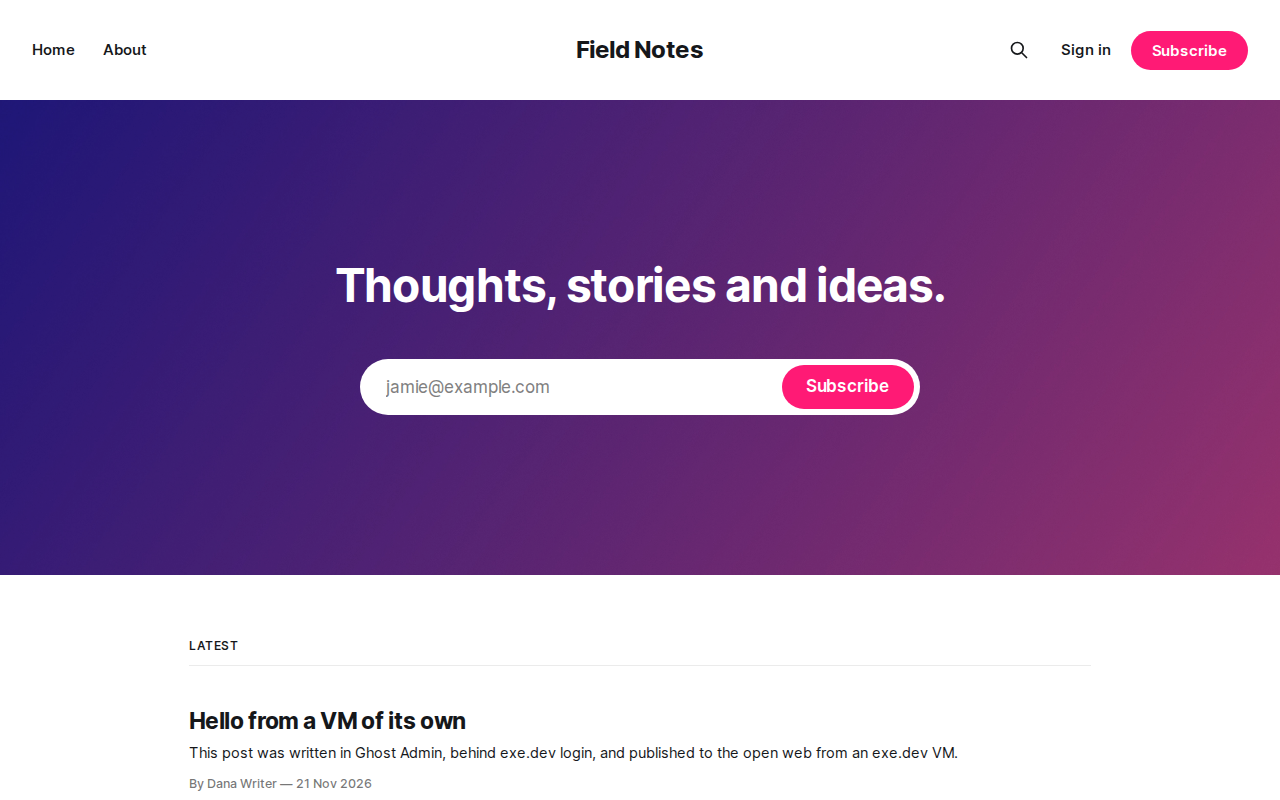
A fresh publication with Ghost's default theme, Source.
Until you set up [email](#email), readers who subscribe never get their
confirmation link. If you make the site public before that, set
**Settings → Membership → Access** to **Nobody** for now.
## Who can sign in
There are two locks on Ghost Admin. The first is exe.dev's: every
request under `/ghost`, its API included, needs an exe.dev sign-in
whose email is in `~/ghost/caddy/staff-emails`, which starts with yours.
exe.dev's proxy adds the signed-in email to each request and removes any
copy a visitor sends, so this lock can't be faked. The second is Ghost's
own staff account, which
[exe-dev-sso.js](https://exe.dev/deploy/ghost/exe-dev-sso.js), a Ghost
sign-in adapter, opens for you when your exe.dev email matches it.
The parts of `/ghost` that every Ghost site serves to visitors (the
Content API behind search and the sign-up form, and the public keys
that the social web checks) stay open; the
[Caddyfile](https://exe.dev/deploy/ghost/Caddyfile) lists them.
To add a writer or an editor, add a line for them to
`~/ghost/caddy/staff-emails` on the VM, and reload Caddy:
```bash
echo 'header X-ExeDev-Email editor@example.com' >> ~/ghost/caddy/staff-emails
cd ~/ghost && docker compose exec caddy caddy reload --config /etc/caddy/Caddyfile
```
Then invite them under **Settings → Staff**, with the same email. The
invitation is an email, so set up [email](#email) first. While the site
is private, also share it with them. On your computer:
```bash
ssh exe.dev share add my-ghost editor@example.com
```
## Make it public
When the publication is ready, on your computer:
```bash
ssh exe.dev share set-public my-ghost
```
Now anyone can read https://my-ghost.exe.xyz/, search it, subscribe,
and comment, and `/ghost` still asks for your exe.dev sign-in. To take
the site private again: `ssh exe.dev share set-private my-ghost`.
A public site also joins the social web. Under **Network** in Ghost
Admin, your publication gets a handle like `@index@my-ghost.exe.xyz`
that people on Mastodon, Threads, and Bluesky (through a bridge) can
follow, and you can follow and reply to them. Ghost runs that service
for self-hosted sites at no cost, within limits it publishes; the
Caddyfile forwards its three paths to `ap.ghost.org`. The handle
follows the site's address, so [move to your own
domain](#use-your-own-domain) before you gather followers.
## Email
Ghost sends two kinds of email, and both need a mail provider:
- **Transactional**: sign-in and sign-up links for members, staff
invitations, and password resets, sent over SMTP. Any provider works
(Mailgun, Postmark, Amazon SES, Resend, your own mail server).
- **Newsletters**: a post sent to every subscriber. Ghost does this only
through Mailgun's API.
exe.dev's [email gateway](/docs/send-email) only reaches you and your
team, so it can't do either job. exe.dev VMs connect out to SMTP
servers on ports 465 and 587.
Put the SMTP settings in `~/ghost/ghost.env` on the VM (it is mode 600;
Ghost reads it as environment variables). For Mailgun's SMTP, say:
```bash
mail__transport=SMTP
mail__from='"Field Notes" '
mail__options__host=smtp.mailgun.org
mail__options__port=465
mail__options__secure=true
mail__options__auth__user=postmaster@mg.example.com
mail__options__auth__pass=your-smtp-password
```
Keep the single quotes around `mail__from`. Then apply it:
```bash
cd ~/ghost && docker compose up -d --wait
```
To test it, open your site in a private window, subscribe with an
address of yours, and click the link in the email. If nothing arrives,
`docker compose logs ghost | grep -i mail` shows what the provider said.
For newsletters, open **Settings → Newsletters → Mailgun** and enter
your Mailgun region, sending domain, and API key. Ghost keeps them in its
database, where your backups carry them. Each post's **Publish** button
then offers **Publish and email**.
## Use your own domain
Point a CNAME at `my-ghost.exe.xyz` (apex domains need an ALIAS or A
record) and tell exe.dev about it, as the [custom domain
guide](/docs/cnames) explains. On your computer:
```bash
ssh exe.dev domain add my-ghost news.example.com
```
Then tell Ghost its new address. On the VM:
```bash
cd ~/ghost
sed -i 's|^GHOST_URL=.*|GHOST_URL=https://news.example.com|' .env
docker compose up -d --wait
```
Ghost stores links in posts relative to its address, so nothing else
changes. Open https://news.example.com/ghost/ to check Ghost Admin;
exe.dev issues the TLS certificate itself. If your DNS is at Cloudflare,
turn its proxy (the orange cloud) off, as the guide explains.
## Publish from scripts
Ghost's [Admin API](https://docs.ghost.org/admin-api) lets a script post
for you, and it lives under `/ghost`, so a script needs both locks: an
exe.dev VM token for the gate and a Ghost Admin API key for Ghost.
Create the key under **Settings → Advanced → Integrations → Add custom
integration**. Create a [VM token](/docs/https-tokens-for-vms) on your
computer:
```bash
ssh exe.dev ssh-key generate-api-key --vm=my-ghost --label=ghost-scripts
```
The script sends the token as `X-Exedev-Authorization: Bearer `
next to Ghost's own `Authorization: Ghost ` header, and the gate
sees your email. The token is as good as your login for this VM, so keep
it where you keep passwords. Services that only take a Ghost API key
(no-code tools with a Ghost connector) can't pass the gate; the public
Content API at `/ghost/api/content/` works for them for reading.
## Move a publication here
Under **Settings → Advanced → Migration tools**, Ghost imports from
Substack (posts and subscribers; paid members too, if you connect the
same Stripe account first), Mailchimp (subscribers), beehiiv, Medium,
WordPress, and others. Export from the old platform, upload the file,
and Ghost fetches the images itself. Members come in without emailing
anyone.
From another Ghost site, use **Settings → Advanced → Import/Export** on
both sides for posts and settings, export members as CSV under
**Members**, and copy the old `content/images` into `~/ghost/content/images`.
## Change your theme with Shelley
Themes live in `~/ghost/content/themes`, owned by your user. To start
from Ghost's default theme, copy it out of the image and give it a name
of its own. On the VM:
```bash
cd ~/ghost
docker compose exec -u node ghost cp -r /var/lib/ghost/current/content/themes/source content/themes/my-theme
sed -i 's/"name": "source"/"name": "my-theme"/' content/themes/my-theme/package.json
docker compose restart ghost
```
Activate **my-theme** under **Settings → Design & branding → Change
theme**. Ghost caches templates, so run `docker compose restart ghost`
after editing them. Shelley can do all of this and check the result in
its browser; ask, for example:
> In my-theme, show reading time on the home page and put the Subscribe
> form after every post, restart Ghost, and show me a post.
Keep your theme in git: `git init` in its directory.
## Try changes on a copy
Before a big change (a new theme, a major update, an import), copy the
whole VM and try it there. A copy is a separate VM with its own disk.
On your computer:
```bash
ssh exe.dev cp my-ghost my-ghost-staging
ssh exe.dev share set-private my-ghost-staging
```
The copy takes the original's sharing, so make it private right away.
It also has your members and your mail settings: turn those off before
anything else, so the copy can't email your readers. On the copy (`ssh
my-ghost-staging.exe.xyz`):
```bash
cd ~/ghost
sed -i "s|^GHOST_URL=.*|GHOST_URL=https://$(hostname).exe.xyz|" .env
sed -i 's/^mail__/# mail__/' ghost.env
docker compose exec -T db sh -c 'MYSQL_PWD="$MYSQL_ROOT_PASSWORD" exec mysql -uroot ghost -e "UPDATE settings SET value = NULL WHERE \`key\` IN (\"mailgun_api_key\", \"mailgun_domain\")"'
docker compose up -d --wait
```
Now https://my-ghost-staging.exe.xyz/ is a private twin of your
publication. When you're happy, make the same change on the live VM, and
delete the copy with `ssh exe.dev rm my-ghost-staging`. [Dev, test, and
prod on exe.dev](/deploy/dev-test-prod) has more on working this way.
## Keep your publication
Every night, a backup of the database, `~/ghost/content` (images,
media, themes, and the adapter), and the settings files lands in
`~/ghost/backups`; the newest 7 stay. A backup on the same disk won't
survive losing the VM, so keep a copy **off the VM**. On your computer:
```bash
scp -r my-ghost.exe.xyz:ghost/backups ghost-backups
```
The backups hold your members' emails, your database password, and your
mail credentials, so keep them private. exe.dev's [VM
backups](/docs/vm-backups) (in preview) can also copy the whole disk to
your own S3 bucket. Before any big change, run `~/ghost/backup.sh` on
the VM. To restore, see [Back up and restore](#back-up-and-restore).
Something odd? On the VM, `cd ~/ghost && docker compose logs --tail 50`
usually explains it, or ask Shelley to look.
## The nuts and bolts
Happy clicking Deploy? You can stop here. These are the same setup steps
Shelley follows, plus the maintenance commands for later.
Install by hand
### Create a VM
On your computer (pick another name if `my-ghost` is taken):
```bash
ssh exe.dev new --name=my-ghost
ssh my-ghost.exe.xyz
```
All remaining installation commands run **on the VM**, as `exedev`.
Commands use `hostname`, so your VM can have any name.
### Write the settings
Docker comes with the VM; make sure it starts at boot. Then make
`~/ghost`, with the site's address and two fresh database passwords in
`.env`, and an empty `ghost.env` for Ghost's own settings, both mode 600:
```bash
sudo systemctl enable --now docker.service
mkdir -p ~/ghost/caddy ~/ghost/content/adapters/sso/exe-dev && cd ~/ghost
[ -e .env ] || (umask 077; cat > .env < ghost.env)
```
Now `compose.yaml`. Ghost listens only inside Docker's network; Caddy
is the one service on port 8000, where exe.dev's proxy sends
https://my-ghost.exe.xyz/. Ghost's emailed new-device codes are off,
because exe.dev's login guards Ghost Admin instead.
```bash
cat > compose.yaml <<'EOF'
name: ghost
services:
db:
image: mysql:8.4
restart: unless-stopped
environment:
MYSQL_DATABASE: ghost
MYSQL_USER: ghost
MYSQL_PASSWORD: ${DB_PASSWORD:?}
MYSQL_ROOT_PASSWORD: ${DB_ROOT_PASSWORD:?}
volumes: ["./mysql:/var/lib/mysql"]
healthcheck:
test: ["CMD-SHELL", "MYSQL_PWD=\"$$MYSQL_ROOT_PASSWORD\" mysqladmin ping -h 127.0.0.1 -uroot --silent"]
interval: 5s
timeout: 5s
start_period: 120s
retries: 30
ghost:
image: ghost:6-alpine
restart: unless-stopped
env_file: ghost.env
environment:
NODE_ENV: production
url: ${GHOST_URL:?}
database__client: mysql
database__connection__host: db
database__connection__user: ghost
database__connection__password: ${DB_PASSWORD:?}
database__connection__database: ghost
adapters__sso__active: exe-dev
security__staffDeviceVerification: "false"
volumes: ["./content:/var/lib/ghost/content"]
depends_on:
db: { condition: service_healthy }
healthcheck:
test: ["CMD", "wget", "-qO", "/dev/null", "--header", "X-Forwarded-Proto: https", "http://127.0.0.1:2368/ghost/api/admin/site/"]
interval: 30s
timeout: 5s
start_period: 120s
start_interval: 2s
caddy:
image: caddy:2.11-alpine
restart: unless-stopped
environment:
ACTIVITYPUB_TARGET: ${ACTIVITYPUB_TARGET:-https://ap.ghost.org}
ports: ["8000:8000"]
volumes:
- ./caddy:/etc/caddy:ro
- caddy-data:/data
depends_on:
ghost: { condition: service_healthy }
volumes:
caddy-data:
EOF
```
### Add the login gate
The [Caddyfile](https://exe.dev/deploy/ghost/Caddyfile) sends visitors
who open `/ghost` without an exe.dev sign-in to exe.dev's, answers
signed-in strangers with 403, and lets through the emails in
`caddy/staff-emails`, which starts with yours.
[exe-dev-sso.js](https://exe.dev/deploy/ghost/exe-dev-sso.js) then signs
them in to Ghost as the staff user with the same email.
```bash
curl -fsSL -o caddy/Caddyfile https://exe.dev/deploy/ghost/Caddyfile
curl -fsSL -o content/adapters/sso/exe-dev/index.js https://exe.dev/deploy/ghost/exe-dev-sso.js
[ -s caddy/staff-emails ] || echo "header X-ExeDev-Email $(curl -fsS https://reflection.int.exe.xyz/email | jq -r .email)" > caddy/staff-emails
cat caddy/staff-emails
```
It should print `header X-ExeDev-Email` and your email. If the email is
missing, write it into that file yourself.
### Start Ghost
```bash
docker compose up -d --wait --quiet-pull
docker compose ps
```
`db`, `ghost`, and `caddy` should all be up and healthy, after a minute
or so. On first start, Ghost creates its tables and copies its default
themes into `~/ghost/content`. Check the site and the gate:
```bash
h=(-H "Host: $(hostname).exe.xyz" -H 'X-Forwarded-Proto: https')
me=$(awk '{print $3; exit}' caddy/staff-emails)
curl -s -o /dev/null -w '%{http_code}\n' "${h[@]}" http://localhost:8000/
curl -s -o /dev/null -w '%{http_code} %{redirect_url}\n' "${h[@]}" http://localhost:8000/ghost/
curl -s -o /dev/null -w '%{http_code}\n' "${h[@]}" -H 'X-ExeDev-Email: someone@example.com' http://localhost:8000/ghost/
curl -s -o /dev/null -w '%{http_code}\n' "${h[@]}" -H "X-ExeDev-Email: $me" http://localhost:8000/ghost/
```
That prints `200` for the site, `302` to `/__exe.dev/login` for
nobody, `403` for a stranger, and `200` for you. Ghost logs `Failed to
send email` until you set up [email](#email); that's expected.
### Set up nightly backups
[backup.sh](https://exe.dev/deploy/ghost/backup.sh) dumps the database
with `mysqldump` and packs it with `.env`, `ghost.env`, `compose.yaml`,
`caddy/`, and `content` (minus logs) into one `.tar.gz` in
`~/ghost/backups`, keeping the newest 7. Ghost itself isn't in it: the
image brings it back.
```bash
curl -fsSL -o ~/ghost/backup.sh https://exe.dev/deploy/ghost/backup.sh
chmod +x ~/ghost/backup.sh
```
Run it at 03:30 every night, or soon after the VM starts if it was off:
```bash
sudo tee /etc/systemd/system/ghost-backup.service >/dev/null </dev/null <<'EOF'
[Unit]
Description=Back up Ghost every night
[Timer]
OnCalendar=*-*-* 03:30:00
RandomizedDelaySec=30m
Persistent=true
[Install]
WantedBy=timers.target
EOF
sudo systemctl daemon-reload
sudo systemctl enable --now ghost-backup.timer
sudo systemctl start ghost-backup.service
ls -l ~/ghost/backups
```
You should see one `ghost-.tar.gz`, and
`systemctl list-timers ghost-backup.timer` shows the next run.
### Fill in the setup screen
Open https://my-ghost.exe.xyz/ghost/ in your browser and fill in Ghost's
setup screen, as in [Finish the install](#finish-the-install). Then
check that Ghost knows its address:
```bash
curl -s -H "Host: $(hostname).exe.xyz" -H 'X-Forwarded-Proto: https' http://localhost:8000/ghost/api/admin/site/ | jq -r '.site.title, .site.url, .site.version'
```
It prints your site title, `https://.exe.xyz/`, and Ghost's
version, `6.78` or newer.
Back up and restore
On the VM, `~/ghost/backup.sh` takes an extra backup and prints its file
name. Each backup holds `ghost.sql` (the database), `.env`, `ghost.env`,
`compose.yaml`, `caddy/`, and `content/`. Look inside one with
`tar -tzf ~/ghost/backups/ | less`.
For posts and members alone, Ghost's own exports work too: **Settings →
Advanced → Import/Export** for content, and **Members → Export** for a
CSV of your list.
### Put the whole publication back
To roll back to a backup, on the same VM or a new one: on a new VM, run
`sudo systemctl enable --now docker.service` first. Copy the backup to
`~/` on the VM (`scp` it from your computer, or
`cp ~/ghost/backups/ghost-.tar.gz ~/`), then:
```bash
cd ~/ghost 2>/dev/null && docker compose down
sudo rm -rf ~/ghost
mkdir ~/ghost && cd ~/ghost
tar -xzf ~/ghost-.tar.gz
docker compose up -d --wait --quiet-pull db
docker compose exec -T db sh -c 'MYSQL_PWD="$MYSQL_ROOT_PASSWORD" exec mysql -uroot ghost' < ghost.sql
rm ghost.sql
docker compose up -d --wait
```
This deletes the VM's current Ghost first, so on a VM with a
publication you want to keep, take a backup before. Then set up the
backup timer from [Install by hand](#create-the-vm). On a VM with a
different name, set its address as in [Use your own
domain](#use-your-own-domain), with `https://.exe.xyz`.
### Back up more often
For hourly backups, change `OnCalendar` in
`/etc/systemd/system/ghost-backup.timer` to `hourly` and the `keep` line
in `~/ghost/backup.sh` to keep a day or two, then run
`sudo systemctl daemon-reload`.
Update Ghost, MySQL, and Caddy
Ghost, MySQL, and Caddy come from Docker images, and Ghost Admin tells
you when a new Ghost is out. On the VM:
```bash
cd ~/ghost
./backup.sh
docker compose pull --quiet
docker compose up -d --wait
docker image prune -f
```
That moves to the newest Ghost 6, MySQL 8.4, and Caddy 2.11; Ghost
updates its own database as it starts. Ghost releases every week or
two, so run this often. When Ghost 7 comes out, read its upgrade notes,
update to the last Ghost 6 first, then change `ghost:6-alpine` to
`ghost:7-alpine` in `compose.yaml` and run the same commands, on [a
copy](#try-changes-on-a-copy) first.
Something not working?
Logs first. On the VM:
```bash
cd ~/ghost
docker compose ps
docker compose logs --tail 50 ghost
docker compose logs --tail 50 caddy
```
**Redirected to exe.dev's sign-in, or "can't open Ghost Admin on this
site".** That's the login gate. Add the email you sign in to exe.dev
with to `~/ghost/caddy/staff-emails` and reload Caddy, as in [Who can
sign in](#who-can-sign-in).
**Ghost asks for a password instead of signing you in.** Your Ghost
staff account's email differs from your exe.dev email. Sign in with
Ghost's password once, and change the email under your profile.
**Locked out of Ghost.** Add a staff email you can sign in to exe.dev
with, or reset the password from the sign-in page once email works.
**`ghost` stays unhealthy.** `docker compose logs ghost` shows why;
usually the database. If you changed `DB_PASSWORD` in `.env` after the
first start, change it back: MySQL set the password when it created the
database and doesn't read it again.
**Too many redirects, or `http://` links.** Something in front of
exe.dev's proxy, such as Cloudflare's orange-cloud proxy, is changing
the request; turn it off. Check that `GHOST_URL` in `.env` is the
address you use, with `https://`.
**Subscribers don't get their sign-in link.** Set up
[email](#email); `docker compose logs ghost | grep -i mail` shows what
the mail server said.
**The site is down after a restart.** `systemctl is-enabled
docker.service` should say `enabled`; all three services have
`restart: unless-stopped`, so they come back with Docker unless you
stopped them with `docker compose stop` or `down`. Start them with
`docker compose up -d`.
## Frequently asked questions
### Is self-hosted Ghost free?
Yes. Ghost is open source under the MIT license, with every feature of Ghost(Pro): members, paid subscriptions, newsletters, comments, and the social web. You pay for the VM (see [exe.dev plans](https://exe.dev/pricing)), for a mail provider once you have readers to email, and Stripe's fees if you sell subscriptions; Ghost takes no cut.
### Can I send newsletters from exe.dev?
Ghost sends newsletters only through [Mailgun](https://www.mailgun.com), and sign-in links through any SMTP provider; you set up both in [Email](#email). exe.dev's own email gateway only reaches you and your team, so it can't serve readers. For a mailing list without a website, [listmonk](https://listmonk.app) sends through any SMTP provider.
### Why put Ghost Admin behind exe.dev's login?
Ghost serves the site and Ghost Admin from the same address, so on most hosts its sign-in page faces the internet. Here a visitor who opens `/ghost` is sent to exe.dev's sign-in, and only the accounts in `~/ghost/caddy/staff-emails` get through, already signed in to Ghost. That replaces Ghost's emailed new-device codes, which this setup turns off.
### Why MySQL 8.4 and not SQLite or MySQL 9?
Ghost supports MySQL 8 in production and nothing else: SQLite is for development, and MySQL 9 isn't on Ghost's supported list yet. 8.4 is MySQL's long-term-support release, maintained into 2032. It runs inside the Compose project, so it doesn't clash with [MySQL on exe.dev](/deploy/mysql) if you also run that.
### Can I move my newsletter from Substack, Mailchimp, beehiiv, or WordPress?
Yes, with Ghost's built-in importers under **Settings → Advanced → Migration tools**: Substack brings posts and subscribers (and paid members, on the same Stripe account), Mailchimp brings subscribers. See [Move a publication here](#move-a-publication-here).
### Can I sell paid subscriptions?
Yes. Make the site public, then connect Stripe under **Settings → Membership → Tiers**. Stripe reaches Ghost's webhook at `/members/webhooks/stripe/`, which is public; only `/ghost` sits behind the login gate.
### How big a publication fits?
Ghost, MySQL, and Caddy use about 700 MB of memory and 2.5 GB of disk for their images. Posts take little room; images and media grow `~/ghost/content`. Run `df -h /` on the VM to see what's free; `ssh exe.dev resize my-ghost --disk=50GB` grows the disk.
## Related
- [Self-host WordPress](https://exe.dev/deploy/wordpress.md): Your WordPress on a computer of its own, with wp-admin only you can reach.
- [Self-host MySQL](https://exe.dev/deploy/mysql.md): Your own MySQL on a real disk, private by default, with backups you've restored.
- [Deploy a Docker Compose app from GitHub](https://exe.dev/deploy/docker-compose.md): Your compose.yaml on a VM of its own. git push to deploy.
- [Dev, Test, Prod: Choose One, Two, or Three](https://exe.dev/deploy/dev-test-prod.md): You can build, test, and deploy on exe.dev.
- [Self-host Payload CMS](https://exe.dev/deploy/payload.md): Payload's admin, API, and Next.js site on a computer of their own.
- [Self-host Strapi](https://exe.dev/deploy/strapi.md): A headless CMS whose admin panel never faces the internet.