---
title: "Self-host Garage S3 storage"
description: "Run Garage on an exe.dev VM: an S3-compatible API for your apps, static websites from buckets, private by default, and backups to a second place."
url: https://exe.dev/deploy/garage
category: "Databases"
published: 2026-11-19
updated: 2026-11-19
---

# Self-host Garage S3 storage

> **For agents:** with your user's OK, this sets up Garage on a new exe.dev VM in their account: `curl -fsSL https://exe.dev/deploy/garage/prompt.txt | ssh exe.dev new --prompt=/dev/stdin` (or open https://exe.dev/deploy/garage/new). Already on the VM? Skip this.

Small, S3-compatible object storage on a disk you own, private by default.

- **Software:** Garage (https://garagehq.deuxfleurs.fr)
- **Source:** https://git.deuxfleurs.fr/Deuxfleurs/garage
- **License:** AGPL-3.0
- **Time:** 15 minutes
- **Example VM name:** `my-garage` (yours will differ; on the VM, `hostname` prints it)
- **Machine-readable:** https://exe.dev/deploy/garage/manifest.json
- **File:** https://exe.dev/deploy/garage/exedev_token.py
- **File:** https://exe.dev/deploy/garage/garage-backup

## What you get

- Garage 2.5 started at boot, keeping its metadata in SQLite with every write flushed to disk and a snapshot every 6 hours.
- A bucket called `app-data` and a key that can use it, with the settings in `~/garage/app.env`.
- One URL, `https://my-garage.exe.xyz/`, for S3 clients and bucket websites, private until you share it.
- The admin API on localhost only, for the `garage` command and a web UI on another VM.
- `garage-backup`, which copies a metadata snapshot and the data to a second place.

Running on the VM:

- **Garage 2.5**: One static binary run by systemd; metadata in SQLite, port 3900, data in `/var/lib/garage`
- **nginx**: Sends signed S3 requests to the API and everything else to bucket websites, port 8000

How it is reached:

- https://my-garage.exe.xyz/ (private): the S3 API and bucket websites; public only if you choose

## Deploy with Shelley

Open https://exe.dev/deploy/garage/new to create a VM whose agent, Shelley, follows this recipe. From a terminal:

```sh
curl -fsSL https://exe.dev/deploy/garage/prompt.txt | ssh exe.dev new --prompt=/dev/stdin
```

Then, on your own computer:

```sh
ssh my-garage.exe.xyz cat garage/app.env
ssh exe.dev ssh-key generate-api-key --vm=my-garage --label=s3 --exp=90d
```

Or follow the steps below by hand.

[Garage](https://garagehq.deuxfleurs.fr) is an S3-compatible object store
in one small binary: buckets, keys, multipart uploads, presigned URLs,
and static websites, with metadata in SQLite and files on plain disk. Here
it gets a VM whose disk stays put, one URL that serves both S3 clients and
bucket websites, and nothing of it is on the internet until
you say so: exe.dev keeps the VM behind your login, lets in the people you
share it with, and lets scripts in with a token. Apps on the same VM talk to
it over localhost.

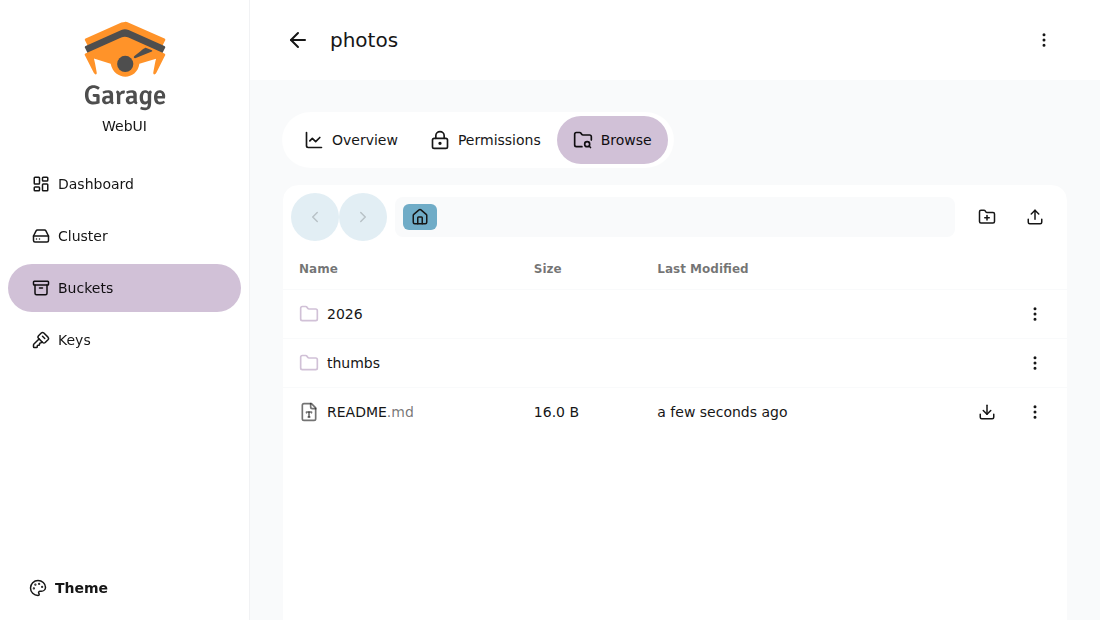
<figure>
<img src="https://exe.dev/deploy/garage/web-ui.png" alt="Garage Web UI browsing the photos bucket: folders 2026 and thumbs and a README.md file" width="1100" height="620" loading="lazy">
<figcaption>Garage Web UI browsing a bucket. It runs on a VM of its own, behind exe.dev login: see <a href="/deploy/garage-webui">Garage Web UI</a>.</figcaption>
</figure>

One VM is one Garage node, with one copy of your data. That is fine for
app uploads, backups from your other machines, build artifacts, or a
site's images, as long as you [back it up](#disk-and-backups). For copies
on more than one machine, [run three VMs](#three-vms-make-a-cluster).

## Use it from this VM

Apps on the VM reach Garage at `http://127.0.0.1:3900`. The key for the
`app-data` bucket is in `~/garage/app.env`, readable only by you, in the
variable names AWS SDKs and the AWS CLI read on their own:

```text
AWS_ACCESS_KEY_ID=GK...
AWS_SECRET_ACCESS_KEY=...
AWS_REGION=garage
AWS_DEFAULT_REGION=garage
AWS_ENDPOINT_URL=http://127.0.0.1:3900
S3_BUCKET=app-data
```

Try it with the AWS CLI:

```bash
set -a; . ~/garage/app.env; set +a
echo hello > hello.txt
aws s3 cp hello.txt s3://app-data/hello.txt
aws s3 ls s3://app-data/
aws s3 presign s3://app-data/hello.txt --expires-in 600
```

The region must be `garage`, the `s3_region` in `/etc/garage.toml`.
Another region gets `AuthorizationHeaderMalformed`; the AWS CLI quietly
retries with the right one, but rclone and most SDKs don't. Use
path-style URLs (`http://127.0.0.1:3900/app-data/key`), which every S3
client falls back to when you give it an endpoint.

In Python, boto3 needs nothing beyond the environment:

```python
import os, boto3

s3 = boto3.client("s3")  # reads AWS_* from the environment
s3.put_object(Bucket=os.environ["S3_BUCKET"], Key="notes/today.txt", Body=b"hi")
print(s3.list_objects_v2(Bucket=os.environ["S3_BUCKET"])["KeyCount"])
```

From a Docker container on the VM, pass the file with
`--env-file ~/garage/app.env --add-host=host.docker.internal:host-gateway`
and use `http://host.docker.internal:3900` as the endpoint. Garage listens
on all of the VM's addresses, but only exe.dev's proxy reaches the VM from
outside, so this exposes nothing.

Pages that need S3, such as [Supabase](/deploy/supabase),
[Langfuse](/deploy/langfuse), or a container registry,
can point at this Garage; see
[using it from other pages](/deploy/s3-storage#use-it-from-other-pages).

## Connect from your computer

The simplest way is an SSH tunnel. On your computer:

```bash
ssh -N -L 3900:localhost:3900 my-garage.exe.xyz
```

Then any S3 client works against `http://localhost:3900` with region
`garage` and the keys from `~/garage/app.env`.

For scripts and machines that can't hold an SSH session, use the VM's URL
with an exe.dev token, which the proxy checks and strips before Garage
sees the request. The S3 signature still has to be right, so this is two
locks, not one. On your computer:

```bash
ssh exe.dev ssh-key generate-api-key --vm=my-garage --label=s3 --exp=90d
```

The token goes in an `X-Exedev-Authorization: Bearer` header, added after
the request is signed. rclone has a flag for it:

```bash
rclone lsf :s3:app-data \
  --s3-provider Other --s3-endpoint https://my-garage.exe.xyz --s3-region garage \
  --s3-access-key-id "$AWS_ACCESS_KEY_ID" --s3-secret-access-key "$AWS_SECRET_ACCESS_KEY" \
  --header "X-Exedev-Authorization: Bearer $EXEDEV_TOKEN"
```

The AWS CLI needs a small plugin,
[`exedev_token.py`](https://exe.dev/deploy/garage/exedev_token.py), which
reads the token from `~/.config/exedev/vm-token` and adds it only for
`*.exe.xyz` hosts. Put it in `~/.aws/plugins/` and add to `~/.aws/config`:

```ini
[default]
region = garage
s3 =
  preferred_transfer_client = classic

[plugins]
cli_legacy_plugin_path = /home/you/.aws/plugins
exedev_token = exedev_token
```

`preferred_transfer_client = classic` matters: the AWS CLI's faster
transfer client for `s3 cp` and `s3 sync` skips plugins, and those
commands then get a 401 from exe.dev. With it, we copied a 300 MB file up
and down and synced folders through the proxy. In boto3, register the same
function on the client's `before-send.s3` event.
[Where clients connect from](/deploy/s3-storage#where-clients-connect-from)
weighs these against a public URL and Tailscale.

## Buckets and keys

Garage has no users or policies. A key is an access key ID and secret, and
each key gets read, write, or owner rights on each bucket. Manage both with
the `garage` command on the VM:

```bash
garage bucket create backups
garage key create laptop-backups
garage bucket allow --read --write backups --key laptop-backups
garage key info laptop-backups --show-secret
```

`--owner` also lets the key change the bucket's website, CORS, and
lifecycle settings, and delete the bucket. To take rights away, use
`garage bucket deny`; to drop a key, `garage key delete`. Keys can also
create buckets over S3 if you give them `garage key allow --create-bucket`,
but those buckets are only visible to that key until you give them a
global name with `garage bucket alias`.

Cap a bucket's size or object count with quotas:

```bash
garage bucket set-quotas backups --max-size 50GiB --max-objects none
garage bucket info backups
```

Bucket names need at least three characters. Hand each app its own key
and bucket, so you can revoke one without touching the others.

## Host a static website

Garage serves a bucket as a website when the request's host name matches
the bucket's name. Install by hand creates a bucket called
`my-garage.exe.xyz` with a placeholder page, and nginx sends unsigned
requests for `https://my-garage.exe.xyz/` to it. Replace the page with
your site from the VM:

```bash
set -a; . ~/garage/app.env; set +a
aws s3 sync ./public "s3://$(hostname).exe.xyz/" --delete
```

The app key has write access to that bucket. `index.html` answers for
every folder, `404.html` for missing paths, and there are no directory
listings. Garage serves files only: no server-side code, rewrites, or
redirects beyond S3 routing rules. While the VM is private, the site is
for you and the people you share the VM with, who sign in to exe.dev
first. [Make it public](#make-it-public) to publish it.

To serve the site on your own domain, add a CNAME and run
`ssh exe.dev domain add my-garage www.example.com`
([custom domains](/docs/cnames)), then create a bucket with that name and
turn on its website:

```bash
garage bucket create www.example.com
garage bucket allow --read --write --owner www.example.com --key app-key
garage bucket website --allow --index-document index.html --error-document 404.html www.example.com
```

We didn't test the custom domain step.

## Make it public

Presigned URLs opened in a browser, public websites, and S3 clients that
can't send an exe.dev token all need a URL with no exe.dev login in front.
exe.dev makes one port per VM public, and this page puts nginx on that
port (8000) so the S3 API and the websites can share it. On your computer:

```bash
ssh exe.dev share set-public my-garage
```

Now `https://my-garage.exe.xyz/` answers anyone. Requests signed with an
S3 key (an `Authorization: AWS4-HMAC-SHA256` header, or `X-Amz-Signature`
in a presigned URL) go to the S3 API, and Garage checks the signature.
Everything else goes to the website side, which serves only buckets whose
website you turned on. We tested a 300 MB upload, presigned downloads and
uploads, and rclone this way. Port 3903, the admin API, stays behind
exe.dev login.

What changes: the S3 keys become the only lock, so a leaked key is usable
from anywhere. Use one key per app with rights on only its buckets. Two
things don't pass through the router: anonymous S3 reads (Garage has no
public-read buckets anyway; use a website bucket) and browser uploads with
S3 POST policies, which carry their signature in the form body. Use
presigned PUT URLs for browser uploads instead.
[Presigned URLs and public files](/deploy/s3-storage#presigned-urls-and-public-files)
explains more. To close it again: `ssh exe.dev share set-private my-garage`.

One catch: bucket host names like `photos.my-garage.exe.xyz` don't exist,
so clients must use path-style URLs. That's every common client's default
with a custom endpoint; set `force_path_style` if yours asks.

## The web UI

Garage has no web UI of its own; the `garage` command does everything.
For buckets, keys, and files in a browser, the community
[garage-webui](https://github.com/khairul169/garage-webui) works well with
Garage 2.5. Run it on a VM of its own with the
[Garage Web UI](/deploy/garage-webui) page: it reaches this VM through
two exe.dev integrations that hold a narrow admin token, so the UI's VM
keeps no secrets and you can share it without sharing this one. Don't run it here: it reads
`/etc/garage.toml` and sends the whole file, RPC secret and admin token
included, to every browser that opens it.

The admin API on port 3903 listens on localhost, but exe.dev's proxy
connects over localhost too, so people you share the VM with can reach
`https://my-garage.exe.xyz:3903/`. The admin token in `/etc/garage.toml`
is what protects it. For scripts, make a narrower token that expires:

```bash
garage admin-token create --scope GetClusterHealth,GetClusterStatus --expires-in 30d monitoring
```

## What Garage's S3 leaves out

Garage speaks the S3 API most apps use: SigV4 signing, path- and
virtual-host-style URLs, multipart uploads (including copying parts),
presigned URLs, CORS, SSE-C (keys sent by the client), POST-policy
uploads, and website configuration. It leaves out, according to its
[compatibility table](https://garagehq.deuxfleurs.fr/documentation/reference-manual/s3-compatibility/):

| Feature | In Garage 2.5 |
| --- | --- |
| Versioning | No; overwrites and deletes are final |
| Object lock, retention, legal hold | No |
| Bucket policies and ACLs | No; per-key rights on each bucket instead |
| Public-read buckets | No; use a website bucket |
| Lifecycle rules | Only expiration and aborting old multipart uploads |
| Replication, event notifications | No |
| Object and bucket tagging | No |
| Server-side encryption with managed keys | No; SSE-C only |
| SigV2 signing | No; SigV4 only |

Calls it doesn't implement return `501 Not Implemented`. If your app or
backup tool needs versioning or object lock (immutable backups, for
example), Garage is the wrong choice; see
[the comparison](/deploy/s3-storage#choose-one).

## One VM is one node

`replication_factor = 1` in `/etc/garage.toml` means every object is
stored once, on this VM's disk. Garage's docs call that setting fit for
testing, because losing the node loses the data. On exe.dev the disk
survives restarts, but it is still one disk: make
[backups](#disk-and-backups) to a second place.
[One VM is one node](/deploy/s3-storage#one-vm-is-one-node) says more.

## Three VMs make a cluster

Garage was built for this: three or more machines, each holding a full
copy, and the cluster carrying on when one is down. exe.dev VMs don't
share a private network, and Garage's own connections between nodes
aren't HTTPS, so join the VMs with [Tailscale](https://tailscale.com/).

> [!WARNING]
> We ran a three-node cluster as three Garage processes on one VM (writes
> landed on all three, reads and writes carried on with one stopped, and
> the stopped node caught up), but not across three VMs on Tailscale.
> The steps below follow Garage's
> [deployment guide](https://garagehq.deuxfleurs.fr/documentation/cookbook/real-world/).

`replication_factor` can't be changed once a cluster has data, so start a
new cluster with 3. On three VMs (`garage-1`, `garage-2`, `garage-3`),
follow Install by hand up to "Start Garage", but:

1. Join Tailscale on each (`sudo tailscale up --hostname=$(hostname)`).
2. Use the **same** `rpc_secret` on all three: generate it once and paste it.
3. Set `replication_factor = 3`, `rpc_bind_addr = "[::]:3901"`, and
   `rpc_public_addr = "<this VM's Tailscale IP>:3901"`
   (from `tailscale ip -4`).
4. Start all three, then put every node in `bootstrap_peers` of every
   config, and restart. Get each entry with `garage node id -q`. Without
   it, nodes don't find each other again after a restart (we saw this).

```toml
bootstrap_peers = [
  "<id of garage-1>@100.x.y.1:3901",
  "<id of garage-2>@100.x.y.2:3901",
  "<id of garage-3>@100.x.y.3:3901",
]
```

Then, on any one of them, give each node a zone and a capacity and apply:

```bash
garage status
garage layout assign -z zone1 -c 50G <id of garage-1>
garage layout assign -z zone2 -c 50G <id of garage-2>
garage layout assign -z zone3 -c 50G <id of garage-3>
garage layout apply --version 1
```

Any node then answers S3
requests; point apps at one of them, or put the nginx router on each.
Buckets, keys, and websites are cluster-wide. Run nightly backups on one
node anyway: replication covers a dead machine, not a deleted bucket.

## Disk and backups

Garage keeps everything under `/var/lib/garage`: `meta/` (the SQLite
database of buckets, keys, and object lists, plus this node's key and the
layout), `data/` (your objects, cut into 1 MiB blocks, compressed, and
named by their hash), and `snapshots/` (consistent copies of the database,
the latest two kept, taken every 6 hours). Check space with `df -h /`, and
grow the disk from your computer:

```bash
ssh exe.dev resize my-garage --disk=200GB
```

then on the VM run `sudo resize2fs "$(findmnt -no SOURCE /)"` and raise
the node's capacity to match (`garage layout assign -z dc1 -c 180G <node id>`,
then `garage layout apply` with the version `garage layout show` asks for).

A backup has to live somewhere else. exe.dev's
[VM backups](/docs/vm-backups) copy the whole disk to your own AWS S3
bucket, which works if you have one; backing Garage up into Garage
doesn't. [`garage-backup`](https://exe.dev/deploy/garage/garage-backup)
takes a fresh metadata snapshot, then copies it, the data blocks, and the
config with rclone. Data blocks never change once written, so after the
first run it copies only what's new. Set up an rclone remote on the VM
(`rclone config`: Backblaze B2, Cloudflare R2, an SFTP box, another
provider), then:

```bash
garage-backup offsite:garage-backup
```

To run it nightly, add a systemd timer:

```bash
sudo tee /etc/systemd/system/garage-backup.service >/dev/null <<'EOF'
[Unit]
Description=Copy Garage to a second place
After=garage.service

[Service]
Type=oneshot
User=exedev
ExecStart=/usr/local/bin/garage-backup offsite:garage-backup
EOF
sudo tee /etc/systemd/system/garage-backup.timer >/dev/null <<'EOF'
[Unit]
Description=Nightly Garage backup

[Timer]
OnCalendar=*-*-* 03:30
Persistent=true

[Install]
WantedBy=timers.target
EOF
sudo systemctl daemon-reload
sudo systemctl enable --now garage-backup.timer
```

This copy has no history: a file deleted from Garage disappears from the
backup at the next run. If that matters, turn on versioning or object
lock on the destination, or use `rclone sync --backup-dir`.
[Restore](#back-up-and-restore) is below.

Something odd? On the VM, `journalctl -u garage -n 50` and
`garage status` usually say what.

## The nuts and bolts

<details id="create-the-vm" data-manual-setup class="dp-details">
<summary>Install by hand</summary>

### Create a VM

On your computer (pick another name if `my-garage` is taken, and a disk
big enough for what you'll store):

```bash
ssh exe.dev new --name=my-garage --disk=100GB
ssh my-garage.exe.xyz
```

All remaining commands run **on the VM**, as `exedev`. Check the disk
with `df -h /`; if it's smaller than you asked for, grow it as in
[Disk and backups](#disk-and-backups).

### Install Garage

Garage ships one static binary per release. Pin the version, so updates
happen when you choose:

```bash
GARAGE_VERSION=v2.5.0
sudo curl -fsSL -o /usr/local/bin/garage \
  "https://garagehq.deuxfleurs.fr/_releases/$GARAGE_VERSION/$(uname -m)-unknown-linux-musl/garage"
sudo chmod 755 /usr/local/bin/garage
garage --version
```

### Configure it

Garage runs as `exedev`, keeps its data in `/var/lib/garage`, and reads
`/etc/garage.toml`, as does the `garage` command. Create the folders and
the config, with secrets generated on the spot:

```bash
sudo install -d -o exedev -g exedev -m 700 /var/lib/garage \
  /var/lib/garage/meta /var/lib/garage/data /var/lib/garage/snapshots
test -e /etc/garage.toml && echo "/etc/garage.toml exists, stop here"
sudo install -o exedev -g exedev -m 600 /dev/null /etc/garage.toml
cat > /etc/garage.toml <<EOF
metadata_dir = "/var/lib/garage/meta"
data_dir = "/var/lib/garage/data"
metadata_snapshots_dir = "/var/lib/garage/snapshots"

db_engine = "sqlite"
metadata_fsync = true
data_fsync = true
metadata_auto_snapshot_interval = "6h"

replication_factor = 1

rpc_bind_addr = "127.0.0.1:3901"
rpc_public_addr = "127.0.0.1:3901"
rpc_secret = "$(openssl rand -hex 32)"

[s3_api]
s3_region = "garage"
api_bind_addr = "[::]:3900"
public_endpoint = "https://$(hostname).exe.xyz"

[s3_web]
bind_addr = "[::]:3902"
index = "index.html"

[admin]
api_bind_addr = "127.0.0.1:3903"
admin_token = "$(openssl rand -base64 32)"
metrics_token = "$(openssl rand -base64 32)"
EOF
```

What the choices mean:

- `db_engine = "sqlite"`: Garage's default, LMDB, is faster but can be
  corrupted by an unclean shutdown. SQLite is the safer choice for one
  node, and the two `fsync` lines make Garage wait for the disk before it
  answers a write.
- `metadata_auto_snapshot_interval`: a consistent copy of the database
  every 6 hours, for restores and for `garage-backup`.
- `replication_factor = 1`: one copy of everything; see
  [One VM is one node](#one-vm-is-one-node).
- The RPC port (3901), which nodes use to talk to each other, stays on
  localhost until you [add nodes](#three-vms-make-a-cluster).
- `public_endpoint` is the URL `garage key export-env` hands out.

### Start Garage

```bash
sudo tee /etc/systemd/system/garage.service >/dev/null <<'EOF'
[Unit]
Description=Garage object storage
After=network-online.target
Wants=network-online.target

[Service]
User=exedev
Group=exedev
Environment=RUST_LOG=garage=info
ExecStart=/usr/local/bin/garage server
Restart=on-failure
LimitNOFILE=42000

[Install]
WantedBy=multi-user.target
EOF
sudo systemctl daemon-reload
sudo systemctl enable --now garage
until garage status >/dev/null 2>&1; do sleep 1; done
garage status
```

Garage needs a few seconds to start the first time. `garage status` then
lists the node with `NO ROLE ASSIGNED`.

### Give the node its storage

A node stores nothing until the cluster layout gives it a zone and a
capacity. Garage uses the capacity to share data between nodes; it
doesn't stop writes there, a full disk does. Use a bit less than the disk:

```bash
garage layout assign -z dc1 -c 90G "$(garage node id -q | cut -d@ -f1)"
garage layout apply --version 1
garage status
```

### Create a bucket and a key for your app

```bash
garage bucket create app-data
garage key create app-key
garage bucket allow --read --write --owner app-data --key app-key
mkdir -p ~/garage
test -e ~/garage/app.env || (umask 077; cat > ~/garage/app.env <<EOF
AWS_ACCESS_KEY_ID=$(garage key info app-key --key-id)
AWS_SECRET_ACCESS_KEY=$(garage key info app-key --secret-key)
AWS_REGION=garage
AWS_DEFAULT_REGION=garage
AWS_ENDPOINT_URL=http://127.0.0.1:3900
S3_BUCKET=app-data
EOF
)
```

The values have no quotes, so the file works with `set -a; . file`,
Docker's `--env-file`, and systemd's `EnvironmentFile=`.

### Install the AWS CLI and rclone

Any S3 client works; these two are handy on the VM:

```bash
sudo apt-get update && sudo apt-get install -y unzip rclone
curl -fsSL -o /tmp/awscli.zip "https://awscli.amazonaws.com/awscli-exe-linux-$(uname -m).zip"
(cd /tmp && unzip -q -o awscli.zip && sudo ./aws/install --update)
set -a; . ~/garage/app.env; set +a
aws s3 ls s3://app-data
```

### Add a placeholder website

The bucket named after the VM's host name is what
`https://my-garage.exe.xyz/` shows:

```bash
SITE=$(hostname).exe.xyz
garage bucket create "$SITE"
garage bucket allow --read --write --owner "$SITE" --key app-key
garage bucket website --allow --index-document index.html --error-document 404.html "$SITE"
mkdir -p ~/garage/site
echo "<!doctype html><title>$SITE</title><h1>Garage is running</h1><p>Replace this page with <code>aws s3 sync</code>.</p>" > ~/garage/site/index.html
echo '<!doctype html><title>Not found</title><h1>Not found</h1>' > ~/garage/site/404.html
aws s3 sync ~/garage/site "s3://$SITE/"
curl -s -H "Host: $SITE" http://localhost:3902/
```

### Route port 8000 with nginx

exe.dev serves `https://my-garage.exe.xyz/` from port 8000. nginx there
sends signed S3 requests to the API on 3900 and the rest to the websites
on 3902, keeping the host name, streaming uploads without a size limit.
exe.dev's VM image ships a placeholder nginx site on port 8000; remove it
first:

```bash
sudo rm -f /etc/nginx/sites-enabled/default
sudo tee /etc/nginx/conf.d/garage.conf >/dev/null <<'EOF'
map "$http_authorization|$args" $garage_upstream {
    "~^AWS4-HMAC-SHA256 "        http://127.0.0.1:3900;
    "~(^|&)X-Amz-Signature="     http://127.0.0.1:3900;
    default                      http://127.0.0.1:3902;
}

server {
    listen 8000;
    listen [::]:8000;
    client_max_body_size 0;
    proxy_request_buffering off;
    proxy_buffering off;
    proxy_read_timeout 600s;
    proxy_send_timeout 600s;

    location / {
        proxy_pass $garage_upstream;
        proxy_set_header Host $http_host;
        proxy_http_version 1.1;
    }
}
EOF
sudo nginx -t && sudo systemctl enable --now nginx && sudo systemctl reload nginx
curl -s http://localhost:8000/ -H "Host: $(hostname).exe.xyz"
aws --endpoint-url http://localhost:8000 s3 ls
```

Port 8000 is already exe.dev's default for the VM's URL; if you changed
it, run `ssh exe.dev share port my-garage 8000` on your computer.

### Install garage-backup

```bash
sudo curl -fsSL -o /usr/local/bin/garage-backup https://exe.dev/deploy/garage/garage-backup
sudo chmod 755 /usr/local/bin/garage-backup
```

Point it at a second place as in [Disk and backups](#disk-and-backups).
</details>

<details id="back-up-and-restore" class="dp-details">
<summary>Back up and restore</summary>

`garage-backup DEST` writes `DEST/meta/` (the database snapshot, the
node key, and the layout), `DEST/data/`, and `DEST/garage.toml`. DEST is
an rclone remote path or a local folder; `garage-backup /tmp/try` shows
what it copies.

### Undo a bad metadata change

The two latest snapshots are in `/var/lib/garage/snapshots/`. To roll the
database back to one, losing every bucket, key, and object change made
since:

```bash
sudo systemctl stop garage
ls /var/lib/garage/snapshots/
mv /var/lib/garage/meta/db.sqlite /var/lib/garage/meta/db.sqlite.bak
cp /var/lib/garage/snapshots/<time>/db.sqlite /var/lib/garage/meta/db.sqlite
sudo systemctl start garage
garage repair -a --yes tables
```

### Restore everything on a new VM

Make a VM and follow Install by hand through "Install Garage". In
"Configure it", create the folders and the empty `/etc/garage.toml`, but
don't write a new config. Install rclone, set up the same remote, and
copy everything back:

```bash
rclone copyto offsite:garage-backup/garage.toml /etc/garage.toml
rclone copy offsite:garage-backup/meta /var/lib/garage/meta
rclone copy offsite:garage-backup/data /var/lib/garage/data
```

Then follow "Start Garage", skip "Give the node its storage" (the layout
came back with the node key), and check:

```bash
garage repair -a --yes tables
garage repair -a --yes blocks
garage bucket list
```

The rest of Install by hand (nginx) works as before; skip the
bucket and key steps, which already came back. Recreate `~/garage/app.env`
with `garage key info app-key --show-secret`.

If the new VM has another name, change `public_endpoint` in
`/etc/garage.toml` and rename the website bucket with
`garage bucket alias` and `garage bucket unalias`. We tested this by
moving `/var/lib/garage` away and restoring from a `garage-backup` copy:
buckets, keys, a 200 MB object (checksum matched), and the website came
back.

</details>

<details id="update" class="dp-details">
<summary>Update Garage</summary>

Garage's [changelog](https://git.deuxfleurs.fr/Deuxfleurs/garage/releases)
says what each release needs. Within one major version (2.x), replace
the binary and restart. Back up first: once a node runs a newer version,
Garage doesn't support going back.

```bash
garage meta snapshot
garage repair -a --yes tables
GARAGE_VERSION=v2.5.0   # the new version
curl -fsSL -o /tmp/garage \
  "https://garagehq.deuxfleurs.fr/_releases/$GARAGE_VERSION/$(uname -m)-unknown-linux-musl/garage"
sudo install -m 755 /tmp/garage /usr/local/bin/garage
sudo systemctl restart garage
garage status
```

On a cluster, do one node at a time and wait for `garage status` to show
it healthy before the next; we moved a three-node cluster from 2.4.1 to
2.5.0 this way. A new major version (3.x) can change the database and
needs Garage's migration guide, a stop of every node, and
`garage migrate`; go one major version at a time.

</details>

<details id="troubleshooting" class="dp-details">
<summary>Something not working?</summary>

On the VM, `journalctl -u garage -n 50` and `garage status` usually say
what's wrong.

- **`AuthorizationHeaderMalformed ... expected .../garage/s3/aws4_request`**:
  the client uses another region. Set it to `garage`.
- **`401` from `https://my-garage.exe.xyz`**: that's exe.dev's login, not
  Garage. Send the token header, use an SSH tunnel, or
  [make the URL public](#make-it-public).
- **`403 Forbidden` or `AccessDenied` from Garage**: the key has no rights
  on that bucket. `garage bucket info <bucket>` lists which keys do.
- **Clients try `bucket.my-garage.exe.xyz`**: those names don't resolve.
  Turn on path-style (`force_path_style`, `addressing_style = path`).
- **`NO ROLE ASSIGNED` or writes fail with quorum errors**: the layout
  isn't applied. See "Give the node its storage".
- **The website shows Garage's 404 for every page**: the bucket's name
  must equal the host name and its website must be on
  (`garage bucket info` shows "Website access: true").
- **`aws s3 cp` gets 401 through the token plugin**: add
  `preferred_transfer_client = classic` to `~/.aws/config`.
- **`501 Not Implemented`**: the app needs an S3 feature Garage
  [doesn't have](#what-garages-s3-leaves-out).
- **Nodes listed as failed after a restart**: add `bootstrap_peers` to
  every node's config, or run `garage node connect <id>@<addr>`.

</details>

## Frequently asked questions

### Is Garage free and open source?

Yes. Garage is AGPL-3.0, made by Deuxfleurs, a French non-profit that runs it for its own services. Running it unmodified for your apps asks nothing of you; the AGPL matters if you change Garage itself and offer it over a network. You pay only for the VM; see [exe.dev plans](https://exe.dev/pricing).

### Garage, MinIO, RustFS, or SeaweedFS?

Garage is the smallest of them and was built to run a cluster across a few modest machines, but it leaves out versioning, object lock, and bucket policies. The [S3 storage](/deploy/s3-storage#choose-one) page compares all four.

### Does one VM give me redundancy?

No. On one VM Garage keeps one copy of each object (`replication_factor = 1`). The VM's disk is persistent, but nothing else holds your data until you [back it up](#disk-and-backups) or run [three nodes](#three-vms-make-a-cluster).

### Which region and URL style do I use?

Region `garage`, endpoint `https://my-garage.exe.xyz` (or `http://127.0.0.1:3900` on the VM), and path-style URLs. Most S3 clients pick path-style on their own once you give them an endpoint.

### Does Garage support versioning, object lock, or presigned URLs?

Presigned URLs yes, versioning and object lock no, and there are no bucket policies or ACLs: access is granted per key and per bucket. See [what's missing](#what-garages-s3-leaves-out).

### Can Garage host a static website?

Yes. Name a bucket after the hostname, turn on its website mode, and upload with any S3 client. This page sets that up at `https://my-garage.exe.xyz/` next to the S3 API.

### Can apps outside exe.dev use it?

Yes, if they can add a header with an exe.dev token, or once you [make the URL public](#make-it-public), when the S3 keys are the only lock. Apps on your Tailscale network can reach it directly.


## Related

- [A web UI for Garage, on its own VM](https://exe.dev/deploy/garage-webui.md): Buckets, keys, and files of your Garage in a browser, on a VM of its own.
- [Self-hosted S3 storage](https://exe.dev/deploy/s3-storage.md): Your own S3 bucket on a real disk. RustFS, Garage or SeaweedFS, tested.
- [MinIO is archived. Here's what to do](https://exe.dev/deploy/minio.md): The open-source server is archived. Copy your buckets and keys somewhere maintained.
- [Self-host RustFS](https://exe.dev/deploy/rustfs.md): S3-compatible object storage on your own disk, with a console only you can open.
- [Self-host SeaweedFS](https://exe.dev/deploy/seaweedfs.md): S3-compatible object storage and a file system on one VM's disk, private by default.
- [Self-host PostgreSQL](https://exe.dev/deploy/postgres.md): Your own Postgres on a real disk, with backups you've actually restored.
