---
title: "A web UI for Garage, on its own VM"
description: "Run garage-webui on an exe.dev VM next to your Garage: browse, upload, and manage buckets and keys, open only to the emails you list."
url: https://exe.dev/deploy/garage-webui
category: "Databases"
published: 2026-11-19
updated: 2026-11-19
---
# A web UI for Garage, on its own VM
> **For agents:** with your user's OK, this sets up Garage Web UI on a new exe.dev VM in their account: `curl -fsSL https://exe.dev/deploy/garage-webui/prompt.txt | ssh exe.dev new --prompt=/dev/stdin` (or open https://exe.dev/deploy/garage-webui/new). Already on the VM? Skip this.
Buckets, keys, and files of your Garage in a browser, on a VM of its own.
- **Software:** Garage Web UI (https://github.com/khairul169/garage-webui)
- **Source:** https://github.com/khairul169/garage-webui
- **License:** MIT
- **Time:** 10 minutes
- **Example VM name:** `my-garage-ui` (yours will differ; on the VM, `hostname` prints it)
- **Machine-readable:** https://exe.dev/deploy/garage-webui/manifest.json
## What you get
- Garage Web UI at `https://my-garage-ui.exe.xyz/`, open only to the exe.dev emails in `~/garage-webui/allowed-emails`.
- Buckets, keys, permissions, and files of your Garage VM, browsed and changed from the browser.
- An admin token that expires in a year and can't create other tokens or change the cluster layout.
- No secrets on this VM. The admin token and exe.dev's key live in two exe.dev integrations, which add them at the edge.
Running on the VM:
- **Garage Web UI 1.1**: khairul169/garage-webui, one Go binary run by systemd, on localhost, port 3909
- **nginx**: Lets in only the emails you list, and hands the UI's S3 requests to the garage-s3 integration, port 8000
- **Two exe.dev integrations**: garage-admin and garage-s3 reach the Garage VM, holding its admin token and exe.dev's key
- **Your Garage**: On its own VM, set up with the Garage page; nothing changes there
How it is reached:
- https://my-garage-ui.exe.xyz/ (private): the web UI, for the exe.dev emails you list
## Deploy with Shelley
Open https://exe.dev/deploy/garage-webui/new to create a VM whose agent, Shelley, follows this recipe. From a terminal:
```sh
curl -fsSL https://exe.dev/deploy/garage-webui/prompt.txt | ssh exe.dev new --prompt=/dev/stdin
```
Then, on your own computer:
```sh
ssh exe.dev share add my-garage-ui teammate@example.com # then add them to allowed-emails
ssh exe.dev integrations remove garage-admin # cut the UI off from Garage
```
Or follow the steps below by hand.
[Garage Web UI](https://github.com/khairul169/garage-webui) puts your
[Garage](/deploy/garage) object store in a browser: cluster health,
buckets and their quotas, keys and who can use what, and a file browser
with uploads, downloads, and image previews. Here it runs on a small VM of
its own, behind exe.dev login and a list of allowed emails. It reaches
your Garage VM through two exe.dev integrations that hold the credentials,
so this VM keeps no secrets and neither VM opens anything to the internet.
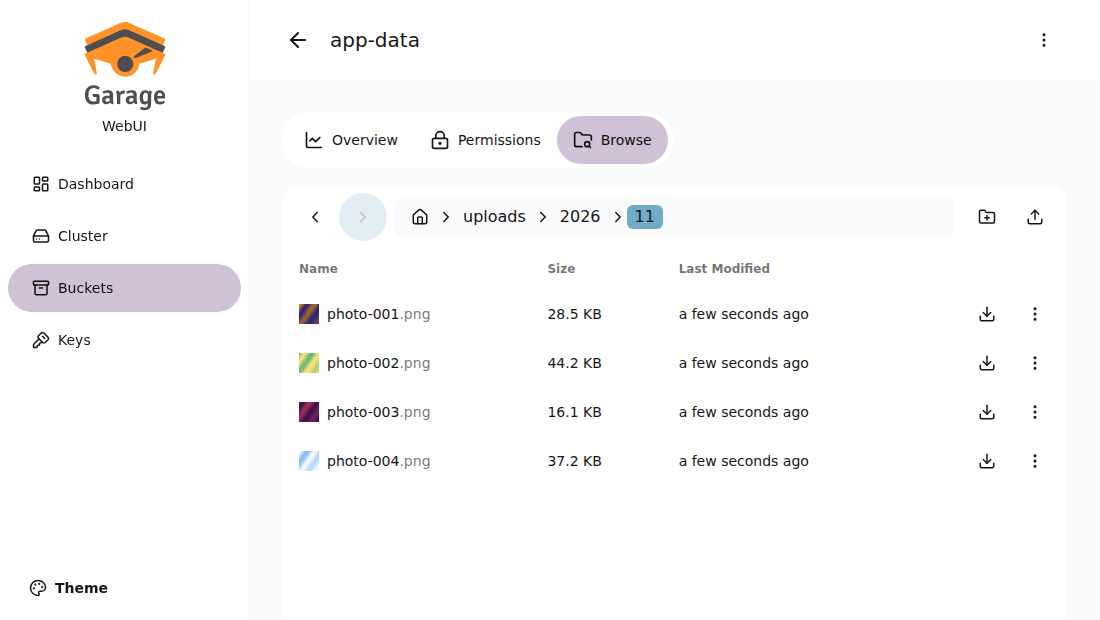
Browsing a bucket on the Garage VM from the UI VM. The thumbnails come straight from Garage over S3.
You need a Garage VM set up with the [Garage page](/deploy/garage) first.
The UI uses its admin API (port 3903) and its S3 API at
`https://my-garage.exe.xyz/`, which that page's nginx serves on port 8000.
## Open the UI
When Shelley finishes, open `https://my-garage-ui.exe.xyz/` and sign in to
exe.dev. The dashboard shows the cluster's health and use; **Buckets**
lists every bucket with its size and object count, and **Browse** opens
its files. **Keys** creates access keys and shows their secrets, and a
bucket's **Permissions** tab gives keys read, write, or owner rights.
Only the emails in `~/garage-webui/allowed-emails` get in, even if you
share the VM. To let a teammate in, share the VM with them, add a line
with their email and ` 1;`, then reload nginx:
```bash
echo 'teammate@example.com 1;' >> ~/garage-webui/allowed-emails
sudo systemctl reload nginx
```
Anyone on the list can read and delete every file and see every key's
secret, so keep it short. Sharing this VM doesn't give anyone access to
the Garage VM itself.
## How it reaches Garage
exe.dev VMs don't share a network, and the Garage VM is private. Two
[VM-to-VM integrations](/docs/integrations-vm-to-vm) connect them. Each
gives this VM an address under `int.exe.xyz`; exe.dev adds a key for the
Garage VM at the edge, and passes the request to that VM's proxy:
| Integration | From this VM | Reaches | Adds |
|---|---|---|---|
| `garage-admin` | `https://garage-admin.int.exe.xyz` | the admin API, port 3903 | the Garage admin token, replacing whatever the UI sends |
| `garage-s3` | `https://garage-s3.int.exe.xyz` | the S3 API, nginx on port 8000 | nothing; S3 requests are signed with a Garage key |
The UI calls the admin API at its `int.exe.xyz` address directly. S3 needs
one more step, because a signed S3 request covers the host name: the
integration delivers it with `Host: my-garage.exe.xyz`, so the UI has to
sign for that name. The UI sends S3 requests for `http://my-garage.exe.xyz`
to a small nginx on `127.0.0.1:3128`, as its HTTP proxy, and nginx hands
them to `https://garage-s3.int.exe.xyz`. It refuses any other host.
Neither credential is on this VM, so someone with a shell here can use
Garage through the UI's integrations but can't take the admin token
elsewhere. Removing the `garage-admin` integration cuts the UI off at
once. The integrations reach only the Garage VM, and requests arrive
there with an `X-Exedev-Source-Vm` header naming this VM.
## What the UI can do
The admin token this page makes is limited to what the UI needs for
buckets and keys, and expires in a year:
```text
GetClusterHealth GetClusterStatus GetClusterLayout GetNodeInfo
ListBuckets GetBucketInfo CreateBucket UpdateBucket DeleteBucket
AddBucketAlias RemoveBucketAlias AllowBucketKey DenyBucketKey
ListKeys GetKeyInfo CreateKey ImportKey DeleteKey
```
It can't create admin tokens or change the cluster layout, so the
**Cluster** page shows the nodes but can't assign or connect them. To
allow that, add `UpdateClusterLayout,ApplyClusterLayout,RevertClusterLayout,ConnectClusterNodes`
to `--scope` when you [renew the token](#renew-the-token).
For files, the UI reads each bucket's first key from the admin API and
uses it over S3, so it sees every bucket that has a key. Uploads go in
one request per file; for big files or whole folders, rclone and
`aws s3 sync` on the [Garage page](/deploy/garage#connect-from-your-computer)
are faster. A bucket's "Share" link points at Garage's website endpoint
and only means something for [website buckets](/deploy/garage#host-a-static-website).
## Renew the token
The Garage admin token expires after a year. To replace it, or to cut
the UI off at once, remove the old token and its integration on your
computer:
```bash
ssh my-garage.exe.xyz garage admin-token delete --yes garage-webui
ssh exe.dev integrations remove garage-admin
```
Then run the first command of
[Connect it to Garage](#connect-it-to-garage) again. Nothing changes on
this VM. `garage admin-token list` on the Garage VM shows when the token
expires.
## Use Tailscale instead
If both VMs are on your [Tailscale](https://tailscale.com/) network, the
UI can reach Garage directly and needs no integrations or forward proxy.
On the Garage VM, set `api_bind_addr = "[::]:3903"` under `[admin]` in
`/etc/garage.toml` and restart Garage; then, in this VM's
`/etc/garage-webui/env`, use `API_BASE_URL=http://my-garage:3903` and
`S3_ENDPOINT_URL=http://my-garage:3900`, put the admin token from "Connect
it to Garage" in `API_ADMIN_KEY`, and drop the `HTTP_PROXY` line. That
token then sits on this VM.
The admin API is then open to your whole tailnet, guarded by its tokens;
use [Tailscale's access rules](https://tailscale.com/kb/1018/acls) to
narrow it. We haven't tested this variant.
## The nuts and bolts
Install by hand
### Create a VM
On your computer (pick another name if `my-garage-ui` is taken):
```bash
ssh exe.dev new --name=my-garage-ui
ssh my-garage-ui.exe.xyz
```
The remaining commands run **on this VM**, as `exedev`, except
"Connect it to Garage", which runs on your computer.
### Install the UI
```bash
sudo curl -fsSL -o /usr/local/bin/garage-webui \
"https://github.com/khairul169/garage-webui/releases/download/1.1.0/garage-webui-v1.1.0-linux-$(dpkg --print-architecture)"
sudo chmod 755 /usr/local/bin/garage-webui
sudo mkdir -p /etc/garage-webui
mkdir -p ~/garage-webui
email=$(curl -fsS https://reflection.int.exe.xyz/email | jq -r .email)
[ -s ~/garage-webui/allowed-emails ] || echo "$email 1;" > ~/garage-webui/allowed-emails
cat ~/garage-webui/allowed-emails
```
It should print your email, then `1;`. If not, put
`you@example.com 1;` in `~/garage-webui/allowed-emails` yourself.
### Connect it to Garage
**On your computer**, make a narrow Garage admin token and hand it straight
to a new exe.dev integration, then add a second integration for S3. Set
the two VM names first:
```bash
GARAGE_VM=my-garage
UI_VM=my-garage-ui
ssh $GARAGE_VM.exe.xyz garage admin-token create --expires-in 365d -q \
--scope GetClusterHealth,GetClusterStatus,GetClusterLayout,GetNodeInfo,ListBuckets,GetBucketInfo,CreateBucket,UpdateBucket,DeleteBucket,AddBucketAlias,RemoveBucketAlias,AllowBucketKey,DenyBucketKey,ListKeys,GetKeyInfo,CreateKey,ImportKey,DeleteKey \
garage-webui |
ssh exe.dev integrations add http-proxy --name garage-admin \
--target https://$GARAGE_VM.exe.xyz:3903/ --peer --bearer=- --attach vm:$UI_VM
ssh exe.dev integrations add http-proxy --name garage-s3 \
--target https://$GARAGE_VM.exe.xyz/ --peer --attach vm:$UI_VM
```
The token never appears on screen or on either VM's disk outside Garage;
exe.dev stores it and adds it to every request through `garage-admin`.
`--peer` makes exe.dev generate a key for the Garage VM, which it keeps
too. The scopes are in [What the UI can do](#what-the-ui-can-do).
Integration names are per account: for a second Garage, pick other names
and use them below.
### Point it at Garage
Back **on this VM**. The UI's settings, with no secrets in them; set
`GARAGE_VM` to your Garage VM's name:
```bash
GARAGE_VM=my-garage
sudo tee /etc/garage-webui/env >/dev/null </dev/null </dev/null <<'EOF'
[Unit]
Description=Garage Web UI
After=network-online.target nginx.service
Wants=network-online.target
[Service]
User=exedev
EnvironmentFile=/etc/garage-webui/env
ExecStart=/usr/local/bin/garage-webui
Restart=on-failure
[Install]
WantedBy=multi-user.target
EOF
sudo systemctl daemon-reload
sudo systemctl enable --now garage-webui
```
### Put it behind your email
nginx on port 8000, the VM's URL, sends visitors who aren't signed in to
exe.dev's login and lets in only the emails in `allowed-emails`. The VM's
nginx comes with a placeholder site on port 8000, so this removes it:
```bash
sudo tee /etc/nginx/sites-available/garage-webui >/dev/null <<'EOF'
# Garage Web UI behind exe.dev login. exe.dev's proxy sends X-ExeDev-Email
# for signed-in visitors; only emails in allowed-emails get through.
map $http_x_exedev_email $garage_webui_allowed {
default 0;
include /home/exedev/garage-webui/allowed-emails;
}
server {
listen 8000;
listen [::]:8000;
absolute_redirect off;
client_max_body_size 0;
location / {
default_type text/plain;
if ($http_x_exedev_email = "") {
return 302 /__exe.dev/login?redirect=$request_uri;
}
if ($garage_webui_allowed = 0) {
return 403 "$http_x_exedev_email isn't in ~/garage-webui/allowed-emails on this VM.\n";
}
proxy_pass http://127.0.0.1:3909;
proxy_set_header Host $host;
proxy_read_timeout 300s;
}
}
EOF
sudo ln -sf ../sites-available/garage-webui /etc/nginx/sites-enabled/garage-webui
sudo rm -f /etc/nginx/sites-enabled/default
sudo nginx -t && sudo systemctl reload nginx
```
Check the three cases: no email (sent to exe.dev login), someone else
(refused), and you, with the UI reaching Garage:
```bash
email=$(head -n 1 ~/garage-webui/allowed-emails | cut -d' ' -f1)
curl -s -o /dev/null -w '%{http_code}\n' http://localhost:8000/
curl -s -o /dev/null -w '%{http_code}\n' -H 'X-ExeDev-Email: someone@example.com' http://localhost:8000/
curl -s -H "X-ExeDev-Email: $email" http://localhost:8000/api/v2/GetClusterHealth | jq -r .status
curl -s -H "X-ExeDev-Email: $email" http://localhost:8000/api/buckets | jq -r '.[].globalAliases[]'
curl -s -H "X-ExeDev-Email: $email" http://localhost:8000/api/browse/app-data | jq -r '.objects[].objectKey'
```
Expect `302`, `403`, `healthy`, your bucket names, and the files at the
top of `app-data` (the last one reads over S3).
Update the UI
Check [the releases](https://github.com/khairul169/garage-webui/releases)
for a newer version and what it changes, then swap the binary:
```bash
VERSION=1.1.0 # the new version
sudo curl -fsSL -o /usr/local/bin/garage-webui \
"https://github.com/khairul169/garage-webui/releases/download/$VERSION/garage-webui-v$VERSION-linux-$(dpkg --print-architecture)"
sudo systemctl restart garage-webui
```
The UI keeps nothing on disk, so there's nothing to back up or migrate.
When you update Garage to a new major version, check that the UI still
supports its admin API (1.1 speaks Garage's v2 API; we tested Garage
2.5).
Something not working?
On this VM, `journalctl -u garage-webui -n 50` and
`sudo tail -n 20 /var/log/nginx/error.log` usually say what's wrong.
- **Pages load but show errors or no data**: run the `GetClusterHealth`
check in "Point it at Garage". `integration not found or not attached
to this VM` means the `garage-admin` integration is missing or attached
to another VM (`ssh exe.dev integrations list` on your computer);
`Forbidden: Invalid bearer token` means the Garage admin token expired,
was deleted, or lacks a scope: [renew it](#renew-the-token).
- **Buckets list, but browsing fails**: run the last check in "Point it
at Garage". If it fails, check the `garage-s3` integration the same way,
and that the Garage page's nginx runs on port 8000 there. If it passes,
check that the bucket has a key.
- **`upstream SSL certificate verify error` in nginx's log**: keep
`proxy_ssl_verify_depth 4`; exe.dev's certificate chain is longer than
nginx's default allows.
- **`403` with your own email**: the email in `allowed-emails` must match
your exe.dev login exactly, followed by ` 1;`.
- **After changing `/etc/garage-webui/env` nothing changed**: restart the
UI with `sudo systemctl restart garage-webui`; it reads its settings at
start.
## Frequently asked questions
### Why a separate VM instead of running it next to Garage?
Three reasons. You can share this VM with a teammate who needs the files without giving them the storage VM. The UI never reads Garage's config file: when it does, it sends the whole file, RPC secret and admin token included, to every browser that opens it. And it holds no secrets at all: its narrow admin token lives in an exe.dev integration, so not even someone with a shell here can read it.
### Is garage-webui part of Garage?
No. Garage has no web UI of its own; garage-webui is a community project under the MIT license. Everything it does, the `garage` command can do too.
### Can I change the cluster layout from the UI?
Not with the token this page makes. It leaves out layout changes and connecting nodes, which are rare and easy to get wrong. Use `garage layout` on the Garage VM, or give the UI a token with more [scopes](#what-the-ui-can-do).
### Does it work with a Garage cluster?
Yes. Point it at any one node; buckets, keys, and files are cluster-wide. We tested it with one node.
### How big a file can I upload through the UI?
It sends each file in one request, not in parts. We uploaded 50 MB without trouble. For big files and whole folders, use rclone or `aws s3 sync` against Garage directly.
### Is it free?
Yes, garage-webui and Garage are free and open source. You pay for the VMs; see [exe.dev plans](https://exe.dev/pricing).
## Related
- [Self-host Garage S3 storage](https://exe.dev/deploy/garage.md): Small, S3-compatible object storage on a disk you own, private by default.
- [Self-hosted S3 storage](https://exe.dev/deploy/s3-storage.md): Your own S3 bucket on a real disk. RustFS, Garage or SeaweedFS, tested.
- [Self-host Redis](https://exe.dev/deploy/redis.md): Your own Redis on a real disk, private by default, with backups you've restored.
- [Give agents API access without giving them the keys](https://exe.dev/deploy/agent-secrets.md): Your agents call your APIs. The keys stay with exe.dev, outside the VM.
- [Self-host Metabase](https://exe.dev/deploy/metabase.md): Charts for the whole team. Questions answered before the meeting.
- [Self-host MongoDB](https://exe.dev/deploy/mongodb.md): Your own MongoDB on a real disk, locked down, with backups you've restored.