---
title: "Run CI on exe.dev, a fresh VM for every job"
description: "Run CI jobs on exe.dev: each job on a fresh sandbox copied from a warm base VM, billed by the second. A vendor-free recipe, and GitHub, GitLab, Buildkite."
url: https://exe.dev/deploy/ci
category: "Developer tools"
updated: 2026-11-04
---
# Run CI on exe.dev, a fresh VM for every job
A warm base VM, a fresh copy per job, deleted when the job ends.
- **Software:** CI on exe.dev (https://exe.dev/docs/standalone-vms)
- **Time:** 20 minutes
- **Machine-readable:** https://exe.dev/deploy/ci/manifest.json
- **File:** https://exe.dev/deploy/ci/ci-dispatcher.py
## What you get
- A base VM with your toolchains and warm caches, ready to be copied
- The ci-dispatcher service, which tests every push in a fresh sandbox and deletes it afterwards
- The exe.dev API key and the forge token held by integrations, on no VM
- A commit status on every push, linking to the job's log
Running on the VM:
- **Dispatcher**: ci-dispatcher.py (Python 3, standard library), the ci-dispatcher systemd service on my-ci, port 8000, data in `~/ci (env, jobs, logs)`
- **Job logs**: served by the same program, private behind exe.dev login, port 8080, data in `~/ci/logs`
- **Base VM**: my-ci-base, a regular VM with your toolchains and warm caches, data in `~/go, ~/.cache, ~/.npm, Docker images`
- **Job sandboxes**: one cp --sandbox copy of the base per push, 2 vCPU / 4 GiB, deleted when the job ends
How it is reached:
- https://my-ci.exe.xyz/ (public): signed push webhooks and one-time source downloads, nothing else
- https://my-ci.exe.xyz:8080/ (private): the job logs, linked from each commit status
- ssh my-ci-base.exe.xyz (private): the base VM, to install toolchains and warm caches
CI needs two things that usually pull against each other: a clean machine
for every job, and a machine that already has your toolchain, your
dependencies, and your build cache. Hosted CI gives you the first and makes
you pay for the second in setup minutes on every run. On exe.dev you get
both: keep one **base VM** warm, and for every job copy it into a fresh
[sandbox](/deploy/sandbox) that is deleted when the job ends.
This page explains that pattern, builds a complete CI with it in one short
script (a push webhook in, a commit status out, for GitHub, Forgejo, Gitea,
or Codeberg), and points to the pages for GitHub Actions, GitLab, Buildkite,
and the rest, which use the same pattern with each service's own runner.
## How CI works on exe.dev
- **A warm base VM.** An ordinary VM that never runs a job. You install
your toolchains on it and build your project there once, so its disk
holds the module cache, the build cache, and the Docker images.
- **A fresh copy per job.** `ssh exe.dev cp my-ci-base --sandbox` makes a
new VM with a copy of that disk in under a second (0.5 to 0.7 seconds
in our tests). The job starts with everything installed and every cache
warm, and nothing it writes goes back to the base.
- **Deleted afterwards.** When the job ends, `rm` deletes the copy, its
disk, and whatever the job left on it.
- **A dispatcher.** A small always-on program on a third VM that hears
about jobs (from a webhook, or by asking your CI service) and makes and
deletes the copies. Each CI service's runner page has one; this page has a
generic one.
What that gets you:
- **Real CPUs.** A sandbox's vCPUs and memory are reserved for it, not
shared with your other VMs or with other jobs, and it's a whole VM: its
own kernel, `sudo`, and Docker without tricks, on a normal Ubuntu
machine.
- **No leftover state.** Every job starts from the same disk. A job can't
see the last one's files, processes, or credentials, and can't poison the
next one's cache.
- **Pay only while jobs run.** Sandboxes are billed by the second, from
the copy to the delete, at $0.105 an hour per 2 vCPU / 4 GiB. Nothing is
billed for job VMs between jobs, because there aren't any.
- **No keys on any VM.** The dispatcher reaches exe.dev's API and your
forge through [integrations](/docs/integrations): exe.dev holds the
tokens and adds them to requests at the network edge. A job VM holds
nothing but the job.
## Pick your CI
If you already use a CI service, keep its workflows and move only where
the jobs run. Each page sets up the same pattern with that service's own
runner. Without one, or with a forge that has no runner you like, use
[the recipe below](#a-ci-in-one-script).
To host the forge itself on exe.dev, see [Forgejo](/deploy/forgejo) and
[Gitea](/deploy/gitea); the recipe below reaches a private one through a
VM-to-VM integration.
Two more pages speed up builds whichever CI runs them. Point jobs, and
laptops, at a shared builder whose cache stays warm between runs:
## A CI in one script
This is the whole pattern without a CI service. On every push to your
repository:
1. the forge sends a signed webhook to
[ci-dispatcher.py](https://exe.dev/deploy/ci/ci-dispatcher.py) on
`my-ci`, which posts a **pending** commit status;
2. the dispatcher downloads the commit's source through the forge's API,
copies `my-ci-base` into a new sandbox, and runs the commit's own
`ci.sh` there, streaming the output into a log;
3. it posts **success** or **failure**, linking to the log, and deletes the
sandbox.
GitHub, Forgejo, Gitea, and Codeberg sign push webhooks the same way and
share one commit status API, so the same script works with all four. The
job VM never sees a token: it fetches the source from the dispatcher
through a one-time URL.
```
20:20:24 20261104-202024-5a55: queued you/app refs/heads/main 106dd5b
20:20:27 20261104-202024-5a55: started my-ci-job-20261104-202024-5a55 for you/app 106dd5b
20:20:34 20261104-202024-5a55: success: passed in 8s; deleted my-ci-job-20261104-202024-5a55
```
That push, to a small Go project whose `ci.sh` runs `go vet`, `go test
-race`, and a Docker container, went from webhook to green check in 10
seconds. Copying the base took 0.7 of them. The same `ci.sh` took 22
seconds on a fresh VM without the warm caches.
### Before you start
- An exe.dev account that can create sandboxes. Personal accounts can. On
a Work team, an admin turns them on with
`ssh exe.dev team settings standalone all-users`.
- A repository on GitHub, Forgejo, Gitea, or Codeberg, and the right to
add webhooks to it. The steps use `you/app`; put yours in its place.
### Prepare the base VM
On your computer, create the base. The `ci` tag matters: the dispatcher's
exe.dev key will only be able to touch VMs with it.
```bash
ssh exe.dev new --name=my-ci-base --tag=ci
```
VM names are global, so pick any free name, and use it for `BASE_VM`
later. The base starts with what the default exe.dev image ships: Docker,
Go, Python with `uv`, git, and build tools. Install whatever else your
build needs, and start Docker at boot so every copy has it running:
```bash
ssh my-ci-base.exe.xyz 'sudo systemctl enable --now docker.service'
ssh my-ci-base.exe.xyz 'sudo apt-get install -y postgresql-client' # for example
```
Then warm the caches by building your project there once. Jobs run as the
same `exedev` user, so they find `~/go/pkg/mod`, `~/.cache/go-build`,
`~/.npm`, `~/.cache/pip`, or `~/.cargo` already full. From a checkout on
your computer:
```bash
rsync -a --exclude=.git ./ my-ci-base.exe.xyz:warm/
ssh my-ci-base.exe.xyz 'cd warm && bash ci.sh; cd && rm -rf warm && sync'
```
End with `sync`: copies get what's on the base's disk. Don't put secrets
on the base; everything on it is on every job's VM.
### Create the dispatcher and its keys
On your computer:
```bash
ssh exe.dev new --name=my-ci
```
**exe.dev.** Make an API key that can copy, list, reach, and delete VMs
tagged `ci`, and nothing else, and hand it to an
[HTTP proxy integration](/docs/integrations-http-proxy) that only `my-ci`
can use:
```bash
ssh exe.dev ssh-key generate-api-key --label=ci-dispatcher --tag=ci \
--cmds=cp,ls,rm,ssh --exp=1y --json | jq -r .token \
| ssh exe.dev integrations add http-proxy --name ci-exe \
--target https://exe.dev --bearer - --attach vm:my-ci
```
Copies of the base carry its `ci` tag, so the key can delete them too.
**The forge.** The dispatcher reads the source of the pushed commit and
writes commit statuses, so it needs a token that can do both, for the
repositories you're testing and nothing else:
- **GitHub:** a
[fine-grained personal access token](https://github.com/settings/personal-access-tokens/new)
with access to only those repositories, and the repository permissions
**Contents: Read-only** and **Commit statuses: Read and write**.
- **Forgejo, Gitea, Codeberg:** an access token from **Settings →
Applications** with the **repository: Read and write** scope.
These tokens apply to every repository you can write to, so on a forge
you share, make a separate user for CI and give it write access to only
the repositories it tests.
Put the token in a second integration, with the forge's address as the
target (`https://api.github.com`, `https://codeberg.org`, or your own
forge's URL). This reads it without echoing it or saving it in your shell
history:
```bash
printf 'Forge token: '; read -rs T; echo
printf %s "$T" | ssh exe.dev integrations add http-proxy --name ci-forge \
--target https://api.github.com --bearer - --attach vm:my-ci
unset T
```
For a forge on an exe.dev VM, which exe.dev's login keeps private, make it
a [VM-to-VM integration](/docs/integrations-vm-to-vm) instead: add
`--peer` and use the VM's address, `--target https://my-forgejo.exe.xyz/`.
exe.dev then lets `my-ci` through the login (a plain proxy gets `401`),
and the token signs it in to Forgejo.
> [!WARNING]
> Attach both integrations to `my-ci` only (`--attach vm:my-ci`), never by
> the `ci` tag: every job VM carries that tag, and any pushed `ci.sh` could
> then create VMs or write to your repositories.
Check both from the dispatcher VM (`ssh my-ci.exe.xyz`):
```bash
curl -s -X POST https://ci-exe.int.exe.xyz/exec -d ls | jq -r '.vms[].vm_name'
curl -s https://ci-forge.int.exe.xyz/repos/you/app | jq .full_name
```
The first prints `my-ci-base` and nothing that isn't tagged `ci`. The
second prints `"you/app"`; on Forgejo, Gitea, and Codeberg, whose API
lives under `/api/v1`, ask
`https://ci-forge.int.exe.xyz/api/v1/repos/you/app` instead.
### Start the dispatcher
On the VM (`ssh my-ci.exe.xyz`), fetch the dispatcher and write its
settings, with a fresh secret for the webhooks:
```bash
mkdir -p ~/ci
curl -fsSL -o ~/ci/ci-dispatcher.py https://exe.dev/deploy/ci/ci-dispatcher.py
(umask 077; cat > ~/ci/env </dev/null <<'EOF'
[Unit]
Description=CI on exe.dev sandboxes
After=network-online.target
Wants=network-online.target
[Service]
User=exedev
EnvironmentFile=/home/exedev/ci/env
ExecStart=/usr/bin/python3 /home/exedev/ci/ci-dispatcher.py
Restart=always
RestartSec=5
[Install]
WantedBy=multi-user.target
EOF
sudo systemctl daemon-reload
sudo systemctl enable --now ci-dispatcher
journalctl -u ci-dispatcher -n 5 --no-pager -o cat
```
The log ends with `testing pushes to you/app on copies of my-ci-base`.
The forge must reach port 8000, so make it public. On your computer:
```bash
ssh exe.dev share set-public my-ci
```
Only requests signed with the webhook secret do anything there; anything
else gets `401`. The job logs on port 8080 stay private: the
[HTTPS proxy](/docs/proxy) never makes ports other than 8000 public.
### Add the webhook
Show the secret on the VM with `grep WEBHOOK_SECRET ~/ci/env`. Then, in
the repository's settings:
- **GitHub:** **Settings → Webhooks → Add webhook**. Payload URL
`https://my-ci.exe.xyz/`, content type `application/json`, the secret,
and **Just the push event**.
- **Forgejo, Gitea, Codeberg:** **Settings → Webhooks → Add webhook →
Forgejo** (or **Gitea**). Target URL `https://my-ci.exe.xyz/`, POST,
`application/json`, the secret, and **Push events**.
GitHub's first delivery, a `ping`, is answered with `204`. On Forgejo and
Gitea, **Test delivery** sends a push for the latest commit, which runs a
real job.
### Add ci.sh and push
`ci.sh` is the job: a script at the top of your repository that runs from
a fresh copy of the commit, in `~/src` on the job VM, and passes or fails
by its exit code. For a Go project:
```bash
#!/usr/bin/env bash
set -euo pipefail
go vet ./...
go test -race ./...
docker build -t app .
```
It can run anything the base has: `npm ci && npm test`, `uv run pytest`,
`cargo test`, `docker compose up -d` for a test database. `CI=true`,
`CI_REPO`, `CI_REF`, and `CI_SHA` are set. The source comes as the
forge's archive of the commit, without `.git`; a script that needs git
history can `git clone` a public repository instead.
Commit it, push, and watch the dispatcher on `my-ci`:
```bash
journalctl -u ci-dispatcher -f -o cat
```
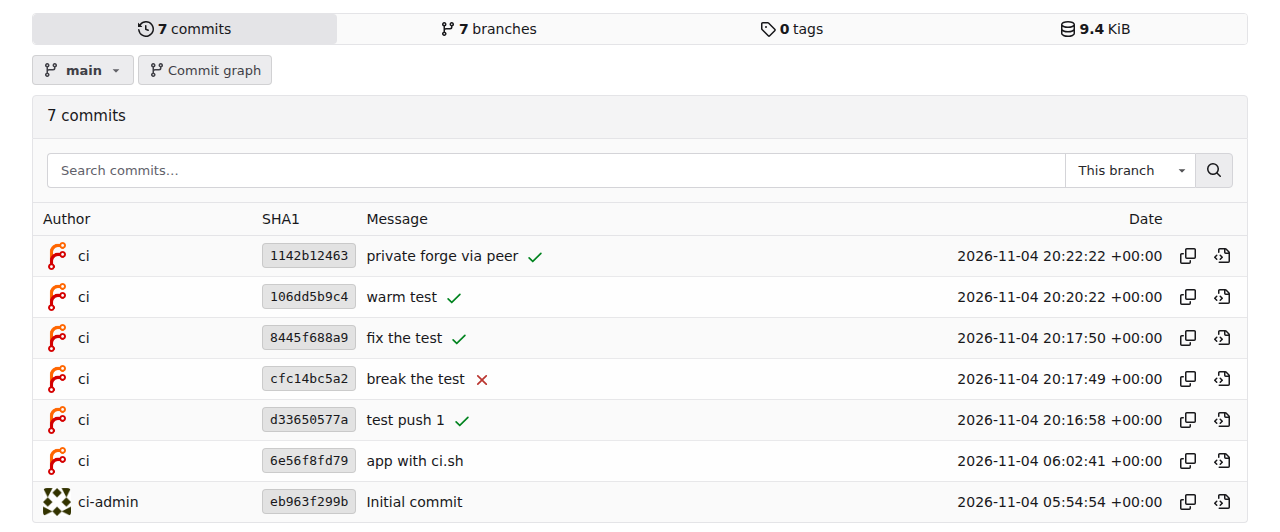
The commit shows a yellow pending mark at once and a green check (or a red
cross) when the job ends:
Commit statuses from the dispatcher on Forgejo 17. Each mark links to its job's log.
Its **Details** link opens the job's log at
`https://my-ci.exe.xyz:8080/`, after the exe.dev login; the index there
lists recent jobs. Several pushes in a row get several VMs, up to
`MAX_JOBS` at once.
To require a passing job before merging, add the `exe.dev` status check
to the branch's protection rule (**Settings → Branches** on GitHub,
Forgejo, and Gitea).
### Keep it running
- **Refresh the base** when dependencies change a lot, or weekly: rerun the
warm-up and `sync`. Jobs already running keep their copy.
- **Update the dispatcher** by fetching `ci-dispatcher.py` again and
`sudo systemctl restart ci-dispatcher`. Jobs it was running are
deleted and run again from the start.
- **Rotate the keys:** the exe.dev key above expires in a year, the forge
token when you chose. Make a new one, `ssh exe.dev integrations remove
ci-exe` (or `ci-forge`), and add it again as above.
- **Old logs** stay in `~/ci/logs`; delete what you don't need, for
example from cron with `find ~/ci/logs -mtime +30 -delete`.
## What it costs
exe.dev bills [sandboxes](/deploy/sandbox) by the second, from the copy to
the delete: $0.105 an hour per 2 vCPU / 4 GiB, so $0.00175 a minute for
the default size, $0.0035 for 4 vCPU, $0.007 for 8. Each job VM lives a
few seconds longer than its job; the examples add 10 seconds. The
dispatcher and the base are ordinary VMs that share your plan's capacity
with your other VMs and cost nothing extra (on Personal, plans start at
$15 a month).
Hosted CI, for comparison: GitHub's
[runners](https://docs.github.com/en/billing/reference/actions-runner-pricing)
are $0.006 a minute for 2 cores, $0.012 for 4, and $0.022 for 8, with
every job rounded up to a whole minute. GitLab's
[hosted runners](https://docs.gitlab.com/ci/pipelines/compute_minutes/)
use compute minutes, $10 per 1,000
([extra minutes](https://about.gitlab.com/pricing/)), at 1× for its small
2 vCPU runner, 2× for medium (4 vCPU), and 3× for large (8 vCPU), counted
by the second.
Some months, on 30 days, before any included minutes:
| Job mix | GitHub-hosted | GitLab-hosted | exe.dev sandboxes |
| --- | --- | --- | --- |
| A small team: 50 jobs a day, 4 minutes, 2 vCPU | $36 | $60 | $10.94 |
| Many short jobs: 1,000 a day, 30 seconds, 2 vCPU | $180 | $150 | $35 |
| A busy monorepo: 300 jobs a day, 8 minutes, 4 vCPU | $864 | $1,440 | $257.25 |
| Nightly builds: 1 a day, 60 minutes, 8 vCPU | $39.60 | $54 | $12.63 |
How those are worked out, for the small team: 1,500 jobs × 4 minutes =
6,000 minutes; GitHub $0.006 × 6,000 = $36; GitLab $0.01 × 6,000 = $60;
exe.dev 1,500 × 4⅙ minutes = 104.2 hours × $0.105 = $10.94. Short jobs
show GitHub's rounding: 30,000 jobs of 30 seconds are billed as 30,000
minutes.
Where hosted CI stays the better deal:
- **Included minutes.** GitHub's Free, Pro, and Team plans include $12 to
$18 of minutes a month for private repositories, and GitLab's Free and
Premium 400 and 10,000 compute minutes. The small team above fits in
GitLab Premium's.
- **Public repositories,** which run free on GitHub's standard runners.
- **macOS, Windows, and arm64,** which exe.dev doesn't run.
- **Memory-hungry 2-core jobs.** GitHub's and GitLab's 2-core runners have
8 GB; a 2 vCPU sandbox has 4 GiB, so a job that needs more takes 4 vCPU
here, at twice the price.
In time, a warm base usually wins back more than it costs to start a VM:
no toolchain download, no cache restore, no `docker pull`.
## Security
- **A fresh VM per job.** Each job runs on a copy made for it and deleted
after it: nothing it installs, starts, or leaves behind reaches the next
job, and nothing it writes reaches the base. Jobs run side by side on
separate VMs with their own kernels, not containers on a shared host.
- **Keys in integrations, on no VM.** The exe.dev key and the forge token
live in exe.dev's integrations, attached to `my-ci` alone. The key can
touch only VMs tagged `ci`, and only with `cp`, `ls`, `rm`, and `ssh`.
A job VM gets the source through a random one-time URL that works once
and is gone when the job ends.
- **Signed webhooks.** The dispatcher acts only on webhooks signed with
its secret, and only for repositories in `REPOS`.
- **Pull requests from forks.** This recipe tests pushes, and only people
with write access can push, so a stranger's code never runs on your VMs.
CI services that test fork pull requests on your runners run that
stranger's code at your cost: [GitHub Actions](/deploy/github-actions)
shows how to require approval and keep them on hosted runners. A
throwaway VM with no keys limits the damage, but the job can still use
the internet, your compute, and any integration attached by the `ci`
tag.
- **Secrets for jobs.** A job that needs a credential (a package registry,
a test API, an LLM) can use an [integration](/docs/integrations)
attached by the `ci` tag, so no key is on the VM. Every job can use it,
including any code anyone pushes, so attach only what every job may use.
- **Logs.** The logs are private to you and the people you
[share](/docs/sharing) `my-ci` with. Don't print secrets in `ci.sh`.
- **A ceiling on the bill.** `MAX_JOBS` caps how many job VMs run at once,
and `MAX_MINUTES` how long each may take.
## Troubleshooting
Start with the dispatcher's log on `my-ci`:
`journalctl -u ci-dispatcher -n 50 --no-pager -o cat`.
- **Nothing happens on a push.** The webhook's recent deliveries on the
forge show why: `401` is a secret that doesn't match `~/ci/env`; a
redirect to a login page means `my-ci` isn't public. A `204` with no
`queued` line means the repository isn't in `REPOS`.
- **`status pending: HTTP Error 403` or `404`.** The forge token lacks a
permission on that repository, or `FORGE_API` lacks `/api/v1` on
Forgejo, Gitea, or Codeberg.
- **`CI error: HTTP Error 401`.** The exe.dev key in `ci-exe` is wrong,
expired, or revoked.
- **`CI error: HTTP Error 422`.** exe.dev refused the copy: sandboxes
aren't enabled for your team, the VM limit is reached, or `BASE_VM`
isn't tagged `ci`. `ssh exe.dev cp my-ci-base --sandbox` on your
computer shows the reason; delete that copy afterwards.
- **`no ci.sh in this commit`.** The commit has no `ci.sh` at the top of
the repository (or no `CI_SCRIPT`).
- **A job can't find a tool or a cached package.** It wasn't on the base's
disk when the job's VM was copied. Install it, `sync`, and push again.
- **Leftover job VMs.** The dispatcher deletes them, and deletes any left
from before when it starts. To see them yourself:
`ssh exe.dev ls --json | jq -r '.vms[].vm_name | select(startswith("my-ci-job-"))'`.
## Frequently asked questions
### How do I run CI on exe.dev?
Keep one VM with your toolchains and caches as a base, copy it into a fresh [sandbox](/deploy/sandbox) for each job with `cp --sandbox`, run the job, and delete the copy. Your CI service's runner does that for you on [GitHub Actions](/deploy/github-actions), [GitLab](/deploy/gitlab-runner), and [Buildkite](/deploy/buildkite); for anything else, [the recipe on this page](#a-ci-in-one-script) does it with a webhook and the commit status API.
### How much does CI on exe.dev cost?
A 2 vCPU / 4 GiB sandbox is $0.105 an hour, billed by the second from copy to delete: about $0.00175 a minute, against $0.006 for GitHub's 2-core runner and $0.01 for GitLab's small one. The dispatcher and the base are ordinary VMs on your plan. See [What it costs](#what-it-costs) for whole months, and when hosted minutes stay cheaper.
### Why a VM per job instead of a container?
A sandbox is a whole machine: its own kernel, `sudo`, Docker that works without tricks, and vCPUs reserved for it, so jobs don't slow each other down. Nothing a job does survives it, and copying a warm base took under a second in our tests, so it costs no more time than starting a container.
### Is it safe to run pull requests from forks?
The recipe here only tests pushes, which need write access to the repository, so code from forks never runs. If you do run it, each job is a throwaway VM with no keys on it, which limits what it can reach; see [Security](#security) for what's left.
### Where do the job logs go?
To `~/ci/logs` on the dispatcher, served at `https://my-ci.exe.xyz:8080/`, which only you and the people you [share](/docs/sharing) the VM with can open. Each commit status links to its job's log.
### Can jobs run on arm64, macOS, or Windows?
No. exe.dev VMs are x86-64 Linux. Keep those jobs on your CI service's hosted runners; most services let one pipeline mix both.
### Do I need a sandbox per job for a small project?
No. One VM running your CI's runner all the time is simpler, and fine for your own pushes; see [Just one runner](/deploy/github-actions#just-one-runner). Jobs then share the VM and see what earlier ones left behind.
## Related
- [Run GitHub Actions jobs on exe.dev, a fresh VM per job](https://exe.dev/deploy/github-actions.md): Every job on a fresh copy of a warm VM, billed by the second.
- [Run GitLab CI jobs on exe.dev, a fresh VM per job](https://exe.dev/deploy/gitlab-runner.md): Every GitLab CI job on a fresh copy of a warm VM, billed by the second.
- [Run Buildkite agents on exe.dev, a fresh VM per job](https://exe.dev/deploy/buildkite.md): Every Buildkite job on a fresh copy of a warm VM, billed by the second.
- [Run a remote Docker builder with a warm BuildKit cache](https://exe.dev/deploy/docker-builder.md): One big VM with a warm build cache that every laptop and CI job builds on.
- [Run a Nix remote builder and binary cache on exe.dev](https://exe.dev/deploy/nix-builder.md): One big VM that builds for every machine and caches what it built.
- [Sandboxes on exe.dev](https://exe.dev/deploy/sandbox.md): A VM with its own CPU and memory, billed by the second while it runs.
 GitHub ActionsJust-in-time runnersChange
 GitLab CI/CDGitLab RunnerA GitLab Runner that runs each job on a fresh sandbox, for gitlab.com and self-managed GitLab.Run GitLab CI jobs on exe.dev →
 BuildkiteBuildkite agentsOne agent per job on a fresh sandbox, with queues for sizes and the agent token in an integration.Run Buildkite agents on exe.dev →
 Forgejo, Gitea, CodebergThis pageThey send the same push webhooks and take the same commit statuses as GitHub, so the recipe below works with them as is.A CI in one script →
 TangledSpindlesHost your repositories on your own knot, and run Tangled's CI on a spindle of your own.Host your Tangled repos →
✓Anything elseThis pageA webhook in, a script from the commit on a fresh sandbox, a commit status out. One Python file, no CI service.A CI in one script →