---
title: "Self-host Authentik"
description: "Self-host Authentik with Docker Compose on an exe.dev VM: public login pages, a private admin interface, OIDC sign-in for Grafana, a login proxy, and backups."
url: https://exe.dev/deploy/authentik
category: "Security"
published: 2026-11-21
updated: 2026-11-21
---
# Self-host Authentik
> **For agents:** with your user's OK, this sets up Authentik on a new exe.dev VM in their account: `curl -fsSL https://exe.dev/deploy/authentik/prompt.txt | ssh exe.dev new --prompt=/dev/stdin` (or open https://exe.dev/deploy/authentik/new). Already on the VM? Skip this.
Single sign-on and a login proxy for your apps, with the admin kept private.
- **Software:** Authentik (https://goauthentik.io/)
- **Source:** https://github.com/goauthentik/authentik
- **License:** MIT (open-source edition)
- **Time:** 20 minutes
- **Example VM name:** `my-authentik` (yours will differ; on the VM, `hostname` prints it)
- **Machine-readable:** https://exe.dev/deploy/authentik/manifest.json
- **File:** https://exe.dev/deploy/authentik/admins-private.yaml
- **File:** https://exe.dev/deploy/authentik/ak
- **File:** https://exe.dev/deploy/authentik/backup.sh
- **File:** https://exe.dev/deploy/authentik/compose.yaml
- **File:** https://exe.dev/deploy/authentik/nginx.conf
## What you get
- Authentik on PostgreSQL, with its base URL set to the VM's address and no first-visitor setup page to race for.
- An akadmin password and API token generated on the VM, in a file only you can read.
- A public port that refuses the admin interface, and a rule that stops administrators signing in there at all.
- The admin interface on a private port behind exe.dev login.
- Nightly database backups, with one restored into a scratch database to check it.
- Everything starts again after a reboot.
Running on the VM:
- **Authentik 2026.8**: The official server and worker images, from Authentik's own compose file, port 9000, data in `~/authentik/data`
- **PostgreSQL 16**: Authentik's database, in the same Compose stack, data in `Docker volume authentik_database`
- **nginx**: Port 8000 serves everything but the admin interface; port 8080 serves it all, port 8000
- **Nightly backup**: A systemd timer; a database dump plus the settings and uploads, kept two weeks, data in `~/authentik/backups`
How it is reached:
- https://my-authentik.exe.xyz/ (public): Login pages, the users' app dashboard, OIDC, SAML and outpost endpoints, once you open it
- https://my-authentik.exe.xyz:8080/ (private): The admin interface, behind exe.dev login; the only place administrators can sign in
## Deploy with Shelley
Open https://exe.dev/deploy/authentik/new to create a VM whose agent, Shelley, follows this recipe. From a terminal:
```sh
curl -fsSL https://exe.dev/deploy/authentik/prompt.txt | ssh exe.dev new --prompt=/dev/stdin
```
Or follow the steps below by hand.
Authentik is an open-source identity provider. You keep users,
passwords, two-factor and groups in one place, and your apps hand sign-in
to it over OpenID Connect, SAML or LDAP: one account for Grafana, your
wiki and your internal tools, and one place to turn someone off. For apps
with no sign-in support at all, Authentik's **proxy outpost** stands in
front of them and asks for the login itself.
This recipe runs Authentik with Docker Compose and
[PostgreSQL](/deploy/postgres) on an exe.dev VM. exe.dev supplies the
HTTPS and the stable address that every token's issuer depends on, and
its login lets you split Authentik in two: the login pages face the
internet, while the admin interface sits on a private port behind your
exe.dev account. Then you connect Grafana on another VM over OIDC, and put
a login in front of an app that has none.
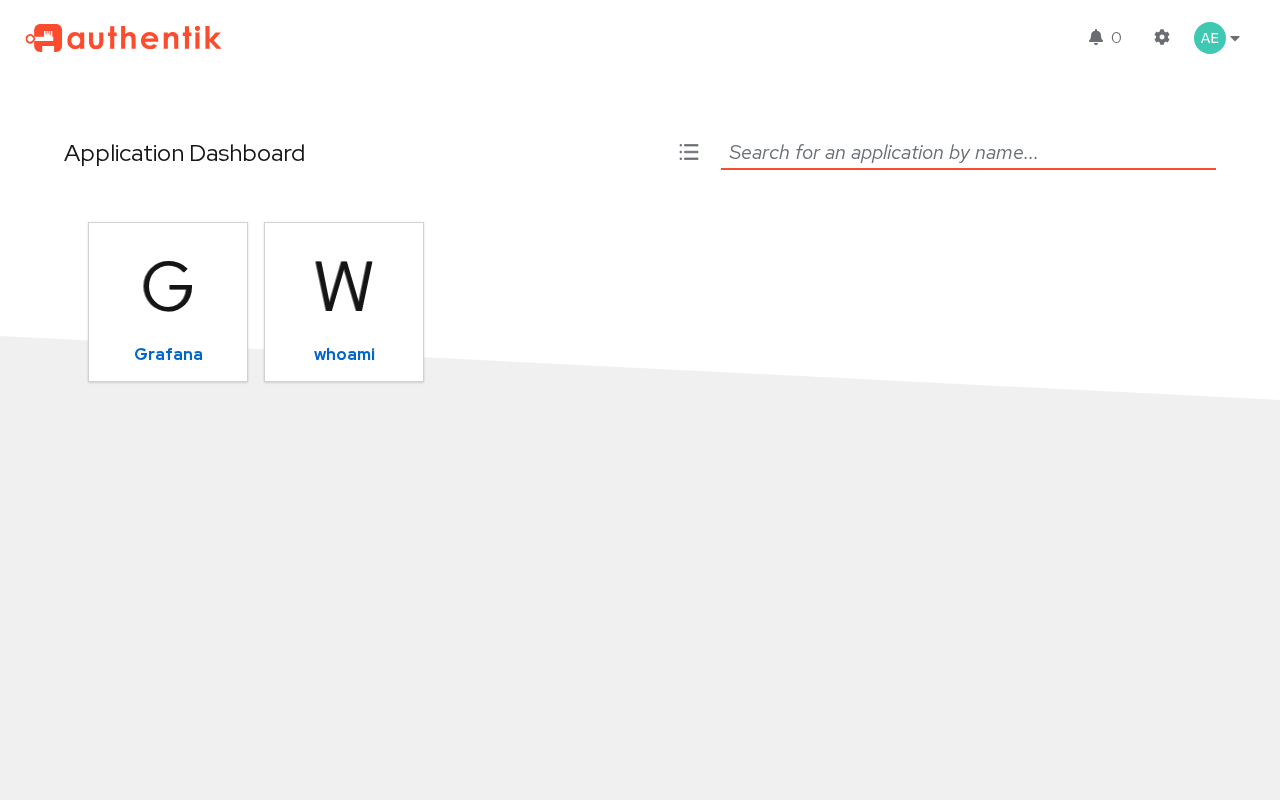
What a user sees after signing in: the apps they're allowed to open.
## Do you need Authentik?
Maybe not. Every exe.dev VM already has a login in front of it. A
private VM lets in only you and the people you
[share it with](/docs/sharing), by email or team, and your app can read
who they are from the `X-ExeDev-Email` header
([Login with exe](/docs/login-with-exe)). That's single sign-on across all
your VMs, with nothing to run. If everyone who uses your apps can have an
exe.dev account, start there.
Run Authentik when:
- **Your users aren't on exe.dev**: customers, contractors, a club or
a school, who should sign in with a username and password you manage,
or with Google or GitHub.
- **The app only speaks OIDC, SAML or LDAP.** Many apps have a "generic
OAuth" setting and nothing else. Authentik gives them a standard
identity provider.
- **The app has no login at all**, and you want one in front of it for
people without exe.dev accounts. That's the proxy outpost.
- **You want groups in one place**, sent to every app, so making someone
a Grafana admin is an Authentik setting.
- **You need policy**: required two-factor, password rules, who may open
which app, sign-in from LDAP or Active Directory.
## How it's laid out
Authentik answers on two ports, through nginx on the VM:
| Address | Who | What it serves |
| --- | --- | --- |
| `https://my-authentik.exe.xyz/` | Anyone, once you open it | Login pages, the users' app dashboard and settings, OIDC, SAML and outpost endpoints |
| `https://my-authentik.exe.xyz:8080/` | You, after exe.dev login | All of the above plus the admin interface |
Authentik serves its admin interface from the same server as its login
pages, so the split takes two pieces. nginx sends `/if/admin/` on the
public port to port 8080. And a small
[blueprint](https://exe.dev/deploy/authentik/admins-private.yaml) adds a
step to Authentik's login flow: when a superuser such as `akadmin` signs
in on the public address, the flow stops right after the username, before
any password is checked. Nobody on the internet can try an admin password.
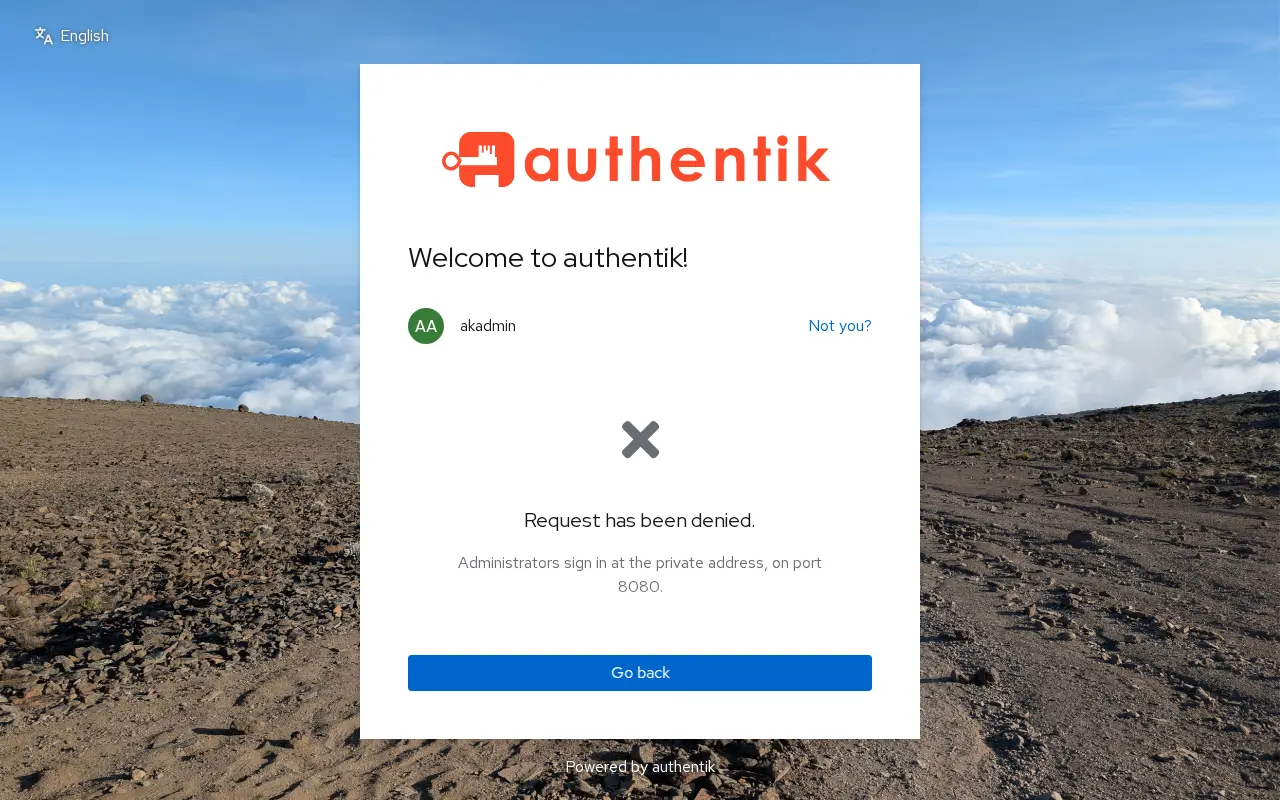
akadmin on the public address: refused before the password.
## Open the admin interface
Open `https://my-authentik.exe.xyz:8080/` and sign in to exe.dev if asked.
Then sign in to Authentik as `akadmin`. The password is
`AUTHENTIK_BOOTSTRAP_PASSWORD` in `~/authentik/.env` on the VM. On your
computer:
```bash
ssh my-authentik.exe.xyz grep BOOTSTRAP_PASSWORD authentik/.env
```
That value was only read on Authentik's first start. If you change the
password in Authentik (avatar menu → **Settings**), the file goes stale;
update it or delete the line. Set akadmin's email there too. There's no
setup page to finish: the install set the password, an API token and the
**Base URL** (`https://my-authentik.exe.xyz`, under **System →
Settings**) for you, so there's no first visitor to race.
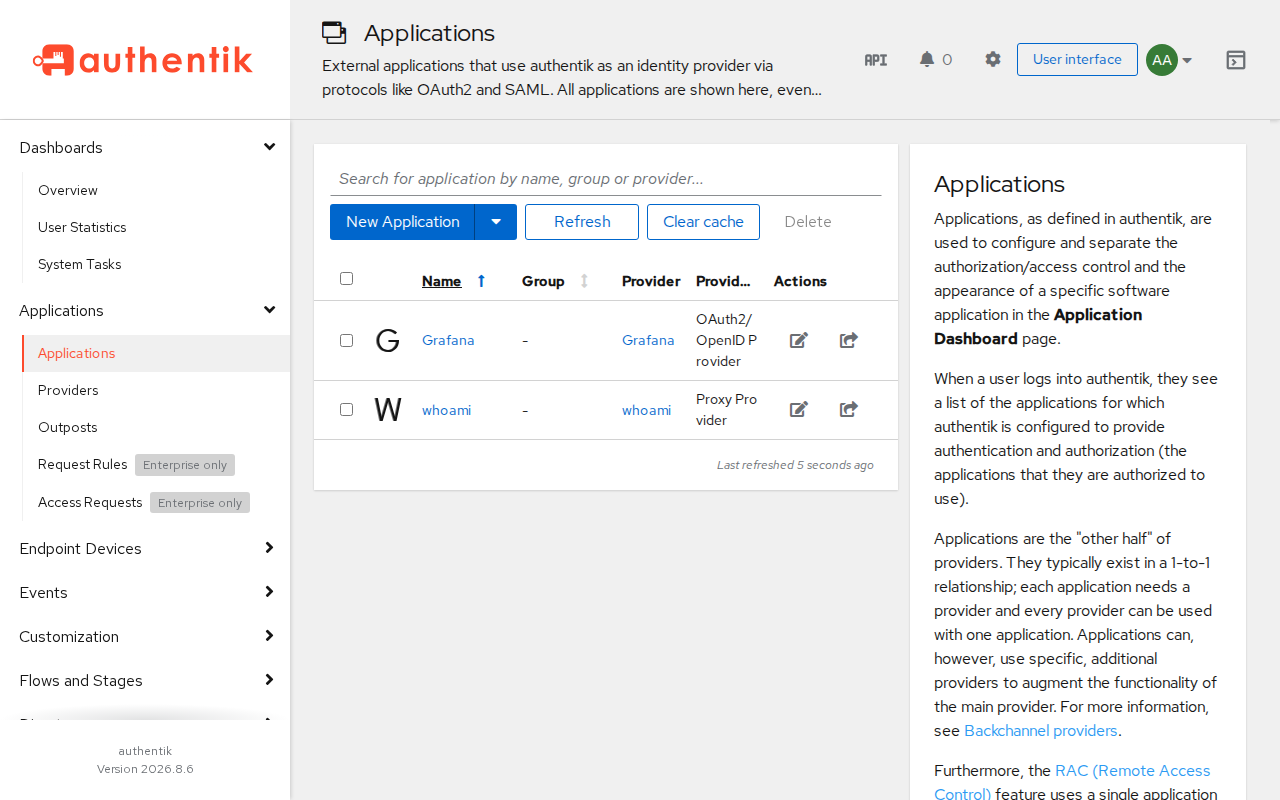
The admin interface on port 8080, after the examples below.
The `~/authentik/ak` helper calls Authentik's
[API](https://api.goauthentik.io/) as akadmin with the install's token, so
you (or Shelley) can script what the admin interface does. The examples
below show both.
## Open the login pages
Your users need to reach the login pages without an exe.dev account, so
make port 8000 public. On your computer:
```bash
ssh exe.dev share set-public my-authentik
```
Port 8080 stays private: exe.dev serves ports other than 8000 only to
signed-in users with access. Check from your computer:
```bash
curl -s -o /dev/null -w '%{http_code}\n' https://my-authentik.exe.xyz/-/health/ready/
curl -s -o /dev/null -w '%{http_code} %{redirect_url}\n' https://my-authentik.exe.xyz/if/admin/
curl -s -o /dev/null -w '%{http_code}\n' https://my-authentik.exe.xyz:8080/
```
The first prints `200`; the second `302` to port 8080, sent by nginx;
the third `401`, refused by exe.dev.
## Add people
In the admin interface: **Directory → Users → New User**, then **Set
password** on the user's page. Groups are under **Directory → Groups**.
Or on the VM:
```bash
cd ~/authentik
./ak POST core/groups/ '{"name":"Grafana Admins"}' >/dev/null
uid=$(./ak POST core/users/ '{"username":"alice","name":"Alice Example","email":"alice@example.com","path":"users"}' | jq -r .pk)
pw=$(openssl rand -base64 12); echo "Alice's first password: $pw"
./ak POST core/users/$uid/set_password/ "{\"password\":\"$pw\"}"
gid=$(./ak GET 'core/groups/?name=Grafana%20Admins' | jq -r '.results[0].pk')
./ak POST core/groups/$gid/add_user/ "{\"pk\":$uid}"
```
Send the password to them yourself; Authentik can't email anyone until
you [give it SMTP](#email). At `https://my-authentik.exe.xyz/` each person
sees their apps, and under **Settings** can change their password, add an
authenticator app or passkey, and sign out of sessions. Once a user has
an authenticator, the default login flow asks for it.
## Connect Grafana
Here's a whole OIDC connection, end to end: a Grafana on its own VM, with
no login of its own, where Authentik decides who gets in and who is an
admin. The same three steps fit most apps: make an application with an
OAuth2/OpenID provider in Authentik, give the app its client ID and
secret, and point the app at Authentik.
> [!NOTE]
> The [Grafana recipe](/deploy/grafana) signs people in with their exe.dev
> login instead, which is simpler if they all have one. This example is a
> fresh Grafana VM for people who don't.
**1. Register Grafana in Authentik.** In the admin interface, that's
**Applications → Applications → New Application** with an
**OAuth2/OpenID Provider**, a confidential client, and the redirect URI
`https://my-grafana.exe.xyz/login/generic_oauth`. Or on the Authentik VM:
```bash
cd ~/authentik
app=https://my-grafana.exe.xyz
flow() { ./ak GET "flows/instances/?slug=$1" | jq -r '.results[0].pk'; }
scopes=$(./ak GET 'propertymappings/provider/scope/?page_size=100' |
jq -c '[.results[] | select(.scope_name == "openid" or .scope_name == "email" or .scope_name == "profile") | .pk]')
cert=$(./ak GET 'crypto/certificatekeypairs/?name=authentik%20Self-signed%20Certificate' | jq -r '.results[0].pk')
prov=$(./ak POST providers/oauth2/ "$(jq -n --arg app "$app" --argjson scopes "$scopes" --arg cert "$cert" \
--arg authz "$(flow default-provider-authorization-implicit-consent)" \
--arg inval "$(flow default-provider-invalidation-flow)" '{
name: "Grafana", client_type: "confidential", client_id: "grafana",
grant_types: ["authorization_code", "refresh_token"],
authorization_flow: $authz, invalidation_flow: $inval,
redirect_uris: [{matching_mode: "strict", url: "\($app)/login/generic_oauth"}],
property_mappings: $scopes, signing_key: $cert}')")
./ak POST core/applications/ "$(jq -n --argjson p "$(echo "$prov" | jq .pk)" --arg app "$app" \
'{name: "Grafana", slug: "grafana", provider: $p, meta_launch_url: $app}')" >/dev/null
mkdir -p clients && (umask 077 && echo "$prov" | jq -r .client_secret > clients/grafana.secret)
```
The application's slug, `grafana`, is part of its issuer:
`https://my-authentik.exe.xyz/application/o/grafana/`. The `profile`
scope sends the user's groups in a `groups` claim, which Grafana turns
into a role below.
**2. Make the Grafana VM and give it the secret.** On your computer:
```bash
ssh exe.dev new --name=my-grafana
ssh my-authentik.exe.xyz cat authentik/clients/grafana.secret |
ssh my-grafana.exe.xyz 'mkdir -p grafana && umask 077 && cat > grafana/client-secret'
ssh my-grafana.exe.xyz
```
**3. Start Grafana, pointed at Authentik.** On the Grafana VM:
```bash
sudo systemctl enable --now docker.service
cd ~/grafana && mkdir -p data
ak=https://my-authentik.exe.xyz/application/o
me=https://$(hostname).exe.xyz
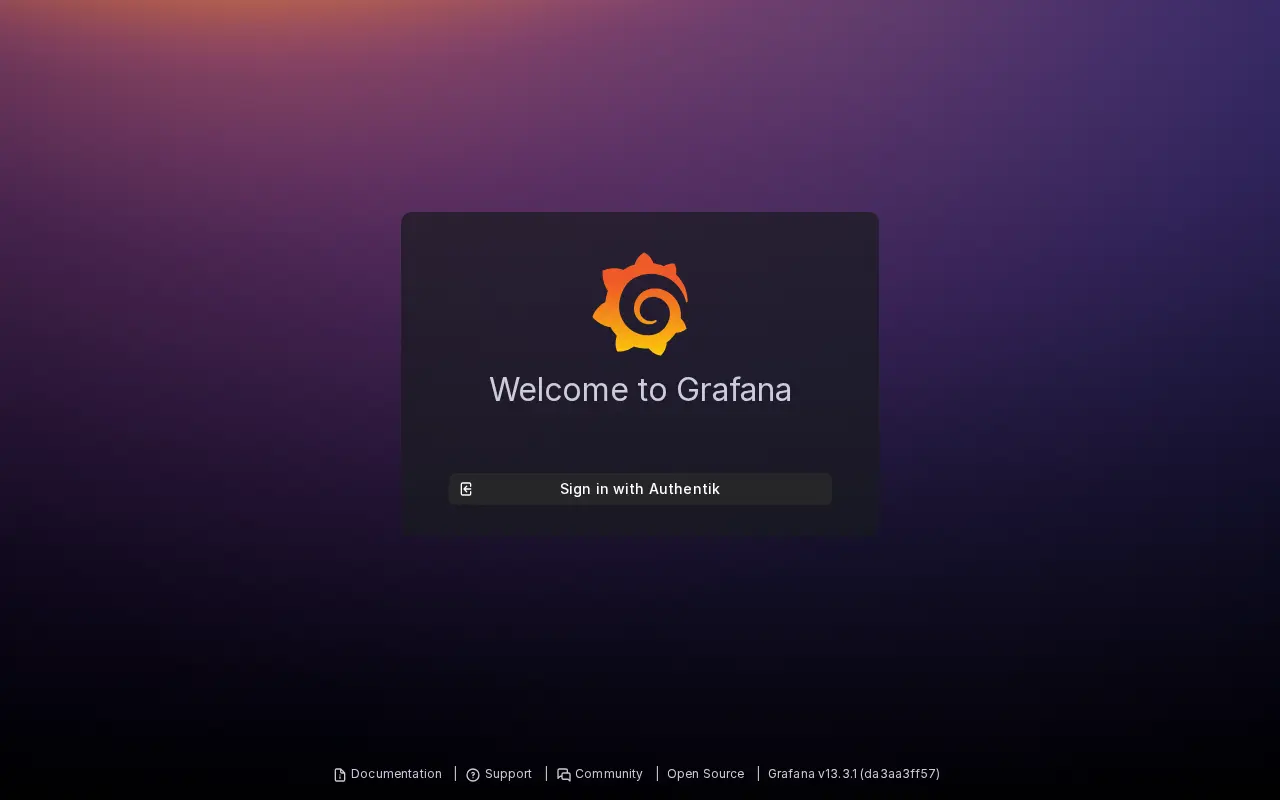
test -e grafana.env || (umask 077; cat > grafana.env < compose.yaml <Grafana on a test VM, signing in only through Authentik.
Grafana's built-in `admin` can't sign in, because the login form is off;
its password is in `~/grafana/grafana.env` in case you turn the form back
on. Every user Authentik knows can open an application that has no
policy bound to it. To limit Grafana to some groups, bind them on the
application's **Policy / Group / User Bindings** tab, as the next example
does.
## Put a login in front of any app
Some apps have no login, or only a shared password: a dashboard, a
document converter, an internal tool you wrote in an afternoon. Authentik's
**proxy outpost** is a small container that sits in front of such an app,
sends visitors to Authentik to sign in, checks they're allowed, and passes
the request through with headers saying who they are.
On exe.dev, each VM has its own address, so the outpost runs on the
app's VM, next to the app, and talks to Authentik over its public address.
Here the app is [`traefik/whoami`](https://github.com/traefik/whoami),
which prints the request it receives, so you can see what your own app
would get. Swap in yours.
**1. Make the application, provider and outpost in Authentik.** In the
admin interface: **Applications → Applications → New Application** with a
**Proxy Provider** in **Proxy** mode, external host
`https://my-app.exe.xyz`, internal host `http://whoami:80`; then
**Applications → Outposts → New Outpost** of type Proxy with that
application. Or on the Authentik VM, which also limits the app to a
`team` group with Alice in it:
```bash
cd ~/authentik
app=https://my-app.exe.xyz
flow() { ./ak GET "flows/instances/?slug=$1" | jq -r '.results[0].pk'; }
prov=$(./ak POST providers/proxy/ "$(jq -n --arg app "$app" \
--arg authz "$(flow default-provider-authorization-implicit-consent)" \
--arg inval "$(flow default-provider-invalidation-flow)" '{
name: "whoami", mode: "proxy", external_host: $app, internal_host: "http://whoami:80",
authorization_flow: $authz, invalidation_flow: $inval}')" | jq -r .pk)
appk=$(./ak POST core/applications/ "{\"name\":\"whoami\",\"slug\":\"whoami\",\"provider\":$prov}" | jq -r .pk)
gid=$(./ak POST core/groups/ '{"name":"team"}' | jq -r .pk)
./ak POST core/groups/$gid/add_user/ "{\"pk\":$(./ak GET 'core/users/?username=alice' | jq -r '.results[0].pk')}"
./ak POST policies/bindings/ "{\"target\":\"$appk\",\"group\":\"$gid\",\"order\":0}" >/dev/null
out=$(./ak POST outposts/instances/ "$(jq -n --argjson p "$prov" --arg h "https://$(hostname).exe.xyz" \
'{name: "whoami", type: "proxy", providers: [$p], config: {authentik_host: $h}}')")
mkdir -p outposts && (umask 077 &&
./ak GET "core/tokens/$(echo "$out" | jq -r .token_identifier)/view_key/" | jq -r .key > outposts/whoami.token)
```
In the admin interface, open the outpost from the Outposts page and use
**Copy token** under *Outpost Deployment Info*.
**2. Make the app's VM and give it the token.** On your computer:
```bash
ssh exe.dev new --name=my-app
ssh my-authentik.exe.xyz cat authentik/outposts/whoami.token |
ssh my-app.exe.xyz 'mkdir -p whoami && umask 077 && { printf AUTHENTIK_TOKEN=; cat; } > whoami/outpost.env'
ssh my-app.exe.xyz
```
**3. Start the app with the outpost in front.** On the app's VM, the
outpost takes port 8000 and the app has no published port, so the only
way in is through the outpost:
```bash
sudo systemctl enable --now docker.service
cd ~/whoami
cat > compose.yaml <<'EOF'
services:
whoami:
image: traefik/whoami:v1.11
restart: unless-stopped
authentik-proxy:
image: ghcr.io/goauthentik/proxy:2026.8.6
restart: unless-stopped
ports:
- 8000:9000
env_file: outpost.env
environment:
AUTHENTIK_HOST: https://my-authentik.exe.xyz
EOF
docker compose up -d --wait
docker compose logs authentik-proxy | grep -c 'connected to websocket'
```
The last line prints `1` or more once the outpost has reached Authentik.
On your computer, `ssh exe.dev share set-public my-app`, then open
`https://my-app.exe.xyz/`. You're sent to Authentik's login; Alice gets
through to the app, and someone outside `team` gets *Permission denied*.
The app sees who's there in headers like these:
```text
X-Authentik-Username: alice
X-Authentik-Email: alice@example.com
X-Authentik-Name: Alice Example
X-Authentik-Groups: Grafana Admins|team
X-Authentik-Meta-Outpost: whoami
```
The outpost's version must match Authentik's, so bump its image tag when
you [update](#update). It used 6 MiB of memory on our test VM.
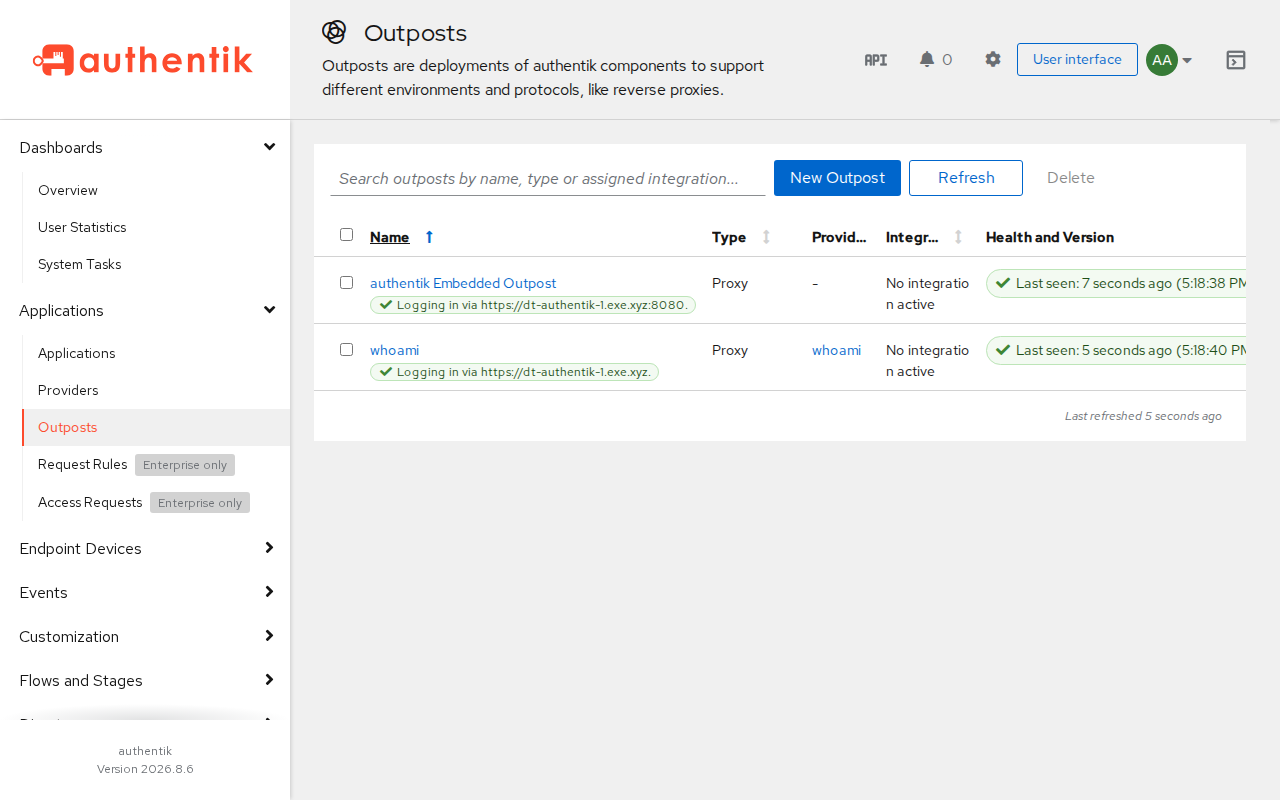
The whoami outpost on its own VM, checked in with Authentik.
Authentik also has an **embedded outpost** inside its own server, which
serves proxy applications whose address points at the Authentik VM. On
exe.dev, each app's address leads to the app's own VM, so this recipe
leaves the embedded one unused. Forward-auth mode, where the app's own
nginx or Traefik asks the outpost, works too; we tested only proxy mode.
## Connect other apps
Most OIDC apps want the same few values. Make an application with an
OAuth2/OpenID provider for each, as above, and give the app:
| Setting | Value |
| --- | --- |
| Issuer | `https://my-authentik.exe.xyz/application/o//` |
| Discovery URL | `https://my-authentik.exe.xyz/application/o//.well-known/openid-configuration` |
| Authorize, token, userinfo | `https://my-authentik.exe.xyz/application/o/authorize/`, `.../token/`, `.../userinfo/` |
| Client ID and secret | From the provider's page |
| Redirect URI | The app's callback, from its docs, entered exactly in the provider |
SAML providers publish metadata on their provider page, and an LDAP
outpost serves directory lookups for apps that only speak LDAP; we didn't
test either. Authentik's [integrations
site](https://integrations.goauthentik.io/) has settings for hundreds of
apps.
Apps can be public, as Grafana is here, or private behind exe.dev
login. A private app means two sign-ins, exe.dev's and then Authentik's,
so it's usually one or the other.
## Email
Authentik sends email for password recovery, address verification and
notifications, but only through an SMTP server you configure with the
`AUTHENTIK_EMAIL__*` settings in `.env`, from any provider (see
Authentik's [email docs](https://docs.goauthentik.io/install-config/email/)).
exe.dev's [email gateway](/docs/send-email) won't do: it delivers only to
you and your team. Until you add SMTP, don't add a recovery flow, and
reset passwords yourself. We didn't test SMTP.
## Sizing
On our test VM (2 CPUs, 8 GB), after an hour of use, Authentik's server
used about 570 MiB, its worker 380 MiB and PostgreSQL under 350 MiB;
the whole VM used 1.1 GB. The first start takes about two minutes while
Authentik sets up its database; later starts are quicker. Authentik asks
for at least 2 CPUs and 2 GB of RAM. The images take 2.3 GB of disk.
## Authentik or Keycloak?
[Keycloak](/deploy/keycloak) is the other popular open-source identity
provider, and has its own recipe. Both do OIDC and SAML well.
Pick Authentik for a small team that wants a friendly admin interface, a
visual editor for login flows, an app dashboard for users, LDAP and
RADIUS outposts, and especially the proxy outpost for apps with no SSO.
Pick Keycloak when apps expect it, or for many realms, SAML-heavy setups
and fine-grained admin roles; its admin console has its own address, so
keeping it private takes only nginx.
## The nuts and bolts
Shelley follows these steps when it sets Authentik up for you. They're
here if you'd rather do it yourself, or want to know what's on the VM.
Install by hand
### Create the VM
On your computer (pick another name if `my-authentik` is taken):
```bash
ssh exe.dev new --name=my-authentik
ssh my-authentik.exe.xyz
```
All remaining installation commands run **on the VM**, as `exedev`.
### Start Docker at boot
```bash
sudo systemctl enable --now docker.service
```
### Write the settings
The secrets go in `.env`, readable only by you. Authentik reads the
`BOOTSTRAP` values and the base URL only on its first start: they set
akadmin's password, create an API token for `ak`, and record the VM's
address, so there's no setup page waiting for the first visitor.
```bash
mkdir -p ~/authentik && cd ~/authentik
mkdir -p data certs custom-templates blueprints backups
test -e .env || (umask 077; cat > .env <.exe.xyz:8080/if/admin/`, `200`.
### Set up nightly backups
```bash
sudo tee /etc/systemd/system/authentik-backup.service >/dev/null <<'EOF'
[Unit]
Description=Back up Authentik
[Service]
Type=oneshot
User=exedev
ExecStart=/home/exedev/authentik/backup.sh
EOF
sudo tee /etc/systemd/system/authentik-backup.timer >/dev/null <<'EOF'
[Unit]
Description=Back up Authentik nightly
[Timer]
OnCalendar=daily
Persistent=true
[Install]
WantedBy=timers.target
EOF
sudo systemctl daemon-reload
sudo systemctl enable --now authentik-backup.timer
```
Take one now and restore it into a scratch database, to check it:
```bash
cd ~/authentik
b=$(./backup.sh)
tar -xzOf "$b" ./authentik.dump > /tmp/authentik.dump
docker compose exec -T postgresql createdb -U authentik restore_test
docker compose exec -T postgresql pg_restore -U authentik -d restore_test --no-owner < /tmp/authentik.dump
docker compose exec -T postgresql psql -U authentik -d restore_test -Atc 'select username from authentik_core_user order by username'
docker compose exec -T postgresql dropdb -U authentik restore_test
rm /tmp/authentik.dump
```
It lists `akadmin` among a few internal accounts.
Back up and restore
Every night, [backup.sh](https://exe.dev/deploy/authentik/backup.sh)
writes `~/authentik/backups/authentik-.tar.gz`: a `pg_dump` of the
database (checked to contain the user table), plus `.env`, `compose.yaml`,
`nginx.conf`, the scripts, `blueprints/`, `custom-templates/` and the
`data/` directory of uploaded files. Two weeks are kept. The database
holds everything Authentik knows: users, password hashes, groups,
applications, providers and their secrets, outpost tokens. `.env` holds
`AUTHENTIK_SECRET_KEY`, which Authentik needs to read what it signed and
encrypted. Treat the archives like the passwords they contain.
They're on the same disk, so copy them off now and then. On your
computer:
```bash
scp "my-authentik.exe.xyz:authentik/backups/$(ssh my-authentik.exe.xyz ls -t authentik/backups | head -1)" .
```
Or back up the whole VM to your own S3 bucket with
[VM backups](/docs/vm-backups).
### Restore
On the VM, this replaces the database with the backup's. Anything since
the backup is lost.
```bash
cd ~/authentik
b=backups/authentik-20261121-030000.tar.gz # the one you want
tar -xzOf "$b" ./authentik.dump > /tmp/authentik.dump
docker compose stop server worker
docker compose exec -T postgresql dropdb -U authentik authentik
docker compose exec -T postgresql createdb -U authentik authentik
docker compose exec -T postgresql pg_restore -U authentik -d authentik --no-owner < /tmp/authentik.dump
docker compose up -d --wait
rm /tmp/authentik.dump
```
On a new VM, run **Install by hand** up to *Write the settings*, but
put the archive's `.env` in `~/authentik` first (so the secret key and
database password match) and unpack its `data.tar` there; then
`docker compose up -d --wait`, restore as above, and continue with *Put
nginx in front*. If the new VM has another name, every issuer changes, so
change the **Base URL** under **System → Settings** and update every
connected app and outpost.
Update Authentik
Authentik releases a new version about every three months (2026.5,
2026.8, ...) with patch releases in between, including security fixes.
Read the [release notes](https://docs.goauthentik.io/releases/) for each
version you cross, and don't skip one: go to the latest patch of each
version in turn. Authentik can't be downgraded, except by restoring the
backup. On the VM:
```bash
cd ~/authentik
./backup.sh
sed -i 's/^AUTHENTIK_TAG=.*/AUTHENTIK_TAG=2026.8.6/' .env # the new version
docker compose pull
docker compose up -d --wait
./ak GET admin/version/ | jq -r .version_current
```
Then bump `ghcr.io/goauthentik/proxy:` to the same version on each
outpost's VM and run `docker compose up -d` there: outposts must match
the server.
Compare `compose.yaml` with Authentik's current
[compose file](https://docs.goauthentik.io/compose.yml) when the release
notes mention it; this recipe's copy keeps the three changes described
under *Write the settings*. Leave `postgres:16-alpine` alone unless the
notes ask: a new PostgreSQL major version needs a dump and restore, not
just a new image. From 2026.11, Authentik requires the Base URL setting,
which this install already sets.
Something not working?
Start with the logs, on the VM:
```bash
cd ~/authentik && docker compose ps && docker compose logs --tail 50 server worker
```
- **`429 Too Many Requests` pulling `postgres`.** Docker Hub limits
anonymous pulls per address, and VMs share addresses. Wait a few
minutes and run `docker compose up -d --wait` again. Authentik's own
images come from GitHub's registry.
- **Worker logs say a relation "does not exist" right after the first
start.** Harmless: the worker starts before the server has finished
creating the database. It stops once both are healthy.
- **akadmin can't sign in: "Administrators sign in at the private
address".** That's the blueprint working. Use
`https://my-authentik.exe.xyz:8080/`.
- **"Request has been denied" on `/if/flow/initial-setup/`.** Also
expected: the install set akadmin's password, so there's no setup to do.
- **An endless spinner, or links that go to http://.** nginx isn't
sending the forwarded headers, or something other than nginx is talking
to Authentik. Check that `nginx.conf` is linked into
`/etc/nginx/sites-enabled/` and `sudo nginx -t` passes.
- **The nginx welcome page on port 8000.** The default site is back;
`sudo rm -f /etc/nginx/sites-enabled/default && sudo systemctl restart nginx`.
- **The app says the login provider denied the request.** Look for the
reason with `docker compose logs server | grep -i oauth2`. *Invalid
grant_type* means the provider has no grant types ticked (the `ak`
example sets them); a redirect URI error means the app's callback
doesn't match the provider's exactly.
- **An outpost shows as unhealthy, or the app's VM loops on login.**
Run `docker compose logs authentik-proxy` on the app's VM. The
Authentik VM must be public, the token must be the outpost's, and the
provider's external host must be the app's exact address.
- **`./ak` answers 403.** The bootstrap token was deleted or expired.
Make a new API token for akadmin under **Directory → Tokens** and put it
in `AUTHENTIK_BOOTSTRAP_TOKEN` in `.env`.
- **Lost the akadmin password.** On the VM,
`docker compose exec server ak create_recovery_key 10 akadmin` prints a
path, `/recovery/use-token/.../`, good for 10 minutes. Open it on
`https://my-authentik.exe.xyz:8080` and set a new password.
## Frequently asked questions
### My users all have exe.dev accounts. Do I need Authentik?
Probably not. exe.dev already puts a login in front of every VM, and you choose who gets in by email or team. Apps can read the signed-in user from the `X-ExeDev-Email` header, as the [Grafana recipe](/deploy/grafana) does. Authentik earns its keep when your users don't have exe.dev accounts, when an app only speaks OIDC, SAML or LDAP, or when you want groups and policies shared by many apps.
### Should I use Authentik or Keycloak?
Both are mature and free. Authentik is friendlier for a small team: a visual flow editor, an app dashboard for users, and the proxy outpost, which puts a login in front of apps with no SSO of their own. [Keycloak](/deploy/keycloak) is the standard for OIDC and SAML at scale, with many realms and fine-grained admin roles, and some apps expect it. See [Authentik or Keycloak?](#authentik-or-keycloak).
### Is the admin interface on the internet?
Not in this recipe. nginx sends `/if/admin/` on the public port to port 8080, which only you reach through exe.dev login, and a blueprint stops administrators' sign-ins on the public address right after the username, before a password is checked. The API stays on the public port, because the login pages and outposts use it; it answers only to a session or token with the right permissions.
### How much memory does Authentik need?
On our test VM, the server used about 570 MiB, the worker 380 MiB and PostgreSQL under 350 MiB after an hour of use. Authentik asks for at least 2 CPUs and 2 GB of RAM. A proxy outpost on an app's VM used 6 MiB.
### Can I use my own domain?
Yes, with a [custom domain](/docs/cnames) pointed at the VM, then the host names in `nginx.conf`, the `:8080` check in `blueprints/admins-private.yaml`, and **System → Settings → Base URL** changed to match. Do it before you connect apps: each provider's issuer contains the address. We didn't test this.
### Can Authentik send password reset emails?
Only with an SMTP server you configure. exe.dev's email gateway delivers only to you and your team, so it can't mail your users. Without SMTP, set passwords yourself; people change them on their settings page.
### How much does it cost?
Authentik's open-source edition is free (MIT), with no user limit. Some features, such as access requests and scheduled offboarding, need a paid Enterprise license. You pay for your [exe.dev plan](https://exe.dev/pricing).
## Related
- [Self-host Keycloak](https://exe.dev/deploy/keycloak.md): Single sign-on for your apps, with the admin console kept private.
- [Self-host Grafana and Prometheus](https://exe.dev/deploy/grafana.md): Dashboards and alerts for every VM you run, signed in with exe.dev.
- [Self-host PostgreSQL](https://exe.dev/deploy/postgres.md): Your own Postgres on a real disk, with backups you've actually restored.
- [Self-host Vaultwarden](https://exe.dev/deploy/vaultwarden.md): A Bitwarden-compatible password manager for you and your team.
- [Deploy a Docker Compose app from GitHub](https://exe.dev/deploy/docker-compose.md): Your compose.yaml on a VM of its own. git push to deploy.
- [Give agents API access without giving them the keys](https://exe.dev/deploy/agent-secrets.md): Your agents call your APIs. The keys stay with exe.dev, outside the VM.